
Teamwork Time Tracking Review 2027: Features, Pricing & a Microsoft 365 Alternative

Every agency owner knows Friday afternoon. Someone opens a spreadsheet, tries to rebuild the week from memory, and quietly rounds a few hours down. Multiply that by every person on the team and every week of the year, and that’s money you earned but never invoiced. Teamwork time tracking is built to close that gap. It puts timers, timesheets and billable rates inside the projects where the work happens, so time turns into budgets, invoices and profit reports without the copy-and-paste in between. And if your team lives in Microsoft 365, there’s an even simpler route, which we cover below.
- Every Teamwork.com plan includes time tracking, the Free plan too, so you can test it before you pay anything.
- Billable-time tracking and reporting starts on Basics. Budgets, retainers and invoicing from logged time start on Accelerate.
- Timesheet approvals and profitability forecasting are on the Optimize plan, which is priced by quote.
- If your team already works in Microsoft Teams and SharePoint, Timesheet 365 tracks time there, with no new platform to roll out.
What Is Teamwork Time Tracking, and How Does It Work?
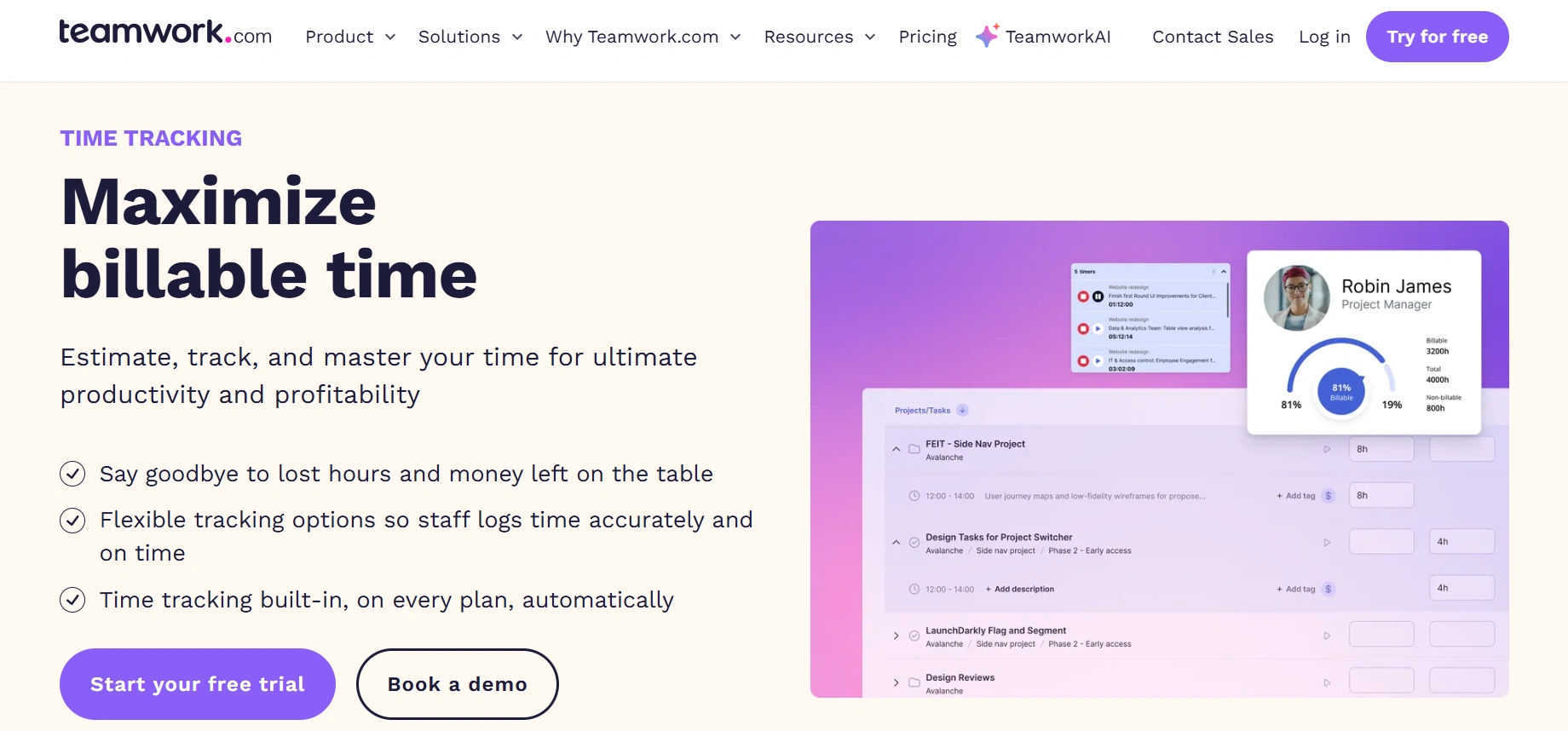
Teamwork.com is a project management platform built for client work. Its time tracking isn’t a separate app bolted on afterwards. It’s part of the cost and profitability management side of the product. Teamwork’s own product page sums it up in one promise: estimate, track, and master your time for productivity and profitability.
In practice, every hour you log is attached to a task, a project and a client, along with a billable or non-billable status and an hourly rate. Teamwork’s reporting, budgeting, capacity planning and invoicing all read from that one record. Basic standalone trackers can’t do this without integrations.
Teamwork groups the feature into four themes:
- Own your time: log time in bulk, in real time, or with reminders.
- Better manage team resources and timelines: use past time data to plan.
- Time is money: budgets, rates and approvals.
- Time transparency: visibility into where every hour goes.
Below we go through each one, then cover pricing, pros and cons, alternatives, and how to get started.
What Can You Do With Teamwork Time Tracking?
Teamwork gives people two ways to log time. Live timers track work as it happens, right from the task, which suits roles with lots of short, interrupted work. Timesheets let people enter a whole day or week at once in a simple grid. Automated reminders nudge anyone who forgets, so managers don’t have to chase hours every Friday.
Every entry can be marked billable or non-billable, and each person can have their own hourly rate. That gives you an honest view of how much time actually turns into revenue. On Accelerate and above, logged hours count down against project budgets and retainers, and billable time can go straight into an invoice through QuickBooks. On Optimize, managers can also review and approve timesheets before anything is billed.
All of this feeds Teamwork’s reports, so you can see where the team’s time goes, plan workloads from past data, and on Optimize find out which projects actually make money. Desktop and mobile apps, integrations like HubSpot, QuickBooks, Salesforce and NetSuite, and built-in AI features round it out, depending on your plan.
Why Teams Use Teamwork Time Tracking
Hours that get logged can get billed. Professional services benchmarks keep finding that utilization sits below target at many firms; SPI Research tracks this every year in its Professional Services Maturity Benchmark. Even a few points of recovered utilization across a team of 20 adds up to a lot of revenue over a year.
Because time lives inside the project, you don’t have to reconcile a time tracker against a project tool against an accounting tool. Budgets update as people log time, reports use real rates, and invoices start from approved entries. Search Station’s co-founder, David Wilkinson, says in Teamwork’s testimonial that his agency used Trello plus a spreadsheet for time tracking before switching, and it didn’t work.
Estimates based on gut feel are usually optimistic. With real time data, timelines are based on how long similar work actually took, so quotes and schedules get more accurate each quarter.
There’s also a cost to not tracking time well. Hours that never get logged can’t be billed, and estimates built on guesswork lead to underpriced projects. Teams that track consistently tend to quote better, plan more realistically, and catch scope creep before it turns into a write-off. Even small improvements in how accurately people log time add up across a team and across a year.
When a client asks why the retainer ran out, a time report broken down by task and person gives a clear answer. Transparent time data builds trust and makes it easier to justify scope changes or a rate increase.
Stop losing billable hours to forgotten timesheets.
See how Timesheet 365 turns captured work into clear reports for managers, stored in SharePoint.
Who Should Use Teamwork Time Tracking?
- Creative, digital and marketing agencies managing several clients on retainers or fixed fees.
- Professional services firms such as consultancies, IT services, accounting and architecture practices that bill by the hour.
- In-house teams that charge back time to internal departments.
- Growing service businesses that have outgrown spreadsheets plus a basic task board.
The common thread is that time equals money. If you send invoices based on hours, report utilization to leadership, or need to prove to clients where their budget went, accurate time data stops being admin and becomes part of how you run the business. Teams that only need a rough sense of effort can usually get by with something lighter.
It’s probably not the best fit for solo freelancers who just need a stopwatch, or for organizations that want to keep working inside Microsoft 365 rather than adopt a new platform.
How Much Does Teamwork Time Tracking Cost in 2027?
Teamwork’s pricing page says “Flexible pricing, start free,” and billing yearly saves about 20% compared with monthly.
Plan | Price (billed yearly) | Time and financial features |
Free | $0 | Task list, board, Gantt and table views; chat tool connections; US & EU data hosting |
Basics | $9.99/user/month | Billable time tracking and reporting; project and portfolio health; custom fields; up to 300 projects; 2,000 automations; TeamworkAI credits |
Accelerate | $24.99/user/month | Time budgets and retainers; invoices from logged time; capacity planning; calendar sync; HubSpot and QuickBooks; 20,000 automations |
Optimize | Contact sales | Timesheet approvals; multi-currency budgets; profitability forecasting and insights; quotes; scheduling by role or skill; Salesforce and NetSuite; 100,000 automations |
Enterprise | Contact sales | Enhanced security, SSO, dedicated success manager, priority support, implementation support |
Every plan includes time tracking, permissions, US/EU hosting, two-factor authentication, desktop and mobile apps, free expert training, and SOC 2 compliance. Add-ons include client communications, document management, Teamwork Connect BI, premium support, onboarding services, and advanced security.
Which plan should you pick? It mostly depends on how you bill clients:
- Choose Basics if you mainly need accurate billable-hour tracking and reports, and you invoice from another system.
- Choose Accelerate if you run retainers or time budgets and want to invoice from logged hours with QuickBooks.
- Choose Optimize if you need timesheet approvals, profitability forecasting or multi-currency budgets.
Teamwork has changed its plan names and prices several times, and older reviews still mention Deliver, Grow and Scale tiers. Always check the live pricing page before you commit.
Teamwork Time Tracking: What Works and What Doesn't
User reviews on G2 rate Teamwork.com highly overall, and reviewers often single out time tracking and client-work features as strengths.
- Time tracking is built into every plan, Free included.
- Timers, bulk timesheets and reminders support different logging habits.
- Billable rates, budgets, invoicing and profitability all use the same time data.
- Designed for agencies and client services.
- Timesheet approvals sit on Optimize, which is quote-only.
- Invoicing and budgets need Accelerate or above.
- Reviewers often mention a learning curve, because the platform does a lot.
- Your team has to adopt a new platform, which is a hard sell if everyone already works in Microsoft 365.
How Does Teamwork Compare to Other Time Trackers?
The real question is whether you want an all-in-one project and profitability platform, or time tracking that fits into the tools your team already uses. Capterra’s timesheet software directory shows how crowded the category is, so it’s worth being clear about which model suits you.
- Teamwork vs. standalone trackers (Toggl Track, Clockify, Harvest): cheaper and easy to adopt, but you need integrations to connect time to tasks, budgets and invoices.
- Teamwork vs. PSA platforms (Productive.io, Accelo, Kantata): close competitors built around agency profitability. Teamwork is generally easier to start with.
- Teamwork vs. work management tools (ClickUp, Monday.com, Asana): these offer some native time tracking, but thinner budgeting, rates and invoicing.
Before you choose, ask three practical questions. First, where does your team already spend its day? A tool that fits that habit will get used, and one that doesn’t will be ignored. Second, how do you bill clients: by the hour, by retainer, or by fixed fee? That decides how much budgeting and invoicing you actually need. Third, who has to approve the switch? IT and finance teams often prefer tools that keep data inside systems the business already controls. If your answers point to Microsoft 365, the next section is worth a close look.
Working in Microsoft 365? Try Timesheet 365 Instead
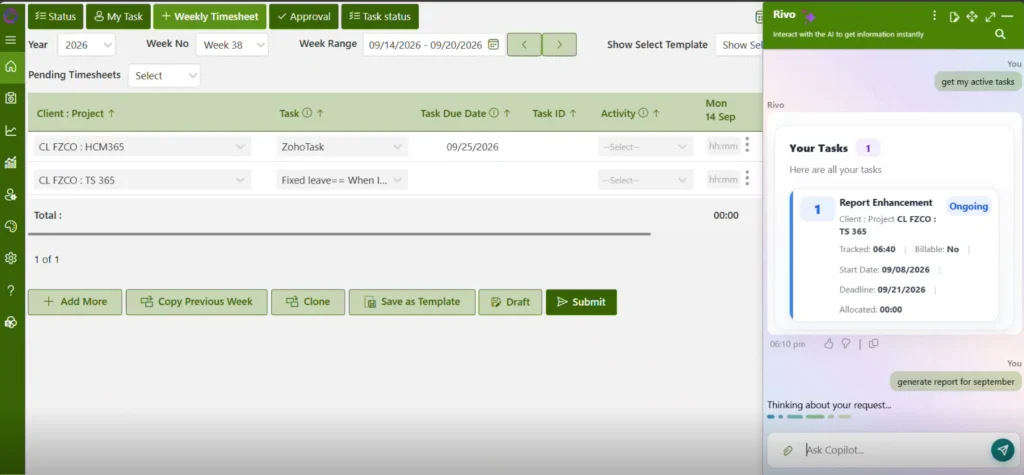
Teamwork works best when you move your projects onto Teamwork. Many organizations don’t want another platform. Their people already spend the day in Microsoft Teams, and their documents already live in SharePoint. Asking everyone to learn a new tool just to log hours is often where time tracking projects fail. For those teams, Timesheet 365 brings time tracking to where the work already happens.
AI That Captures Work for You
The hardest part of time tracking isn’t the software. It’s remembering. Timesheet 365 uses an AI agent for work capture that helps people record what they actually worked on during the day. Instead of staring at an empty timesheet on Friday and guessing, your team reviews and confirms what was captured. Entries are more complete, they’re more accurate, and filling them in takes minutes, not an hour of digging through calendars and email.
Monitoring and Reports Managers Can Use
Logged time is only useful if someone can read it. Timesheet 365 gives managers monitoring and reports that show where time goes across people, projects and clients. You can spot who hasn’t submitted time, which projects are taking longer than planned, and how much of the week goes to billable work. That’s the information you need for client billing, payroll checks and planning next month’s workload, without building spreadsheets by hand.
Built Into Microsoft Teams and SharePoint
Because Timesheet 365 runs inside Microsoft Teams, your team logs time in the app they already have open all day. There’s no extra login and no new interface to learn, so adoption is much easier than with a standalone platform. Timesheet 365 also integrates with SharePoint, so your time data stays in the Microsoft 365 environment your IT team already manages, with the same sign-in and permissions you use today. For organizations with strict security or data policies, that’s often the deciding factor.
Timesheet 365 Pricing
Timesheet 365 pricing starts at just $3.60 per user per month. That’s well below Teamwork’s Basics plan at $9.99 per user per month, and a fraction of Accelerate at $24.99. Because it works inside Microsoft 365, you’re not paying for a full project management platform on top of the tools you already own. For teams that mainly need accurate time capture and clear reports, it’s a much lower-cost way to get there.
Teamwork vs Timesheet 365 at a Glance
Feature | Teamwork | Timesheet 365 |
Where it runs | Its own project management platform | Inside Microsoft Teams, with SharePoint integration |
How time is logged | Timers, timesheets and reminders | AI agent captures work for review and submission |
Reporting | Time, budget and profitability reports (varies by plan) | Monitoring and reports on people, projects and clients |
Where data is stored | Teamwork’s hosting (US or EU) | Your Microsoft 365 environment |
Starting price | $9.99/user/month on Basics (billed yearly) | $3.60/user/month |
Best for | Agencies wanting an all-in-one PM and billing platform | Organizations that already run on Microsoft 365 |
Choose Teamwork if you want an all-in-one project management platform built around agency billing. Choose Timesheet 365 if your organization runs on Microsoft 365 and wants AI-assisted time capture and reporting at a lower price, without changing how people work.
How to Set Up Teamwork Time Tracking in 7 Steps
- Start the 14-day trial. No credit card required. Use real projects, not demo data.
- Set up clients, projects and tasks so every time entry has a home.
- Configure hourly rates for each team member, and set billable defaults by project.
- Pick your logging method. Timers for interrupt-driven roles, timesheets for planners.
- Turn on automated reminders so time gets logged before the week ends.
- Add time budgets or retainers (Accelerate and up) to the projects that matter most.
- Run your first billable-time report after a week and compare it with what you would have invoiced before.
Join Our Creative Community
Frequently Asked Questions
Is time tracking included in Teamwork's free plan?
Yes. Teamwork says time tracking is built into every plan, Free included. Billable-time reporting, budgets and invoicing need the Basics, Accelerate or Optimize plans.
How much does Teamwork time tracking cost in 2027?
Basics costs $9.99 per user per month and Accelerate costs $24.99 per user per month, both billed yearly. Optimize and Enterprise are priced by quote, and paying yearly saves about 20%.
Does Teamwork support timesheet approvals?
Yes. Managers can review and approve timesheets before time is billed or reported. On the current pricing page, approvals are part of the Optimize plan, not the lower tiers.
Can I create invoices from logged time in Teamwork?
Yes. From the Accelerate plan up, Teamwork turns billable time entries into invoices and connects to QuickBooks. Optimize adds NetSuite, Salesforce and multi-currency budgets.
Is there a Teamwork time tracking alternative for Microsoft Teams?
Yes. Timesheet 365 runs inside Microsoft Teams and integrates with SharePoint, using an AI agent to capture work and build reports. Pricing starts at $3.60 per user per month.