













Microsoft 365-Native SharePoint Task Management System
Take Control of Every Task
Plan, Track and Deliver with Task 365
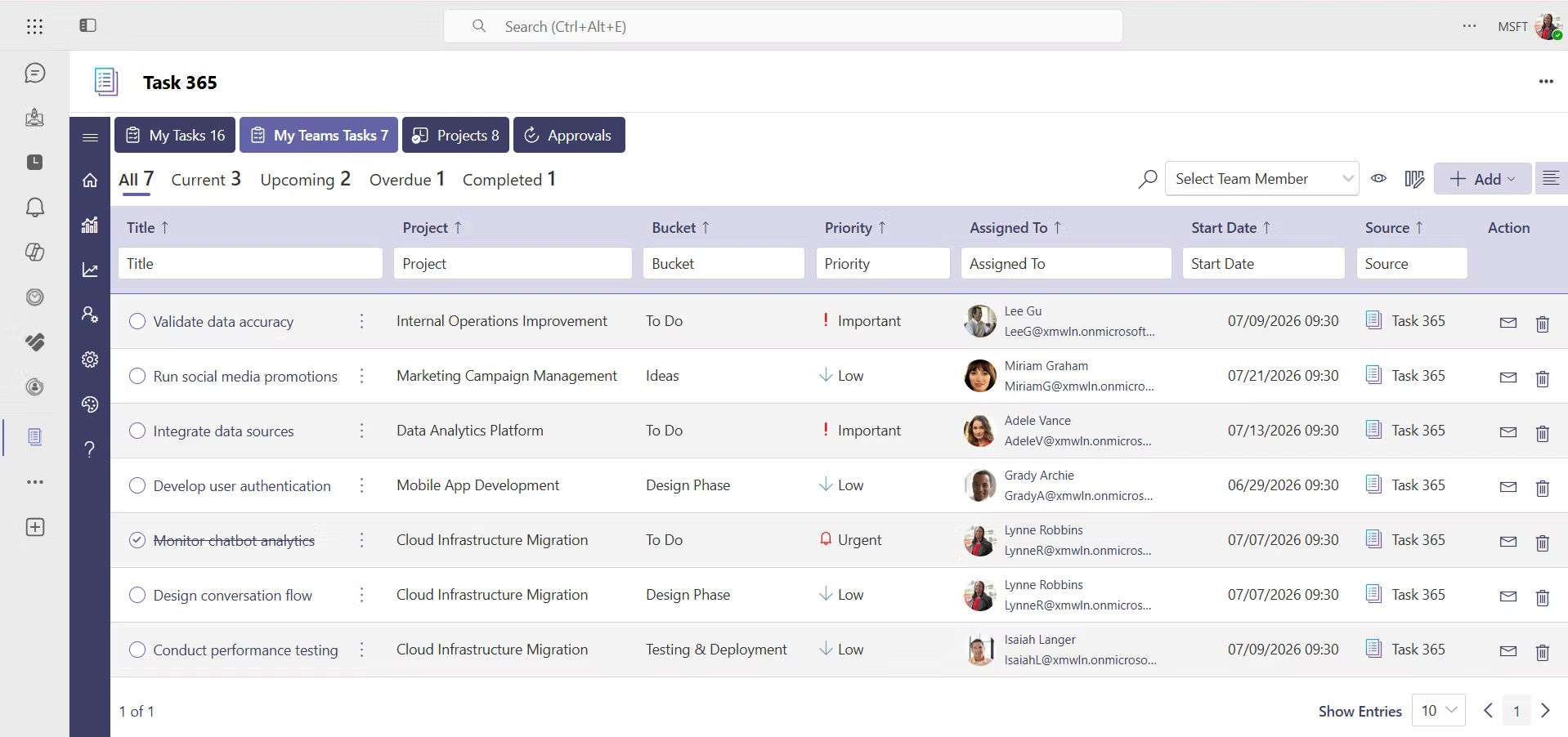
Manage tasks, projects, and team workloads in one place with Task 365, an AI-powered SharePoint task management solution for Microsoft 365. Create and assign tasks, set priorities, automate workflows, track deadlines, and monitor team progress with real-time visibility and better collaboration.
Trusted by 12,100+ deployments from 172 countries
AI-Enhanced SharePoint Task Management in Microsoft Planner
SharePoint Task Management integrated with Microsoft Planner, helps break projects into clear tasks, set priorities, and track progress in real time. Stay on top of deadlines and keep your team running smoothly without stress.
Task Management is now available on Microsoft Teams with
SharePoint Task Management Software Made Simple
With smart task organization and real-time tracking, Microsoft Task Management turns every assignment into action quickly and keeps your team on track.
Smart Task Management
Microsoft Task management lists all the tasks in order of priority and nothing is left out. High-priority tasks are handled first, while routine work is sorted automatically. It can analyze previous projects and then recommend on course of actions to ensure smooth flow of work. By automating repetitive work, you allow your employees to concentrate on what is important and projects are completed faster and relieve stress.
Intelligent Summaries
The SharePoint Task Management offers an immediate overview of all the work. It takes important information, dates and any other important information, hence allowing everybody to know what must be done immediately. Based on experience in previous projects it has the benefit of keeping your team organized, minimizing errors, and accelerating work.
Task 365 Works Smoothly with Microsoft and More
It connects with Microsoft 365 and integrates with Microsoft Planner, Teams, Outlook, SharePoint to deliver a unified, intelligent task management ecosystem powered by AI.
Connection that Works
Microsoft Task Management integrates with the tools your team already uses Microsoft Planner, Teams, Outlook, and SharePoint. Keep tasks, updates, conversations in one place so everyone knows what to do and nothing gets missed.
Create and Assign Tasks Easily with Task 365
Task Creation Software
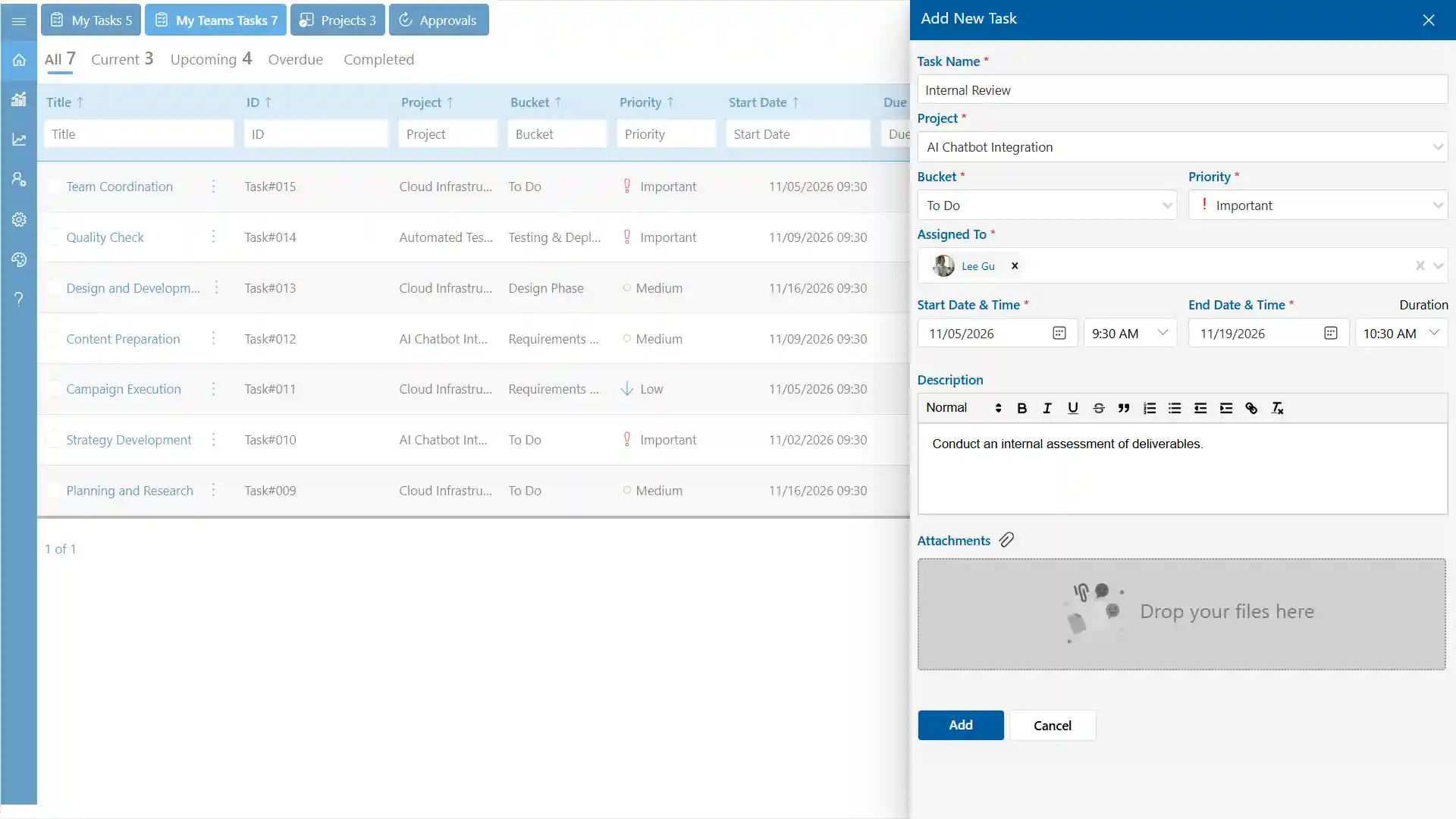
Task 365 helps teams create, organize, and assign tasks within Microsoft 365 and SharePoint. Set clear priorities, define deadlines, and keep every task organized in one place without manual spreadsheets or scattered emails.
Quick Task Creation: Create new tasks in seconds with clear titles, descriptions, and details.
Easy Task Assignment: Assign tasks to team members and define clear responsibilities.
Task Priority Management: Set task priorities to help teams focus on important work.
Due Date Tracking: Set start dates and deadlines to keep tasks on schedule.
Centralized Task Management: Organize and manage team tasks in one connected workspace.
Never Miss a Task Deadline with Smart Reminders in Task 365
Task Reminders & Notifications
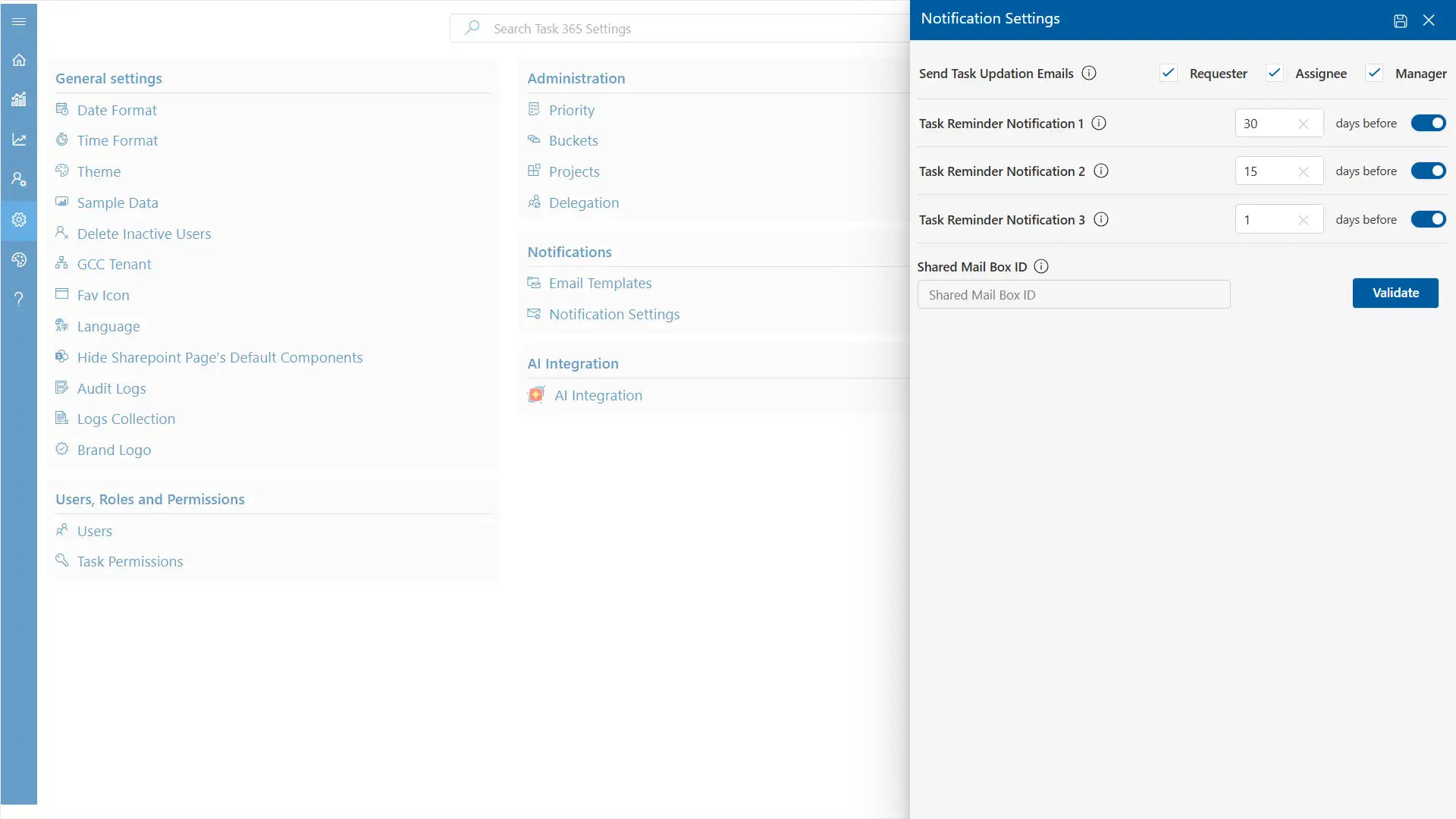
Task 365 helps teams stay on schedule with smart task reminders and automated notifications within Microsoft 365. Get timely alerts for upcoming deadlines, task updates, and meetings without manual follow-ups or missed tasks.
Automated Task Reminders: Get timely alerts for upcoming tasks, deadlines, and meetings.
Flexible Reminder Scheduling: Set daily, weekly, or monthly reminders to stay on track.
Real-Time Task Notifications: Receive instant alerts for new assignments, task changes, and updates.
Microsoft 365 Notifications: Stay informed through Microsoft Teams, Outlook, email, and mobile alerts.
Smart Deadline Tracking: Monitor upcoming due dates and receive alerts to reduce missed deadlines.
Track Every Task and Team Performance with Task 365
Task Analytics & Reporting Software
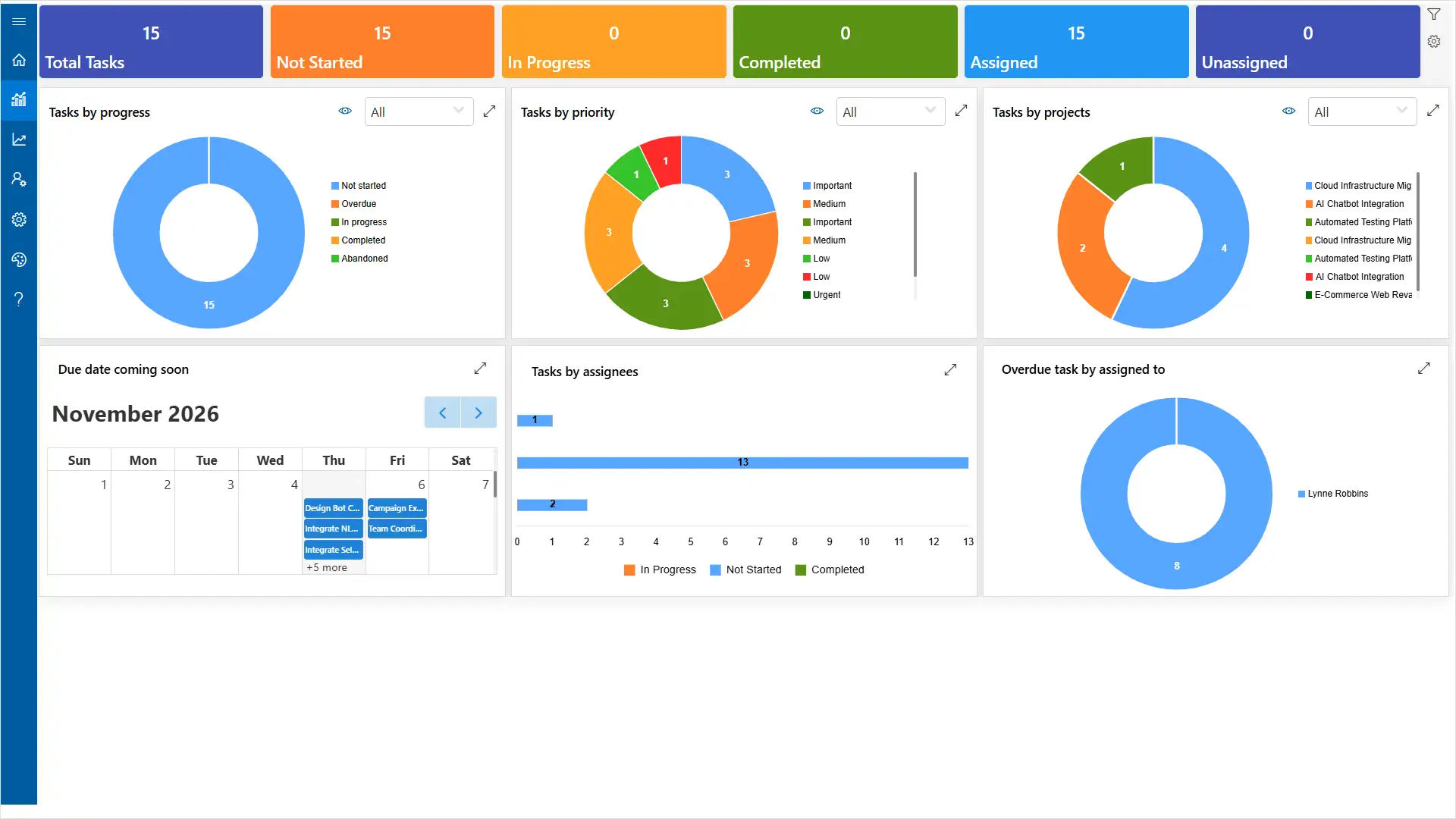
Task 365 helps managers track task progress, monitor team performance, and analyze project activities within Microsoft 365 and SharePoint. Get clear insights into completed, pending, and delayed tasks with visual dashboards and reports, without manual spreadsheets.
Real-Time Task Analytics: Monitor task progress, completion rates, and delays in one place.
Visual Task Dashboards: View task status, project progress, and team activities with easy-to-read charts.
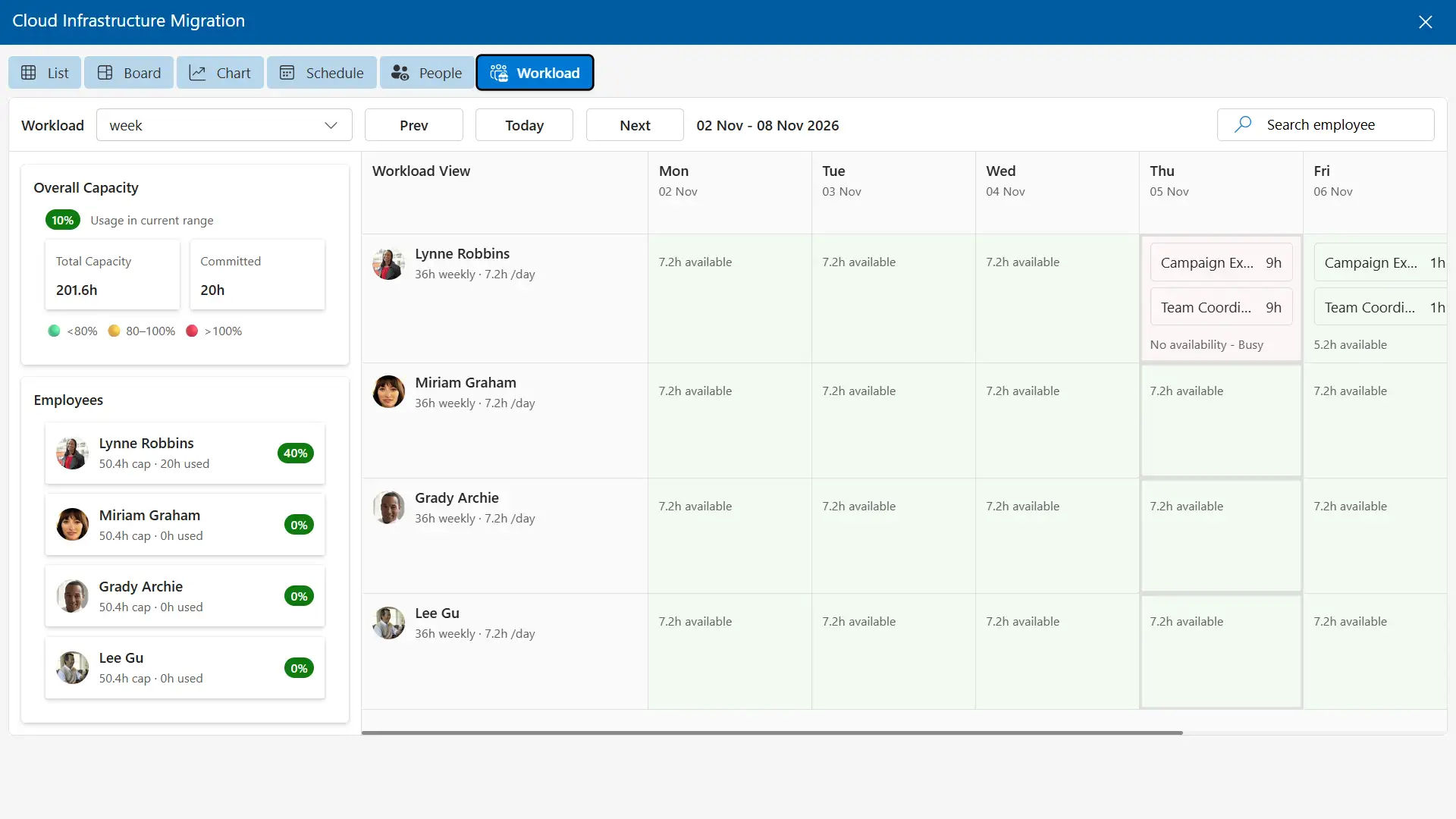
Team Performance Tracking: Analyze employee productivity, workloads, and task completion trends.
Detailed Task Reports: Identify completed, pending, and overdue tasks with clear reports.
Data-Driven Project Insights: Spot bottlenecks, track performance trends, and make better project decisions.
Keep Every SharePoint Task Secure with Task 365
Secure Task Management Software
Task 365 helps teams protect tasks, project data, and sensitive information within Microsoft 365 and SharePoint. Control who can view, edit, and manage tasks with role-based permissions, secure data storage, and access controls.
Role-Based Access Control: Manage who can view, edit, and access tasks based on user roles.
Secure Task Data Storage: Protect sensitive task information with encryption and secure storage.
Microsoft 365 Security: Keep task data protected with Microsoft 365 and Azure security controls.
Task Audit & Activity Tracking: Monitor task changes, approvals, and user activities for better accountability.
Data Privacy & Compliance: Support secure collaboration and protect confidential project information.
Get Fast and Reliable Task Support with Task 365
Task Management Support
Task 365 helps teams resolve issues, get expert guidance, and manage tasks smoothly within Microsoft 365 and SharePoint. Access live chat, AI assistance, and support requests to solve problems faster and keep work moving without delays.
24/7 Expert Support: Get help through live chat, email, and phone whenever you need assistance.
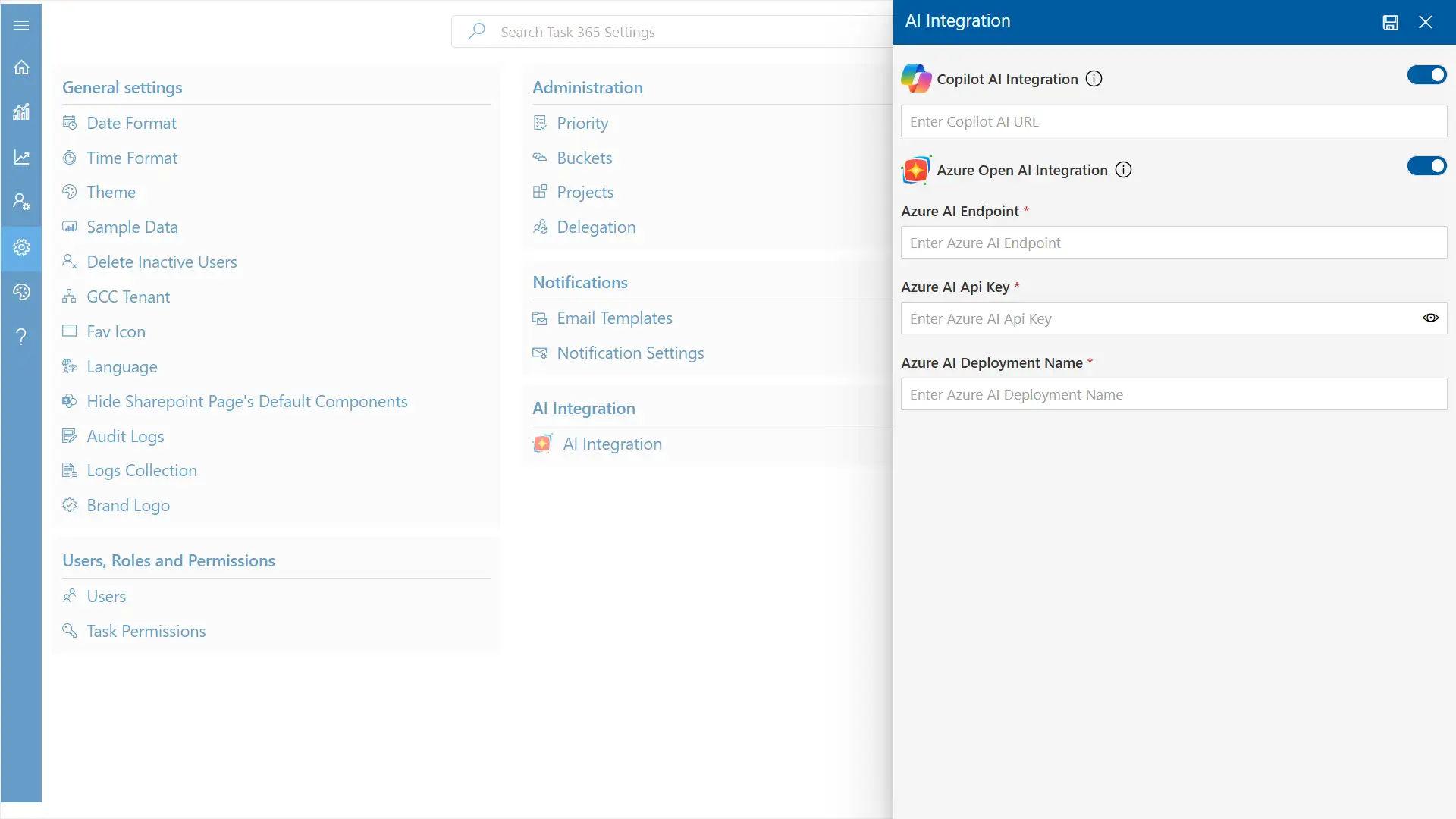
AI-Powered Task Assistance: Find quick answers and resolve common issues with AI and Copilot support.
Support Ticket Management: Submit, track, and manage support requests in one place.
Mobile & Cloud Support: Access tasks and get assistance across devices with real-time cloud synchronization.
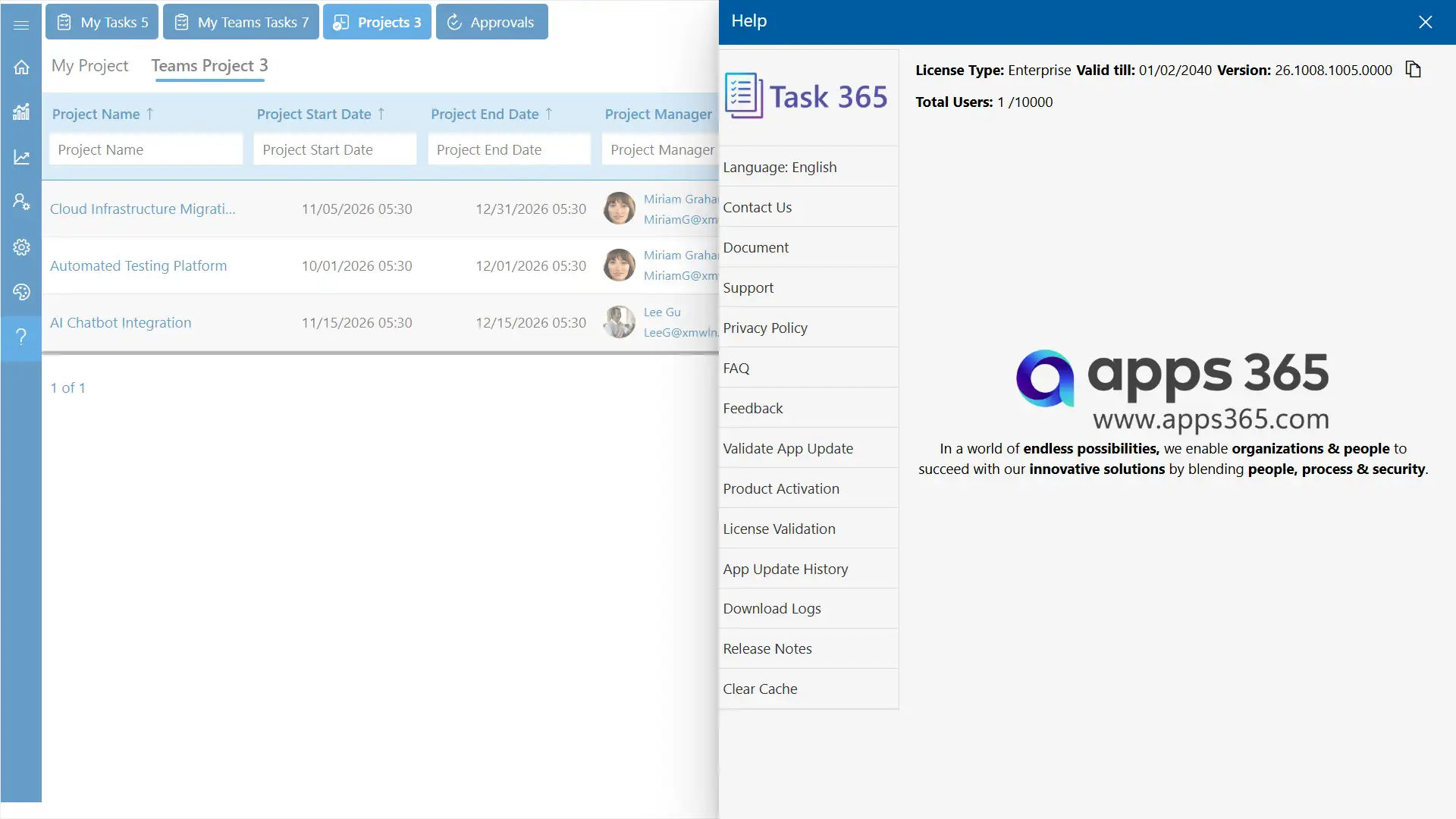
Guided Help & Onboarding: Access tutorials, knowledge base articles, and step-by-step guides to work confidently.
Visualize Every Project Timeline in One Place with Task 365
Task Timeline & Gantt Chart Software
Task 365 helps teams plan, schedule, and track project tasks with interactive timeline views and Gantt charts within Microsoft 365 and SharePoint. Monitor deadlines, task dependencies, and project milestones in one place without manual spreadsheets.
Visual Task Timeline: View project tasks, schedules, and deadlines in one clear Gantt chart.
Drag-and-Drop Scheduling: Easily move tasks, adjust dates, and update project timelines.
Task Dependency Tracking: Connect related tasks and identify which activities must finish first.
Project Milestone Tracking: Monitor key project stages, deadlines, and important checkpoints.
Real-Time Timeline Updates: Track schedule changes, task progress, and project delays as they happen.
Smart Features & Real Impact in SharePoint Task Management Tool
From planning to completion, everything becomes simpler – helping your team work together with more ease, speed, and clarity.

My Tasks
Always keep everything to keep up with work. Easy to prioritize, focused and without stress in meeting deadlines.

Multi-Project Tracking
You can see all your projects on a single screen in real time, where nothing is missed and everyone can be seen to be up to date.
Custom Fields
Assign tags based on priority, status or category to locate the things that are a priority and maintain the organization of work.

Flexible Views
Toggle between List, Board or Calendar or Timeline to plan and allocate your tasks in the manner that best fits your team.
Smart Scheduling
Keep everything in a transparent calendar in order to plan ahead, stay on track and be able to meet deadlines comfortably.

Team Collaboration
Microsoft Teams and Planner allow effortless sharing updates, collaborating, and delegating tasks to everyone in the right direction.

Performance Insights
Monitor the progress using transparent reports and dashboards, which allows to make smarter decisions and achieve improved results.
Data Protection
Secure your information using the trusted Microsoft 365 security system to ensure that your staff remains in line and safe.
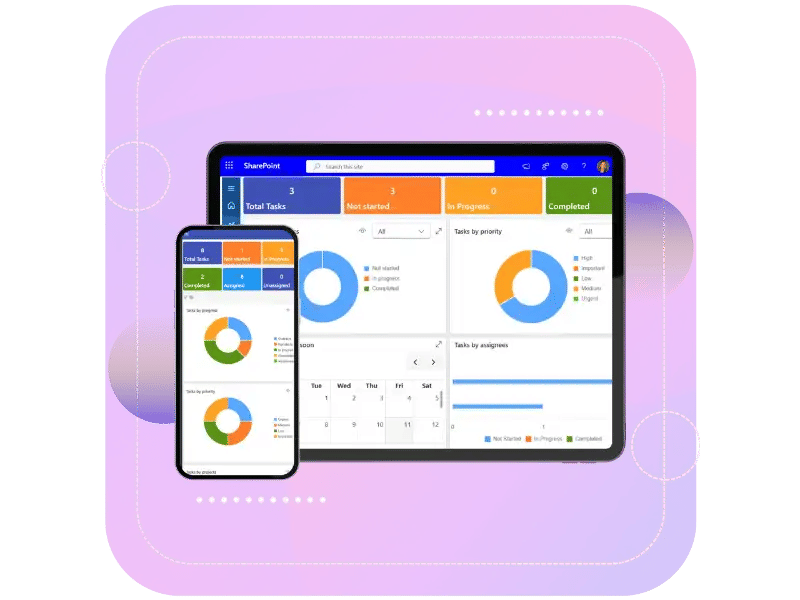
Task 365 On-the-Go
Stay on top of your work from anywhere. Check tasks, updates, and progress right from your phone or laptop, so nothing slows you down and your team keeps moving forward.
Why Choose Task 365?
Store all your work under one roof and accomplish tasks at a faster rate. Priorities, easy collaboration on shared lists and notes, time savings by processing repetitive actions and templates and repeating actions, are key features of the platform.

Built for Microsoft 365
Works easily with the tools your team already uses Teams, SharePoint, Outlook so you can get started without any setup stress.

Stay on Track
Keep track of deadlines and tasks so nothing gets missed and your team stays on top of tasks.

Controlled Access
Choose who can view or edit tasks to keep your work safe, secure, and organized at all times.

Work from Anywhere
Manage and keep track of your team by checking and updating your phone or laptop at any location.

Clear Communication
Keep all updates, notes, and files in one place, making it easy for everyone to stay informed and work together smoothly.
Work from Anywhere
Manage and keep track of your team by checking and updating your phone or laptop at any location.
Live on Azure
Buy directly from Azure Marketplace or via your enterprise agreement.
Special Pricing for NPOs
Non-profits and government-funded educational institutes can avail exclusive rates.
Enterprise Pricing for 50+ Users
Organizations with more than 50 users can avail special pricing.
Apps 365 Advantage
Our cloud-powered tools help your team stay organized, get more done, and grow faster. With easy integrations, strong security, your business can stay efficient and ahead of the game.
Cyber Security
Cyber Security in GCC & GCC High within the Microsoft environment places high importance on stringent measures to protect sensitive government data, ensuring security with robust defenses and Microsoft applications.
GCC & GCC High
Our apps are built for GCC & GCC high tenants of US Federal clouds.
SOC2 Type II Certified
Our apps ensure security, compliance, and data protection
MS Azure Marketplace
Our apps are tested by Microsoft and available on MS Azure Marketplace
Microsoft Appstore
Our innovative applications are available on the Microsoft Appstore.
Customer Support
Our Support Team merges technical prowess with sincere care, fostering trust through expertise and empathy. They build lasting relationships, transcending mere service to create meaningful connections.
AI Enabled Apps
Our innovative apps are built with the options of Azure AI, Copilot, and custom AI solutions.
Swift Deployment
Choose any deployment method Teams, Outlook, or SharePoint that suits your preferences.
Modern UI/UX
Every app is crafted using the latest Fluent UI, ensuring seamless functionality across all devices.
Free Updates
Our valued subscribers enjoy unlimited support, enhancements, features, and updates.
SharePoint Consultant, Raymond West
California
Finance Manager, Exeevo
New York
Sharepoint Developer, Recor Medical
Washington, US
Business Manager, Cerilon
Canada
Director of IT, JConnelly
New York
System Admin
Oregon, US
IT Manager, Pallas LLP
England, UK
IT Officer, HanmiGlobal Saudi
Saudi Arabia
ICT Manager, SMT Shipping
Europe
Barton Associates
Cofounder
Vice President of Operations
Head Of Information & Technology
Director of Infrastructure
Solutions Engineer
US
Director of Marketing
Chicago, US
Cloud Consultant
Netherland
Global Head, IT & Information Security
California
Educator, Department of Education
New York
IT Lead
Aberdeen, Scotland
System Administrator
San Antonio, Texas
HR Ops & Admin Manager
Boston
Partner & President
Puerto Rico
Program Manager
Adelaide, Australia
Learning & Development Manager
Florida, USA
IT Manager
Indiana
Digital Solutions Analyst
Montréal, Canada
Asset Manager
North Carolina
Administration
Dubai
IT Support Specialist
Virginia, USA
Supervisor
Mexico
IT Admin
United States
Customer Testimonials
See how teams and businesses achieve more, stay organized, manage projects better with SharePoint Task 365
Clients Speak
One Place for Every Task
With Microsoft 365 at the core, SharePoint Task Management connects tasks, teams, and tools in one place.
Frequently Asked Questions
What is Task Management?
Task management is the process of planning, organizing, tracking and completing tasks effectively. It helps individuals and teams stay on top of their work and meet deadlines.
Why is Task Management important?
Task management is important because it improves productivity, reduces stress, prevents missed deadlines and helps teams work in a more organized way.
What is Task 365?
Task 365 (also called SharePoint Task Management 365) is a smart task management tool built inside the Microsoft 365 ecosystem. It helps teams manage work more easily by organizing tasks, setting priorities and improving overall productivity.
Where is my Task 365 data stored?
Your Task 365 data is stored within your organization’s Microsoft 365 and SharePoint environment. This helps your organization maintain control over task and project data using existing Microsoft 365 security, permissions, governance, and access controls.
Where is Task 365 hosted?
Task 365 is a SharePoint Framework (SPFx) application designed to run within your Microsoft 365 and SharePoint environment. It can work through SharePoint and Microsoft Teams, allowing users to manage tasks within the Microsoft tools they already use.
Does Task 365 store our private or confidential data on its own infrastructure?
No. Your Task 365 task and project data stays within your organization’s Microsoft 365 environment rather than being stored in a separate Task 365 database or disconnected third-party infrastructure. This helps your organization maintain control over sensitive information using its existing Microsoft 365 security and access settings.
What is the Task 365 application architecture?
Task 365 is built for Microsoft 365 using SharePoint Framework (SPFx) technologies. It works with SharePoint and integrates with Microsoft services such as Teams, Planner, Outlook, and Power Automate to support task creation, assignments, collaboration, workflows, reminders, tracking, and reporting within a connected Microsoft 365 environment.
What does Task 365 do?
Task 365 helps teams keep track of their work, deadlines and progress in one place. It highlights important tasks, simplifies daily planning and reduces manual work so teams can focus on what matters most.
Why is SharePoint Task Management better than Microsoft Planner or To Do?
Perfect for basic task lists. SharePoint Task Management 365 includes AI Copilot assistance, intelligent summaries, multi-project tracking, and automation. It gets to know your workflow to prioritize it, enables you to add any custom fields, change to List, Board, Calendar, Timeline views, and provides extensive performance insight, all in a single system. It is made to power teams that require greater power than mere lists can provide.

Will my current Microsoft 365 applications be compatible with Task 365?
Indeed! The Task Management 365 is a software application that functions within the Microsoft 365 ecosystem. Moreover, it is closely integrated with Microsoft Teams, SharePoint, Outlook, and Planner with straightforward settings.
Does SharePoint Task 365 meet the standards of data-protection?
There is security at every level. SharePoint Task Management 365 is backed by the Microsoft 365 enterprise level security that safeguards data such as Fortune 500 businesses. You can choose who sees or edits tasks, meet industry compliance standards, keep data encrypted, and get regular security updates. Your team’s work stays protected, secure, and always compliant.
How does the AI Copilot make my workday easier?
AI Copilot is the AI that supports your work like a human and solves everyday problems with tasks. It gives instant tips that are useful, databases and organizes tasks depending on their urgency, handles repetitive tasks to save you hours every week, gets familiar with your team performance and gives intelligent follow-up suggestions, and ensures that no one misses out on the information without having to give status updates.
Can SharePoint Task 365 be used in a mobile device?
There will be no need to scroll through all the updates. The AI highlights all the required deadlines, crucial tasks, and changes, is able to display progress immediately. It analyzes your work and displays only the relevant parts for the current time, therefore you have shorter meetings, handle your emails more effectively and are able to come up with solutions much quicker.
What are Intelligent Summaries and what is their time-saving capability?
Intelligent Summaries take all the project information and breaks it down into quick summaries, actionable summaries. They will not have to go through a lot of updates but will be able to see their entire project immediately with all the important deadlines, tasks, and changes highlighted and their progress indicated. The AI evaluates your projects and presents you with only what is important at the moment, thus reducing your time in meetings, keeping your inbox manageable, and accelerating your decision making.
What is the price for Task 365?
The cost is different and it will be based on the team size, needs and your Microsoft 365 subscription. Get in touch with us for a personalized quote. Many companies will get the return on investment from the automation and productivity functions in a month. In addition, we offer demos and trials to demonstrate the value.

How long does the installation of the Task 365 take?
Setup is incredibly fast. The majority of the teams will be operational within minutes, as opposed to days. Task Management 365 does not require complex installations or data migrations because it fully integrates with your current system at Microsoft 365. All one needs to do is to connect the app, invite fellow members of the team and begin forming tasks instantly. Your team will be up and running instantly with our simple interface, no heavy training required.
Does Task 365 support multiple projects at once?
Yes. The best feature is multi-project tracking. Watch every project on a single dashboard, monitor live progress on all teams, switch between views instantly, spot resource problems early and maintain a clear view of all initiatives. You can handle 3 projects or 30 projects and it does not go to waste.
What type of reporting and analytics is offered by Task 365?
Task Management 365 provides robust performance data in an easy-to-use dashboards and reports. Monitor data on productivity, track the rate at which tasks are completed, identify slowdowns, time by project type, generate report templates to be used by stakeholders, and make decisions based on data. The analytics not only show what is happening but also why, which will enable you to keep on improving performance.
Is Task 365 small Business or only Large Businesses?
Task Management 365 is not size sensitive. It is utilized by small businesses to maintain teams without the presence of a project manager. It also has scalability because its people and projects increase in size. The benefits of enterprise security, sophisticated reporting, and control of intricate workflows are appreciated by large enterprises. Task Management 365 can adapt and make you work smarter regardless of the number of employees 5 or 5,000.
What is Task Management Software?
Task management software is a digital tool that helps teams organize, assign, track, and complete tasks more efficiently. It centralizes work, improves visibility, and streamlines workflows so teams stay on schedule and aligned.
What is SharePoint Task Management Software?
SharePoint Task Management Software is a tool built on Microsoft SharePoint that helps teams create, assign, track and manage tasks in one shared workspace.
How does SharePoint Task Management Software work?
SharePoint task management software uses SharePoint as the central hub for storing, organizing, and tracking tasks. It integrates lists, document libraries, permissions, and collaboration features so teams can manage tasks within the SharePoint environment they already use.
What is AI Task Management?
AI Task Management uses artificial intelligence to organize, track and automate tasks so teams can work faster and with less manual effort.
What are the Benefits of AI Task Management?
AI task management helps teams work easier by organizing tasks, spotting issues early, suggesting deadlines, and predicting delays. It saves time and helps everyone stay on track.
How does the AI task management feature help my team work smarter?
AI task management uses smart automation to create tasks fast, suggest priorities, and reduce repetition. It identifies task details automatically and keeps your team focused on what matters most.

How does SharePoint task management improve productivity?
By centralizing tasks, tracking progress in real time, prioritizing work, and automating repetitive steps, teams stay coordinated and complete work faster with fewer delays.
What can the task planner AI do for task creation?
The AI task planner helps you create tasks instantly using suggestions, templates, bulk actions, or drag-and-drop saving manual effort and keeping projects moving.
Is task data secure with this task planner?
Task Management 365 is built on Microsoft 365’s enterprise-grade security, protecting your task data with encryption, permissions, and compliance standards.
What is the SharePoint task management tool?
The SharePoint Task Management tool helps teams create, assign, track tasks in one place, using lists, Planner, or Power Automate for automation. It keeps tasks organized, on schedule, transparent, so teams stay aligned and deadlines are met.


What is a SharePoint task management system?
A SharePoint task management system is a centralized workspace where teams can create tasks, track progress, share documents, assign responsibilities and automate workflows. It helps organizations manage daily work in one place with the tools they already use in Microsoft 365.
Try It Free, No Obligation


Schedule a free personalized 1:1 demo
By proceeding, you accept Cubic Logics’s terms and conditions and privacy policy


By proceeding, you accept Cubic Logics Terms and Conditions and Privacy Policy
Last Chance! Offer Ends in!
Don't Miss Out! Thanksgiving & Black Friday Sale
Avail up to Flat 30% Discount until
November 30th, 2026.
Enter your business email ID and we will send a personalized coupon code straight to your inbox.
Please provide your contact details, we will connect with you soon!
By proceeding, you accept Cubic Logics Terms and Conditions and Privacy Policy
Schedule a free personalized 1:1 demo
By proceeding, you accept Cubic Logics’s terms and conditions and privacy policy