30 Professional Development Activities to Grow Your Team in 2027

- Professional development activities help employees build new skills, grow in their roles and stay longer with your company.
- The best mix covers four goals: building skills, learning from others, growing leaders and keeping training fun and social.
- Short, hands-on employee training activities work better than long lectures. People remember what they practise.
- Every activity needs a clear goal, a simple plan and a way to measure results.
- A learning management system (LMS) makes it easy to run, track and scale employee development activities in one place.
Your best employees want to grow. If they can’t grow with you, many will look for a company where they can.
The good news is that growth doesn’t need a big budget or a week away from work. The right professional development activities can fit into a normal work week. A one-hour lunch and learn, a mentor chat or a short role play can teach more than a long slide deck.
In this guide, you’ll find 30 professional development activities you can use with any team. You’ll also learn how to choose the right ones, plan them well and check if they’re working.
What Are Professional Development Activities?
Professional development activities are planned learning experiences that help employees build skills, gain knowledge and grow in their careers. They can be formal, like a certification course, or informal, like shadowing a colleague for a day.
You’ll often hear a few related terms:
- Employee training activities focus on skills people need for their current job, such as using a new tool or following a safety process.
- Employee development activities look further ahead. They prepare people for bigger roles, new teams or leadership.
- Training activities is the wider term for any exercise used in a learning session, from an icebreaker to a case study.
In practice, these overlap. A good program uses all three to help people do their job well today and grow into tomorrow’s roles.
Why Professional Development Activities Matter
Training is not just a nice extra. It affects how long people stay, how well they work and how ready your company is for change.
Benefits for employees
- New skills and confidence. People feel more sure of themselves when they know how to do their work well.
- Clear career path. Employees can see how to move up or across the company.
- More interest in their work. Learning something new keeps the job fresh.
Benefits for the business
- Better retention. In LinkedIn’s Workplace Learning Report, 94% of employees said they would stay longer at a company that invested in their learning.
- Stronger performance. Skilled teams make fewer mistakes and solve problems faster.
- Ready-made leaders. Growing leaders from inside costs less than hiring from outside.
- Easier change. When teams keep learning, new tools and processes are easier to roll out.
Benefits for managers
Managers get a team that needs less hand-holding. They can also spot hidden talent when they see how people perform in different activities.
Types of Employee Training Activities
Before you pick activities, decide how you’ll deliver them. Most employee training activities fall into three groups.
Type | What it looks like | Best for |
In-person | Workshops, role plays, group games, job shadowing | Team building, soft skills, hands-on practice |
Online (e-learning) | Video lessons, quizzes, microlearning, webinars | Remote teams, compliance, learning at your own pace |
Blended | Online lessons plus live sessions to practise | Most programs: it mixes flexibility with real practice |
Many companies now use a blended approach. Employees learn the basics online, then practise with colleagues in a live session. This saves time in the room and makes the live part more useful.
30 Professional Development Activities and Ideas
We’ve grouped these ideas by goal, so you can pick what fits your team. Mix activities from each group for a balanced program.
Skill-building activities
These employee training activities help people get better at their current job.
1. Skills-based workshops
Run short, hands-on sessions on one skill, such as writing clear emails or using Excel formulas. Keep them under two hours and end with a task people can use the next day.
2. Microlearning lessons
Share five-minute lessons people can finish between meetings. A short video, a quick tip or a two-question quiz is easy to fit into a busy day, and small pieces are easier to remember.
3. Online certification courses
Help employees earn a certificate in their field, such as project management or data analysis. It builds skills and gives people something to show for their effort.
4. Quizzes and knowledge checks
Use quick quizzes after a lesson to check what people remember. Turn it into a friendly competition with a leaderboard to keep energy high.
5. Case study analysis
Give teams a real business problem and ask them to solve it. Using your own company’s past challenges makes it even more useful.
6. Simulations
Let people practise in a safe setting before doing it for real. Simulations work well for software training, customer service and emergency procedures.
7. Presentation skills practice
Ask employees to give short talks to a small group and get feedback. Confidence in speaking helps in meetings, sales calls and leadership roles.
8. Communication workshops
Teach active listening, giving feedback and handling hard conversations. These soft skills affect almost every part of work.
Learning-from-others activities
Some of the best learning comes from colleagues who already know the job.
9. Mentoring programs
Pair a newer employee with someone more experienced. Regular chats help the mentee learn faster and give the mentor leadership practice.
10. Reverse mentoring
Let younger employees teach senior staff about new tools, social media or fresh ideas. Both sides learn, and it breaks down walls between levels.
11. Job shadowing
Let an employee spend a day watching a colleague in another role. It shows how other teams work and can spark interest in a new career path.
12. Lunch and learn sessions
Invite someone to share a topic over lunch. It’s relaxed, low-cost and gets people talking across teams.
13. Peer learning groups
Form small groups that meet regularly to share problems and tips. People often learn more from peers facing the same issues.
14. Skill swap sessions
Ask employees to teach each other a skill they’re good at. One person explains design basics, another shares spreadsheet shortcuts.
15. Cross-training
Train employees to cover tasks in another role. Your team becomes more flexible, and people understand each other’s work better.
16. Guest expert speakers
Bring in industry experts to share new trends. Fresh outside views can change how your team thinks.
Leadership and career growth activities
These employee development activities prepare people for bigger roles.
17. Leadership development programs
Create a structured path for future leaders, covering decision-making, coaching and managing people. Mix online lessons with real projects.
18. Executive coaching
Give senior staff one-to-one sessions with a coach. Coaching helps leaders spot blind spots and set clear goals.
19. 360-degree feedback
Collect feedback from a person’s manager, peers and direct reports. It gives a full picture of strengths and areas to improve.
20. Individual development plans
Help each employee write down their career goals and the steps to reach them. Review the plan every few months with their manager.
21. Stretch assignments
Give people a project slightly beyond their current skills. With the right support, it’s one of the fastest ways to grow.
22. Department rotations
Let high-potential employees spend a few weeks in different teams. They build a wider view of the business, which leaders need.
23. Conferences and industry events
Send employees to events in their field. Ask them to share three key lessons with the team when they return.
24. Professional association memberships
Pay for memberships in industry groups. Members get access to events, resources and a wider network.
Fun and team-building training activities
Training doesn’t have to feel like school. These training activities make learning social and memorable.
25. Icebreakers
Start sessions with a quick game, such as Two Truths and a Lie or a one-word check-in. It relaxes the group and gets everyone talking.
26. Role play
Act out real situations, like handling an upset customer or a tough performance review. Practising in a safe space builds confidence for the real thing.
27. Team problem-solving challenges
Give small teams a puzzle to solve, such as the Marshmallow Challenge (building the tallest tower from spaghetti, tape and a marshmallow). Then discuss what helped and what got in the way.
28. Innovation hackathons
Set a short time frame for teams to come up with new ideas or solutions. Hackathons build creativity and teamwork, and sometimes produce real results.
29. Gamified learning
Add points, badges and leaderboards to your training. Small rewards make people want to finish lessons and come back for more.
30. Show and tell
Ask team members to share a project, tool or lesson they’re proud of. It celebrates good work and spreads ideas across the team.
How to Plan Employee Development Activities That Work
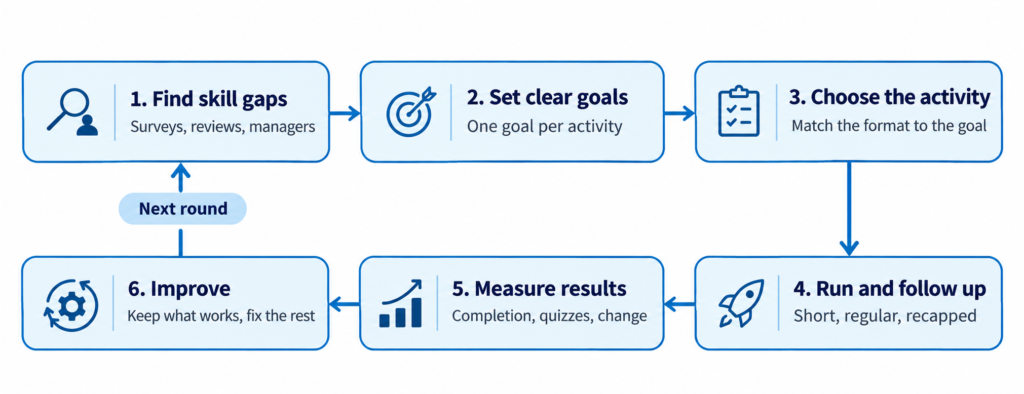
A list of ideas is a good start. But activities only work when they connect to a real need. Follow these six steps.
- Find the skill gaps. Talk to managers, look at performance reviews and run a short employee survey. Ask: what skills does the team need this year that it doesn’t have today?
- Set a clear goal for each activity. “Improve communication” is too vague. “Help new team leads give feedback in one-to-one meetings” is clear and easy to check.
- Pick the right activity and format. Match the activity to the goal. Role play suits soft skills. Microlearning suits product updates. Mentoring suits career growth.
- Plan the details. Decide who takes part, how long it runs, who leads it and what tools you need. Short and regular beats long and rare.
- Make it part of the work week. Block time in calendars so learning doesn’t get pushed aside. Managers should join in too. When leaders take part, others follow.
- Follow up. Learning fades fast without practice. Send a short recap, a quiz or a task a week later to help it stick.
Example: a simple plan for a sales team
Week | Activity | Goal |
1 | Microlearning: five short videos on the new product | Know the key features |
2 | Lunch and learn with the product manager | Understand customer problems the product solves |
3 | Role play: handling price objections | Practise real sales talks |
4 | Quiz and peer feedback | Check knowledge and close gaps |
This mix of online and live training activities takes about four hours over a month. That’s easy to fit around sales targets.
How to Measure the Success of Training Activities
If you don’t measure, you can’t tell what’s working. Track a few simple numbers before and after each program.
What to measure | How to check it | What it tells you |
Completion rate | LMS reports or attendance lists | Are people taking part? |
Satisfaction | Short survey after each session | Did people find it useful? |
Knowledge gained | Quiz scores before and after | Did people learn? |
Behaviour change | Manager check-ins after 30 to 60 days | Are people using the skill at work? |
Business results | Sales, error rates, customer scores, retention | Did it help the company? |
Start with the first three, as they’re the easiest to track. Then work toward behaviour change and business results for your biggest programs.
Common Mistakes to Avoid
Even good activities can fail. Watch out for these common mistakes.
- One-size-fits-all training. A new hire and a senior manager need different things. Tailor activities by role and level.
- Too much at once. Long sessions packed with slides overload people. Break content into short pieces.
- No link to real work. If people can’t use it on Monday, they’ll forget it by Friday. Use real examples from your business.
- Training as a one-time event. Skills grow with practice. Plan follow-ups, refreshers and check-ins.
- Ignoring feedback. If employees say a session wasn’t useful, change it. Their feedback is free advice.
- No support from managers. When managers don’t make time for learning, employees won’t either.
How an LMS 365 Makes Professional Development Easier
Running a few activities by hand is fine for a small team. But as you grow, spreadsheets and email reminders get messy. People miss sessions, records go missing and you can’t see who learned what.
A learning management system (LMS) brings all your professional development activities into one place. With a good LMS, you can:
- Create and share courses with videos, documents and quizzes.
- Build learning paths for each role, so new hires, team leads and managers each get the right training.
- Assign training automatically based on role, team or start date.
- Add quizzes and certificates to check knowledge and reward progress.
- Track progress and reports to see completion rates and quiz scores at a glance.
- Mix online and live training by scheduling workshops and lunch and learns alongside e-learning.
Learn inside the tools your team already uses
If your company works in Microsoft 365, LMS 365 brings learning into SharePoint and Microsoft Teams. Employees don’t need another login or app. They can take a course, finish a quiz or join a session right where they already work.
Managers can assign training in a few clicks and see progress from one LMS dashboard. That makes it easier to run every activity in this guide, from microlearning to leadership programs.
Conclusion
Professional development activities are one of the simplest ways to build a stronger, happier team. You don’t need to use all 30 ideas at once. Start with two or three that match your biggest skill gaps, measure the results and build from there.
Mix skill-building, learning from others, leadership growth and a bit of fun. Keep sessions short and link them to real work. And give employees easy ways to keep learning between sessions.
When you’re ready to run employee training activities at scale, an LMS 365 built into Microsoft 365 can save hours of admin and give you clear results.
Join Our Creative Community
Frequently Asked Questions
What are some examples of professional development activities?
Common examples include mentoring, job shadowing, workshops, online courses, lunch and learns, role play, conferences and leadership programs. The best choice depends on the skill you want to build.
What is the difference between employee training and employee development?
Employee training focuses on skills for the current job, like learning a new tool. Employee development looks at long-term growth, like preparing someone to lead a team. Most programs need both.
How often should we run professional development activities?
Small, regular activities work best. Try a short learning activity every week or two, with bigger programs, like leadership training, a few times a year.
Which training activities work best for remote teams?
Microlearning, online quizzes, virtual lunch and learns, video role plays and online mentoring all work well. An LMS 365 helps remote employees learn at their own pace and keeps progress in one place.
How do I get employees interested in training?
Keep it short, make it useful and link it to their career goals. Add fun elements like games and leaderboards, and make sure managers take part too.
How do I know if our employee development activities are working?
Track completion rates, survey feedback and quiz scores first. Over time, look at changes in behaviour at work and business results like retention and customer scores.