

_mVFFaHUZhS.webp)
Jibble is a popular time and attendance app, especially for teams that need GPS clock-ins, facial recognition, and simple kiosk-style tracking. But as teams grow, many businesses find they need more: deeper project and billable-hour tracking, stronger reporting, AI-driven insights, and tools that work inside the apps their employees already use every day.
- Compare the top Jibble alternatives offering advanced time tracking, reporting, and employee productivity features.
- Discover how Timesheet 365 simplifies time tracking, attendance, payroll, invoicing, and project management.
- Evaluate leading tools based on features, pricing, integrations, customer reviews, and overall business value.
- Choose a scalable solution that improves team productivity, streamlines workflows, and supports remote or hybrid teams.
If your team runs on Microsoft 365, or you simply want more than clock-in and clock-out tracking, this guide compares the 10 best Jibble alternatives for 2026. For each tool, we cover key features, pros, cons, pricing, and who it suits, so you can pick the right fit quickly.
Why Look for a Jibble Alternative?
Jibble does the basics well, but it isn’t the right fit for every team. Here are the most common reasons businesses start looking elsewhere.
Limited project and billing depth. Jibble is built mainly around attendance. Teams that bill clients by the hour, track project budgets, or need task-level time data often need a more project-focused tool.
Reporting that stops at the surface. Basic timesheet exports work for payroll, but managers increasingly want answers, not spreadsheets. Knowing which projects are over budget or which teams are overloaded requires smarter, faster reporting.
Work happens in Microsoft 365. Many organizations run their day in Microsoft Teams, SharePoint, and Outlook. Switching to a separate app just to log time adds friction and lowers adoption. Microsoft’s Work Trend Index shows how much everyday work now happens inside collaboration tools, and time tracking works best when it lives there too.
AI is changing expectations. In 2026, teams expect to ask a question like “How many billable hours did the design team log last month?” and get an instant answer, rather than building a report manually.
Costs add up with add-ons. Some features teams consider essential can sit behind higher tiers, which makes it worth comparing total cost across options.
How to Choose the Right Jibble Alternative
Before comparing tools, get clear on what your team actually needs. Look at where your employees work every day, whether you need attendance tracking, project tracking, or both, how much reporting and automation you need, whether you need approvals, leave tracking, and payroll exports, and your budget per user. Review sites like G2’s Jibble alternatives page are also useful for reading real user feedback before you commit.
Quick Comparison: Jibble Alternatives at a Glance
|
Tool |
Ideal For |
Free Plan |
Teams & SharePoint |
AI Reporting |
|
Microsoft 365 organizations |
Free trial |
Native |
Yes (Timesheet AI Agent) |
|
|
Clockify |
Budget-conscious teams |
Yes |
Limited |
Limited |
|
Connecteam |
Frontline and deskless teams |
Yes (small teams) |
No |
Limited |
|
Toggl Track |
Freelancers and agencies |
Yes |
Limited |
Limited |
|
Harvest |
Client billing and invoicing |
Yes (limited) |
Limited |
No |
|
Hubstaff |
Remote team monitoring |
Trial |
No |
Limited |
|
QuickBooks Time |
Payroll and accounting teams |
Trial |
No |
No |
|
Replicon |
Large enterprises |
Trial |
Limited |
Yes |
|
Buddy Punch |
Hourly workforce and scheduling |
Trial |
No |
No |
|
Insightful |
Productivity analytics |
Trial |
No |
Limited |
Note: Integration and AI availability can vary by plan. Verify current details on each vendor’s website before publishing.
10 Best Alternatives for Jibble
1. Timesheet 365 – Best Jibble Alternative for Microsoft 365 Teams
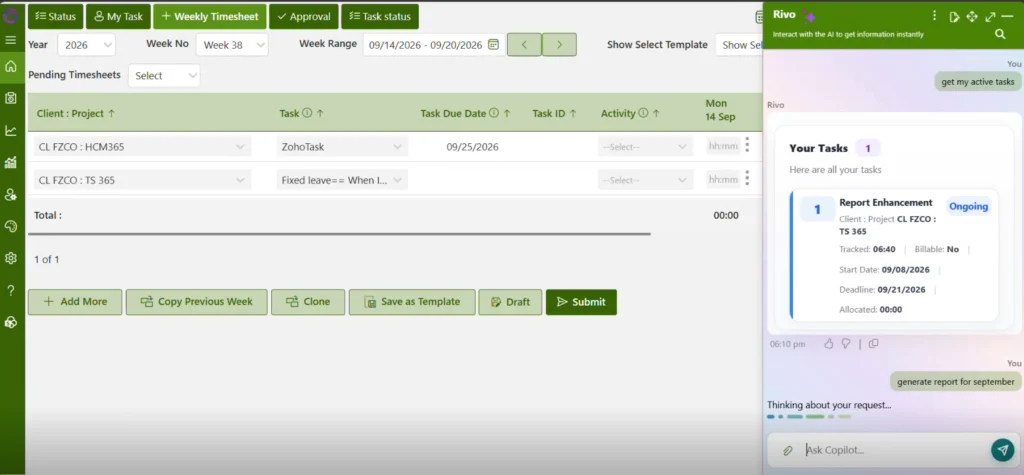
Timesheet 365 is a time tracking and timesheet software built for Microsoft 365. It runs natively inside Microsoft Teams and SharePoint, so employees log time where they already work, with no extra app to learn. With the new Timesheet AI Agent, managers can generate reports and get answers about hours, projects, and team workload simply by asking.
- Timesheet AI Agent: Ask questions in plain language and get instant reports on hours, projects, billable time, and team utilization, with no manual report building.
- Native Microsoft Teams integration: Employees track time, submit timesheets, and receive approval notifications directly inside Teams.
- SharePoint integration: Timesheet data is stored within your Microsoft 365 environment, supporting your existing security and compliance setup.
- Time tracking your way: Use a live timer, daily entry, or weekly timesheets, with billable and non-billable hours tracked separately.
- Project and task tracking: Assign time to projects, tasks, and clients to monitor budgets and progress in real time.
- Approval workflows: Managers review, approve, or reject timesheets in a few clicks, with automated reminders for late submissions.
- Leave and absence tracking: Manage time off alongside timesheets for a complete view of team availability.
Pros:
- Works inside Microsoft Teams and SharePoint, which drives high adoption
- AI Agent turns timesheet data into reports and insights in seconds
- Data stays in your Microsoft 365 environment
- Easy setup with a familiar interface for Microsoft users
- Affordable per-user pricing for teams of any size
Cons:
- Best suited for organizations that use Microsoft 365
Pricing: Free trial available. Paid plans start at $1.6 per user per month.
Ideal for: Organizations of any size running on Microsoft 365 that want time tracking, approvals, and AI reporting in one place.
See Timesheet 365 in Action
Get a live walkthrough of the Timesheet AI Agent and see how your team can track time, approve timesheets, and pull reports without ever leaving Microsoft Teams.
2. Clockify – Free Time Tracking for Growing Teams
Clockify is a widely used time tracker known for its generous free plan, which includes unlimited users and projects. It lets teams track time with a timer or manual entries and organize work by project, client, and task. Paid plans add features like approvals, scheduling, and GPS tracking as teams grow.
- Unlimited users and projects on the free plan
- Timer and manual timesheet entry
- Project, client, and task tracking
- Basic reports and exports
- Browser extensions and mobile apps
Pros:
- Free plan covers most basic needs
- Simple and quick to set up
- Works across desktop, web, and mobile
Cons:
- Advanced features like approvals and GPS require paid plans
- Reporting can feel basic for larger organizations
Pricing: Free plan available. Paid plans start at around $4–5 per user per month.
Ideal for: Small teams and startups that want free, simple time tracking.
3. Connecteam – All-in-One App for Frontline Teams
Connecteam is a mobile-first platform designed for managing deskless and field employees. It brings together a GPS time clock, shift scheduling, team chat, and task checklists in a single app. This makes it a practical option for businesses whose employees rarely sit at a desk.
- GPS-enabled mobile time clock
- Employee scheduling
- Team chat and updates
- Task management and checklists
- Payroll integrations
Pros:
- Great for field and shift-based teams
- Combines several tools in one app
- Free plan for small teams
Cons:
- Less suited for project-based or office teams
- Pricing is structured per hub, which can add up
Pricing: Free for small teams. Paid plans start at around $29 per month for a set number of users.
Ideal for: Businesses with frontline, field, or shift-based employees.
4. Toggl Track – Simple Time Tracking for Freelancers and Agencies
Toggl Track is a clean, easy-to-use time tracker that’s popular with freelancers, consultants, and creative agencies. Its one-click timer and idle detection make it easy to capture every billable minute. Profitability reports help teams see which clients and projects bring in the most value.
- One-click timer with idle detection
- Project and client tracking
- Billable rates and profitability reports
- 100+ integrations
- Desktop, web and mobile apps
Pros:
- Very intuitive interface
- Strong reporting on billable work
- Wide integration library
Cons:
- Limited attendance and leave features
- Advanced features require higher tiers
Pricing: Free for up to 5 users. Paid plans start at around $9–10 per user per month.
Ideal for: Freelancers, consultants, and agencies tracking billable work.
5. Harvest – Time Tracking with Built-In Invoicing
Harvest combines time tracking with invoicing and expense tracking, which makes it popular with service businesses. Teams can turn tracked hours into client invoices in just a few clicks. Its budget reports also help project managers spot overruns before they become a problem.
- Timer and timesheet entry
- Invoicing from tracked time
- Expense tracking
- Project budget monitoring
- Integrations with accounting tools
Pros:
- Seamless time-to-invoice workflow
- Clear budget and project reports
- Easy for clients and teams to use
Cons:
- Free plan limited to one user
- No built-in attendance or leave management
Pricing: Free for one seat. Paid plans start at around $11–12 per user per month.
Ideal for: Agencies and consultancies that bill clients by the hour.
6. Hubstaff – Time Tracking and Monitoring for Remote Teams
Hubstaff is built for remote and distributed teams that want visibility into how work gets done. Along with time tracking, it offers activity levels, app and URL tracking, and optional screenshots. Built-in payroll and GPS tracking also make it useful for mixed office and field teams.
- Time tracking with optional screenshots
- Activity levels and app/URL tracking
- GPS tracking for field teams
- Automated payroll
- Scheduling and attendance
Pros:
- Detailed visibility into remote work
- Built-in payroll features
- Supports both office and field teams
Cons:
- Monitoring features may feel intrusive to some employees
- Can be complex to configure
Pricing: Paid plans start at around $7 per user per month.
Ideal for: Remote teams that need activity insights and payroll in one tool.
7. QuickBooks Time – Time Tracking Built for QuickBooks Users
QuickBooks Time, formerly known as TSheets, is a time tracker designed to work closely with QuickBooks accounting and payroll. Employees can clock in from a mobile app with GPS, and hours sync directly into payroll. It also helps businesses stay on top of overtime and PTO rules.
- Mobile time clock with GPS
- Scheduling
- Job and project tracking
- Overtime and PTO tracking
- Direct QuickBooks payroll sync
Pros:
- Smooth QuickBooks integration
- Strong compliance and overtime tracking
- Reliable mobile app
Cons:
- Higher cost than many alternatives
- Delivers the most value only if you already use QuickBooks
Pricing: Starts at around $20 per month base fee plus about $8 per user per month.
Ideal for: Businesses already using QuickBooks for payroll and accounting.
8. Replicon – Enterprise Time Intelligence Platform
Replicon is an enterprise-grade time intelligence platform built for complex organizations with global teams. It supports project costing, resource management, and labor compliance across multiple countries. AI-assisted time capture helps reduce manual entry for large workforces.
- Project time and cost tracking
- Global compliance and labor rules
- Resource management
- AI-assisted time capture
- Advanced analytics
Pros:
- Handles complex, multi-country requirements
- Strong compliance features
- Scales well for large workforces
Cons:
- Can be expensive for smaller teams
- Longer setup and learning curve
Pricing: Custom pricing based on requirements.
Ideal for: Large enterprises with complex compliance and project needs.
9. Buddy Punch – Online Time Clock for Hourly Teams
Buddy Punch is an online time clock and scheduling tool designed for businesses with hourly employees. Staff can punch in from the web, a mobile app, or a shared kiosk, with GPS and geofencing to confirm location. Hours flow into payroll, which saves managers time every pay period.
- Web, mobile, and kiosk time clock
- GPS and geofencing
- Employee scheduling
- PTO and overtime tracking
- Payroll integrations
Pros:
- Simple for hourly staff to use
- Good payroll integration options
- Responsive customer support
Cons:
- Limited project tracking
- Reporting is basic compared to project-focused tools
Pricing: Starts at around $4–5 per user per month plus a base fee.
Ideal for: Small and mid-sized businesses with hourly employees.
10. Insightful – Time Tracking with Productivity Analytics
Insightful, formerly Workpuls, is a workforce analytics tool that combines automatic time tracking with productivity insights. It shows how time is spent across apps, projects, and tasks without requiring manual entries. Managers of hybrid and remote teams use it to understand work patterns and balance workloads.
- Automatic time tracking
- Productivity and activity analytics
- Attendance tracking
- Project and task time tracking
- Remote and hybrid work insights
Pros:
- Detailed productivity data
- Automatic tracking reduces manual entry
- Useful for hybrid team management
Cons:
- Focus on monitoring may not suit every culture
- Fewer project billing features
Pricing: Paid plans start at around $6–8 per user per month.
Ideal for: Managers who want data on team productivity and work patterns.
Time Tracking and Compliance: Why Accurate Records Matter
Choosing a time tracking tool isn’t only about productivity. In many regions, employers are legally required to keep accurate records of hours worked. For example, the U.S. Department of Labor’s FLSA recordkeeping requirements require employers to keep records of hours worked and wages paid for non-exempt employees. A tool with approval workflows, audit trails, and secure data storage makes these requirements much easier to meet.
Ready to Simplify Timesheets in Microsoft Teams?
Book a free demo and our team will show you how Timesheet 365 fits your projects, approval process, and reporting needs in under 10 minutes.
Why Timesheet 365 Is the Best Jibble Alternative
Every tool on this list has its strengths, but Timesheet 365 stands out for organizations that run on Microsoft 365. Here’s why.
- It lives where your team works. Because Timesheet 365 is built into Microsoft Teams and SharePoint, employees don’t need to switch apps or remember another login. That means more consistent time entries and fewer late timesheets.
- AI that saves managers hours. The Timesheet AI Agent lets managers ask questions and get reports instantly. Instead of exporting data and building spreadsheets, you get clear answers about hours, projects, and workload in seconds.
- Your data stays in your environment. Timesheet data is stored in SharePoint within your Microsoft 365 tenant, so it follows the security, permissions, and compliance policies you already have in place.
- Attendance and projects in one tool. Unlike tools that focus only on clock-ins or only on projects, Timesheet 365 covers time tracking, project tracking, approvals, and leave management together.
- Engagement improves when tools are simple. Gallup’s State of the Global Workplace research shows that employee engagement remains a major challenge for organizations. Removing friction from everyday tasks like timesheets is a small but meaningful way to make work easier.
- Affordable and easy to roll out. With simple per-user pricing and a familiar Microsoft interface, teams can get started quickly without long onboarding.
Conclusion
Jibble is a solid time and attendance app, but it isn’t always the right fit for teams that need deeper project tracking, smarter reporting, or tools that work inside Microsoft 365. The right alternative depends on how your team works. Clockify suits free, basic tracking. Connecteam and Buddy Punch work well for frontline and hourly teams. Toggl Track and Harvest are strong for billable client work. Hubstaff and Insightful serve remote teams that want activity data, and Replicon fits large enterprises with complex needs.
If your organization runs on Microsoft 365, Timesheet 365 is the clear choice. With native Teams and SharePoint integration, a built-in Timesheet AI Agent for instant reports, and time, project, approval, and leave tracking in one place, it gives your team everything it needs without adding another app to the mix.
Join Our Creative Community
Frequently Asked Questions
What is the best alternative to Jibble?
The best Jibble alternative depends on your team’s needs. For organizations using Microsoft 365, Timesheet 365 is the top choice thanks to its native Teams and SharePoint integration and AI-powered reporting. For free basic tracking, Clockify is a popular option.
Is there a free alternative to Jibble?
Yes. Clockify offers a free plan with unlimited users, and Toggl Track and Connecteam offer free plans for small teams. Timesheet 365 offers a free trial so you can test its full features, including the Timesheet AI Agent, before committing.
Which Jibble alternative works with Microsoft Teams?
Timesheet 365 works natively inside Microsoft Teams, letting employees log time, submit timesheets, and get approval notifications without leaving Teams. Some other tools offer limited integrations, but few run fully inside the Microsoft 365 environment.
What should I look for in a Jibble alternative?
Look for a tool that fits where your team already works, covers both attendance and project tracking, and includes approval workflows and strong reporting. AI-powered insights, leave management, and secure data storage are also worth prioritizing in 2026.
Can AI help with timesheet reporting?
Yes. AI tools like the Timesheet 365 AI Agent let managers ask questions in plain language and get instant reports on hours, projects, and team utilization. This removes manual spreadsheet work and helps managers make faster, data-backed decisions.


_JiluXJRGNl.svg)























