

IT Support Ticketing System vs ITSM Software: What's the Real Difference?
_eH2jDg7dZ.png)
If you manage an IT team, you’ve probably asked this question: do we need a simple ticketing tool, or do we need full ITSM software? The two terms get used interchangeably all the time, but they are not the same thing. Picking the wrong one can mean overpaying for features you’ll never touch, or worse, outgrowing a tool within a year of buying it.
- A ticketing system focuses on logging and resolving support requests; ITSM software manages the entire IT service lifecycle.
- Ticketing tools are faster to set up, cheaper, and easier for small to mid-size teams to adopt.
- ITSM software follows frameworks like ITIL and includes incident, problem, change, and asset management.
- Most growing teams start with a ticketing system and expand into ITSM-style workflows as complexity increases.
- Helpdesk365 gives you ticketing simplicity today with the room to add ITSM-style workflows as your team grows.
In this guide, we’ll break down exactly what separates an IT support ticketing system from ITSM software, when each one makes sense, and how to choose the right fit for your team’s size, budget, and goals.
What Is an IT Support Ticketing System?
An IT support ticketing system is a tool that captures, organizes, and tracks support requests from employees or customers. Every issue, a locked account, a broken laptop, a software bug, becomes a ‘ticket’ with a status, an owner, and a history of updates.
At its core, a ticketing system answers three questions for every request:
- Who reported this issue, and what do they need?
- Who on the team is responsible for fixing it?
- Has it been resolved, and how long did it take?
Ticketing systems are built for speed and simplicity. Agents can see every open request in one queue, prioritize by urgency, and close tickets without digging through email threads or chat history. Most platforms also include automation rules, canned replies, and basic reporting on response and resolution times.
This makes ticketing systems a natural fit for internal IT help desks, customer support teams, and any group that handles a steady stream of individual requests that need a clear start and end point.
Think about a typical Monday morning at a mid-size company. An employee can’t log into their email, another needs a new laptop provisioned, and a third is reporting a printer that won’t connect to the network. In a ticketing system, each of these becomes its own tracked item. The IT agent sees exactly what’s open, what’s overdue, and what’s already been handled, without hunting through a shared inbox or a messy group chat.
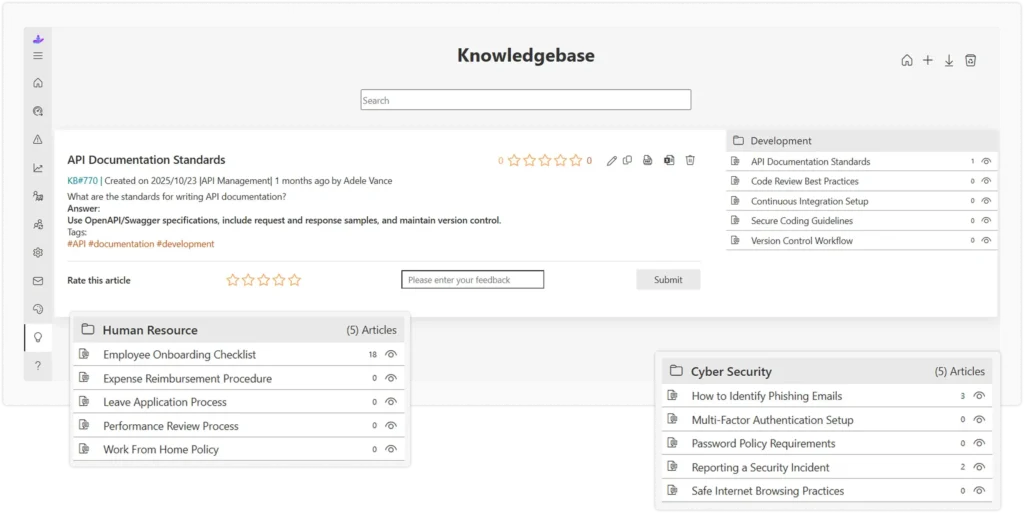
Most ticketing platforms also include a self-service portal or knowledge base, so employees can search for answers to common problems, like resetting a password, before they even raise a ticket. This alone can cut ticket volume significantly, freeing up agents to focus on issues that actually need a human touch.
What Is ITSM Software?
ITSM stands for IT Service Management. ITSM software goes beyond ticket resolution, it manages how IT services are planned, delivered, supported, and improved across an entire organization. Most ITSM platforms are built around the ITIL framework, a widely recognized set of best practices for running IT as a service.
Where a ticketing system handles individual requests, ITSM software typically covers:
- Incident management — restoring service quickly after something breaks
- Problem management — finding and fixing the root cause behind repeat incidents
- Change management — controlling how updates and changes are approved and rolled out
- Asset management — tracking hardware, software, and licenses across the business
- Service catalog and request management — a structured menu of IT services employees can request
Because it covers so much more ground, ITSM software is usually chosen by larger IT departments that need to coordinate across multiple teams, manage compliance requirements, and prove that IT operations follow a consistent, auditable process.
Picture a large enterprise rolling out a new operating system across 3,000 employee laptops. That single project touches change management (getting the rollout approved and scheduled), asset management (knowing which devices need the update and which are already compliant), incident management (handling the inevitable issues that pop up during rollout), and reporting (proving to leadership that the project stayed on track). A basic ticketing tool can log the individual issues, but it can’t connect all these moving pieces into one coordinated plan. That’s the gap ITSM software is built to close.
ITSM platforms also tend to include a configuration management database, or CMDB, which maps out how different IT assets and systems relate to one another. When a server goes down, a CMDB can show exactly which applications and departments will be affected, something a simple ticketing queue was never designed to do.
Core Differences Between Ticketing Systems and ITSM Software
The line between these two categories has blurred over the years, since many modern ticketing platforms now include some ITSM-style features. Still, four differences consistently separate the two.
Scope and Functionality
A ticketing system is built around one workflow: request comes in, gets assigned, gets resolved. ITSM software manages several connected workflows at once, incidents, changes, assets, and problems, and links them together so a single hardware failure can trigger an incident ticket, a change request, and an asset update automatically.
Complexity and Setup
Ticketing systems are usually ready to use within a day. You connect your email or chat channel, set up a few categories, and start receiving tickets. ITSM software takes longer to implement because it requires mapping out service catalogs, approval chains, and configuration item relationships before it delivers full value.
Cost Considerations
Ticketing tools are priced to be accessible, often on a simple per-agent, per-month basis. ITSM platforms carry enterprise pricing that reflects their broader scope, and many also charge extra for modules like asset management or advanced automation.
Team Size and Use Case
Small and mid-size IT teams, or teams supporting a single department, usually get everything they need from a ticketing system. Large enterprises with distributed IT operations, strict compliance needs, and multiple interconnected systems tend to need the structure that full ITSM software provides.
Reporting and Visibility
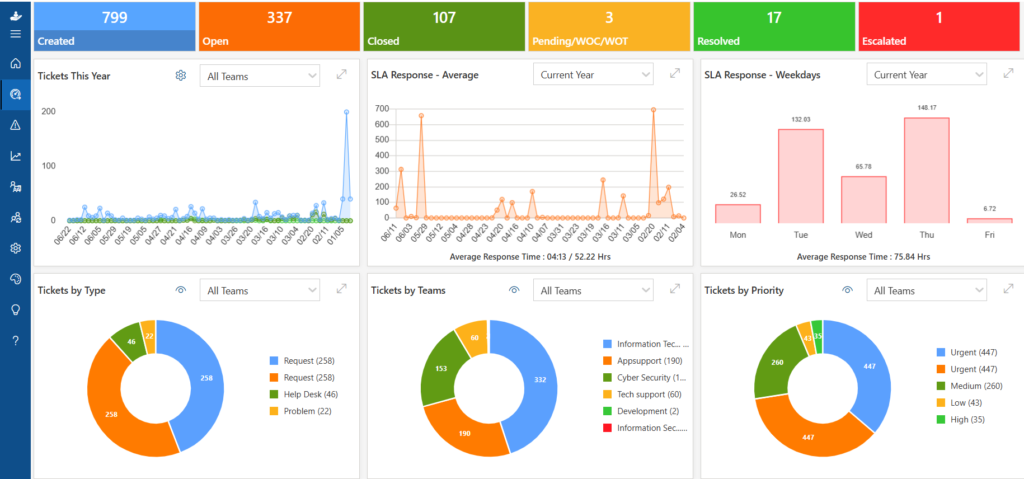
Ticketing systems give you the numbers that matter day to day, how many tickets came in, how fast they were resolved, and which agents are carrying the heaviest load. ITSM software builds on this with service-level reporting across the whole organization, showing trends in incidents, the business impact of outages, and whether IT is meeting the service levels it promised to internal customers.
Ownership and Governance
In a ticketing system, ownership is usually simple: one agent, one ticket, one resolution. ITSM software introduces layers of governance, approval chains for changes, escalation paths across teams, and audit logs that record every decision. This governance is exactly what larger organizations need to stay compliant, but it can feel like unnecessary overhead for a small team that just wants requests handled quickly.
See How a Ticketing System Fits Your Team
Side-by-Side Comparison Table
Here’s a quick visual summary of how the two categories stack up:
Aspect | IT Support Ticketing System | ITSM Software |
Primary Focus | Managing and resolving support tickets | Managing the full lifecycle of IT services |
Scope | Ticket creation, tracking, and resolution | Incident, problem, change, asset, and request management |
Best For | Small to mid-size support teams | Larger IT departments with complex operations |
Setup Time | Hours to a few days | Weeks to months |
Cost | Lower, often per-agent pricing | Higher, enterprise-level pricing |
Learning Curve | Simple and intuitive | Steeper, needs training |
Framework Alignment | Not tied to a specific framework | Usually built around ITIL best practices |
Reporting Depth | Ticket and SLA reports | Service-level, asset, and change reports |
When Should You Use a Ticketing System?
A dedicated ticketing system is usually the right call if any of these sound like your team:
- You’re a small or mid-size IT team handling day-to-day support requests
- You need to get up and running in days, not months
- Your budget doesn’t stretch to enterprise ITSM licensing
- You mainly deal with incidents and requests, not complex change or asset workflows
- Your team values a simple, low-maintenance tool over a feature-heavy platform
For most growing businesses, a well-built ticketing system covers 90% of daily support needs without the overhead of a full ITSM rollout.
A useful test: if you can describe your IT support process in a single sentence, ‘requests come in, get assigned, get resolved’, a ticketing system is very likely all you need right now. You can always revisit the decision in a year once your team, and your process, has grown more complex.
When Should You Use Full ITSM Software?
Full ITSM software makes more sense once your organization hits certain thresholds:
- IT supports multiple departments, locations, or business units
- You need formal change management with approval workflows
- Asset and configuration tracking is critical for compliance or audits
- You’re required to follow ITIL or a similar framework
- You need to connect incidents, problems, and changes into one unified process
If your team is regularly firefighting the same recurring issues without a way to trace them to a root cause, or if compliance auditors are asking questions your current tool can’t answer, that’s usually the signal it’s time to move toward ITSM.
It’s also worth noting that moving to ITSM is rarely an overnight switch. Most organizations phase it in, starting with formal incident management, then adding change management once the team is comfortable, and layering in asset management and a full service catalog over time. Trying to implement everything at once is one of the most common reasons ITSM rollouts stall.
Common Myths About Ticketing vs ITSM
Myth 1: ‘ITSM software is always better because it does more’
More features aren’t automatically better if your team never uses them. Paying for change management, asset tracking, and service catalogs you don’t need just adds cost and complexity without adding value.
Myth 2: ‘A ticketing system can’t scale’
Modern ticketing platforms have grown far beyond basic inboxes. Many now include automation, SLA management, and reporting that used to be exclusive to ITSM tools — enough to support growing teams for years before an upgrade is needed.
Myth 3: ‘ITSM and ticketing are the same thing’
Ticketing is one piece of ITSM, not the whole picture. Every ITSM platform includes ticketing, but not every ticketing tool includes full ITSM.
Myth 4: ‘We need ITSM to look professional to employees’
Employees care about how quickly and clearly their issue gets resolved, not which framework sits behind the scenes. A well-run ticketing system with fast response times and clear communication will always beat a sluggish, over-engineered ITSM rollout in the eyes of the people actually using it.
Compare Plans and Find Your Fit
How to Choose the Right Solution for Your IT Team
Ask yourself these questions before committing to either category:
- How many people are on the requesting side, dozens, hundreds, or thousands?
- Do we need formal change approval, or do most changes happen informally?
- Is asset and license tracking a compliance requirement for us?
- How much budget and time can we realistically commit to implementation?
- Will our support volume and complexity grow significantly in the next 12–24 months?
If your answers point to steady, manageable support volume without heavy compliance demands, a ticketing system will serve you well, and you can always add ITSM-style modules later as your needs change.
It also helps to involve the people who will actually use the tool every day. IT agents can tell you quickly whether a platform’s queue, automation, and reporting genuinely fit how they work, or whether it’s adding extra clicks to an already busy day. A tool that looks impressive in a sales demo but slows agents down in practice is rarely the right long-term choice, no matter which category it falls into.
Why Helpdesk365 Is a Smart Starting Point
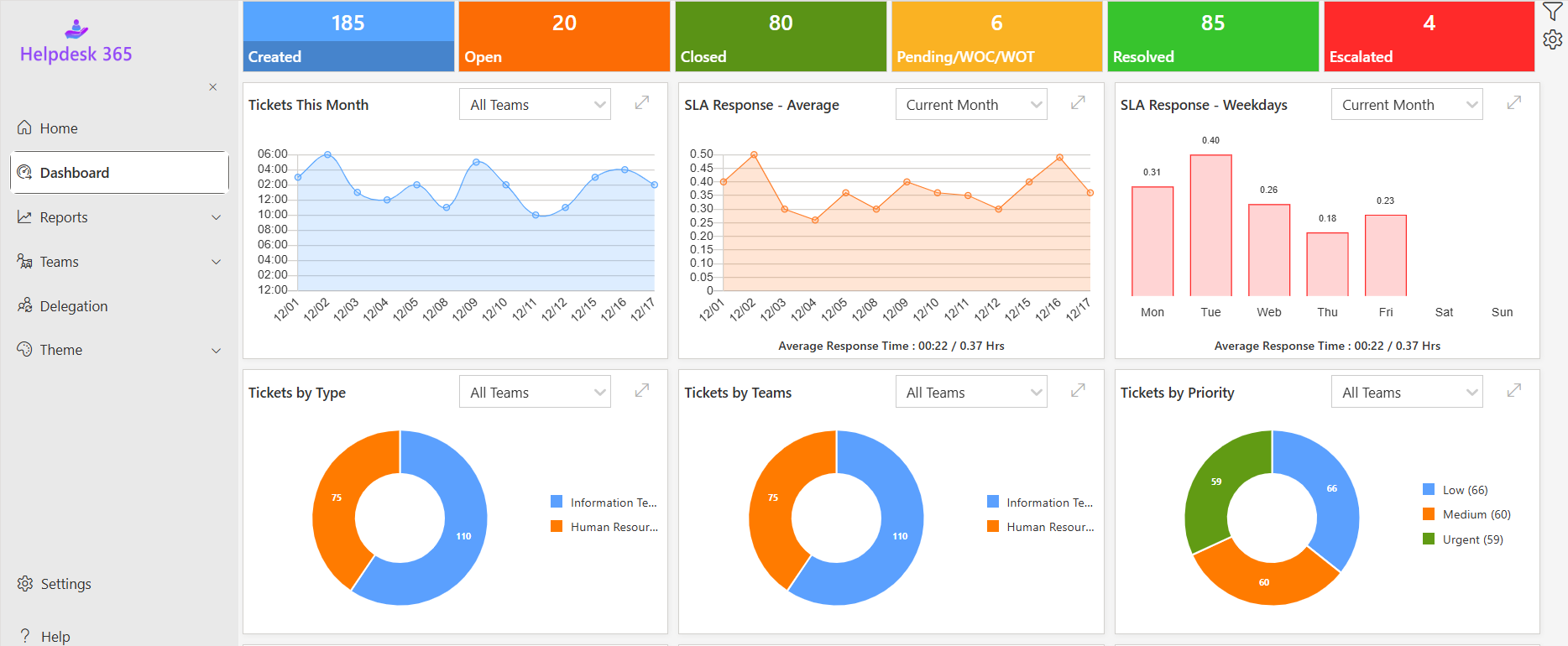
For most IT teams weighing this decision, Helpdesk365 hits the balance that a lot of ticketing tools miss. It gives you the speed and simplicity of a dedicated ticketing system, fast setup, an easy-to-learn interface, and automation that removes repetitive work, while still supporting the SLA tracking, reporting, and workflow structure that growing teams need as they take on more complex requests.
Here’s what makes Helpdesk365 a practical choice for IT teams deciding between ticketing and full ITSM:
- Set up your ticket queue and automation rules in hours, not weeks
- SLA timers and escalation rules keep priority issues from slipping through
- Built-in reporting shows response times, resolution rates, and agent workload
- A self-service knowledge base reduces repetitive tickets before they’re even created
- Room to grow, add structured workflows as your support needs become more complex
Instead of forcing a small IT team into enterprise ITSM pricing and complexity, Helpdesk365 lets you start simple and scale your process only when you actually need to, not before.
This matters because the biggest risk in this decision isn’t picking a ticketing tool or ITSM software, it’s picking a platform that can’t move with you. Teams that choose a rigid, ticketing-only tool often find themselves migrating to a new system within a year or two once their processes get more complex.
Teams that jump straight to heavyweight ITSM software often end up paying for modules they never fully implement. Helpdesk365 is designed to avoid both traps by giving you a genuinely usable ticketing experience today, with a clear path to more structured workflows when your support operation actually needs them.
Conclusion
There’s no one-size-fits-all answer. Smaller IT teams often benefit most from a simple, affordable ticketing system, while larger organizations with complex processes typically need full ITSM capabilities. A scalable solution like Helpdesk 365 lets you start with efficient ticketing and expand as your IT support needs grow.
Ready to improve IT Support Ticket ?
See how it can support your real IT workflows.
Join Our Creative Community
Frequently Asked Questions
Is a ticketing system a type of ITSM tool?
Ticketing is one function within ITSM, but a standalone ticketing system doesn’t include the full range of ITSM processes like change and asset management unless those features are specifically added.
Can I upgrade from a ticketing system to ITSM software later?
Yes. Many teams start with a ticketing system and layer on ITSM-style workflows — like change approvals or asset tracking, as their support needs grow more complex.
Does ITSM software always follow ITIL?
Most ITSM platforms are designed around ITIL principles, but the framework is a guideline, not a strict requirement. Some tools offer lighter, customizable versions of these processes.
Which option is cheaper for a small business?
A ticketing system is almost always the more cost-effective choice for small businesses, since it avoids the licensing and implementation costs tied to full ITSM platforms.
How do I know if my team has outgrown a basic ticketing tool?
Signs include recurring incidents with no clear root-cause tracking, informal or undocumented change processes, difficulty tracking IT assets, and growing pressure from compliance or audit requirements.
Can a ticketing system support multiple departments, not just IT?
Yes. Many teams use the same ticketing platform to support HR, facilities, and finance requests alongside IT, simply by setting up separate queues or categories for each department. This is a common middle step before considering full ITSM.
Is ITSM software only for large enterprises?
Not exclusively, but the cost and setup time usually only make sense once a team has outgrown the simpler workflows a ticketing system offers. Smaller teams that adopt ITSM too early often end up using a fraction of what they’re paying for.


_JiluXJRGNl.svg)























