

What is ITSM Software? Guide for Microsoft 365 Organizations
ITSM software manages IT services like incidents, requests, and changes in a structured way for better control and efficiency.
- Centralizes IT support
- Automates workflows
- Improves service speed
_eH2jDg7dZ.png)

Overview
If your IT team is still managing service requests through shared inboxes, spreadsheets, or disconnected ticketing tools, you are leaving efficiency, visibility, and user satisfaction on the table. IT service management (ITSM) software exists to change exactly that.
This guide explains what ITSM software is, how it works, what its core components are, and why organizations embedded in the Microsoft 365 ecosystem are increasingly turning to purpose-built solutions like Helpdesk 365 instead of heavyweight, expensive platforms.
Whether you are an IT manager evaluating your first ITSM tool, or a CTO re-evaluating a costly enterprise platform, this guide will give you everything you need to make a confident decision.
What is ITSM (IT Service Management)?
IT Service Management (ITSM) is the practice of designing, delivering, managing, and continuously improving IT services to meet the needs of a business and its end users. It is not just about fixing broken things, it is a structured, process-driven approach to how IT operates as a service organization within a company.
ITSM software is the technology platform that operationalizes these practices, automating workflows, tracking incidents, managing SLAs, enabling self-service, and giving IT leaders the data they need to improve over time.
At its core, ITSM answers the question: How does IT consistently deliver value to the business?
Why ITSM Matters
Organizations that implement ITSM software report measurable improvements across three dimensions:
Operational efficiency: Repetitive manual tasks, assigning tickets, sending status updates, escalating overdue issues, are automated. IT staff spend their time solving problems, not administering them.
User experience: End users get faster resolutions, consistent communication, and self-service options to resolve common issues without raising a ticket at all.
Business alignment: ITSM gives IT leaders visibility into service performance, SLA compliance, and team workload, enabling them to make data-driven decisions and demonstrate value to business stakeholders.
According to industry research, organizations using structured ITSM practices resolve incidents up to 60% faster than those without, and experience significantly higher employee satisfaction scores around IT support.
ITIL Framework Overview
The most widely adopted framework for ITSM is ITIL (IT Infrastructure Library), now in its fourth version. ITIL 4 provides a set of best practices that help organizations align IT services with business strategy.
Key ITIL concepts relevant to ITSM software include:
- Service Value System (SVS): A holistic model describing how all components of an organization work together to create value through IT services.
- Service Value Chain: A flexible operating model covering plan, improve, engage, design & transition, obtain/build, and deliver & support activities.
- Guiding Principles: Including “focus on value,” “start where you are,” and “keep it simple and practical.”
- Management Practices: 34 practices covering everything from incident management and change enablement to knowledge management and service desk operations.
ITSM software platforms implement these ITIL practices in a tangible, configurable way, making it possible for real IT teams to operate at the standard ITIL recommends.
Core Components of ITSM Software
Understanding what ITSM software actually does requires a look at its key functional modules. Any serious IT service management ITSM software platform should include the following:
Incident Management
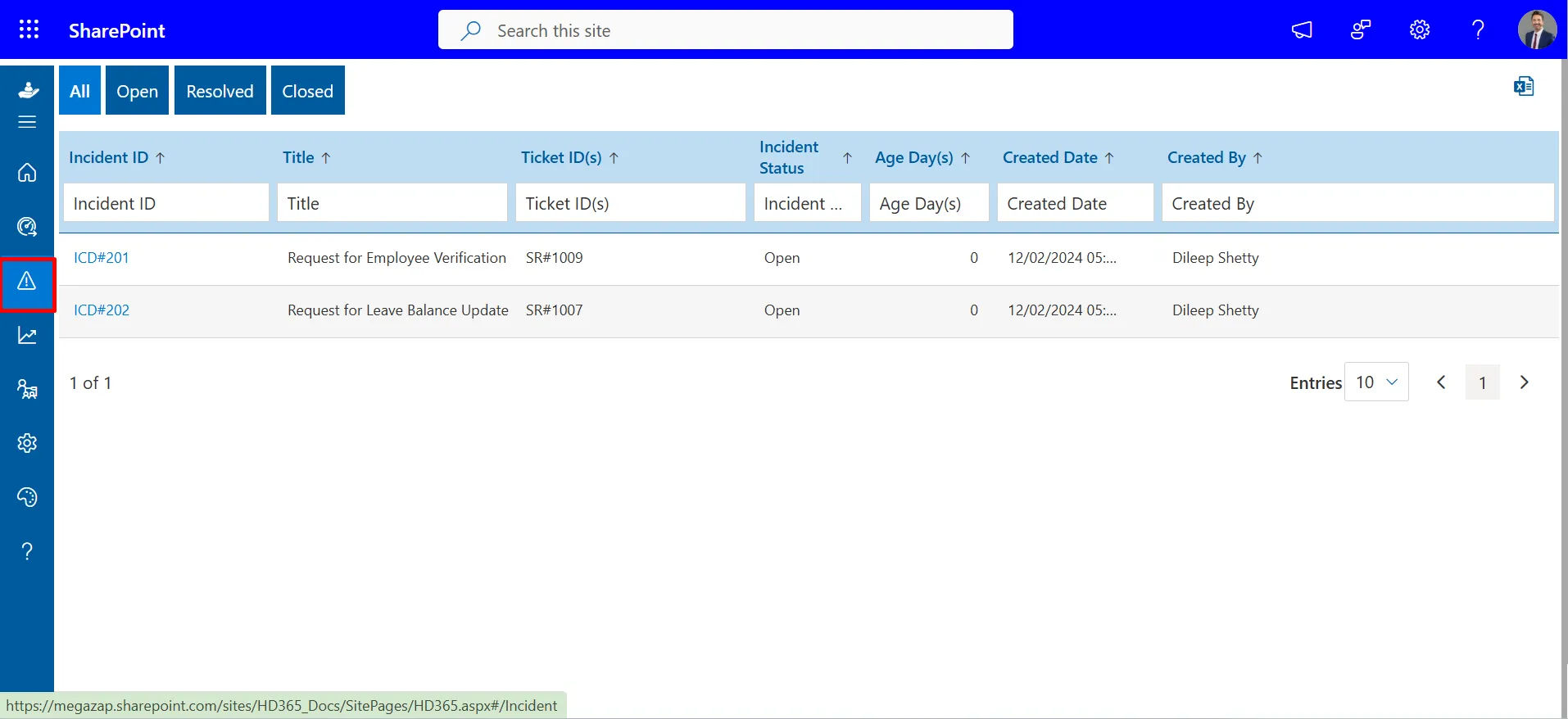
Incident management is the process of restoring normal service operations as quickly as possible following an unplanned disruption. In ITSM software, this means:
- Logging incidents via multiple channels (email, portal, Teams, phone)
- Auto-classifying and routing tickets based on category, priority, and team
- Tracking resolution progress against SLA targets
- Escalating automatically when deadlines approach
- Closing and documenting outcomes for future reference
A robust incident management module dramatically reduces mean time to resolution (MTTR) and ensures no request falls through the cracks.
Service Request Management
Not everything raised to the IT team is an incident. Service requests, provisioning a new laptop, requesting software access, onboarding a new employee, are planned, repeatable activities. ITSM software handles these through:
- A structured service catalog listing available services
- Approval workflows for requests that require authorization
- Automated fulfillment steps where possible
- Clear SLA commitments for delivery time
Separating incidents from service requests allows IT teams to prioritize correctly and measure performance accurately.
SLA Management
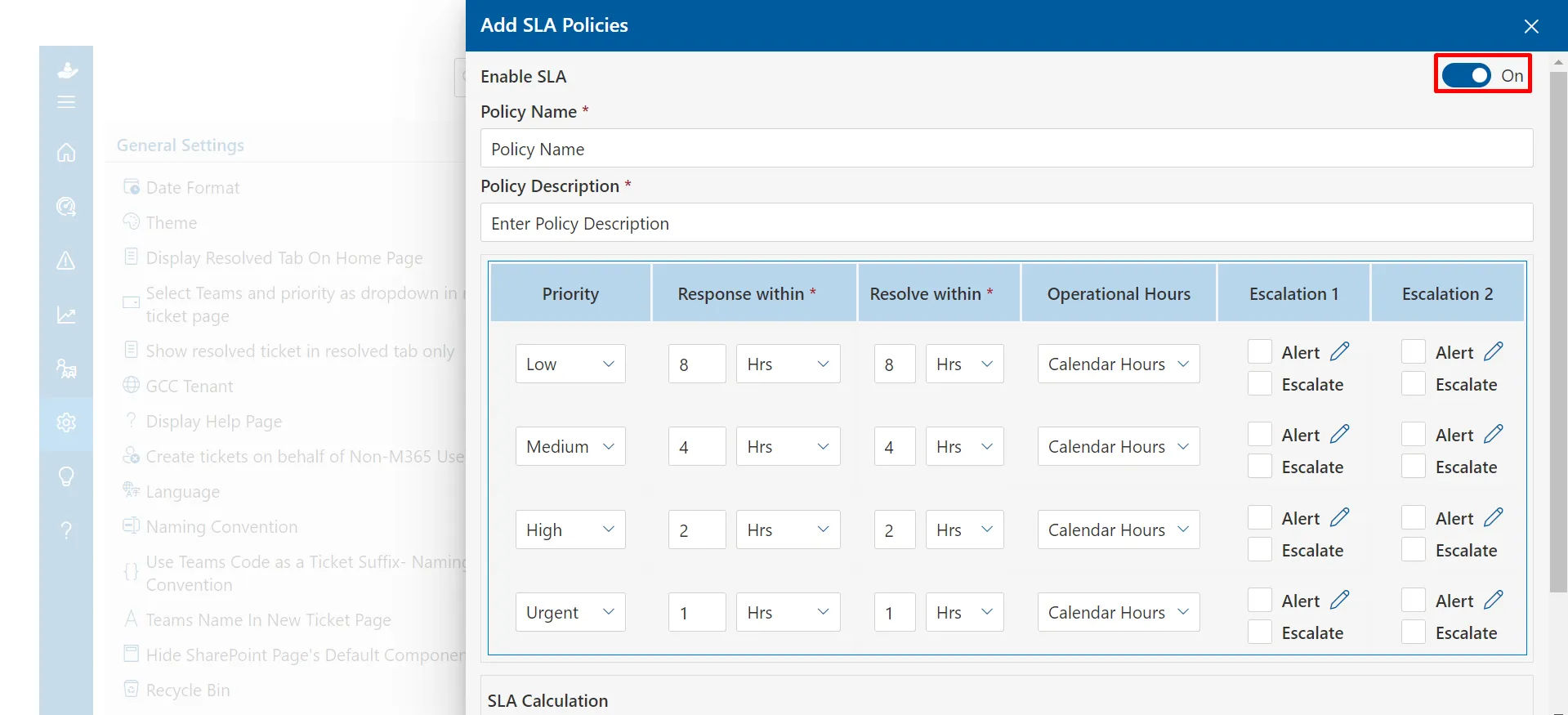
Service Level Agreements (SLAs) are the contractual commitments IT makes to its users, response times, resolution times, availability targets. ITSM software enforces SLAs by:
- Defining SLA policies per ticket type, priority, or department
- Tracking elapsed time against SLA deadlines in real time
- Sending automated alerts and escalations before breaches occur
- Reporting on SLA compliance over time
SLA management transforms IT accountability from a promise into a measurable reality.
Knowledge Management
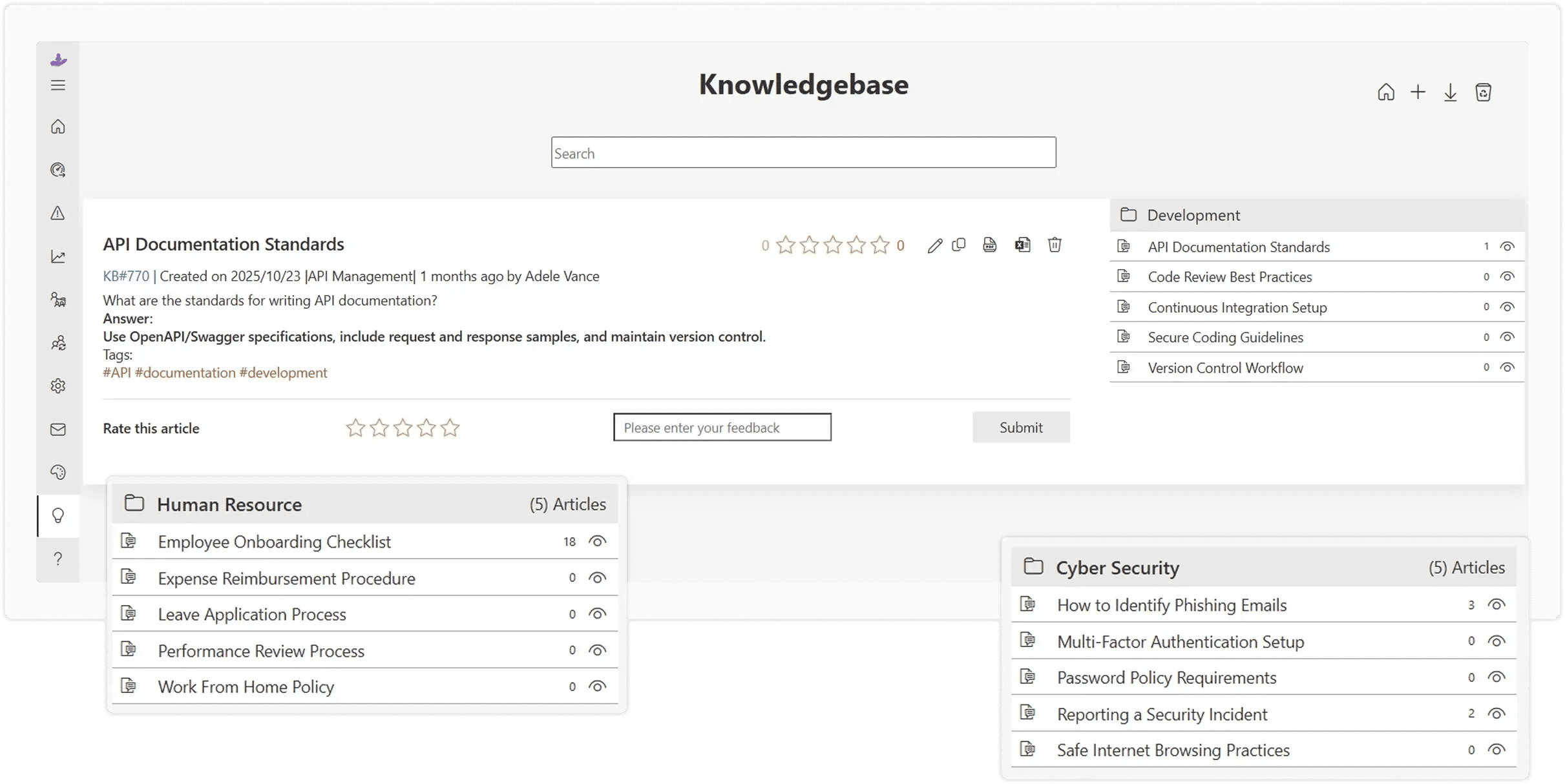
A knowledge base within ITSM software enables IT teams to document solutions to common issues, making that knowledge available to both agents and end users. Benefits include:
- Faster agent resolution through guided solution articles
- Reduced ticket volume via end-user self-service
- Organizational memory that survives staff turnover
- Continuous improvement through usage analytics
Workflow Automation
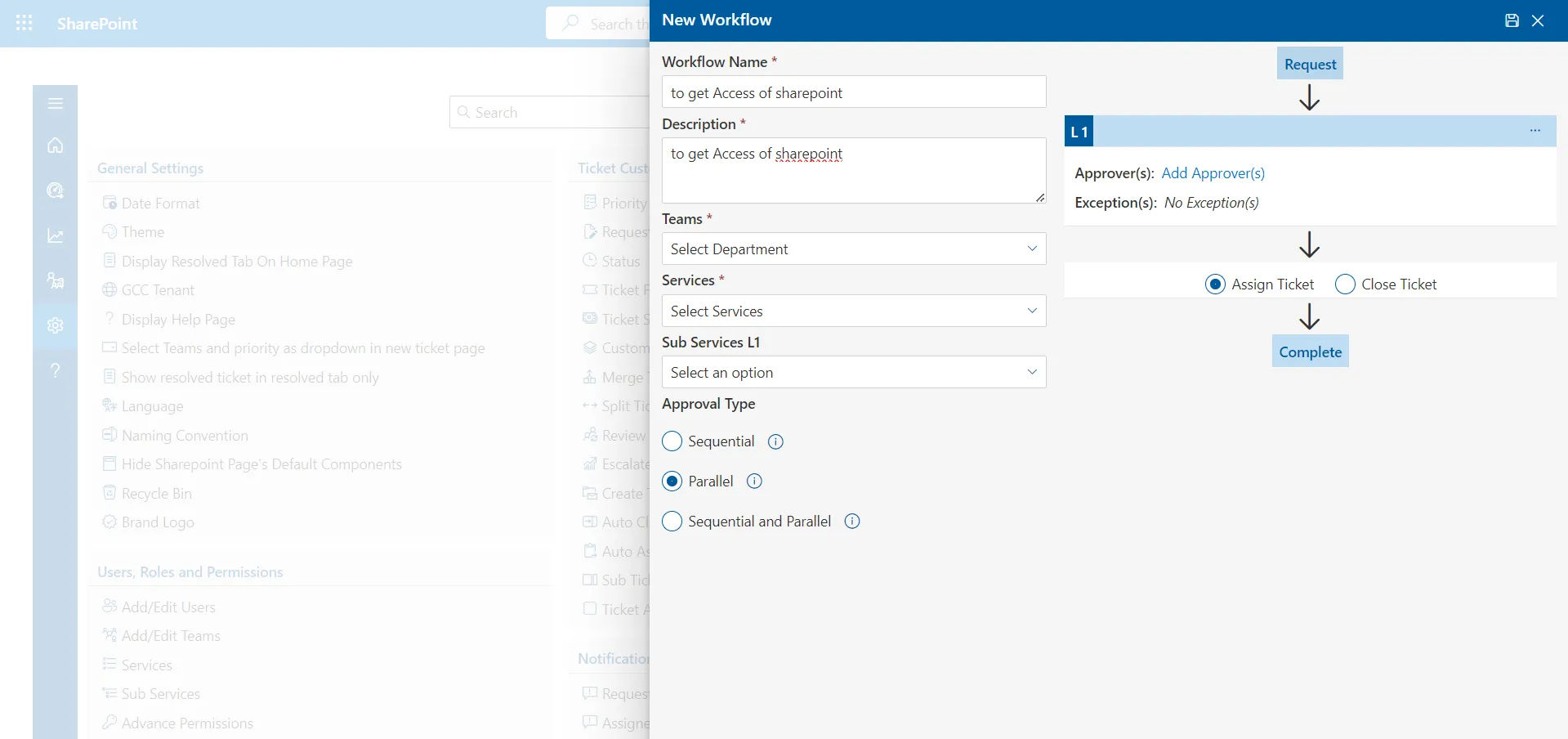
Modern ITSM software automates the routine work that consumes agent time without adding value. This includes:
- Auto-assigning tickets based on category, skill, or load balancing
- Sending acknowledgment and update notifications automatically
- Triggering approval chains for change requests
- Auto-closing resolved tickets after a configurable period
- Integrating with other systems (Active Directory, HR platforms, monitoring tools)
Automation is where ITSM delivers its highest ROI, reducing handling time per ticket by 30–50% in many deployments.
Reporting & KPIs
You cannot improve what you do not measure. ITSM software provides built-in dashboards and reporting that track:
- Ticket volume by category, team, and time period
- SLA compliance rates
- Average resolution time (MTTR)
- First contact resolution (FCR) rate
- Agent and team productivity
- Self-service adoption rates
Advanced ITSM platforms integrate with business intelligence tools like Power BI to enable custom reporting and executive-level dashboards.
Elevate your support system and empower collaboration with ITSM software
ITSM vs Helpdesk vs Service Desk: What Is the Difference?
One of the most common sources of confusion in IT management is how these three terms relate to each other. Here is a clear breakdown:
Dimension | Helpdesk | Service Desk | ITSM Software |
Focus | Break-fix, incident resolution | Broader user support & service requests | Full IT lifecycle management |
Scope | Reactive, tactical | Reactive + some proactive | Strategic + operational |
Processes | Basic ticketing | Ticketing + service catalog | Incident, change, problem, asset, SLA, knowledge |
ITIL Alignment | Minimal | Partial | Full |
Target Users | Small IT teams | Mid-size IT teams | Mid to enterprise IT organizations |
Typical Tools | Email/shared inbox | Basic ticketing platforms | Dedicated ITSM platforms |
Where does Helpdesk 365 fit?
Helpdesk 365 bridges the gap between a capable service desk and a full ITSM platform, delivering enterprise-grade ITSM capabilities within the Microsoft 365 environment, without the complexity, cost, or long deployment timelines of traditional ITSM tools.
It is the right choice for organizations that want structured, process-driven IT service management without outgrowing their existing Microsoft investment.
Challenges with Traditional ITSM Tools
Before evaluating ITSM software, it is important to understand why so many organizations are actively seeking a ServiceNow alternative or replacing tools they already own.
High Cost
Enterprise ITSM platforms like ServiceNow are priced for large enterprises, and the costs are substantial. Between platform licensing, per-agent fees, implementation services, and annual maintenance, a mid-sized organisation can spend hundreds of thousands of dollars before serving a single ticket.
For mid-sized companies, educational institutions, and government organizations, this pricing model makes expensive ITSM software inaccessible or impossible to justify.
Complex Implementation
Complex ITSM platforms are notorious for implementation timelines that stretch months, or years. A typical ServiceNow deployment involves:
- Dedicated implementation partners
- Extensive requirements gathering
- Configuration and customization sprints
- UAT cycles
- Change management programs
Organizations often go live 6–12 months after signing a contract, with significant scope creep and budget overruns along the way.
Heavy Customization Requirements
Traditional ITSM tools are highly configurable, which is both their strength and their weakness. Out-of-the-box, they often require substantial customization before they match an organization’s actual workflows. Each customization increases complexity, raises costs, and creates technical debt that makes future upgrades painful.
Long Deployment Time
Even well-resourced IT teams frequently experience 6-month-plus deployment timelines with traditional ITSM platforms. In that time, the original business needs may have shifted, and the tool being deployed is already behind the curve.
These pain points have created a significant market for modern, lightweight ITSM management software that delivers real ITSM functionality without the enterprise overhead.
How Helpdesk 365 Supports ITSM in Microsoft 365
For organizations already invested in Microsoft 365, Helpdesk 365 is purpose-built ITSM software for Microsoft 365, living natively inside SharePoint and Microsoft Teams rather than requiring a separate platform, separate login, or separate data environment.
Incident Management via Ticketing
Helpdesk 365 provides a structured ticketing system that supports the full incident management lifecycle. Tickets can be raised via email, the self-service portal, or directly inside Microsoft Teams. Each ticket is tracked with priority, category, assigned agent, and SLA status, giving teams complete visibility from submission to resolution.
Auto-routing rules ensure tickets reach the right team or individual based on configurable logic, eliminating manual triage.
SLA Tracking & Escalation
SLA policies in Helpdesk 365 can be configured by ticket type, department, priority level, or service category. The system tracks elapsed time in real time and triggers automated escalation notifications before SLA breaches occur.
Managers get proactive visibility into at-risk tickets, not a retrospective report after the breach has already happened.
Workflow Automation
Helpdesk 365 automates the routine operational work that consumes agent time. Automated actions include ticket assignment, acknowledgment emails, status updates, approval routing, and escalation triggers. Workflows are configured through a visual interface, no developer required.
This makes Helpdesk 365 practical for IT teams without dedicated ITSM administrators, which is a key differentiator from complex ITSM platforms that require specialist knowledge to maintain.
Self-Service Portal
The built-in self-service portal, hosted on SharePoint, allows end users to submit requests, track ticket status, and search the knowledge base, all without contacting IT directly. A well-populated knowledge base can deflect 20–40% of incoming tickets, freeing agent capacity for complex issues.
The portal is branded, responsive, and accessible, designed for everyday users, not IT professionals.
Microsoft Teams Integration
ITSM integrated with Teams is one of Helpdesk 365’s most powerful differentiators. Agents can receive, respond to, update, and resolve tickets directly inside Microsoft Teams, the platform where they already spend their day.
End users can raise tickets through a Teams bot without ever leaving their workflow. Notifications, approvals, and escalations appear as Teams messages. This dramatically increases adoption, reduces context switching, and keeps IT service management embedded in the tools organizations already use.
Power BI Reporting
Helpdesk 365 integrates natively with Power BI to deliver real-time dashboards across all ITSM KPIs, ticket volume, SLA compliance, resolution time, team productivity, and more. IT leaders can build executive reports, trend analyses, and operational dashboards without exporting data to a separate analytics tool.
This SharePoint ITSM tool approach keeps all data inside the Microsoft tenant, where governance and security policies already apply.
Who Should Use ITSM Software Like Helpdesk 365?
Mid-Sized Companies
Organizations with 100–2,000 employees typically outgrow basic ticketing tools but cannot justify the cost and complexity of enterprise ITSM platforms. Helpdesk 365 delivers the right level of ITSM capability, structured processes, SLA management, automation, and reporting, at a price point and deployment model that works for mid-market IT teams.
Educational Institutions
Universities, colleges, and school districts face a unique challenge: high ticket volume from non-technical users, limited IT staff, and tight budgets. Helpdesk 365’s self-service portal, knowledge base, and Teams integration allow lean IT teams to support large user populations effectively. The SharePoint-native architecture also fits neatly into the Microsoft 365 for Education licensing most institutions already hold.
Government Organizations
Government agencies require data sovereignty, security compliance, and auditability from any software they adopt. Because Helpdesk 365 operates entirely within the organization’s own Microsoft 365 tenant, all data stays under the agency’s control, no third-party cloud dependency, no data residency concerns.
IT Teams Already Using Microsoft 365
Any IT team already operating on Microsoft 365 benefits from the zero-friction deployment model. There is no new environment to provision, no new identity system to integrate, and no new security review required. Helpdesk 365 extends the Microsoft 365 investment rather than adding to the software stack.
Benefits of Using ITSM Software Inside Microsoft 365
No External System Required
Traditional ITSM software adds another application to an already crowded stack. Helpdesk 365 eliminates this by running entirely within Microsoft 365, on SharePoint and Teams, so there is no new platform to procure, no new vendor relationship to manage, and no new system for users to learn.
Data Stays in Your Tenant
Every ticket, every conversation, every attachment, and every report stays inside the organization’s own Microsoft 365 tenant. This means existing data governance policies, retention rules, eDiscovery configurations, and security controls apply automatically, without any additional configuration.
Teams Integration Drives Adoption
The single biggest reason ITSM implementations fail is low user adoption. When ITSM tools require users to leave their primary workspace to log a ticket, they find workarounds, which defeats the purpose. Because Helpdesk 365 lives inside Teams, where users already spend 4–8 hours a day, adoption happens naturally.
Lower Cost
Helpdesk 365 is significantly more cost-effective than standalone ITSM platforms. Organizations eliminating a standalone ITSM tool frequently recover the full cost of Helpdesk 365 from license savings alone, before factoring in reduced implementation costs and faster deployment.
Faster Setup
A Helpdesk 365 deployment can be live in days, not months. Because it sits on SharePoint and Teams infrastructure the organization already runs, there is no new environment to configure, no lengthy discovery phase, and no integration project required to connect it to the identity and security layer.
ITSM Implementation Checklist
Whether you are deploying Helpdesk 365 or any other ITSM tool, use this checklist to structure a successful rollout:
1. Define Your Workflows Map your current IT processes before configuring any software. Identify the key workflows: incident triage, service request fulfillment, change request approval, escalation paths. Document the current state first, then design the improved future state you want the ITSM tool to enforce.
2. Define Your SLAs Determine the response and resolution time commitments you will make by ticket priority. A typical starting framework:
- Critical (P1): 1-hour response, 4-hour resolution
- High (P2): 4-hour response, 8-hour resolution
- Medium (P3): 8-hour response, 24-hour resolution
- Low (P4): 24-hour response, 5-day resolution
3. Configure Ticket Categories Define a logical category taxonomy for your service catalog. Common top-level categories include Hardware, Software, Network, Access & Security, and HR/Onboarding. Subcategories drive auto-routing and enable meaningful reporting by service type.
4. Train Your Agents Technical configuration is not enough, agent adoption determines whether ITSM delivers value. Train agents on ticket handling procedures, SLA expectations, escalation protocols, and knowledge base contribution. Keep training practical and scenario-based.
5. Monitor and Improve Performance Set a regular cadence for reviewing ITSM KPIs, weekly for operational metrics (open tickets, SLA compliance), monthly for trend analysis (volume by category, MTTR trends), quarterly for strategic review (team capacity, service catalog gaps). Use data to continuously improve.
Why Helpdesk 365 is a Smart ITSM Choice
Choosing the right ITSM software is critical for delivering efficient and reliable IT services. Helpdesk 365 stands out as a smart choice for Microsoft 365 organizations by combining powerful ITSM capabilities with seamless integration, automation, and ease of use.
- Built for Microsoft 365
Helpdesk 365 is designed to work natively within Microsoft 365 tools like Teams, Outlook, and SharePoint. This means users can raise, track, and respond to tickets without switching platforms, reducing friction and improving adoption across the organization. - All-in-One ITSM Capabilities
It brings together core ITSM functions such as incident management, service requests, problem management, and change management into one unified system. This eliminates the need for multiple disconnected tools and creates a more streamlined IT service environment. - AI-Powered Automation
With built-in AI capabilities, Helpdesk 365 can automatically categorize tickets, assign them to the right agents, and suggest responses. This reduces manual workload, speeds up response times, and allows IT teams to focus on more critical tasks. - Centralized Ticket Management
All incoming requests—whether from email, Teams, or portals—are consolidated into a single dashboard. This gives IT teams complete visibility into ticket status, priorities, and workloads, making it easier to manage and resolve issues efficiently. - Faster Resolution with SLA Management
Helpdesk 365 enables organizations to define and track Service Level Agreements (SLAs). Automated alerts and escalations ensure that tickets are addressed on time, helping teams maintain service quality and meet user expectations. - User-Friendly Interface
The platform is designed with simplicity in mind, making it easy for both IT teams and non-technical users to navigate. This reduces training time and encourages widespread usage across departments. - Customizable Workflows
Organizations can tailor workflows, ticket forms, categories, and automation rules based on their specific processes. This flexibility ensures the system aligns perfectly with business needs rather than forcing teams to adapt to rigid structures. - Improved Team Collaboration
Helpdesk 365 supports internal collaboration through comments, mentions, and shared ticket views. Teams can work together in real time, reducing back-and-forth communication and resolving issues faster. - Scalable for Growing Businesses
Whether you’re a small team or a large enterprise, Helpdesk 365 can scale with your needs. It supports increasing ticket volumes, additional users, and more complex workflows without compromising performance. - Actionable Insights and Reporting
Built-in analytics and dashboards provide valuable insights into ticket trends, team performance, and service efficiency. These insights help IT leaders identify bottlenecks, optimize processes, and make data-driven decisions.
Conclusion
ITSM software is no longer a luxury reserved for large enterprises, it is an operational necessity for any organization that depends on IT services to function. The question is not whether to implement ITSM, but which approach fits your organization’s size, budget, and existing technology environment.
For organizations operating on Microsoft 365, the answer is increasingly clear. Why add a complex, expensive, standalone platform to your stack when purpose-built ITSM software for Microsoft 365 like Helpdesk 365 delivers everything you need, incident management, SLA tracking, workflow automation, self-service, and Power BI reporting, natively inside the tools your team already uses?
Helpdesk 365 combines the structure and rigor of enterprise ITSM with the simplicity, speed, and cost-effectiveness that mid-sized companies, educational institutions, and government organizations actually need.



Frequently Asked Questions
What is ITSM software used for?
ITSM software is used to manage IT service delivery within an organization. It handles incident management, service requests, SLA tracking, workflow automation, knowledge management, and performance reporting, enabling IT teams to operate efficiently and deliver consistent, measurable service to end users.
What is the difference between ITSM software and a helpdesk tool?
A helpdesk tool typically handles basic ticket logging and tracking. ITSM software is broader, it encompasses the full lifecycle of IT service delivery, including structured processes, SLA management, service catalogs, change management, and strategic reporting aligned to frameworks like ITIL.
Is Helpdesk 365 a ServiceNow alternative?
Yes. For organizations using Microsoft 365, Helpdesk 365 is a compelling ServiceNow alternative. It delivers core ITSM capabilities, incident management, SLA tracking, workflow automation, and reporting, at significantly lower cost, with faster deployment and native Microsoft 365 integration.
Does ITSM software need to be ITIL-compliant?
ITIL compliance is not a formal certification for software, it is a framework of practices. Good ITSM software supports ITIL practices like incident management, service request management, and knowledge management. Helpdesk 365 supports ITIL-aligned processes within a Microsoft 365-native environment.
How long does it take to implement ITSM software?
Traditional enterprise ITSM platforms typically take 3–12 months to deploy. Helpdesk 365 deploys in days for most organizations, thanks to its SharePoint-native architecture, pre-built templates, and Microsoft 365 integration that eliminates most infrastructure and identity configuration work.
What is the best ITSM software for Microsoft 365 organizations?
For organizations fully invested in the Microsoft ecosystem, Helpdesk 365 is the strongest choice. It operates natively inside SharePoint and Teams, keeps all data within the organizational tenant, integrates with Power BI for reporting, and provides enterprise-grade ITSM functionality without the cost or complexity of standalone platforms.
Can ITSM software work inside Microsoft Teams?
Yes, Helpdesk 365 is specifically designed as an ITSM tool integrated with Teams. Agents manage tickets directly within Teams, end users submit and track requests via a Teams bot, and all notifications and escalations surface as Teams messages, driving adoption without requiring users to switch applications.
Who needs ITSM management software?
Any organization where IT serves internal users at scale benefits from ITSM software. This includes mid-sized companies with structured IT teams, educational institutions supporting large non-technical user bases, government agencies requiring auditability and data governance, and any organization already using Microsoft 365 looking to formalize IT service delivery.
Try It Free, No Obligation










Schedule a free personalized 1:1 demo
By proceeding, you accept Cubic Logics’s terms and conditions and privacy policy





Don't Miss Out! Halloween Offer
Avail up to Flat 30% Discount until
November 06th, 2026.
Enter your business email ID and we will send a personalized coupon code straight to your inbox.
Please provide your contact details, we will connect with you soon!
Please provide your contact details, we will connect with you soon!
By proceeding, you accept Cubic Logics Terms and Conditions and Privacy Policy
Schedule a free personalized 1:1 demo
By proceeding, you accept Cubic Logics’s terms and conditions and privacy policy







