


Managing business expenses gets messier as your team expands. Methods that ran smoothly with 20 or 30 employees like tracking purchases in Excel, passing around company cards, and handling paper receipts start breaking down when you 100 or 1000 people.
Manual expense management causes delays, lost receipts, approval bottlenecks, and poor visibility into company spending. This increases errors, compliance risks, and administrative workload. Expense management solutions automate expense tracking, approvals, and reporting in one platform.
The problems pile up fast. Accounting team spends days matching receipts to transactions.. Unauthorized purchases slip through. And your finance staff works overtime every month just to close the books.
The problems pile up fast. Accounting team spends days matching receipts to transactions.. Unauthorized purchases slip through. And your finance staff works overtime every month just to close the books.
The good news? Software companies have built tools specifically to fix these challenges. Modern expense management apps give you clear understanding to basic questions: Who spent what? Was it approved? Do we have the receipt? These systems grow with your business instead of against it.
To reduce your research time, we’ve put together a list of 7 expense management solutions that companies use and recommend.
How We Analysed Best Expense Management Solutions?
We have evaluated each solution based on its features and recent G2 ratings and selected the tools with a higher level of user satisfaction and successful performance in terms of controlling business expenses. Based on this analysis, we have made a list of the best 7 expense management solutions. We are aimed at assisting organizations in making the process of tracking expenses easier, more controlled, and streamlined.
Importance of Implementing Expense Management Solutions
Speed and efficiency is one of the crucial factor for growing businesses. But Studies show that 70% of businesses still rely on manual expense management methods, which often leads to mistakes and wasted time. Here’s the thing: expense management software doesn’t just organize receipts it gives your finance team their productivity back.
1. Time Spent on Manual Expense Tracking
Manual tracking of expenses is a time-consuming activity among the employees and finance departments. Receipt collection, data input in spreadsheets, and checking of each input is an additional burden. Expense tracking software can make this time shorter as employees can file expenses online and save records in a single location.
2. Limited Visibility into Business Spending
When expenses are incurred in emails, spreadsheets and paper receipts, it is hard to tell where the company’s expenses is spent. It offers centralized dashboard where finance departments can see all expenses at a single location. This assists companies to track the spending patterns and make improved financial choices.
3. Delays in Expense Approvals and Reporting
Manual approval processes can slow down expense reviews and delay financial reporting. Managers can lose emails or spend more time going through submissions and this impacts on the timelines of reporting and financial visibility. Studies show that 75% of businesses report that increased fraud risk due to manual expense tracking limitations, while automated solutions reduce error rates by over 60%, highlighting the importance of adopting better expense management tools.
4. Challenges in Tracking Employee Expenses
When the size of teams increases, it becomes harder to keep track of the expenses of individual employees. The system enable employees to directly submit expenses via a system to assist finance teams in maintaining full and orderly records. This simplifies the task of reviewing, verifying and controlling the expenses of the employees as the business grows.
5. Need for Better Expense Policy Control
In the absence of effective expense management solutions, it may be challenging to track whether the expenses are in line with the company policies. It assists companies in setting travel expense policies and tracking submissions, which assists the finance teams to have a better control and consistency. This helps the organizations to have uniform expense practices in all teams.
6. Reducing Repetitive Work for Finance Teams
Finance teams often spend hours reviewing entries, organizing receipts, and preparing reports. These tasks are automated by the app and less manual effort is required, and the finance teams can concentrate on financial planning and analysis. This enhances the overall productivity and assists teams to use their time better.
7. Improving Overall Expense Control and Visibility
Clear visibility and control over expenses help businesses manage budgets effectively. The platform offer real-time access to expense information, which assists organizations to monitor expenses, track trends, and have a better financial control. This assists the leadership to make sound decisions using the correct financial information.
7 Top Expense Management Solutions: Complete Guide
We have discussed the significance of introducing a software to monitoring costs. The following are some of the solutions that can assist you in controlling costs.
Products | Integrations | G2 Ratings | Free Trial |
Expense 365 | SharePoint, MS Teams, Outlook, Power BI, MS Copilot, QuickBooks and Xero | 4.8/5 | 14-day |
Zoho Expenses | Integrates with Zoho Apps | 4.5/5 | 14-day |
Volopay | Xero, QuickBooks and NetSuite | 4.3/5 | Yes / Contact sales |
Rippling | Salesforce, Jira, HubSpot and QuickBooks | 4.8/5 | 14 days |
Concur Expense (SAP Concur) | Omnify Expense, Topia and travel accounting systems | 4/5 | 15 days |
Pleo | Oracle NetSuite, QuickBooks and Xero | 4.7/5 | Connect Sales |
Brex | NetSuite, QuickBooks, Workday and Slack | 4.8/5 | 30 days |
1. Expense 365
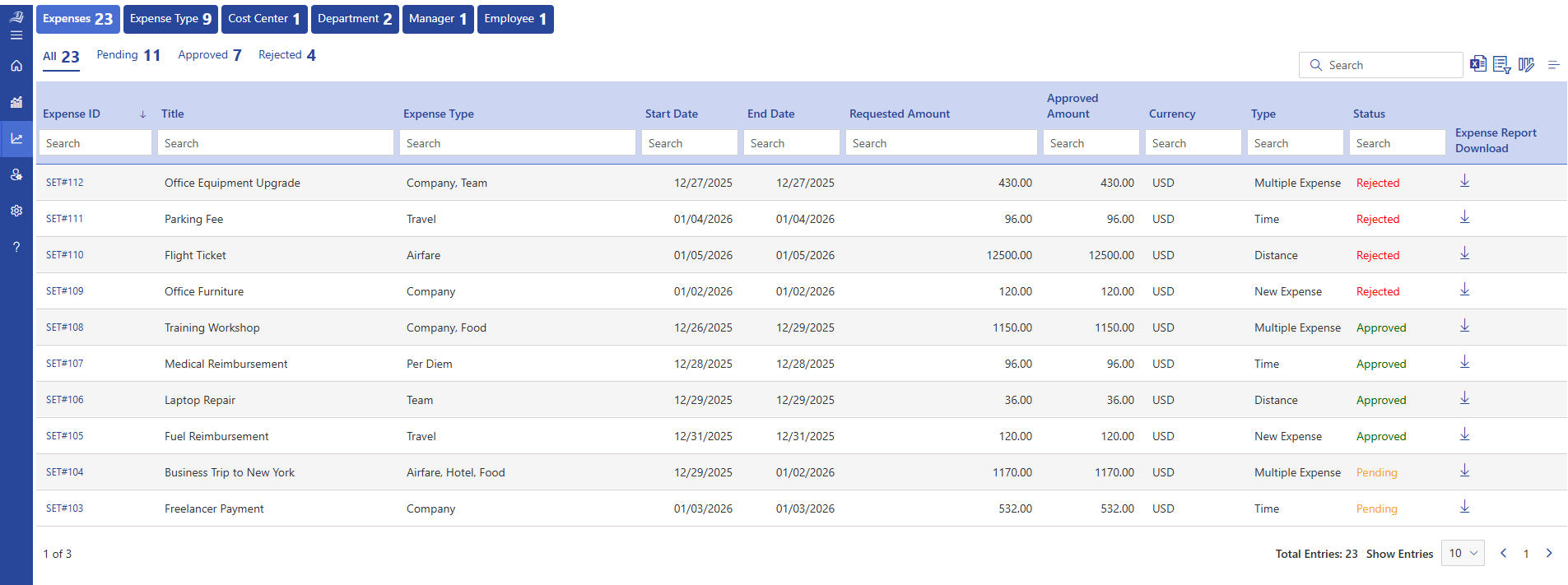
Expense 365 is a trusted expense management solution that is built to assist businesses expenses, track and control their expenses in a single location. It is developed in the Microsoft environment, and teams can capture expenses, control claims, and keep transparent financial records without using manual techniques.
The platform also gives real-time updates on expenses, which keeps finance teams and managers updated on company expenditures. Its centralized platform enables users to access expense data both on desktop and mobile devices and as such, teams that work at various locations can easily be connected.
Expense 365 also has smart expense automation which assists in classifying expenses and arranging records automatically. This saves on manual labour and assists finance teams to keep data accurate and organized.
Expense 365 provides a trusted method of managing costs and enhancing financial transparency, whether it is a small business or a large enterprise.
Key Features
- AI powered receipt scanning
- Automated expense management
- Group based approval workflows & delegation
- Centralized view of all expenses
- Expense reimbursement
- Mileage tracker
- Role-Based Access Control
- Dedicated Account Manager
- Expense audit
- SSL encryption
- Multi-factor authentication
- Advanced audit trail report
- Tax compliance
- Per diem automation
- Corporate card management
What Makes Expense 365 Stand Out?
Expense 365 is widely recognized as a user-friendly interface, enterprise-level security, robust reporting capabilities, and seamless expense management in the Microsoft 365 environment. It is a best solution to both the SMBs and enterprise businesses looking to improve and simplify their expense tracking process.
Pricing : Starts at $49 per month, billed yearly
Business Plan – Custom pricing based on company size and needs.
Hear From Our Delighted Clients – G2 Platform
“Expense 365 is a great app with excellent support. The advanced features make it a complete tool & has really improved our expense tracking and reporting workflow.”
How to Built Workflow with Expense 365
- Open Expense 365 from your Microsoft 365 environment and create a fresh expense record using the built-in Expense Manager template.
- Enter expense details using the predefined fields, including category, amount, employee name, approval progress, and other necessary information.
- Add an Approval Date column to record the exact date when each expense is approved or reviewed.
- Include a Reimbursement Due Date field to track when payments must be processed and avoid delays.
- Attach receipts and invoices through a File Upload option to keep supporting documents organized in one location.
- Create a Vendor Information field to store supplier or payee names along with their contact details.
- Add a Department field to assign each expense to the appropriate team for better financial tracking.
- Configure custom views to quickly monitor pending approvals, large-value expenses, or vendor-specific spending insights.
2. Zoho Expense
Zoho Expense is part of the Zoho business software family, which makes it a natural option for companies already using Zoho tools. It helps businesses record expenses, manage claims, and review spending in an organized way. Employees can upload receipts and submit claims, while managers can review and approve them quickly. The system also handles expense reconciliation, travel expense logging, and policy checks, making it suitable for both small companies and large teams.
Features
- Automatic receipt capture and data entry
- Built-in policy checks for expense rules
- Support for multiple currencies
- Mileage tracking for travel expenses
- Custom approval process setup
- Connection with accounting software
- Expense reports and data dashboards
- Support for recurring expenses
Best Known For
Works well with other Zoho apps such as accounting and HR tools, allowing businesses to manage expenses and financial records within the Zoho environment.
3. Volopay
Volopay is designed for businesses that want to manage employee spending, company cards, and vendor payments in one system. It allows companies to provide virtual and physical cards to employees and monitor spending as it happens. Finance teams can also track budgets, approve expenses, and handle vendor payments from one place. It is useful for companies that want better visibility and control over business expenses.
Features
- Issue physical and virtual company cards
- Automatic syncing with accounting platforms
- Expense sorting by category
- Custom approval setup
- Multi-currency support
- Budget tracking and spending reports
- Employee and team access control
- Vendor payment management
Best Known For
Acts as a complete spend management platform that helps companies track employee expenses, vendor payments, and budgets in one system.
4. Rippling
Rippling integrates HR, IT, and finance services into a single platform, as well as expense management. The records of expenses are linked with the profiles of the employees, and it simplifies reimbursement and tracking. It is good platform that helps businesses look at expenditure, approvals, and costs on a team or departmental basis. It can be applied to those businesses that require employee management and expense tracking.
Key Features
- Employee expense submission and approval
- Matching expenses with company card transactions
- Role-based approval control
- Direct link between payroll and reimbursements
- Department-level expense tracking
- Multi-currency support
- Expense reporting and data export
Best Known For
Offers one platform where employee data, payroll and expenses are managed.
5. Concur Expense (SAP Concur)
Concur Expense is an application designed to handle large businesses that require travel and business expenses. It links travel booking, receipt capture and expense approval to a single system. It can be used by companies that are based in various countries to monitor their expenses and trace various tax and policy requirements. Enterprises that have intricate expenditure requirements often use it.
Key Features
- Integration with corporate cards
- Built-in company policy controls
- Expense reporting and analytics
- Multi-currency support
- Tax tracking based on location
- Central storage for expense documents
- Reporting tools for finance teams
- Audit tracking support
Best Known For
Used by large organizations to manage travel costs, employee expenses, and financial reporting across different regions.
6. Pleo
Pleo offers business cards and expense tracking software that assists companies to track how their employees spend the money. Employees can use either physical or virtual cards to cover work expenses and all the transactions are automatically recorded. Managers can see capital expenditure reports and authorize expenses. Pleo is the best alternative among small and medium-sized businesses that are interested in an easy-to-use expense tracking system.
7. Brex
Brex is a great choice made for startups and growing companies. It integrates expense tracking, financial tools, and company cards. Companies can issue cards, monitor expenditure and budgets in real time. It is effective with international teams that deal with costs in various currencies.
Features
- Issue corporate cards to employees
- Automatic expense recording
- Budget monitoring tools
- Approval workflow setup
- Multi-currency support
- Real-time expense tracking
- Vendor payment management
- Expense reports and analytics
Best Known For
Helps startups and growing companies manage employee expenses, company cards, and budgets from one platform.
How Does Expense Management Solution Actually Works?
After discussing the most effective expense management solutions, the following is a basic description of how it works.
Step 1: Expense Entry
Employees can add their expenses by uploading receipts, typing the amount, and selecting the appropriate category. There are also numerous applications that enable a user to capture a picture of the receipt, and the system automatically stores the information.
Step 2: Manager Review and Approval
Once submitted, the cost is forwarded to a manager. The manager can verify the information and approve or disapprove the claim in the system.
Step 3: Transfer to Accounting System
Upon approval, the data on expenses is forwarded to the accounting software. This eliminates the use of manual data input and maintains up-to-date financial records.
Step 4: Manager Review and Approval
The system generates reports displaying aggregate expenditure, expenditure by categories and expenses by employees. This assists in funding teams to monitor expenditure and discern trends.
Step 5: Tracking Spending
Firms can establish budgets on teams, projects, or individuals. The system provides notifications in case the expenses exceed the permitted amount.
Step 6: Reimbursement of the Employees
Once approved, the reimbursement value is paid to the employee under the payment procedure of the company. This assists the employees in getting their money immediately.
Step 6: Reimbursement of the Employees
Once approved, the reimbursement value is paid to the employee under the payment procedure of the company. This assists the employees in getting their money immediately.
Key Features to Look for in Expense Management Solutions
Having considered various expense management solutions, some of the features can be distinguished as necessary to manage business expenses. These features determine the way an good expense system gathers information, approvals, and finance operations.
1) AI-Powered Receipt Scanning and Mobile Access
McKinsey reports that 78% of organizations apply AI to at least one of their business functions. The expense management solutions use AI-powered receipt scanning to extract the receipt information, including receipt amount, date, and vendor, directly out of the uploaded images. The mobile app allows employees to capture the photos of receipts, and the expense management solution captures the data automatically.
2) Automated Expense Categorization
It automatically categorize the expenses into the pre-defined expense categories, including travel, food, accommodation, and office supplies. This feature is based on pre-defined rules that are used to categorize expenses according to the type of vendor, transactional data or user choice. Automated categorization keeps uniform expense records and enables the finance teams to see category level expenditure.
3) Approval Workflow Management
It have customizable approval processes that establish the flow of expenses through review processes. The managers can view the expenses submitted, approve expenses or reject entries directly in the system. The approval history, timestamps, and reviewer details are also logged in the expense management solution.
4) Travel Expense Tracking
Reportedly, 83% of the employees who commute to work find it difficult to balance their travel costs. The software also have special travel expense management features that capture expenses on flights, hotels, meals, and transportation. The travel receipts can be uploaded by the employees and all the travel records are stored in a single place by the expense management solution.
5) Multi-Currency and Multi-Country Support
It support multiple currencies and international expense tracking. The system records expenses in local currency and converts values based on exchange rates. This feature allows businesses to manage expense for global teams, international travel, and overseas operations
6) Corporate Card Management
The PYMNTS Intelligence report indicates that 56% of CFOs believe that virtual cards are important in the management of financial operations. It also assist on managing corporate card that automatically record card transactions. The expense management solution connects the card payments to the expense records, stores the transaction information, and allocates the expenses to the employees.
7) Audit Trail and Compliance Tracking
The system has a full audit trail of expense activities. The system logs date of submission, history of approval, modifications and user activities. This characteristic enables finance departments to check the records of expenses, monitor the approval process, and ensure that the company policies are maintained Expenses records are all kept to be audited and reported.
8) Integration with Accounting and ERP Systems
It integrates with accounting like QuickBooks and ERP systems to send expense records directly to financial systems. The system aligns the expense information, employee database and transaction information with accounting software. This integration ensures that financial records are updated and enables the finance teams to get access to expense data.
9) Per Diem Management
Expense management solutions have the per diem tracking capabilities that capture the fixed daily allowances on travel, meals and accommodation. The system enables companies to establish per diem rates depending on location, position or type of travel. The employees will have the option of per diem and the solution will capture and store these entries in expense reports.
10) Reporting and Expense Analysis
On the one hand, report preparation and receipt collection is time-consuming, according to Center1, almost 40% of finance leaders. Expense management solutions also have reporting tools that produce expense summaries, category level expense reports and employee level expense information. The software store the past expense records and displays expense information in dashboards and organized.
Benefits of Expense Management Solutions
It assist companies to document, track, and manage company expenditure using a systematic computerized system. The following are the main advantages of an expense management solution.
- Cost Savings and Spending Control
The system can assist a business to cut on unnecessary costs as they offer a clear tracking of all the expenses such as traveling, paying vendors and employee claims. Frequent corporate travel companies will be able to track flight, hotel and transportation expenses more efficiently. Expense 365 documents all transactions and enables finance departments to understand the areas that manages more expenses. - Global Expense Management Support
It assist companies with operations in more than one country in managing expenses in a wide range of currencies, regions, and entities. It documents the international transactions, reimbursements and stores tax related information like VAT and GST. This enables organizations to operate the global costs under a single system and still have all the financial records. - Policy-Based Spending Control
Expense management solutions enable companies to establish spending limits, category limits and approval rules. These rules are used in the expense submission and corporate card usage by the system. This assists organizations to have discipline in spending and monitor expense policy activity among employees, teams, and departments. - Faster Financial Closing
It bridge the gap between expense information and accounting data, enabling finance departments to obtain updated financial data. The expense management solution captures expenses when they arise and transfer the data into financial systems. This enables the businesses to audit financial records and do monthly and quarterly closing tasks more quickly. - Better Employee Expense Experience
Expense management solutions provide a single platform where employees can submit expenses, upload receipts, and track reimbursements. The expense management solution allows employees to record expenses, manage multiple corporate cards, and monitor claim status through web or mobile access. This creates a simple and organized process for managing employee expenses.
How Do I Select Expense Management Solutions?
Choosing the right system is important for businesses to track spending, control costs, and simplify financial processes without manual effort.
- Audit your current expense lifecycle before evaluating any solution
Identify how expenses are submitted, reviewed, recorded, and reimbursed today. Look for delays, duplicate entries, and manual tracking. This helps you select an expense management solution that directly addresses and manages finance workflow effectively. Prioritize real-time expense capture capabilities
Choose an expense management solution that records expenses at the moment of transaction through receipt capture, mobile entry, or corporate card integration. Early capture improves record completeness and financial tracking. - Validate approval structure flexibility
Your expense management solution should support multi-level approvals, department-specific reviewers, and value-based approval routing. This reflects how spending decisions are controlled inside your organization. - Examine accounting and ERP integration depth
Select an expense management solution that transfers expense data directly into your accounting system. This keeps financial records aligned and allows finance teams to maintain updated ledgers. - Assess corporate card and transaction visibility
An effective expense management solution should automatically record corporate card transactions and associate them with employees, departments, and expense categories. This provides a complete record of company spending. - Review reporting structure and financial data access
Your expense management solution should provide structured reports based on cost centers, departments, vendors, and timelines. This allows finance leaders to review spending activity across the organization. - Evaluate scalability across teams, entities, and locations
Choose an expense management solution that supports remittance and business expansion, including new departments, global teams, and increased transaction volume, without disrupting financial tracking. - Test usability for both employees and finance teams
The expense management solution should allow employees to submit expenses easily while giving finance teams full visibility, approval control, and access to expense records. Ease of use improves adoption across the organization.
Conclusion
Expense management solutions play a critical role in helping businesses monitor, record, and manage company expenses in a structured way. They provide a central system to track spending, review expense records, and maintain accurate financial data across teams and departments.
Take control of your business expenses with Expense 365, a complete expense management solution designed for modern organizations. Start your free trial today and experience smarter expense tracking.
Join Our Creative Community
Frequently Asked Questions
What are the benefits of expense management solutions to the finance teams?
Expense management solutions offer centralized expense records, organized approval tracking, and in-depth reports.
What is the process by which employees make expenses using an expense management solution?
Employees can submit expenses via web or mobile connectivity by uploading receipts, entering expense details and choosing categories.
Is Expense 365 able to reimburse employees?
Yes, Expense 365 will enable employees to make expense claims and upload receipts. Within the system, managers can review and approve claims and finance teams can monitor the status of reimbursement.
Is Expense 365 can handle expenses at the department level?
Yes, Expense 365 enables businesses to allocate expenses to departments, projects or teams. This assists in funding the teams to track expenditure in various business units.


_JiluXJRGNl.svg)























