

How to Manage Employee Records Effectively in an Organization

Every company collects information about its people. It starts with a job application and grows over time with pay slips, tax forms, reviews, leave requests, and much more. If this information is messy or spread across emails, folders, and spreadsheets, things can go wrong fast. You may miss a legal deadline, lose an important document, or share private data with the wrong person.
- Employee records are all the documents and data about an employee, and keeping them well helps you follow the law, make fair decisions, and protect your company.
- Maintain six main types of records: basic info, hiring, payroll and tax, performance, benefits, and medical and safety (kept separately).
- Each record has a minimum retention period, from 1 year for hiring files up to 30 years for some medical records.
- A central digital system, like employee directory software, keeps records secure, up to date, and easy to find.
The good news is that managing employee records does not have to be hard. In this guide, you will learn what employee records are, which types you should keep, how long to keep them, and simple steps to manage them the right way. We will also look at how employee directory software can make the whole process easier.
What Are Employee Records?
Employee records are an organized collection of all the information about an employee. They cover the full employee journey, from hire date to the last working day. Most companies keep these records in a personnel file for each person.
A complete employee record usually includes details like the employee’s name, address, date of birth, job title, salary, and benefits. It also includes hiring documents, pay changes, performance reviews, training, and any disciplinary actions.
Why Do Employee Records Matter?
Employee records are more than just paperwork. They help your business in many ways:
- Legal compliance: Government agencies such as the Department of Labor (DOL) and the Equal Employment Opportunity Commission (EEOC) require employers to keep certain records. For example, the Fair Labor Standards Act (FLSA) requires you to keep records of hours worked, pay rates, and total earnings.
- Fair decisions: Records help managers make fair choices about promotions, raises, and terminations based on facts, not memory.
- Protection in disputes: If an employee files a complaint or lawsuit, a clear paper trail helps you show what really happened.
- Smooth payroll and taxes: Correct records make it easy to run payroll and create year-end forms like W-2s.
- Benefits for employees: Employees can use their records to prove their job history, skills, and training when they apply for new roles.
Types of Employee Records Every Organization Should Maintain
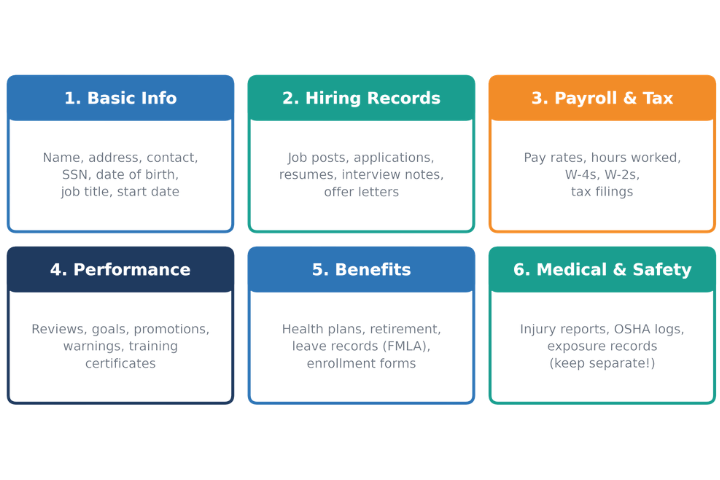
Not every document needs to be kept forever, but some records are a must. Here are the six main types of employee records every organization should maintain.
Basic Employee Information
This is the core of every employee information. It includes the employee’s full name, home address, phone number, email, Social Security number, date of birth, job title, department, start date, and emergency contacts. Keep this information up to date, because it is used across almost every HR task.
Hiring and Recruitment Records
These records show how you hired someone. They include job postings, applications, resumes, interview notes, background checks, and offer letters. Keep records for candidates you did not hire as well. If someone claims your hiring process was unfair, these documents prove your decisions were based on skills and experience.
Payroll and Tax Records
Payroll records include pay rates, hours worked each day and week, overtime, deductions, and the dates of each payment. Tax records include W-4 forms, W-2 forms, Form 941, and other tax filings. These records are often checked during audits, so accuracy is very important.
Performance and Training Records
This group covers performance reviews, goals, promotions, awards, training certificates, and any warnings or disciplinary notes. These documents support fair decisions. If a former employee questions why they were let go, documented performance issues can protect your company.
Benefits and Leave Records
Benefits records include health insurance enrollment, retirement plan details, and leave records such as those under the Family and Medical Leave Act (FMLA). They show what each employee is entitled to and what they have used.
Medical and Safety Records
These include workplace injury reports, OSHA logs, medical accommodations, and records of exposure to harmful materials. Medical records are highly sensitive. Always keep them in a separate, secure file with very limited access, not in the main personnel file. The same goes for Form I-9, which proves an employee’s right to work.
How Long Should You Keep Employee Records?
Different records have different legal retention periods. The table below shows common U.S. federal minimums. Remember that some states require you to keep records longer, so always check your local laws.
Record Type | Minimum Time to Keep | Law / Source |
Hiring records (applications, resumes, interview notes) | 1 year from the record or action (2 years for federal contractors) | EEOC |
Time cards and wage-rate tables | 2 years | FLSA |
Payroll records (name, pay rate, hours, wages paid) | 3 years | FLSA, ADEA |
Form I-9 | 3 years after hire or 1 year after exit, whichever is later | USCIS |
Employment tax records (W-4, W-2, 940/941) | 4 years | IRS |
OSHA injury and illness logs | 5 years | OSHA |
Benefit plan records | 6 years | ERISA |
OSHA exposure and medical records | 30 years | OSHA |
Tip: If a lawsuit, audit, or complaint is in progress, do not delete any related records, even if the retention period has ended. Keep them until the matter is fully closed.
How to Manage Employee Records Effectively
Now that you know what to keep, let’s look at how to manage it all. Follow these eight simple steps to keep your employee records organized, safe, and compliant.
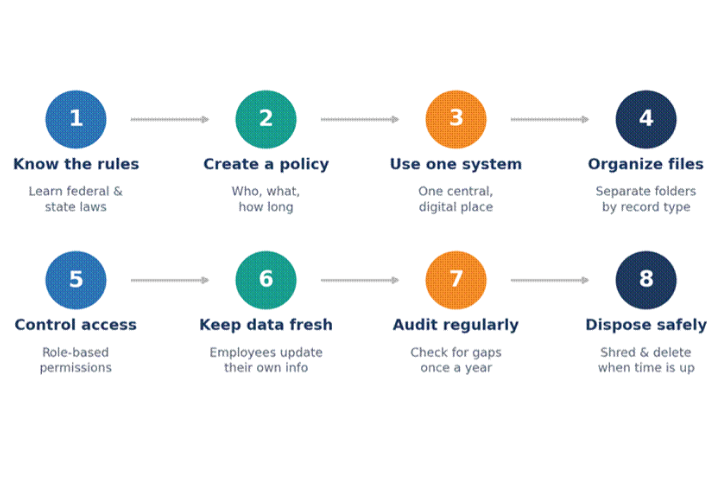
Step 1: Know the Rules That Apply to You
Start by learning the federal, state, and local laws that apply to your business. Rules can change based on your location, industry, and company size. When in doubt, talk to a legal or HR expert.
Step 2: Create a Clear Records Policy
Write a simple policy that explains what records you keep, who is responsible for them, who can access them, how long each type is kept, and how they are disposed of. Share this policy with your HR team and managers so everyone follows the same process.
Step 3: Use One Central, Digital System
Paper files take up space, get lost, and are hard to search. Move your records into one secure digital system. This makes it easy to find documents quickly, back them up, and keep a single source of truth for employee data.
Step 4: Organize Files by Record Type
Inside your system, create separate folders or sections for each record type: personnel, payroll, benefits, and so on. Keep medical records and I-9 forms in their own secure areas. Use clear and consistent file names so anyone on your HR team can find what they need.
Step 5: Control Who Can Access Records
Not everyone needs to see everything. Give access based on job roles. For example, a manager may see an employee’s job title and reviews but not their medical or salary details. Role-based access protects privacy and lowers the risk of data leaks.
Step 6: Keep Information Up to Date
Outdated records cause payroll errors, missed messages, and compliance problems. Set up an easy way for employees to tell you about changes, like a new address, phone number, or emergency contact. Even better, let them update their own basic details through a self-service portal.
Step 7: Audit Your Records Regularly
At least once a year, review your records. Check for missing documents, old data, and files that have passed their retention period. Regular audits help you catch problems before an official audit or legal claim does.
Step 8: Dispose of Records Safely
When the retention period ends, get rid of records the right way. Shred paper documents and permanently delete digital files from all systems, including backups. Simply throwing files in the trash is not enough and can lead to data breaches or identity theft. Keep a short log of what you disposed of and when, to show you follow your policy.
- Duplicates: Extra copies of the same document create confusion. Keep one correct version.
- Old worksheets and drafts: Goal-setting worksheets or draft notes that no longer serve a purpose.
- Outdated emergency contacts: Once a former employee’s file has no further use, their emergency contact details can be removed.
How Employee Directory Software Simplifies Employee Records Management
Managing records by hand works when you have a few employees. As your team grows, it quickly becomes slow and error-prone. This is where employee directory software helps. It gives every employee a digital profile and keeps all key details in one organized, searchable place.
Here is how employee directory software makes records management easier:
- One source of truth: All employee profiles live in one place, so HR, managers, and employees always see the same, current information.
- Self-service updates: Employees can update their own contact details, skills, and photos. This saves HR time and keeps data fresh.
- Sync with existing systems: Many tools connect with Microsoft 365 or your HR system, so changes flow automatically without double entry.
- Role-based access: You decide who sees which fields. Sensitive data stays private, while useful details like job title and department stay visible.
- Fast search: Find anyone by name, department, location, or skill in seconds instead of digging through files.
- Automatic org charts: See reporting lines and team structure at a glance, which helps new hires and managers alike.
- Better onboarding: New employees can quickly learn who is who and get connected with the right people from day one.
In short, employee directory software turns scattered employee data into a clean, organized, and secure system. It supports your records policy, reduces mistakes, and frees your HR team to focus on people instead of paperwork.
Conclusion
Employee records are the backbone of good HR. They help you follow the law, make fair decisions, run payroll smoothly, and protect your business if a dispute ever comes up. To manage them well, know which records to keep and for how long, write a clear policy, store everything in one secure digital system, control access, keep data current, audit often, and dispose of old records safely.
You do not need to do it all by hand. With the right employee directory software, you can keep employee information organized, accurate, and secure, while giving your employees an easy way to keep their own details up to date.
Join Our Creative Community
Frequently Asked Questions
What should be included in an employee record?
An employee record should include basic personal details, job title and history, hiring documents, payroll and tax forms, performance reviews, benefits information, and training records. Medical records and I-9 forms should be kept in separate, secure files.
Can I store employee records electronically?
Yes. Most federal agencies accept electronic records as long as they are accurate, readable, and can be produced when requested. Make sure your system is secure, backed up, and has proper access controls.
Can employees ask to see their personnel file?
It depends on where you are. Many states give current and former employees the right to review or copy their personnel file, often within a set time frame. Check your state’s rules before responding to a request.
What happens if you don’t keep the required employee records?
Agencies can fine you if records are missing during an audit or investigation. Missing records can also make it much harder to defend your company in a legal claim or employee dispute.
How should employee records be kept secure?
Limit access to people with a real business need, store sensitive files such as medical records separately, use secure systems or locked cabinets, and shred or permanently delete records once their retention period ends.
How does employee directory software help with records management?
It keeps employee profiles in one central place, lets employees update their own details, syncs with tools like Microsoft 365, and controls who can see which information. This keeps records accurate and secure with less manual work.


























