

Employee Profile Management Made Easy with Employee Directory 365
_eH2jDg7dZ.png)
Managing employee information can be a hassle, especially when your organization is growing fast. Imagine trying to find someone’s contact details, job title, or skills in a sea of spreadsheets or outdated systems. It’s frustrating, and it wastes time.
- Scattered employee data costs time and security. Without a central system, teams lose hours searching for contact details, collaborate poorly, and risk exposing sensitive information.
- Employee Directory 365 centralizes every profile inside Microsoft 365. It syncs automatically with Azure Active Directory and works across Teams, Outlook, and SharePoint.
- AI-powered search, custom profiles, and dynamic org charts help people find the right colleague in seconds, by name, role, department, or skill.
- It is quick to deploy and built for Microsoft-centric teams. Setup takes under 10 minutes, security follows the Zero Trust model with GCC and GCC High compliance, and the pricing suits small and mid-sized businesses.
That’s where Employee Directory 365 comes in. It is a tool designed to make employee profile management simple, secure, and efficient. Built for Microsoft 365, it centralizes all your employee data, integrates with the tools you already use, and helps your team stay connected.
In this blog, we’ll explore why Employee Directory 365 is a game-changer, how it works, its standout features, and how it stacks up against competitors.
Why Employee Profile Management Matters
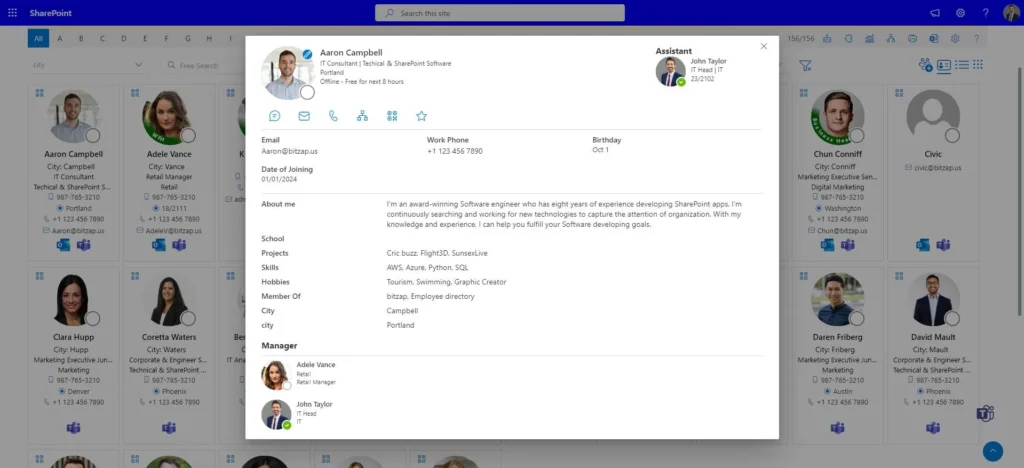
Every organization, big or small, needs a way to keep track of its people. Employee profile management isn’t just about storing names and phone numbers. It’s about creating a system where everyone can quickly find who they need, understand their roles, and collaborate better. A good employee directory does more than list contacts: it builds transparency, boosts teamwork, and saves time.
Without a proper system, you might deal with:
- Wasted Time: Employees spend hours searching for contact info or figuring out who does what.
- Poor Collaboration: Remote or hybrid teams struggle to connect without clear profiles.
- Data Chaos: Outdated or scattered information leads to confusion and mistakes.
- Security Risks: Sensitive data stored in unsecured places can become a serious problem.
Employee Directory 365 solves these problems with a centralized, user-friendly platform that is secure and customizable.
Keep employee profiles accurate and searchable with Employee Directory 365 in Microsoft 365.
What is Employee Directory 365?
Employee Directory 365 is a cloud-based employee directory tool built specifically for Microsoft 365 users. Think of it as a digital phone book on steroids: it pulls data from your Microsoft 365 environment to create detailed, searchable employee profiles. Whether you’re a small business or a large enterprise, it makes it easy to manage and access employee information.
Here’s what makes it special:
- Seamless Integration: Works with Microsoft Teams, Outlook, SharePoint, and Azure Active Directory.
- AI-Powered Search: Find employees fast with smart search that suggests results based on names, skills, or departments.
- Customizable Profiles: Tailor profiles with details like photos, job titles, skills, and contact info.
- Top-Notch Security: Built on Microsoft’s Zero Trust model, so your data stays safe.
- Quick Setup: Get it running in under 10 minutes, with no tech headaches.
With Employee Directory 365, you’re not just organizing data. You’re creating a hub that connects your team and streamlines workflows.
Key Features of Employee Directory 365
Let’s break down the features that make Employee Directory 365 stand out.
Centralized Employee Profiles
Every employee gets a profile that includes their name, job title, department, contact details, skills, and even a photo. Profiles are automatically synced with Azure Active Directory, so updates happen in real time. No more chasing down HR for the latest informatio
AI-Powered Search
Looking for someone specific? The AI search feature lets you find people by typing their name, role, or even a skill like “project management.” It’s fast and intuitive, saving you from endless scrolling.
Microsoft 365 Integration
Employee Directory 365 fits right into existing Microsoft tools. Access profiles directly from Teams, send emails via Outlook, or view org charts in SharePoint. It feels like it’s part of the Microsoft family.
Customizable Dashboards
Need a specific view for your team? You can customize dashboards to show the information that matters most, such as department hierarchies or skill sets. It’s flexible enough for any organization.
Mobile Access
Whether your team is in the office or on the go, Employee Directory 365 works on mobile devices. Employees can search profiles, check org charts, or contact colleagues from anywhere.
Robust Security
Data privacy is a big deal, and Employee Directory 365 takes it seriously. It uses Microsoft’s trusted infrastructure, including GCC and GCC High compliance, to keep your employee data secure.
Org Charts
Visualize your company’s structure with dynamic org charts. See who reports to whom, explore departments, and understand team connections at a glance.
These features make Employee Directory 365 a one-stop shop for managing employee profiles. But how does it compare to the competition?
Book a demo to explore AI search, custom profiles, and live org charts in Microsoft 365.
Comparing Employee Directory 365 to Top Competitors
To give you a clear picture, let’s look at three top competitors: OneDirectory, Pingboard, and BambooHR. Each has its strengths, but Employee Directory 365 holds its own in key areas.
1. OneDirectory
OneDirectory is another Microsoft 365-focused employee directory known for its clean design and org chart features. It’s great for businesses that want a simple, visual way to explore employee data. It offers interactive org charts with profile cards, smart tags and group tiles, Microsoft 365 integration with Teams and Azure, and responsive list views.
Why Employee Directory 365:
- Faster Setup: Employee Directory 365 can be deployed in under 10 minutes, while OneDirectory may require more configuration.
- AI Search: Employee Directory 365’s AI-powered search is more advanced, offering smarter suggestions.
- Security: Zero Trust and GCC compliance give it an edge for organizations prioritizing data privacy.
- Where OneDirectory excels: Its visual appeal and profile card designs are top-notch for companies that value aesthetics.
2. Pingboard
Pingboard is a modern employee directory focused on transparency and engagement, popular for its colorful org charts and recognition features. It offers dynamic org charts, birthday and work anniversary reminders, integration with HR tools like Slack and ADP, and a mobile app.
Why Employee Directory 365:
- Microsoft Integration: Deep Microsoft 365 integration makes it a better fit for organizations using Teams or SharePoint.
- Cost-Effectiveness: It is often more affordable for small and medium-sized businesses.
- Customization: It offers more flexible dashboards and profile customization.
- Where Pingboard excels: Peer recognition tools and fun features like birthday reminders make it ideal for boosting company culture.
3. BambooHR
BambooHR is a full HR platform with an employee directory as one of its modules, designed for businesses that want an all-in-one HR solution. It offers payroll, onboarding, and performance tracking, customizable self-service profiles, a mobile app with integrations, and workforce analytics.
Why Employee Directory 365:
- Focus on Directory: It is laser-focused on employee profiles, making it simpler and more specialized than BambooHR’s broader platform.
- Microsoft Ecosystem: BambooHR doesn’t integrate as seamlessly with Microsoft 365, which can be a drawback for Microsoft-centric businesses.
- Ease of Use: Its intuitive UI is easier to navigate for non-HR users.
- Where BambooHR excels: It is perfect for companies that need a complete HR suite, not just a directory.
Why Choose Employee Directory 365?
- Perfect for Microsoft Users: If your organization relies on Teams, Outlook, or SharePoint, it feels like a natural extension.
- Affordable for SMEs: Small and medium-sized businesses love its pricing and ease of use.
- Quick Deployment: You don’t need a tech wizard to set it up. It’s ready in minutes.
- Scalable: Whether you have 10 or 10,000 employees, it grows with you.
- Trusted by Users: It is recognized by G2 for its user-friendly interface and reliability.
How Employee Directory 365 Boosts Productivity
A good employee directory isn’t just about organization. It’s about making work easier.
- Faster Collaboration: With instant access to profiles and contact info, employees connect with the right people without delays. Need a designer for a project? Search by skill and find them in seconds.
- Better Onboarding: New hires use org charts and profiles to understand their team and company structure, like a map to their new workplace.
- Improved Remote Work: Mobile access and clear profiles keep remote and hybrid teams connected and less isolated.
- Streamlined HR Tasks: HR saves time because data syncs automatically and employees update their own profiles. No more manual data entry.
- Enhanced Transparency: Org charts and detailed profiles show how the company fits together, building a sense of belonging and trust.
Getting Started with Employee Directory 365
Ready to try it? Here’s how to get started:
- Sign Up for a Trial: Visit the Employee Directory 365 website and click “Get It Now” for a free 14-day trial.
- Install the App: Add it to your Microsoft 365 tenant. It takes less than 10 minutes.
- Customize Profiles: Set up profiles with the fields your organization needs, like skills or office locations.
- Sync Data: Connect to Azure Active Directory for automatic data syncing.
- Train Your Team: Share the app with employees and show them how to search and use profiles.
Once it’s set up, you’ll wonder how you ever managed without it.
Set up Employee Directory 365 in minutes for secure, easy employee search.
Conclusion
Employee profile management doesn’t have to be a headache. With Employee Directory 365, you get a simple, secure, and powerful tool that fits right into your Microsoft 365 workflow. Its AI-powered search, customizable profiles, and seamless integrations make it a top choice for businesses of all sizes. Whether you want to boost collaboration, streamline HR tasks, or connect remote teams, this tool has you covered.
Join Our Creative Community
Frequently Asked Questions
What is an employee directory application?
It is software that stores and organizes employee profiles, such as names, roles, departments, contact details, and skills, so colleagues can quickly search and connect with each other.
How do I create an employee directory?
With Employee Directory 365, install the app in your Microsoft 365 tenant, connect Azure Active Directory to sync employee data, customize the profile fields, and share it with your team.
Why is an employee directory important?
It saves time, improves collaboration, supports onboarding, and gives everyone a clear view of who does what across the organization.
Can employee directories integrate with other tools?
Yes. Employee Directory 365 integrates with Microsoft Teams, Outlook, SharePoint, and Azure Active Directory.
Is employee directory software secure?
Employee Directory 365 is built on Microsoft’s Zero Trust model and supports GCC and GCC High compliance, keeping employee data protected.


























