

8 Ways Employee Directory Software Improves Employee Engagement
_eH2jDg7dZ.png)
Employees don’t quit companies. They quit feeling invisible. When people don’t know who to reach out to, who owns what, or who their new colleague even is, they slowly disengage. It is a quiet problem, but it is a costly one.
- Employee directory software gives every employee a clear, searchable view of who’s who in the company, reducing confusion and delays.
- It strengthens onboarding, cross-team collaboration, and recognition, all of which are proven drivers of engagement.
- Self-service profiles reduce HR’s workload while giving employees more control over their own information.
- Directories with org charts and skill tags help employees find the right person faster, boosting productivity and morale.
- Tools like Employee Directory 365 combine these features with analytics, helping HR teams measure and improve engagement over time.
This is where employee directory software steps in. It sounds simple, a searchable list of employees, their roles, and their contact details. But when done right, it becomes a tool that improves communication, builds trust, and makes employees feel seen and connected.
Whether you run a fast-growing startup or manage HR for a large enterprise, chances are your employees have felt this disconnect at least once. Someone joins a new project and doesn’t know who to loop in. A remote employee spends their first month unsure who their manager’s manager even is. A department head can’t find anyone in-house with a specific skill, so the company ends up paying for outside help it didn’t need.
In this blog, we will break down exactly how employee directory software improves employee engagement, what features to look for, common mistakes to avoid, and how to implement it the right way so your team actually uses it.
What Is Employee Directory Software?
Employee directory software is a digital platform that stores and organizes information about every employee in a company. Think of it as a smart, searchable phonebook. Instead of a static spreadsheet, it holds live profiles with photos, job titles, departments, contact details, skills, and reporting lines.
Most modern platforms go beyond basic contact information. They include org charts, birthday and work anniversary reminders, skill and expertise tags, and integration with tools like Slack, Microsoft Teams, or email. Employees can search for a colleague by name, department, location, or even by the skill they need, such as “who knows Python” or “who handles vendor contracts.”
For HR teams, this software removes a huge administrative burden. For employees, it removes the daily friction of not knowing who does what.
Why Employee Engagement Matters More Than Ever
Employee engagement is not just a buzzword. It is directly linked to productivity, retention, and company culture. Gallup’s research has repeatedly shown that engaged employees are more productive, take fewer sick days, and are far less likely to leave their jobs.
With hybrid and remote work now common, the natural, informal interactions that once built connection, a chat in the break room, a wave in the hallway, have mostly disappeared. Employees today often work with people they have never met in person. Without a clear system to find and understand who their colleagues are, isolation creeps in.
This is exactly why HR teams are turning to structured, digital solutions. Employee directory software rebuilds that sense of connection, even when teams are spread across cities, countries, or time zones.
The Real Cost of Low Engagement
Disengagement rarely shows up as a single dramatic event. It shows up as small, everyday signs: employees doing the bare minimum, meetings that feel flat, and good people quietly updating their resumes. Over time, this adds up to higher turnover, lower productivity, and a culture that feels harder and harder to fix.
Replacing an employee typically costs a company anywhere from half to double that employee’s annual salary, once you factor in recruiting, training, and lost productivity. Much of this cost is preventable. Many disengaged employees don’t leave because of pay. They leave because they feel disconnected, unseen, or unsure of where they fit in. Something as simple as a well-built employee directory can chip away at that root cause.
How Employee Directory Software Improves Employee Engagement
This is the core of the matter. Let’s look at the specific ways a good directory tool drives real engagement, not just convenience.
It Breaks Down Communication Silos
In many companies, employees only know the people on their immediate team. A directory makes the entire organization visible. When someone in marketing needs to find the right person in finance, they don’t need to send three emails asking “who handles this?” They simply search and connect.
This small change has a big impact. Faster answers mean less frustration, and less frustration means employees feel more capable and less stuck in their daily work. Over time, employees also start to see the company as one connected organization, instead of a set of disconnected departments that happen to share a payroll system.
It Makes Onboarding Feel Personal
New hires often spend their first few weeks feeling lost, unsure of who their manager’s manager is, or who to ask about expense reports. A well-organized directory gives new employees a map of the company from day one.
They can see photos and employee profiles of their new teammates before they even meet them, browse the org chart to understand reporting lines, and reach out to people directly instead of waiting for an introduction. This early sense of belonging strongly influences how engaged a new hire stays over the following months. In fact, employees who feel well-oriented in their first 90 days are far more likely to stay past their first year. A directory won’t replace a proper onboarding program, but it removes one of the quiet, ongoing sources of first-week anxiety: not knowing anyone.
It Supports Recognition and Social Connection
Many employee directory platforms include features like birthday reminders, work anniversary alerts, and shout-out or kudos walls. These small touches matter more than people expect. A quick “happy work anniversary” message or public recognition of a job well done makes employees feel valued.
Recognition is one of the top drivers of engagement, and directory software makes it effortless to remember and celebrate these moments, even in a large or distributed company. Managers who are juggling dozens of direct reports across time zones often simply forget dates and milestones, not because they don’t care, but because there’s no easy way to keep track. A directory takes that burden off their plate automatically.
_YlcI5q4rs.webp)
It Improves Cross-Department Collaboration
Skill and expertise tags are one of the most underrated features of modern directory tools. Instead of only listing job titles, employees can tag themselves with skills like “graphic design,” “SQL,” or “public speaking.”
This turns the directory into a searchable knowledge base. Employees can find the right internal expert instead of hiring outside help or struggling alone. Collaboration across departments becomes faster and more natural, which strengthens teamwork and mutual respect. It also gives quieter employees, who might not naturally network across departments, a fair chance to be discovered for their skills.
It Gives Employees More Control (Self-Service Profiles)
When employees can update their own profile photo, contact number, or skills, they feel a small but meaningful sense of ownership. It also keeps the information accurate, since employees, not HR, are responsible for keeping their own details current.
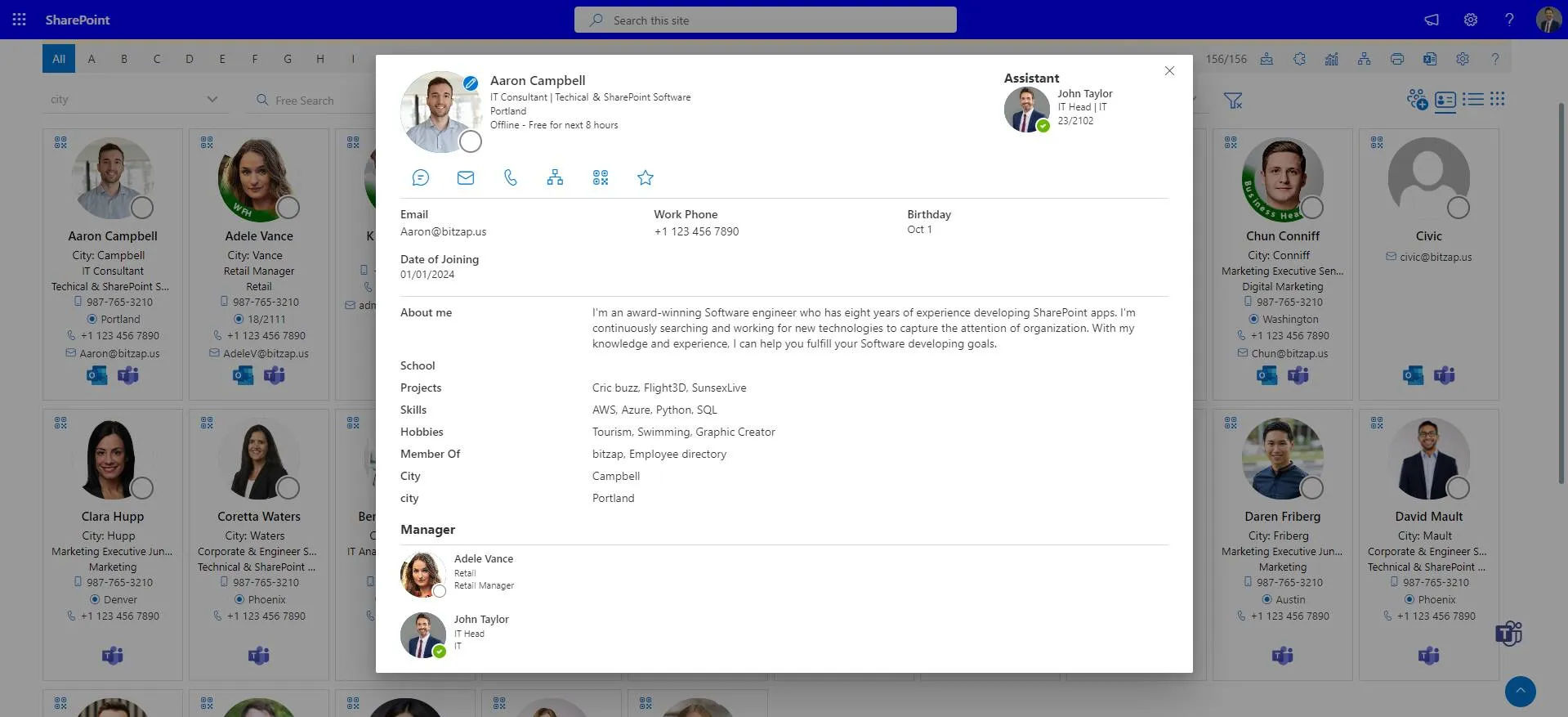
This self-service model reduces dependency on HR for minor updates and gives employees a sense of autonomy, which research consistently links to higher engagement. It also means the directory stays accurate without HR having to chase people down for updated details every time someone changes roles or teams.
It Helps Remote and Hybrid Employees Feel Included
For remote workers, the directory often becomes their main window into company culture. Seeing colleagues’ faces, understanding team structures, and being able to reach out directly helps remote employees feel like part of the team, not an outsider working in isolation. Some platforms even highlight time zones and working hours on each profile, so teammates know when it’s appropriate to reach out, which reduces the small daily friction that remote teams often deal with.
Discover How Employee Directory 365 helps Create a more Connected and Engaged Workplace.
It Reduces Frustration and Saves Time
Searching for the right contact should take seconds, not fifteen minutes across three different systems. When employees waste less time hunting for information, they spend more energy on meaningful work. Over time, this reduces daily frustration, which is one of the quiet, cumulative causes of disengagement. It’s rarely one big problem that pushes someone to disengage. It’s usually dozens of small ones, and this is an easy one to remove.
It Provides HR With Engagement Insights
Many directory platforms come with built-in analytics. HR teams can see which departments are most active, spot employees who might be isolated or under-connected, and track how engagement changes over time. This data-driven approach allows HR to act early, rather than reacting after someone has already decided to leave. Instead of relying only on annual engagement surveys, HR gets a continuous, real-time signal of how connected the workforce actually feels.
Key Features to Look For in Employee Directory Software
Not all employee directories are built the same way. Some are little more than a static contact list, while others are full engagement platforms. When evaluating a platform, HR teams should look for:
- Searchable, up-to-date profiles with photos, roles, departments, and contact details, so anyone can be found in seconds.
- Interactive org charts that update automatically as the company changes, removing the need for manually redrawn charts.
- Skill and expertise tags to support internal collaboration and help employees find hidden talent within the company.
- Recognition tools, such as birthday and anniversary reminders or kudos features, to keep small moments of appreciation from slipping through the cracks.
- Self-service editing, so employees can manage their own information without submitting a request to HR.
- Integration with existing tools like Slack, Microsoft Teams, and email, so the directory fits into workflows people already use.
- Mobile access, especially important for remote, hybrid, and field employees who aren’t always at a desk.
- Analytics and reporting, so HR can measure engagement with real data, not just guesswork.
Platforms such as Employee Directory 365 are built specifically around these needs, combining a clean, searchable directory with engagement and analytics features in one place, so HR teams don’t need to stitch together multiple tools.
A Quick Example
Picture a mid-sized company with 400 employees spread across three offices and a growing remote team. Before adopting a directory tool, new hires often took weeks to figure out who to contact for IT issues or expense approvals, and cross-office collaboration was rare because teams simply didn’t know who existed in other locations.
After rolling out a platform like Employee Directory 365, employees could search by skill, department, or location in seconds. Onboarding feedback improved, cross-office project requests increased, and HR could finally see, through built-in analytics, which teams were thriving and which ones needed more support. None of this required a massive cultural overhaul. It simply came from making the existing team visible and easy to reach.
Best Practices for Implementing an Employee Directory
Rolling out new software well matters just as much as choosing the right one. Even the best directory tool will sit unused if employees aren’t given a reason to log in and update their profile. A few practices make a real difference:
Involve employees early. Ask a small group from different departments what information and features would actually help them day to day. This also creates early advocates who help drive adoption once the tool launches.
Keep the setup simple. Don’t overload the directory with unnecessary fields at launch. Start with the basics, name, role, department, contact details, and expand once people are comfortable using it.
Communicate the “why.” Employees are more likely to use a new tool when they understand how it benefits them personally, not just the company. Frame it around solving a problem they already feel, like not knowing who to contact.
Assign ownership. Someone in HR or IT should be responsible for keeping the directory accurate and encouraging adoption in the first few months. Without a clear owner, updates tend to slip and the directory quietly goes stale.
Gather feedback and iterate. After the first few weeks, ask employees what’s working and what isn’t, and adjust accordingly. Small tweaks based on real usage go a long way toward long-term adoption.
See how Employee Directory 365 simplifies employee directory implementation.
Common Mistakes to Avoid
Even well-intentioned rollouts can fall short. These mistakes are common, and thankfully, all of them are avoidable with a bit of planning:
- Treating it as a one-time project. A directory needs regular updates and maintenance, not a single launch and then neglect. Outdated profiles quickly erode trust in the tool.
- Ignoring mobile users. If field or remote staff can’t easily access it on their phones, adoption will suffer, especially in industries where employees aren’t sitting at a desk all day.
- Overcomplicating profiles. Too many mandatory fields discourage employees from completing or updating their information, so keep required fields to the essentials.
- Skipping employee training. Even simple tools need a short walkthrough so people know what’s available and how to use it, don’t assume it’s self-explanatory.
- Not integrating with existing tools. A directory that lives completely separately from tools like Slack or Teams gets forgotten quickly, since employees won’t go out of their way to open one more app.
How to Measure the Impact on Engagement
To know whether the directory is actually improving engagement, and not just sitting unused, HR teams should track a few clear indicators over time:
- Adoption rate — the percentage of employees who log in and update their profiles regularly.
- Search and usage frequency — how often employees are using the directory to find colleagues.
- Onboarding feedback — whether new hires report feeling more connected in their first 90 days.
- Employee engagement survey scores — comparing results before and after rollout.
- Time-to-connect — informally tracking how quickly employees say they can find the right person for a task.
These metrics don’t need complex tools. A simple quarterly review, combined with the analytics most directory platforms already provide, is usually enough to show real progress. The goal isn’t to chase a perfect score, it’s to see steady movement in the right direction, and to catch early warning signs, like a team with unusually low activity, before they turn into resignations.
If you’re Ready to Bring your Team Closer Together, it might be Time to Explore a Platform Built for Exactly this.
Conclusion
Employee engagement is built through everyday interactions. Employee directory software helps employees quickly find colleagues, stay connected, and collaborate more effectively.
Rather than serving as a static contact list, a modern employee directory supports communication, recognition, and teamwork, helping organizations create a more connected and engaged workplace.
Join Our Creative Community
Frequently Asked Questions
Is employee directory software only useful for large companies?
No. Even small and mid-sized companies benefit, especially once they grow past the point where everyone naturally knows each other, often around 30 to 50 employees.
How is this different from a regular HR database?
An HR database is usually built for compliance and record-keeping, with restricted access. An employee directory is built for employees to browse, search, and connect with each other daily.
Does it work for remote and hybrid teams?
Yes, and this is often where it delivers the most value, since it replaces the informal, in-person ways people would otherwise get to know each other.
How long does implementation usually take?
Most cloud-based tools can be set up within a few days to a few weeks, depending on how much existing employee data needs to be imported and cleaned.
Is employee data secure in these platforms?
Reputable providers use role-based access controls and encryption, so employees only see what they’re meant to see, and sensitive HR data stays protected.
Will employees actually use a new directory tool?
Adoption depends heavily on how it’s introduced. When employees understand the personal benefit, faster answers, easier onboarding, better recognition, adoption tends to happen naturally, especially if the tool is simple and mobile-friendly from day one.


_JiluXJRGNl.svg)























