

Customer Interaction Management: A Complete Guide and 7 Best Practices

A customer sends an email about a billing issue. Two days later, they follow up through live chat. The support agent asks them to explain the problem again because the earlier conversation is not available.
The customer has already shared everything. Yet the company treats each message like a new request.
This is what poor customer interaction management looks like.
According to PwC’s 2025 Customer Experience Survey, 29% of consumers stopped buying from a brand because of a poor customer experience.
- Customer interaction management helps businesses organize communication and improve customer satisfaction.
- Centralized customer records reduce repeated questions and help teams resolve issues faster.
- AI, automation, and SLA tracking improve response times and support team productivity.
- Ticket-based communication helps prevent missed requests and keeps customers informed.
Helpdesk 365 helps Microsoft 365 teams manage tickets, automate workflows, and track support performance.
Meanwhile, Salesforce’s State of the AI Connected Customer reports that 71% of customers are becoming more protective of their personal information.
These findings show why businesses need better communication, organized customer records, and responsible handling of information.
But managing customer interactions is not just about responding quickly. It is about understanding the issue, keeping conversations connected, and helping customers get the answers they need.
This guide explains customer interaction management, its types, features, benefits, and seven practical ways to improve customer communication.
What Is Customer Interaction Management?
Customer interaction management (CIM) is the process of tracking, organizing, and improving communication between a business and its customers across different channels.
It covers interactions through email, phone calls, live chat, social media, support portals, and other communication channels.
The goal is simple: help every customer receive clear, timely, and relevant responses without having to repeat information.
Customer interaction management brings together three important elements:
- Communication: How customers connect with the business.
- Information: What the business knows about previous conversations and requests.
- Resolution: How customer questions, complaints, and service requests are handled.
Consider a software company whose customer cannot access a purchased subscription.
The customer first contacts support through email. The issue requires help from the billing team, so the support agent transfers the request.
With a structured interaction management process, the billing team can review the original message, understand what has already been checked, and continue the conversation.
The customer does not need to explain the problem again.
A Customer Experience Platform can support this process by connecting customer information, communication channels, and service activities.
However, customer interaction management is broader than software. It also includes how employees communicate, assign work, and follow up with customers.
Customer Interaction Management vs. Customer Experience Management
These terms are related, but they focus on different areas.
Customer Interaction Management | Customer Experience Management |
Manages individual customer conversations | Manages the overall customer journey |
Focuses on communication and resolving requests | Focuses on satisfaction, loyalty, and relationships |
Tracks messages, cases, and follow-ups | Studies customer behavior and experiences across touchpoints |
Helps teams manage day-to-day service | Helps businesses improve the complete customer relationship |
Customer interaction management improves each conversation, while customer experience management improves how customers feel about the business over time.
Why Customer Interaction Management Matters
A customer may contact your company several times before an issue is resolved.
They might speak with sales, contact technical support, ask the finance team about an invoice, and later request an account update.
When these teams work separately, important information can get lost.
Customer interaction management helps connect these conversations and gives teams a clearer view of customer needs.
Here are four reasons it matters.
1. Customers Expect Consistent Communication
Customers should receive accurate information regardless of the channel they use.
When someone moves from email to phone support, the next agent should understand the earlier conversation.
This creates a more connected customer experience.
2. Small Communication Gaps Can Damage Trust
A delayed response may be understandable. A request that receives no update can be much more frustrating.
Imagine a customer waiting for a refund.
Even when the refund requires several business days, a clear explanation and timely update can reduce uncertainty.
3. Support Teams Need Shared Information
When customer details are spread across personal inboxes, spreadsheets, and chat messages, employees spend extra time searching for answers.
A shared interaction history helps agents understand what happened and what needs attention next.
4. Managers Need Visibility Into Service Problems
A CEO or IT manager should be able to answer questions such as:
- Which customer issues appear most often?
- How many requests are still waiting for action?
- Where are customers experiencing delays?
- Are teams meeting agreed response times?
Without organized interaction records, answering these questions becomes difficult.
Types of Customer Interaction Management
Customers interact with businesses in different ways. Each communication method requires a suitable response process.
Here are six common types of customer interactions that businesses need to manage.
1. Email Interaction Management
Email is widely used for customer inquiries, complaints, billing questions, and technical support.
Businesses need a way to track incoming messages, assign responsibility, and maintain conversation history.
Example: A customer emails about an incorrect invoice. The support team records the request and forwards it to finance while keeping the original details available.
An email-based ticketing system can help prevent follow-up messages from being overlooked.
2. Phone and Voice Interaction Management
Phone support allows customers to explain urgent or complex problems directly.
However, important details can be lost when agents do not record the conversation.
Support teams should document the issue, actions taken, and any promised follow-up.
This allows the next employee to continue helping the customer without starting over.
3. Live Chat and Messaging Management
Live chat supports quick conversations through websites, applications, and messaging platforms.
It is particularly useful for basic troubleshooting, account questions, and product guidance.
When an issue requires further investigation, the conversation should be connected to a support case so work can continue after the chat ends.
4. Social Media Interaction Management
Customers may ask questions or report problems through social media.
These interactions can affect public trust because other people may see how a company responds.
For instance, a customer might post about a delivery delay.
The business can acknowledge the concern publicly and move personal account details to a private support channel.
5. Self-Service Interaction Management
Not every question needs direct support from an agent.
A searchable knowledge base, FAQ page, or customer portal can help users find answers independently.
For example, a customer who wants to reset a password may prefer clear instructions instead of contacting support.
Businesses should still provide an easy way to reach a person when self-service does not solve the problem.
6. Proactive Customer Interaction Management
Proactive interaction management focuses on contacting customers before they need to ask for help.
Examples include planned maintenance notices, subscription reminders, service disruption updates, and order status messages.
A SaaS company might notify customers about scheduled maintenance and explain which features will be unavailable.
This gives customers time to prepare rather than discovering the problem unexpectedly.
An important distinction: Multichannel support offers several communication options. Omnichannel support connects those options so conversation history and context can follow the customer.
Key Features of Customer Interaction Management
The right Customer Experience Software should help teams manage communication without creating extra work.
Features vary between products, but these capabilities are especially useful when evaluating a customer interaction management system.
1. Centralized Interaction History
A central record helps agents review previous messages, customer questions, support actions, and unresolved issues.
This reduces repeated questions and makes it easier for another team member to continue the conversation.
2. Multichannel Communication
Customers should be able to contact businesses through the channels available to them.
A capable system can bring supported email, chat, phone, and portal interactions into a shared working view.
Channel availability depends on the chosen product and its integrations.
3. Ticket Management and Assignment
Ticket management turns customer requests into trackable cases.
Each ticket can include an owner, category, priority, status, and conversation history.
Assignment rules can direct billing questions to finance and technical problems to the appropriate support team.
4. SLA Management and Escalations
Service-level agreements (SLAs) define response and resolution targets.
SLA tracking helps teams identify requests approaching their deadlines.
Escalation rules can notify a supervisor when an urgent issue has not received attention within the expected time.
5. Workflow Automation and AI Assistance
Automation can handle routine actions such as assigning requests, sending notifications, or updating ticket details.
AI-supported features may also help classify incoming issues, summarize conversations, and suggest relevant answers.
Agents should review sensitive or uncertain responses before sending them to customers.
6. Knowledge Base and Self-Service
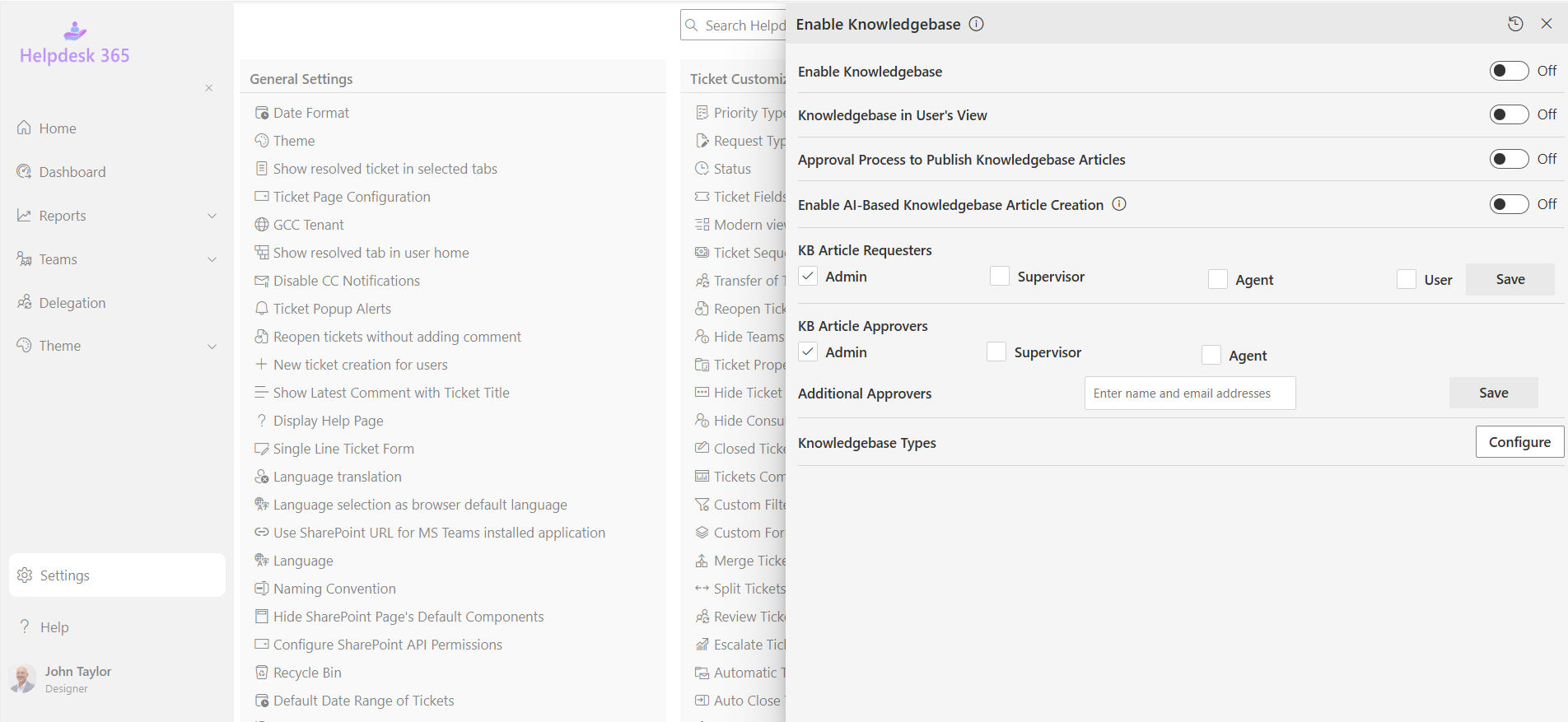
A knowledge base stores answers to common questions, troubleshooting steps, and product instructions.
Agents can reuse approved information, while customers can solve simple problems through self-service.
Regular reviews help keep articles accurate as products and processes change.
7. Customer Feedback and Reporting
Reporting helps managers understand response times, recurring issues, ticket volumes, and customer satisfaction.
Feedback surveys can reveal whether customers found the support useful.
These insights help teams identify changes that are worth making.
8. Access Controls and Data Protection
Customer conversations may contain personal, financial, or business information.
A suitable Customer Experience Tool should support appropriate access controls, secure information handling, and data retention policies.
Businesses should collect only the information needed to provide support.
For businesses using Microsoft 365, Helpdesk 365 brings ticket management, AI-assisted features, automation, and SLA tracking into one support environment.
Explore how your team can manage support requests more effectively.
Benefits of Customer Interaction Management
Effective customer interaction management improves more than communication. It also changes how teams organize work and respond to customer needs.
1. Faster Customer Support
Agents can review previous conversations instead of collecting the same details again.
Clear ownership and ticket tracking can also reduce time spent finding the right person to handle a request.
2. Better Customer Satisfaction
Customers value useful answers and honest updates.
When teams explain the next steps and follow through on commitments, customers have a clearer idea of what to expect.
This can improve their overall service experience.
3. Fewer Missed Requests
Centralized tracking makes it easier to identify open cases, pending approvals, and unanswered messages.
A supervisor can review overdue requests before they remain unattended for several days.
4. Improved Team Productivity
Support employees spend less time searching through emails or asking coworkers for missing information.
Shared records, knowledge articles, and automated reminders allow teams to spend more time resolving actual problems.
5. Stronger Customer Relationships
Every interaction is an opportunity to build trust.
When customers receive consistent help, they have more reason to feel confident about contacting the business again.
Better service can support customer retention, although product quality, pricing, and other factors also influence loyalty.
6. More Useful Business Decisions
Interaction records can reveal patterns that individual conversations do not.
If customers repeatedly ask about the same billing policy, the problem might be unclear invoices rather than poor agent performance.
Managers can use that information to improve the underlying process.
7 Customer Interaction Management Best Practices
Managing customer conversations well requires more than choosing the right communication tools.
These seven practices can help businesses build a more reliable customer support process.
1. Map Every Customer Touchpoint
Start by understanding where customers contact your company.
Review emails, calls, website forms, live chats, and support portals.
Then identify what happens after each request arrives.
Ask three questions:
- Who receives the request first?
- Who is responsible for resolving it?
- How does the customer receive updates?
Practical example: A SaaS company finds that subscription cancellation requests arrive through three different inboxes. It creates one tracked process with a clear owner and a defined response target.
The improvement comes from removing confusion about responsibility, not simply adding another communication channel.
2. Keep Customer Information in One Accessible Record
Customers should not need to explain the same issue whenever they speak with a different agent.
Maintain useful information such as previous requests, actions taken, pending decisions, and promised follow-ups.
Use CRM or ticketing integrations when different systems need to share context.
For sensitive information, provide access only to employees who need it.
Practical example: A customer reports that an application is not working. The first agent completes basic checks and records the results. When the case moves to technical support, the next agent can continue troubleshooting instead of repeating those checks.
3. Set Clear Ownership and Escalation Rules
Every customer request should have someone responsible for moving it forward.
Define which team handles each request type, when a ticket should be reassigned, and when a manager needs to step in.
Priority should reflect the effect of the issue, not simply how urgent the message sounds.
For instance, a service outage affecting an entire company may need attention before a routine account update.
Review assignment rules regularly. If requests frequently move between teams, the ownership process may need adjustment.
4. Communicate Before Customers Have to Follow Up
A quick first reply is useful, but customers also need updates while their issue is being investigated.
Tell them what is happening, who is working on the problem, and when they can expect another update.
Avoid promising a resolution time unless the team has a reasonable basis for that commitment.
Example of a helpful update:
“We’ve shared your billing issue with our finance team. They’re reviewing the invoice, and we’ll update you by tomorrow afternoon.”
This is more useful than saying, “Your request is being processed.”
5. Make Every Response Clear and Personal
Customers want answers they can understand.
Avoid complicated technical terms when simpler language explains the same thing.
A good support response should acknowledge the issue, explain the action being taken, and describe the next step.
Use previous conversation details when they are relevant, but avoid adding unnecessary personal information.
AI-generated replies can help agents prepare responses. However, employees should check the accuracy and tone before sending them, especially for billing, access, or security concerns.
6. Offer Self-Service Without Making Human Help Difficult
Create knowledge articles for questions that customers ask repeatedly.
Start with topics such as password resets, account settings, subscription changes, and common error messages.
Keep instructions short, include screenshots where helpful, and review articles after product updates.
Also give customers a clear way to contact support if the instructions do not work.
Practical example: An IT team notices frequent requests for VPN setup instructions. It publishes a step-by-step article and makes it available through the support portal.
The team can then compare related ticket volume before and after publication to see whether the article is useful.
7. Measure Interaction Quality, Not Just Ticket Volume
Closing more tickets does not always mean customers receive better support.
Measure how effectively issues are handled.
Useful customer service KPIs include:
- First response time: How long customers wait for an initial reply.
- Resolution time: How long it takes to resolve an issue.
- First contact resolution: The share of issues solved during the first interaction.
- Customer satisfaction (CSAT): How customers rate the support received.
- Ticket reopen rate: How often resolved cases need further attention.
Review these measures alongside customer comments.
For example, fast ticket closures combined with frequent reopenings may indicate that teams are closing requests before confirming that the issue is fixed.
Use the results to improve training, documentation, and service processes.
See how Helpdesk 365 can support your team’s daily service operations.
How Ticket-Based Communication Improves Customer Interaction Management
One common problem in customer service is the gap between receiving a message and completing the requested work.
A business may respond quickly but still lose track of what needs to happen next.
Ticket-based communication connects customer conversations with ownership, progress, and resolution tracking.
Instead of leaving a request in a personal inbox, a ticketing system creates a record that support teams can follow from start to finish.
How the Process Works
Step 1: Capture the customer request
A customer submits a question through a supported channel, such as email or a support portal.
The system creates a ticket containing the issue description and relevant details.
Step 2: Assign the request
The ticket is categorized and sent to the appropriate team.
For instance, access issues go to IT, while invoice questions go to finance.
Step 3: Maintain communication history
Agents record questions, actions, notes, and updates in the same case.
If another employee takes ownership, the earlier information remains available.
Step 4: Track progress and deadlines
Ticket status and SLA targets help teams see which requests need attention.
Reminders or escalations can support timely follow-up.
Step 5: Confirm the resolution
Once the issue is addressed, the support team can explain the solution and confirm whether the customer needs more help.
The completed case also becomes a useful record for future support.
A Practical Example
Consider an employee who cannot access an important business application.
They contact IT through Microsoft Teams. The technician discovers that access approval is required from the employee’s manager.
Without a shared process, the request may sit in a chat while everyone waits for someone else to respond.
A ticket-based workflow can record the access problem, assign an owner, track the approval, and notify the employee when progress is made.
This same approach also applies to external service requests, provided the ticketing platform supports the required customer channels and processes.
How Helpdesk 365 Supports Ticket-Based Communication
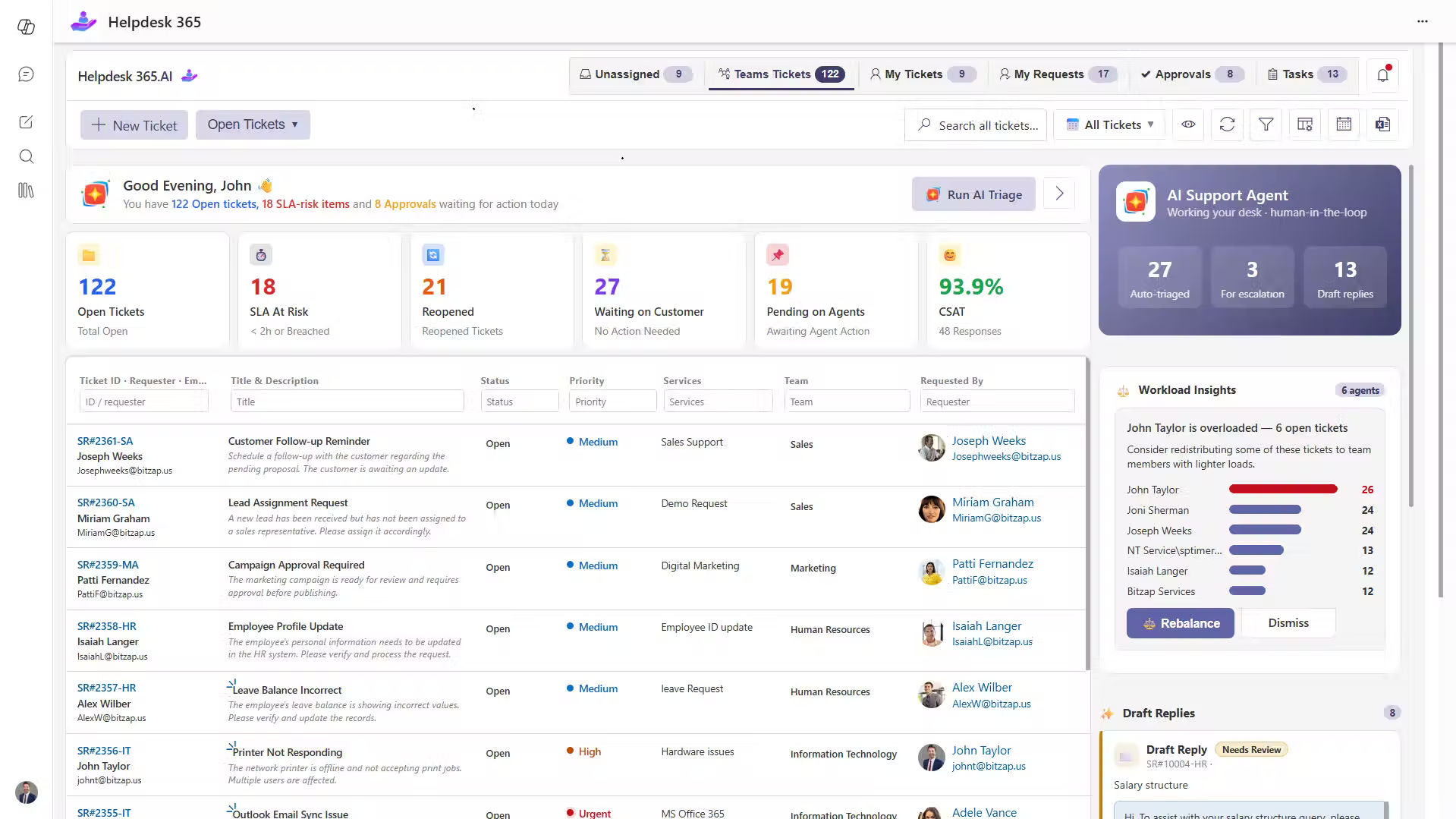
For organizations using Microsoft 365, Sharepoint Helpdesk 365 provides a way to manage support requests through SharePoint, Microsoft Teams, and Outlook.
It brings ticket management, workflow automation, AI-assisted ticket handling, SLA tracking, and reporting into the Microsoft 365 environment.
Support teams can use these capabilities to organize conversations, track requests, and maintain visibility across IT, HR, Finance, and other departments.
For example, an IT manager can review incoming tickets, identify requests approaching SLA deadlines, and help the team address unresolved issues.
Helpdesk 365 is particularly suited to internal and departmental service management. Companies seeking a complete customer experience platform may also need CRM, marketing, voice, or customer journey tools.
Want to improve how your team handles support requests ?
Conclusion
Customer interaction management is not simply about replying to customers faster.
It is about understanding the issue, keeping the right information available, assigning responsibility, and helping every request reach a clear outcome.
Start by reviewing how customer conversations move between teams. Identify where information gets lost, where follow-ups are delayed, and which questions customers ask repeatedly.
Then improve those areas with practical processes, useful knowledge, and suitable customer service tools.
For Microsoft 365 organizations, Helpdesk 365 can support this approach through centralized ticket management, automation, SLA tracking, and team collaboration.
Join Our Creative Community
Frequently Asked Questions
What is the difference between a recurring transaction and a subscription?
A subscription is a business model where customers pay for ongoing access to a product or service. A recurring transaction is the actual payment mechanism that powers a subscription. In practice, the terms are often used interchangeably, but technically, a subscription is the agreement and a recurring transaction is the automated charge that fulfills that agreement each billing cycle.
Can a business charge a different amount each billing cycle?
Yes — this is known as a variable recurring transaction. Utility bills, usage-based SaaS pricing, and metered billing models all use variable recurring charges where the amount changes each cycle based on consumption or usage. The key requirement is that the customer must have authorized variable billing upfront and must be notified of each charge amount before it is processed (depending on local regulations).
What happens if a recurring transaction fails?
Most payment systems have automated retry logic that attempts the charge again after a set number of days. If all retry attempts fail, the merchant’s system typically notifies the customer via email and may suspend or downgrade their account. Businesses with robust workflows recover a significant portion of initially failed recurring payments through automated communication sequences.
How do I stop an unauthorized recurring transaction?
Start by contacting the merchant directly to cancel and request a refund if applicable. If the merchant is unresponsive or continues billing after cancellation, contact your bank or card issuer to initiate a chargeback. For debit cards, you can also request that your bank block future payments to that merchant by issuing a stop payment instruction.


























