

What Is a Ticket Management System? A Comprehensive Guide

A ticket management system is software that captures every support request, organizes it, and tracks it until resolution. It matters because it replaces scattered emails and guesswork with one clear, accountable record.
Support volume rarely slows down, and the market reflects that. Grand View Research values the global help desk software market at more than $10 billion, growing by roughly 10% a year as companies move away from shared inboxes and spreadsheets (Grand View Research, Help Desk Software Market Report). Separate research from Salesforce’s State of the Connected Customer report found that most customers now rate the service experience as just as important as the product itself, which means a missed ticket costs more than time. It costs trust.
Whether you run IT for a mid-size company, handle support for an online store, or just got handed “fix our support process” as a task, this guide covers what a ticketing platform actually does, why it matters, and how to choose one without wasting months on the wrong pick.
- A ticket management system turns every request, email, chat, phone, social, into one trackable record instead of a scattered mess.
- Skip one, and requests get lost, response times balloon, and the same issue sometimes gets solved twice by two different agents.
- Core features include a shared inbox, automated routing, SLA tracking, a knowledge base, and reporting.
- Centralizing support requests cuts resolution time and gives managers real data instead of gut feelings.
- AI now handles first-line triage, drafts replies, and flags urgent tickets before a human even opens them.
What Is a Ticket Management System
Think of a ticket like a case file. Someone opens it, work happens inside it, and it closes only when the issue is actually fixed, not just acknowledged.
Think of a ticket like a case file. Someone opens it, work happens inside it, and it closes only when the issue is actually fixed, not just acknowledged.
Most platforms pull requests from multiple channels, email, live chat, phone, social media, a web form, into one queue. That queue is often called a shared inbox, or in larger IT teams, a service desk.
The word “ticket” isn’t just internal jargon. It’s the reason these tools scale. A sticky note gets lost. A ticket gets assigned, timestamped, and tracked until someone closes it out.
Why Ticket Management Systems Matter
Here’s the moment most teams realize they need one: request volume crosses a point where memory and good intentions stop being enough.
If you’re fielding ten requests a week, a shared inbox works fine. Once you hit fifty, a hundred, or five hundred, that inbox becomes a liability. Nobody knows who’s handling what. Two people reply to the same customer with conflicting answers. A message from a key client sits unread for three days because it landed in a crowded folder.
A dedicated system fixes the visibility problem first. Every request gets an owner, a status, and a history. Nothing depends on one person’s memory or inbox habits.
It also builds accountability that email can’t. When each ticket carries a timestamp and an assigned owner, a manager can actually measure how the team performs instead of relying on instinct, and agents get credit for the work they actually close instead of whatever happened to land in their name.
What Happens Without a Ticket Management System
Teams without a dedicated system tend to hit the same wall: requests buried in a shared inbox, no way to confirm what’s been answered, duplicate replies from different reps, zero data on response times, and no accountability when something slips through. Customers usually notice the silence long before a manager does.
Here’s a pattern that plays out constantly. A small e-commerce brand runs support out of a shared Gmail account used by three people. Two agents open the same message and reply with different return policies. The customer, now confused and annoyed, posts about it publicly. Nobody caught the conflict because nobody could see who had answered.
That’s not a rare edge case. It’s the default outcome once more than one person touches a shared inbox regularly.
The bigger cost shows up later, in the data that was never collected. When a manager asks how long it takes to resolve a billing complaint, the honest answer is often “we don’t know” — because nothing was tracked in a way that could be measured or reported.
If any of this sounds familiar, it’s usually the first sign a team has outgrown email as a support tool.
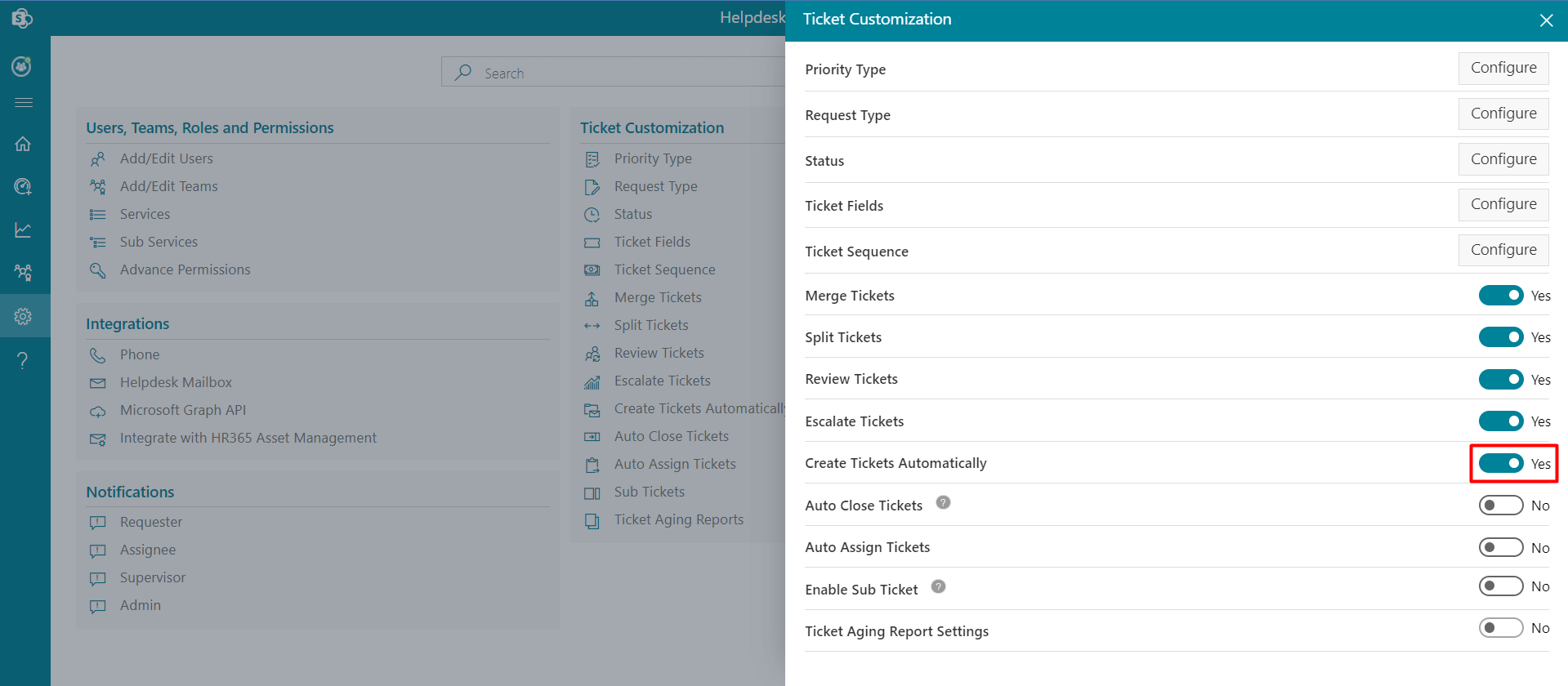
Tired of tickets disappearing into shared inboxes? See how Helpdesk 365 catches, sorts, and assigns every request the moment it arrives.
Key Components and Features of a Ticket Management System
A solid ticketing system isn’t just a fancier inbox. Its components work together to remove guesswork at every stage of a request.
- Omnichannel intake: pulls requests from email, chat, phone, social, and web forms into a single queue.
- Automated routing and assignment: sends tickets to the right person or team based on category, keyword, or current workload.
- SLA tracking and escalation: flags tickets nearing a response or resolution deadline, then escalates automatically if nobody acts.
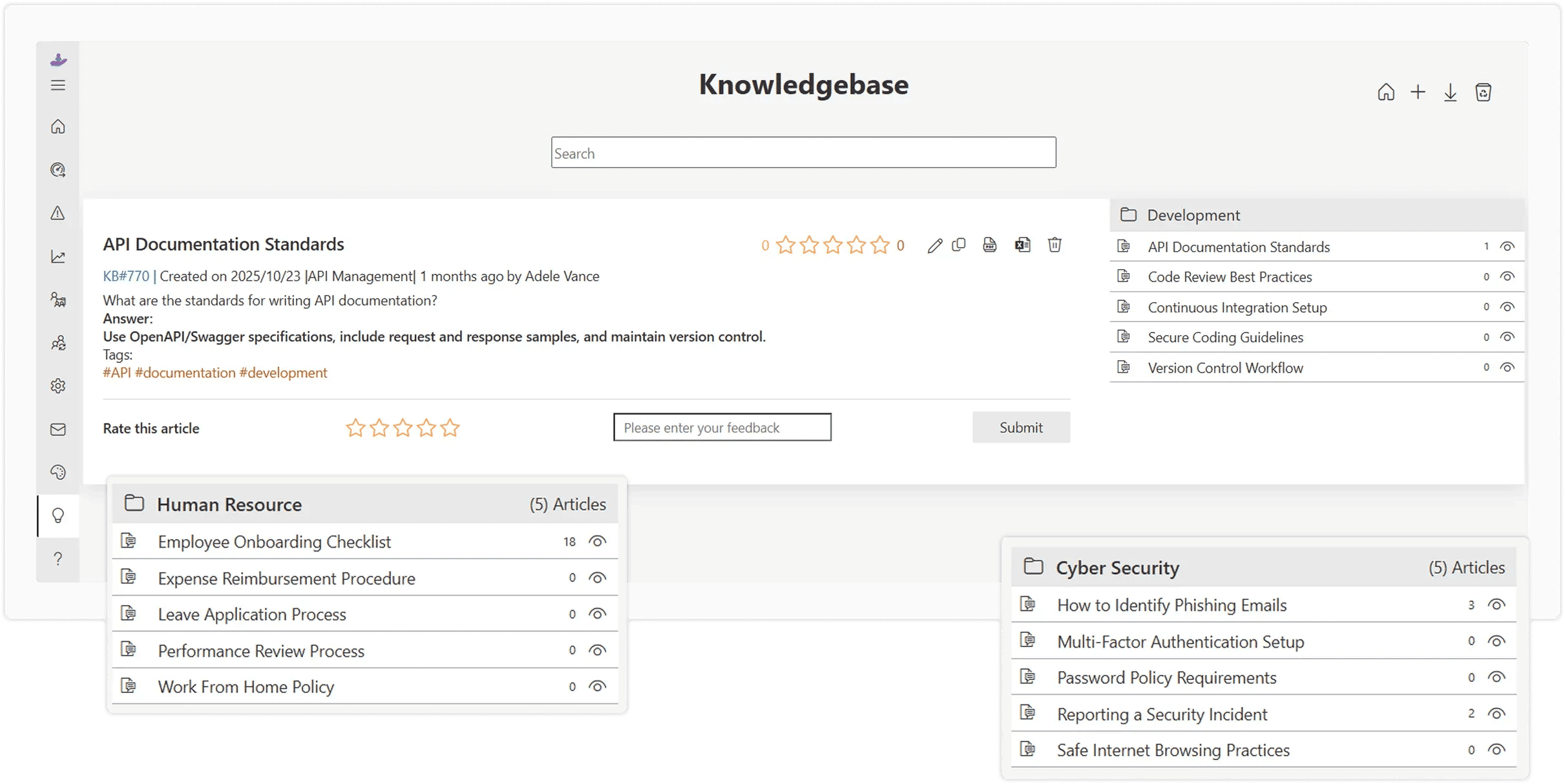
- Knowledge base and self-service: lets customers or employees resolve simple issues on their own before a ticket ever gets created.
- Reporting and analytics: shows resolution time, ticket volume, agent workload, and recurring issues at a glance.
- Macros and canned responses: saves agents from retyping the same answer to common questions all day.
- Integrations: connects to CRM, chat apps, project tools, and phone systems so agents stop switching tabs constantly.
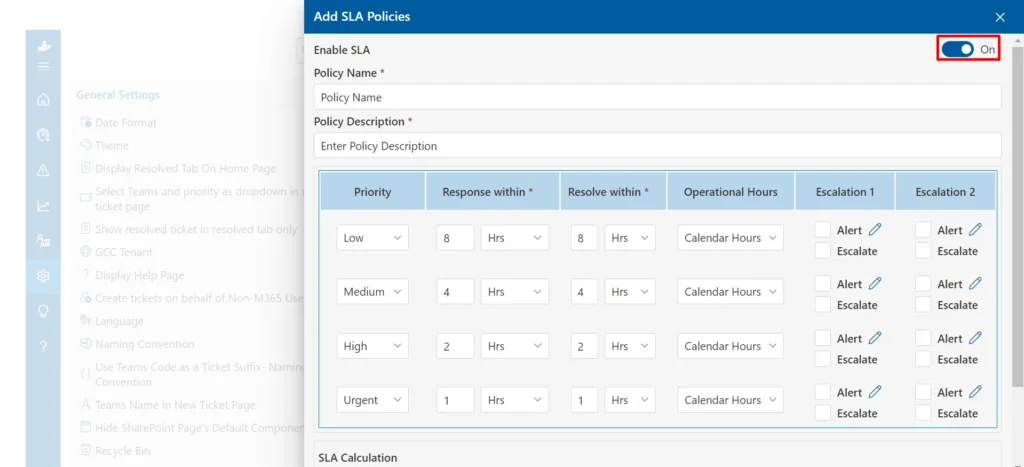
None of these matter much in isolation. The value shows up when they work together — a request arrives, routes automatically, starts an SLA clock, and gets logged for reporting, without a human deciding each step by hand.
Benefits and Business Impact
The upside isn’t abstract. It shows up in three places: speed, cost, and retention.
Speed is the most visible one. When tickets route automatically and agents work from a shared queue instead of a personal inbox, average response time drops because nothing sits unseen for long.
Cost shows up in agent time. A rep who spends less time hunting through old email threads for context spends more time actually solving problems, which means a team can absorb more volume without growing headcount at the same pace.
Retention is what leadership tends to care about most. Salesforce’s connected-customer research has repeatedly found that people weigh the service experience as heavily as the product itself. A slow, disorganized process doesn’t just annoy customers, it pushes them toward a competitor.
There’s also a data benefit that’s easy to miss, especially for teams that have never tracked this before. Once every request lives in one system, patterns become visible instead of hiding. If thirty percent of tickets ask the same billing question, that’s not a support problem anymore. It’s a signal to fix the billing page.
How to Implement a Ticket Management System: Step by Step
Rolling one out works best in six steps: map current request channels and volume, define categories and service-level targets, choose and configure a tool that fits the workflow, migrate existing data and set automation rules, train the team through a short pilot, then review the first month’s reports and adjust.
1. Map your current channels. Before picking software, find out where requests actually arrive today — email, phone, chat, a contact form created with IvyForms and roughly how many land per week.
2. Define categories and SLAs. Decide what counts as urgent versus routine, then set response-time targets your team can realistically hit.
3. Choose and configure the tool. Pick a system that matches your channels and team size, and set up routing rules before going live.
4. Migrate data and automate. Bring over open tickets and existing customer records, and build routing, escalation, and canned-response rules before launch day, not after.
5. Train the team and pilot. Run a two-week pilot with a small group first. This is where the confusing categories and the unrealistic SLA usually surface.
6. Review and adjust. After the first month, pull the reports. Look at what’s actually breaching SLA and fix the underlying process, not just the symptom.
Building this from scratch can eat a full quarter if a team goes it alone. Helpdesk 365 ships with routing, SLAs, and reporting pre-configured, so most teams launch in days.
Real-World Examples of Ticket Management in Action
An online retailer during a holiday sales spike. A sixty-person e-commerce brand normally handled about forty support tickets a day through a shared inbox. During its biggest sale weekend, volume jumped past three hundred a day. Without routing or SLA tracking, urgent shipping complaints sat next to routine password resets with no way to tell them apart.
After switching to a system with automated priority tagging, the same team cleared the backlog within two days instead of losing a full week, and shipping complaints got answered within the hour instead of sitting for two or three days.
An internal IT team buried in password resets. A three-hundred-employee manufacturing company had a single admin fielding every request by email, badge access, printer jams, password resets, software installs. He was working weekends just to keep pace.
After adding a ticket system with a self-service portal, employees started resetting their own passwords through a guided form, cutting his ticket volume nearly in half within the first month.
A SaaS support team drowning in repeat questions. A software company noticed that a third of its tickets asked some version of “how do I export my data.” Instead of just answering faster, the team wrote one knowledge base article and linked it in an automated first reply.
Tickets on that topic dropped by more than half within six weeks, freeing agents to focus on harder issues.
Best Practices for Ticket Management
- Set SLAs the team can actually meet, then track them honestly. A target nobody hits is worse than no target — it just trains customers to expect broken promises.
- Keep categories simple. Five to eight clear tags beat forty overlapping ones that confuse agents more than they help.
- Turn recurring tickets into knowledge base articles. If a question came up three times this month, write the answer down once instead of retyping it forever.
- Review reports weekly, not quarterly. A slow week is easy to fix early and much harder to fix once it becomes a pattern.
- Close the loop with customers. A quick follow-up after resolution — did this actually fix it? — catches problems that a “closed” status alone misses.
- Avoid ticket ping-pong. If a request bounces between three agents before anyone solves it, that’s a routing problem, not a people problem.
Also Read:- Managing Helpdesk Tickets Across All Channels
Common Mistakes to Avoid
Even capable teams get this wrong in predictable ways.
Treating the tool as “set and forget.” A company can spend weeks configuring a system, launch it, then never touch the settings again. Six months later, the routing rules no longer match how the team actually works, and everyone has quietly built workarounds outside the tool.
Ignoring SLA breaches instead of investigating them. One team let response-time alerts pile up for months because “we’re busy.” By the time leadership checked the reports, average resolution time had crept from four hours to two full days, and nobody noticed until a customer complained on social media.
Overcomplicating ticket categories. A mid-sized company once built forty different tags trying to capture every possible issue type. Agents couldn’t remember which one to use, so most tickets landed in a generic “other” bucket, which made the reporting useless.
Skipping agent training. Rolling out new software without training just moves the same chaos into a nicer interface. The tool isn’t the fix by itself; how people use it is.
Not integrating with other tools. A system that doesn’t talk to a CRM or chat app leaves agents juggling multiple tabs, which erases much of the time saved. A support team at a growing subscription business learned this firsthand, manually copying customer details between two disconnected tools every day for months before anyone flagged the wasted hours.
The Role of AI and Technology in Ticket Management
AI moved from a nice-to-have to a default expectation in ticket management, and the shift happened fast.
Modern platforms now use AI to:
- Auto-categorize and prioritize tickets the moment they arrive, based on keywords and urgency signals.
- Draft suggested replies for common questions, which an agent reviews and sends instead of writing from scratch.
- Detect sentiment, so an angry or urgent message gets flagged before an agent even opens it.
- Power self-service chatbots that resolve simple requests without creating a ticket at all.
- Predict escalation risk, flagging tickets likely to breach an SLA before they actually do.
According to Zendesk’s CX Trends research, a growing share of support leaders now describe AI as central to their customer experience strategy rather than a side experiment.
That said, AI works best as a first layer, not a replacement for judgment. A billing dispute involving real money, or a frustrated long-term customer, still needs a person who can read context AI tools miss. The goal isn’t removing people from support. It’s clearing the repetitive share of tickets so people can focus on the ones that actually need a human.
How to Choose the Right Ticket Management System
Basic shared inboxes, like a Gmail group, work fine under twenty requests a week but offer no routing, no SLA tracking, and no reporting. Dedicated ticket management systems add automation, accountability, and data at the cost of a learning curve and a monthly fee. Once volume or team size grows past a handful of people, the dedicated system almost always wins on time saved.
Beyond that basic choice, a few questions actually predict whether a tool will work for a given team:
- Does it match your channels? If half your requests arrive through chat or social, confirm the tool supports those, not just email.
- How steep is the setup? Some systems need a consultant and three months. Others let a small team configure routing and SLAs in an afternoon.
- Does it integrate with what the team already uses? A tool that skips your CRM or chat app creates more tab-switching, not less.
- Can reporting answer real questions? Ask to see the actual dashboard before buying, not a sales deck screenshot.
- What does onboarding look like? A responsive setup team usually beats a longer feature list with a slower rollout.
If you’re comparing options right now, Helpdesk 365 is built around exactly this checklist — fast setup, honest reporting, and integrations that work out of the box.
Conclusion
Every team eventually hits the same wall: requests outgrow the inbox, and good intentions stop being a strategy on their own. None of this is about software for its own sake. It’s about giving every request an owner, a timeline, and a record, so nothing depends on memory or luck.
Start with the basics: map your channels, set realistic SLAs, and pick a tool the team will actually use. Then build the habit of reviewing your own data instead of guessing at it.
Join Our Creative Community
Frequently Asked Questions
Is a ticket management system the same thing as a help desk?
Mostly, yes. “Help desk” usually refers to the team and process, while “ticket management system” refers to the software they use. In practice, people use both terms interchangeably.
Is a ticket management system the same as a CRM?
No. A CRM tracks customer relationships and sales history. A ticket system tracks individual support requests. Many businesses use both, and the strongest setups connect them.
How much does a ticket management system cost?
Pricing usually runs per agent per month, often ranging from around fifteen to over a hundred dollars depending on features. Smaller teams often start on lower tiers and upgrade as automation needs grow.
Do small businesses actually need one, or is this only for big companies?
Once a business handles more than a handful of requests a week, a dedicated system usually pays for itself in time saved, regardless of company size.
What's the difference between a ticket system and a tool like Jira?
Jira is built for tracking software bugs and development tasks. Ticketing software is built for customer or employee support requests instead. Some teams use both for different purposes.
Do I need separate systems for IT support and customer support?
Not necessarily. Many modern platforms handle both, using separate queues, categories, and SLAs so each team gets its own workflow inside one tool.
How long does implementation actually take?
A basic setup can go live in a few days. A full rollout with automation, integrations, and training usually takes two to four weeks for most small-to-midsize teams.
Does a ticket management system work for remote or hybrid teams?
Yes, and distributed teams often benefit the most. Since every request lives in a shared system instead of someone’s personal inbox, agents across time zones can hand off open tickets without losing context or making a customer repeat themselves.


_JiluXJRGNl.svg)























