

Contract Repository Software: Guide to Storing, Finding, and Managing Agreements

Most expensive contract is the one you can’t find.
Every organization signs contracts. Vendor deals, client agreements, NDAs, leases, employment letters the list never really ends.
The challenges is knowing where they live once they are signed. Ask any legal, sales, or procurement team where last year’s vendor contract is, and you will often get a long pause before someone opens five different folders to look for it.
This is exactly why more teams are moving to contract repository software. It gives every agreement one home, adds structure to that home, and lets people find what they need in seconds instead of hours.
In this guide, we will walk through what this contract repository software does, how a contract repository system like CLM 365 works inside Microsoft 365.
- Centralize every contract in one secure location to improve visibility, consistency, and document accessibility.
- Reduce time spent searching for agreements with advanced search, metadata, and document organization capabilities.
- Tracking renewal dates, obligations, and key milestones reduces the risk of missed contractual commitments.
- Role-based access, audit trails, and standardized organization strengthen contract governance and accountability.
What Is Contract Repository Software
Contract repository software is a digital system built to store, organize, and manage every contract a business signs, from the first draft to the final signed copy and every renewal after that.
Instead of agreements sitting in random folders, personal inboxes, or a shared drive with no naming rules, a repository keeps them in one searchable, permission-controlled place.
At its core, a centralized contract repository does three things. First, it stores the document itself Word file, PDF, or scanned copy. Second, it stores the data about that document, such as parties involved, contract value, start date, and expiry date.
How Does CLM 365 Contract Repository Software Work?
CLM 365 is a contract lifecycle management tool built directly on Microsoft SharePoint and the wider Microsoft 365 environment. Instead of asking teams to learn a brand-new platform, it works inside the tools people already use daily Outlook, Teams, Word, and SharePoint document libraries. Here is the basic flow.
- Contracts are created or uploaded into a structured SharePoint library.
- Metadata such as contract type, department, owner, contract value, and renewal date is automatically captured or entered by the user.
- Contracts move through review, redlining, and approval workflows.
- Every version, edit, and comment is stored to maintain a complete audit trail.
- Once signed, the final contract is securely stored, tagged, and fully searchable.
- Automated reminders help track renewal, expiry, and other important contract dates.
- Built on Microsoft 365, CLM 365 uses existing Microsoft permissions and access controls.
- Legal teams control access to sensitive contract information.
- Finance can view payment terms without accessing the full legal record.
- Sales teams can access their own customer agreements without viewing HR or other departmental contracts.
- A single centralized repository provides role-based access, ensuring every user sees only the contracts relevant to them.
Difference Between Manual Process vs Automated Contract Repository
Many teams still run contracts through shared drives, email threads, and spreadsheets. Below is a side-by-side look at what changes when a business moves from a manual setup to automated contract repository software.
Aspect | Manual Process (Folders/Spreadsheets) | Automated Contract Repository |
Storage | Scattered across drives, inboxes, and desktops | One central, structured location |
Search | Manual file-by-file opening, based on file names | Full-text and metadata search across every document |
Version Control | Multiple copies named “final,” “final v2,” “final_edited” | Single source of truth with automatic version history |
Renewal Tracking | Manual calendar reminders, often missed | Automated alerts before expiry or renewal windows |
Access Control | Shared folder permissions, hard to fine-tune | Role-based access down to the document or clause level |
Reporting | Manual data pulls into spreadsheets, prone to gaps | Live dashboards showing status, value, and risk |
The table makes the pattern clear. Manual systems depend on someone remembering to do the right thing at the right time. A proper contract repository system removes that dependency by building the rule into the system itself.
Every misplaced contract costs more than a contract repository ever will
Challenges of Managing Contracts in Folders & Spreadsheet
Folders and spreadsheets feel free no license fees, no new tool to learn. But without contract repository software behind them, the hidden cost shows up over time, usually right when a contract matters most.
Finding the right document takes too long
Recent research has revealed the pervasive nature of contracts, with an average 25% of the workforce regularly working with them, yet most of that workforce has no fast way to locate a specific clause or term. Studies back this up directly, 9 in 10 contract professionals struggle to search specific contracts.
Ownership gets lost
In many businesses, nobody is fully sure who owns a given agreement once the deal is signed. Research from the World Commerce and Contracting Association found that in 40% of organizations, it’s a guessing game of who’s in charge of which contract responsibility. Spreadsheets do not fix this on their own a cell with a name in it is not the same as a real system of accountability.
Version chaos is normal
Folder-based storage almost always ends with several versions of the contract floating around, each with a slightly different file name. Nobody wants to be the one who sends a client the wrong draft, but it happens constantly under this setup. Without proper version control, teams waste valuable time verifying which copy is the latest instead of focusing on contract execution.
Renewals slip through
Spreadsheet reminders depend on someone opening the file and checking dates manually. Miss one row, and a contract silently auto-renews on unfavourable terms, or a service simply lapses. Without automated alerts, important renewal deadlines can easily be overlooked, leading to unnecessary costs and business risks.
No real audit trail
If a regulator, auditor, or new legal hire asks who approved a clause and when, folders rarely have an answer. The overall picture matches broader industry data: between 55% and 70% of firms lack efficient contract management system, and most of that gap traces back to exactly these folder-and-spreadsheet habits that contract repository software is designed to remove.
Don’t let your valuable contracts get buried in spreadsheets.
CLM 365 stores all your agreements in a secure, centralized contract repository, making it easy to organize, search, and access every contract from one place
Importance of Storing Contract Data in Secure Repository
A contract is not just paperwork it is a record of money owed, obligations promised, and risk taken on. When that record sits in an open folder with loose permissions instead of proper contract repository software, the business is exposed in ways that rarely show up until something goes wrong.
Security in a contract repository system covers a few layers: who can see a document, who can edit it, who can approve it, and how long records are kept once a contract ends. Getting this wrong is expensive.
Industry estimates put the number at an average of 9.2% of annual revenue lost due to contract mismanagement much of it tied to missed obligations, unauthorized changes, and terms nobody tracked properly.
On the flip side, tightening this process pays for itself: according to Weshare, organizations can save 2% of annual costs simply by managing contracts properly instead of letting them sit unmanaged.
A secure repository also protects sensitive terms pricing, penalty clauses, personal data from people who have no business reason to view them. It keeps a permanent log of every access and edit, which matters heavily during audits, disputes, or contract reviews. And it gives leadership something folders never can, a real, trustworthy picture of every obligation the company currently holds.
Key Features of Contract Repository Software
CLM 365 offers multiple features that simplify contract storage, organization, and retrieval. Here’s how it helps
Centralized Secure Repository
Store every contract in a secure, centralized SharePoint-based repository that serves as your organization’s single source of truth. Keep legal, procurement, HR, finance, and sales agreements organized in one place with consistent document management. This eliminates scattered files and makes it easy for authorized users to locate the latest signed contract whenever they need it.
Advanced Search Options
Quickly find contracts using powerful full-text search, metadata filters, and clause-level search capabilities. Search by contract title, counterparty, department, owner, renewal date, keywords, or even specific clauses within agreements. Instead of manually browsing folders, users can search the right contract in seconds.
Metadata Management
Automatically capture and manage contract metadata such as type, department, owner, contract value, status, effective date, and renewal date. Structured metadata keeps contracts consistently organized while making filtering, sorting, and reporting much easier. Teams can quickly locate agreements based on business information instead of relying on file names alone
Clause Library
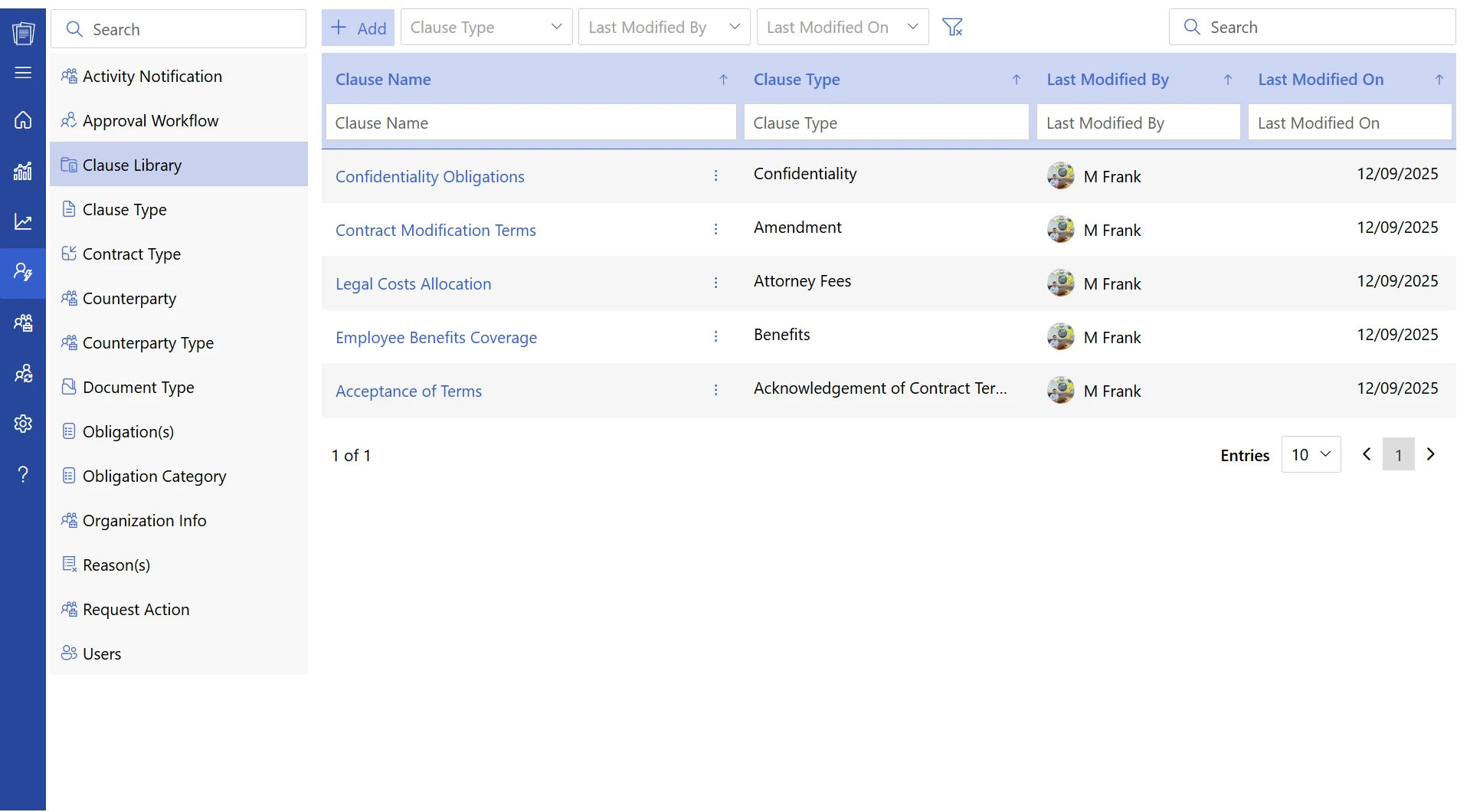
Maintain a centralized clause library of pre-approved clauses, templates, and standard legal language for consistent contract drafting. Legal teams can easily update approved content while business users insert trusted clauses into new agreements. This improves drafting efficiency, reduces legal risk, and promotes consistency across every contract.
Version History
Automatically record every edit, approval, comment, and redline throughout the contract lifecycle. CLM 365 preserves a complete version history, allowing teams to compare revisions and restore previous versions whenever required. Users always know which version is current, eliminating confusion caused by duplicate files
AI-Powered Clause Analysis
Speed up contract reviews with AI that automatically identifies unusual clauses, missing provisions, and deviations from approved contract language. Reviewers can quickly focus on contracts that require attention instead of manually reading every document. This improves review efficiency while supporting greater consistency and compliance.
Turn 200-page contracts into clear, AI-generated summaries
Microsoft 365 Permission Controls
Protect sensitive contracts using Microsoft 365’s built-in security, permissions, and access controls. Configure role-based access by department, user, folder, or document type without creating separate permission systems. Teams only see contracts relevant to their responsibilities while maintaining enterprise-grade security.
Contract Activity Dashboard
Gain real-time visibility into every stage of your contract lifecycle through an interactive dashboard. Monitor contracts in drafting, review, approval, signature, active, renewal, or expiry stages from a single screen. Contract dashboard helps legal and business teams prioritize work, track progress, and identify bottlenecks faster.
Renewal & Expiry Tracking
Stay ahead of important contract milestones with automated renewal and expiry notifications. CLM 365 sends timely reminders to contract owners, giving teams enough time to review, renegotiate, renew, or terminate agreements. Proactive alerts help prevent missed deadlines, unexpected auto renewals, and compliance risks.
Reporting & Insights
Generate contract reports on contract values, approval timelines, renewal trends, compliance, and overall contract performance. Built-in dashboards transform contract data into meaningful business insights without manual spreadsheet work. Legal, finance, and leadership teams can make faster, data-driven decisions using real-time reporting.
Benefits of Managing Contracts in SharePoint Contract Repository
SharePoint already sits inside most Microsoft 365 businesses, which makes it a practical foundation for a contract repository system rather than an extra platform to maintain. Here is what teams gain from it.
Trusted by Organizations Worldwide
SharePoint is not a niche platform—over 250,000 organizations and approximately 190 million people use SharePoint worldwide. Its widespread adoption proves that it is reliable, scalable, and capable of supporting businesses of every size. Organizations benefit from a platform that is well-tested, well-documented, and backed by Microsoft’s continuous innovation.
Familiar Interface
Most employees already use SharePoint, Microsoft Teams, and Microsoft 365 every day. This means they can start managing contracts without learning a completely new system, reducing training time and increasing adoption. Teams can work with contracts using tools and workflows they are already comfortable with.
Secure Role-Based Access
SharePoint’s built-in permission model lets you control exactly who can view, edit, or approve contracts. Legal teams can access confidential agreements, finance can review payment terms, and sales can manage contracts without accessing sensitive documents. This keeps contract data secure while enabling seamless collaboration across departments.
Automatic Version History
Every contract amendment, comment, and revision is automatically saved as a new version. Users can compare previous versions, restore older copies when needed, and always identify the latest approved contract. This eliminates confusion caused by duplicate files and provides a complete audit trail for every document
Seamless Microsoft 365 Integration
SharePoint integrates natively with Microsoft Teams, Outlook, Word, Power Automate, and other Microsoft 365 applications. Teams can review, share, collaborate, and approve contracts directly from the tools they already use every day. This reduces context switching and creates a faster, more connected contract management experience.
Lower Cost of Ownership
Organizations already investing in Microsoft 365 can use SharePoint as a contract repository without purchasing another standalone platform. There is no need to maintain separate storage systems, duplicate security policies, or additional infrastructure. This helps maximize existing Microsoft investments while reducing overall software and maintenance costs.
Easier Compliance and Auditing
SharePoint automatically maintains activity logs, permission history, document versions, and audit trails for every contract. Compliance teams can quickly access the information required for internal reviews, regulatory audits, or legal investigations. This simplifies governance while improving transparency and accountability across the contract lifecycle.
Common Mistakes Happened While Managing Agreements in Repository
Even after moving to a repository, teams sometimes carry over old habits that quietly undo the benefits.
Skipping Metadata Entry
A repository with incomplete or blank metadata behaves much like a traditional folder system. Without details like contract type, owner, renewal date, or department, search becomes less effective and reports lose accuracy.
No Naming Standard
Using inconsistent file names such as Vendor_final2 or Vendor_new makes contracts difficult to identify at a glance. A standardized naming convention keeps documents organized and reduces confusion when multiple agreements exist for the same customer or vendor
Ignoring Renewal Alerts
Automated reminders only add value when someone reviews and acts on them. Ignored notifications can lead to missed renewal opportunities, unwanted auto-renewals, or expired agreements.
Over-Permissioning Access
Giving everyone edit or administrative access increases the risk of accidental changes and unauthorized access to sensitive contracts. Role-based permissions ensure employees only see and modify the agreements relevant to their responsibilities.
Storing Only the Final Signed Copy
Keeping only the executed contract removes valuable negotiation history and previous drafts. Earlier versions often provide important context during audits, disputes, renewals, or future contract negotiations.
Not Archiving Expired Contracts
Leaving expired agreements mixed with active contracts makes repositories harder to manage and search. Archiving completed or inactive contracts keeps the repository organized while preserving historical records for future reference.
Given that 89% of organizations feel that their contract process is not that effective, these small habits matter. Contract repository software fixes the technical side of storage, but the discipline around using a contract repository system properly still comes down to the team.
Best Practices to Manage Repository
A few habits keep contract repository software useful long after the initial setup:
- Standardize metadata fields across every department before contracts start flowing in, so search and reporting stay reliable from day one.
- Assign clear ownership for every contract type, so there is always one named person responsible for renewals and reviews.
- Review access permissions quarterly, removing former employees or roles that no longer need visibility into certain contracts.
- Keep a live clause library so drafting always starts from approved, current language instead of an old contract copied from someone’s inbox.
- Set renewal alerts well in advance 90, 60, and 30 days out rather than a single reminder close to the deadline.
- Archive expired agreements into a separate, clearly labeled section instead of deleting them or leaving them mixed with active records.
Run a quarterly audit of the repository itself, checking for missing metadata, broken links, or contracts stuck in draft for too long.
Finance sits closer to contracts than most people assume. Every agreement carries a number attached to it payment terms, penalty clauses, renewal costs, or total contract value and finance teams need accurate, current data from contract repository software to forecast properly.
A shared contract repository system gives finance direct visibility into payment schedules and contract value without waiting on legal or procurement to send a spreadsheet.
This matters for cash flow planning, budget forecasting, and catching auto-renewals before they hit the books unexpectedly. It also supports audits, since finance can pull a clean record of every active obligation instead of reconstructing it from old emails.
Given that mismanaged contracts already account for a meaningful share of lost revenue, finance teams have a direct stake in how well contracts are stored, tagged, and tracked.
A repository built with proper metadata turns contract data into something finance can use for planning, not just paperwork they check once a year.
Why Choose CLM 365 for Centralized Contract Repository?
CLM 365 is built for teams already working inside Microsoft 365, which removes the usual friction of adopting a brand-new platform. Contracts stay inside SharePoint, permissions follow the groups IT already manages, and approvals happen through Teams and Outlook tools employees open every day anyway.
Beyond storage, CLM 365 covers the features that change daily work: full-text and metadata search, automated renewal alerts, a shared clause library, AI-assisted clause review, and live dashboards for contract status.
Because it sits on infrastructure most businesses already pay for, the cost of adoption stays low compared to standalone contract platforms that require new licensing, new logins, and new training.
For a business trying to move away from folders and spreadsheets without adding a separate system to manage, CLM 365 offers a reliable system, that the team already knows.
Conclusion
Contracts carry real financial and legal weight, yet most businesses still store them the same way they store old meeting notes scattered across folders, inboxes, and spreadsheets. The cost of that habit shows up in lost time, missed renewals, and, as the data shows, real revenue loss.
Your business needs a secure, centralized place to store contracts and retrieve them whenever needed.
It’s time to move beyond spreadsheets and scattered folders. Start your 14-day free trial with CLM 365 and experience smarter contract management.
Frequently Asked Questions
How is a contract repository system different from a shared drive?
A shared drive only stores files. A repository adds metadata, version history, access control, search, and automated renewal alerts on top of the stored documents.
Can a contract repository track renewal dates automatically?
Yes. A proper repository sends alerts ahead of renewal or expiry dates, based on metadata attached to each contract, removing the need for manual calendar tracking.
Who should own the contract repository inside a company?
Ownership typically sits with legal or contract management teams, though finance, sales, and procurement all need defined access based on their role in the contract lifecycle.
How does a repository help with compliance and audits?
It keeps a full activity log of every view, edit, and approval, giving compliance teams a ready record instead of one built manually from emails and old files.


_JiluXJRGNl.svg)























