

Best Contract Management Software for Businesses
Contract management software uses AI and automation to manage contracts from drafting and negotiation to signing, storage, and renewal, reducing manual work and speeding up workflows.


Contracts touch almost every part of a business but managing contracts can quickly become a full-time job.
World Commerce & Contracting reports that 29% of the workforce is involved in contract management.
That’s why businesses are migrating their process to an software managing contracts to reduce manual work and gain control over the contract lifecycle.
In this guide, we’ll explore what contract management software is, how it works, its key benefits, and what to look for when choosing one.
What is Contract Management Software?
Contract management software uses AI and automation to manage agreements from drafting and review to approvals, signing, storage, and renewals. It brings key contract activities into a centralized system, giving teams better visibility across the entire lifecycle.
By automating routine tasks and workflow steps, these platforms reduce the time teams spend on administrative work. Legal and business teams can focus more on higher-value activities while contracts move through the required stages with less manual effort.
Why Business Needs a Software to Manage Contracts?
This is why businesses are adopting software for contract management to simplify agreement management, reduce bottlenecks, and gain clearer visibility into their contracts.
Contracts often end up spread across inboxes, shared drives, local folders, and multiple document systems. With agreements stored in different places, finding the right version can take valuable time and create confusion. It centralizes these agreements in one organized platform, making it easier for teams to find, access, and manage contracts when they need them.
Contract approvals can take a long time when many people need to review and approve a document. Without a clear process, teams often use emails and manual reminders, which can slow down approvals and delay business decisions.
Contracts have many important dates, including renewals, payments, and expiry dates. Tracking these dates by hand can lead to missed deadlines. A contract management tool helps teams track key dates and get timely alerts before important deadlines arrive.
When contracts are spread across different tools and folders, finding a specific agreement or checking its status can be difficult. Research from Ernst & Young found that 90% of contracting professionals have difficulty finding contracts efficiently. A contract management platform brings agreements into one place, giving teams a clear view of their contracts and their current status.
Manually reviewing contracts can take a lot of time, especially when teams need to check clauses, terms, and obligations across long documents. Legal teams may spend hours going through agreements line by line, slowing down the contract process. AI contract management software can help speed up reviews by finding key clauses, obligations, and possible risks in contracts.
Contracts often contain important commitments, such as payment dates, service deadlines, and compliance requirements. If these responsibilities are tracked manually, teams may miss important tasks. Contract management software helps monitor these obligations and alerts teams about upcoming actions.
Contracts typically involve multiple departments including legal, finance, procurement, and operations. Without a shared system, teams may work in isolation, leading to delays, duplicate versions, or unclear communication. Software for contract management allows teams to review and comment and facilitates a collaborative contract management approach.
How Does Contract Management Software Work in Business Scenario
Now that we’ve covered the key contract challenges businesses often face, let’s walk through how contract software handles the contract lifecycle, step by step.
Step 1: Contract Request: The process starts when a department needs a new agreement. Users can submit a request with details such as the contract type, parties involved, purpose, and other requirements.
Step 2: Contract Creation: Teams can create the agreement using a suitable template. They can add business details, terms, conditions, and relevant clauses based on the type of contract.
Step 3: Contract Review: The draft is shared with the relevant teams for review. Users can check the terms, add comments, suggest changes, and work on the agreement together.
Step 4: Contract Approval: After review, the contract moves through the required approval steps. Approvers receive notifications, while teams can track the approval status.
Step 5: Contract Signing: Once all approvals are complete, the agreement is sent for digital signatures. All parties can sign the contract online without relying on printed documents.
Step 6: Contract Storage: After signing, the final agreement is saved in a central contract repository. Authorized users can search, view, and access contracts whenever needed.
Step 7: Contract Tracking: Important dates such as renewals, expiry dates, payment milestones, and review periods can be tracked. Automated reminders help teams act before important deadlines.
Step 8: Renewal and Amendments: Before a contract expires, teams can review its terms and decide whether to renew or update it. Any amendments are recorded to maintain a clear history of contract changes.
Core Features of Contract Management Software
We have looked at how the contract process works. Now let’s explore the key features that make contract management software useful for businesses handling many agreements.
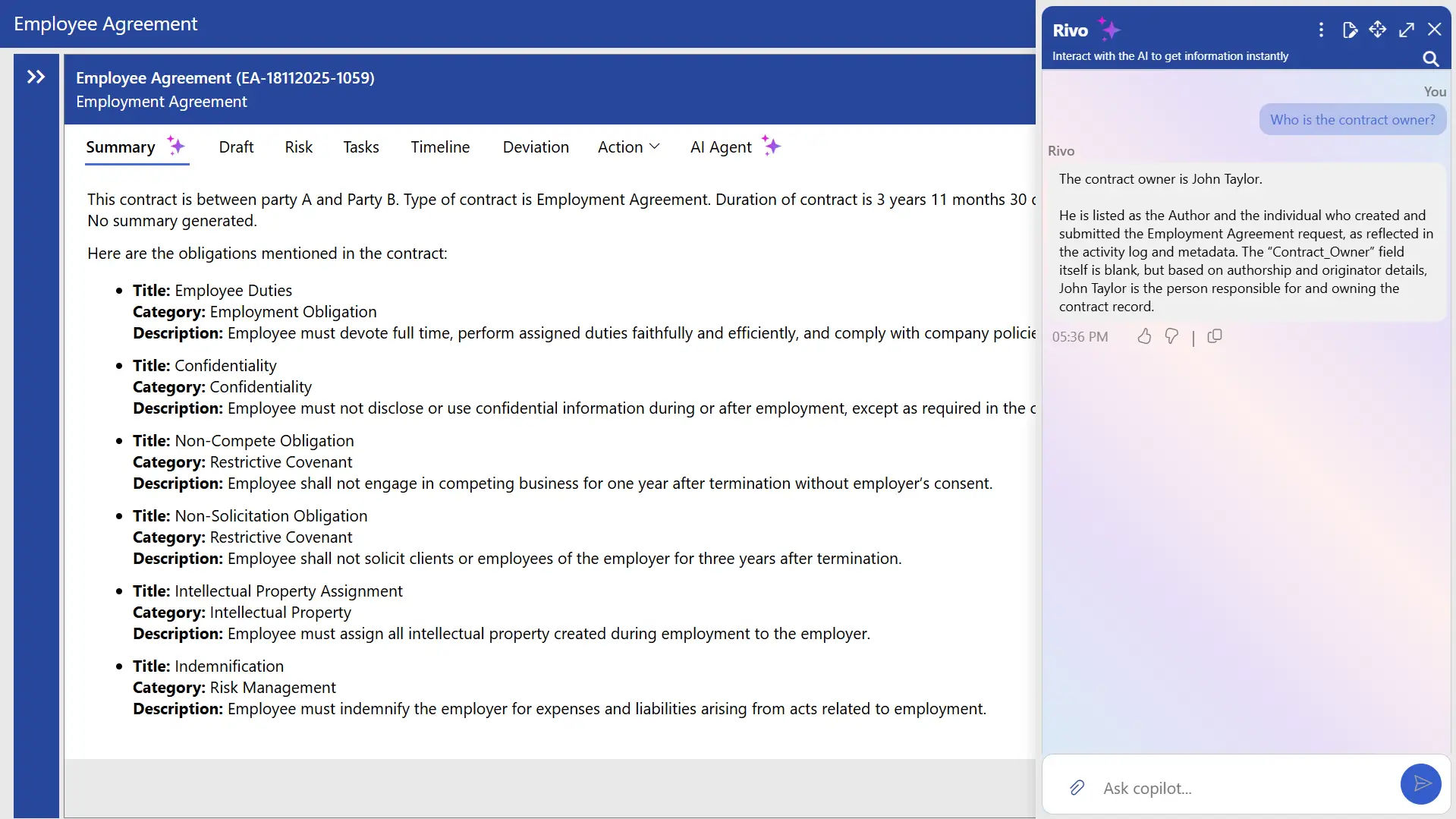
Modern contract management software uses AI to analyze contracts and identify important clauses, risks, and obligations. Instead of reading long documents line by line, teams can quickly locate key terms such as payment conditions, renewal clauses, or liability sections. AI tools can also highlight missing clauses or unusual language in a contract. According to McKinsey & Company, 88% of organizations report regular AI use in at least one business function, compared with 78% a year earlier. This growth shows how AI is becoming a common part of many business tools, including contract management.
Contracts contain legal and compliance requirements that businesses need to follow. PwC reports that 85% of executives believe compliance requirements have become more complex over the past three years. A contract management platform makes it easier to organize and monitor these contractual obligations.
Without a structured approval process, documents can get delayed in email inboxes or shared folders. Contract automation enables businesses to set approval workflows that move contracts through the required review stages. Nearly 70% of organizations have a formal contracting technology strategy, while 99% still lack the data and technology needed to improve their contracting process.
Contract management software lets users save contracts in a digital repository and quickly find documents using keywords, contract names, or involved parties. A contract repository system helps teams access agreements during audits, negotiations, and business reviews without searching across multiple folders or platforms.
A clause library stores commonly used legal provisions for reuse across contracts. Legal teams can save clauses covering confidentiality, payment terms, liability, and termination in a shared library. Contract management software makes these clauses easy to access and add to new agreements, helping maintain consistency and reducing the time needed to draft contracts.
Contracts may pass through multiple revisions before the final version is approved, with different stakeholders making changes along the way. The contract management tool allows teams to compare document versions and identify changes between drafts. Users can see added, deleted, or modified sections, making it easier for legal teams to compare contracts and track how the contract has changed over time.
Negotiation is a key stage in the contract process, where both parties review terms and propose changes. Contract negotiation workflow helps teams manage discussions, comments, and document revisions in one place. It maintains a record of edits and negotiation activity, allowing teams to track progress and review the history of changes throughout the process.
Business requirements can change after a contract is signed, making amendments to pricing, scope, or timelines necessary. A good software for contract management helps businesses record these amendments and maintain a history of changes. This allows teams to track contract amendment and access the latest version of an agreement when needed.
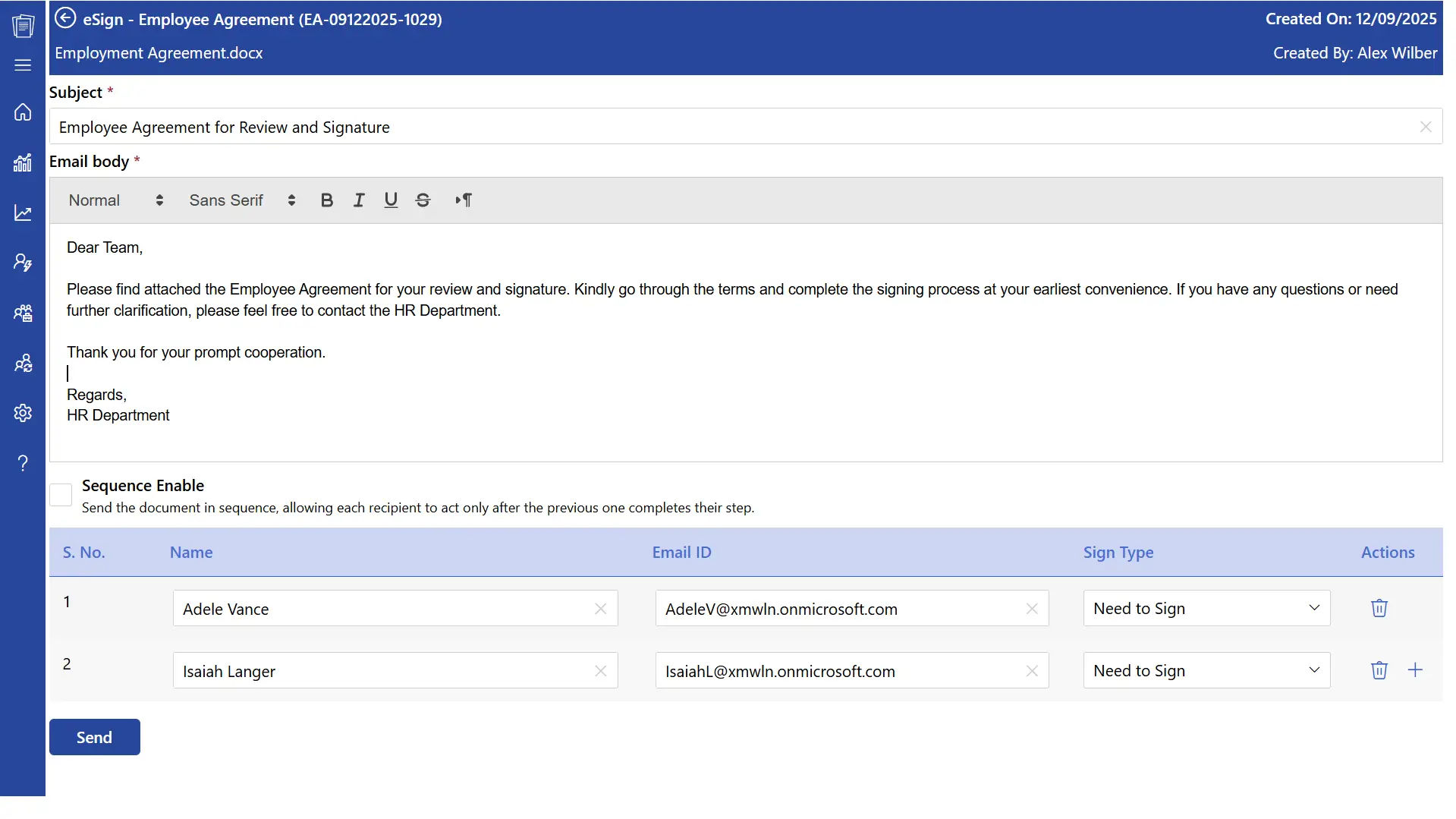
Research indicates that electronic signatures can increase customer loyalty by up to 500% by making contract signing faster and more convenient. Electronic signatures let businesses sign contracts digitally without printing or scanning documents. Contract management software can integrate with e-signature tools, allowing agreements to be signed online. This simplifies the contract signing process and enables remote teams to complete agreements from different locations.
Contracts may include sensitive information such as pricing, intellectual property, and partnership terms. The contract management tool uses role-based permissions to control who can access or edit specific agreements. Legal teams can have full access, while other departments can be limited to the contracts or information relevant to their roles.
Contract Management Software to Consider Before You Choose One
Choosing a contract platform can feel harder than it should. Every product promises faster workflows, better visibility, and smarter contract handling. But the real difference shows up when you look at how each tool fits the way your team actually works.
Products | Integration Capability | G2 Ratings | Free Trial |
SharePoint, Microsoft 365 Applications, Adobe Acrobat and Docusign | Yes (14-days) | ||
Juro | Salesforce, Greenhouse, | 4.5/5 | No |
Ironclad | HubSpot Sales Hub, Salesforce and Okta | 4.4/5 | Custom Quote |
Icertis | Salesforce, Whatfix, Workday and SAP S/SAP 4 HANA | 4.2/5 | Custom Quote |
Zoho Contracts | Zoho Suites | 4.6/5 | Yes |
Summize | Box, DocuSign, NetSuite and Salesforce | 4.7/5 | Yes |
Concord | Salesforce, Hubspot , Gmail and Box | 4.2/5 | Yes |
Hyperstart | Hubspot, Pipedrive, Google Drive and Slack | 4.5/5 | Yes |
Note to readers: G2 ratings were last updated in September 2026 and may change over time as new reviews are added.
CLM 365 is a contract lifecycle management platform built for organizations that already work with Microsoft 365. Instead of creating another isolated system for contracts. It connects contract management with familiar Microsoft tools such as SharePoint, Microsoft Teams, Word, Outlook, Power Automate, Power BI, and Microsoft Copilot.
It covers the contract lifecycle from creation and review to approvals, signing, storage, and renewals. Its AI capabilities can also help users understand contract content faster.
Pros
Built around Microsoft 365
Microsoft Teams and SharePoint integration
AI-powered contract capabilities
Power Automate workflow automation
Contract templates and clause management
Centralized contract repository
Contract access controls and audit trails
Reporting and contract insights
Microsoft Word and Outlook integration
Cons
- Initial configuration may require some planning
- Teams may need onboarding to use the wider range of capabilities
Best known for
Easy-to-use contract management with AI and automation. CLM 365 combines a simple user experience with AI-powered capabilities and automated workflows, helping teams manage contracts with less manual effort while working within the Microsoft 365 environment they already know.
Supported Browsers: CLM 365 supports modern browsers, including Google Chrome, Microsoft Edge, Mozilla Firefox, and Safari.
Pricing Plans
- Plus: $49.99 per user / month, billed yearly
- Premium: $69.99 per user / month, billed yearly
- Enterprise Plan: Get a custom quote
Lite User
- Plus lite user: $19.99 per lite user / month, billed yearly
- Premium: $39.99 per lite user / month, billed yearly
Hear from Our Delighted Clients
CLM 365 has made contract reviews faster and more efficient with AI-powered contract summaries. It helps teams quickly understand key terms, obligations, and potential risks, reducing manual review and enabling faster, more informed decision-making.
Juro takes a browser-first approach to contract management. It gives legal and business teams a shared workspace for creating, reviewing, negotiating, approving, and signing agreements.
Its clean interface and collaborative workflow make it suitable for teams that want contract work to happen online without relying heavily on separate documents and email threads.
Pros
- Easy-to-use interface
- Browser-based workspace
- Flexible templates
- AI-assisted contract workflows
- Collaboration features
Cons
- Complex document formatting may need adjustments
- Advanced workflows can require configuration
Ironclad is designed around structured contract workflows. It helps organizations define how agreements move through drafting, review, approval, negotiation, and signing.
Its integrations with business applications also help connect contract processes with wider sales and operational workflows.
Pros
- Flexible workflow design
- Business application integrations
- Contract negotiation tools
- Approval management
- Workflow automation
Cons
- Setup can involve significant configuration
- Advanced functionality may be unnecessary for smaller teams
Icertis is built for large organizations with extensive and complex contract portfolios. It supports contract creation, compliance, workflow management, analytics, and integrations across enterprise systems.
Its focus is less on basic contract storage and more on managing contracts as a source of structured business information.
Pros
- Enterprise-scale capabilities
- Extensive customization
- Contract analytics
- Compliance management
- Enterprise integrations
Cons
- Implementation can be complex
- Smaller businesses may not need its full feature set
Zoho Contracts adds contract lifecycle management to the wider Zoho business ecosystem. It covers drafting, negotiation, approvals, electronic signatures, storage, renewals, and post-signature activities.
For companies already using Zoho applications, this creates a more connected environment for managing agreements.
Pros
- User-friendly interface
- Contract templates and clause library
- Automated reminders
- Contract status tracking
- Zoho ecosystem integration
Cons
- Third-party integration options may be limited
- Some advanced customization may be restricted
Summize connects contract management with the workplace applications employees already use. It integrates with platforms such as Microsoft Teams, Slack, Salesforce, and Jira, allowing users to initiate and manage contract-related activities from familiar environments.
Its approach puts accessibility at the center of the contract process.
Pros
- Strong workplace integrations
- Intuitive interface
- AI-assisted contract analysis
- Contract request management
- Automated workflows
Cons
- Search capabilities may have some limitations
- Advanced functionality can take time to learn
Concord brings contract creation, collaboration, electronic signatures, and storage into one platform. Its straightforward interface is designed for business teams that want to manage agreements without dealing with an overly complicated system.
It can be particularly useful for organizations looking for a simpler approach to everyday contracting.
Pros
- Simple user interface
- Online collaboration
- Electronic signatures
- Contract storage
- Accessible for business teams
Cons
- Customization options may be limited
- Some platform issues have been reported by users
HyperStart is a contract management software designed to help legal and business teams manage agreements from drafting to post-signature activities. It combines AI-powered contract review with workflows for approvals, negotiations, e-signatures, and contract tracking, giving teams a centralized place to manage their agreements.
Pros
- Clause Library
- Automated approval and contract workflows
- Centralized contract repository
- E-signature capabilities
- Contract tracking and reminders
Cons
- Some advanced features may require a learning curve
- Integration options may vary depending on business requirements
What are the Benefits of Contract Management Software?
It helps businesses handle agreements in a more organized way. It improves team collaboration, supports compliance, reduces risks, and keeps contracts easy to access. It also provides useful data that helps businesses make better decisions.
Contract management tools provides a shared workspace where legal, finance, procurement, and business teams can work on agreements together.
Teams can upload, review, and edit contracts within one platform while accessing the latest version of the document. Users can also add comments and suggestions directly to contracts, making collaboration easier.
When contract management integrates with Microsoft Teams, internal and external teams can collaborate more effectively during contract reviews.
Contract management software helps teams track these details and stay informed about their responsibilities.
The system monitors deadlines, obligations, and key milestones, helping teams take action on time. Proper tracking can help businesses reduce the risk of penalties, disputes, and missed commitments.
A centralized record of contract activities also makes it easier to manage legal and operational responsibilities.
Contracts define commitments, timelines, and legal conditions that shape business relationships.
The contract management software tracks deadlines, contractual obligations, and key milestones, giving teams greater clarity over upcoming commitments. This allows them to respond at the right time and reduce the risk of missed duties, disputes, or penalties.
A structured record of contract activities also gives organizations a clearer view of their legal and operational commitments.
Automation in contract management platform helps businesses handle routine contract activities with less manual effort.
Processes such as approvals, reminders, and document tracking can be automated within the system.
Faster contract workflows can help teams complete agreements sooner while supporting stronger relationships with vendors and partners.
Contract lifecycle management software helps safeguard this data through features such as encryption, user permissions, and audit logs.
Access controls let organizations determine who can view or modify specific agreements, reducing the risk of unauthorized access.
Audit logs also maintain a record of contract-related activities, giving businesses greater visibility into changes and supporting compliance with internal policies.
It helps them find agreements quickly and examine important clauses with greater ease.
The contract management software records document revisions, tracks changes, and maintains a history of updates made throughout the contract lifecycle. Alerts can also help legal teams identify issues that require attention.
Detailed audit logs capture changes, approvals, and other contract activities, providing a clear record for legal and compliance purposes.
Centralized storage is a key benefit of contract software. Agreements are kept in a single digital repository, making them easier to find and access when needed.
Procurement teams and business managers can review supplier agreements, monitor contract performance, and access important terms from one location.
Contract management software helps businesses assess agreements in advance, negotiate terms more effectively, and identify upcoming contract renewals.
Who Benefits from Contract Software Management?
A software for contract management helps teams across the business manage agreements, track obligations, and access contract details easily. Legal, HR, procurement, finance, and compliance teams can all benefit from it.
- Legal Team: Manage, review, track, and store contracts while monitoring clauses, versions, and obligations.
- Procurement Team: Manage supplier agreements, track renewal dates, review terms, and monitor vendor commitments.
- Sales Team: Create customer agreements, track approvals, and access signed contracts quickly.
- Finance Team: Track payment terms, contract values, billing schedules, and financial commitments.
- HR Team: Manage employee agreements, track important dates, and maintain organized contract records.
- Supply Chain Team: Manage supplier contracts, track delivery terms, and monitor supplier responsibilities.
Why Choose CLM 365 Among All ?
Your contract data stays within your Microsoft 365 and SharePoint environment, using your existing security, permissions, and access controls.
You stay in control of AI, with no contract data sent to public AI services such as ChatGPT unless you explicitly configure an approved provider.
CLM 365 combines a simple interface with enterprise-grade security. It is SOC 2 compliant, Microsoft certified, and recognized as a Microsoft Solutions Partner, with support for Microsoft GCC and GCC High.
CLM 365 offers transparent pricing with no hidden charges, so you know what you’re paying for from the start.
Conclusion
Using contract management software helps businesses manage agreements in a more organized way. It provides a complete system that supports every stage of the contract process, from creating agreements to tracking renewals.
With features such as AI support, automated workflows, secure storage, and real-time tracking, contract management software helps teams handle contracts more effectively while meeting legal and policy requirements.
Looking to improve your contract management process? Schedule a free demo today. Our demo specialist will guide you through the platform and answer your questions.
Frequently Asked Questions
How long does it usually take to implement contract management software?
Implementation time varies based on your organization’s needs. CLM 365 can be deployed within your Microsoft 365 environment in under 10 minutes, while workflows, integrations, and other settings can be configured based on your requirements.
Where is CLM 365 hosted?
CLM 365 is a SharePoint Framework (SPFx) application that runs within your Microsoft 365 and SharePoint Online environment. It works with your existing Microsoft ecosystem and integrates with services such as SharePoint and Microsoft Teams.
How long does it usually take to implement contract management software?
Implementation time varies based on your organization’s needs. CLM 365 can be deployed within your Microsoft 365 environment in under 10 minutes, while workflows, integrations, and other settings can be configured based on your requirements.
Can multiple people edit the same contract without creating duplicate versions?
Yes. Contract management software provides version control, collaboration features, and audit trails, allowing multiple users to work on agreements while maintaining a clear record of previous revisions.
How do I find a specific contract when we have hundreds of them?
Advanced search and filters help you quickly find contracts by keywords, vendors, owners, departments, renewal dates, values, statuses, and other metadata.
Can I customize approval workflows for different contract types?
Yes. Approval workflows can be customized based on contract type, value, department, region, vendor, or other business rules.
Try It Free, No Obligation










Schedule a free personalized 1:1 demo
By proceeding, you accept Cubic Logics’s terms and conditions and privacy policy





Please provide your contact details, we will connect with you soon!
Please provide your contact details, we will connect with you soon!
By proceeding, you accept Cubic Logics Terms and Conditions and Privacy Policy
Schedule a free personalized 1:1 demo
By proceeding, you accept Cubic Logics’s terms and conditions and privacy policy







