
Clockify vs Toggl Track: Pros, Cons & Differences (Complete Guide)
_mVFFaHUZhS.webp)
Are you tired of losing track of hours and watching your revenue slip away? Whether you’re comparing Clockify vs Toggl Track for your team or exploring toggl vs clockify as a solo worker, this guide gives you every answer you need clearly, honestly, and without the tech jargon.
✓ Compare Clockify and Toggl Track based on features, pricing, and usability
✓ Choose Clockify for larger teams, invoicing, and flexible time-tracking options
✓ Choose Toggl Track for simple tracking, integrations, and privacy-focused teams
✓ Explore Timesheet 365 for Microsoft 365, SharePoint, and Teams-based time tracking
Why Time Tracking Matters More Than Ever in 2027
Let’s be real. Most people think they know where their time goes. But the data says otherwise. Studies show the average employee is truly productive for less than three hours a day. Hours vanish. Projects go over budget. Clients get billed less than they should. And at the end of the week, nobody can explain where all the time went.
That is exactly why time tracking software has exploded in popularity. In 2027, the global time tracking software market is valued at over $8 billion and it is growing fast. Smart businesses, freelancers, remote teams, and even students are turning to tools like Clockify and Toggl Track to take back control of their days.
📊 Stat:
The global time tracking software market is projected to grow from $8.36 billion in 2025 to $29.88 billion by 2033, at a CAGR of 17.26%.
So, the question is not whether you need a time tracker. The question is: which one is right for you?
Two names come up in almost every conversation: Clockify and Toggl Track. Both are popular. Both are trusted. But they are built for different kinds of people. Let us break it down.
What Is Clockify?
Clockify is a free time tracking tool built for teams of all sizes. It was created in 2017 and quickly became one of the most widely used time trackers in the world mainly because of one huge reason: it is completely free for unlimited users.
That is not a typo. You can add 5 people or 500 people to your Clockify workspace and pay exactly zero dollars. The free plan includes:
- Unlimited time tracking and timesheets
- Unlimited projects and clients
- Basic reports and dashboards
- Browser extensions for Chrome, Firefox, and Edge
- Mobile apps for iOS and Android
- Calendar view and manual time entry
Clockify is a great fit for growing businesses that need to manage a team without blowing their budget. It is also widely used by agencies, HR managers, and project leads who need to track billable hours accurately.
What Is Toggl Track?
Toggl Track (often called just Toggl) is one of the oldest time tracking tools on the market. It launched in 2006 and has built a loyal following for one simple reason: it is incredibly easy to use.
The moment you open Toggl Track, you see a big, bright start button. Click it. Track your time. That is it. There is no steep learning curve. No confusing menus. Just clean, fast, and simple time tracking that anyone can pick up in minutes.
Toggl Track’s free plan supports up to five users and includes:
- One-click timer with auto-start reminders
- Manual time entries and calendar view
- Basic reporting and CSV export
- 100+ integrations with tools like Asana, Jira, and Salesforce
- Desktop apps for Windows and Mac
- Mobile apps for iOS and Android
Toggl is especially popular among freelancers, designers, consultants, and small teams that value a clean interface and a smooth daily experience.
Ready for a smarter way to track time?
Clockify vs Toggl Track: Quick Comparison
Before we go deep, here is a simple side-by-side view of how these two tools compare on the things that matter most.
| Feature | Clockify | Toggl Track |
| Free Plan Users | Unlimited | Up to 5 users |
| Starting Paid Price | $5.45/user/month | $9/user/month |
| Ease of Use | Moderate | Very Easy |
| Auto Time Tracking | Yes (desktop app) | Yes (desktop app) |
| Invoicing | Yes (Standard plan+) | No invoicing |
| Timesheet Approval | Yes (Standard plan) | Only on Premium ($20) |
| GPS Tracking | Yes (Pro plan) | No |
| Integrations | 80+ | 100+ |
| Kiosk / Clock-In Mode | Yes | No |
| Privacy Policy | Moderate monitoring | No GPS or screenshots |
| Reports & Analytics | Good | Excellent |
| Best For | Teams & Businesses | Freelancers & Small Teams |
Clockify: Pros and Cons
Pros of Clockify
- Free forever for unlimited users — no hidden fees, no user caps
- More affordable paid plans — starts at $3.99/user vs Toggl’s $9/user
- Built-in invoicing on the Standard plan and above
- Timesheet approval so managers can review and sign off on hours
- Kiosk mode for shared clock-in terminals — great for offices
Cons of Clockify
- The interface can feel cluttered and less modern compared to Toggl
- Employee monitoring features (GPS, screenshots) can feel intrusive
- Some syncing issues reported between mobile and desktop apps
- Data older than one year requires a paid upgrade to access in reports
- Less polished integration experience than Toggl
Toggl Track: Pros and Cons
Pros of Toggl Track
- The cleanest, most beautiful interface in the time tracking category
- One-click timer — start tracking in literally seconds
- 100+ integrations, including Asana, Jira, Salesforce, Notion, and GitHub
- Excellent visual reporting with revenue tracking, team workload, and profit data
- Strong privacy stance — no GPS tracking or screenshots, ever
Cons of Toggl Track
- Free plan only supports 5 users — teams grow fast and hit this wall quickly
- Starting paid price ($9/user) is more than double Clockify’s entry plan
- No invoicing at any plan level — you need a separate billing tool
- No kiosk mode or GPS tracking — not ideal for field or shift-based teams
- Cannot add expenses or manage scheduling within the platform
💡 Why settle for two tools when Timesheet 365 does it all?
Clockify vs Toggl: Pricing Breakdown
Let us talk money — because for most businesses and individuals, pricing is the deciding factor.
Clockify Pricing
- Free: $0 — Unlimited users, unlimited projects, basic tracking
- Basic: $3.99/user/month (annual) — Break tracking, time audits
- Standard: $5.49/user/month — Invoicing, timesheet approval, leave management
- Pro: $7.99/user/month — GPS, scheduling, expense management
- Enterprise: $11.99/user/month — SSO and audit logs
Toggl Track Pricing
- Free: $0 — Up to 5 users, basic tracking and reports
- Starter: $9/user/month — Billable rates, time rounding, project templates
- Premium: $18/user/month — Timesheet approvals, priority support
- Enterprise: Custom pricing — Dedicated support and custom contracts
The verdict on pricing is clear: Clockify wins on value. For a team of 10 people, Clockify at the Standard plan costs around $55/month. The same team on Toggl Starter costs around $90/month. That is real money especially for growing businesses.
Which Tool Has Better Integrations?
In 2027, no tool works in a silo. Your time tracker needs to connect with the apps your team already uses every day.
Toggl Track leads here with 100+ integrations. It plugs directly into tools like Jira, Notion, GitHub, Asana, Salesforce, and more. The browser extension lets you start a Toggl timer right inside third-party apps, no tab switching needed.
Clockify has 80+ integrations and works well with Google Calendar, Trello, Jira, and Microsoft Outlook. However, its integration experience is considered less seamless compared to Toggl, especially for development and creative teams.
If integrations are your top priority, Toggl Track has the edge.
Reporting and Analytics: Who Wins?
Both tools offer solid reporting. But they focus on different things.
Clockify gives you detailed reports on time entries, project cost, billable hours, and team usage. The analytics dashboard is useful for billing clients and managing payroll. You can export data as PDF, CSV, or Excel.
Toggl Track went through a major reporting upgrade in early 2025. It now offers five report types including Summary, Detailed, Workload, Revenue vs. Budget, and Profit & Loss. These visual reports are richer and more polished ideal for agency owners or consultants who present results to clients.
For deep financial analytics and team performance insights, Toggl Track has the stronger reporting suite. For basic project and billing reports, Clockify gets the job done at a much lower cost.
Employee Privacy: A Key Difference
This is where Toggl vs Clockify shows a very real values difference.
Clockify offers GPS location tracking, screenshot capture, and kiosk clock-in on its higher plans. These are powerful tools for companies that need to monitor field employees or manage shift workers. But some employees may find these features intrusive.
Toggl Track is against employee surveillance. It doesn’t provide GPS tracking or screenshots at any plan level. This is ideal for businesses looking to foster trust and independence within their organization.
There is no right or wrong answer here. It is completely dependent on your team’s culture and your business requirements. Clockify’s monitoring capabilities can be beneficial for field teams and hourly employees. Toggl’s no-surveillance environment might be better for knowledge workers and creative teams.
Who Should Use Clockify?
Clockify is the better choice if you:
- Need a free time tracker for a large team with no user cap
- Want built-in invoicing and timesheet approval without paying premium prices
- Manage a field team that needs GPS and kiosk clock-in features
- Are running a business with tight margins and need to control software costs
- Need scheduling, expense tracking, and project budgeting in one place
- Are part of a startup, agency, or company with 10 or more employees
Who Should Use Toggl Track?
Toggl Track is the better choice if you:
- Are a freelancer, consultant, or solo professional who values simplicity
- Work in a small team of 5 or fewer people (free plan covers you)
- Prioritize a clean, beautiful interface and fast one-click tracking
- Use tools like Jira, Notion, GitHub, or Salesforce and need tight integration
- Care deeply about employee privacy and do not want surveillance features
- Need strong reporting and visual dashboards to share with clients
Timesheet 365 combines AI-powered tracking + Microsoft 365 + SharePoint. See it live
Why Timesheet 365 is the Best Alternative for Businesses
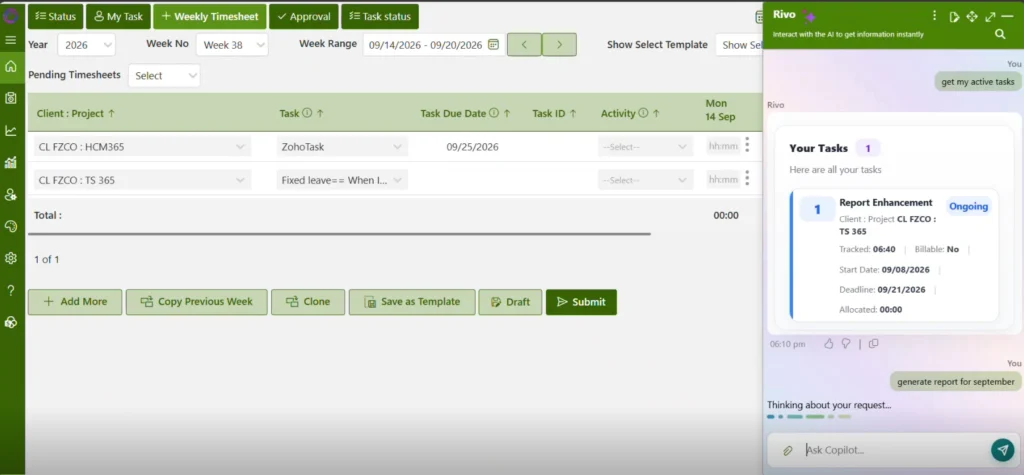
Here is the honest truth: Both Clockify and Toggl Track are good tools. But neither was built for the way most modern businesses actually work especially teams using Microsoft 365, SharePoint & Timesheet AI agents that helps to track and monitor employees.
If your team lives in Microsoft’s ecosystem, you are constantly switching between your time tracker and your work apps. That is friction. That is time wasted. That is exactly the problem Timesheet 365 was built to solve.
Timesheet 365 is a next-generation time and attendance solution built natively inside Microsoft 365. It is not a bolt-on tool. It is a fully integrated experience that lives where your team already works.
Timesheet 365: Key Features
- AI-Powered Time Tracking — Smart suggestions based on your Microsoft 365 activity, calendar, and project patterns. No more manually logging every task.
- SharePoint Integration — All timesheet data stored securely in your SharePoint environment. Full data ownership. Zero third-party servers.
- Microsoft Teams Integration — Submit, review, and approve timesheets right inside Teams. No separate app needed.
- Power BI Reporting — Real-time dashboards and deep analytics powered by Power BI. Turn time data into business intelligence.
- Timesheet Approval Workflow — Automated approval chains built into your existing Microsoft workflow.
- Works for Everyone — Freelancers, SMBs, enterprise teams, HR managers, project leads, and executives. One platform for all.
- GDPR-Compliant & Secure — Your data stays in your Microsoft tenant. No data leaves your environment.
Think of Timesheet 365 as the bridge between your time tracking and your entire Microsoft ecosystem. It is smarter, faster, and more connected than Clockify or Toggl could ever be for Microsoft users.
Conclusion
In the clockify vs toggl track battle, there is no clear winner, there is only the best solution for you.
Clockify is the winner if you need a free tool for a large team, built-in invoicing, GPS or monitoring features. Toggl Track is a good choice for freelancers or small teams that seek a beautiful, simple experience with robust integrations and a privacy-first approach.
However, if your team is on Microsoft 365 and most teams are — neither provides the deep integration, AI-powered automation, and native SharePoint experience that Timesheet 365 offers.
Ready to See the Future of Time Tracking?
Book a Free Demo of Timesheet 365 — No Credit Card Required.
Frequently Asked Questions
Is Clockify really free for unlimited users?
Yes! Clockify’s free plan supports unlimited users with core time tracking, timesheets, and basic reports. Features like invoicing, GPS, and timesheet approval require a paid plan starting at $3.99/user/month.
Is Toggl Track better than Clockify?
It depends on your needs. Toggl Track has a better interface and stronger integrations, while Clockify wins on price and team size flexibility. For Microsoft 365 users, Timesheet 365 is a stronger alternative to both.
Does Toggl Track have invoicing?
No. Toggl Track does not include invoicing at any plan level. You will need a separate billing tool like FreshBooks or QuickBooks. Clockify includes invoicing on its Standard plan ($5.49/user/month).
Can I switch from Clockify or Toggl to Timesheet 365?
Absolutely. Timesheet 365 offers easy onboarding for Microsoft 365 users and can import existing timesheet data. Your team can be up and running within hours, not days.
What makes Timesheet 365 different from Clockify and Toggl?
Timesheet 365 is built natively inside Microsoft 365 and SharePoint. It uses AI to auto-suggest time entries, integrates with Microsoft Teams for approvals, connects to Power BI for reporting, and keeps all data inside your secure Microsoft tenant — something neither Clockify nor Toggl can offer.


_JiluXJRGNl.svg)























