

Clockify vs Harvest: Which Time Tracking Software Wins in 2027?
_mVFFaHUZhS.webp)
In this guide we compare Clockify vs Harvest feature by feature for 2027. We cover what each tool is, how they differ, their pros and cons, and who each one suits best. Then we show you a third option built for teams that live in Microsoft 365: Timesheet 365, which uses an AI agent to capture work hours and carries them all the way from entry to reporting.
- Clockify is the best value, with a free plan for unlimited users.
- Harvest is the best for fast, polished client invoicing.
- Both rely on manual timers or timesheets, so hours still get missed.
- Timesheet 365 uses an AI agent to capture hours automatically, inside Teams and SharePoint.
What is Clockify?
Clockify is a time tracking and timesheet app built by CAKE.com, known best for its free plan with unlimited users and unlimited time tracking. Teams can log time with a start-stop timer, enter hours manually in a weekly timesheet, or clock in through a shared kiosk.
Over the years Clockify has grown beyond simple time logging. Paid tiers add scheduling, expense tracking, invoicing, time-off management, approvals, GPS tracking and optional screenshots. It runs on web, desktop and mobile, and its browser extension adds a timer button inside dozens of popular tools such as Jira, Asana and Trello.
Clockify tends to attract budget-conscious teams, agencies and growing businesses that want broad employee time tracking without a large upfront cost.
What is Harvest?
Harvest is a time tracking and invoicing tool, launched in 2006, that is designed around one idea: turn tracked hours into paid invoices with as little friction as possible. It is especially popular with agencies, consultancies and freelancers who bill clients by the hour.
Harvest offers a timer and timesheet entry, project budgets, expense tracking and polished visual reports. Its standout strength is invoicing. Billable time and expenses flow straight into invoices, which clients can pay online, and Harvest syncs with accounting tools like QuickBooks and Xero.
It integrates with tools such as Asana, Trello, Jira and Slack, and its sister product, Harvest Forecast, handles resource planning as a separate subscription. The result is a focused, easy-to-learn tool that does fewer things than Clockify but does its core workflow very well.
Clockify vs Harvest vs Timesheet 365: feature comparison
Clockify wins on price and breadth, Harvest wins on invoicing polish, and Timesheet 365 wins for teams that work inside Microsoft 365 and want time entry automated.
Feature | Clockify | Harvest | Timesheet 365 |
Free plan | Yes, unlimited users and tracking | Yes, 1 seat and 2 projects | 14-day Free Trial |
Paid pricing (approx., per user/month, annual) | About $4 to $12 across tiers | About $11 to $14 across tiers | About $3.6 per user |
Time capture | Timer, manual timesheet, kiosk, auto tracker | Timer, manual timesheet | AI agent captures work hours automatically |
Invoicing | Yes, on paid plans | Yes, core strength with online payments | Reporting-led; check billing needs in demo |
Approvals | Yes, on paid plans | Yes, on higher tier | Built into the entry-to-reporting flow |
Reporting | Detailed, summary and weekly reports | Visual project and budget reports | Automated reports from captured hours |
Microsoft Teams | Via integrations and add-ons | Limited | Native Teams integration |
SharePoint | Not native | Not native | Native SharePoint integration |
Best for | Budget-conscious teams wanting many features | Agencies that bill clients by the hour | Microsoft 365 organizations wanting automation |
Feature availability and pricing change often. Treat this as a starting point and confirm details with each vendor.
Clockify: features, benefits, pros and cons
Clockify’s biggest benefit is reach: you can roll it out to an entire company for free and add advanced features only where you need them.
- Flexible time entry. A one-click timer, weekly timesheet view, kiosk mode for shared devices, and an auto tracker on desktop that records apps and sites used.
- Project and task tracking. Organize work by client, project, task and tag, with billable rates set per user or per project.
- Workforce tools. Scheduling, time off, expenses, GPS location and attendance appear on paid tiers.
- Reports and exports. Summary, detailed and weekly reports that export to PDF, CSV or Excel.
- Wide integrations. A browser extension adds a timer to many web apps, plus an API for custom workflows.
Small teams can track project time without a budget conversation. Growing businesses can add payroll-ready attendance and approvals later without switching tools. Managers also get a clear view of billable versus non-billable work across clients.
- Generous free plan with unlimited users
- Low per-user pricing on paid plans
- Very broad feature set in one product
- Available on web, desktop and mobile
- The interface can feel busy as more features are switched on
- Many valuable features sit behind higher tiers
- Time entry is still largely manual unless people remember to start timers
- Microsoft Teams and SharePoint support is not native
Harvest: features, benefits, pros and cons
Clockify’s biggest benefit is reach: you can roll it out to an entire company for free and add advanced features only where you need them.
- Simple time tracking. A clean timer and timesheet that new users learn in minutes, on web, desktop and mobile.
- Invoicing and payments. Turn billable hours and expenses into invoices, send reminders, and accept online payments.
- Project budgets. Set budgets by hours or fees and get alerts before a project runs over.
- Visual reports. Clear reports on time, budgets, uninvoiced work and team capacity.
- Accounting sync. Connections to QuickBooks and Xero, plus integrations with Asana, Trello, Jira and Slack.
Agencies protect margins because budget alerts flag overruns early. Finance teams spend less time rebuilding invoices from spreadsheets. Leaders get an easy view of utilization rate and which clients are profitable.
- Clean, intuitive design with a short learning curve
- Excellent time-to-invoice workflow
- Strong project budget tracking
- Reliable accounting integrations
- Free plan is very limited (1 seat, 2 projects)
- Higher per-user cost than Clockify
- Fewer workforce features such as scheduling, GPS or attendance
- Resource planning needs a separate Forecast subscription
- Limited native support for Microsoft Teams and SharePoint
SHRM: accurate records are a compliance issue, not a nice-to-have
SHRM’s guidance on wage and hour compliance stresses that employers must keep accurate records of hours worked for non-exempt employees under the Fair Labor Standards Act. When people fill timesheets from memory at the end of the week, errors creep in, and those errors can turn into payroll disputes. Accurate employee time tracking protects both the business and its people. SHRM
Harvard Business Review: collaboration is eating the workday
In “Collaborative Overload,” Harvard Business Review reported that time spent by managers and employees in collaborative activities had grown by 50% or more over two decades. Much of that time lives in meetings, chats and calls, which are exactly the hours people forget to log. A tool that only records what someone remembers to type will miss a large share of real work. Harvard Business Review
Deloitte: leaders want better ways to measure work
Deloitte’s 2024 Global Human Capital Trends research found that most leaders see finding better measures of worker performance as important, yet only a small minority feel very effective at it. Reliable project time tracking is one of the building blocks of that measurement, because it shows where effort actually goes across clients and initiatives. Deloitte Insights
Microsoft Work Trend Index: people are short on time and focus
Microsoft’s 2023 Work Trend Index found that 64% of people struggle to have the time and energy to do their job. Asking those same people to also reconstruct their week in a timesheet adds to the load. This is why AI time tracking and timesheet automation are moving from optional to expected. Microsoft WorkLab
Timesheet 365: AI-powered alternative for Microsoft 365 teams
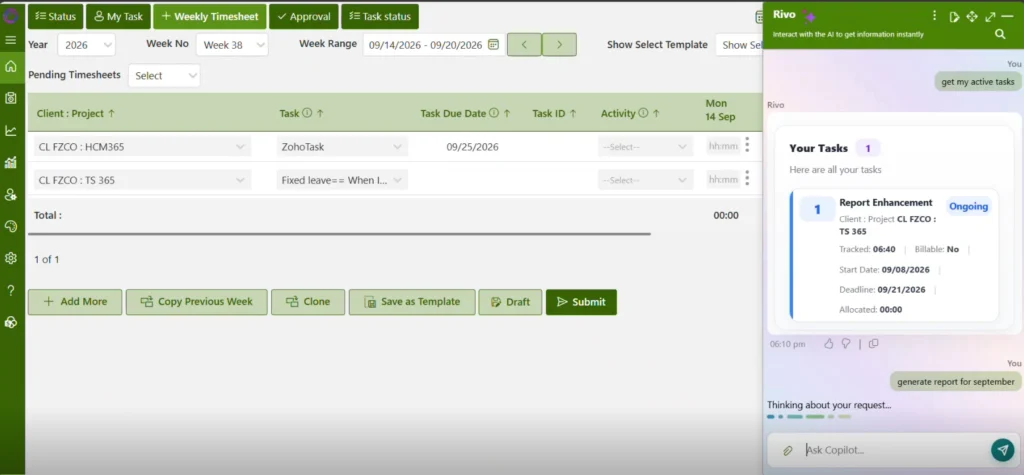
Timesheet 365 removes the hardest part of time tracking, remembering to do it, by letting an AI agent capture work hours for you inside the tools your team already uses.
Clockify and Harvest are both strong tools, but they share one limit. They depend on people starting a timer or filling a timesheet. Timesheet 365 is built on a different idea: the hours should come to the timesheet, not the other way around.
Still chasing timesheets every Friday?
Let’s talk. In a 20-minute demo we’ll show you how Timesheet 365 fills them in for your team.
AI agent that captures work hours
The Timesheet 365 AI agent captures work hours as people work, so entries are built from real activity rather than end-of-week memory. Meetings, calls and project tasks that usually slip through the cracks are recorded. Employees review and confirm instead of typing from scratch.
Automation from entry to reporting
Most tools automate one step. Timesheet 365 automates the whole flow, from time entry through review to reporting. Managers get up-to-date reports on billable hours, project effort and utilization without exporting spreadsheets or nudging people for missing days.
Native Microsoft Teams integration
Your team already spends its day in Microsoft Teams. Timesheet 365 works right there, so logging, checking and approving time happens in the same place as chats and meetings. No extra app to open, and no new habit to build.
Native SharePoint integration
Timesheet 365 connects with SharePoint, so time data sits alongside your projects, documents and sites in Microsoft 365. That keeps information in your trusted environment and makes it easier to tie hours back to the work itself.
The research above shows teams losing time to collaboration, struggling for focus, and needing better ways to measure work. An AI agent that captures hours automatically answers all three: fewer forgotten entries, less admin for employees, and cleaner data for leaders.
Clockify vs Harvest vs Timesheet 365: which should you choose?
The right tool depends on how your team works and where your data needs to live.
If your priority is | Choose | Why |
Lowest cost and the widest feature set | Clockify | Free for unlimited users, with low-cost upgrades for scheduling, GPS and approvals |
Fast, polished client invoicing | Harvest | Best-in-class time-to-invoice flow, budgets and accounting sync |
Automated time capture inside Microsoft 365 | Timesheet 365 | AI agent captures hours, automates entry to reporting, and runs natively in Teams and SharePoint |
If you are a freelancer or small agency, Clockify or Harvest will likely serve you well. If you are an organization standardized on Microsoft 365, and missing or late timesheets are a real cost, Timesheet 365 is the stronger fit. It is worth seeing it alongside the other two before you commit.
Join Our Creative Community
FAQs
Is Clockify better than Harvest?
Clockify is better if you want a free plan for unlimited users and lots of features. Harvest is better if fast, polished client invoicing matters most.
Is Clockify really free?
Yes, the free plan includes unlimited users and unlimited time tracking. Features like scheduling, GPS, approvals and invoicing need a paid plan.
Does Harvest integrate with Microsoft Teams?
Harvest’s Teams support is limited compared with its Slack and accounting integrations. Teams that live in Microsoft 365 often prefer a natively integrated tool like Timesheet 365.
What makes Timesheet 365 different from Clockify and Harvest?
Timesheet 365 uses an AI agent to capture work hours automatically instead of relying on timers. It automates the flow from entry to reporting and works natively in Teams and SharePoint.
Which time tracking software is best for Microsoft 365 users?
A tool built for Microsoft 365, like Timesheet 365, avoids extra apps and keeps data in your environment. Book a demo to see it working with your own Teams and SharePoint setup.


























