

Contracting Software: The Complete Guide for Modern Businesses

For businesses, managing contracts manually can quickly become difficult as the business grows. A vendor agreement gets signed, stored in different folders, and forgotten until an important renewal date or pricing change is missed.
- Align the software with your business goals before choosing a contracting solution.
- Identify high-value processes where contracting software can improve efficiency and control.
- Understand the importance of contract management across the entire contract lifecycle.
- Follow implementation best practices to maximize the value of your contracting software.
World Commerce and Contracting reports that organizations lose up to 9% of annual revenue due to missed obligations and poor visibility. The deals were good. The follow-through was not.
If you search for a contracting software and if it aligns with your company’s goals, the next step is to determine where it can deliver the most value in your processes. This guide explains the importance of contract management and shares best practices for implementing contracting software effectively.
What is Contracting Software?
Contracting software is a digital platform that handles all the phases of a contract, including drafting and negotiation, execution, compliance, and renewal. It replaces the disjointed email chains, shared drives with inconsistently named PDFs, and spreadsheets with expiration dates.
In its simplest form, it provides your legal, procurement, sales and operations departments with one location to develop, review, approve, sign and store contracts. However, the contracting software extends far beyond storage.
7 Best Contracting Software for Teams in 2026
The best contracting software helps businesses manage agreements, speed up approvals, reduce risks, and keep contracts organized as the business grows. Here are some best tools to consider.
Products | Integrations | Ratings (G2) | Free Trial |
CLM 365 | SharePoint, MS Teams, Outlook, MS Copilot, Docusign and MS Word Plugin, Adobe and Docusign | 4.9/5 | ✓ |
Icertis | SAP, Ariba and Salesforce | 4.2/5 | ✓ |
Juro | HubSpot, Salesforce, Zapier and Ashby | 4.6/5 | Contact Sales |
Concord | Salesforce, HubSpot, Slack and Google Drive | 4.2/5 | ✓ |
Zoho Contracts | Integrates with Zoho Suites | 4.6/5 | ✓ |
Summize | Salesforce, Slack, HubSpot and Jira | 4.7/5 | Custom |
SpotDraft | Google Drive, HubSpot, Salesforce and Jira Comment Sync | 4.5/5 | ✓ |
1. CLM 365
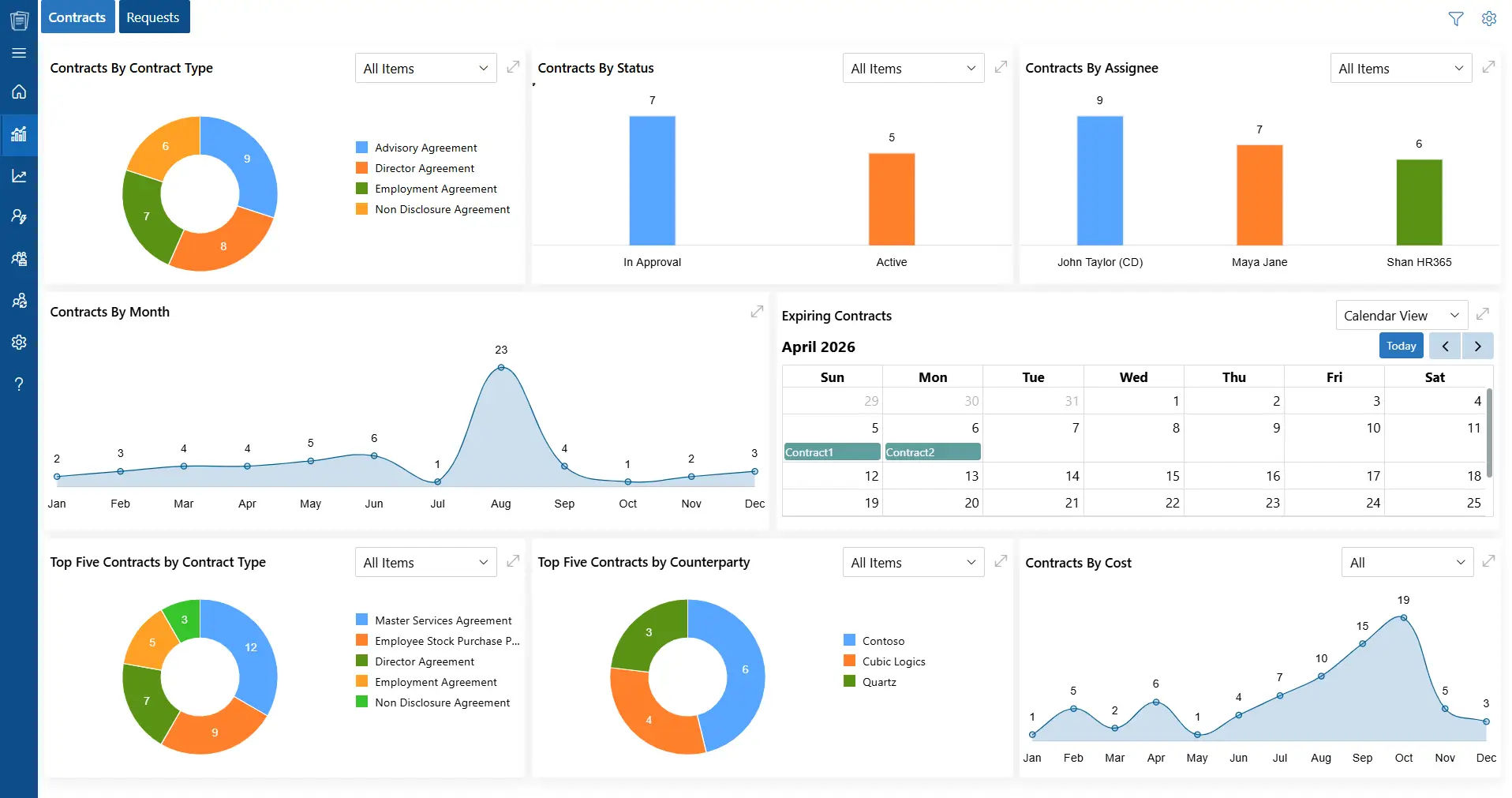
CLM 365 is an AI-powered contract management software built completely inside Microsoft 365, so businesses can manage contracts directly through SharePoint, Teams, Outlook, Power BI, Power Automate and MS Copilot without using separate systems. This makes it useful for companies already working in the Microsoft environment.
The platform supports the complete contract process, including creating contracts from clause library, approvals, editing, tracking obligations, and renewal reminders. Its Microsoft Copilot integration helps users quickly generate contract drafts, summarize clauses, and review agreements using AI.
CLM 365 also focuses strongly on security. It is SOC 2 compliant, Microsoft Certified, and supports GCC and GCC High environments for organizations with strict security needs.
Key Features
- AI-powered contract summaries and obligation tracking
- Contract compliance
- Contract drafting directly inside Outlook
- Draft comparison
- Approval workflows with audit tracking
- Redlining and version control in Microsoft Word
- Contract negotiation with OTP-based protection
- Automated reminders for deadlines and renewals
- DocuSign integration for e-signatures
- Reporting and analytics dashboard
- Enterprise-level security and role-based permissions
Pricing
CLM 365 pricing starts at $49.99 per user/month, billed yearly. The platform offers flexible plans suitable for businesses of different sizes.
Best For
Organizations already using Microsoft 365 that want a contract management solution integrated into their existing workflow. It also helps legal and business teams review contracts faster using AI tools.
How to Deploy CLM 365 (Short Guide)
Getting started with CLM 365 does not require a lengthy implementation project. Here is how to deploy CLM 365.
- Assess your existing contract process to determine the points of congestion, missing links or manual operations that slacken the process.
- Evaluate the tools that your team currently utilizes to prepare documents, accept agreements, contact stakeholders, and store the files of contracts. This assists in identifying the ways in which CLM 365 can integrate into your current workflow.
- Turn on CLM 365 and integrate it with Microsoft 365 to use it to its full potential.
- Connect to Outlook, Microsoft Teams, SharePoint, Microsoft Copilot, and the Word add-in enabling teams to manage contracts in their existing applications.
- Establish approval processes and user access and establish notifications of important dates, obligations, and milestones of the contract.
- Give your team good directions and practical examples and they will learn to use the system effectively within a short time.
- Monitor the use of track systems and contract performance to determine the areas where the workflow can be enhanced with time.
Hear what our client says about us
“CLM 365 helped us transition from a folder-based document repository to a structured contract management system. Contracts are now easier to organize, search, and manage, while standardized processes have significantly improved consistency across our organization.”
IT Specialist, Arianna 2001 S.p.A
Italy
2. Icertis
Icertis is built for large businesses managing thousands of contracts with strict compliance requirements. It integrates with enterprise systems like SAP and Salesforce, making it popular among procurement and legal teams. Its AI powered contract summaries help businesses identify risks, track obligations, and monitor compliance across large contract portfolios.
Key Features
- AI-based risk and obligation analysis
- SAP and Salesforce integration
- Enterprise-grade security and permissions
- Mobile access for approvals
- Advanced contract search
- Custom dashboards for different teams
Best For: All-in-One Browser Platform for Drafting, Approvals, and Signing
3. Juro
Juro is designed to keep the entire contract process in one browser-based platform. Users can create, edit, negotiate, approve, and sign contracts without switching between multiple tools. It works well with CRM platforms like HubSpot and Salesforce, making it useful for sales-focused businesses. The platform helps legal and sales teams collaborate faster by simplifying approvals and contract review process.
Key Features
- Browser-based contract editor
- Built-in e-signature support
- AI contract review and policy checks
- Centralized contract storage with smart search
- Live contract tracking dashboard
- CRM integrations with HubSpot and Salesforce
Best For
Sales and legal teams that want a simple platform to manage contracts from start to finish in one place.
4. Concord
Concord helps businesses improve contract visibility and speed up approvals. It supports collaboration between legal, HR, finance, and sales teams while keeping track of every contract amendment. Its smart search and clause detection features make it easier to manage contracts without changing existing workflows.
Key Features
- Real-time team collaboration
- Clause detection in Microsoft Word
- Smart contract search
- Automated renewal reminders
- Detailed change tracking
- API integrations with business tools
Best For: Real-Time Collaboration and Faster Contract Approval Workflows
5. Zoho Contracts
Zoho Contracts works smoothly with Zoho CRM and other Zoho applications. It helps businesses manage the full contract lifecycle, including drafting, approvals, e-signatures, and version tracking. The interface is simple, making it easy for non-technical users to handle contracts.
Key Features
- Ready-to-use contract templates
- Automated approval workflows
- Built-in e-signatures
- Legal clause library
- Integration with Zoho apps
- Version history tracking
Best For: Reliable Contract Management for Businesses Using Zoho Ecosystem
6. Summize
Summize is designed for legal professionals who mainly work in Microsoft Word. Its Word add-in allows users to review and edit contracts directly inside documents while AI extracts important details like contractual obligations, dates, and risks. This helps legal teams continue working in familiar tools while still benefiting from AI automation.
Key Features
- Microsoft Word add-in
- AI contract summaries and data extraction
- Reminder tracking for important dates
- Team collaboration dashboards
- Cloud-based contract management
- Legal guidance tools
Best For: Centralized Contract Management for Legal and Business Teams
7. SpotDraft
SpotDraft helps reduce repetitive legal work by allowing business teams to create standard contracts through guided templates while keeping legal teams in control through approval systems. Its AI tools identify risky clauses and help maintain compliance before contracts are signed.
Key Features
- AI-powered risk detection
- Guided contract templates
- Built-in e-signature tools
- Custom approval workflows
- Role-based permissions
- Automated renewal reminders
- Real-time reporting dashboard
Best For: In-house legal teams that want faster contract creation and better control over approvals and compliance.
ROI of Investing in Contracting Software
Many businesses think the return on investment from contracting software only comes from saving time or reducing manual mistakes. A good contract management system can improve revenue, strengthen compliance, and help teams work faster and smarter.
1. Capture More Revenue Opportunities
Contracting software helps businesses stay on top of renewals, vendor discounts, payment terms, and important obligations. Automated reminders and tracking ensure your team never misses valuable opportunities and improve financial control. It also gives decision-makers better visibility to contracts that directly impact profitability.
2. Close Deals Faster
With automated approvals, ready-made templates, and centralized collaboration, contracts move through the process much quicker. Faster contract turnaround helps sales teams’ close deals sooner and accelerates revenue generation. This allows businesses to respond quickly to new opportunities without delays caused by manual processes.
3. Increase Productivity Across Legal Teams
Contracting software helps legal teams work more efficiently by simplifying reviews, approvals, and document management. Standardized workflows and organized contract storage allow teams to handle a larger volume of agreements. It also reduces repetitive administrative work so legal teams can focus on higher-value tasks.
4. Strengthen Compliance and Reduce Business Risk
A centralized contract system makes it easier to monitor obligations, maintain records, and stay aligned with compliance requirements. This improves visibility, supports audit readiness, and helps businesses operate with greater confidence and control. Better contract tracking also reduces the chances of missed deadlines, policy violations, or costly legal issues.
5. Build Better Relationships with Vendors and Partners
A smooth and professional contract process creates a positive experience for vendors, clients, and business partners. Faster communication, organized workflows, and timely approvals help build trust and strengthen long-term business relationships. Stronger partnerships often lead to better negotiations and more reliable business operations over time.
Important Things to Check Before Choosing Contracting Software
Before signing up for a free trial or booking a demo, it is important to evaluate whether the software truly fits your business needs.
Does the Software Fit Into Your Team’s Existing Workflow?
Teams usually adopt software faster when it works inside tools they already use every day. Platforms that integrate with systems like Microsoft 365, CRM tools, or email applications often improve productivity and reduce training time.
Are the AI Features Actually Useful?
Many contract management platforms promote AI capabilities, but the features can vary greatly. Ask for a live example of how the AI works, whether it helps with clause extraction, contract summaries, obligation tracking, or risk analysis. Understanding the practical value of these features helps you make a smarter decision.
How Long Will Implementation Take?
Setup time can differ depending on your company size and contract volume. Some platforms may require more customization and onboarding than expected. Getting a realistic implementation timeline helps your team plan resources and avoid delays.
Does the Platform Offer Strong Access Controls?
Contracts often contain sensitive business information, so permission settings are important. Look for software that allows role-based access control so different departments can safely access only the information they need.
Can You Easily Export Your Data Later?
It is important to know how your contract data can be accessed if you decide to switch platforms in the future. Check whether the software provides easy export options, standard file formats, and a smooth transition process without additional complications.
Is There a Complete Audit Trail?
A detailed audit history improves transparency and accountability. The software should track edits, approvals, signatures, and contract changes so teams can easily review activity whenever needed.
How Does It Handle Contract Renewals?
Automated renewal reminders help businesses stay prepared before important deadlines arrive. A good system should provide alerts well in advance, giving teams enough time to review terms, negotiate, or make informed renewal decisions.
Can the Software Support Future Business Growth?
Your contract volume may increase significantly as the business grows. Choosing scalable software ensures the platform can continue handling larger workloads, more users, and complex processes without slowing down operations.
Conclusion
Contracts are the foundation of every business relationship. They outline responsibilities, protect business interests, and ensure both parties clearly understand their commitments. Modern contracting software helps businesses simplify contract processes, improve visibility, reduce delays, and manage agreements with greater accuracy and control.
Explore the right contracting software for your business and simplify the way you manage agreements, approvals, and renewals.
Frequently Asked Questions
What is contract software?
Contract software is a digital solution designed to help businesses manage contracts from creation to completion. It supports activities such as drafting agreements, approvals, signing, renewal tracking, and storing contracts in one centralized system.
Why do companies use contract software?
Businesses use contract software to organize agreements, improve visibility into important deadlines, reduce manual processes, and streamline contract workflows across different departments. It also helps teams manage contracts more efficiently and consistently.
Is contract software safe for sensitive business agreements?
Yes, most contract management platforms include advanced security features such as data encryption, permission-based access, audit tracking, and secure cloud storage to protect confidential contract information.
Which teams commonly use contract software?
Contract software is widely used by legal, procurement, finance, sales, HR, and operations teams. It helps multiple departments collaborate better while keeping contract processes organized and transparent.
What are the important features to look for in contract software?
Some essential features include centralized contract storage, automated approval workflows, deadline reminders and integration with existing business applications.

Trusted by the Best

_JiluXJRGNl.svg)























