

Vendor Spend Analysis: How It Works, Challenges and How Expense 365 Helps

Ask your finance team how much you spent last quarter. They will give you a number in minutes. Now ask them how much you paid your top 10 vendors, or how many vendors you paid twice. Most teams cannot answer that fast.
That gap costs money. Small vendor charges add up. Duplicate payments slip through. Teams buy from vendors no one approved. And no one sees the full picture until the budget is already gone.
Vendor spend analysis fixes this. It shows you who you pay, how much you pay, and what you get for it. Finance and procurement teams use it to cut costs, control budgets, and negotiate better deals.
In this guide, you will learn what vendor spend analysis is, how it works, the challenges it brings, and the steps and KPIs that make it work. You will also see how Expense 365 gives finance teams clear vendor spend visibility and simple reporting inside Microsoft 365.
- Vendor spend analysis shows who you pay, how much, and why, so you can cut costs.
- Scattered data, messy vendor names, and missing receipts are the biggest barriers to clear analysis.
- Tracking KPIs like budget vs. actual spend and duplicate payments every month stops waste early.
- Expense 365 gives finance teams real-time vendor spend visibility and simple reports inside Microsoft 365.
What Is Vendor Spend Analysis?
Vendor spend analysis is the process of collecting, cleaning, and reviewing every payment your business makes to its vendors. It groups spend by vendor so you can see where your money goes.
It answers four simple questions:
- Who do we pay? A full, clean list of active vendors.
- How much do we pay each one? Total spend per vendor over time.
- What do we buy, and for whom? Spend by category, department, project, and employee.
- Does this spend follow the rules? Whether purchases match contracts, budgets, and policy.
Vendor spend analysis is also called supplier spend analysis. It is the first step of vendor spend management. Analysis shows you what is happening. Management is what you do next: negotiate, cut, or consolidate.
How Does Vendor Spend Analysis Work?
Vendor spend analysis follows a simple cycle. You collect the data, clean it, sort it, study it, and act on it.
- Collect. Pull spend data from every source: invoices, purchase orders, company cards, and employee expense claims.
- Clean. Remove duplicates and fix errors. Merge vendor name variations, such as “ABC Ltd” and “ABC Limited,” into one vendor.
- Sort. Tag each expense with a category, department, project, and employee.
- Study. Find your top vendors, track trends, compare spend to budget, and flag anything unusual.
- Act. Share reports with leaders. Then renegotiate contracts, drop extra vendors, and tighten policy.
A one-time review finds quick savings. Ongoing tracking stops waste before it starts. That is why the best teams run spend analysis every month, not once a year.
Challenges of Vendor Spend Analysis
Most teams know vendor spend analysis matters. The hard part is getting good data. Here are the challenges that slow teams down.
- Predicting which candidates are likely to stay long-term
- Flagging inconsistencies in applications
- Reducing unconscious bias in early-stage screening
- Auto-generating job descriptions that attract more qualified applicants
- Surfacing passive candidates from your existing talent pool
One vendor can show up under three or four names. One team codes a laptop as “IT.” Another codes it as “Office Supplies.” These small mismatches hide your true top vendors and make reports wrong.
Missing receipts and invoices leave gaps in your records. Without proof, you cannot confirm what you bought, what you paid, or who approved it. These gaps also cause trouble during audits.
Many teams still export data to Excel and clean it by hand every month. This takes hours and invites errors. By the time the report is ready, the numbers are already old.
Department heads often cannot see their own vendor spend. Finance cannot see patterns across teams. As a result, two teams pay for the same tool, and budget overruns show up only at month-end.
Vendors send quotes in different formats, with different terms and bundles. Without a clear record of past spend, you cannot tell if a new quote is fair or if a cheaper option exists.
Vendor data includes bank details, contract prices, and employee spending. When you bring this data into one place, you must control who sees it. Weak access control raises the risk of fraud and data leaks.
How Expense 365 Helps With Vendor Spend Analysis and Reporting
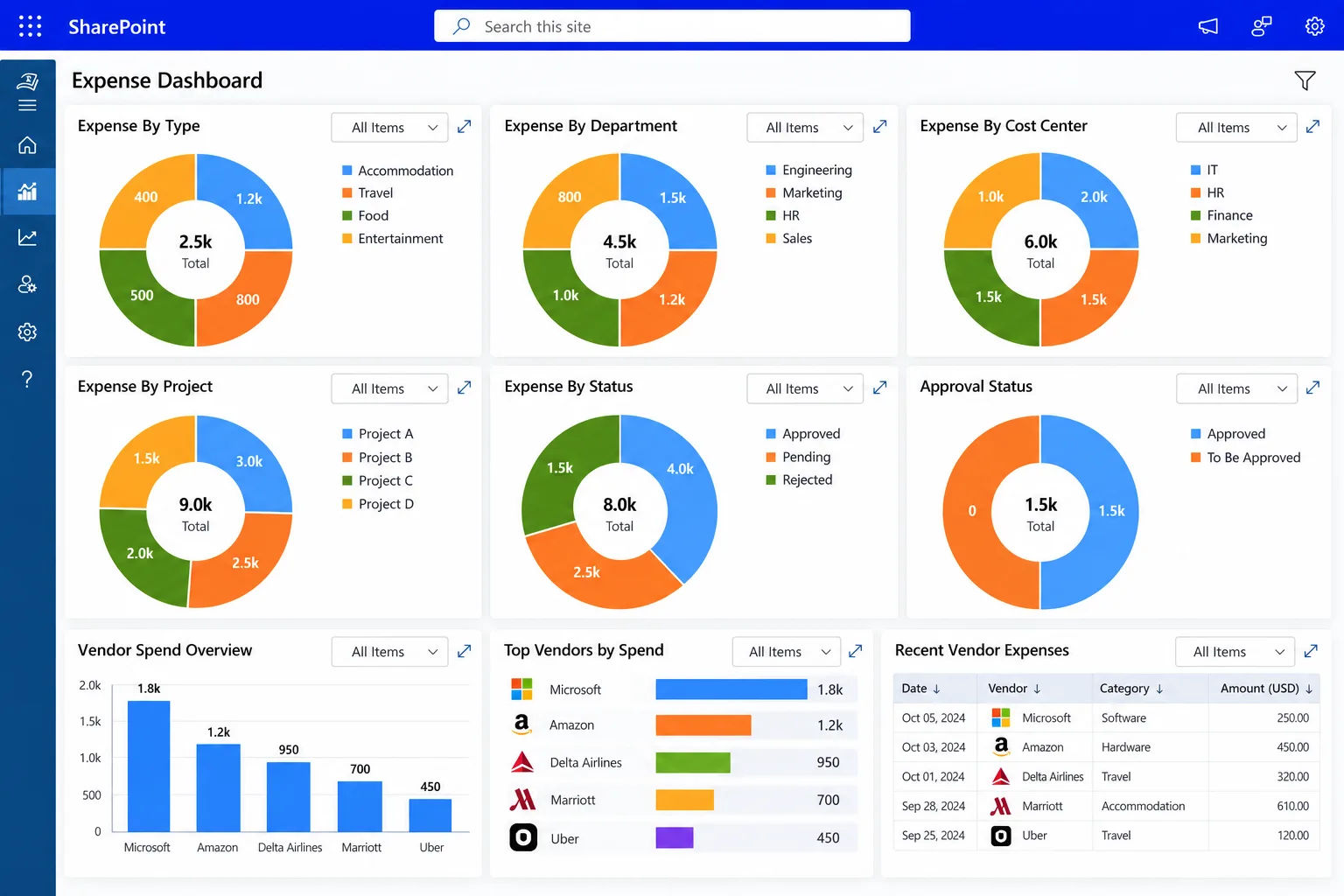
Expense 365 helps businesses track vendor expenses, monitor spending by supplier, and get real-time visibility into company spending within Microsoft 365. Finance teams can view expenses by vendor, category, department, project, and employee. This makes it easy to spot high-cost vendors, watch budgets, and build clear expense reports.
Here is how Expense 365 solves the challenges above.
Expense 365 tracks every expense by vendor. You see what each supplier costs you in one place, without building totals by hand. You can spot your most expensive vendors in seconds.
A vendor total tells you how much. A breakdown tells you why. Expense 365 lets you view Expense by category , department, project, and employee. You see which team drives each vendor cost and where to act first.
The best time to stop bad spend is before you pay it. Expense 365 sends expenses for approval before they are final. Managers review each claim, so unapproved vendors and off-policy purchases get caught early.
Employees attach receipts and supporting documents to each expense. Every record carries its proof. Your reports stay accurate, and your team stays ready for audits.
Expense 365 helps you monitor budgets as spend happens. Managers see when a department or project heads toward its limit. They can act before the overrun, not after month-end close.
Expense 365 gives finance teams real-time views of company spending. You can create clear expense reports by vendor, category, or department without hours of spreadsheet work. Leaders get the numbers they need, when they need them.
Expense Management software runs inside Microsoft 365, the tools your teams already use every day. Employees do not need to learn a new system, so they adopt it faster. IT manages access through your existing Microsoft 365 setup, which helps keep vendor data secure.
Ready to simplify Vendor Spend Analysis ?
How to Conduct Vendor Spend Analysis Step by Step
Follow these eight steps to run a clear and useful vendor spend analysis.
1. Gather Vendor and Expense Data
Collect at least 12 months of data. Include invoices, purchase orders, company card statements, and employee expense claims. Twelve months shows seasonal patterns and yearly renewals. Make sure each record has the vendor, amount, date, category, and department.2. Clean and Standardize Vendor Names
Create one master vendor list. Merge every name variation into a single vendor. Fix typos and link branches to their parent company. Flag vendors that share bank details but use different names, since this can signal duplicates or fraud.3. Categorize Spend by Vendor, Department, and Project
Tag each expense with a category, department, and project. Keep your categories simple and apply them the same way across every team. Consistent tags give you reports you can trust.4. Analyze Vendor Spending Trends
Rank vendors by total spend. Then compare spend month over month and year over year. In most businesses, a small group of vendors takes most of the budget. Look for sudden spikes, slow price increases, and growing reliance on one vendor.5. Identify Duplicate Payments and Policy Violations
Search for payments with the same vendor, same amount, and close dates. Check for invoice numbers that repeat with small changes. Then compare spend against your approved vendor list and expense policy to find off-policy purchases.6. Compare Vendor Quotes and Contracts
Check what you paid against what your contract says. Compare vendors that offer similar products on price, terms, and service. Use your spend history as proof when you negotiate.7. Identify Cost-Saving Opportunities
Turn your findings into savings. Combine overlapping vendors to get volume discounts. Renegotiate with your largest vendors. Cancel unused subscriptions. Recover any duplicate payments.8. Build Reports and Monitor Vendor Spend
Build simple dashboards for finance, procurement, and department heads. Review them every month. Watch for new vendors, budget gaps, and policy breaks. Regular tracking keeps savings in place.Key KPIs and Metrics for Vendor Spend Analysis
Track these eight KPIs to measure vendor spend and spot problems early.
Total Spend by Vendor
This KPI shows how much you pay each vendor over a set period. Add up every payment to each vendor after you merge duplicate names. It shows your most important vendors and where negotiation can save the most.Spend by Category and Department
This KPI shows how spend splits across categories and teams. Divide each category or department’s spend by total spend, then multiply by 100. It tells you which teams drive costs and where to focus controls.Vendor Concentration and Dependency Risk
This KPI shows how much you rely on a few vendors. Divide your top vendor’s spend by total category spend, then multiply by 100. High reliance can bring discounts, but it also creates risk if that vendor raises prices or fails to deliver.Budget vs. Actual Vendor Spend
This KPI compares what you planned to spend with what you spent. Subtract budget from actual spend, divide by budget, and multiply by 100. It flags overruns early and improves future budgets.Recurring Vendor Payments
This KPI tracks subscriptions, retainers, and other repeat charges. Recurring costs often renew on their own. Review them often to catch unused licenses, duplicate tools, and quiet price increases.Average Expense Value by Vendor
This KPI shows the typical size of a purchase from each vendor. Divide total vendor spend by the number of transactions. Many small purchases may point to buying that a contract could cover. Unusual large purchases may point to errors.Duplicate Payments and Duplicate Vendors
This KPI tracks money paid twice and vendors set up twice. Divide the value of duplicate payments by total payments, then multiply by 100. Every duplicate payment is lost money, so even a small rate matters.Off-Policy or Unapproved Vendor Spend
This KPI shows spend outside your approved vendors and contracts, often called maverick spend. Divide off-policy spend by total spend, then multiply by 100. Off-policy buying usually skips your negotiated prices and your controls.Best Practices for Vendor Spend Management
Use these habits to keep vendor spend under control all year.
- Keep all spend in one system. Bring invoices, card spend, and employee claims together so vendor totals stay complete.
- Maintain a clean vendor list. Assign an owner, verify new vendors, and check for duplicates every quarter.
- Use simple, shared categories. Give every team the same list and the same rules.
- Approve before you pay. Use approval workflows and an approved vendor list to stop off-policy spend early.
- Require receipts for every expense. Proof keeps reports accurate and audits simple.
- Review top and recurring vendors often. Focus on your biggest vendors and every subscription.
- Give managers their own view. Leaders who see their spend control it better.
- Limit access to sensitive data. Let only the right people see bank details and contract prices.
- Track KPIs every month. Regular reviews catch problems while they are still small.
- Pick tools your team already uses. Familiar tools, such as Microsoft 365, lead to faster adoption and better data.
Conclusion
Vendor spend analysis shows you who you pay, how much, and why. With that view, you can negotiate better deals, cut extra vendors, stop duplicate payments, and keep budgets on track. The biggest barrier is not the analysis itself. It is scattered, messy, and incomplete data.
Expense 365 removes that barrier. It tracks vendor expenses inside Microsoft 365 and lets finance teams view spend by vendor, category, department, project, and employee. You spot high-cost vendors faster, watch budgets closely, and build clear reports without spreadsheet work.
Ready to see your vendor spend in one place?
Book a free demo of Expense 365 today.
Frequently Asked Questions
What is vendor spend analysis?
Vendor spend analysis is the process of collecting and reviewing all payments to vendors. It shows who you pay, how much, and for what, so you can cut costs and reduce risk.
How often should you do vendor spend analysis?
Track key numbers every month and do a deeper review every quarter. Run a full analysis once a year before budgets and contract renewals.
How does vendor spend analysis reduce costs?
It shows where you can combine vendors, renegotiate prices, cancel unused subscriptions, recover duplicate payments, and stop off-contract buying.
What data do you need for vendor spend analysis?
You need the vendor name, amount, date, category, department or project, and approver. This data comes from invoices, purchase orders, card statements, and expense claims.
What is maverick spend?
Maverick spend is buying outside approved vendors, contracts, or processes. It often costs more and weakens control.
Which tools help with vendor spend analysis?
Teams use spreadsheets, accounting reports, and expense management software. Expense 365 tracks vendor expenses and builds reports inside Microsoft 365.


























