


A receipt is easy to collect. Keeping thousands of them organized, secure, and easy to find is where things get complicated.
- Corporate travel management is the process of planning, booking, and overseeing business trips for employees.
- Receipt storage helps companies manage everything related to business travel, from approvals and bookings to expenses and reimbursements.
- A well-structured travel program ensures employees can travel for work while following company policies and budgets.
- It brings together travellers, managers, finance teams, and travel providers to make business travel more organized and efficient.
As businesses process more expenses, receipts can end up scattered across filing cabinets, email inboxes, employee phones, cloud folders, and accounting records.
Receipt storage is the process of securely keeping business receipts in an organized format so they can be easily accessed, verified, and used when needed
This guide covers receipt storage, common challenges, best practices, and how AI and expense management software can simplify it.
What Is Receipt Storage?
Receipt storage means preserving receipts and related expense evidence in a way that keeps the information readable, organized, secure, and retrievable.
A receipt may prove what was purchased, when the purchase happened, which merchant was paid, how much was spent, and sometimes the tax charged. For a business, that small document can support bookkeeping entries, employee expense reimbursements, corporate card reconciliation, tax deductions, project costing, and financial audits.
A useful receipt storage system does more than save an image. It connects the receipt to context, such as:
- Employee or cardholder
- Merchant name
- Transaction date
- Amount and currency
- Expense category
- Business purpose
- Project, client, or department
- Approval status
- Reimbursement record
- Accounting entry
That connection is what makes a stored receipt useful later. A photo named “IMG_4821.jpg” is technically saved, but it is not well managed if nobody can tell which claim it supports.
Don’t let receipts get lost or scattered across systems
Expense 365 keeps receipts, expenses, approvals, and reimbursements connected in one place, so your finance team can find what they need when they need it.
How Long Should Businesses Keep Receipts?
There is no single retention period for every business receipt. The correct period depends on what the receipt supports, the tax rule involved, contractual requirements, local law, industry regulation, and internal policy.
Employment tax records have a different rule. The IRS says employers must keep them for at least four years after the tax becomes due or is paid, whichever is later.
A practical policy might look like this:
- Keep ordinary expense receipts for at least the applicable tax limitation period.
- Keep employment-related records for at least four years when they support payroll or employment taxes.
- Keep asset purchase records until after the asset is disposed of and the related tax limitation period has expired.
- Keep documents longer when insurance, lenders, grants, contracts, or industry rules require it.
- Suspend deletion when records are tied to an audit, investigation, dispute, or legal hold.
Don’t use a blanket “delete after three years” rule. Check how long each type of receipt needs to be kept. A good receipt capture app should help you set different retention periods so important records aren’t deleted too soon or kept longer than necessary.
Challenges Businesses Face When Organizing Receipts
Receipt problems usually start small. An employee puts a lunch receipt in a wallet. A traveler takes a blurry photo. A finance coordinator downloads an attachment into a personal folder. Someone renames a file incorrectly. By month-end, the evidence is scattered across devices and inboxes.
Lost paper receipts
Thermal paper fades, small slips tear, and physical documents are easy to misplace. Once the original disappears, finance may have to ask for a duplicate or additional proof.
Inconsistent file names
Files called “receipt1,” “scan,” or “image123” become difficult to search when hundreds of documents sit in the same folder.
Receipts separated from transactions
A receipt can exist but still be useless if it is not matched to the correct card charge, expense claim, project, or reimbursement.
Duplicate submissions
Employees may upload the same receipt twice, especially when one copy arrives by email and another is photographed. Without detecting duplicate expenses, duplicate claims can reach approval.
Manual data entry
Finance teams often retype merchant names, dates, totals, taxes, and categories. Each extra handoff adds review work and creates another chance for inaccurate data.
Access problems
Shared drives can become either too open or too restrictive. Finance needs reliable access while sensitive spending records should remain limited to authorized people.
Audit pressure
An auditor may ask for a sample of transactions from months earlier. Searching folders, inboxes, and paper boxes turns a simple request into a time-consuming exercise.
These problems grow with transaction volume. That is why receipt storage should be designed as part of expense control, not treated as an afterthought.
Difference Between Folders vs. Digital Receipt Storage
Folders still work for very small operations with low transaction volume. The problem appears when multiple employees, offices, cards, projects, and approval layers create more receipts than a physical filing method can handle.
Aspects | Local Folders | Digital Receipt Storage |
Search | Manual browsing | Search by merchant, date, amount, employee, or category |
Access | Usually location-based | Authorized access from approved devices |
Backup | Vulnerable to loss or damage | Can use controlled backups and recovery |
Matching | Manual cross-checking | Can connect receipts with expense records |
Audit review | Pull files by manually | Retrieve records through filters and audit trails |
Security | Locked cabinets and physical controls | Permissions, logs, retention rules, and account controls |
Scale | More cabinets and handling | More records without equivalent physical storage |
Electronic receipts do not automatically mean better. A badly organized cloud folder can recreate the same problems as a filing cabinet. The advantage comes from structure.
The IRS allows electronic recordkeeping, but the system must preserve complete and accurate information, keep it accessible, and reproduce records in a legible format. Electronic systems should also support indexing and retrieval.
Why Businesses Need a Secure System to Store Receipts?
Receipts often reveal more than a purchase total. They can contain employee names, travel locations, partial payment details, supplier information, client names, addresses, tax data, or project activity. That makes storage security a finance and privacy concern.
A secure receipt scanning solution should protect three things: confidentiality, integrity, and availability.
Confidentiality means only authorized people can view sensitive expense evidence.
Integrity means records cannot be silently changed without controls or history.
Availability means finance can retrieve required documents when tax authorities, auditors, managers, or employees need them.
The IRS specifically says electronic record systems should include controls that prevent unauthorized addition, alteration, or deletion of retained records. It also expects stored records to remain retrievable and readable.
Security therefore includes more than a password. Businesses should look for:
- Role-based permissions
- Multi-factor authentication
- Audit logs
- Version or change history
- Defined retention settings
- Reliable backups
- Data recovery processes
- Controlled sharing
- Encryption where appropriate
- Clear administrator ownership
The safest receipt is not simply the one that cannot be lost. It is the one that can be found quickly while access and changes remain controlled.
That matters during employee turnover, system migrations, tax reviews, and disputes because records often outlive the people who created them. Strong governance keeps that evidence usable without giving every user access to sensitive financial documents.
Storing receipts is just as important as tracking expenses
Expense 365 keeps receipts, expense tracking, approvals, and reimbursements connected in one place.
How Receipt Storage Helps With Financial Audits?
Good receipt storage can make future audits much easier by keeping expense records organized and easy to access. It will help finance teams.
- Find receipts quickly: Search receipts by date, vendor, employee, project, amount, or expense type.
- Maintain a clear audit trail: Keep receipts connected to the related expense, business purpose, approval, and payment record.
- Check compliance early: Identify missing receipts, unusual expenses, or incomplete information before an audit takes place.
- Support fraud checks: Make it easier to review and investigate suspicious or unsupported expenses.
- Reduce audit preparation time: Quickly provide supporting documents instead of searching through old emails, folders, or paper files.
- Keep records ready: Maintain an organized archive so financial evidence is available whenever an audit comes up.
Good receipt storage won’t prevent an audit, but it can make preparing for one faster, easier, and less disruptive.
Common Receipt Storage Mistakes
Businesses often invest time in collecting receipts but still weaken their records through avoidable habits.
- Saving receipts without metadata: A file without merchant, date, amount, owner, or category is harder to find and verify.
- Keeping only card statements: A bank or card statement may prove payment, but it may not explain the business purpose or what was purchased. The IRS notes that proof of payment alone does not necessarily establish entitlement to a deduction.
- Using personal inboxes as archives: Employee email accounts are poor long-term repositories because access changes when people leave or roles change.
- Ignoring image quality: Cropped totals, unreadable dates, glare, and blurry text can make stored proof useless.
- Allowing uncontrolled edits: Replacing files without history can weaken trust in the evidence.
- Storing duplicates everywhere: Multiple copies create uncertainty about which file is final and can make duplicate claims harder to spot.
- Keeping everything forever: Unlimited retention increases clutter, storage exposure, and governance work.
- Deleting too early: Premature removal can create problems during tax reviews, audits, disputes, or reimbursements.
A receipt storage system should turn these mistakes into controlled steps rather than relying on employees to remember every rule.
8 Best Practices for Store Receipt & Organize
Keeping receipts isn’t enough. They also need to be stored securely and organized so you can find the right record when you need it. These best practices can help businesses keep receipts organized, accessible, and ready for future use.
1. Capture receipts immediately
Ask employees to upload receipts at the time of purchase or soon afterward. Waiting too long increases the chance of losing the receipt, forgetting the business purpose, or missing important details such as the date or amount.
2. Use one approved location
Store receipts in one central system instead of spreading them across personal drives, email inboxes, desktops, messaging apps, and filing cabinets. A receipt storage makes receipts easier to organize, search, and retrieve.
3. Connect every receipt to an expense
Attach each receipt to the matching expense, reimbursement, or corporate card management. This gives finance teams the context they need to verify what was purchased, who made the purchase, and why it was a business expense.
4. Standardize required information
Make sure each receipt record includes important details such as the merchant, date, amount, currency, expense category, business purpose, employee, and project or department when relevant. Consistent information makes searching, reviewing, and reporting easier.
5. Set role-based access
Not everyone needs access to every expense record. Employees should be able to access their own expenses, managers should have access to the reimbursement claims they need to review. Finance teams should maintain broader oversight. This also helps protect sensitive financial information.
6. Create a retention schedule
Decide how long different types of receipts need to be kept and document the reason for each period. Consider tax, legal, contractual, insurance, and business requirements rather than using the same retention period for every receipt.
7. Review exceptions regularly
Regularly check for missing receipts, duplicate documents, edited receipts, late submissions, policy violations, and unusual expenses. Addressing these issues early can reduce financial and compliance risks. ACFE’s 2026 research found that more than half of occupational fraud cases involved either missing internal controls or an override of existing controls.
8. Test retrieval before an audit
Don’t wait for an audit to find out whether your receipt storage works. Each quarter, select a few transactions and check whether finance can quickly find the receipt, approval, business purpose, and payment evidence.
How Expense 365 Helps Store Receipts?
When receipt volume grows, finance teams need more than shared folders. Expense 365 provides receipt capture and expense management inside the Microsoft 365 environment, with SharePoint used to store receipts, expense records, and related documents in structured libraries.
Employees can upload receipts when submitting expenses, while the platform links those documents to expense records. Expense 365 supports receipt capture through mobile uploads, email forwarding, and direct file uploads, then links receipts with transactions for review.
For teams already using Microsoft 365, this approach can reduce the problem of documents being split between unrelated locations.
Expense 365 also provides:
- AI receipt scanning for data extraction
- Automatic categorization
- Receipt-to-transaction matching
- Approval workflows
- Audit logs with timestamps
- Duplicate claim detection
- SharePoint permission controls
- Expense reporting
- Microsoft Teams access
Its receipt storage supports PDF, JPG, and PNG receipt files and extracts details used to create structured expense records.
The value is not simply “storing a receipt.” It is keeping the supporting document connected with the expense lifecycle, from submission through approval, reimbursement, reporting, and later review.
Role of AI in Managing Receipts
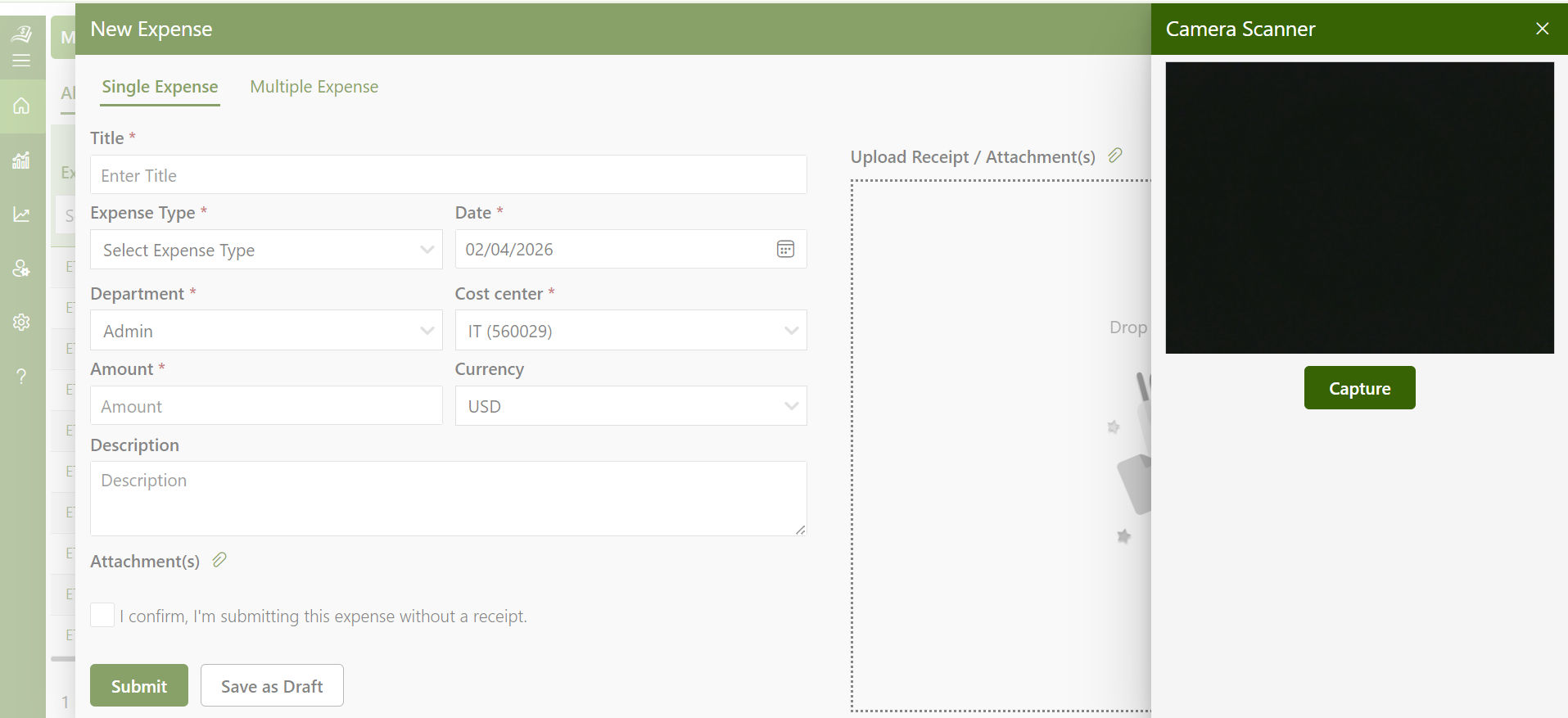
AI changes receipt management by turning an image into usable expense data.
Traditional digital receipt storage often stops after upload. Someone still has to open the file, read the merchant, type the date, enter the total, choose an expense category, and match the document to a transaction.
AI can assist with those steps through optical character recognition, document understanding, pattern matching, and rules.
A typical process looks like this:
- An employee photographs or uploads a receipt.
- AI reads fields such as merchant, date, subtotal, tax, total, and currency.
- The system creates or updates the expense record.
- Rules suggest a category or project.
- Matching compares the receipt with card or transaction data.
- Exceptions are sent for human review.
AI can also help spot duplicate documents, unusual amounts, altered receipts, repeated merchants, missing fields, or claims outside policy.
AI-powered expense management does not remove the need for finance judgment. OCR can misread damaged receipts, currency symbols, handwritten tips, or unusual layouts. Human review remains important for exceptions and higher-risk claims.
The best use of AI is therefore assisted receipt storage: machines handle repetitive reading and matching, while people make decisions that require policy knowledge and context.
Conclusion
Receipt storage is more than keeping digital copies of receipts. It helps businesses keep expense evidence organized, secure, searchable, and ready when needed.
As businesses grow, storing receipts across inboxes, shared drives, and paper folders can make expense reviews and audits harder. A structured digital system helps finance teams retrieve documents faster, maintain better records, and reduce manual work.
Expense 365 brings receipt storage, expense tracking, approvals, and reimbursements together in one place, built natively for Microsoft 365.
Keep every receipt organized and every expense connected with Expense 365.
Frequently Asked Questions
What types of receipts does receipt scanning software support?
It support common formats such as JPG, PNG, and PDF, along with receipts captured through a mobile device. The exact formats and capture methods depend on the software.
What does a corporate travel manager do?
A corporate travel manager oversees the company’s travel program. This includes maintaining the travel policy, managing relationships with airlines, hotels, and booking platforms, supporting employees with travel issues, and reporting on travel spend to finance and leadership.
Will the software extract the total amount from a receipt?
Yes. OCR technology can identify the total amount and other key fields from a receipt. Finance teams should still have the ability to review or correct extracted information when necessary.
Can receipts be matched with credit card transactions?
Yes, Matching receipts with card transactions helps finance teams connect the purchase evidence with the corresponding financial transaction.
Can managers see receipts before approving an expense?
Yes. Receipt management is most useful when the receipt is attached directly to the expense claim, allowing managers to review supporting documentation before approving reimbursement.


_JiluXJRGNl.svg)























