







































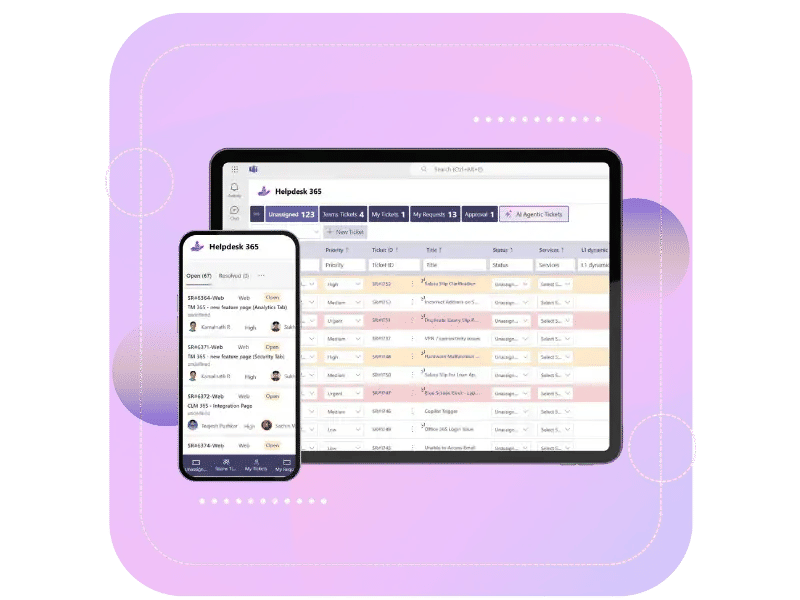
Microsoft Native SharePoint Helpdesk Software
AI-Powered SharePoint Helpdesk System for Microsoft 365That Resolves Tickets 60% Faster
Helpdesk 365 is a Microsoft-native SharePoint helpdesk solution for managing IT support requests. Use this SharePoint helpdesk tool to prioritize urgent issues and streamline workflows. Simplify support with a powerful SharePoint helpdesk system built for Microsoft 365.
Trusted by 12,100+ deployments from 172 countries


Helpdesk 365 Combines Intelligent Automation with Human Support
Helpdesk 365 is a Microsoft-native SharePoint helpdesk solution that helps IT teams manage support requests efficiently. This SharePoint helpdesk software streamlines workflows across Microsoft 365, including Teams, Outlook, and SharePoint, helping employees get timely support through a centralized helpdesk system.
Helpdesk 365 is Now Available on Microsoft Teams with
AI Agents in Action: Streamlining IT Support Requests
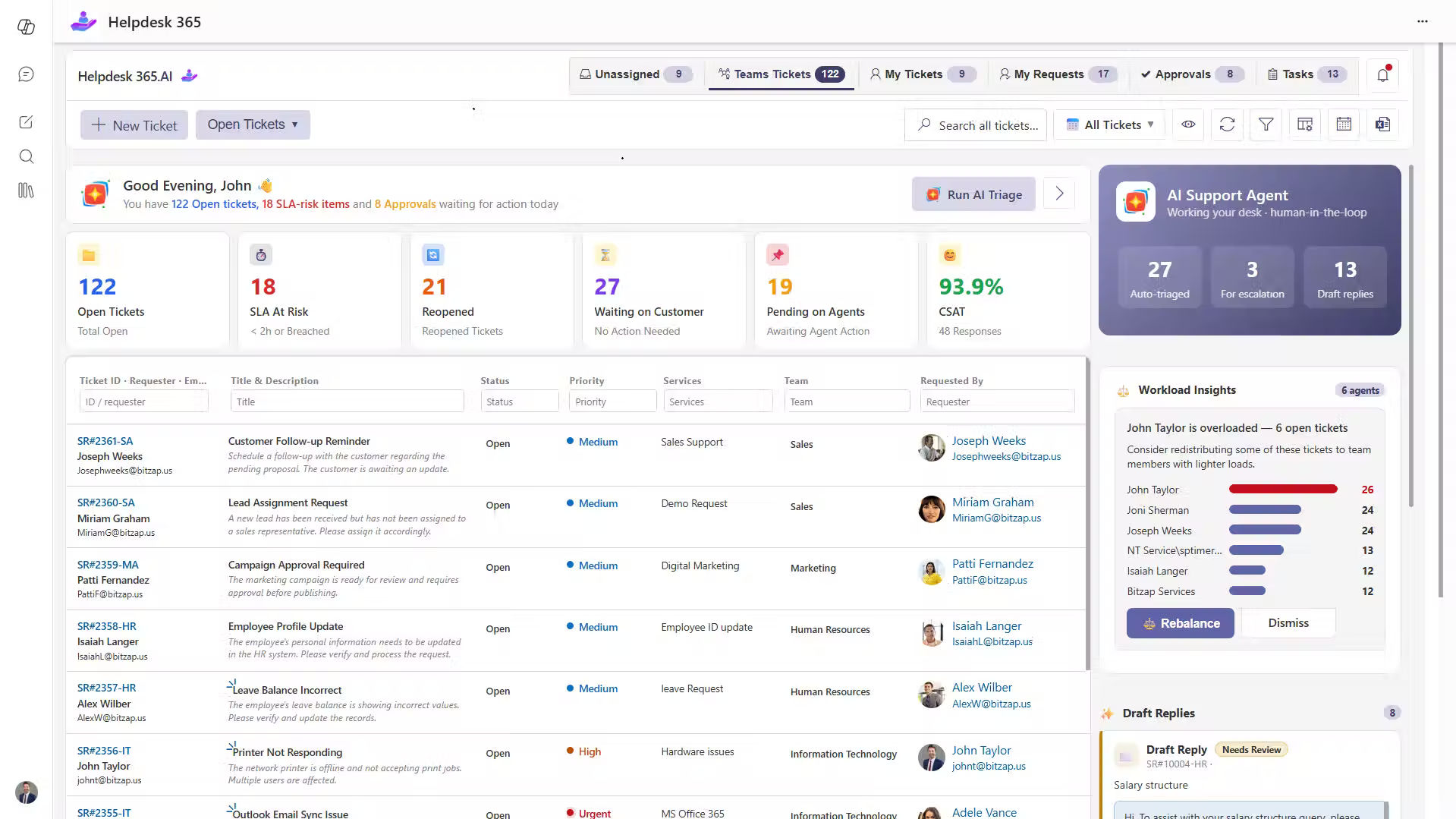
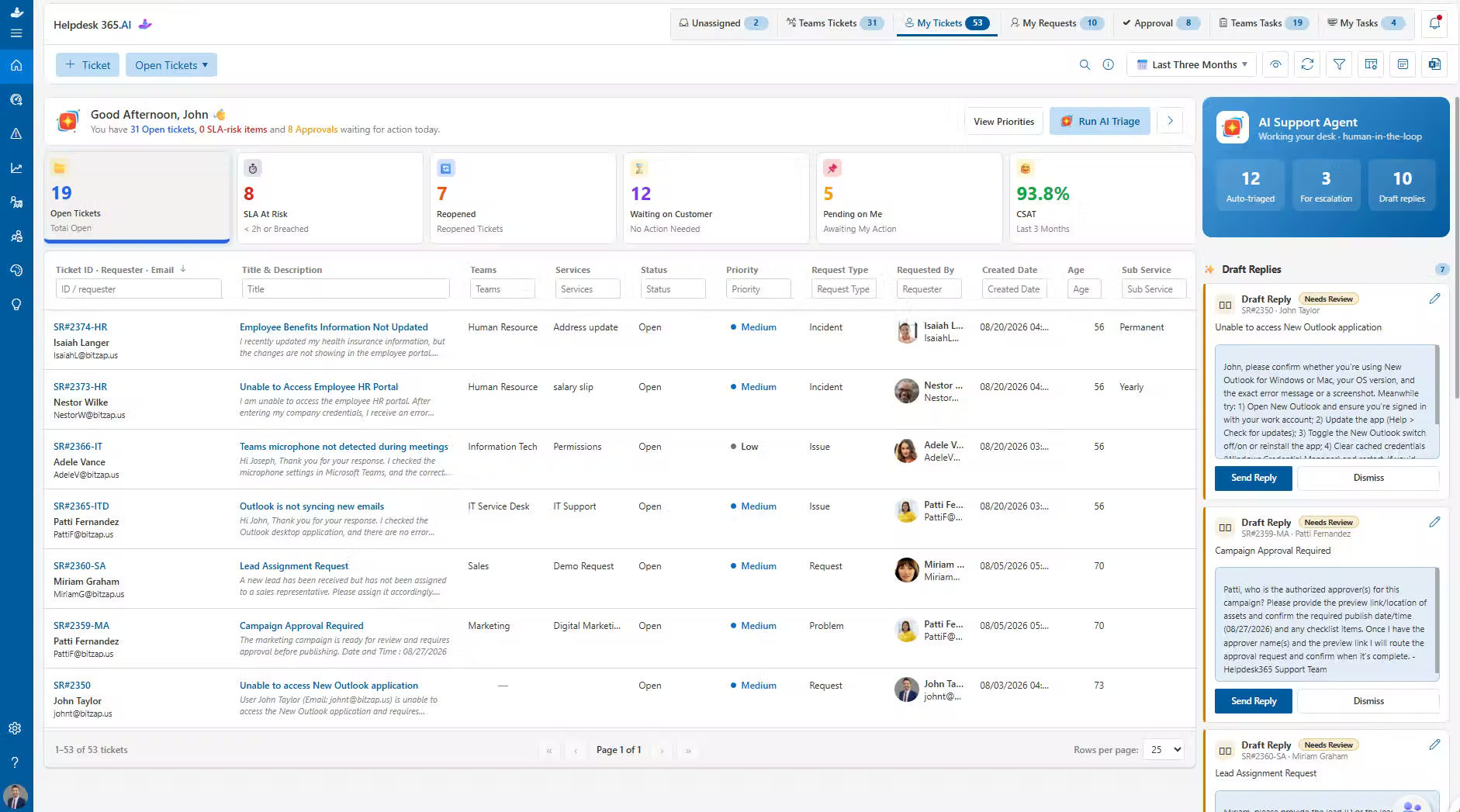
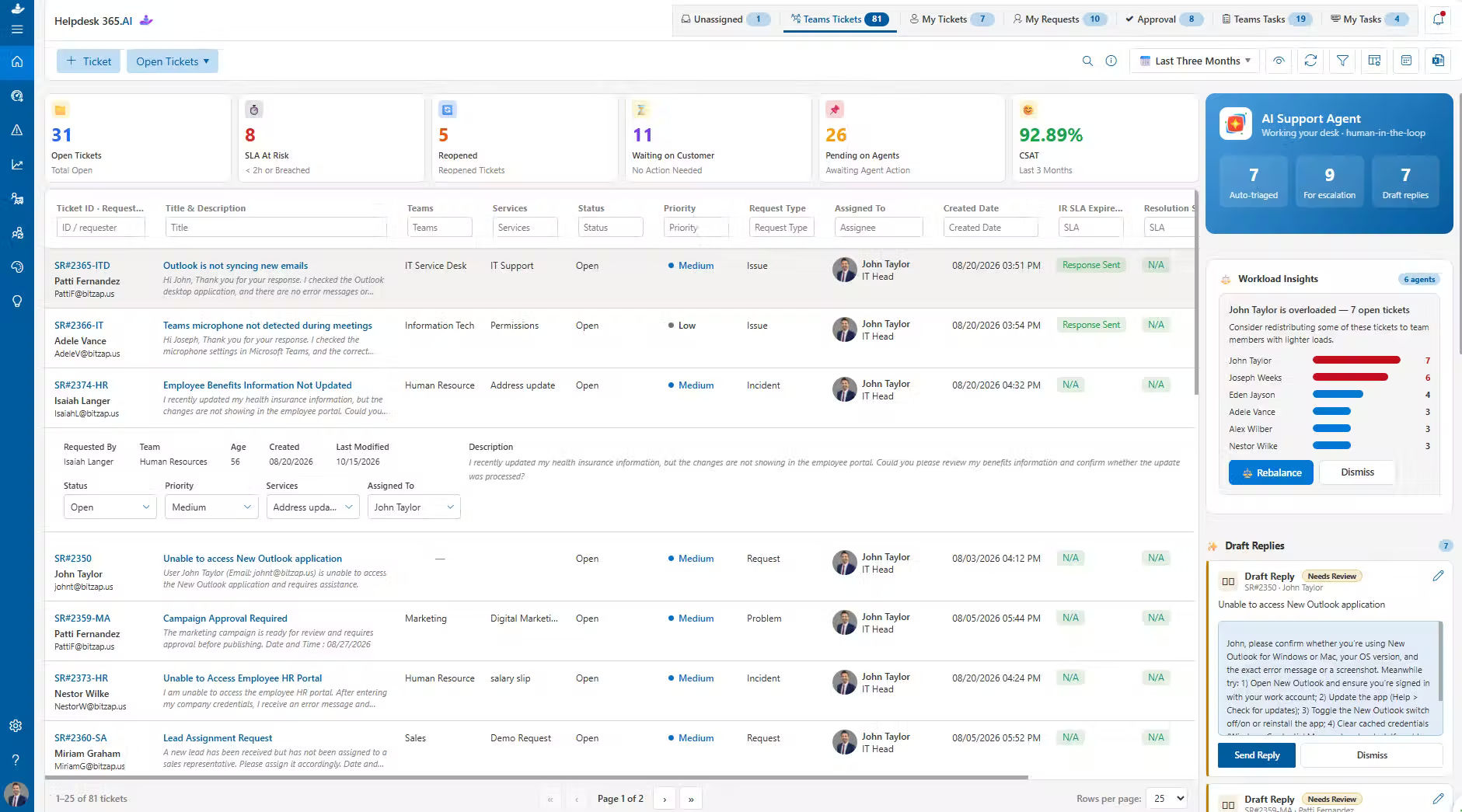
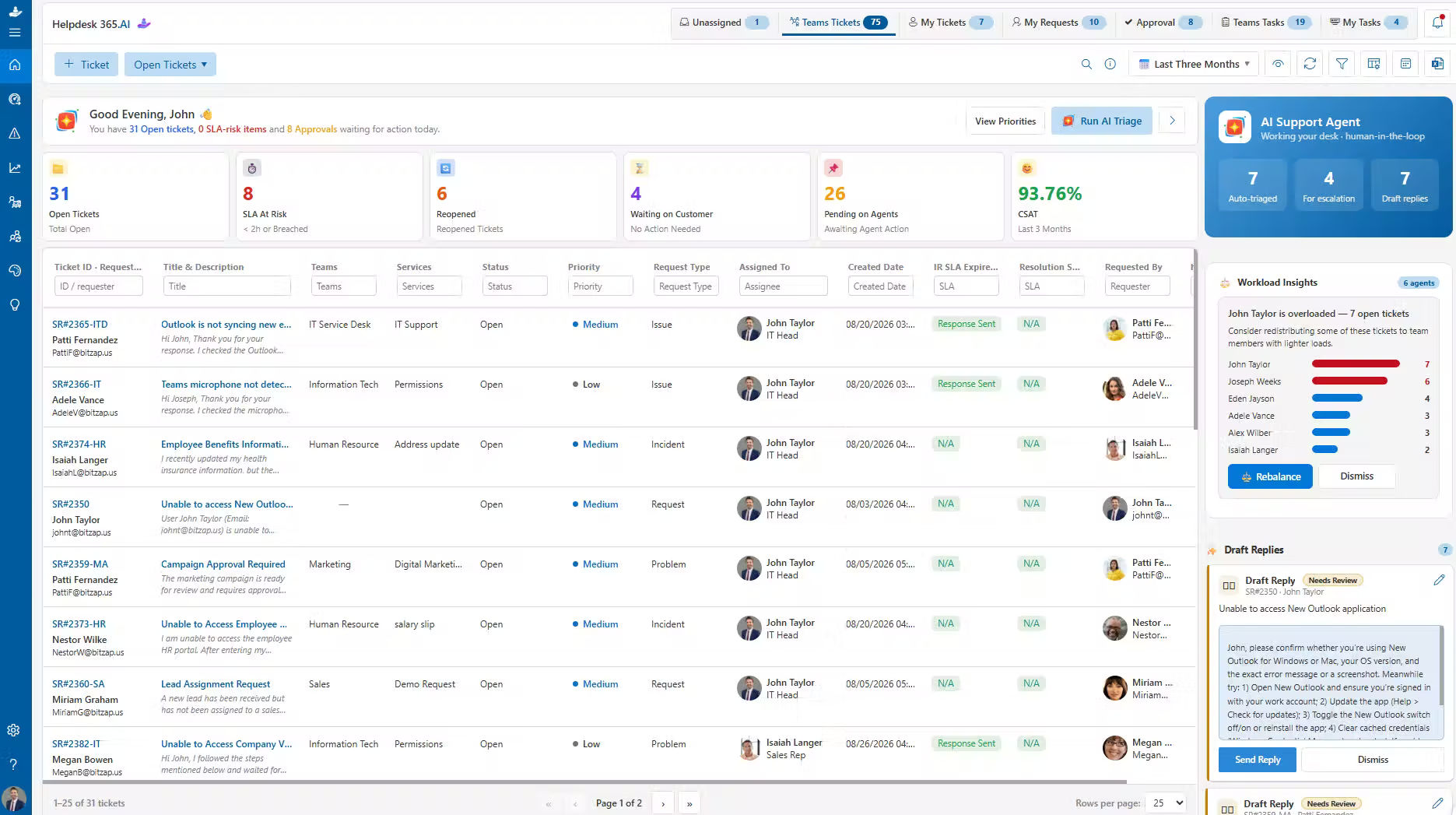
Helpdesk 365 uses AI-powered capabilities to help IT teams prioritize requests, streamline support workflows, and identify issues that need attention. By combining intelligent automation with actionable insights, teams can manage requests more efficiently and deliver timely support to employees.
Smart Ticket Intelligence for SharePoint
Helpdesk 365 helps IT teams manage support requests more efficiently with intelligent ticket categorization and routing. Requests can be directed to the appropriate team, while urgent issues are prioritized for timely attention. By using insights from previous interactions, the system can suggest relevant solutions and help support agents handle recurring issues more consistently. Automating repetitive tasks gives your team more time to focus on complex requests that require human expertise.
AI Agentic Tickets
AI Agentic Tickets helps your team respond faster and more accurately. It looks at each ticket, understands what it’s about, and suggests the best way to reply. This means less typing and guesswork for your agents. It also handles common, routine requests on its own, so your team can spend more time on tricky issues that need personal attention. The more it’s used, the better it gets at spotting problems early and helping fix them before they grow bigger.
Intelligent Summaries
Intelligent Summaries gives your team a quick, clear view of every support ticket. It pulls together the main details from past messages and related info, so agents can understand the issue at a glance. This saves time and helps avoid mistakes. As it keeps learning from old tickets, it becomes smarter and more helpful, making daily work smoother and faster.
AI Copilot
AI Copilot makes your team’s day a little easier. It jumps in to help with everyday questions, offers quick tips, and points agents in the right direction when handling tickets. Over time, it picks up on how your team works and takes care of simple, repetitive jobs on its own. That means your team can spend more time solving the bigger stuff that really needs a person’s touch. It fits right into the tools you already use, helping everyone stay on top of their work and keeping customers happy.
Built to Work with Microsoft 365 & Beyond
Helpdesk 365 integrates with Microsoft Teams, Outlook, and SharePoint to bring support requests and team communication into one connected workspace. Integrations with tools like Azure DevOps help teams streamline workflows, coordinate tasks, and manage support more efficiently.
Connect the Tools Your Team Uses
Bring conversations, tasks, and support data together with integrations designed to fit your existing workflows. SharePoint Helpdesk 365 Solution helps your team stay connected and manage IT support from familiar tools.
Resolve SharePoint Helpdesk Tickets Faster with AI
AI-Powered Helpdesk Software
Helpdesk 365 uses AI to simplify IT support, reduce repetitive tasks, and help teams manage requests more efficiently within Microsoft 365.
Identify ticket priority, category, and next action using AI.
Summarize long ticket conversations and key updates quickly.
Generate relevant reply suggestions based on ticket details.
Understand team workloads and balance ticket assignments.
Identify positive, neutral, or negative customer sentiment.
Capture key meeting discussions, insights, and action items.
Manage SharePoint Helpdesk Tickets from Request to Resolution
Ticket Management
Helpdesk 365 brings support requests from email, Microsoft Teams, and your support portal into one place. Organize, assign, and track tickets while keeping your team informed and every request moving toward resolution.
Manage requests submitted via email, Microsoft Teams, or support portal.
Categorize and prioritize tickets to address important requests faster.
Assign tickets to the right agents or teams for clear ownership.
Track ticket status, progress, updates, and history in real time.
Automate notifications, status changes, and routine ticket workflows.
Improve team collaboration and capture key details with custom ticket fields.
Keep SharePoint Helpdesk SLAs on Track
SLA Management
Helpdesk 365 helps IT teams manage SLAs, track response and resolution deadlines, and address requests before targets are missed. Automated alerts and escalations keep teams accountable and improve service delivery.
Define response and resolution times for different support requests.
Escalate tickets approaching or exceeding SLA deadlines.
Identify overdue requests and tickets that need immediate attention.
Set targets based on ticket priority, department, or request type.
Notify agents about upcoming deadlines and required actions.
Track missed targets and identify opportunities to improve support.
Find Faster Answers with a SharePoint Helpdesk Knowledge Base
Knowledge Base
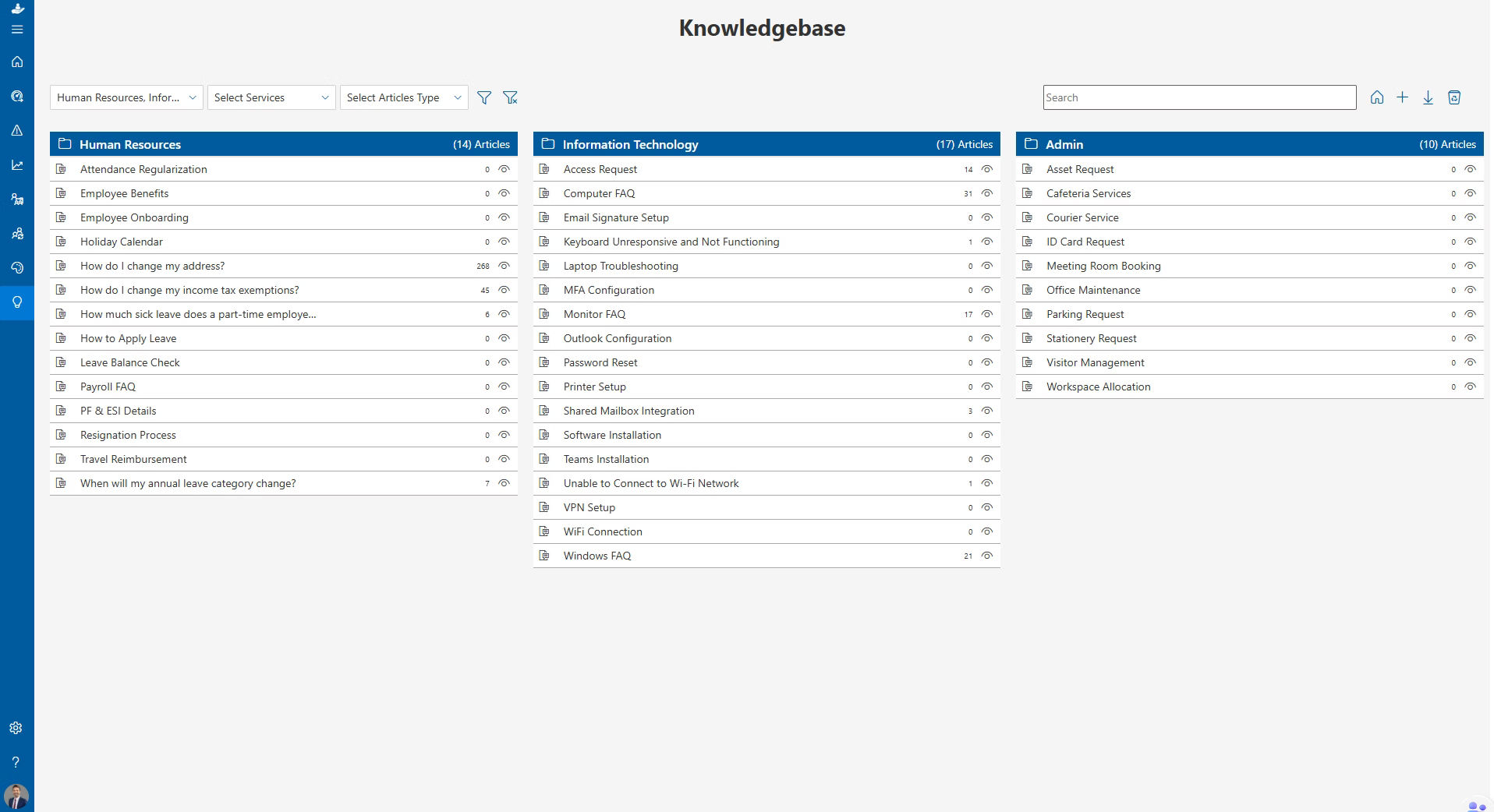
Helpdesk 365 centralizes support articles, FAQs, and proven solutions so IT teams can find reliable answers, share knowledge, and resolve requests more efficiently.
Create articles from resolved tickets, common issues, and proven solutions.
- Quickly find relevant answers using keyword-based knowledge search.
- Organize guides, FAQs, and solutions in one centralized knowledge library.
- Collaborate with team members to create, review, and update articles.
- Access relevant knowledge articles directly within tickets for faster resolution.
- Track article usage, identify helpful content, and improve knowledge quality.
Protect Sensitive Data in Your SharePoint Helpdesk System
Data Privacy
Protect sensitive ticket, customer, and employee information within your Microsoft 365 environment. Manage data access, strengthen security, and maintain better control over support information while meeting organizational compliance needs.
Control access to sensitive ticket information based on user roles and responsibilities.
Protect support data with encryption during storage and transfer.
Secure user access through Microsoft-based authentication.
Keep support information within your Microsoft 365 environment.
- Track ticket activities and user actions to support audits and compliance.
- Manage data access across teams and departments to prevent unauthorized access.
Automate SharePoint Helpdesk Tasks and Workflows
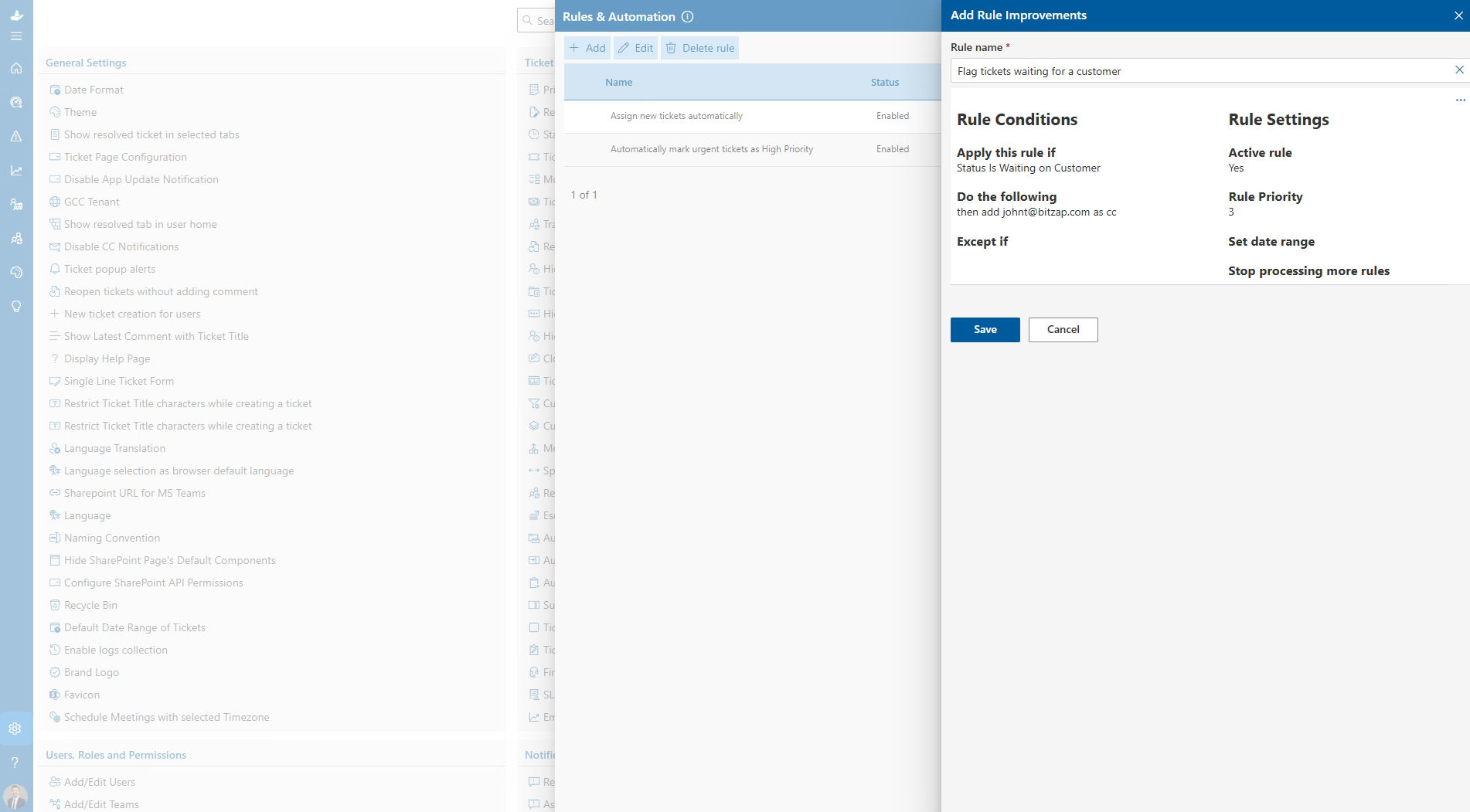
Rules and Automation
Helpdesk 365 automates routine support tasks, simplifies ticket assignments, and keeps teams updated. Custom rules and workflows help IT teams reduce manual effort and move requests toward resolution efficiently.
Create smart rules based on ticket priority, category, department, or status.
Automatically assign incoming tickets to the right agents or teams.
Send timely alerts and notifications for ticket updates and deadlines.
Customize workflows for approvals, follow-ups, and recurring support tasks.
Set time-based triggers for reminders, escalations, and pending requests.
Automatically update ticket status, priority, assignments, and other details.
Simplify SharePoint Helpdesk Requests and Approvals
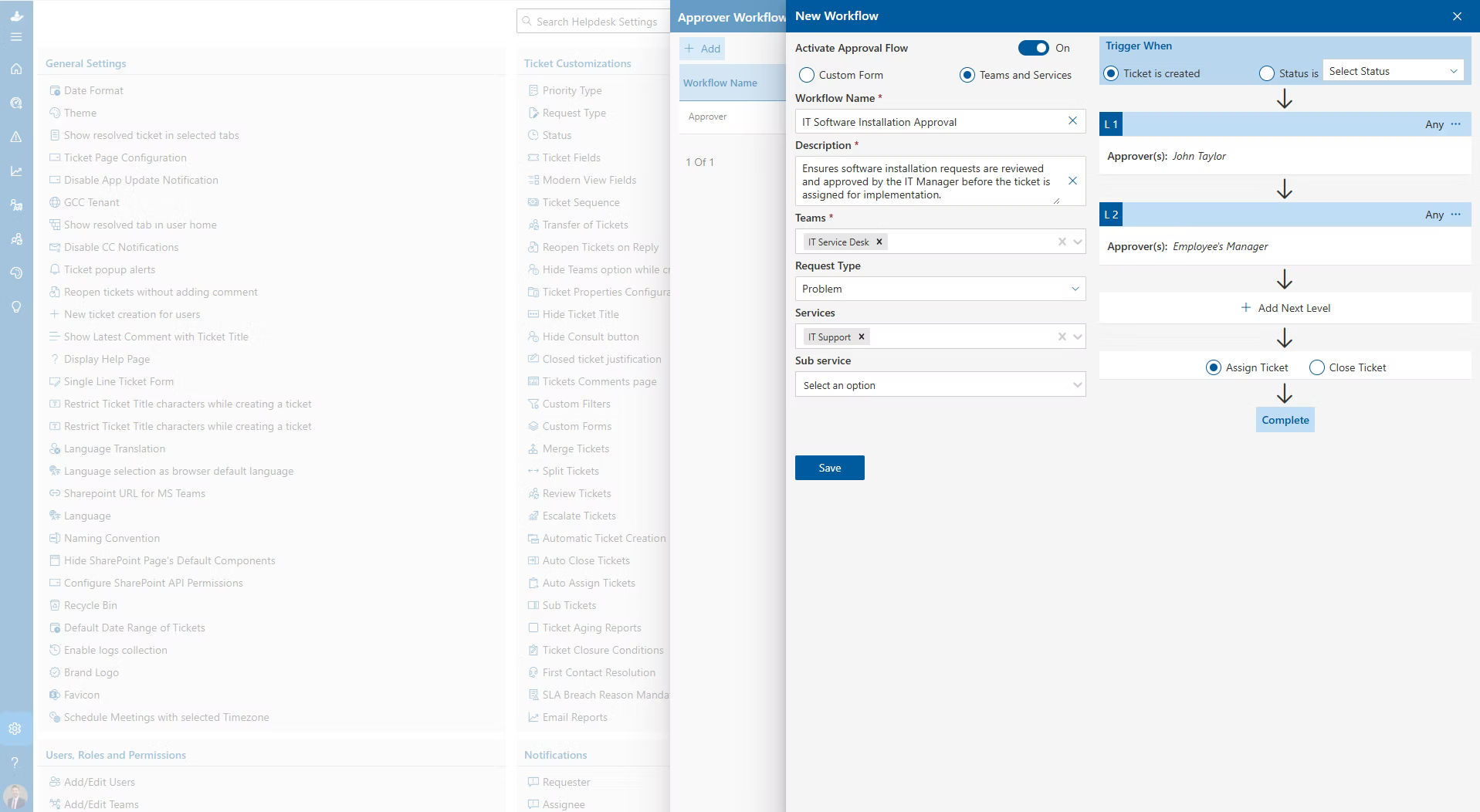
Custom Forms & Approvals
Simplify request management with customizable forms and automated approval workflows. Collect the right details, reduce manual follow-ups, and keep requests moving smoothly from submission to approval.
Create custom request forms with fields, dropdowns, and options.
Automate approval workflows to reduce manual effort and delays.
Set up multi-level approvals across different teams or departments.
Route requests to the right teams or approvers based on defined rules.
Send automatic notifications for approval requests, decisions and updates.
Track request and approval status in real time from submission to completion.
Automatically Route SharePoint Helpdesk Tickets to the Right Team
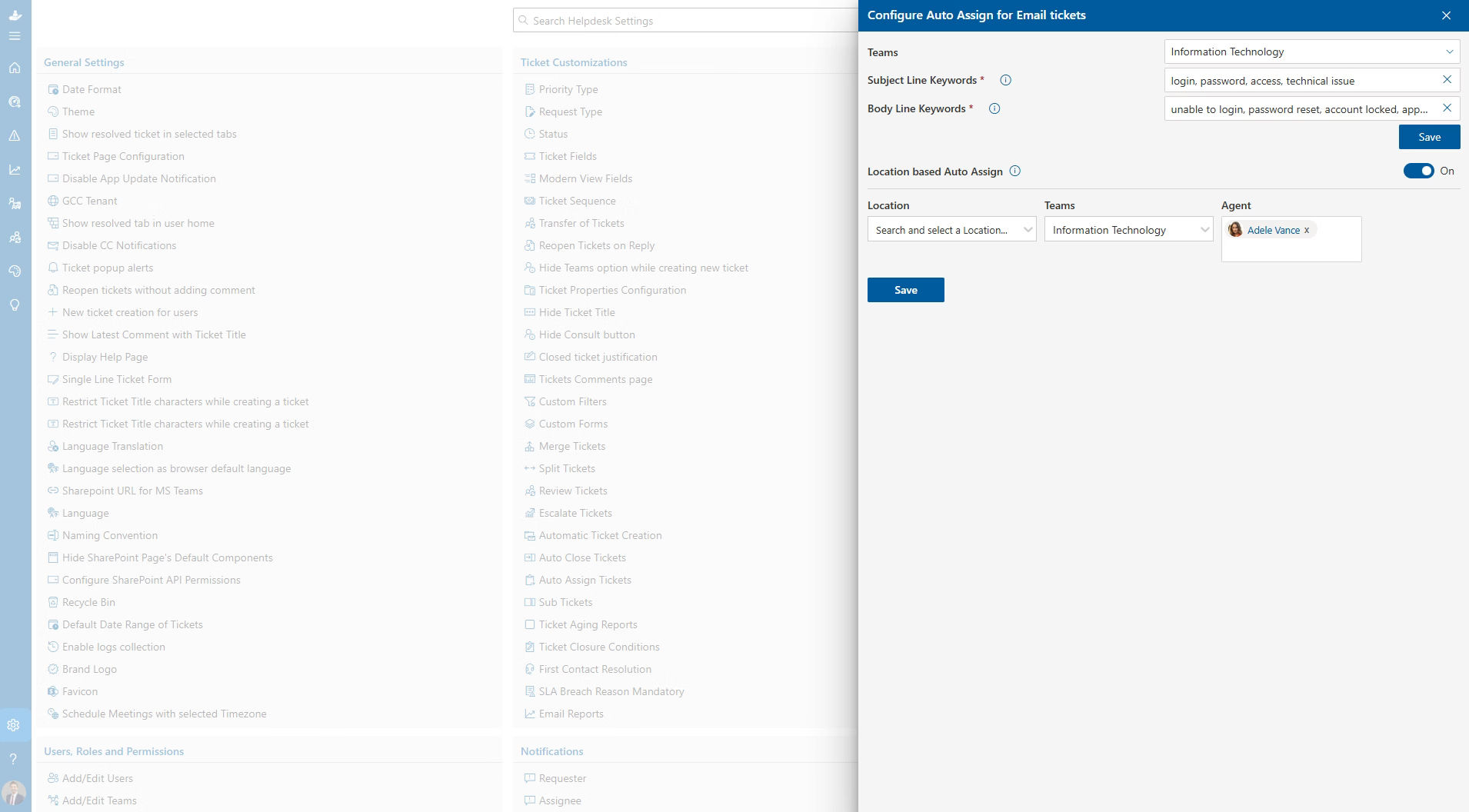
Ticket Auto Assign
Helpdesk 365 simplifies ticket assignment with automated routing rules. Distribute requests efficiently, balance workloads, and ensure each ticket reaches the right agent or team with clear ownership.
Automatically route incoming tickets to the right agents or teams.
- Distribute tickets evenly across team members using round robin assignment.
- Assign tickets based on workload, capacity, or weighted distribution rules.
- Customize assignment rules by department, category, priority, or role.
- Balance workloads to prevent overloaded agents and uneven ticket distribution.
- Assign clear ticket ownership from the start to reduce delays and speed up resolution.
Analyze SharePoint Helpdesk Performance and Improve Support
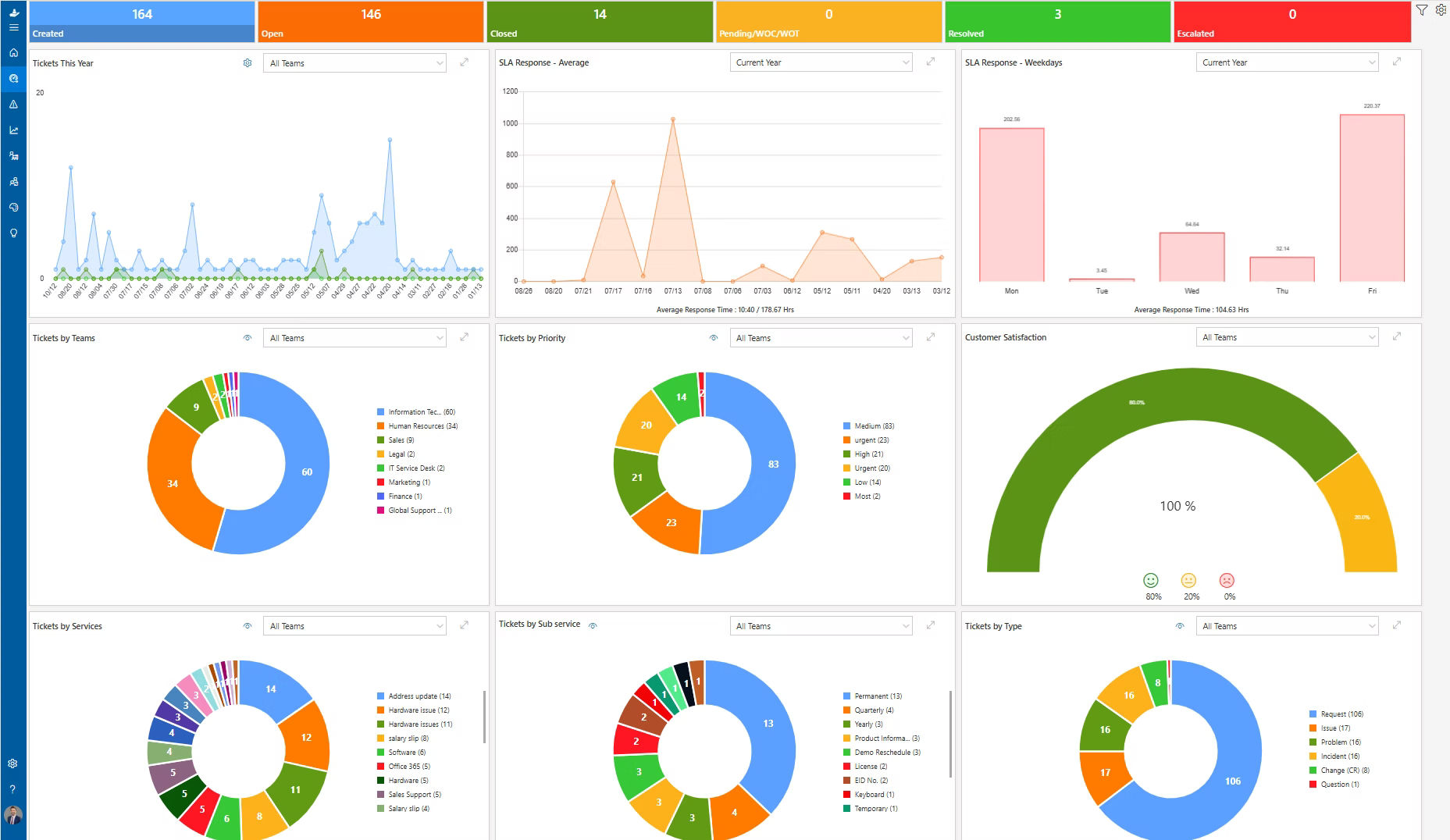
Reporting & Analysis
Helpdesk 365 provides dashboards, reports, and AI-driven insights to help IT teams monitor performance, identify recurring issues, and make informed decisions that improve productivity and service quality.
- Monitor ticket volumes, response times, and team activity with real-time dashboards.
- Track agent productivity, resolution times, and workloads to improve team performance.
- Review SLA performance, missed deadlines, and escalations to meet service targets.
- Identify recurring ticket patterns, common issues, and support trends.
- Create custom reports based on department, category, priority or ticket owner.
- Use AI analytics to uncover performance gaps, track AI feature usage, and gain actionable insights.
Helpdesk 365 On-the-Go
Work from anywhere without missing a thing. You can check your tickets, tasks, and updates right from your phone or laptop. Everything stays within reach, you can keep things moving no matter where you are.
Why Choose Helpdesk 365?
Helpdesk 365 simplifies IT support by automating routine tasks and organizing requests within your Microsoft 365 environment. This SharePoint helpdesk solution helps teams manage requests, streamline workflows, and resolve issues more efficiently. Whether your business is growing or established, Helpdesk 365 helps reduce manual work, improve team productivity, and deliver a better support experience.

Native Microsoft 365 Integration
Manage IT support within Microsoft Teams, SharePoint, and Outlook. Helpdesk 365 fits into your existing Microsoft 365 environment, helping teams streamline support without switching between tools.

Centralized Helpdesk Management
Manage support tickets, conversations, and updates in one place. Track ticket ownership, monitor progress, and keep requests organized from submission to resolution.
AI-Powered Helpdesk Automation
Automate ticket routing, identify priorities, and get AI-assisted response suggestions. Reduce repetitive tasks so your IT team can focus on complex support requests.
Secure and Scalable Support
Manage helpdesk operations within your Microsoft 365 environment with appropriate access controls. Adapt support workflows as your team, request volume, and business needs grow.
Resolve SharePoint Tickets 5X Faster with Helpdesk 365
Live on Azure
Buy directly from Azure Marketplace or via your enterprise agreement.

Special Pricing for NPOs
Non-profits and government-funded educational institutes can avail exclusive rates.
Enterprise Pricing for 50+ Users
Organizations with more than 50 users can avail special pricing.
Apps 365 Advantage
Apps 365 delivers Microsoft-native solutions that simplify business processes and improve productivity. With seamless Microsoft 365 integration, AI-powered capabilities, and a focus on security and scalability, Apps365 helps organizations streamline workflows and work more efficiently.
Cyber Security
Cyber Security in GCC & GCC High within the Microsoft environment places high importance on stringent measures to protect sensitive government data, ensuring security with robust defenses and Microsoft applications.
GCC & GCC High
Our apps are built for GCC & GCC high tenants of US Federal clouds.
SOC2 Type II Certified
Our apps ensure security, compliance, and data protection
MS Azure Marketplace
Our apps are tested by Microsoft and available on MS Azure Marketplace
Microsoft Appstore
Our innovative applications are available on the Microsoft Appstore.
Customer Support
Our Support Team merges technical prowess with sincere care, fostering trust through expertise and empathy. They build lasting relationships, transcending mere service to create meaningful connections.
AI Enabled Apps
Our innovative apps are built with the options of Azure AI, Copilot, and custom AI solutions.
Swift Deployment
Choose any deployment method—Teams, Outlook, or SharePoint—that suits your preferences.
Modern UI/UX
Every app is crafted using the latest Fluent UI, ensuring seamless functionality across all devices.
Free Updates
Our valued subscribers enjoy unlimited support, enhancements, features, and updates.
Customer Testimonials
Hear from satisfied organizations that have transformed their IT and internal support with Helpdesk 365.
ICT Manager
California
IT Director
Texas, US
IT Officer, HanmiGlobal Saudi
Saudi Arabia
Director of Marketing
Chicago, US
Educator, Department of Education
New York
System Administrator, San Antonio
Texas
IT Manager
Indiana
One SharePoint Helpdesk for Every Request
Helpdesk 365 unites tickets, teams, and tools inside Microsoft 365, giving you visibility, control, and collaboration in one place.
Book Your Personalized Helpdesk 365 Demo
Frequently Asked Questions About SharePoint Helpdesk 365
What is Helpdesk 365?
Helpdesk 365 is an AI-powered internal ticketing system built natively on SharePoint and Microsoft 365. It helps organizations manage employee IT support requests efficiently by automatically categorizing tickets, prioritizing urgent issues, and resolving routine problems without human intervention. The platform reduces support response times by up to 60% and auto-resolves approximately 40% of routine tickets.
Where is my Helpdesk 365 data stored?
Your Helpdesk 365 data is stored within your organization’s Microsoft 365 and SharePoint environment. This allows you to use your existing Microsoft 365 security, permissions, and access controls to manage helpdesk tickets and related support data.
Where is Helpdesk 365 hosted?
Helpdesk 365 is a SharePoint Framework (SPFx) application designed to run within Microsoft 365 and SharePoint Online. It works within your existing Microsoft environment and integrates with services such as SharePoint, Microsoft Teams, and other Microsoft 365 capabilities.
Does Helpdesk 365 store our private or confidential data on its own infrastructure?
Your Helpdesk 365 ticket and support data is stored within your organization’s Microsoft 365 and SharePoint environment rather than on separate Helpdesk 365-hosted infrastructure. This helps your organization maintain control over data access and permissions using its existing Microsoft 365 security configuration.
What is the Helpdesk 365 application architecture?
Helpdesk 365 is built using Microsoft 365 and SharePoint Framework (SPFx) technologies. Ticket data is managed within SharePoint, while the application integrates with Microsoft services such as Microsoft Teams and other Microsoft 365 capabilities to support ticket creation, assignment, collaboration, workflows, notifications, SLA management, reporting, and issue resolution.
How does SharePoint Helpdesk 365 work?
Helpdesk 365 captures support requests from multiple channels including email and Microsoft Teams. The AI engine analyzes each ticket for urgency and business impact, then automatically routes requests to the appropriate team members. The system continuously learns from every interaction to improve accuracy and can independently resolve common requests such as password resets, access permissions, and software installations.
How does user licensing work?
Helpdesk 365 requires licenses only for Admins, Supervisors, and Agents who manage and operate the ticketing system.
Does Helpdesk 365 require on-premise servers?
No, Helpdesk 365 is 100% cloud-based, running on Microsoft 365 and Azure infrastructure. There’s no hardware to buy, maintain, or upgrade. Everything is managed and automatically scaled in the cloud.
How do you calculate user licenses?
User licenses are calculated based on individuals who work on tickets, respond to requests, manage tickets, or administer the helpdesk. This includes agents, supervisors, and administrators. All plans come with five user licenses included, and you can purchase additional licenses by contacting the sales team or support team.
Requesters who raise tickets for themselves are not counted toward user licenses. The number of requesters varies by plan, with unlimited requesters available in Premium and Enterprise plans.
What is a SharePoint Helpdesk?
A SharePoint helpdesk is a ticketing system built using SharePoint that helps teams manage support requests, track issues, and assign tasks within Microsoft 365.
How do you create a helpdesk in SharePoint?
A helpdesk in SharePoint can be created using lists, forms, and workflows through Power Automate.
This setup allows teams to log tickets, assign them, and track progress.
Is SharePoint suitable for a ticketing system?
SharePoint can be used for basic ticketing needs within Microsoft 365 environments.
However, it may require customization to match the functionality of dedicated helpdesk tools.
What are the key features of a SharePoint helpdesk?
A SharePoint helpdesk typically includes ticket tracking, task assignment, and status monitoring.
Additional features depend on customization or third-party solutions.
What are the challenges of using SharePoint as a helpdesk?
Setting up a helpdesk in SharePoint can require technical effort and ongoing maintenance.
It may also lack built-in features like SLA tracking and advanced reporting.
Can SharePoint automate ticket management?
Yes, SharePoint can automate ticket workflows using Power Automate.
This helps in assigning tickets, sending notifications, and updating statuses.
What is a SharePoint ticketing system?
A SharePoint ticketing system is a structured way to log, manage, and resolve support requests using SharePoint.
It acts as a centralized platform for handling internal or external service issues.
What is the best alternative to a manual SharePoint helpdesk?
A pre-built SharePoint helpdesk solution offers advanced features without manual setup.
It provides automation, reporting, and structured workflows for better efficiency.
Does SharePoint support SLA management in helpdesk systems?
Native SharePoint does not include built-in SLA management features.
These need to be configured manually or added through external solutions.
How long does it take to implement Helpdesk 365?
Most organizations have Helpdesk 365 fully operational within 1-2 weeks. Implementation includes SharePoint configuration, AI model training on your existing ticket data, workflow customization, user onboarding, and agent training. Smaller teams can be up and running in as little as 3-5 days.
Try It Free, No Obligation


Schedule a free personalized 1:1 demo
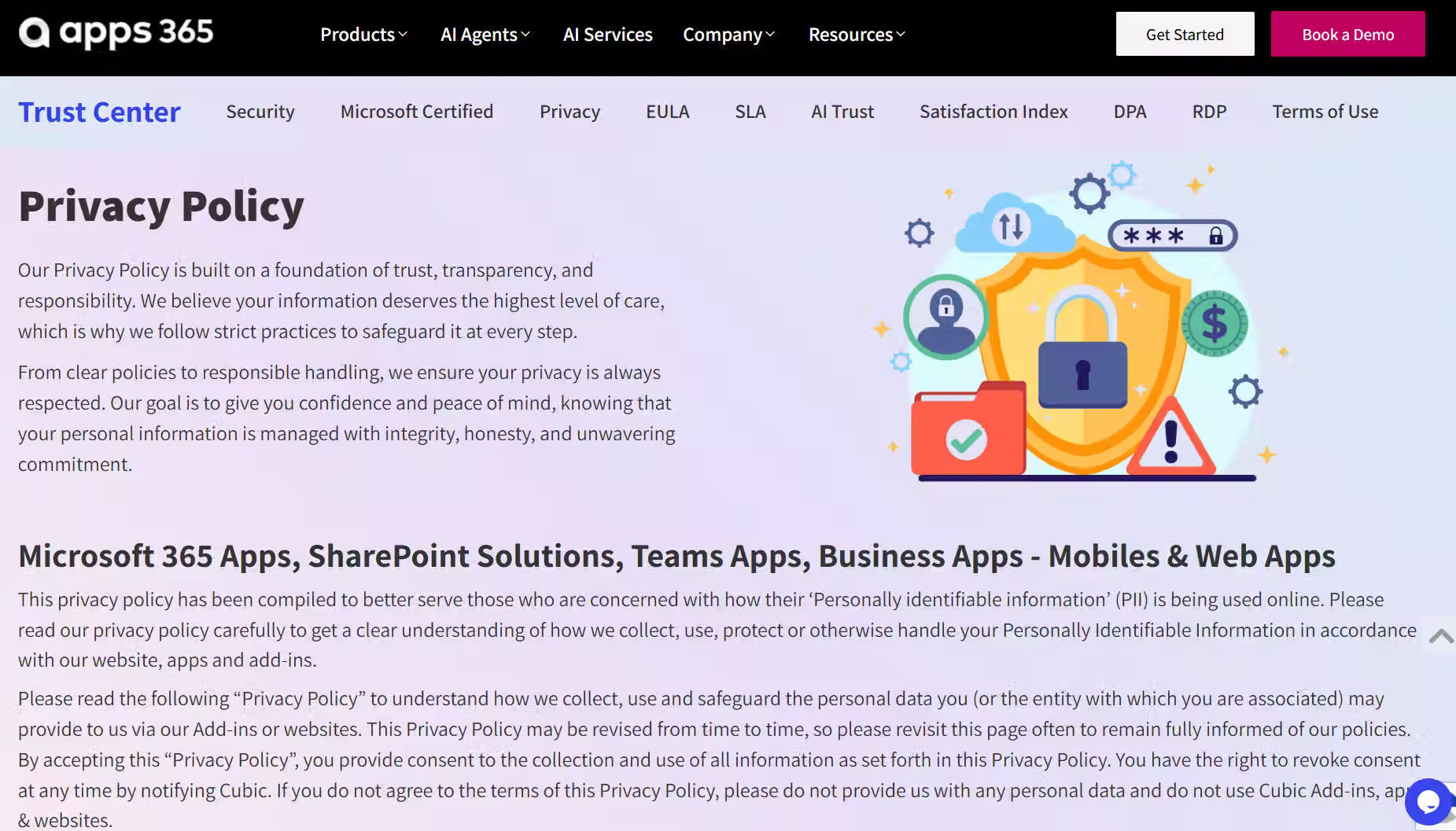
By proceeding, you accept Cubic Logics’s terms and conditions and privacy policy


By proceeding, you accept Cubic Logics Terms and Conditions and Privacy Policy
Please provide your contact details, we will connect with you soon!
By proceeding, you accept Cubic Logics Terms and Conditions and Privacy Policy
Schedule a free personalized 1:1 demo
By proceeding, you accept Cubic Logics’s terms and conditions and privacy policy