

Helpdesk SoftwareThe Complete Guide for Modern Teams
Helpdesk software is the dedicated platform modern teams use to efficiently centralize, manage, and resolve all support requests. This guide covers its functions, benefits, and how to choose the right helpdesk software.
_eH2jDg7dZ.png)

What Is Helpdesk Software?
Helpdesk software is a core centralized platform, often referred to as a help desk system, specifically engineered to manage and simplify all incoming employee support requests.
The fundamental component of any system is the ticketing system. This mechanism automatically captures communications from various channels such as email, phone, web forms, and chat and instantly converts them into a trackable, manageable record known as a support ticket or issue.
The helpdesk platform acts as the single point of contact for users, guaranteeing that no request is overlooked, duplicated, or lost. It provides the essential structure required for every issue, whether technical or nontechnical, to be systematically logged, correctly prioritized, appropriately assigned to an agent, and efficiently resolved.
When utilized internally, this becomes IT helpdesk software. In this context, the focus shifts to supporting employees with their operational questions, technical problems, or administrative queries. By providing a clear process for handling internal requests, the system minimizes employee downtime and significantly enhances overall workplace productivity.
Why Modern Teams Need Helpdesk Software
Relying on fragmented tools like shared inboxes and spreadsheets for support leads to a chaotic and inefficient process. This archaic approach often results in overlooked requests and poor visibility, failing to meet modern service expectations. From small businesses to vast enterprise helpdesk software users, requires helpdesk solutions to manage complexity, scale operations, and truly thrive. The adoption of a dedicated helpdesk system transforms support from a reactive cost center into a strategic asset.
Centralized Request Management: A unified ticketing software captures all support requests into one single location. This centralization prevents tickets from being dropped, ensures no issue is duplicated, and provides a comprehensive view of the entire support workload. This is especially vital for teams handling a high volume of requests across multiple channels.
Enhanced Efficiency and Accountability: A well-structured support ticket system provides immediate clarity. By clearly assigning and tracking ticket status, agents know precisely who is responsible for resolving a given issue and its current stage. This elimination of ambiguity leads directly to streamlined workflows, optimized resource allocation, and significantly faster resolution times.
Improved Customer and Employee Experience: The delivery of prompt, organized, and consistent support directly correlates with increased satisfaction levels. This high quality experience is crucial not only for external customers but also for internal employees seeking IT support ticketing system assistance for technical, HR, or operational queries, minimizing their downtime and boosting morale.
Better Data Driven Decisions: Modern systems are built to generate comprehensive helpdesk reporting and analytics. These tools provide deep, actionable insights into common issues, peak request times, agent performance metrics, and bottlenecks in existing processes. This wealth of data allows managers to optimize staffing, enhance the knowledge base software, and drive continuous process improvement.
Meeting Service Level Agreements (SLAs): Helpdesk platforms incorporate robust SLA management software functionality. This ensures your team can define, monitor, and adhere to specific commitments regarding response and resolution times for different request types. Automatically tracking these obligations is essential for maintaining consistent professionalism, fulfilling contractual agreements, and building long term customer trust.
Scaling Support Operations: Whether you are a growing startup or a large corporation, manual processes quickly hit a wall. Helpdesk software provides the foundational structure and helpdesk workflow automation necessary to handle increasing ticket volumes without linearly increasing staff, making support operations scalable and sustainable.
Take the next step toward better support operations.
Core Features of Helpdesk Software
The best helpdesk software offers a comprehensive suite of helpdesk tools to facilitate easy support operations.
AI Helpdesk Software: Leveraging Artificial Intelligence is the future of support. AI helpdesk software performs tasks like sentiment analysis on incoming requests to flag angry customers immediately, provides automated response suggestions to agents, and powers smart chatbots for instant, 24/7 self service. This intelligence helps scale service without scaling staff.
Ticket Management: This is the fundamental, nonnegotiable feature of any helpdesk platform. It involves the systematic process of creating, logging, categorizing, prioritizing, and assigning support tickets. Agents use robust tools to manage tickets based on severity (e.g., high priority technical outages versus low priority general queries), ensuring that critical issues are addressed first and that no request falls through the cracks. This capability is the foundation of effective helpdesk ticket management.
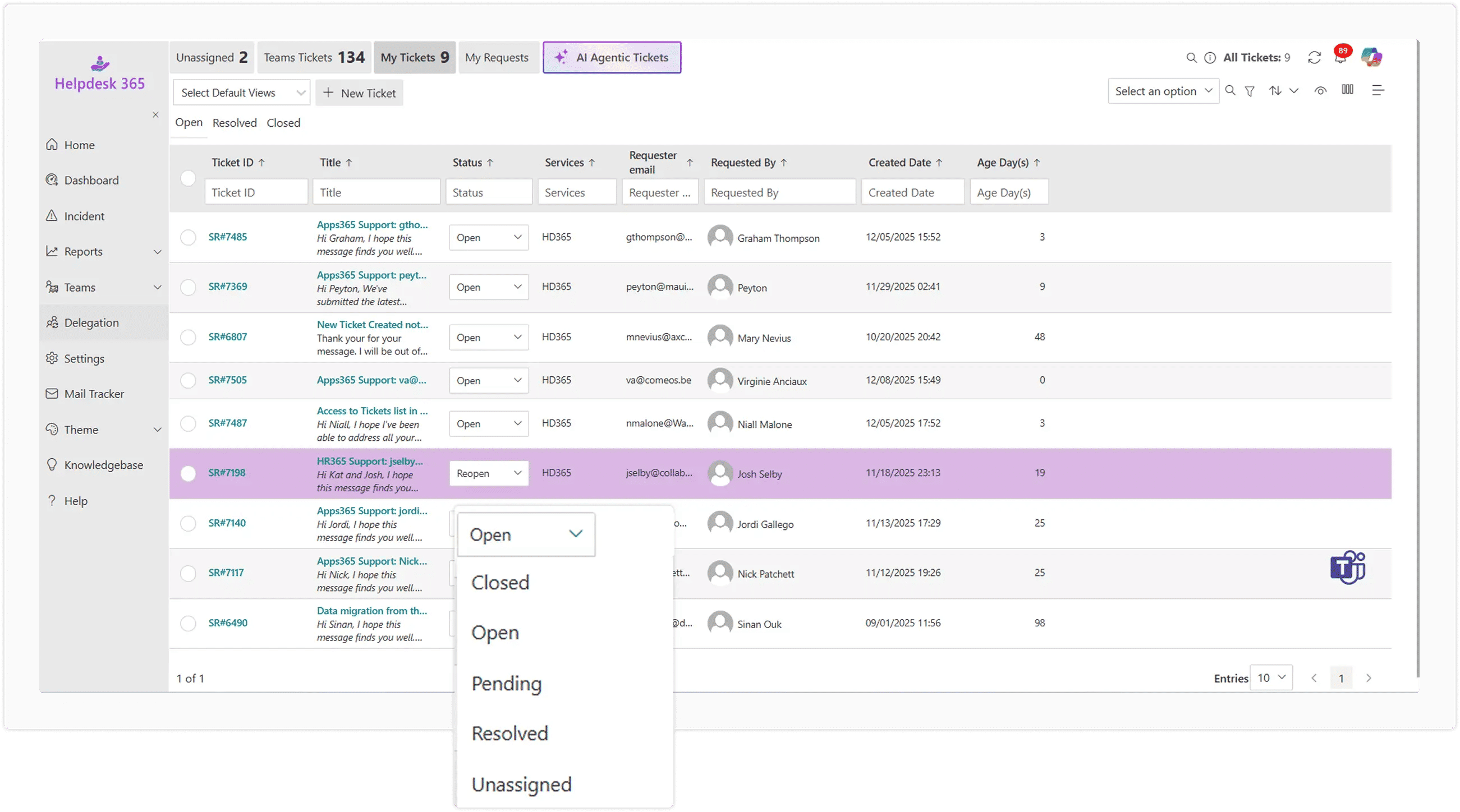
Multi Channel and Omnichannel Helpdesk: Understanding how users communicate is key. A multi channel helpdesk supports interaction across different tools like email, phone, and web chat. A true omnichannel helpdesk, however, unifies the entire customer interaction history from all sources, including social media, into a single, effortless agent view. This maintains full context, preventing customers from having to repeat their issue and leading to faster, more personalized service.
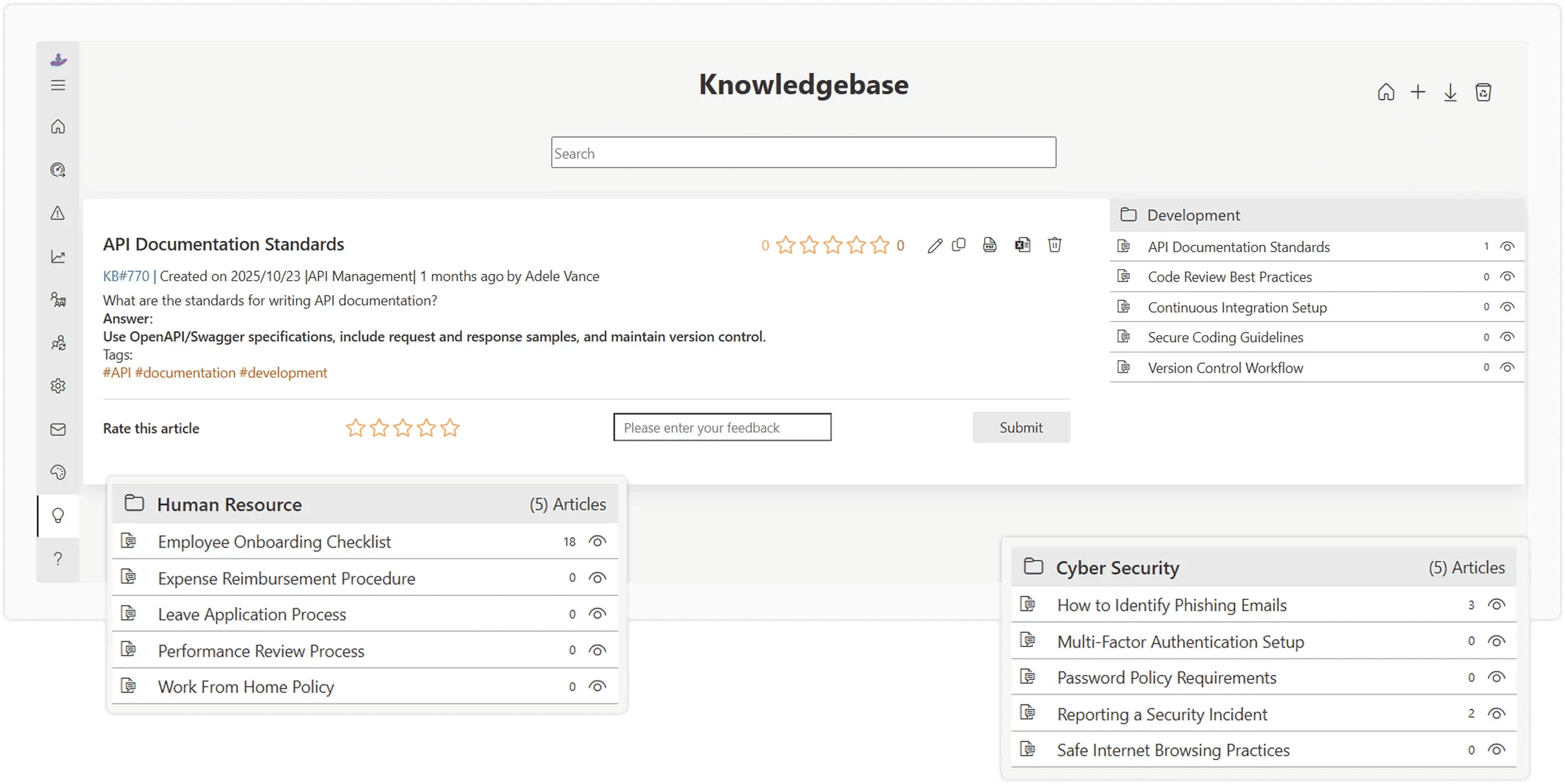
Knowledge Base Software and Self Service: These features are a critical component for ticket deflection and cost savings. Knowledge base software provides the tools for agents to create, organize, and manage a repository of informative articles, guides, and Frequently Asked Questions (FAQs). A connected self service helpdesk portal allows users to search and find solutions independently, drastically reducing the volume of simple, incoming tickets and empowering customers and employees alike.
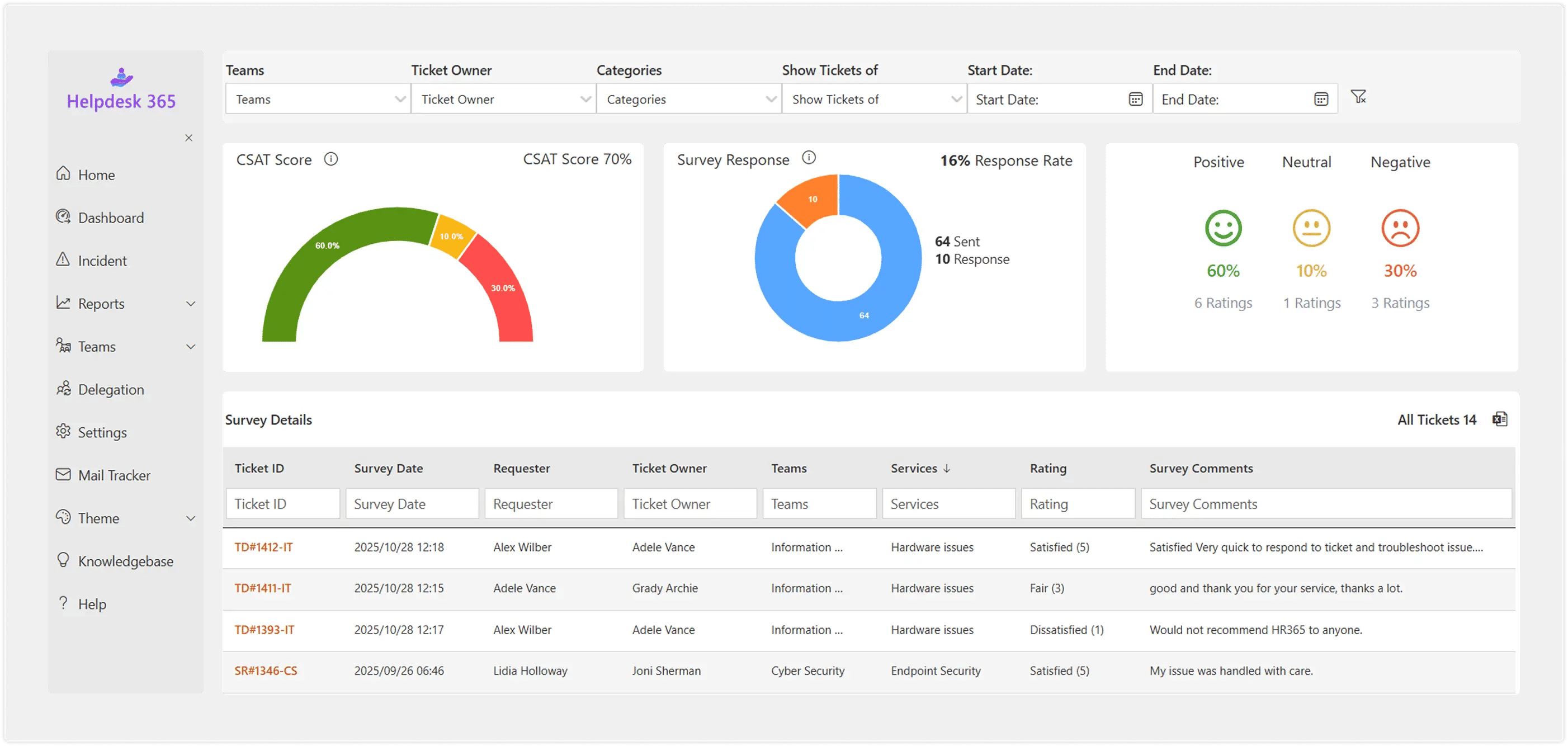
Helpdesk Workflow Automation: Automated helpdesk software uses predefined business rules to intelligently handle time consuming and repetitive tasks. This includes automatic ticket routing to the correct department or agent, triggering follow up notifications, sending satisfaction surveys, and automatically closing tickets after a period of user inactivity. This automation significantly boosts agent productivity and ensures consistent application of support policies.
Reporting and Analytics: For continuous improvement, a system must generate clear helpdesk reporting and helpdesk analytics. These tools allow for a deep dive into crucial performance metrics such as agent response time, average resolution time, ticket volume trends, and Customer Satisfaction (CSAT) scores. This data provides the objective insights required for managers to optimize processes and make better data driven decisions.
Elevate your support system and empower collaboration with Helpdesk Software.
How To Choose the Right Helpdesk Software
Selecting the online helpdesk software that is right for your organization requires careful consideration of your specific needs, whether you are a helpdesk for small business or an enterprise helpdesk software user.
Define Your Audience and Scope
The first critical step is clearly defining who your support system is for. Are you primarily looking for a platform to handle external customer support and sales queries? Or is the focus on internal helpdesk software or IT helpdesk software designed to assist employees with HR, Facilities, or technical issues? Clarifying the audience, and the types of tickets they submit, will immediately filter the market and guide your feature requirements.

Identify Must Have Features
Resist the urge to choose the most feature rich platform. Instead, prioritize the specific functionalities you absolutely need. Determine if your operation requires omnichannel helpdesk capabilities to unify interactions across all channels (chat, social, email, phone), or if a simpler email-to-ticket system is sufficient. Crucially, assess whether SLA management software functionality is essential to meet strict response and resolution time commitments. Prioritizing features ensures you invest in a solution that solves your core problems.
Evaluate Integration
The selected helpdesk platform must integrate seamlessly with your existing technology stack. Look for native connectors to your Customer Relationship Management (CRM) system, Enterprise Resource Planning (ERP) platform, and internal project management tools. Deep integration is vital for enabling efficient helpdesk workflow automation, such as syncing customer data or linking support tickets directly to development tasks. If your organization relies heavily on Microsoft products, look specifically for native SharePoint helpdesk solutions for cohesive operation.
Test for User Friendliness
The success of any help desk system hinges on adoption. The interface must be intuitive, clean, and easy to navigate for both the support agents using it daily and the end users submitting requests. A complex or poorly designed system will lead to agents resisting its use and customers abandoning the self service portal, ultimately resulting in poor support efficiency and lower satisfaction. Always prioritize hands on testing.
Assess Scalability
Choose a solution built to grow with your company. What works perfectly for a five-person helpdesk for small business may quickly become unsustainable when ticket volume triples or you expand into global markets. Evaluate the platform’s ability to handle increased ticket volume, new agent licenses, additional languages, and complex future needs without requiring a costly and disruptive migration to a new helpdesk platform.
Here are 5 best Helpdesk Software Solutions
| Rank | Software Name | Best For | Key Highlight |
| 1 | Helpdesk 365 | Microsoft 365 & Internal IT Support | Effortlessly built for Microsoft Teams helpdesk and SharePoint helpdesk. Data stays within your Microsoft tenant, leveraging existing user access and Power Automate for workflows. |
| 2 | Zendesk | Scaling Businesses & Omnichannel Support | Extremely robust feature set, deep customization, and market leading omnichannel helpdesk support (chat, email, social) with powerful AI helpdesk software tools. |
| 3 | Freshdesk | High Volume & Cost Effectiveness | Highly intuitive user interface, excellent helpdesk workflow automation, and a generous free tier for small teams (up to 10 agents). Strong knowledge base software features. |
| 4 | Jira Service Management | IT Teams & DevOps Integration | Deeply integrated with Atlassian products (Jira, Confluence). Ideal for internal helpdesk software and teams requiring strong IT support ticketing system features and linking support to development backlogs. |
| 5 | Zoho Desk | Zoho Ecosystem Integration & AI | Strong, context aware multi channel support and built in AI helpdesk software (Zia) for tasks like sentiment analysis and predictive insights. Excellent integration with the broader Zoho suite. |
Helpdesk Software for Microsoft 365 (Teams and SharePoint)
For organizations already invested in the Microsoft ecosystem, adopting a Microsoft 365 helpdesk can provide unparalleled integration and ease of use. Many modern helpdesk platforms offer specialized solutions that turn existing tools like Microsoft Teams and SharePoint into a fully functional ticketing system.
Microsoft Teams Helpdesk
Employees can raise and track support tickets directly within their familiar Teams interface using a dedicated app. Agents can collaborate on complex tickets using Teams chat, keeping the discussion attached to the ticket record.

SharePoint Helpdesk
Solutions can be built or integrated to store all help desk data and documents within your SharePoint environment, providing robust security and keeping all information within your existing Microsoft infrastructure. This avoids the need for external cloud storage and simplifies user authentication using existing Microsoft credentials.
Step-by-Step Guide for Creating a SharePoint Ticketing System
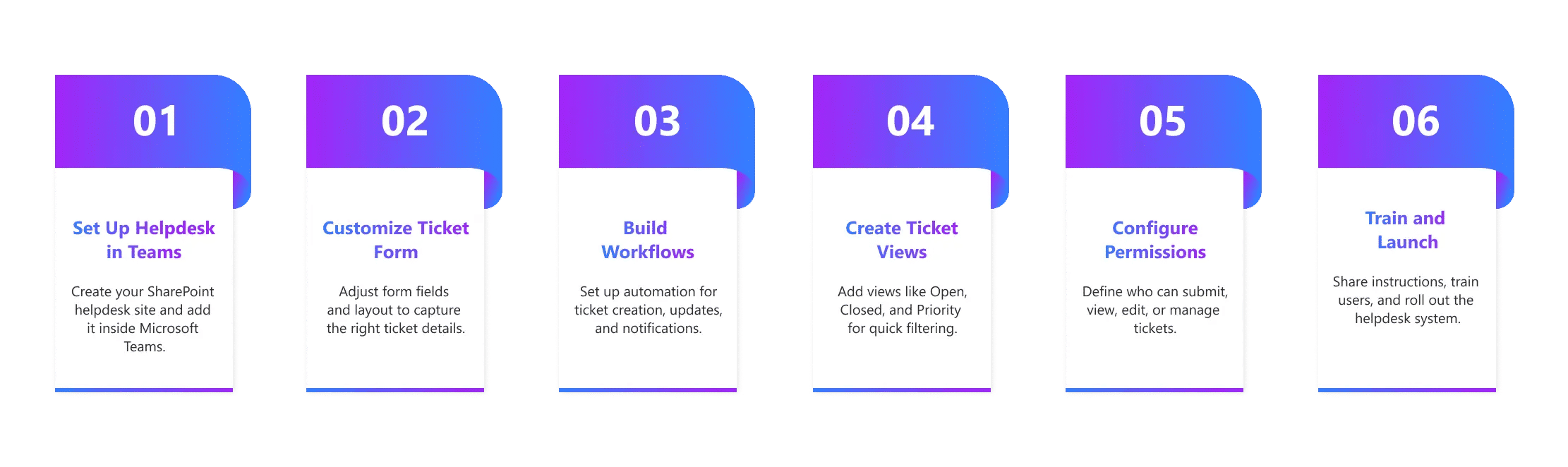
A guide for creating a SharePoint Ticketing System outlines how to build a basic helpdesk system using native Microsoft 365 tools, specifically by using a SharePoint List as the central ticketing software and Power Automate to manage submissions, tracking, and workflow automation.
1. Create the Site and List
- Set Up a Dedicated Site: Create a new SharePoint Communication or Team Site specifically to house the Help Desk. This ensures security and organization.
- Create the Ticket List: The core of the system is a custom SharePoint List that acts as the ticket tracker. Define necessary columns, such as:
Ticket ID | Title/ Description
| Requester
| Status | Priority (Choice field: Low, High, Critical)
| Assigned To (Person field for the agent)
|
2. Submission and Interface
- Create the Submission Form: Use a dedicated form tool like Microsoft Forms (or Power Apps for more complexity) to create the user input interface. Ensure the form fields match the columns in your SharePoint List.
- Link the Form to the List: Use Power Automate to create a workflow that automatically takes the data submitted via the form and creates a new item (a support ticket) in your SharePoint List.
- Customize Views: Create multiple List Views (e.g., “Open Tickets,” “My Assigned Tickets,” “Closed Tickets”) to make it easy for agents and users to filter and track progress.
3. Automation and Management
- Set Up Workflows (Power Automate): Define automation rules for key actions:
- Notifications: Send automatic email notifications to agents when a new ticket is created and to the requester when the status changes.
- Assignment: Implement logic to automatically assign tickets to specific teams or agents based on the ticket category or priority.
- Implement Permissions: Configure specific list and site permissions to control who can submit tickets (all employees) and who can view, edit, or close tickets (only support agents).
4. Enhancements
- Integrate with Teams: Embed the ticket submission form and the main ticket list view directly into a Microsoft Teams channel for easy access.
- Add a Knowledge Base: Create a separate SharePoint Page or List to serve as a simple knowledge base software or FAQ repository for self service helpdesk functionality.
A SharePoint ticketing system leverages existing Microsoft 365 helpdesk components (SharePoint, Forms, and Power Automate) to create a functional, centralized IT support ticketing system without requiring external vendor software.
.webp)
A Guide to Building a SharePoint Ticketing System for Your Team
Mistakes To Avoid When Adopting a Helpdesk System
The path to a successful help desk system implementation is fraught with common pitfalls. Avoid these mistakes for a smoother transition:
Neglecting the Self-Service Portal
Assuming users will always raise a support ticket. An under-invested knowledge base software or self-service helpdesk means more basic requests land on your agents’ desks.
Over-Automating Too Soon
While helpdesk workflow automation is powerful, overly complex or poorly configured rules can lead to incorrect ticket routing and agent frustration. Start simple and build up.
Ignoring Agent Input
Your agents are the primary users of the ticketing software. Solicit their feedback during the selection and testing phases to ensure a frictionless agent experience.
Failing to Define SLAs and Priorities
Without clear SLA management software rules and ticket priorities, agents will struggle to manage their workload effectively, leading to missed deadlines and poor service.
Choosing Based Solely on Features
A feature-rich platform you only use 10% of can be costly. Focus on a simple, efficient tool that meets your core needs first.
Future Trends in Helpdesk Software
The future of helpdesk solutions is defined by intelligence and automation, moving beyond simple helpdesk ticket management.
AI Helpdesk Software Dominance
AI helpdesk software will move from being an add-on to a core component. Generative AI will revolutionize knowledge management by automatically drafting articles, summarizing long ticket threads, and improving the quality of self-service.
Hyper-Automation
Advanced helpdesk workflow automation will create “self-healing” processes, where the system proactively identifies and resolves common issues before an employee or customer even raises a support ticket.
Predictive Support
Leveraging helpdesk reporting and machine learning, systems will predict potential outages or common user issues and initiate proactive communication or fixes, changing support from reactive to truly preventive.
Deeper Collaboration
Further integration with communication tools like Microsoft Teams will make internal collaboration on complex tickets virtually seamless, blurring the line between the support and development/operations teams.
This evolution ensures that your helpdesk platform remains a strategic asset, enabling your team to deliver exceptional and scalable service with maximum efficiency.
Conclusion
Helpdesk software is essential for modern teams, replacing scattered support tasks with a centralized and structured system that helps teams stay organized, respond faster, and handle issues with greater accuracy. It simplifies communication, reduces confusion, and creates a consistent way to manage requests.
With platforms like Helpdesk 365, organizations benefit from easy integration within their Microsoft 365 environment, allowing teams to work in familiar tools while improving visibility across support activities. Leaders gain clearer insights through reporting, teams enjoy smoother workflows, and the overall support experience improves for both customers and employees.



Frequently Asked Questions
What does helpdesk software actually do for a team?
Helpdesk software helps teams handle questions, issues, and requests in one place. It organizes tickets, assigns them to the right people, tracks progress, and keeps everyone informed. It also helps teams respond faster and avoid missed tasks.
Who should use helpdesk software in a company?
Any team that receives requests can use it—IT, HR, Operations, Facilities, and Customer Support. Modern companies use one shared helpdesk so everyone can request help using a simple form, chat, email, or portal.
How is helpdesk software different from a shared inbox or email support?
A shared inbox does not show ownership, priority, or progress. Helpdesk software turns every request into a structured ticket with status, category, deadlines, and responsibility. This helps teams reduce confusion and improve accountability.
What features should a modern helpdesk have?
A modern helpdesk should include ticket forms, automations, approval workflows, SLAs, knowledge base, collaboration tools, analytics, and integrations with tools like Microsoft Teams and SharePoint. These features help teams reduce manual work and keep everything organized.
Why do companies switch from traditional helpdesks to modern ones?
Companies switch because older systems feel slow, hard to use, and disconnected. Modern helpdesks are easier to set up, mobile-friendly, support automation, work with team tools, and help managers understand what is happening in real time.
Schedule a free personalized 1:1 demo
By proceeding, you accept Cubic Logics’s terms and conditions and privacy policy










Try It Free, No Obligation





Don't leave yet,
get up to 30% special offer
until 31st March 2026
Enter your business email ID and we will send a personalized coupon code straight to your inbox.
Please provide your contact details, we will connect with you soon!
Please provide your contact details, we will connect with you soon!
By proceeding, you accept Cubic Logics Terms and Conditions and Privacy Policy
Schedule a free personalized 1:1 demo
By proceeding, you accept Cubic Logics’s terms and conditions and privacy policy








By proceeding, you accept Cubic Logics Terms and Conditions and Privacy Policy