

How to Improve Employee Search with a SharePoint Staff Directory
_eH2jDg7dZ.png)
- A SharePoint staff directory helps employees find the right person in seconds, not minutes.
- Advanced filters, org charts, and mobile access make employee search faster and easier.
- A well-built directory reduces IT helpdesk tickets and speeds up new employee onboarding.
- Tools like Employee Directory 365 turn plain SharePoint into a powerful, searchable people hub.
Why Employee Search Matters in the Modern Workplace
Every workday, employees ask the same question: “Who do I talk to about this?” Maybe they need the HR manager’s phone number. Maybe they want to find someone from the finance team. Or maybe a new hire is trying to locate their manager on their second day at work.
These small searches happen all day, every day. When they take too long, they waste time and slow down work. Studies show that employees spend several hours each week just looking for the right person, file, or piece of information.
This is where a strong employee search system becomes important. Most companies already use Microsoft 365, which means they already have SharePoint. But many organizations do not use it fully. A SharePoint staff directory turns this everyday tool into a fast, searchable people directory. It helps employees find colleagues, contact details, and reporting lines in just a few seconds.
In this blog, we will explain what a SharePoint staff directory is, why it matters, and how to build one that actually works for your team. We will also cover the features to look for, common mistakes to avoid, and how a ready-made tool like Employee Directory 365 can save you weeks of setup time.
By the end, you will have a clear, practical plan to turn your existing SharePoint environment into a fast, reliable employee search hub that your whole company will actually use.
What Is a SharePoint Staff Directory?
A SharePoint staff directory is a searchable list of all employees in your organization. It lives inside SharePoint Online, so employees can access it from the same place they use for documents, teams, and company news.
A basic directory shows names, job titles, and email addresses. A well-designed SharePoint online staff directory goes much further. It can show profile photos, phone numbers, departments, office locations, skills, and even reporting managers. Employees can search by name, department, or skill and get instant results.
Unlike a simple Excel sheet or PDF list, a good directory stays up to date on its own. When HR updates a profile in Microsoft 365, the directory reflects the change automatically. This saves time, reduces manual work, and keeps information accurate for everyone.
Common Employee Search Problems Without a Directory
Without a proper directory, employee search becomes frustrating. Here are common problems teams face:
- Outdated contact lists: Old spreadsheets often show people who have already left the company.
- No central place to search: Employees check emails, chat apps, and old documents just to find one contact.
- Slow onboarding: New employees struggle to learn who does what and who reports to whom.
- Wasted IT time: Helpdesk teams get repeated requests just to share someone’s extension number.
- Poor mobile access: Many older directories don’t work well on phones or tablets.
These issues slow down daily work and quietly hurt productivity across the whole company. A modern SharePoint staff directory solves each of these problems directly.
Key Features of an Effective SharePoint Online Staff Directory
Not all directories are equal. To truly improve employee search, your SharePoint staff directory needs the right features built in.
Advanced Search Filters
Employees should be able to search by name, job title, department, location, or skill. Filters make search much faster than scrolling through one long list.
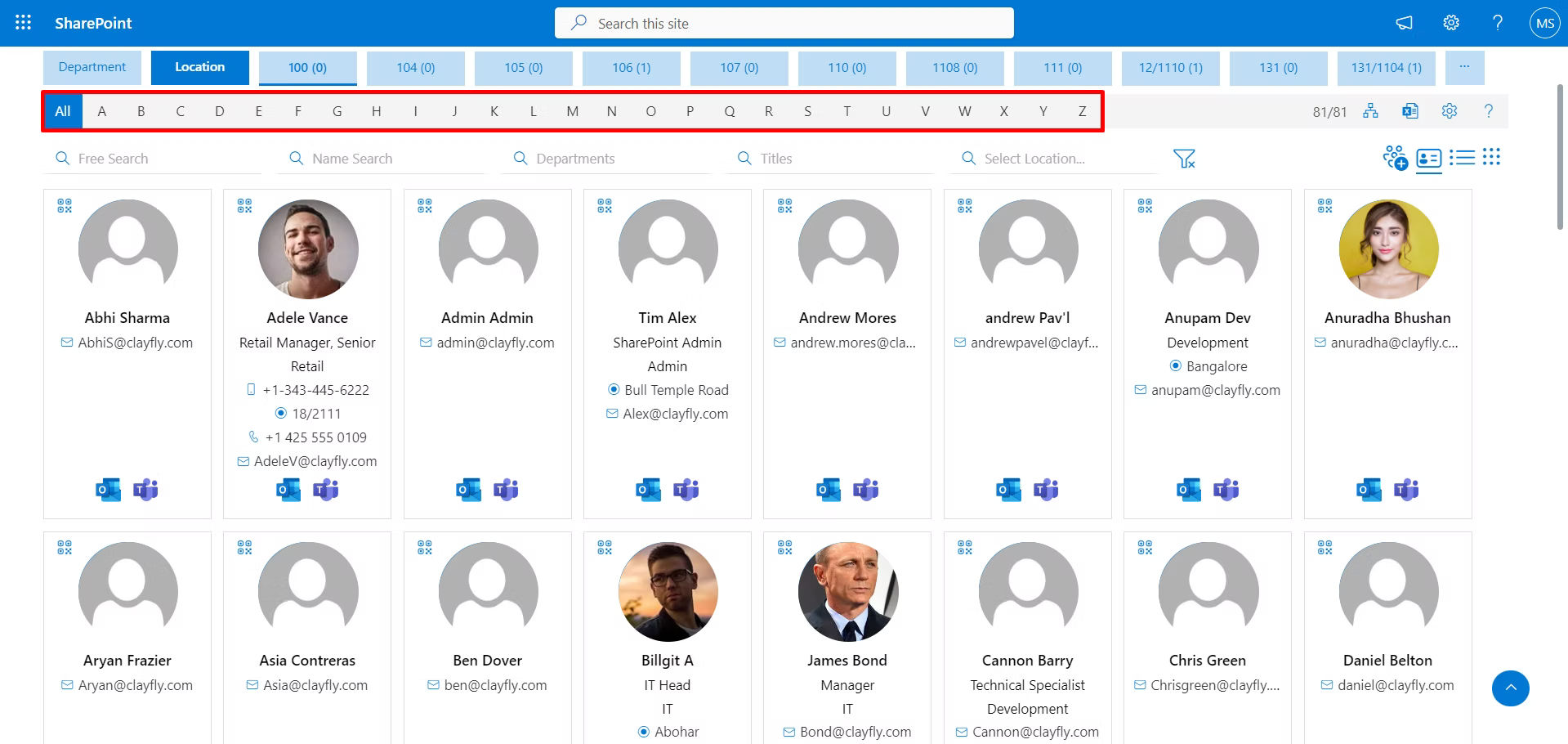
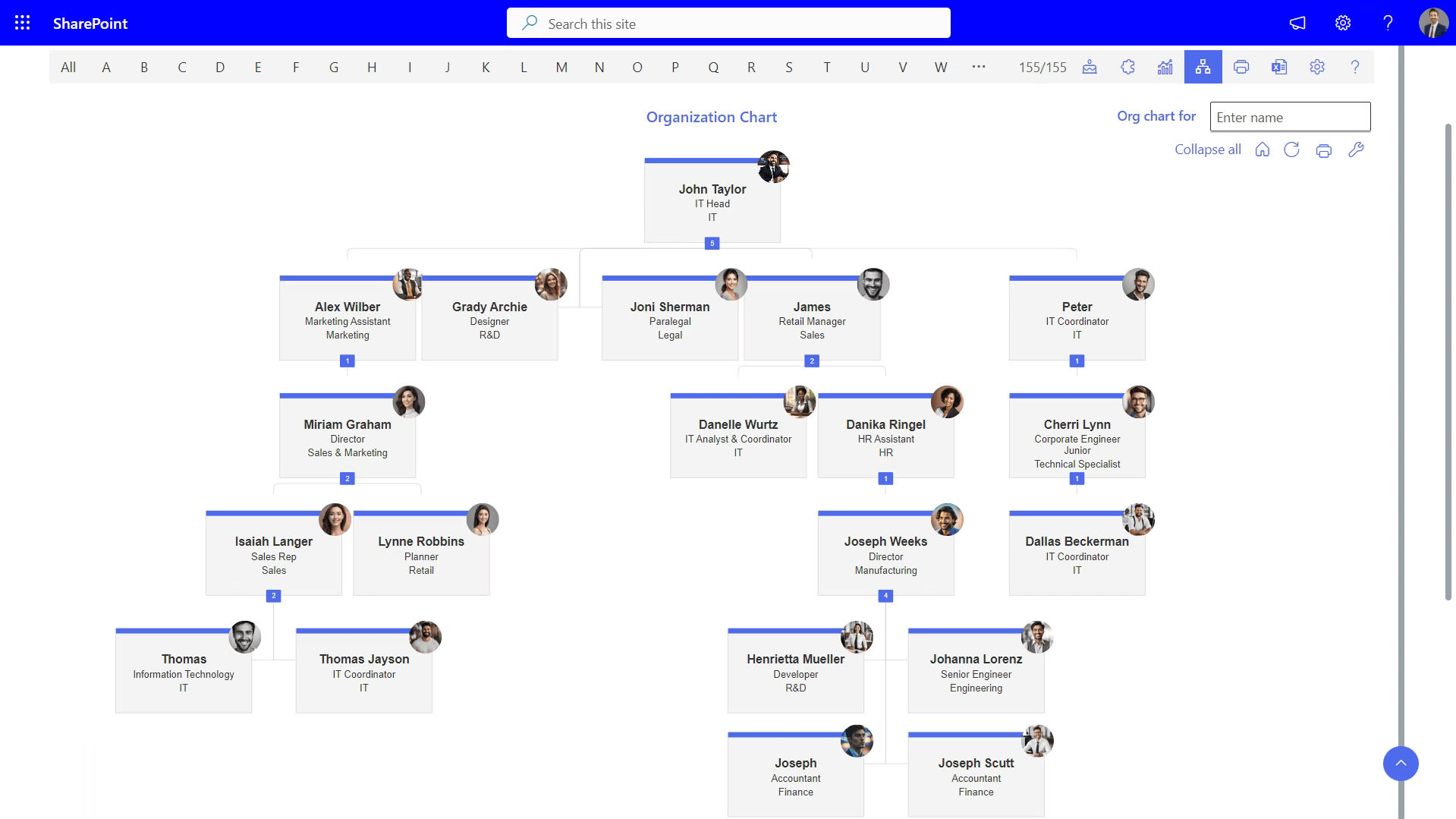
Organization Chart View
A visual org chart helps employees understand reporting lines at a glance. It also helps new hires see how teams and departments are structured.
Profile Photos and Contact Details
Employee Profile photos help people recognize colleagues, especially in large or remote teams. One-click access to phone numbers and email saves valuable time.
Mobile Accessibility
Many employees now work from phones or tablets, on the move or from home. A directory that works well on mobile keeps employee search fast wherever people are.
Integration with Microsoft 365
The best directories connect directly with Azure Active Directory and Microsoft 365. This keeps profile data accurate at all times, without any manual updates.
Skill and Expertise Search
A skill and expertise search lets employees find the right specialist, not just the right department. For example, someone can search for “Power BI” or “German speaker” and instantly see who fits.
Benefits of Using a SharePoint Staff Directory
A well-built SharePoint staff directory does more than list names. It creates real, measurable benefits for the whole organization.
Faster Employee Search
Employees find the right person in seconds. There is no more digging through emails or asking around the office.
Improved Collaboration
When people can find experts and teammates easily, they collaborate more often. Cross-department projects move faster and with less friction.
Better Onboarding Experience
New employees learn the organization structure quickly. This reduces the time it takes for them to feel comfortable and settled at work.
Reduced IT Helpdesk Requests
When the directory is easy to search on its own, employees stop calling IT just for basic contact information. This frees up the IT team for bigger, more valuable tasks.
Stronger Company Culture
A directory with photos and full profiles helps remote and hybrid teams feel more connected, even when they rarely meet in person.
Time and Cost Savings
A searchable directory reduces the time employees spend looking for people. Multiply this small saving across hundreds of employees, and it adds up to real cost savings for the business.
Data Security and Control
Because the directory lives inside Microsoft 365, it follows the same security rules as the rest of your company data. IT teams keep full control over who can view or edit each profile, which is harder to guarantee with outside tools or shared spreadsheets.
Want to see how a SharePoint staff directory can transform your workplace? Book a free demo today and discover how Employee Directory 365 makes employee search effortless.
Who Should Use a SharePoint Staff Directory?
A SharePoint staff directory is useful for companies of almost any size, but it helps most in a few common situations.
Growing companies benefit the most, since new employees join faster than word-of-mouth can keep up. When a company crosses fifty or a hundred employees, people naturally stop knowing everyone by name, and a searchable directory becomes essential rather than optional.
Remote and hybrid companies also see a big impact. When teams rarely meet in person, a directory with photos, roles, and contact details helps employees feel like they know their colleagues, even across time zones and offices.
Finally, companies with frequent reorganizations or new hires benefit from a directory that updates automatically. Instead of manually editing an org chart every few months, the directory reflects Microsoft 365 changes right away.
How to Set Up a SharePoint Staff Directory
Setting up a staff directory does not have to be complicated. Follow these steps to build one that actually works for your team.
- Define what information you need.Decide which fields matter most for your team, such as name, title, department, location, skills, and manager.
- Choose your data source.Most companies pull data from Azure Active Directory or Microsoft 365 user profiles. This keeps informationaccurate and reduces manual data entry.
- Pick the right tool.You can build a directory using SharePoint’s built-infeatures, or use a ready-made solution like Employee Directory 365 for a faster setup and more advanced features from day one.
- Design for easy search.Add filters,a search bar, and sorting options. Keep the layout clean, simple, and easy to scan.
- Add visual elements.Includeprofile photos and an org chart view to make the directory easier and more pleasant to use.
- Test onmobile devices. Check that the directory works well on phones and tablets before rolling it out to the whole company.
- Train employees.Show your team how to use the new directory. A short guide, email, or videogreatly helps adoption in the first few weeks.
- Keep it updated. Set a clear process for updating profiles automatically when employees join, leave, or change roles.
Who Should Use a SharePoint Staff Directory?
- Keep profiles complete: Encourage employees to fill in all fields, including skills and a short bio.
- Use clear categories: Group employees by department or location for easier browsing and search.
- Update regularly: Set a monthly review to remove old accounts and add new employees promptly.
- Gather feedback: Ask employees what information they need most, and adjust the directory over time.
- Promote the directory: Share the link in onboarding materials and company newsletters so every employee knows it exists.
SharePoint vs. Other Employee Directory Tools
Some companies consider building a directory in a separate, standalone app instead of using SharePoint. However, using SharePoint Online has clear advantages for most organizations.
Since most companies already use Microsoft 365, employees do not need to learn a brand-new platform. The staff directory sits alongside Teams, Outlook, and OneDrive, so it fits naturally into daily work.
Standalone directory apps often require separate logins and manual data updates. A SharePoint-based directory, especially one powered by Employee Directory 365, syncs directly with Azure Active Directory. This means less maintenance work and more accurate, trustworthy results.
For companies already invested in Microsoft 365, building the staff directory inside SharePoint is usually the simpler and more cost-effective choice.
There is also a security benefit. A separate app often means separate logins, separate permissions, and another system for IT to monitor. Keeping the directory inside SharePoint means it inherits the same login, the same security policies, and the same support your IT team already manages every day.
Who Should Use a SharePoint Staff Directory?
Building a directory from scratch in SharePoint takes time, budget, and technical skill. This is why many companies choose Employee Directory 365, a ready-made solution designed specifically for Microsoft 365 and SharePoint Online.
Employee Directory 365 offers advanced search filters, an interactive org chart, and profile photos right out of the box. It integrates directly with Azure Active Directory, so employee data stays accurate without extra manual work from your IT team. The tool also works smoothly on mobile devices, making it easy for employees to search anytime, from anywhere.
For companies that want to improve employee search without spending months on development, Employee Directory 365 offers a fast, reliable, and affordable way to get started. Most teams can go from setup to a fully working directory in days, not months, with minimal support needed from IT.
Ready to simplify employee search at your company? Start your free trial of Employee Directory 365 and see the difference for yourself in minutes.
How to Measure the Success of Your Staff Directory
Once your SharePoint staff directory is live, it is worth checking whether it is actually working. A few simple signs point to success.
Watch for a drop in basic IT helpdesk requests, such as questions about someone’s phone number or department. Fewer of these tickets usually means employees are finding answers on their own.
You can also track how often the directory is used, if your tool supports usage reports. Steady or growing usage over time is a good sign that employees have made it part of their daily routine.
Finally, ask new hires directly. If they say it was easy to find their team and manager in the first week, your directory is doing its job well.
Real-World Use Cases
A SharePoint staff directory helps in many everyday, real-world situations:
- New employee onboarding: A new hire uses the org chart to quickly understand who their manager and teammates are.
- Cross-department projects: A marketing employee searches by skill to find a designer working in another office.
- Remote and hybrid teams: Employees working from home use profile photos and chat links to feel more connected to colleagues they rarely meet in person.
- Everyday IT support: Instead of calling the helpdesk, an employee searches the directory to find the right contact for a software issue.
Common Mistakes to Avoid
- Skipping mobile testing: A directory that does not work well on phones frustrates employees and lowers adoption.
- Ignoring data accuracy: Outdated information makes employees stop trusting the directory altogether.
- Overcomplicating the design: Too many fields or a cluttered layout slows down search instead of speeding it up.
- Forgetting to promote it: Even a great directory fails quietly if employees simply don’t know it exists.
- Restricting access unnecessarily: Locking the directory behind too many permissions defeats its purpose. Keep it open to every employee who needs to search it.
Launch Checklist
Before you launch, run through this simple checklist to make sure your SharePoint staff directory is ready for everyday use.
- Confirm all employee profiles have a name, title, department, and photo.
- Test the search bar and filters with a few real queries.
- Open the directory on a phone and a tablet to check mobile display.
- Set a clear owner responsible for keeping data accurate going forward.
- Share the directory link in a company-wide announcement or onboarding email.
Ticking off these five points helps your launch go smoothly and ensures employees adopt the tool quickly.
Don’t let outdated contact lists slow your team down. Book a free demo and see how Employee Directory 365 keeps your SharePoint staff directory fast, accurate, and easy to use.
Conclusion
A SharePoint staff directory is more than an employee list, it helps people quickly find colleagues, improve collaboration, and stay connected. By adding features like advanced search, filters, org charts, and mobile access, or using a ready-made solution like Employee Directory 365, organizations can simplify employee search, reduce administrative effort, and help teams spend more time on meaningful work.
Join Our Creative Community
Frequently Asked Questions
What is a SharePoint staff directory?
It is a searchable list of employees inside SharePoint Online, showing details like name, title, department, and contact information.
How is it different from a normal contact list?
Unlike static lists, it updates automatically from Microsoft 365 data and offers search filters, photos, and org charts.
Can I use SharePoint's built-in features to build a directory?
Yes, but it takes technical setup and ongoing maintenance. Tools like Employee Directory 365 offer a faster, ready-made option.
Does a staff directory work on mobile devices?
A well-built directory, like Employee Directory 365, works smoothly on both phones and tablets.
How often should the directory be updated?
Ideally, it should sync automatically with Azure Active Directory so it stays accurate at all times.
Is Employee Directory 365 secure?
Yes. It uses standard Microsoft 365 security and permissions, so only authorized employees can view or edit directory data.
Can I customize the directory design?
Most modern tools, including Employee Directory 365, allow custom branding, layouts, and fields to match your company’s needs.
Is a staff directory only useful for large companies?
No. Even small and mid-sized companies benefit, especially as new hires join faster than word-of-mouth can keep up.


_JiluXJRGNl.svg)























