

Is an Open Source Customer Service Ticketing System Enough for Your Business?

An open source customer service ticketing system can be a smart choice if you want to track support requests without paying for a traditional software license. Tools such as osTicket, Zammad, and GLPI turn requests into tickets, assign work, and track progress.
But is open source enough for your business? Yes, if you have the technical resources to manage the system and its features meet your needs. It may be a harder fit if you want less work for IT, ready-to-use Microsoft 365 connections, or advanced support workflows without building them yourself.
- Open-source ticketing software can manage support requests, ownership, replies, and ticket history.
- A free software license does not remove hosting, setup, security, or support costs.
- Features such as SLAs and automation exist in open-source tools, but their setup and depth vary.
- Self-hosting fits teams with technical skills and a strong need for control.
- Helpdesk 365 is a paid Microsoft 365-based alternative, not an open-source product.
This guide covers the features, costs, and limitations to check before choosing open source or a paid alternative such as SharePoint Helpdesk 365.
What Is an Open Source Customer Service Ticketing System?
An open source customer service ticketing system is software that helps a support team receive, organize, and resolve customer requests. Its source code is available under an open-source license, so people can study and change the software within the license terms.
Each ticket records an issue, its owner, priority, replies, and status. Agents can follow the work in one place instead of searching several inboxes.
For example, a customer emails about a failed payment. The system creates a ticket, routes it to the right team, and saves each reply.
According to the Open Source Initiative, open source means more than simply allowing people to see code. The license also sets rules for using, changing, and sharing it
Open source, free software, and self-hosted software are not the same thing. A free plan may have closed code. An open-source tool may offer a paid hosted service. Self-hosting tells you where it runs, not what license it uses.
How Does an Open-Source Ticketing System Work?
Most systems follow a similar path from the first request to the final reply.
A request arrives.
A customer sends an email or fills out a support form. Some platforms accept requests from more channels.
A ticket is created.
The system stores the message and gives it an ID, status, and often a priority.
An agent takes ownership.
A rule or team member assigns the ticket to someone who can help.
The team works on the issue.
Agents add notes, contact the customer, and pass work to another team when needed.
The ticket is closed and reviewed.
The team records the solution and can study reports to spot repeat problems.
Without a shared ticket queue, two agents may answer the same email while another request goes unseen. Ownership and status help prevent that.
What Features Should You Look For?
An open-source license does not tell you which help desk features are included.
Feature | Why it matters |
Email and web ticket intake | Brings requests into a shared queue. |
Assignment and ticket status | Shows who is responsible and what still needs work. |
Priority rules and SLAs | Helps teams track urgent requests and response goals. |
Customer portal and knowledge base | Lets users submit requests and find answers themselves. |
Automation and integrations | Reduces repeat tasks and connects other business tools. |
Reports and access controls | Helps managers review service quality and control who sees tickets. |
These features are not exclusive to paid software. For example, osTicket documents ticket filters, SLAs, customer portals, and a knowledge base. The real question is whether a tool offers the right features in the version you plan to use, and how much work it takes to set them up.
Why Do Businesses Choose Open-Source Ticketing Software?
More control over the system
An open-source platform can give your technical team more freedom to change forms, business rules, and the way the software runs. This helps with unusual approval steps or integrations.
Self-hosting also lets you choose where the server runs, but adds responsibility for its safety.
A lower entry cost
Many open-source help desks offer a community version with no software license fee. That can help teams that want to avoid per-agent fees for the core software.
Still, the total cost depends on hosting, paid add-ons, technical work, and any support contract you buy.
Freedom to customize and move
Developers can add features and connections. Self-hosting may also give you direct access to ticket data
If you do not plan to change the code, ease of use may matter more.
What Are the Limitations of an Open Source Customer Service Ticketing System?
Many open-source help desks have strong features. Their trade-offs often come from running the software yourself.
Setup and maintenance take time
With a self-hosted system, someone must install it, configure incoming email, manage the database, set up backups, and keep the server working. Updates also need testing, especially when your team uses custom code or extensions.
A failed update can pull your only administrator away from other urgent work.
A hosted edition may reduce this work.
Your team owns much of the security work
Open source is not unsafe by default. But self-hosting means your team must manage access, patches, and backups.
This is an ongoing job. For instance, GLPI has published security updates that administrators were urged to install. A system that is not updated can remain exposed even when the project has already released a fix.
Paid tools also need a security review.
Some useful features may cost extra
The free core of a platform may cover normal ticket handling, while advanced functions come as paid modules or services. Costs can include automation tools, reporting extensions, extra channels, and direct technical support.
For example, FreeScout offers optional modules for workflows, saved replies, and other needs. Include those charges in your budget.
Compare the edition you will actually use.
Integrations may require extra work
Many companies depend on Microsoft Teams, Outlook, SharePoint, CRMs, or business apps to handle requests. Some open-source tools offer ready-made connections, APIs, or community extensions. Others need custom development.
A request that starts in Teams, needs approval, and ends in a Power BI report may require extra integration work.
Test your required integrations; an API alone does not make them simple.
Support depends on the project and plan
A community forum can help with common problems, but answers may not arrive when your team needs them. Paid support contracts and hosted editions can provide more direct help, yet coverage differs by provider.
Ask who will respond if ticket intake stops working and how quickly service can be restored.
Advanced automation and AI vary widely
Open-source platforms can support routing rules, SLA tracking, and even AI features. It would be wrong to say they cannot. Availability and setup effort differ by edition.
Test how well the system sorts tickets, drafts replies, and finds previous solutions instead of trusting feature labels.
Considering an open-source help desk mainly to save money?
Compare the cost of hosting and maintaining it with a ready-to-use option before you commit. For teams working in Microsoft 365, explore as one alternative.
Is an Open-Source Ticketing System Really Free?
The software can be free to use, but operating it rarely costs nothing. Costs depend on the deployment.
Think about six cost areas: hosting, installation, email configuration, security and backups, updates, and add-ons or support. If your own staff does the work, those hours still have a business cost.
Here is a simple example. Say an IT administrator spends four hours a month on maintenance. At an illustrative internal labor cost of $40 per hour, that is $160 a month before hosting or extra modules.
A fair comparison uses the total cost over one to three years, not just the first invoice. Include the time it takes to solve problems and the cost of downtime. Compare that total with paid help desk costs.
Open Source vs. Paid Ticketing Systems: What Changes?
Neither choice wins in every situation. The better option depends on your team’s skills, budget, and support goals.
Decision factor | Self-hosted open source | Paid managed ticketing system |
Software cost | Often no core license fee | Usually a subscription or license |
Hosting and updates | Typically your responsibility | Often handled or guided by the provider |
Customization | Strong code-level freedom | Usually limited to supported settings and integrations |
Technical support | Community or optional paid support | Depends on the purchased plan |
Time to start | Depends on setup skills | Can be quicker when ready-made workflows fit |
Control over data | More infrastructure control when self-hosted | Depends on the vendor’s hosting and data model |
These are patterns, not rules. Open-source vendors may offer hosting; paid tools may store data in your own environment.
When Should You Consider a Paid Alternative?
A paid ticketing system becomes worth comparing when maintaining the platform starts taking attention away from customer or employee support.
You may be ready to look beyond self-hosted software if your team wants a simpler rollout, reliable vendor assistance, clearer administration, or workflows that connect with tools employees already use.
For organizations working mainly in Microsoft 365, the decision often comes down to one question: Do we want to build and maintain our own connections, or work with a ticketing system designed for our existing Microsoft tools?
Where Does Helpdesk 365 Fit?
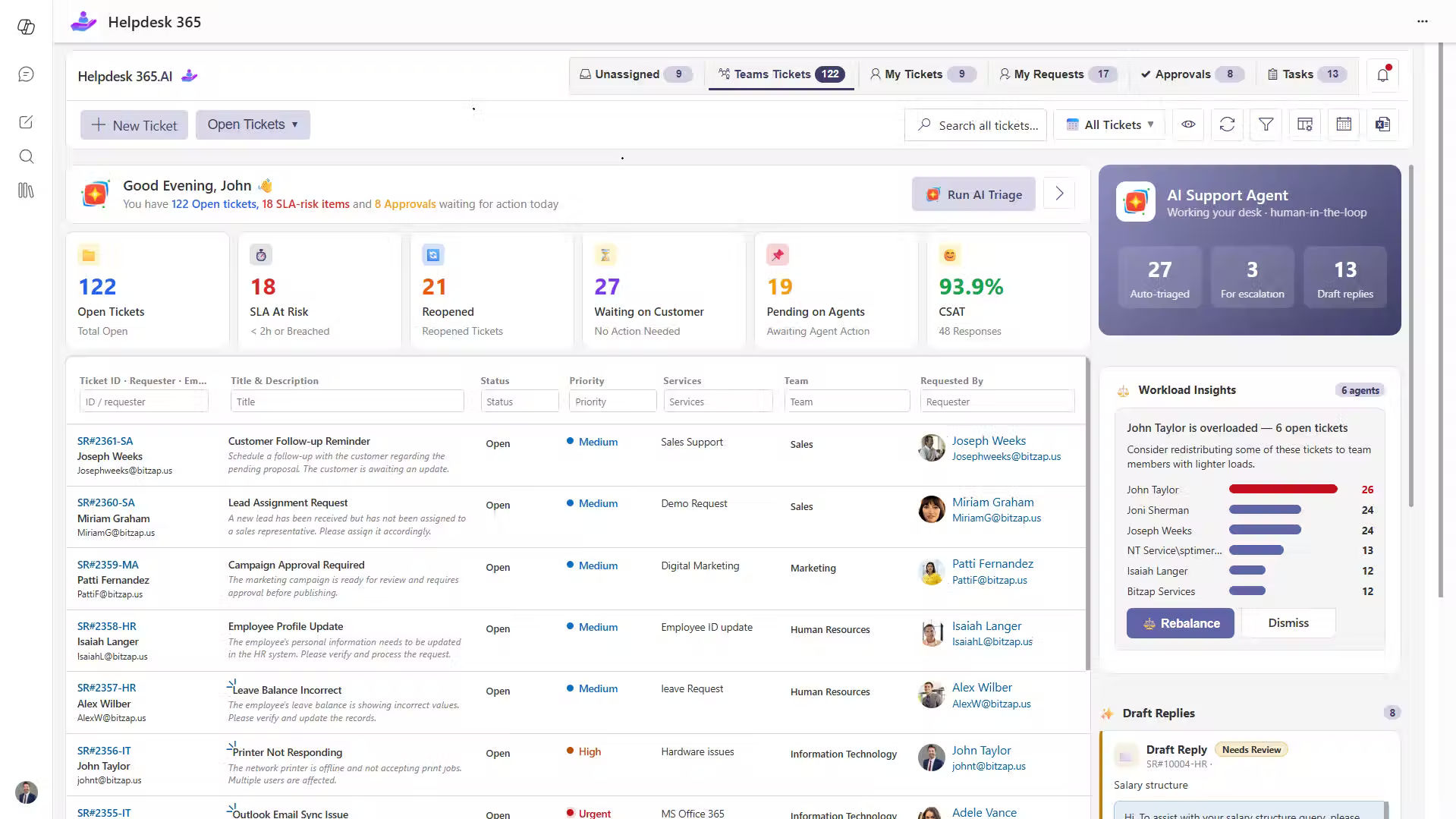
It is not open-source software.
It is a commercial, SharePoint-based help desk built for organizations using Microsoft 365. Its strongest fit is internal support, such as IT, HR, and other employee service requests. Businesses seeking a public customer support portal should confirm their external-user needs and available features before choosing it.
It offers ticket management in the Microsoft 365 environment instead of a separate self-hosted server.
Manage requests across familiar Microsoft apps
Employees can submit and manage requests through supported experiences in Microsoft Teams, Outlook, and SharePoint. Agents can track owners, replies, and status within familiar tools.
An account access request from Teams can become a ticket with a clear owner and status.
Handle routine tasks with automation
It includes ticket assignment, notifications, service-level tracking, and workflow options. Depending on the plan, teams can also use approvals and Power Automate connections for steps that would otherwise need manual follow-up.
Give agents more context with AI and knowledge sharing
The product offers AI-assisted features such as ticket summaries, reply suggestions, and knowledge-based help. A knowledge base supports self-service. Check which paid plan includes the features you need.
Review service performance in one place
Dashboards and reporting help managers review open work, response times, and service goals. It also describes storing ticket data in the organization’s SharePoint environment, subject to the chosen deployment and setup. Review permissions and retention settings as part of setup.
Want to see whether this approach fits your Microsoft 365 support process ?
How to Choose Without Regretting the Decision
Before selecting any customer service ticketing software, test these questions with your support team:
- Who will use it?
Are you serving external customers, employees, or both? The right portal and access model may be different. - Where do requests come from?
List email, web forms, Teams, and any other channel you must support. - What happens after a ticket arrives?
Test assignment, approvals, escalations, and follow-up messages. - Who will maintain it?
Name the person or vendor responsible for upgrades, backups, and incidents. - Which features are included?
Check the exact version or paid plan for SLAs, AI, reporting, and integrations. - What will it cost over time?
Include subscriptions, hosting, support, and staff hours.
Run a small pilot with real requests. Measure whether tickets reach the right owner, whether agents can find past answers, and whether users know the status of their issues.
Conclusion:-
An open source customer service ticketing system is enough when its features meet your needs and your team can manage the technical work. It offers ticket tracking and customization without a traditional core license fee.
But the lowest software price is not always the lowest cost of running support. Before you decide, look at maintenance, security, integrations, agent experience, and what happens when your team needs help.
If your organization already works in Microsoft 365 and wants a help desk built around Teams, Outlook, and SharePoint
Join Our Creative Community
Frequently Asked Questions
Is an open-source customer service ticketing system good for small businesses?
Yes. It can be a good fit when support needs are simple and someone can manage the software. If there is no technical owner, hosting and updates may take more effort than expected. Compare the full operating cost before deciding.
Can free open-source ticketing software handle SLAs and automation?
Yes. Some platforms already include SLA rules, ticket filters, and automated actions. For example, osTicket and GLPI document these features. The exact options and setup steps vary, so test the community edition you plan to use.
Is open-source help desk software secure?
It can be, but security depends on the software, its settings, and how well you maintain it. Self-hosted teams need to manage patches, access rights, backups, and monitoring.
Can open-source ticketing software work with Microsoft 365?
Some platforms can connect through email, APIs, or add-ons. But a working email connection is not the same as a complete Teams, SharePoint, and Power Automate workflow. Test each needed integration before making a choice.
Table of Contents
- What Are the Limitations of an Open Source Customer Service Ticketing System?


























