

12 Top Customer Service Software for Small Business in 2027

A customer sends an email about a payment issue. Another asks for an update through live chat. Meanwhile, an important support request is sitting in a shared inbox, waiting for someone to respond.
For a small business, managing these conversations becomes difficult when the team grows and customer requests come from different places.
- Customer service software helps small teams manage customer questions, support tickets, and follow-ups from one place.
- The right platform depends on your support channels, team size, current tools, and budget.
- AI, automated ticket assignment, and self-service options can reduce repetitive support work.
- Compare the total cost, important features, and daily usability before choosing a platform.
- Helpdesk 365 is particularly relevant for businesses managing employee and departmental support within Microsoft 365.
This is where customer service software can help.
The best customer service software for small business helps teams organize requests, assign work, track conversations, and respond without losing important details.
But which platform is worth your investment?
In this guide, we’ll compare 12 customer service tools, explain their strengths and limitations, and help you choose software that fits your business needs and budget.
What Is Customer Service Software for Small Business?
Customer service software for small business is a digital platform that helps companies manage customer questions, complaints, technical issues, and support requests.
Instead of tracking conversations through separate email accounts, spreadsheets, or chat applications, businesses can organize them in one support system.
Most customer support platforms offer features such as:
- Ticket Management: Converts support requests into tickets that teams can assign, track, and resolve.
- Shared Inbox: Allows several employees to manage customer emails without sending duplicate replies.
- Workflow Automation: Assigns requests, sends notifications, and handles routine follow-ups.
- Knowledge Base: Provides helpful articles, FAQs, and troubleshooting guides.
- Live Chat: Lets customers communicate directly with support teams.
- Reporting: Tracks response times, ticket volume, customer satisfaction, and team performance.
Some platforms focus on external customer support, while others also help businesses manage internal IT, HR, and Finance requests.
Example: Imagine a small software company receiving 40 support emails daily. Instead of manually assigning every message, its help desk software can create tickets, identify responsible agents, and record conversations until each issue is resolved.
The team can then see which requests need attention without checking multiple inboxes.
Why Does Customer Service Software Matter to Small Businesses?
Small businesses often depend on a limited number of employees to handle customer support.
When someone is absent or busy, unanswered requests can quickly affect the customer experience.
According to Salesforce’s State of Service report, 82% of surveyed service professionals say customer expectations are higher than they used to be.
That makes reliable support especially important for smaller teams.
1. Customers Expect Timely Responses
Customers want to know that someone has received their request.
Automatic ticket confirmation and clear ownership help businesses acknowledge problems before an agent begins investigating.
2. Small Teams Handle Multiple Responsibilities
In many small businesses, the IT administrator may also manage employee access, technical issues, and software requests.
A ticketing system gives each task an owner and makes pending work easier to track.
3. Customer History Matters
When customers contact support again, they should not have to explain everything from the beginning.
A shared conversation history helps agents understand previous issues and continue where the last employee stopped.
4. Business Owners Need Visibility
Without reporting, managers may know how many complaints arrive but struggle to identify why customers keep contacting support.
Customer service analytics can show repeated problems, delayed responses, and areas that need improvement.
Comparison Table: 12 Best Customer Service Software for Small Business
| Software | Best For | Standout Capability | Consideration |
| Helpdesk 365 | Microsoft 365 businesses | Teams and SharePoint ticketing | Mainly suited to Microsoft 365 |
| Freshdesk | Growing support teams | Automated ticket management | Advanced features may cost more |
| Zendesk | Multi-channel support | Unified agent workspace | Can be complex for small teams |
| Zoho Desk | Budget-conscious businesses | Ticketing and workflow rules | Features vary by plan |
| Help Scout | Email-focused support | Shared inbox and knowledge base | Less focused on complex IT workflows |
| HubSpot Service Hub | CRM-based customer service | Support and customer records | Advanced plans are expensive |
| Intercom | SaaS businesses | AI and conversational support | AI usage can add costs |
| Gorgias | E-commerce stores | Shopify order support | Ticket-based billing |
| Front | Collaborative support | Shared inbox and team coordination | Multi-channel tools may need higher plans |
| Hiver | Gmail-based teams | Support directly inside Gmail | Best fit for Google Workspace |
| LiveAgent | Chat and phone support | Built-in call center tools | More tools to configure |
| Tidio | Website-based support | Live chat and AI assistance | Conversation limits apply |
12 Best Customer Service Software for Small Business in 2027
There is no single platform that works equally well for every small company.
A business handling employee IT tickets has different requirements from an online retailer answering delivery questions.
Here are 12 customer service platforms worth comparing.
1. Helpdesk 365 – Best for Microsoft 365-Based Support Teams
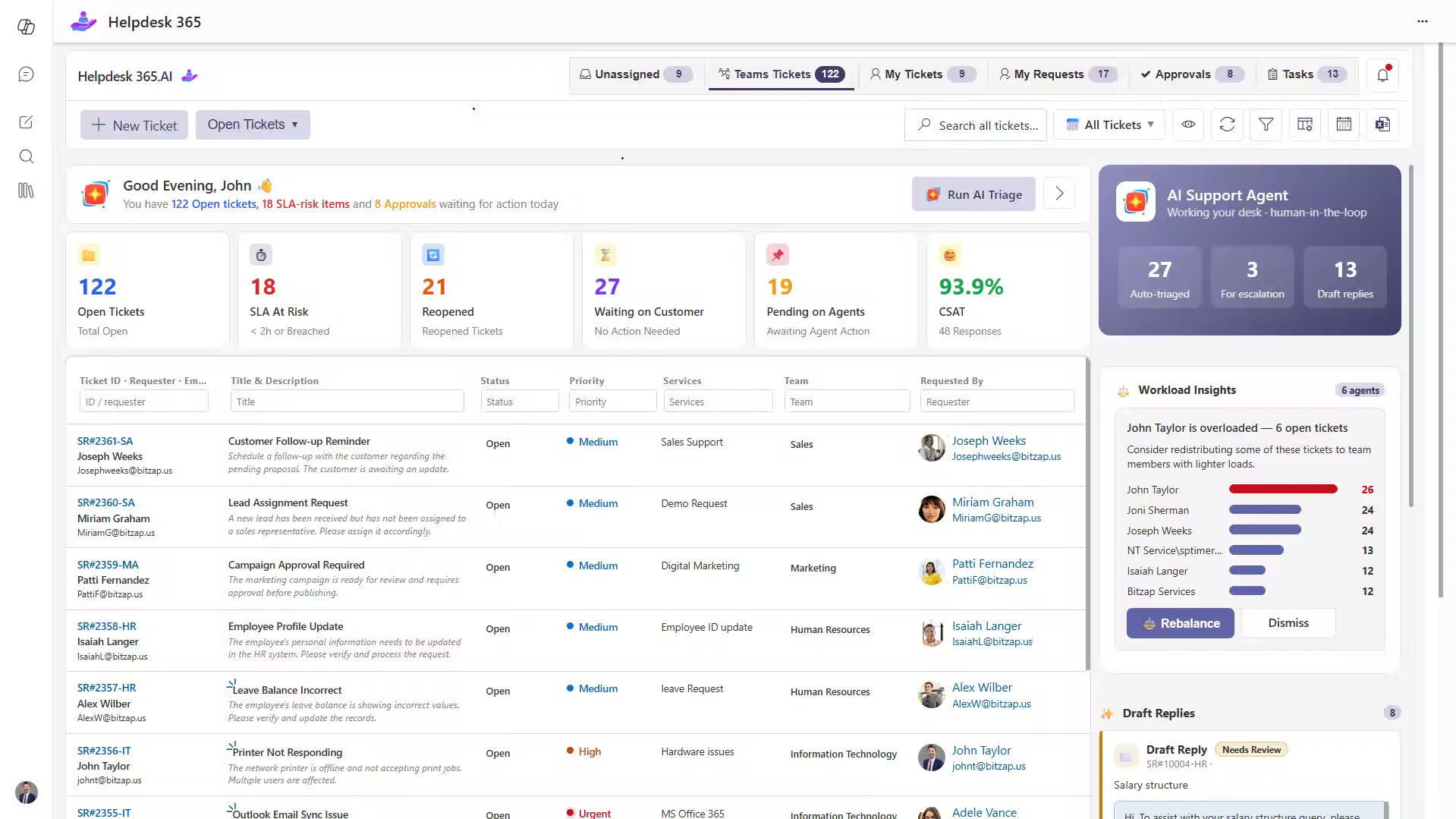
Helpdesk 365 is an AI-powered helpdesk software solution designed for businesses using Microsoft 365, SharePoint, Microsoft Teams, and Outlook.
It helps organizations manage IT support, employee requests, and service activities across departments such as HR and Finance.
Employees can submit support tickets through familiar Microsoft applications, while support agents manage assignments, priorities, approvals, and resolution activities.
Key Features
- AI-powered ticket categorization, prioritization, and routing.
- Ticket management through Microsoft Teams, Outlook, and SharePoint.
- SLA tracking, alerts, and escalation workflows.
- Knowledge base and employee self-service.
- Reporting dashboards and automated notifications.
- SharePoint-based ticket data storage.
Practical Example
Consider a 50-person company using Microsoft Teams. An employee reports a software access problem. The request becomes a ticket, reaches the responsible IT team, and remains visible until it is resolved.
Best For: Small and growing Microsoft 365 organizations managing internal support.
Limitation: Businesses needing extensive public-facing social media or e-commerce customer support should compare dedicated external support platforms.
2. Freshdesk – Best for Growing Customer Support Teams
Freshdesk is a customer support platform that brings incoming requests into a ticket management workspace.
It offers assignment rules, customer self-service, reporting, and AI capabilities that help teams manage routine work.
Key Features
- Centralized ticketing and shared inboxes.
- Automated ticket assignment and escalation.
- Customer portal and knowledge base.
- Freddy AI support capabilities.
- SLA tracking and performance reporting.
Practical Example
A growing service company receives requests about invoices, subscriptions, and account changes. Freshdesk can organize these conversations by category and direct them to the right employees.
Best For: Businesses that need structured customer support and room to grow.
Limitation: AI capabilities, advanced automation, and channel coverage depend on the selected Freshdesk product and plan.
3. Zendesk – Best for Multi-Channel Customer Service
Zendesk supports businesses that communicate with customers across email, messaging, chat, and phone channels.
Its agent workspace helps support teams review customer conversations and manage requests from a central location.
Key Features
- Ticket tracking and customer conversation history.
- Messaging, email, and voice support.
- Help center and self-service options.
- Reporting and performance dashboards.
- Automation and application integrations.
Practical Example
A travel service provider receives booking questions through email and chat. Zendesk helps the support team access conversation details and manage follow-ups.
Best For: Small businesses planning to expand their support channels.
Limitation: Configuration and advanced features may be more than a very small team needs.
4. Zoho Desk – Best for Budget-Conscious Businesses
Zoho Desk provides ticketing, automation, customer communication, and reporting tools for businesses of different sizes.
It is particularly useful for companies already working with Zoho applications.
Key Features
- Email and web-form ticketing.
- Workflow and assignment rules.
- Customer knowledge base.
- Customer satisfaction tracking.
- Zia AI capabilities in eligible plans.
Practical Example
A small consulting firm managing customer emails can use Zoho Desk to assign requests, record responses, and review unresolved tickets.
Best For: Small teams seeking affordable help desk software.
Limitation: Some capabilities, including advanced AI, phone support, and multi-department workflows, require higher plans.
5. Help Scout – Best for Personalized Email Support
Help Scout offers a shared inbox designed to help teams communicate with customers in a personal, organized way.
Its interface focuses on conversations rather than complicated service processes.
Key Features
- Shared inbox with assignments and internal notes.
- Saved replies for common questions.
- Knowledge base and customer help center.
- AI-assisted writing and conversation summaries.
- Customer profiles and support reporting.
Practical Example
A design agency receives client questions about revisions, deadlines, and payments. Help Scout lets employees collaborate privately while keeping customer replies clear.
Best For: Small service businesses that rely heavily on email.
Limitation: Companies requiring detailed IT service management may need additional tools.
6. HubSpot Service Hub – Best for CRM-Connected Support
HubSpot Service Hub connects customer service activities with customer relationship management information.
Support teams can access contact records, manage tickets, and review previous interactions without separating sales and service information.
Key Features
- Ticket management and shared inbox.
- CRM-connected customer records.
- Live chat and customer communication.
- Customer feedback tools.
- Knowledge base and advanced help desk features in eligible plans.
Practical Example
A small B2B company receives a support request from an existing client. Its agent can review relevant account information before replying.
Best For: Businesses already using HubSpot CRM.
Limitation: Advanced help desk, automation, and customer success features may require a significant subscription upgrade.
7. Intercom – Best for AI-Powered Customer Conversations
Intercom focuses on customer conversations through messaging, support inboxes, and AI.
Its Fin AI Agent can answer common questions using approved support information, while human agents handle requests needing personal attention.
Key Features
- Website and application messaging.
- Shared inbox and support tickets.
- Fin AI Agent.
- Help center and support articles.
- Customer conversation reporting.
Practical Example
A SaaS customer asks how to change a subscription setting. An AI agent can provide a relevant guide, while a human agent takes over if the issue requires account investigation.
Best For: SaaS companies and digital businesses offering chat-based support.
Limitation: Seat subscriptions and AI outcome-based charges should both be considered when estimating costs
8. Gorgias – Best for E-Commerce Customer Support
Gorgias is designed for online stores handling questions about orders, shipping, returns, and refunds.
Its Shopify integration allows agents to review customer purchases and perform supported order actions from their help desk.
Key Features
- Email, chat, and social support channels.
- Shopify order information.
- Refund and order management actions.
- Automated responses and support rules.
- Customer profiles and performance reports.
Practical Example
A shopper asks to change an order before shipping. A support employee can check the order details and take supported action without moving between several systems.
Best For: Shopify stores and growing e-commerce teams.
Limitation: Ticket-based pricing, AI automation fees, and channel add-ons can affect monthly expenses.
9. Front – Best for Collaborative Customer Support
Front combines shared inboxes, customer communication, ticketing, and team collaboration.
It works well when several employees need to contribute to resolving a single customer request.
Key Features
- Team inboxes with shared visibility.
- Ticket ownership and workflow rules.
- Internal collaboration.
- AI-assisted replies and summaries.
- Knowledge base and reporting.
Practical Example
A customer reports a billing mistake that requires input from both Finance and Customer Support. Employees can coordinate internally while keeping the customer informed.
Best For: Businesses handling requests that involve several departments.
Limitation: Multi-channel support, more advanced rules, and certain AI capabilities may require higher plans or add-ons.
10. Hiver – Best for Gmail-Based Customer Support
Hiver helps teams manage customer support directly within Gmail.
It adds shared inboxes, ticket ownership, automation, and reporting to familiar email workflows.
Key Features
- Gmail-based shared inbox.
- Email assignment and status tracking.
- Internal team collaboration.
- Workflow rules and SLA reporting.
- AI-assisted support features.
Practical Example
A small accounting company uses a shared Gmail inbox for customer questions. Hiver helps assign each message to an employee and shows which conversations still need replies.
Best For: Teams already using Gmail and Google Workspace.
Limitation: Organizations working mainly within Microsoft 365 may prefer software built around their existing Microsoft applications.
11. LiveAgent – Best for Phone and Live Chat Support
LiveAgent brings customer emails, live chat, phone conversations, and other supported channels into a single service workspace.
It is useful for businesses where customers expect direct conversations with support agents.
Key Features
- Email ticketing.
- Website live chat.
- Call center capabilities.
- Knowledge base tools.
- AI assistance and customer service reporting.
Practical Example
A small equipment supplier receives technical questions by phone and order inquiries through website chat. LiveAgent can help manage these interactions from one platform.
Best For: Businesses that depend on live conversations and phone support.
Limitation: Teams focused only on basic email ticketing may not need the broader collection of communication tools.
12. Tidio – Best for Website Chat and AI Support
Tidio combines live chat, ticketing, and AI assistance for businesses that interact with customers through their websites.
Its Lyro AI Agent can answer common questions based on the support information provided by the business.
Key Features
- Website live chat.
- AI-powered customer responses.
- Email and conversation ticketing.
- Website visitor information.
- Automated chat flows and reporting.
Practical Example
An online store receives repeated questions about delivery times and return policies. Tidio can answer supported questions automatically and direct other conversations to an employee.
Best For: Small online businesses that want to offer website-based support.
Limitation: Monthly conversation limits and separate AI usage quotas should be reviewed before choosing a plan.
Benefits of Customer Service Software for Small Businesses
Choosing the right platform should improve more than response speed. It should also make daily support easier to manage.
Faster Request Handling
Automated ticket creation and assignment reduce the time employees spend deciding who should answer a request.
Better Customer Experience
Customers receive clearer updates, while agents can review earlier conversations instead of asking the same questions repeatedly.
Less Manual Work
Automation can handle ticket confirmations, reminders, assignment rules, and routine notifications.
Improved Team Accountability
When every support request has an assigned owner and status, managers can identify unfinished work before customers have to ask for updates.
More Useful Support Data
Reports help businesses understand which problems occur repeatedly and where service improvements may be needed.
Support Beyond Business Hours
A customer knowledge base or AI assistant can answer common questions when employees are unavailable.
For example, publishing clear instructions for password resets, billing questions, or account access can reduce repeated requests.
Good customer service software does not simply close more tickets. It helps a business solve the issues that cause customers to contact support in the first place.
How to Choose the Best Customer Service Software for Small Business
Buying the platform with the longest feature list is rarely the best approach.
Start with the problems your employees face every day.
Identify Where Support Requests Come From
Do customers mainly contact you through email, live chat, phone, or social media?
A company managing internal Microsoft Teams requests will need something different from a retailer handling Instagram messages.
Choose software that works with your most important support channels.
Check Your Existing Business Tools
Look at the applications your team already uses.
For example:
- Microsoft 365 users can evaluate Helpdesk 365.
- Gmail-based teams can consider Hiver.
- Shopify stores can compare Gorgias.
- HubSpot CRM users can explore Service Hub.
Working with existing systems can reduce training and adoption difficulties.
Look Beyond the Starting Price
Compare the total monthly cost, not only the advertised subscription price.
Check user licenses, minimum seats, AI usage, ticket limits, add-ons, and annual billing requirements.
A low starting price may not include the features your team needs.
Test Real Support Situations
Prepare common requests and see how each platform handles them.
Can agents assign tickets easily? Can managers find overdue requests? Can employees locate previous conversations?
These questions reveal more than a product demonstration alone.
Consider Security and Data Access
For IT managers and business owners, customer data protection is an important part of selecting service software.
Review access permissions, data storage, available compliance documentation, and how the vendor handles sensitive information.
Evaluate Reporting Before AI Features
AI assistance can be useful, but first confirm that the platform can track ticket volume, response time, resolution time, and customer satisfaction.
Without dependable support data, it becomes difficult to judge whether automation is improving the service.
A Simple Way to Test Customer Support Software
Before purchasing, run a short trial using actual business needs.
Week 1: Identify your most common support requests and select two or three platforms.
Week 2: Configure the inbox, ticket categories, employee roles, and assignment rules.
Week 3: Test common cases using sample or anonymized tickets. Record how easily agents resolve and transfer requests.
Week 4: Review support reports, user feedback, training needs, and projected costs.
Choose the system that your team can use confidently, not simply the one with the most features.
Conclusion
The best customer service software for small business is the platform that makes support easier for both customers and employees.
Freshdesk, Zendesk, and Zoho Desk offer structured customer ticketing. Help Scout and Front are useful for team conversations, while Gorgias and Tidio serve many online support needs.
For organizations using Microsoft 365, Helpdesk 365 offers a practical way to bring ticket management, automation, knowledge sharing, and reporting into familiar applications.
The goal is not to introduce more software. It is to help your team take ownership of every request, communicate clearly, and solve problems with less manual effort.
Turn resolved tickets into useful knowledge and make support easier for your team
Join Our Creative Community
Frequently Asked Questions
1. What is the best customer service software for a small business?
The best choice depends on your business needs. Helpdesk 365 suits Microsoft 365-based internal support, Freshdesk offers customer ticketing, Gorgias supports e-commerce, and Help Scout works well for email-focused teams.
2. What features should small businesses look for?
Look for ticket management, shared inboxes, automated assignment, customer history, knowledge base tools, SLA tracking, and reporting. Choose additional features based on your support channels and business requirements.
3. Can a small business use AI for customer service?
Yes. AI can help classify tickets, suggest responses, summarize conversations, and answer routine questions. Businesses should review AI responses and provide a clear way to contact human support agents.
4. What is the difference between customer service software and help desk software?
Customer service software is a broad category covering customer communication, chat, feedback, and support operations. Help desk software generally focuses on managing, assigning, tracking, and resolving support tickets. Many modern platforms provide both.
5. Can customer service software improve customer satisfaction?
It can help by reducing missed requests, making customer history available, and improving communication. Results depend on how well the business sets up its workflows, trains employees, and follows through on customer problems.


























