
_eH2jDg7dZ.png)
Finding the right person on a large team can feel like searching for a needle in a haystack. As companies grow, a simple list of names and emails is no longer enough. This is where AI steps in, turning a basic Microsoft Teams employee directory into a smart, searchable, and self-updating people hub.
- AI upgrades a Microsoft Teams employee directory from a static list into a smart, searchable people hub.
- Natural-language search and auto-updating profiles save HR teams hours of manual work every week.
- A smarter teams employee directory improves onboarding, cross-team collaboration, and skill discovery.
- Tools like Employee Directory 365 bring AI-powered search directly inside Microsoft Teams.
Every company depends on people finding people. A new hire needs to know who runs marketing. A manager needs to find someone who knows Python and design. In small teams, this is easy. You just ask around. But once a company has hundreds or thousands of employees, asking around stops working.
This is why so many businesses use Microsoft Teams for daily work. Teams already holds calls, chats, and files. It makes sense to keep employee information there too. But a plain Microsoft Teams employee directory, built from Azure Active Directory data alone, often falls short. Names may be spelled wrong. Job titles are outdated. Skills and interests are missing completely.
Artificial intelligence changes this picture. AI can read, sort, and update employee data automatically. It can also understand plain questions like “who works on the Mumbai sales team” and return the right answer in seconds. In this blog, we will look at how AI makes a teams employee directory smarter, faster, and far more useful for everyone, especially HR and People teams.
What Is an Employee Directory in Microsoft Teams?
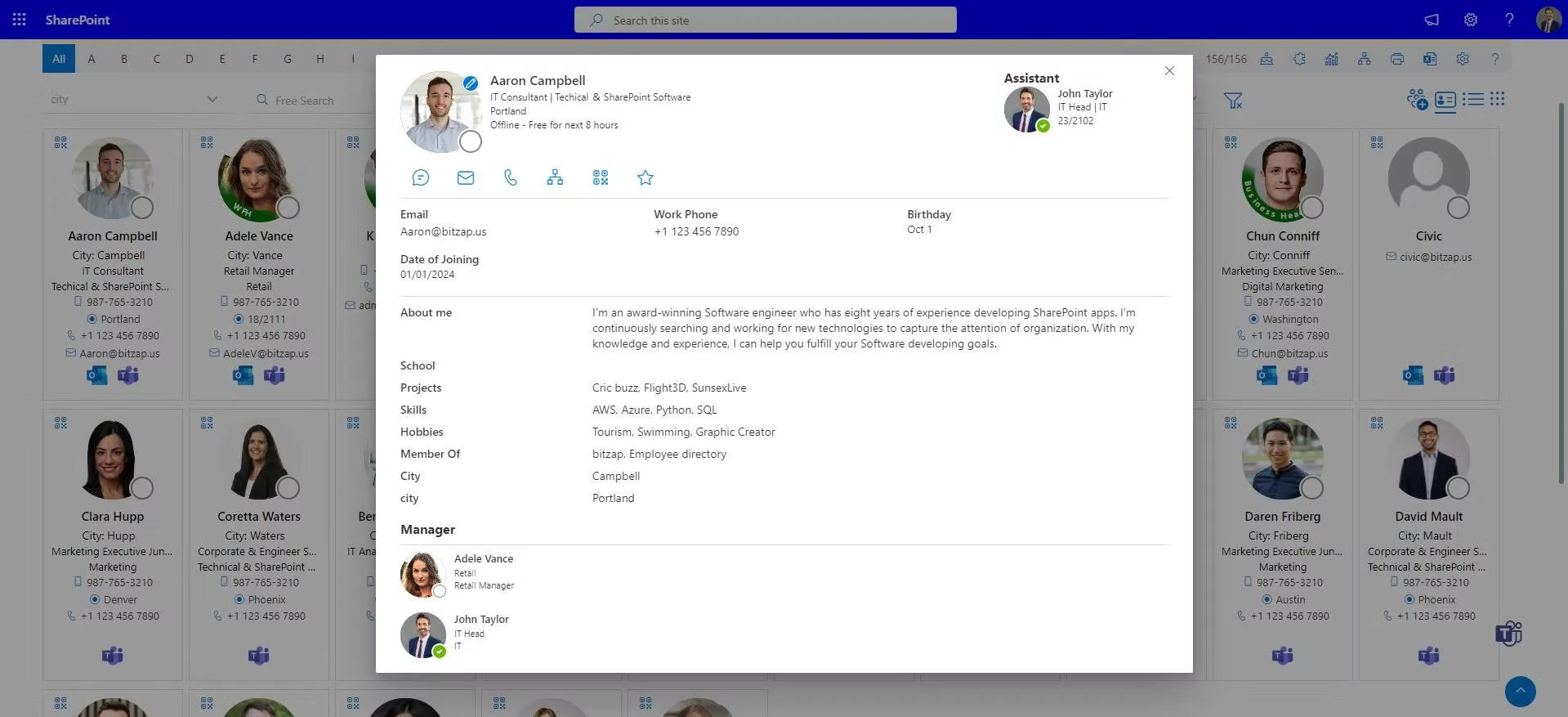
A Microsoft Teams employee directory is a searchable list of everyone in your organization, built right inside the Teams app. It usually includes names, photos, job titles, departments, contact details, and reporting lines.
The default Teams directory pulls basic details from Azure Active Directory. This works fine for very small teams. But it has clear limits. There is no way to search by skill. Org charts are hard to view. Profiles often go stale because no one has time to update them by hand.
A smarter, AI-powered teams employee directory fixes these gaps. It becomes a living, breathing tool that people actually enjoy using, not just a page they visit once and forget.
Why Traditional Directories Fall Short
Before we talk about AI, it helps to understand the common pain points HR teams face with a basic directory:
- Outdated information: Job changes and new hires are not reflected quickly.
- Weak search: You can only search by exact name, not by skill, project, or location.
- No self-service: Employees email HR just to find a colleague’s contact details.
- Poor onboarding experience: New hires struggle to understand team structure.
- Manual upkeep: HR spends hours updating spreadsheets and directory entries by hand.
These problems add up. A recent Gallup-style pattern seen across many organizations is simple: the harder it is to find the right person, the slower projects move. This is exactly the gap AI is built to close.
Traditional Directory vs. AI-Powered Directory
It helps to see the difference side by side. A traditional Microsoft Teams employee directory relies on manual updates and basic name search. An AI-powered teams employee directory works differently at almost every step:
- Search: Exact name match only, versus natural-language and skill-based search.
- Data accuracy: Manual updates that lag behind reality, versus automatic sync with Microsoft 365.
- Org charts: Static images that go stale, versus live charts that rebuild themselves.
- Employee experience: Frequent HR requests for basic contact info, versus true self-service search.
- Maintenance: Hours of admin work each month, versus a system that largely manages itself.
Seen this way, the shift from a basic directory to an AI-powered one is not a small upgrade. It changes how people actually experience your company on a daily basis.
How AI Makes Employee Directories Smarter
AI does not just digitize your directory. It adds intelligence on top of your existing Microsoft 365 data. Here is how it transforms a plain teams employee directory into a smart people platform.
1. Smart, Natural-Language Search
Instead of typing an exact name, employees can search the way they naturally speak. A query like “who handles payroll in the Bangalore office” returns accurate results instantly. AI-powered search understands context, synonyms, and even small spelling mistakes, so no one gets stuck with a blank results page.
2. Automatic Profile Enrichment
AI can scan existing Microsoft 365 data, such as Outlook, SharePoint, and Teams activity, to fill in missing profile details automatically. Job titles stay current. Skills and certifications get added without manual data entry. This keeps every employee profile in the teams employee directory fresh, with almost no extra work for HR.
3. Visual, Self-Updating Org Charts
Traditional org charts go out of date the moment someone changes roles. AI-driven directories rebuild the chart automatically whenever reporting lines shift in Azure Active Directory. Employees always see an accurate picture of who reports to whom.
4. Personalized Recommendations
Some AI-powered directories suggest people you may want to connect with, based on shared projects, skills, or departments. This is especially helpful for new hires trying to build their internal network in the first few weeks.
5. Real-Time Sync Across Microsoft 365
Because AI tools connect directly to Microsoft 365 and Azure Active Directory, updates happen automatically in the background. A promotion, a department move, or a new phone number updates everywhere at once, inside the Microsoft Teams employee directory and beyond.
Key Benefits for HR and People Teams
For HR and People teams specifically, an AI-powered teams employee directory brings real, measurable value:
- Less manual work: Automatic updates mean fewer hours spent editing spreadsheets.
- Faster onboarding: New hires find teammates, managers, and mentors on day one.
- Better data accuracy: AI flags outdated or duplicate entries before they cause confusion.
- Stronger employee experience: Self-service search reduces repetitive HR queries.
- Smarter workforce planning: Skill-based search helps HR quickly find internal talent for new projects.
In short, HR teams move from being the directory’s caretaker to simply overseeing a system that mostly runs itself.
Real-World Use Cases
These benefits show up in everyday moments across a company. Consider a new employee who joins the marketing team on a Monday. Instead of waiting for a welcome email with a list of names, they open Teams, search for “marketing team Bangalore,” and instantly see photos, roles, and contact details for everyone they will work with.
Or think about a project manager who needs someone with experience in Power BI for a new dashboard project. Rather than sending a message to five different Slack or Teams channels asking around, they simply search the skill inside the teams employee directory and get a short list of qualified colleagues in seconds.
HR teams benefit too. During a company reorganization, instead of manually rebuilding an org chart in PowerPoint, the AI-powered directory reflects new reporting lines automatically as changes are made in Azure Active Directory. This alone can save HR teams several hours during every major restructuring.
Must-Have Features in an AI-Powered Employee Directory
If you are evaluating tools for your organization, look for these core features:
- Native integration inside Microsoft Teams, not a separate app to log into.
- Natural-language and skill-based search.
- Automatic sync with Azure Active Directory and Microsoft 365.
- Visual org charts that update in real time.
- Role-based access controls to protect sensitive employee data.
- Mobile-friendly design for employees on the go.
Why Employee Directory 365 Is Built for Microsoft Teams
Employee Directory 365 was designed to bring all of these AI capabilities directly into the Microsoft Teams experience your employees already use every day. There is no extra login and no separate app to learn.
It automatically pulls and enriches profile data from Microsoft 365, offers smart search that understands plain-language questions, and keeps org charts current without manual edits. For HR and People teams, this means less time spent fixing directory data and more time spent on people, not paperwork.
Whether your goal is faster onboarding, better cross-team collaboration, or simply a directory people actually trust, Employee Directory 365 turns your existing Microsoft Teams employee directory into a genuinely smart workplace tool.
Best Practices for Rolling Out an AI Directory
- Start with clean source data in Azure Active Directory before syncing.
- Communicate the change to employees so they know where to search first.
- Set clear data privacy and access rules from day one.
- Review AI-suggested profile updates periodically to confirm accuracy.
- Gather employee feedback in the first few weeks and fine-tune settings.
Conclusion
A people directory should never be a source of frustration. With AI, a basic Microsoft Teams employee directory becomes a smart, self-updating hub that saves time for HR teams and helps every employee find the right person, fast.
If your organization is still relying on outdated spreadsheets or a bare-bones directory, now is a good time to explore what an AI-powered teams employee directory can do for your team. The change does not need to be complicated. In most cases, it starts with connecting your existing Microsoft 365 data and letting the AI take over the routine work of keeping profiles accurate and searchable.
The companies that get this right tend to see the same pattern: fewer repetitive HR questions, faster onboarding, and a workplace where finding the right person is no longer a chore. That is the real promise of bringing AI into your Microsoft Teams employee directory.
Join Our Creative Community
Frequently Asked Questions
Does an AI-powered employee directory work inside Microsoft Teams directly?
Yes. Tools like Employee Directory 365 are built as native Teams apps, so employees can search for colleagues without leaving Teams.
Will AI automatically update employee profiles?
Yes. AI-powered directories sync with Microsoft 365 and Azure Active Directory to keep job titles, departments, and contact details current.
Is employee data safe with an AI-driven directory?
Reputable tools use role-based access controls and follow Microsoft 365 security standards to protect sensitive employee information.
How long does it take to set up an AI employee directory in Teams?
Most organizations can connect their existing Microsoft 365 data and go live within a few days, depending on the size of the company.
Can employees update their own profile information?
Most AI-powered directories allow employees to add details like skills or interests themselves, while core data such as job title stays synced from Azure Active Directory.
Does it work for companies with multiple offices or countries?
Yes. An AI-powered Microsoft Teams employee directory can filter and search by location, time zone, and department, which is especially useful for distributed and global teams.


_JiluXJRGNl.svg)























