

Best Microsoft Contract Management for MS 365 Users: CLM 365

Managing contracts effectively is one of the most critical workflow of legal teams. Between tracking deadlines, juggling multiple versions, and ensuring compliance, legal professionals often find themselves spending more time managing administrative tasks.
CLM 365 fits directly into your MS 365 environment and handles everything from drafting to renewal in a single place. It offers secure and easy-to-use features for legal teams. It also provides real-time collaboration and tracking, ensuring every stakeholder stays informed throughout the contract lifecycle.
Since so many organizations already use Microsoft 365 apps, it is only natural that contract teams are seeking an opportunity to handle their complete contract lifecycle within the same system.
If you are seeking a contract management that is well integrated in Microsoft 365. You are in the right place.
This guide provides a complete overview of how Microsoft Contract Management works.
What Is Microsoft Contract Management?
Microsoft contract management is the approach to managing all the contract-related activities within the Microsoft 365 ecosystem. It involves the process of drafting, reviewing, approving, storing, and tracking contracts with the help of Microsoft applications, such as Word, SharePoint, Teams, Outlook, and Copilot AI.
Microsoft contract management does not require switching to various platforms, instead, it has it all within a single connected workspace.
The teams are able to write documents using Word, store them in SharePoint, talk about updates in Teams, and send approvals using Outlook and the contract management system keeps track of activity, versions, and deadlines.
Steps to Deploy Microsoft Contract Lifecycle Management
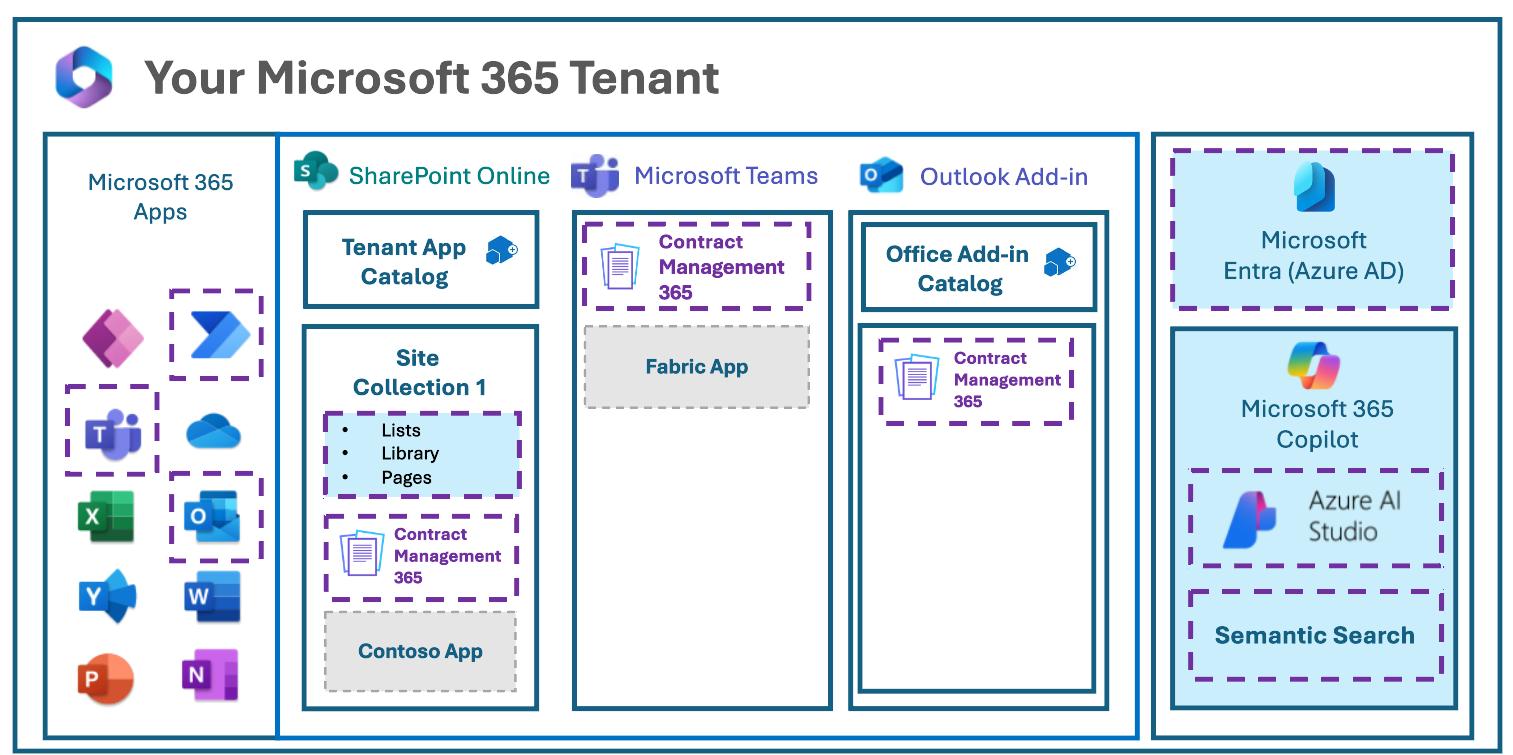
Setting up SharePoint contract management is easier than many companies think. The following are the steps that are required to develop a robust contract process in Microsoft 365.
Step 1: Examine your current contract lifecycle to see where your process is getting bogged down, or where there is redundancy or duplication.
Step 2: Review the tools that your team currently uses to draft contracts, approve contracts, and store them to make sure they are in sync.
Step 3: Integrate CLM 365 with your Microsoft 365 to manage it centrally.
Step 4: Add it to Outlook, Teams, SharePoint, Copilot, and the Word add-in to allow a smooth cross-departmental collaboration.
Step 5: Set up automated approval processes, permissions and smart notifications to suit your organization.
Step 6: With the help of the AI Agent, one can create brief summaries and identify vital risks, responsibilities, and provisions without reading the whole document.
Step 7: offer practical learning lessons, real life scenarios and easy manuals to ensure that your team embraces the system without any complications.
Step 8: Track usage, cycle times and improvements in contract turnaround.
Step 9: Optimize workflows, permissions and automation rules according to real-time performance insights.
Step 10: Keep on improving your setup as your volume of contracts, team size and business processes change.
Key Features of Microsoft Contract Management Software
CLM 365 comes with a full range of features that are fully compatible with the Microsoft 365 ecosystem. The features aim to streamline and streamline the process of contract handling as well as making it more secure in teams of any size.
1. Microsoft 365 Apps Integration
The software is directly integrated with the popular Microsoft 365 applications such as Word, Outlook, Teams, SharePoint, and Copilot.
This will enable teams to write, read and distribute contracts without leaving the applications that they use on a daily basis.
Work can be retained in familiar tools, which makes collaboration more effective, eliminating the necessity to switch platforms.
Teams do not have to spend time managing various software tools but rather work productively.
Recommended Reading: Best Practices to Use Microsoft Teams Contract Management
1. AI Agent
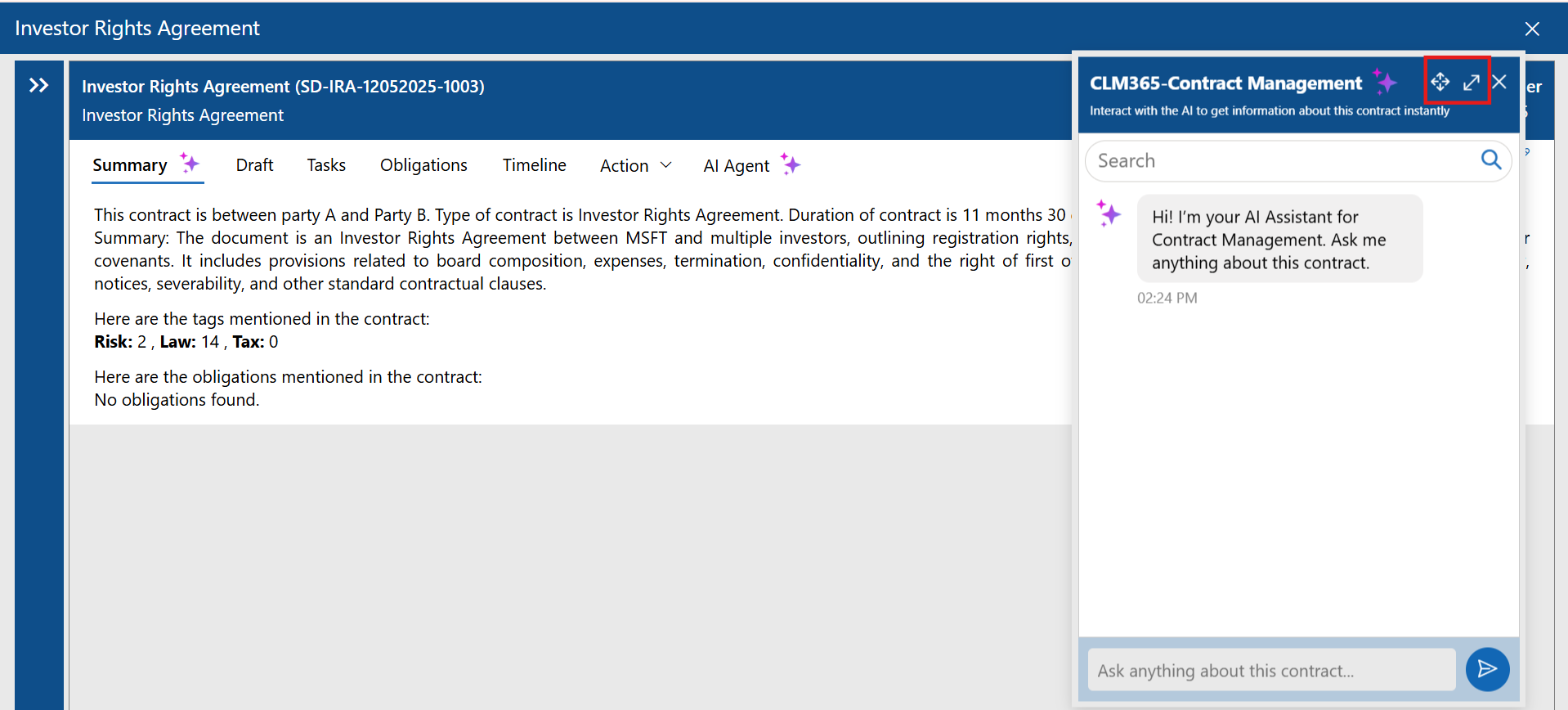
The AI Agent of the Microsoft contract management software assists the team in comprehending the contracts much quicker as long documents are examined within a few seconds.
It also automatically brings out the key points, important clauses, and risks, which would otherwise have to be reviewed manually.
The teams can save a lot of time by getting summarized by AI rather than reading the whole document.
This will ensure that the contract review process is faster and more effective to all the parties.
2. Compliance Tools
With proper compliance management for contract workflow make sure that your team adheres to the legal requirements and internal rules in a completely understandable manner.
Ready-to-use templates and workflow systems ensure that each contract is in line with the company standards.
The Microsoft contract management minimize the chances of overlooking critical legal or policy provisions and guarantee uniform contract development.
They assist organizations to keep in check and enhance the quality of documents in general.
3. Automated Workflows
Microsoft contract management software provides automated workflow that takes the contracts through every phase in a smooth and predictable way.
Each step has a predetermined path and, as such, teams never miss the next step to take.
This assists in getting rid of undue delays and maintains the contract lifecycle in order.
Managers also have the ability to monitor progress in real time without having to work extra hours in order to do manual follow-ups.
4. Draft Comparison
Draft comparison allows teams to see a variety of different versions of a contract and easily find changes. Edits, additions, and removals are clearly highlighted so that they can be reviewed faster.
The teams are able to monitor the progress of various versions more accurately.
This saves much time that would have been used to compare documents manually.
5. Multi-Level Approvals
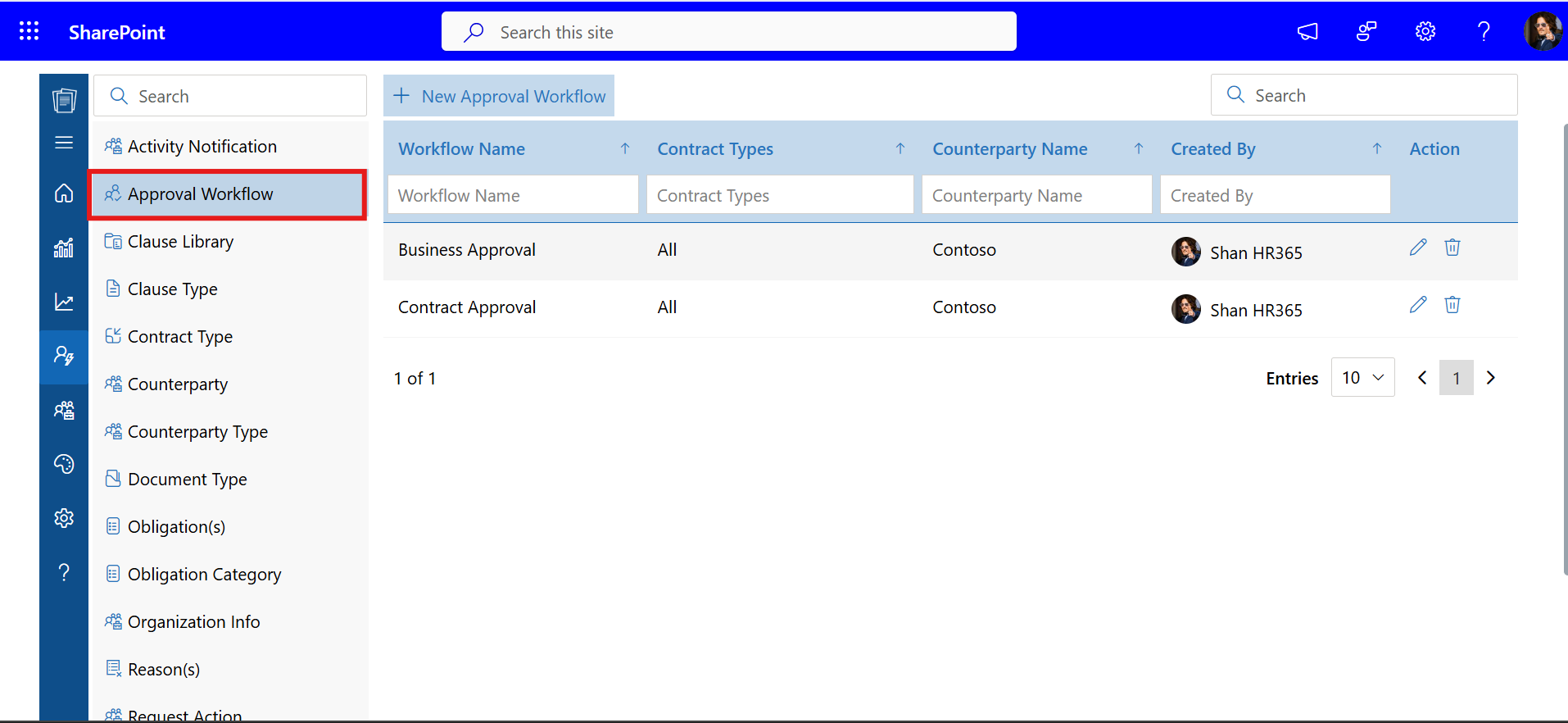
Multi-level approvals are applicable in organizations that have several stages of review prior to concluding a contract. Every contract approval process has a systematic course, and the process is structured and clear.
The teams can easily view the department or person responsible at any given stage.
This is especially beneficial in large organizations that have high contract volumes.
6. Contract Redlining
Redlining enables reviewers to propose edits, comment and point out areas that require attention.
Any changes are easily seen and thus it becomes easier to work together as a team.
Several reviewers are allowed to work on the same at the same time without losing the previous feedback. This makes discussions structured and enhances accuracy of documents.
Recommended Read: How to redline a contract effectively
7. Secure Signing
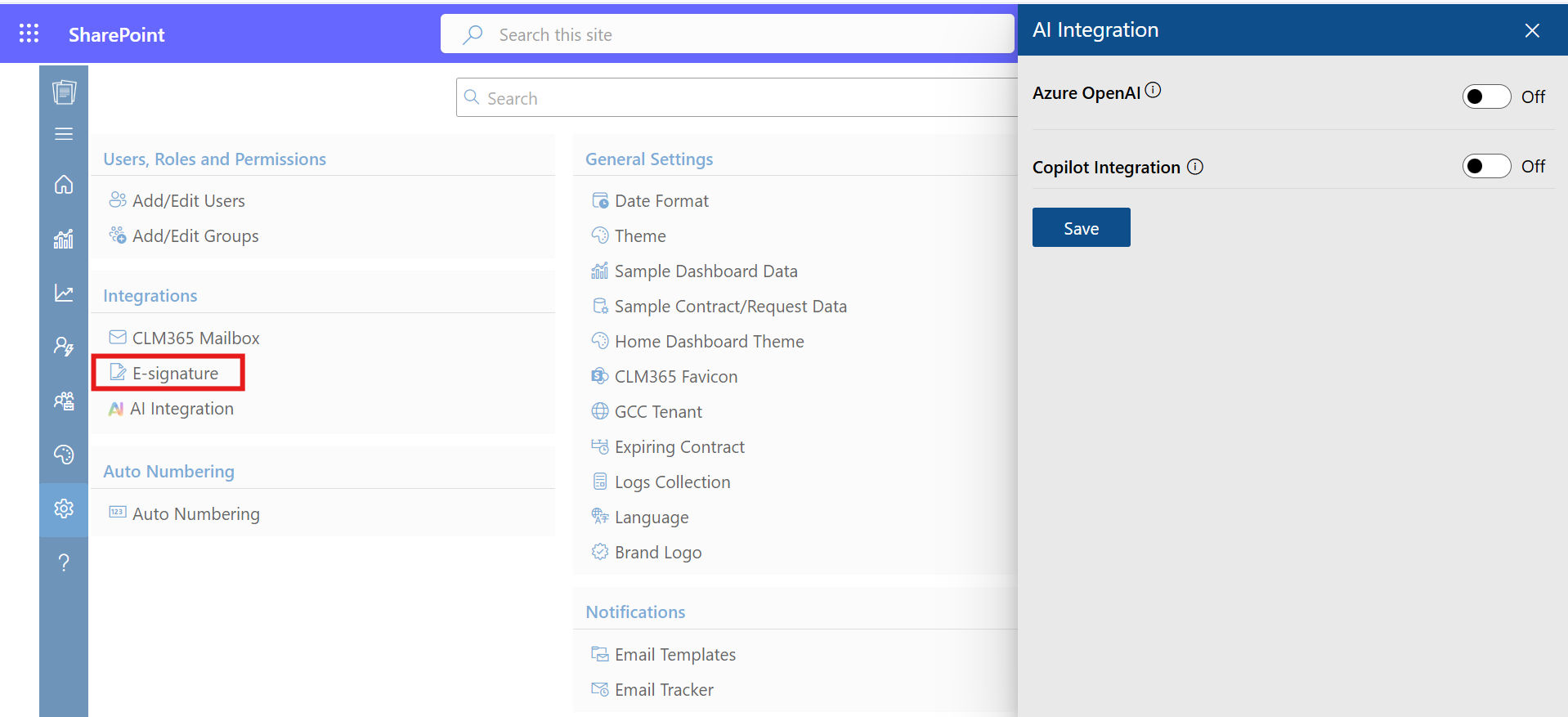
Secure contract signing helps teams to sign digital signatures with trusted signing tools. Signers are able to look through and sign contracts anywhere without the physical paperwork.
The signature process is completely secured on the Microsoft 365 platform. This aspect speeds up the process of contract completion and makes it more convenient to all the parties.
8. Version Control
Version control captures all the changes to a contract and makes sure that all the past versions are available whenever one needs them.
Older versions can be easily opened by teams to see the edits, compare changes or restore previous versions when needed.
This maintains the entire history of the contract and eases the management of documents. Contract version control introduces consistency and transparency to the contract life cycle.
Benefits of Microsoft Contract Management
Microsoft contract management is adopted by companies due to various reasons. The software assists teams to manage contracts in a more efficient, secure and collaborative manner. Here are the key benefits
1. Secure Workflows
Microsoft contract management solution offers a secure system of protection of your contract data.
All the contract information is encrypted and access-controlled when it is utilized with CLM 365 or other tools.
Activity logs are used to monitor significant activities during the contract lifecycle, which provide managers with a clear understanding of all the steps.
2. Works Well within the Microsoft 365 Ecosystem
The advantage of Microsoft contract management is that teams can collaborate within familiar Microsoft applications, such as SharePoint, Word, Teams, and Outlook.
One does not have to study an entirely new system or change platforms.
This will minimize the number of interruptions and make employees concentrate on the effective management of contracts.
3. User Friendliness and Fast Implementation
Employees are already using Microsoft 365, which makes it easy and comfortable to implement Microsoft contract management.
Implementation is quick since the system is based on the already existing tools that your organization is already using.
Contracts can be managed fast, and teams do not require much time to train.
4. Storing Contracts Centrally
All contracts are kept at a single repository and thus one can easily access any document whenever the need arises.
Search functions enable teams to locate contracts immediately without wasting time to search through various folders.
Centralized Microsoft contract management eliminates duplication of files and maintains clean and well-organized records of contracts.
5. Team Collaboration
Microsoft contract management helps user review, comment, and discuss updates to a contract within Microsoft applications such as Word, Teams, or Outlook.
Teams can collaborate on the same contract, and the discussions are clear and organized.
This arrangement assists the teams to pass through the contract work more efficiently and in a mutual understanding.
6 Scalable to Teams of any size
Microsoft contract management can be applied to both small and large companies. As your organization expands, you can add new users, departments, and workflows.
The system is scalable to support teams of all sizes and can be modified to meet the changing business requirements.
7. Provides Amendment Feature
Contracts are usually updated, clarified or amended as time goes by and Microsoft contract management simplifies the process of making such adjustments.
Version tracking ensures that every update is stored in a manner that teams can access previous versions when the need arises.
The processes of approval of modified contracts are organized in the same way, and teams can easily cope with updates.
How to Enhance the Workflow of Contract Management?
There are a few practices that companies using Microsoft contract management can enhance their contract process. These practices assist teams to operate more clearly, organized and consistently throughout the contract lifecycle.
- Standard Contracts Templates
Templates save time on drafting and maintain key areas of similarity in all the agreements. Approved templates can be stored in Word or SharePoint so that they can be accessed immediately by teams. This will provide your organization with a solid foundation in terms of quicker contract development and reduced needless corrections. - Automate Approval Steps
CLM 365s automated approvals assist in getting contracts through every step in the correct sequence. Microsoft contract management software eliminates time wastage that normally occurs when individuals do not know who should take the next action. Teams work steadily and predictably with clear paths when it comes to reviews and signoffs. - Renewals and Deadlines Use Alerts
Reminders about contract renewal and deadline reminders are useful in keeping your team on track. These alerts bring significant dates into the limelight and ensure that they are easier to handle. Consequently, renewal, review and follow-up activities occur as scheduled. - Keep a Clean Folder and Naming System
Organized files within SharePoint assist teams in locating files without any struggle. A fixed naming format ensures that you do not have duplicate files in your contract library. This structured arrangement helps in quicker work when two or more departments require the same contract. - Provide Ongoing Team Training
Regular training sessions that are short in duration enable the employees to remain conversant with the features of Microsoft contract management. During these sessions, everyone is informed about new tools, shortcuts, and helpful practices. An informed team will be more comfortable and will produce quicker results. - Review Insights and Reports
Contract analytics help you see significant trends in your workflow, including promptness of approval or stagnant phases. These are insights that assist managers to know where they need to improve.
In the long run, this will result in improved planning and performance throughout the contract cycle. - Maintain All Communication Connected to the Contract
Microsoft Teams and Outlook allow connecting the conversation to the very document in SharePoint. This ensures that comments, questions and decisions are not dispersed invarious locations as they are attached to the contract. Having everything in a single place, teams operate in a better context and have fewer misconceptions.
Should Microsoft Contract Management Software Be the Choice?
- Microsoft contract management software is an excellent option in case your company.
- The teams that use Microsoft 365 daily can handle contracts in those tools that they are already used to.
- The companies that will not want to move to an entirely new contract platform can stay in the same ecosystem.
- The AI agent in Microsoft contract management software support gives summaries, insights into clauses, and faster comprehension of documents.
- Outlook, Teams, and SharePoint enhances teams communication, storage, and collaboration in relation to the contract.
- The Microsoft framework provides strong security and compliance protection that ensures that contract data is secured.
- An established toolset assists employees to embrace contract management features with little training.
- Microsoft based system is compatible with the current workflow and does not interfere with the day-to-day operations.
When these points align with the needs of your company, then a Microsoft-based contract system will seamlessly integrate into your day to day operations.
CLM 365: A Best Choice Microsoft 365 Users
CLM 365 is designed to support companies that desire to handle contracts within the Microsoft 365. It integrates seamlessly within SharePoint, MS Teams, Outlook, Copilot, MS Word Add ins. It provides
- AI Agent to summaries and risk detection
- Automated workflows
- Microsoft-native integrations
- Secure digital signing
- Multi-level approvals
- Draft comparison
- Version control
- Effective storage and compliance configuration
Since it is compatible with Microsoft 365, teams do not require separate platforms.
Future of Contract Management
- AI analysis accelerates the process of risk detection, key-term extraction, and contract insights in seconds.
- Automated workflows that boosts contract workflow and facilitates team productivity.
- AI-based review processes that reduce manual processes and greatly enhance the speed of contract turnaround.
- AI assistants to improve drafting, redlining, and summaries, which will drive obvious productivity improvements.
- AI-based contract repositories transforming into dynamic knowledge systems that reinforce compliance and decisions.
Conclusion
With Microsoft 365 now being the foundation of everyday work, an increasing number of organizations are resorting to Microsoft contract management to manage agreements effectively. The teams can collaborate at a single location without changing apps, and all the phases of the contract lifecycle are interconnected.
Start your 14-day CLM 365 trial and experience how Microsoft contract management simplifies your entire contract process.
Join Our Creative Community
Frequently Asked Questions
How do centralized contract libraries improve compliance?
They store all contracts in one secure place, making it easy to use the correct version, follow company rules, and avoid mistakes during audits.
How do Power Automate workflows help with contract approvals?
They automate each approval step, send alerts to approvers, and move the contract forward without delays, making the whole process faster and more organised.
Does Microsoft contract management support electronic signatures?
Yes. It connects with e-sign tools like DocuSign and Adobe Sign, allowing teams to send, sign, and track signatures directly in the system.
Steps to migrate existing contract repository into SharePoint
How to design contract metadata and content types in SharePoint
Can Microsoft Teams channels be used to collaborate on contract drafting?
Table of Contents

Trusted by the Best

_JiluXJRGNl.svg)























