

Inventory Management System for Small Business: A Complete Guide

Running a small business becomes difficult when inventory records do not match what is actually available. Employees spend time searching for equipment, purchasing teams order items already in stock, and managers struggle to understand where business resources are going.
Imagine an IT manager preparing laptops for five new employees. The inventory spreadsheet shows enough devices, but two laptops are assigned to other departments, one needs repairs, and another cannot be located. What should have been a simple task now causes onboarding delays and unexpected purchases. These situations often happen when businesses depend on manual inventory records.
- What it is: An inventory management system for small business helps companies track stock, equipment, locations, and inventory movement from one platform.
- Why it matters: Poor inventory tracking can lead to missing equipment, duplicate purchases, stock shortages, and unnecessary business expenses.
- Key features: Look for real-time inventory tracking, barcode and QR code scanning, multi-location management, stock alerts, asset assignments, and reporting dashboards.
- Business benefits: Inventory management software helps improve inventory accuracy, reduce manual work, control purchasing costs, and increase accountability.
- Choosing the right system: Consider your inventory type, business size, required features, integration needs, security, and software pricing before making a decision.
- Best practices: Maintain accurate records, update inventory movements, assign clear responsibilities, and conduct regular inventory audits.
- How Asset 365 helps: Asset 365 supports inventory tracking, equipment assignments, maintenance, and asset lifecycle management within Microsoft 365, making it relevant for IT and operations teams.
An inventory management system for small business helps organizations track stock, equipment, locations, and inventory movement from one platform. It gives teams better information about available resources and helps them plan purchases based on actual business needs. This guide explains how inventory management systems work, their features, benefits, costs, and how to choose the right software for your organization.
What Is an Inventory Management System for Small Business?
- An inventory management system for small business is software that helps companies monitor inventory quantities, item locations, stock movement, and availability.
- Instead of maintaining separate spreadsheets or paper records, employees can access shared inventory information and update records when items are received, transferred, assigned, or removed.
- Inventory management software may support different business resources, including office supplies, IT equipment, warehouse products, spare parts, and consumable materials.
- For example, an IT services company might need to track laptops, monitors, networking devices, and accessories across several client locations.
- A retail business, however, may focus on product quantities, sales orders, stock replenishment, and warehouse movement.
The right solution depends on the type of inventory being managed. Inventory management focuses on stock availability and movement, while asset management focuses on equipment ownership, condition, maintenance, value, and lifecycle. Some business software supports both functions.
Why Is Inventory Management Important for Small Businesses?
- Small businesses often operate with limited budgets, employees, and storage space. Poor inventory records can affect purchasing decisions, customer service, and operational costs.
- When inventory information is inaccurate, businesses may purchase unnecessary items or discover shortages when employees need supplies.
- Inventory visibility also becomes important as organizations expand into new offices, warehouses, or client locations.
- Consider a company with 100 laptops distributed across different departments. Without updated assignment records, the IT team may struggle to identify available devices.
- An inventory system helps teams understand what they own, where items are located, and whether resources are available for use.
This information supports better planning, purchasing, and accountability.
How Does an Inventory Management System Work?
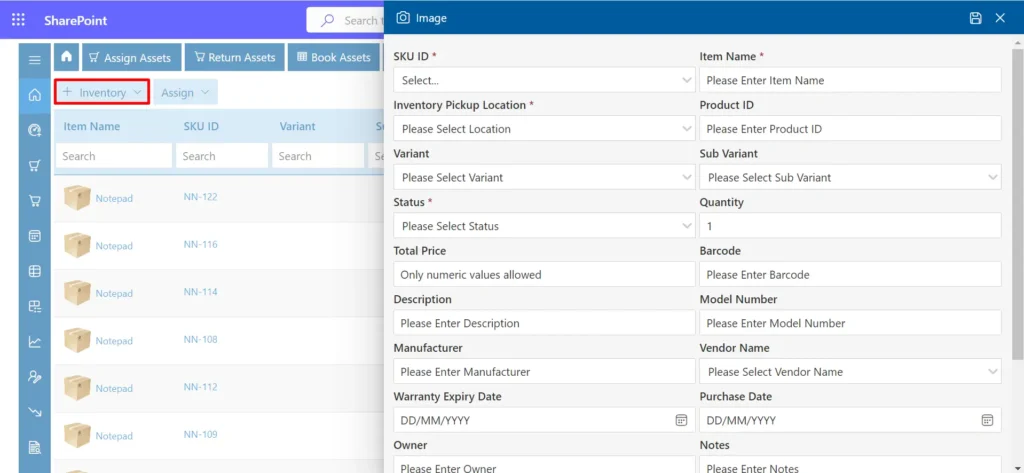
- Inventory management software creates a digital record of the items a business owns or holds.
When new inventory arrives, employees enter item details such as quantity, category, location, supplier, and identification number. - The system stores this information in a central database. As inventory moves between locations or employees, authorized users update the corresponding records. Depending on the software, barcode scanning, notifications, reporting, and other tools help manage these activities.
- For example, when an employee receives a company laptop, the IT department can record the assignment. When the employee returns the device, its status can change to available.
- For consumable inventory, the system can record incoming supplies and outgoing quantities.
- Managers can then review inventory information to identify shortages, unused resources, or purchasing requirements.
Different Types of Inventory Management Systems
Inventory management systems are designed for different operational needs.
Cloud-Based Inventory Management
Cloud-based software allows authorized employees to access inventory information through supported internet-connected devices.
It can be useful for businesses operating across multiple locations or supporting remote employees.
Barcode Inventory Management
Barcode-based systems use identification labels to connect physical items with digital inventory records. Employees scan labels to find items, review details, and record supported inventory activities.
Warehouse Inventory Management
Warehouse-focused software helps businesses manage stored products, receiving activities, stock movement, and order fulfillment.
It is relevant to retailers, distributors, and businesses holding large quantities of saleable products.
IT Inventory and Asset Management
IT inventory software focuses on business technology, including laptops, monitors, accessories, networking devices, and software licenses.
Some platforms also support equipment assignments, maintenance history, warranty tracking, and asset retirement.
Key Features of Inventory Management Software
Choosing suitable inventory management software requires understanding which capabilities support everyday business operations.
Centralized Inventory Tracking
- A centralized inventory database helps employees review item records without searching through multiple files.
- Businesses can maintain information about inventory types, quantities, locations, and status in one place.
Barcode and QR Code Tracking
- Barcode and QR code features help employees identify equipment and locate its digital record.
- They can also support physical inventory checks and reduce repeated manual searches.
Multi-Location Inventory Management
- Businesses operating across offices, warehouses, or customer sites need accurate records showing where inventory is stored.
- Multi-location tracking helps teams identify available resources at individual locations.
Inventory Alerts and Notifications
- Supported inventory alerts can inform employees about low stock, pending activities, or equipment-related deadlines.
- Notifications help teams identify situations that require attention before they affect daily work.
Asset Assignment and Return Tracking
- Equipment-based businesses need to know which employee, department, or location currently holds an item.
- Assignment records help IT teams manage equipment distribution, transfers, and returns.
Reports and Dashboards
- Inventory dashboards provide useful information about stock availability, movement, categories, and usage.
- Managers can use reports to review purchasing requirements and identify inventory discrepancies.
User Roles and Access Controls
- Inventory systems should allow organizations to control who can view, create, or modify records.
- Permissions are particularly important when multiple departments share inventory information.
Benefits of Inventory Management Systems for Small Businesses
An inventory management system can improve everyday operations when employees maintain accurate records.
Better inventory accuracy: Digital records help teams monitor quantities and identify differences between recorded and physical inventory.
Lower purchasing costs: Employees can check available equipment before requesting additional purchases.
Improved employee accountability: Assignment records help managers understand who currently holds company equipment.
Reduced administrative work: Centralized information reduces the need to update several spreadsheets manually.
Faster inventory audits: Organized records and supported scanning features make physical inventory verification easier.
Better business planning: Inventory reports help managers understand resource availability and future purchasing requirements.
These benefits depend on consistent record updates, appropriate software configuration, and employee adoption.
Inventory Management Software vs Spreadsheets
Spreadsheets remain useful for businesses with limited inventory and simple tracking requirements. However, it becomes harder to manage when several employees update records or items move frequently between locations.
Business Requirement | Spreadsheets | Inventory Management Software |
Inventory records | Manual maintenance | Centralized records |
Stock movement | Manual updates | Recorded transactions |
Barcode identification | Additional tools needed | Available in supported systems |
Multiple locations | Separate tracking effort | Location-based visibility |
Inventory reports | Manual preparation | Built-in reporting options |
Equipment assignments | Custom records | Dedicated tracking features |
A dedicated system becomes worth considering when spreadsheet errors cause repeated purchases, missing equipment, or time-consuming inventory checks.
Common Inventory Management Challenges
Implementing inventory software does not automatically solve every inventory problem. Businesses must also address the processes responsible for inaccurate records.
Inaccurate Inventory Data
Missing item details, duplicate records, and outdated quantities reduce the usefulness of inventory reports.
Regular verification helps maintain record accuracy.
Untracked Inventory Movement
Employees sometimes transfer equipment between locations without updating the inventory system.
Clear procedures should define who records transfers and when updates must happen.
Overstocking and Stock Shortages
Ordering too much inventory increases storage costs, while insufficient supplies can interrupt operations.
Reviewing consumption patterns and replenishment requirements helps purchasing teams make better decisions.
Limited Inventory Ownership
When nobody is responsible for maintaining records, inventory information becomes outdated.
Assigning clear responsibilities to employees or departments improves accountability.
How Much Does Inventory Management Software Cost?
The cost of inventory management software depends on business size, required features, provider pricing, and subscription structure. Some solutions offer basic plans for smaller teams. Others charge according to users, inventory volume, locations, or advanced capabilities.
Businesses should also consider implementation expenses, employee training, support, and data migration.
Software with equipment maintenance, software license management, or advanced reporting may have different pricing from basic stock tracking tools.
Before making a purchase, compare total costs rather than looking only at monthly subscription fees. Request current vendor pricing and confirm which features are included in the proposed plan.
How to Choose the Right Inventory Management System?
Choosing an inventory management system for small business begins with identifying the problems your organization needs to solve. An IT manager may prioritize device assignments, equipment history, and barcode tracking. An operations manager may need inventory availability across offices, while a business owner may focus on purchasing costs and reporting. Evaluate the following requirements:
- Inventory categories and expected growth
- Number of employees and locations
- Barcode or QR code support
- Reporting and audit requirements
- Integration with existing business software
- User permissions and data security
- Subscription and implementation costs
Ask software providers to demonstrate your actual inventory workflows rather than relying entirely on feature descriptions. A practical evaluation should show how employees register items, change locations, update assignments, and prepare reports.
How to Implement an Inventory Management System?
Successful implementation starts with reviewing existing inventory records.
- Identify duplicate entries, missing details, and items that are no longer available.
- Next, create standard categories and define the information employees must record for each item.
- Prepare verified inventory data for import into the selected system.
- Set user permissions and establish responsibilities for receiving inventory, updating records, and approving changes.
- Train employees on common activities, including item registration, transfers, and inventory checks.
- Consider introducing the system within one department before expanding to additional locations.
- Finally, compare physical inventory with digital records and correct any differences. Regular reviews help businesses maintain useful information after implementation.
Inventory Management Best Practices
Inventory software works best when organizations follow consistent tracking procedures.
- Create a standard naming system for inventory categories and item descriptions.
- Record incoming inventory as soon as employees receive it.
- Update records whenever equipment changes location or ownership.
- Conduct physical inventory checks based on business requirements.
- Review reports to identify inactive equipment, missing items, and purchasing patterns.
- Establish clear responsibilities for inventory updates and periodic audits.
- Businesses should also review their processes as inventory volumes and operational requirements change.
Inventory Management with Asset 365
- Businesses already using Microsoft 365 may benefit from inventory software that also manages company-owned equipment. Asset 365 is an asset management solution designed for the Microsoft 365 environment.
- It helps IT and operations teams manage equipment records, inventory information, asset assignments, locations, and maintenance activities. The platform supports barcode and QR code identification, reporting, inventory management, and asset lifecycle tracking.
- For example, an IT team can maintain laptop records, assign devices to employees, and track equipment through return or retirement.
- Organizations can also use relevant asset information to support audits, maintenance planning, and purchasing decisions.
- Asset 365 is particularly relevant to businesses managing physical equipment and IT assets. Companies requiring specialized retail order fulfillment, manufacturing planning, or warehouse automation should verify those capabilities separately.
Conclusion
An inventory management system for small business helps organizations maintain accurate records, monitor inventory movement, and make informed purchasing decisions.The right software depends on business operations, inventory types, available budgets, and future requirements.
Before choosing a platform, identify tracking problems, compare required features, and test everyday workflows. For organizations working within Microsoft 365, Asset 365 provides a way to manage business equipment, inventory records, and asset activities from a connected environment.
Explore Asset 365 and choose an inventory management approach that supports your team’s everyday work. Book a 1:1 free demo
Frequently Asked Questions
What is the best inventory management system for a small business?
The best solution depends on the type of inventory, number of users, locations, budget, and required features. Businesses should evaluate software against actual operational needs.
Can small businesses manage inventory without software?
Yes. Small businesses with limited inventory can use spreadsheets. Dedicated software becomes more useful when inventory movement, reporting, and collaboration become difficult to manage manually.
What is the difference between inventory management and asset management?
Inventory management focuses on stock quantities, availability, and movement. Asset management focuses on equipment ownership, assignments, maintenance, financial value, and lifecycle history.
Can inventory management software track IT equipment?
Yes. Suitable IT inventory systems help businesses track laptops, monitors, accessories, and other technology resources across employees and locations.
Does Asset 365 support inventory management?
Yes. Asset 365 includes inventory management alongside asset tracking, barcode and QR code identification, assignments, maintenance, and reporting capabilities.
Is inventory management software worth it for small businesses?
It can be valuable when manual tracking causes inventory errors, duplicate purchases, missing equipment, or additional administrative work.


























