

Contract Matrix: Simplify Contract Tracking and Risk Management

Contract matrix is a simple table that shows every contract your company holds, who owns it, when it ends and what it needs.
Most teams keep contracts in emails, folders and spreadsheets, so nobody sees the full picture.
This guide explains the types, the key columns and the steps to build one.
- A contract matrix is one table that lists all contracts with their owners, dates, values and status in a single view.
- Different matrices solve different problems, such as tracking, approvals, signing power, duties and risk.
- A good matrix needs clean columns, clear owners and alerts for renewals, or it goes out of date quickly.
- A spreadsheet works at the start, but a SharePoint-based tool like CLM 365 keeps the matrix live without manual updates.
What Is a Contract Matrix?
A contract matrix is a grid that organizes your contracts in rows and columns. Each row is one contract, and each column holds one detail, such as the party name, contract type, contract value, start date, end date, owner and status. It works like a map of all your agreements.
Teams use it to answer everyday questions fast.
- Which contracts end this quarter?
- Who must approve this vendor deal?
- Which agreements carry the most risk?
- Without a matrix, people search through inboxes and shared drives to find answers.
With one, the answer takes seconds, and no deadline slips by unnoticed.
Types of Contract Matrix
Companies use more than one kind of matrix. Each type answers a different question, and many teams run two or three together.
Contract Tracking Matrix
This is the most common type. It lists every contract with its dates, value, owner and status. Teams use it to see what is active, what is pending and what is about to expire, all in one place
Contract Approval Matrix
An approval matrix shows who must approve a contract based on its value or type. For example, a deal under a set amount may need only a manager, while a larger one needs finance and legal. This removes guesswork and speeds up reviews.
Signing Authority Matrix
This matrix lists who is allowed to sign contracts and up to what limit. It protects the company from contract signing without power to commit. It also gives auditors a clear record of who held authority at any time.
Contract Responsibility Matrix
Also called a RACI matrix, it shows who is responsible, accountable, consulted and informed for each contract task. Legal may draft, sales may review and finance may approve. Everyone knows their role before the work starts.
Contract Obligation Matrix
Every contract creates duties, such as delivery dates, payment terms and reporting needs. An obligation matrix lists each duty, its due date and the person in charge. This helps teams avoid penalties and liability.
Contract Risk Matrix
A risk matrix scores each contract by how likely a problem is and how big the damage could be. High-value deals with weak terms rise to the top. Teams can then focus review time where it matters most.
Want these benefits without building everything by hand?
Find out how a connected contract matrix can save your team hours every week.
What to Include in a Contract Matrix
The columns you pick decide how useful your matrix is. Start with the basics, then add more only when a team truly needs it.
Party and Contract Details
Add the counterparty name, contract title and contract types, such as vendor, customer, employment or NDA. Include a unique contract ID as well. This makes every agreement easy to search and avoids mix-ups between similar names.
Value and Payment Terms
Record the total value, billing cycle and payment terms. Finance teams use these fields to plan cash flow and spot costs that keep growing. When values sit in the matrix, nobody needs to open each file to check numbers.
Key Dates and Renewal Terms
Include the start date, end date, notice period and auto-renewal status. This is the most valuable part of any matrix. Missing a notice window can lock your company into another year of a deal you wanted to end.
Owner and Approvers
Name the person who manages each contract and the people who approved it. Clear ownership means questions never bounce around the company. It also helps when someone leaves, because the matrix shows exactly who must take over.
Status and Stage
Show where each contract stands, such as draft, in review, awaiting signature, active or expired. A stage column lets managers see the pipeline at a glance and find the deals that are stuck.
Obligations and Risk Level
Add the main duties, special clauses and a simple risk rating of low, medium or high. These fields turn the matrix from a list into a decision tool. Leaders can see which contracts need attention first.
Here is a small example of how a tracking matrix looks:
Contract | Party | Owner | End Date | Status | Risk |
Software License | Vendor A | IT | 30 Jun 2027 | Active | Low |
Master Services | Client B | Sales | 15 Jan 2027 | Renewal due | Medium |
Office Lease | Landlord C | Admin | 31 Dec 2026 | Expiring | High |
How to Build a Contract Matrix
You can build a working matrix in a few days. The key is to start small, keep it simple and make someone responsible for it.
Choose Your Columns
Pick the fields from the list above that your teams really use. Start with ten columns or fewer. Too many fields make people stop updating the sheet, and a matrix that is out of date is worse than none.
Set Up the Matrix in One Place
Store the matrix where everyone can reach it, such as SharePoint or a shared workbook. Avoid copies on personal laptops. One shared contract version keeps data clean and stops teams from working with old numbers.
Assign an Owner for Each Contract
Give every contract one named owner who keeps its row up to date. Add one person to oversee the whole matrix as well. Shared contract ownership sounds nice, but in practice it means nobody checks anything.
Add Alerts for Renewals and Deadlines
Set reminders at 90, 60 and 30 days before key dates. Early alerts give you time to renegotiate or cancel. Manual reminders in a spreadsheet are easy to miss, so automatic alerts are a big help here.
Review the Matrix Every Month
Hold a short monthly check with legal, finance and business owners. Update statuses, close finished contracts and add new ones. A quick regular review keeps the matrix trusted, and people keep using what they trust.
Benefits of Using a Contract Matrix
A matrix does more than keep contracts tidy. It changes how fast your company works, how well it plans and how safe it stays when deals get complex.
Faster Access to Contract Information
Instead of digging through folders, anyone can find a contract detail in seconds. Questions about dates, values or owners get quick answers. This saves hours every week and keeps teams focused on real work.
Fewer Missed Renewals
Notice periods and end dates sit in one visible column. Teams act before a deadline, not after it. This stops unwanted auto-renewals and gives you time to negotiate better terms.
Lower Risk and Fewer Surprises
When risk levels and duties are listed, problems show up early. Leaders can spot weak terms or overdue tasks before they cause penalties. A clear view makes it easier to protect the company.
Better Cost Control
Values and payment terms sit side by side, so overlapping deals and rising costs are easy to see. Finance can plan budgets with real numbers. Many companies find savings simply by reviewing what they already pay for.
Smoother Teamwork
Everyone works from the same table, so legal, finance and business teams stop sending the same questions back and forth. Roles are clear, updates are shared and handoffs become much simpler
Easier Audits and Reviews
Auditors ask for contract records, approvals and signing proof. A matrix gives them a clean contract auditing in one place. Preparation time drops, and your team feels far less stress during reviews.
How CLM 365 Helps with Your Contract Matrix ?
Spreadsheets break when many people edit them. CLM 365 is SharePoint contract management built inside SharePoint and Microsoft 365, so your contract matrix stays live where your teams already work.
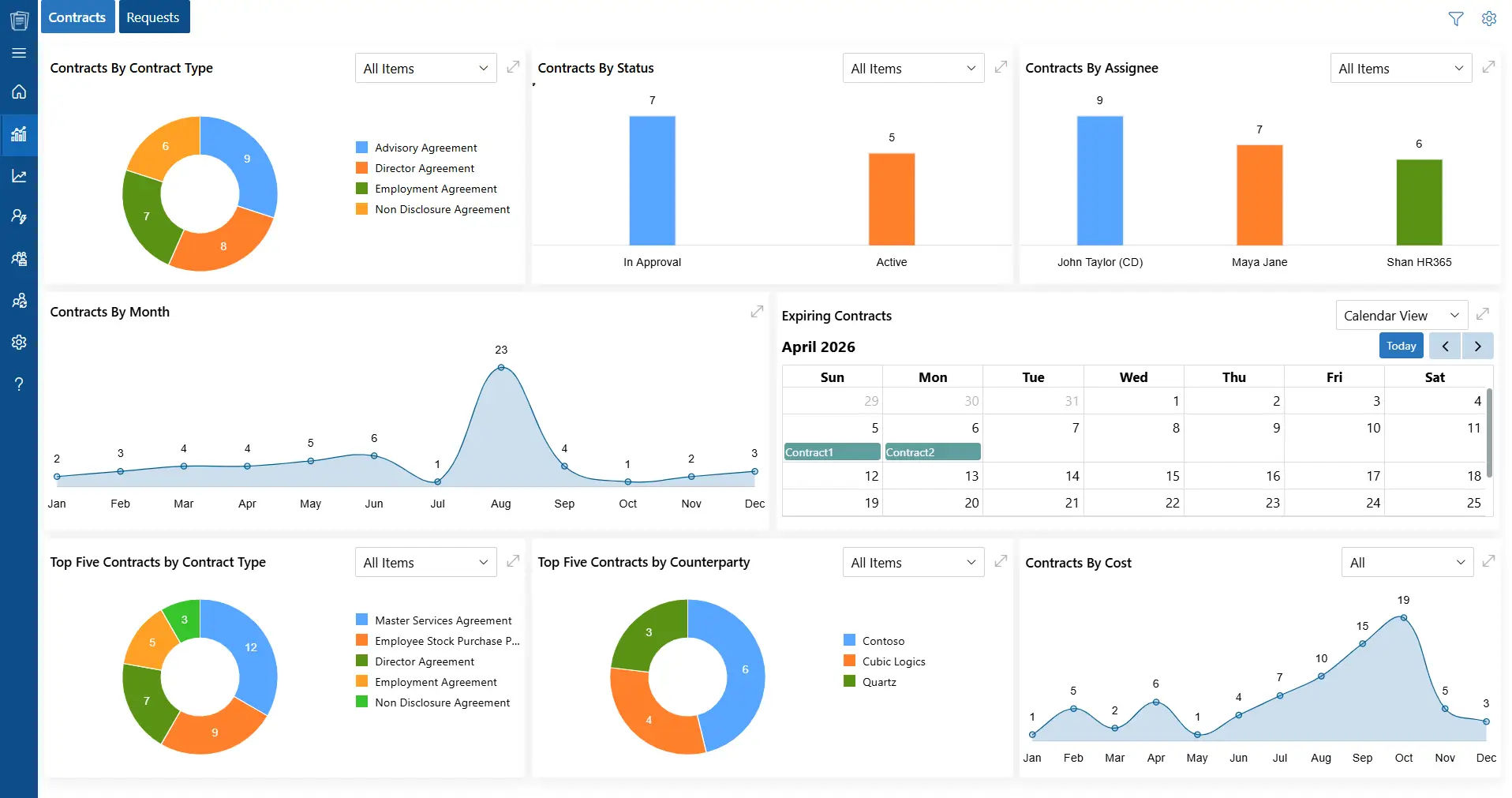
A Live Matrix Inside Microsoft 365
The system keeps your contract data in your own Microsoft 365 tenant. The matrix updates as contracts move, so there is no copy-pasting between files. Teams open it from SharePoint, Teams or Outlook.
Dashboard View of All Contracts
The dashboard shows every contract with its status, owner and key dates in one screen. Managers can sort and filter in seconds. This replaces the hunt through folders with a single clear view.
Approvals and Version Control
Approval steps follow your rules, so the right people review each contract in the right order. Version control saves every change. Your matrix always points to the latest approved file, not an old draft.
AI Summaries and Risk Flags
AI reads a contract and gives a plain-language summary. It also flags risky clauses and suggests safer wording. Your risk column fills with real insight, not guesses, and reviews move much faster.
Obligation and Renewal Tracking
It tracks duties and renewal dates for you and sends alerts before deadlines. Nobody has to keep a calendar of dates in their head. This protects you from missed notices and surprise auto-renewals.
Conclusion
A contract matrix gives your company one clear view of every agreement, from owners and dates to duties and risk. It cuts search time, prevents missed renewals and helps teams make faster, better decisions. Start with a few key columns, name clear owners and review the matrix every month so it stays useful.
A spreadsheet is a fine first step, but it needs constant care. As contracts grow, a tool that keeps the matrix live saves time and lowers risk.
Want your contract matrix to run on its own?
Explore how CLM 365 can organize your contracts in one place.
Frequently Asked Questions
Do small businesses need a contract matrix?
Yes. Even a small company can lose money from one missed renewal or one forgotten payment term. A simple matrix with ten to twenty contracts is easy to set up. It also builds a good habit before the number of contracts grows.
What are the most common mistakes when creating a contract matrix?
The biggest mistakes are adding too many columns, leaving contracts without an owner and never updating the data. Some teams also skip small agreements or keep several copies of the same file. A short, shared and regularly reviewed matrix avoids most of these problems.
Who should have access to a contract matrix?
Give full edit access only to contract owners and the person who manages the matrix. Finance, legal and team leads can get view access for the parts they need. Limiting access protects sensitive details like pricing and payment terms from the wrong eyes.
How do I know if my contract matrix is working?
Check a few simple signs. Renewals should no longer be missed, contract details should take seconds to find, and every contract should have an owner and a current status. If your team trusts the matrix and uses it daily, it is working.
Can a contract matrix help with compliance?
Yes. It shows who signed each contract, who approved it and which duties are due. This gives your team a clear record when internal reviews or external checks happen. It also helps you spot contracts that miss required approvals or terms before they become a problem.


























