


Contracts rarely fail because someone forgot they exist; they fail because key dates, clauses, versions, and obligations are buried where the right person cannot act on them.
- Contract digitization goes beyond scanning by turning agreements into searchable records, structured data, workflows, and contract intelligence.
- Digital contracts reduce reliance on inboxes, drives, spreadsheets, and memory by connecting versions, approvals, obligations, and renewals.
- Successful digitization requires clean contract data, clear standards, access rules, migration testing, workflows, and ownership.
- CLM 365 supports contract requests, drafting, review, approval, e-signing, storage, renewals, reporting, and AI-assisted analysis.
Digital contracts make this information easier to access, organize, and manage, giving teams better visibility throughout the contract lifecycle.
Contract digitization turns folder based contract storing into searchable data and controlled workflows, giving teams a shared view of agreements, ownership, and next steps.
This guide explains the process, digital contract role, lifecycle, manual-work risks, best practices, AI review, and how CLM 365 supports Microsoft 365 contract management.
What Is Contract Digitization?
Contract digitization is the process of converting contract documents and contract information into digital formats that people and systems can search, organize, track, analyze, and act on.
Mature contract digitization goes further by extracting fields, applying metadata, linking amendments, recording owners, controlling access, and placing agreements into a defined lifecycle.
Digital contracts are agreements created, negotiated, approved, signed, and stored electronically. Electronic contracts may include online terms, clickwrap agreements, electronically signed documents, and other agreements completed through digital channels.
Why Is Contract Digitization Important?
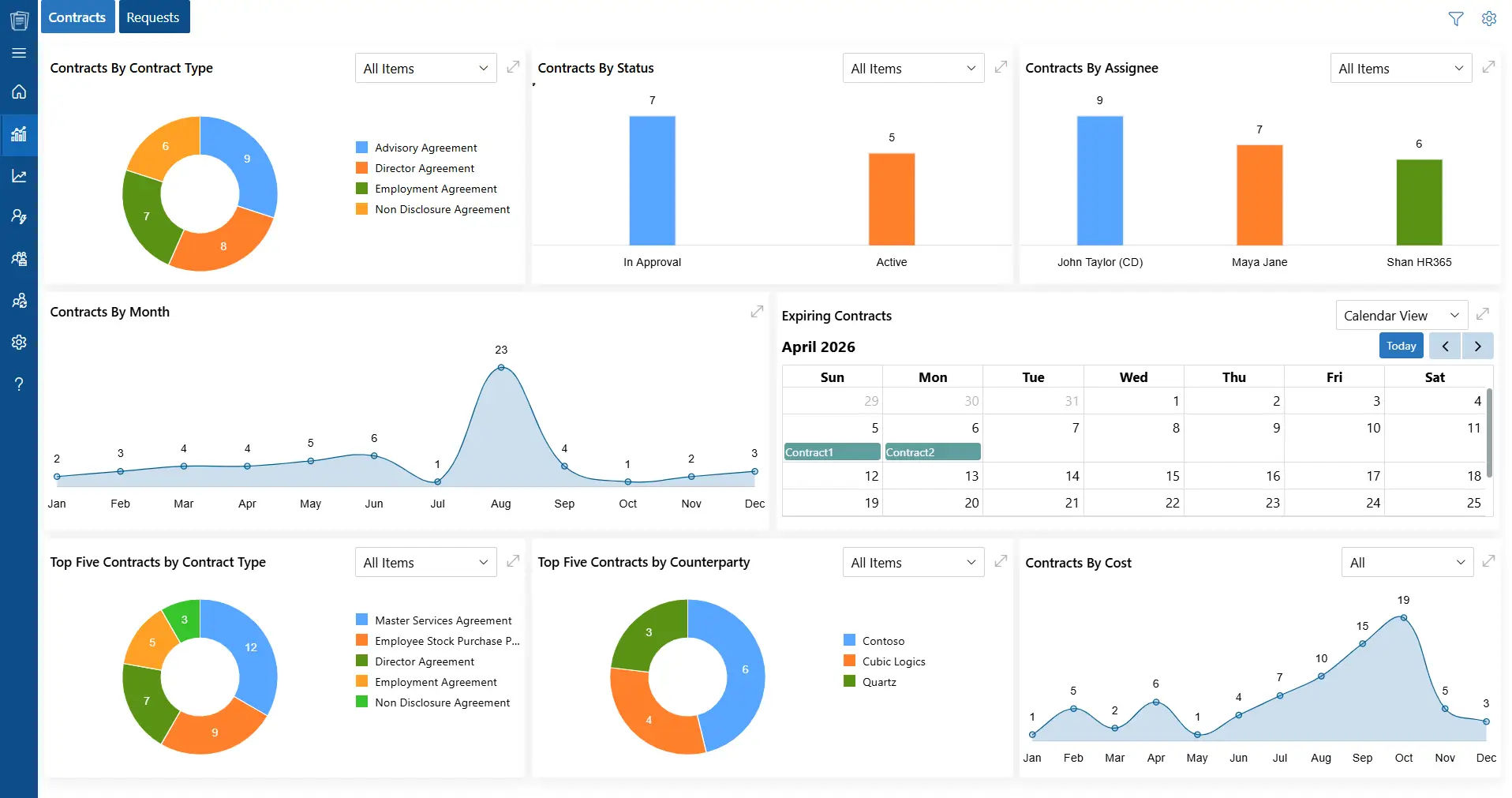
The business case begins with visibility. When agreements live across email, desktops, file shares, cabinets, and spreadsheets, teams may spend more time finding the correct document than evaluating the deal.
World Commerce & Contracting reported in 2025 that contract-related data is scattered across an average of 24 systems.
The same research says only 39% of commercial practitioners believe their contracts effectively deliver the desired outcome. Contract digitization addresses the information problem by creating one governed source of contract records and data.
Consider a common renewal mistake. A digital contract management agreement renews automatically unless notice is sent 60 days before expiration. The signed PDF sits in a former employee’s folder. Finance sees the invoice after the notice window closes. The business pays another year for a service it planned to replace.
The clause was fine; visibility and ownership failed. Contract digitization turns contract terms into managed events by linking renewals and supporting records in one controlled system, making contract audits easier as volumes grow.
How Does the Digital Contract Lifecycle Work?
The digital contract lifecycle follows an agreement from request through performance, renewal, and closure, keeping each stage connected to one record.
Step 1: Request and Intake
A business user submits the need, counterparty, value, contract type, deadline, and documents. Structured intake reduces incomplete requests and gives legal context before drafting.
Step 2: Drafting and Template Selection
The system can route users to approved clause libraries and clauses by contract type, region, risk, or value. Digital contracts start with controlled language rather than old personal files.
Step 3: Review and Negotiation
Legal, procurement, finance, security, and business owners review under defined rules. One current version should be obvious, with comments, redlines, and decisions recorded.
Step 4: Approval
Approval paths can change by risk or value. A standard NDA may need fewer approvers than a major supplier agreement with unusual data terms or uncapped liability.
Step 5: Electronic Signature
Approved agreements move to electronic signature where permitted. Status should return to the record as pending, completed, declined, or expired.
Step 6: Repository and Record Creation
The executed agreement becomes the authoritative record. Metadata, related documents, approval evidence, and signature records stay connected.
Step 7: Obligation and Performance Management
Owners receive tasks for deliverables, notices, certificates, price reviews, service levels, audits, or other commitments.
Step 8: Renewal, Amendment, or Closure
Alerts should begin early enough for the business to evaluate performance and alternatives before a notice deadline. If the agreement changes, amendments should remain linked to the same contract family.
This lifecycle is what separates digital contract management from simple file storage.
Turn lengthy contracts into clear insights.
CLM 365 AI helps identify important terms, summarize agreements, compare clauses, and highlight areas that may need attention.
How Do Manual Contract Workflows Affect Legal Team Efficiency?
Manual contract workflows create contract management challenges by adding repetitive administrative work, reducing visibility, and making it harder to track approvals, versions, obligations, and deadlines.
- Incomplete requests create delays when legal teams must repeatedly chase missing business context or contract details.
- Duplicate drafting increases work when teams rely on old contracts or disconnected documents.
- Inconsistent clauses can create unnecessary review cycles and increase contract risk.
- Email-based approvals slow decisions because stakeholders must manually track requests and follow-ups.
- Version confusion makes it difficult to identify the latest draft, negotiation changes, or approved language.
- Poor contract visibility limits insight into negotiation history, blockers, owners, and current status.
- Manual tracking can lead to missed renewal dates, unassigned obligations, and misplaced signed agreements.
- Administrative work consumes legal capacity, leaving less time for risk assessment, negotiation, and strategic business advice.
World Commerce & Contracting reports average contract value erosion of 8.6%, showing why contract digitization is becoming an operating priority. This is why contract digitization is important.
How Does Contract Digitization Support Digital Transformation?
Contract digitization moves contracts from disconnected files into structured, searchable, and automated workflows, making contract data easier to access, manage, and use across the business.
Contract digitization converts scanned PDFs, email attachments, and files stored across different locations into accessible digital records.
Instead of searching through filing cabinets, inboxes, or local folders, teams can find contracts from a centralized system.
This creates a more reliable foundation for depositing contracts and managing and accessing agreements throughout their lifecycle.
Digital contracts give legal, procurement, finance, sales, and operations teams a shared view of relevant contract information.
Details such as parties, contract values, owners, approval status, obligations, and renewal dates can be captured and accessed by authorized users.
This reduces information gaps between departments and makes it easier for teams to coordinate actions based on the same contract data. For B2B suppliers, the next step in digital transformation is connecting approved commercial terms to everyday selling, so customer-specific pricing, payment conditions, and purchasing approvals are reflected in online ordering workflows.
Contract digitization allows organizations to replace repetitive manual activities with structured digital workflows.
Contract requests can be routed to the right teams, approvals can follow predefined paths, and reminders can be triggered for upcoming deadlines or renewals.
Automating the contract lifecycle, these routine steps reduce administrative work, minimize follow-ups, and create a more consistent contract process.
Digitization does more than create electronic copies of contracts.
Important information can be captured as structured data, expiration dates, values, clauses, obligations, and renewal terms.
Once this information is structured, teams can search, filter, compare, report on, and analyze contracts efficiently.
Centralized digital contract records make it easier for contract governance and who is responsible for the next action.
Teams can track drafts, approvals, signatures, obligations, and renewals from a controlled environment.
Access permissions, version history, and audit trails also provide greater control over who can view or modify contract information.
Digitized contracts provide the foundation for applying AI to contract-related tasks.
AI helps summarize contracts, extract key terms, summarize agreements, compare language across contracts, and highlight potential inconsistencies or risks.
These capabilities can reduce the time spent on repetitive review while keeping final interpretation and risk-based decisions with legal professionals.
Digital contract workflows generate data that can reveal how contracts move through the organization.
Teams can identify patterns such as lengthy approval times, recurring bottlenecks, delayed renewals, or frequently negotiated clauses.
These insights can be used to refine workflows, improve internal processes, establish better standards, and continuously improve contract operations.
Make contract management easier to manage.
CLM 365 brings contract requests, drafting, reviews, approvals, e-signatures, storage, and renewals into one connected workflow.
Key Benefits of Digitizing Contract Workflows
Digitizing contract workflows helps organizations reduce manual work, improve visibility, speed up approvals, and manage agreements more consistently throughout their lifecycle.
Searchable contract text and structured metadata reduce the need for file-by-file review. Users can quickly find agreements by counterparty, date, contract type, value, owner, clause, or status, making everyday contract queries faster.
A digital workflow creates a clearer record of the contract lifecycle. Teams can identify the current version, track changes, see who reviewed or approved an agreement, and understand when each decision was made.
Automated reminders can be triggered before renewal and notice periods, giving teams enough time to review contract performance, pricing, business requirements, and negotiation options. This reduces the risk of missed renewals or unwanted extensions.
Structured contract and clause data makes it easier to identify agreements containing nonstandard language, missing protections, unusual liability terms, or specific regulatory requirements. Teams can prioritize contracts that require closer review.
Digital contract data gives teams a clearer view of contract activity without manually rebuilding reports. Leadership can track contract volumes, cycle times, approval delays, upcoming renewals, contract values, obligations, and recurring risk patterns.
How to Digitize Existing Contracts
Whether your contracts are sitting in filing cabinets, shared folders, or scattered across PDFs, digitization involves more than simply converting them into digital files. The goal is to turn existing contracts into organized, searchable, and actionable records.
- Locate Contracts: Start by identifying where contracts are currently stored—shared folders, local drives, email attachments, physical files, or legacy systems. Create an inventory before moving anything.
- Clean the Repository: Remove duplicate, expired, irrelevant, or incomplete files. Separate active contracts from archived agreements so you do not carry unnecessary clutter into the new system.
- Organize Contracts: Group agreements by contract type, department, vendor, customer, or other relevant categories. Establish a consistent naming structure before migration.
- Extract Contract Data: Capture important information such as parties, contract type, effective date, expiration date, contract value, renewal terms, and key obligations. OCR and AI can help extract this information from scanned or unstructured documents.
- Validate Information: Review extracted data before migration. Pay particular attention to dates, renewal clauses, contract values, obligations, and other information that will drive future workflows.
- Migrate to CLM: Upload the contracts into a centralized CLM repository along with their relevant metadata. This moves contracts from basic folder storage into a structured system where they can be searched and managed.
- Connect Contract History: Link amendments, addendums, renewals, supporting documents, and previous versions to the relevant contract. This gives users a complete view of the agreement’s history.
How CLM 365 Supports the Entire Contract Lifecycle
For Microsoft 365 organizations, CLM 365 provides contract lifecycle management inside the same ecosystem. A SharePoint-based contract software connects requests, drafting, review, approvals, electronic signing, storage, obligations, renewals, reporting, and AI-assisted analysis.
This matters when contracts are digitized but surrounding work still lives in email and spreadsheets.
CLM 365 can centralize records in Microsoft 365 environment with structured metadata and version history, helping teams search agreements, track status, and connect related documents.
CLM 365 supports drafting, review, approvals, e-signatures, and post-signature tracking, helping teams manage contracts from creation through renewal.
It also provides dashboards, Teams and Outlook integration, and AI-assisted tools for summarizing agreements, extracting terms, and identifying clauses and review areas.
Hear from Our Delighted Clients
CLM 365 has made contract reviews faster and more efficient with AI-powered contract summaries. It helps teams quickly understand key terms, obligations, and potential risks, reducing manual review and enabling faster, more informed decision-making.
Role of AI in Managing Contracts
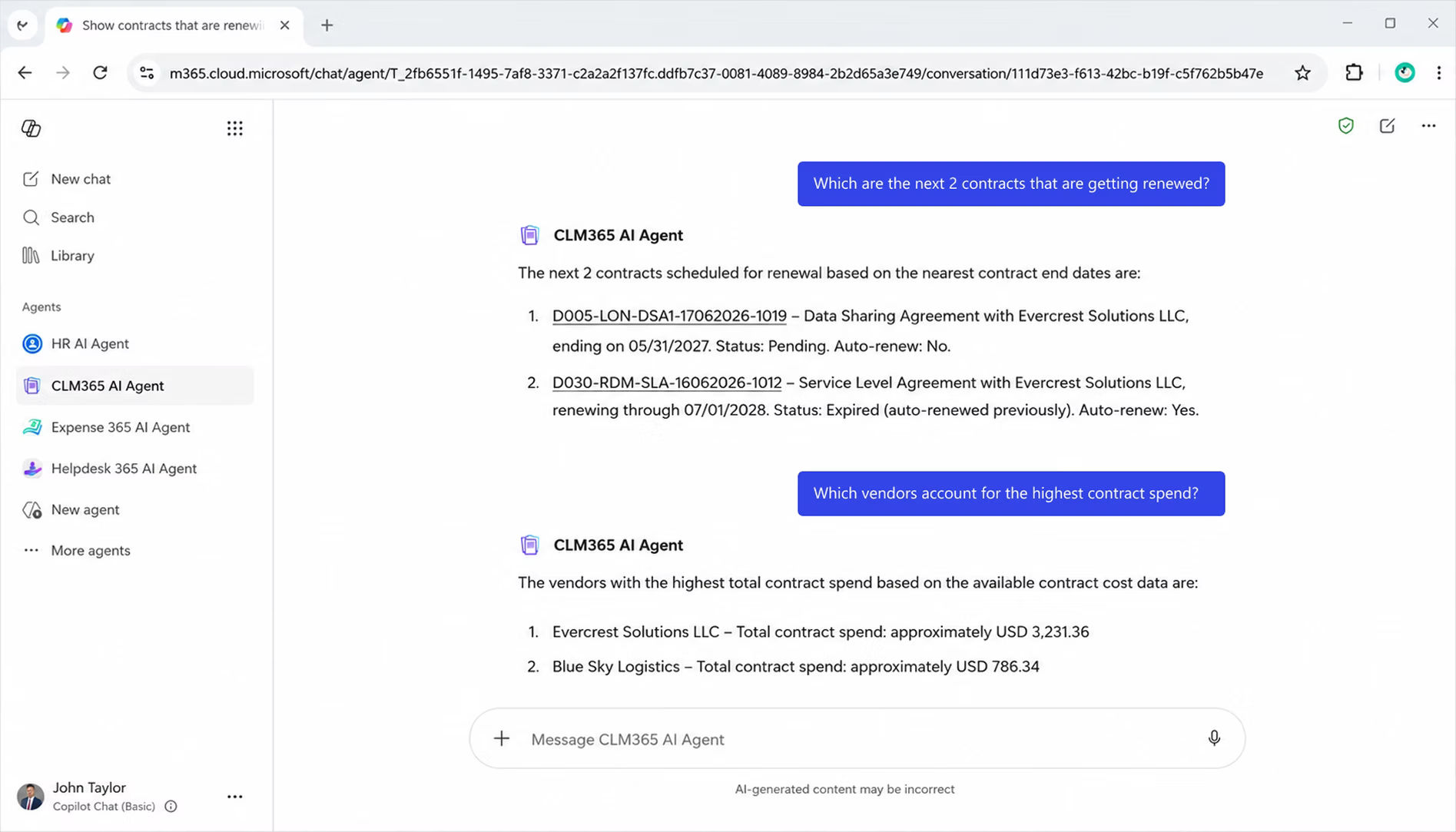
AI can reduce the review burden for large volumes of contracts by handling tasks such as summarization, clause identification, metadata extraction, obligation detection, language comparison, and risk spotting.
- 240 hours: Legal professionals expect AI to free up nearly 240 hours per year, equivalent to about five hours per week.
- $19,000: Those time savings represent an estimated $19,000 in annual value per professional.
- Human oversight remains essential: AI can miss context or misinterpret unusual contract language, so lawyers should make the final risk and negotiation decisions.
- Best approach: Use AI for first-pass review while keeping confidential data protected, verifying outputs, and maintaining clear human-review requirements.
For example, AI may identify an indemnity clause, compare it with a preferred position, and flag a difference. A lawyer then decides whether the change is acceptable based on deal value, negotiating power, insurance, jurisdiction, and the wider agreement.
Conclusion
Contract digitization shifts contracts from static files to controlled, searchable, actionable business records. Scanning may start it, but value comes from structured data, ownership, workflows, renewal control, and reporting.
If your team still struggles to find contract versions, track notice periods, understand status, or identify commitment owners, it may be time to move beyond document storage.
Explore CLM 365 to see how a connected digital contract workflow can help your team manage agreements from request to renewal.
Frequently Asked Questions
What should we measure after implementing contract digitization?
Measure time to find a contract, request-to-signature cycle time, approval delay, metadata completeness, missed renewals, on-time obligations, approved-template use, and adoption. Migration volume alone is not success if nobody trusts the data.
How do we extract contract metadata from existing PDFs?
Metadata such as parties, contract dates, values, contract types, and renewal terms can be extracted using OCR, document processing, or AI and then validated before being added to the contract record.
How should we structure metadata for a large contract repository?
Define a consistent set of fields such as counterparty, contract type, owner, effective date, expiry date, value, status, renewal date, and department before migration begins.
Can AI identify risky clauses in legacy contracts?
AI can flag unusual or potentially risky language based on defined criteria, but legal professionals should determine whether the identified language actually creates material risk.
How Can AI track obligations across hundreds of contracts?
AI can extract obligations from contracts and organize them by owner, deadline, status, and reminder, reducing manual tracking across spreadsheets.


_JiluXJRGNl.svg)























