

Best Practices for Maintaining an Accurate Company Staff Directory
_eH2jDg7dZ.png)
A company staff directory is only useful if people trust it. The moment someone finds a wrong phone number, an ex-employee’s name, or a manager who changed roles six months ago, they stop checking it — and start pinging colleagues on Slack or Teams instead, which is exactly the friction the directory was supposed to remove.
- A staff directory decays continuously — new hires, promotions, and departures change data every week, not once a year.
- Manual updates are the single biggest cause of directory inaccuracy; automation from a system of record (HRIS or Azure AD) is the most reliable fix.
- Clear ownership of the directory matters as much as the tooling — someone (or some process) must be accountable for accuracy.
- Staff directory, employee directory, and org chart are related but distinct — and confusing them leads to gaps in coverage.
- Quarterly audits plus automated sync catch the errors that pure automation alone can miss (typos, incomplete profiles, orphaned accounts).
This guide covers what actually keeps a staff directory accurate over time: the best practices, the common failure points, how manual upkeep compares to automation, and the questions HR and IT teams ask most often when fixing this problem for good.
What Is a Company Staff Directory?
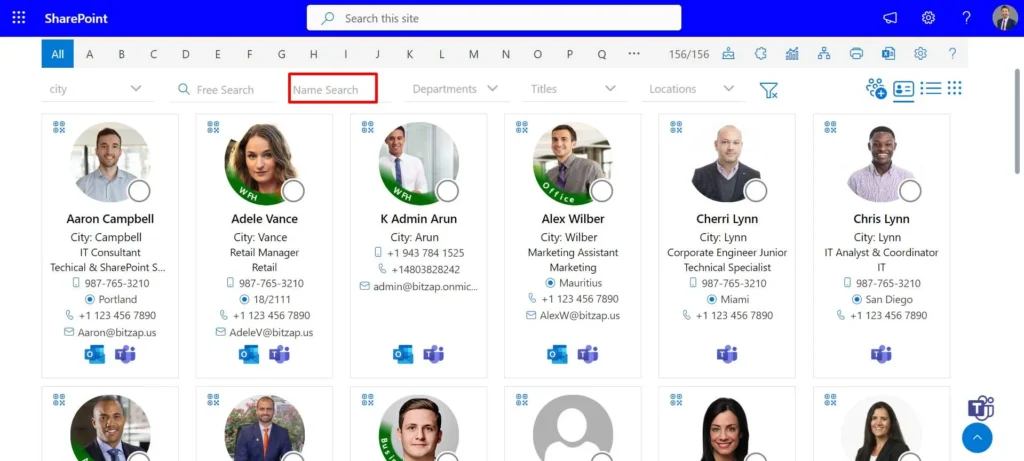
A company staff directory is a centralized, searchable record of everyone in an organization — typically including name, job title, department, manager, location, contact details, and photo. It functions as the operational “who’s who” employees use to find the right person, understand reporting lines, and route requests correctly.
Unlike a simple contact list, a well-built staff directory is a living system connected to underlying employee data (usually an HRIS or directory service like Azure AD), so it reflects hires, transfers, and exits without someone manually rewriting a spreadsheet.
Why Staff Directories Become Inaccurate
Directories don’t go stale all at once — they decay gradually, through a handful of predictable causes:
- Manual entry as the source of truth. If someone has to remember to update a spreadsheet or wiki page, it will eventually be forgotten.
- No single owner. When HR assumes IT maintains it, and IT assumes HR does, nobody actually does.
- Disconnected systems. The HRIS, email system, and directory tool don’t talk to each other, so updates happen in one place but not the others.
- No offboarding trigger. Former employees remain listed — a data hygiene issue and, in some cases, a security concern.
- Fast headcount change. Growing or restructuring teams generate change faster than manual processes can track.
Industry data-hygiene research on contact and employee records generally points to a consistent pattern: a meaningful share of records in any people database become outdated every month simply through normal personnel movement. Even without an exact figure for your organization, the direction is the same — the longer a directory goes unmanaged, the less anyone trusts it.
The Real Cost of an Outdated Directory
An inaccurate directory isn’t just a minor annoyance — it creates measurable operational drag:
- Slower onboarding. New hires can’t find the right contacts or understand reporting structure.
- Misrouted communication. Requests, approvals, and escalations go to the wrong (or former) person.
- Compliance and security risk. Departed employees still listed as active can signal broader access-control gaps.
- Erosion of trust in internal tools. Once employees stop trusting the directory, they stop using it — and the investment in building it is wasted.
- Duplicate effort. Teams recreate their own local contact lists because the “official” one isn’t reliable, fragmenting the source of truth further.
10 Best Practices for Maintaining an Accurate Staff Directory
Centralize a single source of truth
Every directory field should trace back to one authoritative system — typically your HRIS or Azure Active Directory — rather than being entered separately in multiple tools.
Automate updates, don’t rely on manual entry
Sync the directory directly to your HR system or AD so that new hires, role changes, and terminations flow through automatically instead of depending on someone remembering to update a record.
Assign clear ownership
Name a specific team or role (often HR Ops or IT) accountable for directory accuracy, with a documented process for who fixes what.
Define update triggers
Tie directory updates to real HR events — new hire, promotion, department transfer, and offboarding — rather than periodic manual review alone.
Integrate with tools employees already use
A directory embedded in SharePoint, Teams, Outlook, or Slack gets checked and corrected far more often than one living in a standalone tool people forget exists.
Enable self-service updates with approval workflows
Let employees flag or update their own contact details, photo, or title, with manager or HR approval for sensitive fields — this catches errors faster than any audit cycle.
Run quarterly data audits
Even fully automated directories accumulate small errors — duplicate entries, incomplete profiles, or unsynced photos. A scheduled quarterly review catches what automation misses.
Apply field-level validation rules
Required fields, standardized formats (e.g., phone number patterns), and dropdown-based department/title lists prevent inconsistent or junk data at the point of entry.
Set access and edit permissions deliberately
Not everyone should be able to edit every field. Separate who can view directory data from who can edit it, especially for sensitive information like personal phone numbers or home addresses.
Make the directory mobile-accessible and searchable
A directory only used at desks misses a large share of lookups. Fast search, filters by department/location, and mobile access keep adoption — and therefore reporting accuracy — high.
Staff Directory vs. Employee Directory vs. Org Chart
These terms are often used interchangeably but serve different purposes:
Term | Primary Purpose | Typical Data Shown | Best For |
Staff Directory | Quick lookup of contact info | Name, title, department, contact details | Finding “who do I call/email” |
Employee Directory | Broader employee record reference | Contact info + role history, skills, sometimes bio | HR and internal people search |
Org Chart | Reporting structure visualization | Manager/report hierarchy | Understanding who reports to whom |
Most modern directory tools, including SharePoint-based ones, combine all three into a single searchable interface.
Manual vs. Automated Directory Management
Factor | Manual (spreadsheet/wiki) | Automated (HRIS/AD-synced) |
Accuracy over time | Degrades steadily without constant upkeep | Stays current as HR data changes |
Time investment | High — ongoing manual entry | Low after initial setup |
Offboarding handling | Easy to miss | Removed automatically when deactivated in source system |
Scalability | Breaks down as headcount grows | Scales with organization size |
Error source | Human forgetfulness | Sync/config errors (rare once configured) |
The pattern is consistent: manual directories work for very small teams but become unreliable past roughly 20–30 employees, which is when most organizations move to an automated, synced approach.
Real-World Example: SharePoint-Based Directories
Many SMBs already run Microsoft 365 and SharePoint, which makes a SharePoint-native directory a natural fit rather than adding a separate standalone tool. A solution like Employee Directory 365 pulls employee data directly from SharePoint/Azure AD, so when HR updates a title or deactivates an account, the directory reflects it without anyone touching a spreadsheet. For teams that already live inside Microsoft 365, this kind of native sync is usually the fastest path from “directory nobody trusts” to “directory people actually use.”
Conclusion
An accurate staff directory isn’t a one-time project — it’s an ongoing process that depends on the right source of truth, clear ownership, and enough automation that accuracy doesn’t rely on someone remembering to update a spreadsheet. Get those three things right, and the directory becomes something employees actually trust and use, instead of another internal tool that quietly goes stale.
Join Our Creative Community
Frequently Asked Questions
What is the best way to keep a staff directory accurate?
Sync it directly to your HRIS or Azure Active Directory so updates happen automatically when employee data changes, and back that with quarterly manual audits to catch edge cases.
How often should a company staff directory be updated?
Automated directories update continuously as HR data changes. If managed manually, review and update it at least monthly, with a full audit each quarter.
Who should own the company staff directory?
Typically HR Operations or IT, depending on the organization — but ownership must be explicitly assigned, since shared or unclear ownership is the most common reason directories go stale.
What's the difference between a staff directory and an org chart?
A staff directory is built for contact lookup (name, title, contact info), while an org chart visualizes reporting relationships. Many tools now combine both.
Can a staff directory be automated inside SharePoint?
Yes. Tools like Employee Directory 365 sync directly with SharePoint and Azure AD, so directory data updates automatically as HR records change, without manual re-entry.


_JiluXJRGNl.svg)























