

A global business account is a business account that holds, sends, and receives money in more than one currency. It often comes with local account details in other countries, so you can pay overseas suppliers and collect from foreign customers without opening a bank account in each country.
This matters most for US companies with international customers, remote contractors, or overseas vendors. Each cross-border payment can bring conversion costs, delays, and messy records. A single account for several currencies reduces those problems.
This article explains how these accounts work, what they cost, and how to open one. It also covers the spending side, because money that crosses borders still needs tracking. That’s where Expense 365 fits in. It’s expense management software, not a bank.
- A global business account holds, sends, and receives money in several currencies
- It cuts conversion steps, but fees and exchange rate spreads vary by provider
- Compare currencies, fees, security, and software links before you choose one
- Expense 365 doesn’t hold money, but it tracks and controls the spending that follows
What Is a Global Business Account?
A global business account lets a company hold balances in several currencies, send international payments, and collect money from customers abroad. Many providers add local account details, such as a EUR or GBP account number, so customers can pay you like a local. Both banks and payment firms offer them.
You’ll also see the idea called an international business account or global business banking. The names overlap, and providers define them differently. Demand is growing: McKinsey estimates that cross-border payments reached about $190 trillion in 2025.
Take a US online store that sells to Germany. Without one, a €5,000 customer payment may convert to dollars on arrival. With one, the store can keep the euros and use them to pay a German supplier.
How Does a Global Business Account Work?
You open one account that carries a separate balance for each currency. Customers pay into local account details, and the money lands in the matching balance. You can hold it, convert it when rates suit you, or pay suppliers straight from it. The provider handles the banking links behind the scenes.
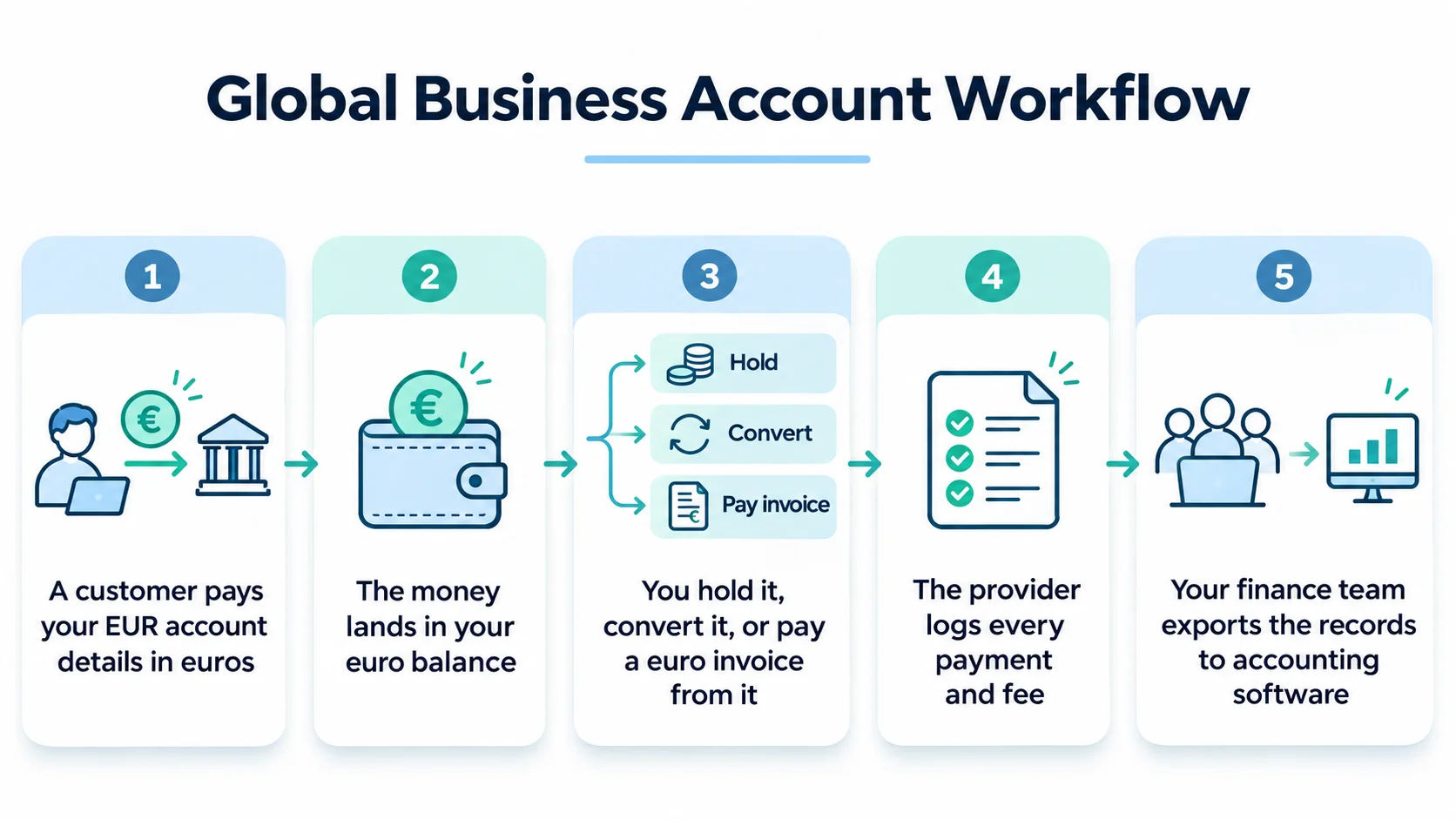
Here’s a typical flow:
- A customer pays your EUR account details in euros
- The money lands in your euro balance
- You hold it, convert it, or pay a euro invoice from it
- The provider logs every payment and fee
- Your finance team exports the records to accounting software
What Are the Benefits of a Global Business Account?
The main benefits are fewer currency conversions, faster payments, and one view of your international cash. You can also bill customers in their own currency and pay overseas vendors from local balances. Results depend on the provider, so compare real numbers before you commit.
- Lower conversion costs: hold foreign currency instead of converting every payment
- Faster international business payments: local payment rails often settle quicker than wires
- Clearer cash position: see each currency balance on one dashboard
- Easier collections: customers pay in their own currency, which can speed up payment
What Is the Difference Between a Global Business Account and a Regular Business Account?
A regular business account works mainly in one currency and sends international payments by wire. By contrast, a global business account holds several currencies and often gives you local account details abroad. Domestic firms usually do fine with a regular account. Companies that pay or get paid overseas often get more from a global one.
Feature | Regular business account | Global business account |
Currencies held | Usually one | Several |
Receiving foreign payments | Wire to a single account | Local account details in several currencies |
Currency conversion | Bank rate, often on each payment | Hold balances and convert when you choose |
Best for | Mostly domestic activity | Regular overseas payments |
Many providers sell the same product as a multi-currency business account.
What Features Should You Look for in a Global Business Account?
Look for the currencies you use, clear fees, strong security, accounting links, and spending controls. Check whether the provider is a bank or a payment firm, since that changes how your money is protected. Match features to how you actually pay and get paid.
Confirm the provider supports your main currencies and offers local details for them. A long currency list means little if yours is missing.
The FDIC insures deposits up to $250,000 per depositor, per insured bank, per ownership category. It doesn’t cover the failure of institutions it doesn’t insure. Some payment firms aren’t banks, so ask how they protect customer funds.
Check for accounting software links, approval rules, user permissions, and cards. These keep payments and records together.
What Are the Fees Associated With Global Business Accounts?
Fees can include monthly charges, transfer fees, currency conversion fees, and charges for incoming payments. The biggest cost is often the spread, which is the gap between the market exchange rate and the rate you get. Compare total cost on a real payment, not the headline fee.
Fee type | What it is | What to check |
Monthly fee | Flat charge to keep the account | Free tier limits |
Transfer fee | Charge per outgoing payment | Flat amount or percentage |
Exchange rate spread | Markup on the market rate | Compare with the mid-market rate |
Incoming payment fee | Charge for receiving funds | Local versus international |
Example with illustrative numbers: you convert $50,000 a month. A 1% spread costs $500 a month, or $6,000 a year. A 0.5% spread costs half that.
How Do You Open a Global Business Account?
Choose a provider, apply online, submit your business documents, and wait for verification. Most providers ask for your legal business name, tax ID, ownership details, and proof of address. Approval time varies by provider, business type, and country, so gather your documents first.
- Compare providers on currencies, fees, and protection
- Apply online with your business details
- Upload ownership and identity documents
- Wait for verification, then fund the account
- Connect the account to your accounting software
If the account sits at an institution outside the US, your company may need to file an FBAR (Report of Foreign Bank and Financial Accounts) when its combined foreign accounts top $10,000 at any point in the year. The IRS explains who must file. Check with a tax adviser first.
What Are the Challenges of Managing International Business Expenses?
Currency swings, scattered receipts, slow approvals, and mismatched records make international expenses hard to track. Spending happens in many places and currencies, so finance teams lose time converting amounts and chasing paperwork. A bank account moves the money but doesn’t explain what it paid for.
McKinsey points out that the real effort around an international payment sits in manual steps such as invoice matching, approvals, tax compliance, and reconciliation.
A 20-person team that submits 150 receipts a month across five countries creates 150 amounts in different currencies. Someone has to convert each one and check it against policy.
Finance must match each expense to a bank or card line. International expense tracking gets slow when receipts live in email, chat, and spreadsheets. Read more on global expense management.
How Can Expense 365 Help Businesses Track International Expenses?
Expense 365 is expense management software, not a global business banking provider. It tracks, approves, and reports the spending that happens after money leaves your account. Employees log expenses in their own currency, and Expense 365 converts each one to your base currency.
- Receipt scanning: employees snap a photo and the system reads the details
- Approval workflows: each claim routes to the right manager
- Corporate card management: track card spending in the same place as employee claims
- Dashboards and reports: finance sees spending by team and category
Because it runs inside Microsoft 365, employees can submit and approve from Teams or SharePoint with no new login.
Chasing receipts across five currencies?
Expense 365 scans receipts, converts amounts to your base currency, and sends each claim to the right approver, inside Microsoft 365.
Conclusion
A global business account gives a company one place to hold, send, and receive money in several currencies. It suits businesses that pay or get paid abroad often. Before you choose one, compare currencies, fees, protection, and integrations, and check tax reporting rules if the account sits outside the US. Then set up a way to track what those payments cover. The account moves the money, and Expense 365 tracks the spending behind it.
Frequently Asked Questions
Can a small business open a global business account?
Yes, many providers accept small businesses. You’ll usually need to pass identity and business checks, and some providers set minimum activity or location rules. Requirements differ by provider and country, so check eligibility before you apply. Having your documents ready speeds up review.
Can a global business account hold multiple currencies?
Yes, holding several currencies is its main purpose. The list differs by provider, so confirm that yours covers the currencies you actually use. Also check whether each currency has its own local account details or only supports transfers, because that affects how customers can pay you.
Is a global business account the same as a multi-currency account?
Not always. A multi-currency account only needs to hold several currencies. A global business account often adds international payments, local account details, cards, or accounting links. Some providers use the terms interchangeably, so read the feature list instead of relying on the name.
Can a US business open an international business account?
Yes. A US company can open one with a US bank that offers foreign currency services, with a non-bank payment provider, or with a bank abroad. Expect to provide your tax ID, formation documents, and ownership details. Each route has different protection and reporting rules, so compare them first.
Are global business accounts safe?
Safety depends on the provider. FDIC-insured banks protect deposits up to $250,000 per depositor, per bank, per ownership category. Non-bank providers work differently, so ask how they safeguard customer funds and which regulator licenses them. Also turn on multi-factor sign-in and set approval limits for payments.
Do businesses need separate accounts for each country?
Not usually. One global account can hold several currencies and often gives you local account details in different countries. You may still need a local entity or bank account for payroll, tax filings, or local rules. Check this with a local adviser before you expand.