

Best Apps to Track Spending in 2026: Business & Personal Expense Trackers

Money goes out fast. A coffee here, a bill there, and suddenly you don’t know where it all went. That’s where apps to track spending can help.
- Businesses need apps for approvals, receipts and reimbursements, while individuals need apps for budgets and daily spending.
- Expense 365 is the best app to track spending for businesses that use Microsoft 365.
- YNAB and Monarch Money are among the best apps to track spending for personal use.
- The right app is the one that fits your needs and that you’ll keep using every day.
What Are Apps to Track Spending?
Apps to track spending are tools that show you where your money goes. They record every purchase, sort it into groups like food, travel or bills, and show you simple charts and reports. Some apps connect to your bank or cards and add your spending on their own. Others let you type in each purchase by hand.
- App to track Personal Spending: help you or your family set a budget, see daily spending and save more.
- App to track Business Spending: help companies manage team expenses. Employees send receipts, managers approve them, and finance pays people back and tracks company spending.
10 Good Apps to Track Spending at a Glance
| App | Type | Best for | Demo/Trail |
| YNAB | Personal | Planning every dollar | Free trial |
| PocketGuard | Personal | People who overspend | Yes |
| Monarch Money | Personal | Seeing all your money in one place | Free trial |
| Money Manager | Personal | Adding expenses by hand | Yes |
| Goodbudget | Personal | The “envelope” method | Yes |
| Expense 365 | Business | Companies using Microsoft 365 | Demo + 14-daysfree trial |
| Expensify | Business | Teams with lots of receipts | Yes |
| Ramp | Business | Companies that want company cards | Yes |
| Zoho Expense | Business | Small teams and Zoho users | Yes |
| QuickBooks Online | Business | Small business owners | Free trial |
Best Personal Apps to Track Spending
These are good apps to track spending for yourself, your partner or your family.
YNAB helps you plan where every dollar goes before you spend it. You give each dollar a job, like rent, food or savings. It takes a little time to learn, but it helps you stop guessing and start planning.
Best for: People who want to change how they handle money.
Features:
- Plan every dollar you earn
- Connects to your bank
- Goals for savings and bills
- Free online classes for beginners
Reviews: App Store: ~4.8 / 5 | Google Play: ~4.6 / 5
PocketGuard shows you how much money is safe to spend right now. It takes your income, removes your bills and savings, and shows what’s left. You don’t need a detailed budget, just one simple number.
Best for: People who often spend more than they planned.
Features:
- “Safe to spend” number
- Bill tracking and reminders
- Savings goals
- Plans to pay off debt
Reviews: App Store: ~4.6 / 5 | Google Play: ~4.3 / 5
Monarch Money puts all your money in one place: bank, cards, loans and savings. It sorts your spending into groups like food, travel and bills. If you fix a group once, it remembers next time.
Best for: People who want the full picture of their money.
Features:
- Connects all your accounts
- Smart spending groups that learn
- Share with your partner
- Net worth and investment tracking
Reviews: App Store: ~4.7 / 5 | Google Play: ~4.5 / 5
Money Manager is a simple app where you add each expense yourself. It doesn’t connect to your bank, so you type in each purchase in a few taps. This helps you notice every dollar you spend.
Best for: People who don’t want to link their bank account.
Features:
- Quick manual entry
- Track cash, cards and accounts
- Easy weekly and monthly charts
- Works without a bank connection
Reviews: App Store: ~4.6 / 5 | Google Play: ~4.6 / 5
- Digital envelope budgeting
- Share with your partner on different phones
- No bank connection needed
- Debt tracking
Best Business Apps to Track Spending
For a business, the best app to track spending does more than show numbers. It helps your team send receipts, get approvals, get paid back and keep clean records.
1. Expense 365: Best Overall App to Track Spending for Businesses
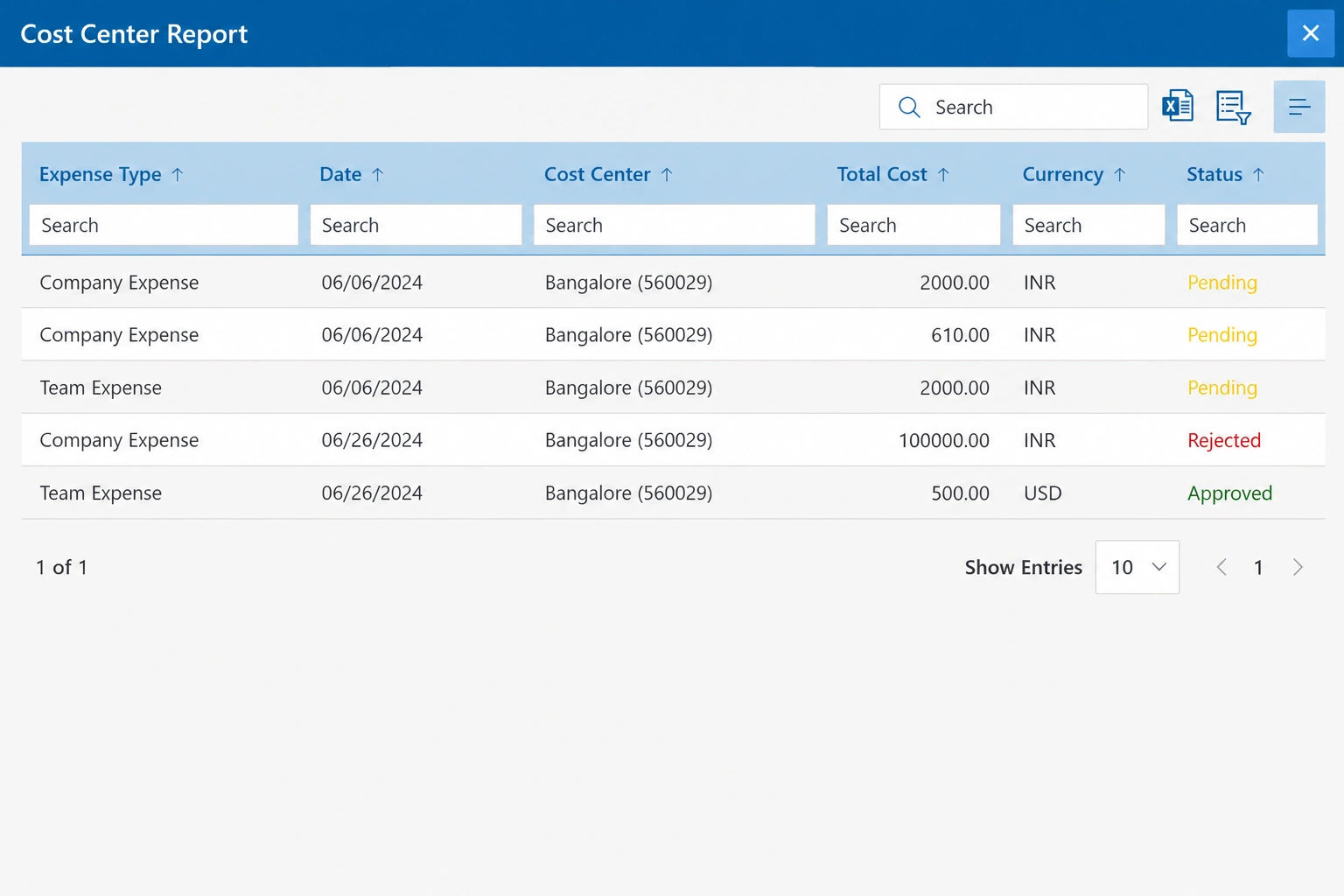
Expense 365 lets your team track company spending right inside Microsoft 365, with no new app and no new login. Employees send expenses from Teams or SharePoint, and managers approve them in the same place. Finance gets clear reports without chasing anyone for receipts.
Most expense tools make your team learn something new. Expense Management software works where your people already spend their day, so more of them actually use it. Because it’s built on Microsoft 365, there’s no data to move over and no extra system for your IT team to manage.
Best for: Companies that already use Microsoft 365 and want a simple, safe way to manage team expenses.
Key Features:
Easy expense submission
- Send expenses right from Microsoft Teams or SharePoint
- Upload receipts by photo or file
- Read receipt details automatically, with no typing
- Add expenses on the go from your phone
- Track travel miles and claim them as expenses
- Handle expenses in different currencies
Smart approvals
- Set up approval steps for managers and finance
- Get approval alerts in Teams and email
- Approve or reject with one click
- Flag expenses that break company spending rules
- Spot and stop duplicate claims
Reimbursements and reports
- Track every claim from “sent” to “paid”
- See spending by person, team, project or category
- Build reports with Power BI
- Export data to your accounting software
- Keep a full record of every change for audits
Security and control
- Your data stays inside your Microsoft 365 setup
- Uses your existing Microsoft logins and permissions
- Backed by SOC 2 Type II and ISO 27001 security standards
- Control who can see, send and approve expenses
Benefits:
- No new tool to learn. Your team already knows Teams and SharePoint, so getting started is quick and easy.
- Faster approvals. Managers approve expenses where they already work, so claims don’t sit waiting for days.
- Less work for finance. No more chasing receipts, fixing spreadsheets or typing data by hand.
- Better control over spending. Spending rules catch problems before money goes out, not after.
- Peace of mind for IT. Company data stays inside Microsoft 365, protected by the security you already trust.
Reviews: G2: 4.9 / 5 (HR365)
Ready to simplify expense tracking for your team?
Expensify is known for its quick receipt scanning. You take a photo of a receipt, and the app fills in the store, date and amount for you. It also handles approvals, travel costs and paying employees back.
Best for: Teams that travel a lot and collect many receipts.
Features:
- SmartScan receipt reading
- Mileage and travel expense tracking
- Approval workflows
- Connects to popular accounting software
Reviews: G2: 4.5 / 5
Ramp gives your team company cards with spending limits built in. If someone tries to spend more than allowed, the card simply says no. It also matches receipts to purchases on its own, which saves time at month end.
Best for: US companies that want cards and expense tracking together.
Features:
- Physical and virtual company cards
- Spending limits by person or team
- Automatic receipt matching
- Bill payments and spending reports
Reviews: G2: 4.8 / 5
Zoho Expense is a simple expense app for small teams. Your team can scan receipts, track travel miles and send expenses for approval. It works best if you already use other Zoho apps.
Best for: Small teams and businesses that already use Zoho.
Features:
- Receipt scanning
- Mileage tracking
- Travel requests and approvals
- Spending rules and policy checks
Reviews: G2: 4.5 / 5
- Bank and card connections
- Receipt photos from your phone
- Expense sorting for taxes
- Invoices and financial reports
Business Spending Track Apps vs Personal Spending Track Apps
Both are apps to track spending, but they do very different jobs
| Business apps (like Expense 365) | Personal apps (like YNAB) |
Whose money? | The company’s | Yours or your family’s |
Main job | Approve, pay back and report expenses | Plan a budget and see spending |
Who uses it? | Employees, managers and finance teams | One person or a couple |
How it works | Send, approve, pay back, report | Connect, sort, compare to budget |
Safety needs | Company security standards | Keeping your personal data safe |
Simple rule: If more than one person spends money that someone else must approve, you need a business app. A personal app can’t handle approvals, receipt records or reports for your accountant.
How to Choose the Right App to Track Spending?
- Ask yourself these simple questions before you pick an app:
- Who is the app for? If it’s for you or your family, a personal app is enough. If a team spends company money, choose a business app with approvals and reports.
- Does it work with the tools you already use? The best app fits into your daily routine. For businesses, an app that works inside your current software, like Microsoft 365, is easier for your team to start using.
- Is it easy to use? If the app feels hard, you’ll stop using it. Look for clean screens, simple steps and quick ways to add expenses.
- Does it connect to your bank or accounting software? Automatic connections save time and cut down on mistakes. If you’d rather not link your bank, pick an app that lets you add expenses by hand.
- Is your data safe? Look for strong security, like two-step login. For business apps, check for trusted standards such as SOC 2 and ISO 27001.
- What do real users say? Check ratings on the App Store and Google Play for personal apps, and on G2 and Capterra for business apps.
Try any app for one full month before you decide. That’s enough time to see if it really works for you.
Conclusion
The best app to track spending depends on whose money you’re managing.
If you’re tracking your own money, a personal app like YNAB or Monarch Money can help you set a budget, spot bad habits and save more. If you want something free and simple, PocketGuard, Goodbudget or Money Manager are good places to start.
If you’re managing company money, you need more than a budget. You need a way to collect receipts, approve expenses, pay back employees and see clear reports. For businesses that use Microsoft 365, Expense 365 does all of this inside Teams and SharePoint, so your team doesn’t have to learn a new tool.
Whichever app you choose, give it a full month. The right app is the one you’ll actually keep using.
If a vendor cannot answer these questions clearly, keep looking. The right ATS should make your hiring process simpler not add new complexity.
Ready to Take Control of Your Company’s Spending?
Chasing receipts and waiting on approvals slows your team down. Expense 365 brings it all into Microsoft 365, so your team can send, approve and track expenses in one place.
Frequently Asked Questions
How do I keep track of spending with an app?
First, pick an app. Then connect your bank and cards, or add expenses by hand. Check your spending once a week and fix anything that’s in the wrong group. At the end of the month, see what you spent and plan better for next month.
What is the best app to track spending?
For businesses that use Microsoft 365, Expense 365 is the best app to track spending because your team doesn’t need to learn a new tool. For personal use, YNAB is great if you want to plan every dollar, and Monarch Money is great for seeing everything in one place.
Are there good free apps to track spending?
Yes. PocketGuard, Goodbudget and Money Manager all have free versions. Zoho Expense also has a free plan for very small teams. Free versions usually have fewer features.
Can I use a personal app for my business?
It can work if you work alone. But once you have a team, you need approvals, receipts and reports. A business app like Expense 365 handles all of that for you.
What are the best apps to track spending for a small business?
If you have a team and use Microsoft 365, Expense 365 is the best fit. If you run the business alone, QuickBooks Online is a good choice. Ramp, Expensify and Zoho Expense are also good options.
Is ATS software suitable for small businesses?
Absolutely. Small businesses often benefit the most from ATS software because they have limited HR staff and cannot afford to lose time on manual tasks. Modern platforms like Recruitment Management 365 are designed to scale — offering core automation features that are affordable and easy to implement for teams of any size.
How long does it take to implement an applicant tracking system?
Implementation time varies depending on the platform and your team size. Simple setups with pre-built templates can be live in a matter of days. More complex configurations with custom workflows, integrations, and multi-department rollouts typically take two to four weeks. Recruitment Management 365 is recognized for its fast implementation, earning a G2 Fastest Implementation badge.


























