
_mVFFaHUZhS.webp)
Workstatus is a popular workforce management tool that offers time tracking, attendance, geofencing, and productivity monitoring in one place. But as teams grow, workflows change, and AI reshapes how work gets reported, many businesses start searching for a Workstatus alternative that better fits their existing tools, budget, and reporting needs. Some want deeper integration with Microsoft 365, others want simpler approvals, and many simply want reports that do not take hours to build.
- Timesheet 365 is the best overall Workstatus alternative for Microsoft 365 organizations, thanks to its native Teams experience and Timesheet AI Agent.
- AI-powered reporting and automation are now key differentiators, helping managers get answers in seconds instead of building reports manually.
- Tools like Hubstaff, Time Doctor, and Insightful suit teams that need activity monitoring, while Toggl Track and Harvest favor simple, trust-based tracking.
- Clockify and Jibble offer strong free plans, and ActivTrak stands out for enterprise workforce analytics and workload insights.
In this guide, we compare the 10 best Workstatus alternatives and competitors in 2026, including Timesheet 365, Hubstaff, Time Doctor, Toggl Track, Clockify, Harvest, and more. You will find a quick comparison table, detailed feature breakdowns, and practical guidance on which time tracking software suits which kind of team, so you can choose confidently and avoid costly switching mistakes later.
Why Look for a Workstatus Alternative?
Workstatus is a capable platform, and it works well for many organizations. However, no single tool fits every team. Here are the most common reasons businesses explore Workstatus alternatives in 2026:
- Microsoft 365 alignment: Teams that already work in Microsoft Teams and SharePoint often prefer a timesheet app that lives inside those tools instead of adding another separate platform.
- AI-powered reporting: Managers increasingly expect to ask questions in plain language and get instant answers, rather than exporting spreadsheets and building reports manually.
- Simpler approval workflows: Growing organizations need flexible, multi-level timesheet approvals that match how their departments and projects are actually structured.
- Monitoring versus trust: Some teams want detailed activity monitoring, while others prefer lighter, privacy-friendly time tracking that respects employee autonomy.
- Pricing and scalability: As headcount grows, businesses look for pricing models and feature sets that scale predictably with their needs.
If any of these sound familiar, the tools below are worth a closer look. Each one has distinct strengths, so the right choice depends on how your team works.
Quick Comparison: Best Workstatus Alternatives
Tool | Best For | Standout Feature | Free Plan / Trial |
Microsoft 365 organizations | Timesheet AI Agent, native Teams and SharePoint app | Free trial | |
Hubstaff | Remote and field teams | GPS tracking, geofencing, and payroll | Free trial |
Time Doctor | Remote agencies and BPOs | Productivity analytics and distraction alerts | Free trial |
Toggl Track | Freelancers and small teams | One-click timers and clean reporting | Free plan available |
Clockify | Budget-conscious teams | Free plan with unlimited users | Free plan available |
Harvest | Agencies and consultancies | Time tracking plus invoicing | Free plan (limited) |
DeskTime | Office and hybrid teams | Fully automatic time tracking | Free trial |
ActivTrak | Mid-size and enterprise | Workforce analytics and workload insights | Free plan (limited) |
Insightful | Varied monitoring needs | Configurable monitoring modes | Free trial |
Jibble | Hourly and deskless workers | Facial recognition clock-ins | Free plan available |
Note: Plans and pricing change often. Please check each vendor’s website for current details.
Quick Comparison: Best Workstatus Alternatives
Below is a closer look at each Workstatus alternative, including its key features and the type of team it suits best.
1. Timesheet 365 (Best Overall Workstatus Alternative)
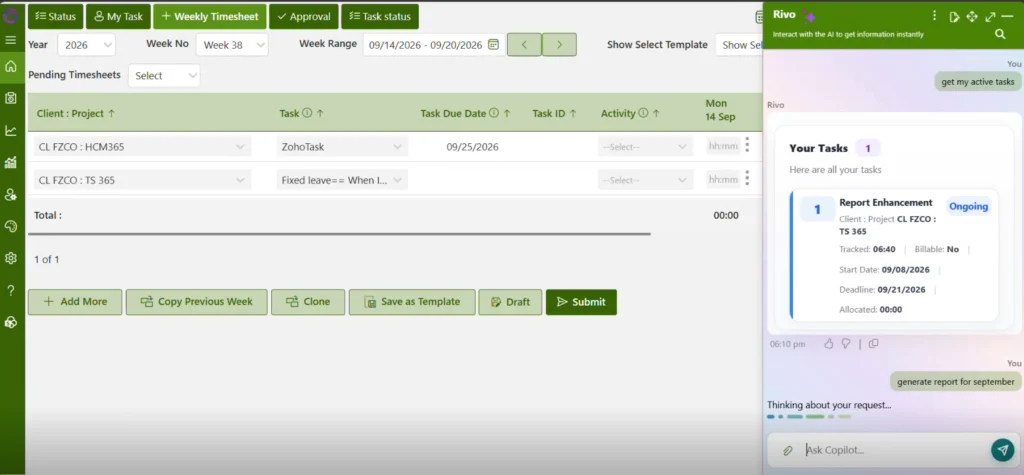
Timesheet 365 by Apps 365 is a timesheet and project time tracking app built natively for Microsoft 365. It runs inside Microsoft Teams and SharePoint, so employees log hours where they already work, and your data stays within your Microsoft 365 environment. With its built-in Timesheet AI Agent, Timesheet 365 goes beyond tracking hours to deliver smarter, automated, and genuinely easy reporting, which is why it tops our list of Workstatus alternatives.
- Timesheet AI Agent: Ask questions in plain language and get instant reports, summaries, and insights on hours, projects, and utilization without building reports manually.
- AI-powered automation: Automate routine work such as timesheet reminders, missing-entry follow-ups, and recurring report generation, cutting admin effort for managers.
- Native Microsoft 365 experience: Works inside Microsoft Teams and SharePoint with Microsoft 365 sign-in, so there is no new platform for employees to learn.
- Multi-level approvals: Configurable approval workflows let managers review, approve, or reject timesheets quickly with complete visibility and audit history.
- Project and task tracking: Track hours against projects, tasks, and clients to monitor budgets, billable time, and resource allocation in one place.
- Advanced reporting and Power BI: Built-in dashboards plus Power BI connectivity support deeper analysis of utilization, costs, and project performance.
- Enterprise-grade security: Leverages Microsoft 365 security and permissions, helping organizations meet compliance requirements with role-based access.
How the Timesheet AI Agent makes reporting easy: Instead of exporting data into spreadsheets, a project manager can simply ask, “Show me billable hours by client for last month” or “Who has not submitted timesheets this week?” and get a clear answer in seconds. This makes advanced reporting accessible to everyone, from team leads to finance and leadership.
Best For: Organizations using Microsoft 365 that want AI-powered, easy timesheet reporting, automation, and approvals without adding another separate tool.
Still Chasing Timesheets Every Friday?
Teams are replacing manual follow-ups and spreadsheet reports with an AI agent that answers in seconds. See Timesheet 365 in action inside Microsoft Teams.
2. Hubstaff
Hubstaff is a well-established time tracking and workforce management platform used by remote and field teams worldwide. It combines time tracking, activity monitoring, and payroll features, making it a popular Workstatus alternative for distributed businesses that want clear visibility across projects and people.
- Automatic time tracking with optional screenshots, plus app and URL activity levels for managers.
- GPS tracking and geofencing that support field teams, job sites, and on-site employees effectively.
- Automated payroll and client invoicing calculated directly from tracked hours and configured pay rates.
- Scheduling and attendance tools that help managers organize shifts, breaks, and employee time off.
- Integrations with popular project management, accounting, and communication tools used by many growing teams.
Best For: Remote and field service teams needing time tracking, GPS, and payroll together in one platform.
3. Time Doctor
Time Doctor is a productivity-focused time tracking software built for remote, hybrid, and outsourced teams. It helps managers understand how time is spent across tasks, apps, and websites, which makes it a practical Workstatus alternative for organizations focused on performance insights and accountability.
- Manual and automatic time tracking at the task and project level for accurate records.
- Productivity ratings plus detailed web and app usage reports that help managers spot patterns.
- Distraction alerts and idle time detection that gently keep employees focused on priority work.
- Payroll support with integrations for common payment platforms used by remote and global teams.
- Client login access that shares work reports and hours with external stakeholders and clients.
Best For: Remote agencies and BPO teams that want detailed productivity analytics along with helpful client-facing reports.
4. Toggl Track
Toggl Track is known for its simple, one-click timer and clean, intuitive interface. It focuses on low-friction time logging rather than heavy monitoring, making it a friendly Workstatus alternative for teams that value ease of use, flexibility, and a culture of employee trust.
- One-click timers available across web, desktop, mobile apps, and popular browser extensions for convenience.
- Background tracking and idle detection that help employees fill timesheet gaps quickly and accurately.
- Flexible reports on billable hours, projects, clients, and overall profitability for smarter business decisions.
- Project budgets and estimates that help teams monitor progress against plans in real time.
- A large library of integrations with popular productivity, project management, calendar, and CRM apps.
Best For: Freelancers, agencies, and small teams that want simple, privacy-friendly time tracking without invasive employee monitoring.
5. Clockify
Clockify is a widely used time tracker offering a generous free plan with unlimited users. It covers timesheets, projects, and reporting, while paid tiers add approvals, scheduling, and much more, making it a budget-friendly Workstatus alternative for startups, small businesses, and fast-growing teams.
- Timer and manual timesheet entry options for tracking hours across multiple projects and clients.
- A free plan that supports unlimited users and projects, ideal for teams getting started.
- Timesheet approvals, time off management, and scheduling features available on the paid subscription tiers.
- Reports on billable hours, expenses, and productivity trends that can be shared or exported.
- Kiosk mode that lets employees on shared devices clock in and out using PINs.
Best For: Cost-conscious teams of any size that want solid time tracking starting on a free plan.
6. Harvest
Harvest combines time tracking, expense logging, and invoicing in one straightforward, easy-to-use package. It is especially popular with agencies and consultancies that bill by the hour, making it a reliable Workstatus alternative for teams focused on project profitability and smooth client billing workflows.
- Timers and weekly timesheets that make logging billable and non-billable work quick and easy.
- Expense tracking with receipt capture that helps teams record accurate project costs and reimbursements.
- Invoicing features that turn tracked time and expenses into professional client bills in minutes.
- Project budget reports that clearly show spending, remaining hours, and progress against client estimates.
- Integrations with popular accounting, payment, and project management tools to connect existing business workflows.
Best For: Agencies, consultancies, and freelancers that bill clients by the hour and need built-in invoicing tools.
7. DeskTime
DeskTime is an automatic time tracker that starts as soon as employees turn on their computers. It classifies app and website usage as productive or unproductive, making it a hands-off Workstatus alternative for managers who want effortless tracking with minimal setup and input.
- Automatic time tracking that runs in the background without any manual start or stop.
- Productivity classification of apps, websites, and documents used, customizable for each team or role.
- Optional screenshots and idle time tracking that give managers added visibility into work activity.
- Shift scheduling and absence calendars that simplify team planning, coverage, and time off management.
- Project and task tracking with cost calculation features that help estimate project spend accurately.
Best For: Office-based and hybrid teams that want automatic, reliable time tracking with minimal effort from employees.
Your Team Already Lives in Microsoft 365. Why Track Time Anywhere Else?
Join organizations turning everyday hours into instant insights with Timesheet 365 and its Timesheet AI Agent. No new platform, no reporting headaches.
8. ActivTrak
ActivTrak is a workforce analytics platform that focuses on productivity trends rather than detailed employee surveillance. It helps leaders understand workload, engagement, focus time, and burnout risk, making it a data-driven Workstatus alternative for larger organizations that make decisions based on workforce insights.
- Productivity and focus time analytics that reveal how work happens across teams and departments.
- Workload balance insights that highlight burnout risk and underutilization before they affect overall performance.
- Technology usage reports that support smarter software spending and application rationalization decisions for IT.
- Goal setting and benchmarks that help leaders measure and improve team performance over time.
- Privacy-focused configuration options that give organizations full control over data handling, access, and visibility.
Best For: Mid-size and enterprise organizations that want workforce analytics and actionable, trend-based productivity insights at scale.
9. Insightful
Insightful, formerly known as Workpuls, is an employee monitoring and productivity tool for modern remote, hybrid, and office teams. It offers both visible and stealth tracking modes, making it a flexible Workstatus alternative for companies with varied monitoring, compliance, and productivity reporting needs.
- Automatic time tracking with detailed app and website usage breakdowns for every team member.
- Productivity labels and dashboards that can be customized by team, department, or job role.
- Optional screenshots and real-time activity views that help managers understand work as it happens.
- Project and task time tracking that supports accurate client billing and detailed cost analysis.
- Attendance and shift tracking features designed for hybrid, office-based, and fully remote teams alike.
Best For: Companies that need configurable monitoring and productivity analytics across many different work setups and locations.
10. Jibble
Jibble is a time and attendance app known for its free plan and facial recognition clock-ins. It works especially well for hourly, shift-based, and deskless workers, making it an accessible Workstatus alternative for teams that prioritize attendance accuracy, simplicity, and cost savings together.
- Clock in and out options via mobile, web, shared kiosks, or popular messaging apps.
- Facial recognition and GPS verification that help prevent buddy punching and time theft onsite.
- A free plan covering unlimited users for core time tracking and attendance management features.
- Timesheets, overtime calculations, and payroll-ready exports that simplify pay processing for all hourly workers.
- Integrations with Slack and Microsoft Teams that let employees clock in quickly from chat.
Best For: Hourly, shift-based, and deskless teams that need accurate, dependable attendance tracking at a low cost.
Conclusion
Choosing the right Workstatus alternative comes down to how your team works, where your data lives, and how quickly you need insights. Hubstaff, Time Doctor, Toggl Track, Clockify, Harvest, DeskTime, ActivTrak, Insightful, and Jibble each bring real strengths, from GPS tracking and invoicing to workforce analytics and free plans.
However, for organizations that already rely on Microsoft 365, Timesheet 365 stands out as the most seamless choice. It brings time tracking, approvals, and project reporting directly into Microsoft Teams and SharePoint, while the Timesheet AI Agent turns complex reporting into simple conversations and automates routine follow-ups. If you want a smarter, easier, and more connected way to manage timesheets in 2026, Timesheet 365 is the Workstatus alternative worth trying first.
Join Our Creative Community
Frequently Asked Questions
What is the best Workstatus alternative in 2026?
Timesheet 365 is the best Workstatus alternative for most Microsoft 365 organizations. It runs natively in Microsoft Teams and SharePoint and includes a Timesheet AI Agent for instant reporting. Hubstaff, Time Doctor, and Clockify are also strong options depending on your needs.
Is there a Workstatus alternative that works inside Microsoft Teams?
Yes. Timesheet 365 is built for Microsoft 365, so employees can log hours, submit timesheets, and get approvals directly inside Microsoft Teams. Jibble also offers a Teams integration focused on clock-ins, but Timesheet 365 provides a complete timesheet and reporting experience there.
How does the Timesheet AI Agent simplify reporting?
The Timesheet AI Agent lets you ask questions in plain language, such as billable hours by client or missing timesheets, and get answers in seconds. It also helps automate reminders and recurring reports, reducing manual work for managers, finance teams, and project leads.
Are there free Workstatus alternatives available?
Yes. Clockify, Toggl Track, and Jibble offer free plans, while Harvest and ActivTrak provide limited free tiers. Timesheet 365 offers a free trial, so you can test its AI-powered reporting and Microsoft Teams experience with your own team before committing.
How do I choose the right Workstatus alternative for my team?
Start by listing where your team works, what you need to report on, and how much monitoring you want. If you use Microsoft 365 and want easy AI reporting, choose Timesheet 365. For GPS, invoicing, or analytics, compare Hubstaff, Harvest, or ActivTrak.


























