

10 Best Productivity Apps for Android, iPhone & Mac: Tested and Ranked for 2026
_mVFFaHUZhS.webp)
You open your Mac at 9:00, check your iPhone at 9:04, reply to a message on your Android tablet at 9:10, and by lunch you have no idea where the morning went. If that sounds familiar, you are not alone. The problem is rarely effort. It is visibility. Without a clear record of where hours go, even organized teams lose time to switching apps, chasing approvals and rebuilding timesheets from memory every Friday.
- Timesheet 365 is the best overall productivity app in 2026 for teams on Microsoft 365, with an AI agent, Teams and SharePoint integration, and location-based tracking.
- The best productivity apps for Android, iPhone and Mac sync in real time, so time logged on one device shows up on every other device.
- Automatic trackers like Timely and RescueTime suit individuals, while timesheet and approval tools suit teams and payroll.
- GPS and geofencing in Timesheet 365, Hubstaff, QuickBooks Time and Jibble help field and hybrid teams stay accurate.
- Free plans from Clockify, Toggl Track and Jibble are good starting points, but growing teams need stronger reporting and integrations.
That is why we did the heavy lifting for you. Our team reviewed and tested dozens of time tracking and timesheet software across Android phones, iPhones and Macs, comparing features, cross-device sync, reporting depth and ease of use. Instead of spending hours reading every listicle online, you can use this shortlist of the best productivity apps in 2026 to land on the right tool the first time.
Whether you are a freelancer who bills by the hour, a manager approving team timesheets or an organization running on Microsoft 365, this guide will help you find the app that fits how you actually work.
Why Time Tracking Is the Real Productivity Upgrade in 2026
Most people do not need more to-do lists. They need to protect their time. According to Microsoft’s 2025 Work Trend Index, 80% of the global workforce say they lack the time or energy to do their work, and employees are interrupted roughly every two minutes during core hours by meetings, emails or chats. Time tracking apps turn that invisible drain into data you can act on, which is exactly what the best productivity apps for Android, iPhone and Mac users should deliver. When every hour is visible, planning gets easier, billing becomes accurate and teams can finally focus on the work that moves the needle.
How We Picked the Best Productivity Apps
Disengagement and poor visibility carry a real cost. Gallup’s State of the Global Workplace 2025 report estimates that falling engagement cost the world economy about $438 billion in lost productivity. With that in mind, we scored each app on five criteria: availability on Android, iPhone and Mac; timesheet accuracy; reporting and insights; integrations with everyday tools; and team features such as approvals and location tracking.
Every tool was tested on real workdays, logging hours on an Android phone, reviewing them on an iPhone and running reports on a Mac to check that sync, speed and accuracy held up across all three.
Quick Comparison: Best Productivity Apps in 2026
| App | Standout Feature | Works On | Ideal For |
| Timesheet 365 | AI agent for faster reporting, Teams & SharePoint integration, location tracking | Android, iPhone, Mac, Web, Microsoft Teams | Teams on Microsoft 365 |
| Toggl Track | One-click timers and Pomodoro focus mode | Android, iPhone, Mac, Windows, Web | Freelancers & small teams |
| Clockify | Free time tracking for unlimited users | Android, iPhone, Mac, Windows, Web | Budget-conscious teams |
| Harvest | Time tracking linked to invoicing | Android, iPhone, Mac, Web | Agencies & consultants |
| Hubstaff | GPS and activity tracking | Android, iPhone, Mac, Windows | Remote & field teams |
| QuickBooks Time | Geofencing and payroll sync | Android, iPhone, Web (Mac browser) | Hourly & payroll teams |
| Timely | AI-powered automatic tracking | Android, iPhone, Mac, Web | Professionals who dislike timers |
| TimeCamp | Automatic tracking plus attendance | Android, iPhone, Mac, Windows, Web | Growing teams |
| Jibble | Facial recognition and kiosk clock-ins | Android, iPhone, Mac, Web | Shift & on-site staff |
| RescueTime | Focus and distraction insights | Mac, Windows, Android, iPhone | Individuals improving focus |
10 Best Productivity Apps for Android, iPhone & Mac Users
1. Timesheet 365 – Best Overall Productivity App for Teams
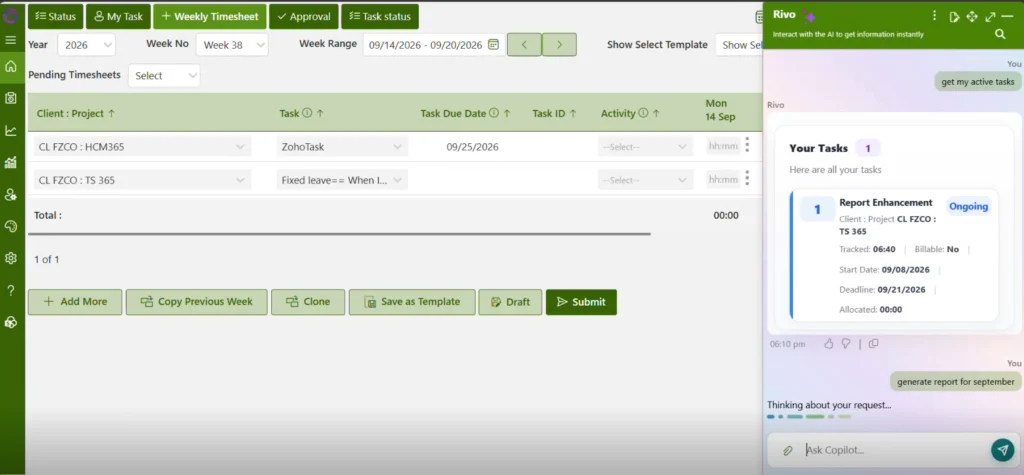
Timesheet 365 is a time tracking and timesheet solution built for the way modern teams already work. Instead of adding another disconnected tool, it lives inside Microsoft Teams and SharePoint, so employees log hours where they collaborate and managers approve them in the same place. Its AI agent takes the pain out of reporting, turning raw hours into clear summaries in minutes.
This matters because AI adoption is moving faster than most leaders expect. McKinsey’s Superagency in the Workplace (2025) report found employees are three times more likely to be using generative AI for a meaningful share of their work than their leaders realize. Timesheet 365 puts that power directly into time reporting.
- AI agent for faster reporting: ask for project, client or team summaries and get ready-to-share reports in minutes.
- Built for teams: approval workflows, project tracking and manager dashboards keep everyone aligned.
- Microsoft Teams integration: log time, submit and approve timesheets without leaving Teams.
- SharePoint integration: timesheet data stays organized inside your existing Microsoft 365 environment.
- Simple timesheet entry: daily or weekly entry with timers and manual logs that take seconds.
- Location-based tracking: capture where time is logged, ideal for hybrid, remote and field teams.
Platforms: Android, iPhone, Mac, Windows, web and Microsoft Teams.
Pros: No new app for Microsoft 365 users to learn. AI reporting saves hours every week. Strong fit for teams of any size.
Cons: Delivers the most value for organizations already using Microsoft 365.
Tired of chasing timesheets every Friday
See how Timesheet 365’s AI agent turns hours of manual reporting into minutes, right inside Microsoft Teams.
2. Toggl Track
Toggl Track is one of the best productivity apps for Android, iPhone and Mac users who want time tracking without friction. Its clean interface lets you start a timer in one click and see exactly how your day was spent.
- One-click timers with idle detection and reminders to track.
- Pomodoro focus mode built into the Mac and desktop apps.
- Detailed reports by project, client and tag for billable hours.
- Browser extension that works inside 100+ popular web tools.
Platforms: Android, iPhone, Mac, Windows, Linux and web.
Pros: Very easy for new users to learn. Generous free plan for small teams.
Cons: Advanced reporting and team features require paid plans.
3. Clockify
Clockify is a popular pick among the best productivity apps for teams watching their budget. It offers core time tracking and timesheets for unlimited users at no cost, with smooth sync across Android, iPhone and Mac.
- Timer and manual timesheet entry for daily or weekly logging.
- Kiosk mode that lets staff clock in from a shared device.
- Project budgets, billable rates and exportable reports.
- Integrations with tools such as Jira, Asana and Trello.
Platforms: Android, iPhone, Mac, Windows, Linux and web.
Pros: Free plan covers unlimited users. Clear weekly timesheet view.
Cons: The interface can feel busy as more features are added.
4. Harvest
Harvest combines time tracking with billing & invoicing, making it a strong fit for agencies and consultants who bill by the hour. Log time on your iPhone, Android phone or Mac, then turn those hours into accurate invoices in minutes.
- Timers and timesheets linked directly to projects and clients.
- Built-in invoicing and expense tracking with receipt capture.
- Budget alerts that flag when projects near their limits.
- Integrations with Asana, Trello, QuickBooks and Slack.
Platforms: Android, iPhone, Mac, Windows and web.
Pros: Seamless path from tracked time to invoice. Clean, visual project reports.
Cons: The free plan is limited to one seat and a few projects.
5. Hubstaff
Hubstaff is built for remote and field teams that need proof of work, not just logged hours. Its Android and iPhone apps add GPS tracking, while the Mac app captures activity levels during tracked time for managers who need clear accountability.
- GPS location tracking and geofences for job sites.
- Optional screenshots and activity levels for remote work.
- Automated payroll and payments based on tracked hours.
- Scheduling, attendance and overtime alerts for managers.
Platforms: Android, iPhone, Mac, Windows, Linux and web.
Pros: Strong tools for distributed workforces. Payroll automation saves admin time.
Cons: Monitoring features may feel intrusive to some employees.
6. QuickBooks Time
QuickBooks Time, formerly TSheets, is designed for businesses that pay staff hourly. Employees clock in from Android or iPhone, and managers review timesheets on a Mac or any browser before hours flow straight into payroll without extra data entry.
- Mobile clock-in with GPS points and geofence reminders.
- Employee scheduling with shift notifications for staff.
- Direct sync with QuickBooks Online and payroll providers.
- Timesheet approvals and overtime tracking for managers.
Platforms: Android, iPhone and web, with Mac access through the browser.
Pros: Excellent for payroll accuracy. Reliable mobile clock-in for hourly staff.
Cons: Pricing is higher than many time tracking alternatives.
7. Timely
Timely uses AI to track work automatically, so you never have to remember to start a timer. It records time spent in apps, documents and meetings on your Mac, then helps you build timesheets you can review later on Android or iPhone.
- Automatic background tracking with a private activity timeline.
- AI suggestions that turn activity into timesheet entries.
- Team capacity and project dashboards for managers.
- Calendar integrations with Google Calendar and Outlook.
Platforms: Android, iPhone, Mac, Windows and web.
Pros: Removes most manual time entry. Strong privacy controls for users.
Cons: Paid plans only, which may not suit solo users on a budget.
8. TimeCamp
TimeCamp blends automatic time tracking with attendance and invoicing, making it one of the most versatile best productivity apps for growing teams. It runs quietly on your Mac and syncs smoothly with its Android and iPhone apps throughout the day.
- Automatic tracking of apps and websites by project.
- Attendance, leave and time-off tracking in one place.
- Billable rates, invoicing and budget reports for clients.
- Integrations with tools like Asana, Trello and Jira.
Platforms: Android, iPhone, Mac, Windows, Linux and web.
Pros: Covers tracking, attendance and billing together. Free plan available for individuals.
Cons: Initial setup takes time to configure well.
9. Jibble
Jibble is a time and attendance app ideal for shift workers and on-site teams. Staff clock in from Android phones, iPhones or a shared kiosk, while managers monitor hours and attendance from a Mac or web dashboard, keeping every shift and break accurately recorded.
- Facial recognition clock-ins to prevent buddy punching.
- GPS and geofencing for location-verified attendance.
- Kiosk mode for shared tablets at job sites.
- Timesheets, overtime tracking and payroll exports.
Platforms: Android, iPhone, Mac, Windows and web.
Pros: Free plan for unlimited users. Great fit for busy frontline and shift-based workforces.
Cons: Project-level reporting is lighter than dedicated tools.
10. RescueTime
RescueTime is less about timesheets and more about understanding your focus. It runs in the background on your Mac and Android device, showing which apps and websites help or hurt your productivity each and every day.
- Automatic tracking of apps and websites with productivity scores.
- Focus Sessions that block distracting sites while you work.
- Daily goals and weekly reports on your work habits.
- Gentle alerts when you spend too long on one activity.
Platforms: Mac, Windows, Android and iPhone (limited tracking on iPhone).
Pros: Eye-opening insights into daily habits. Runs with zero manual input.
Cons: Not built for team timesheets or client billing.
Why Timesheet 365 Users Call It the Best Overall
Deloitte’s 2025 Global Human Capital Trends report urges organizations to look beyond activity metrics and focus on human performance, the real value people and teams create. Timesheet 365 is designed around that idea, giving teams clarity without adding extra work. Here is why users consistently rank it at the top of their productivity stack:
- Works where teams already are: timesheets live inside Microsoft Teams, so there is no new app to adopt.
- AI agent does the reporting: summaries that used to take hours are ready in minutes.
- SharePoint-connected data: records stay organized within your Microsoft 365 environment.
- Location-based tracking: accurate time records for hybrid, remote and field staff.
- Truly cross-platform: log time on Android, iPhone, Mac or the web with instant sync.
- Made for teams: approvals, projects and dashboards that scale as you grow.
Still confused about which app fits your team?
Stop switching between browser tabs and comparison charts.
Conclusion
The best productivity apps in 2026 are the ones that show you where your time goes and make reporting effortless on Android, iPhone and Mac. Toggl Track, Clockify and RescueTime work well for individuals, while Hubstaff, QuickBooks Time and Jibble suit hourly and field teams. For organizations on Microsoft 365 that want AI-powered reporting, Teams and SharePoint integration and location-based tracking in one place, Timesheet 365 is the best overall choice.
Join Our Creative Community
Frequently Asked Questions
What are the best productivity apps in 2026?
The best productivity apps in 2026 for time tracking include Timesheet 365, Toggl Track, Clockify, Harvest and Hubstaff. Timesheet 365 leads for teams because it combines AI reporting, Microsoft Teams integration and location-based tracking in one platform.
Which productivity app works best on Android, iPhone and Mac?
Look for an app with native or web access on all three and real-time sync. Timesheet 365, Toggl Track, Clockify and TimeCamp all work across Android, iPhone and Mac, so hours logged on one device appear everywhere instantly.
Is there a free time tracking app for teams?
Yes. Clockify and Jibble offer free plans for unlimited users, and Toggl Track has a free tier for small teams. Free plans suit basic tracking, but growing teams usually need paid features like approvals, advanced reports and integrations, Timesheet 365 offers 14day free trial without any requirements.
Can productivity apps track employee location?
Many can. Timesheet 365, Hubstaff, QuickBooks Time and Jibble offer location-based tracking or geofencing to verify where time is logged. It is best to share a clear policy with employees so tracking feels fair and transparent.
How does AI improve time tracking and reporting?
AI removes manual effort by suggesting entries, spotting gaps and generating summaries. With Timesheet 365, the AI agent builds project and team reports in minutes, so managers spend less time compiling data and more time acting on it.


_JiluXJRGNl.svg)























