














Built for Construction Teams
Built to Track Construction Hours, Projects and Crew Time
with Timesheet 365
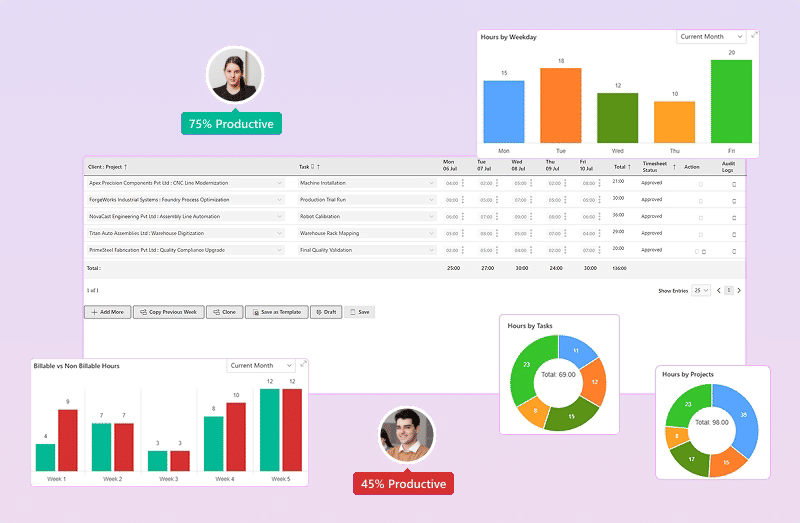
Track crew and job hours with time tracking for construction, automate approvals, and improve project visibility. Replace manual spreadsheets with organized time tracking, accurate records, and clear insights across every construction project— all within Microsoft 365.
Live inside Microsoft 365 in minutes
Built on SharePoint & Microsoft Teams
Start with 14-Days Free Trial
Trusted by 12,100+ deployments from 172 countries
What is Time Tracking for Construction?
Time tracking for construction is a centralized platform that helps construction companies capture labor hours against jobs, phases, cost codes, and crews — giving project managers and finance teams accurate, real-time visibility into where labour time and cost are actually going across every job site.
Key benefits
- Automate time tracking and job costing across jobs, phases, and cost codes for accurate records.
- Track labor hours, equipment time, and certified payroll data in one place.
- Improve collaboration between field crews, project managers, and finance teams while reducing errors.
What Happens Without Centralized Time Tracking for Construction
Without proper time tracking, construction teams lose visibility, accuracy, and job profitability.

Untracked Labor Hours
Field crews often forget to log hours or rely on paper timesheets at the end of the week, leading to inaccurate records and missed billable time.

Delayed Project Timelines
Without clear time tracking against jobs and phases, it's hard to spot delays early, causing schedules and milestones to slip unnoticed.

Poor Resource Visibility
Managers struggle to see who is working on which job site, making it difficult to balance crews and equipment across active projects.

Manual Timesheet Errors
Paper and spreadsheet-based tracking is prone to mistakes, duplicate entries, and missing data, leading to payroll and certified payroll compliance issues.
Inaccurate Job Costing and Client Billing
Without precise time logs by cost code, billing clients and tracking job profitability becomes guesswork, risking revenue loss or disputes.

Lack of Real-Time Reporting
Without a centralized system, generating accurate reports on job hours, labor cost, and crew productivity takes time and effort.
What Timesheet 365 Delivers for Construction Teams
Everything Construction Teams Need in One Timesheet
Manage job hours, crew schedules, and billing — all in one place.
Manage Every Hour from One Place
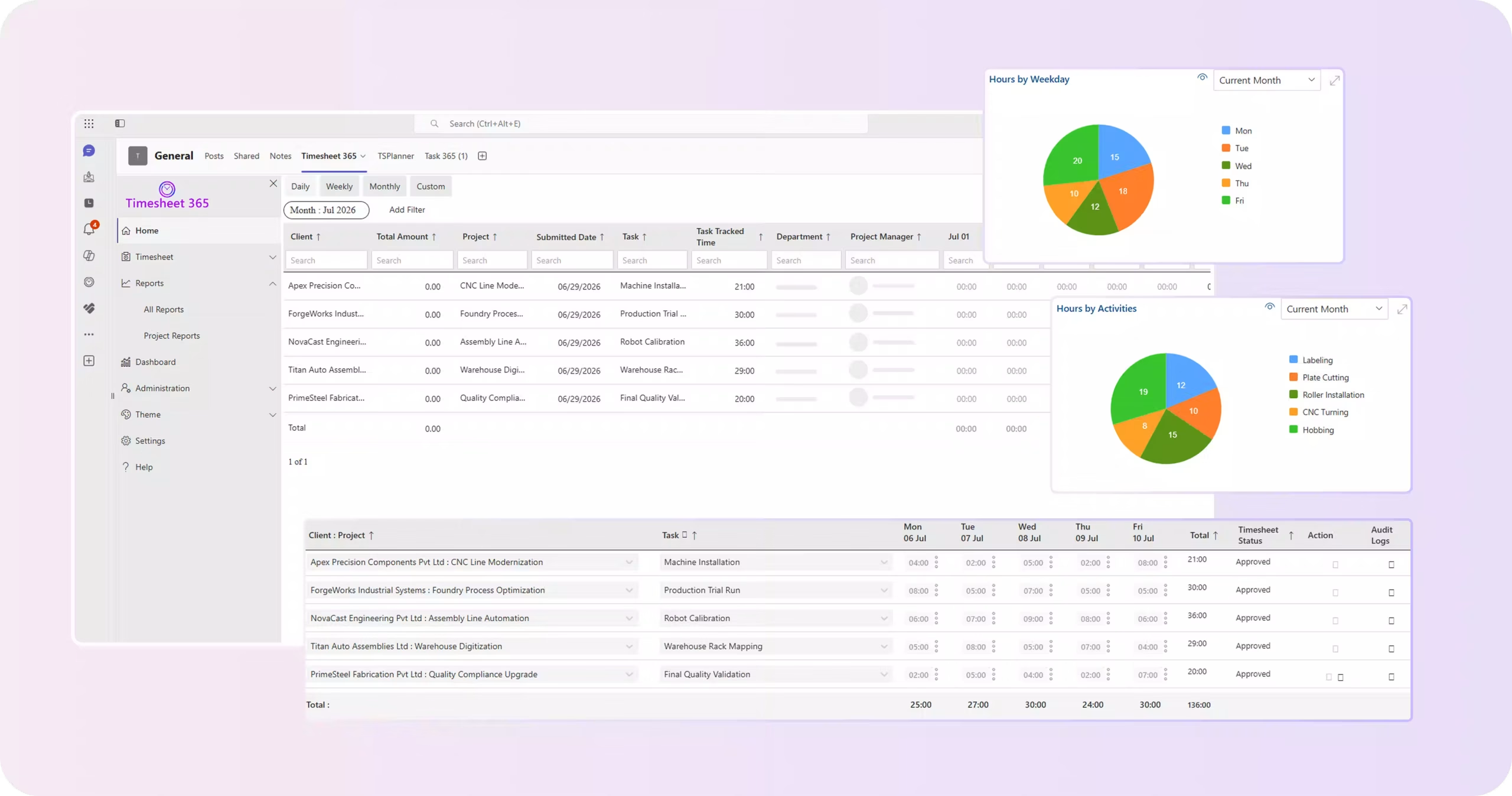
Track daily and weekly labor hours across jobs, phases, and cost codes with a simple, structured timesheet system that keeps your crews accountable and accurate.
- Real-time entry for every logged hour
- Custom fields for every timesheet entry
- Rule-based limits on daily and weekly hours per crew
- Preview sample timesheets before rollout
Track Exactly Where Construction Time Goes
Log time against jobs, phases, tasks, or cost codes for accurate visibility and billing — down to certified payroll requirements.
- Log time by job, phase, task, or cost code in daily and weekly views
- Escalate unavresolved tickets before SLA breaches
- Real-time visibility into hours spent across active jobs and phases
- Exportable job reports for project managers and finance teams
Organize Work the Way Your Construction Team Operates
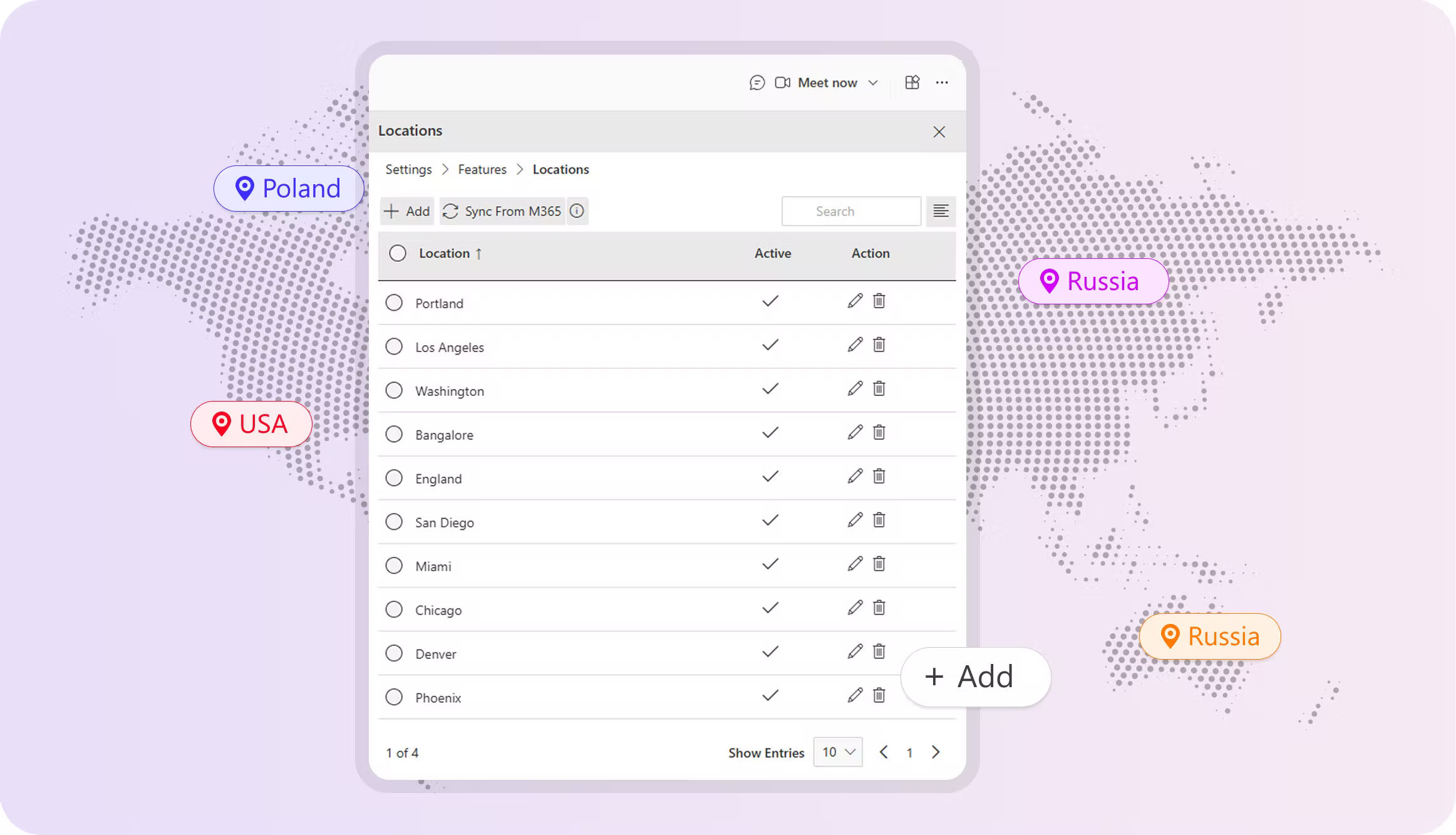
Set up crews, offices, and job structures to match how your construction team actually works — across one job site or many.
- Group teams by trade, crew, or discipline
- Assign & sync job site locations across offices directly from Microsoft 365
- Add custom fields and personalize timesheet layout per job
- Mark job off days and preview setup with sample data before rollout
Turn Hours into Accurate Billing and Clear Reports
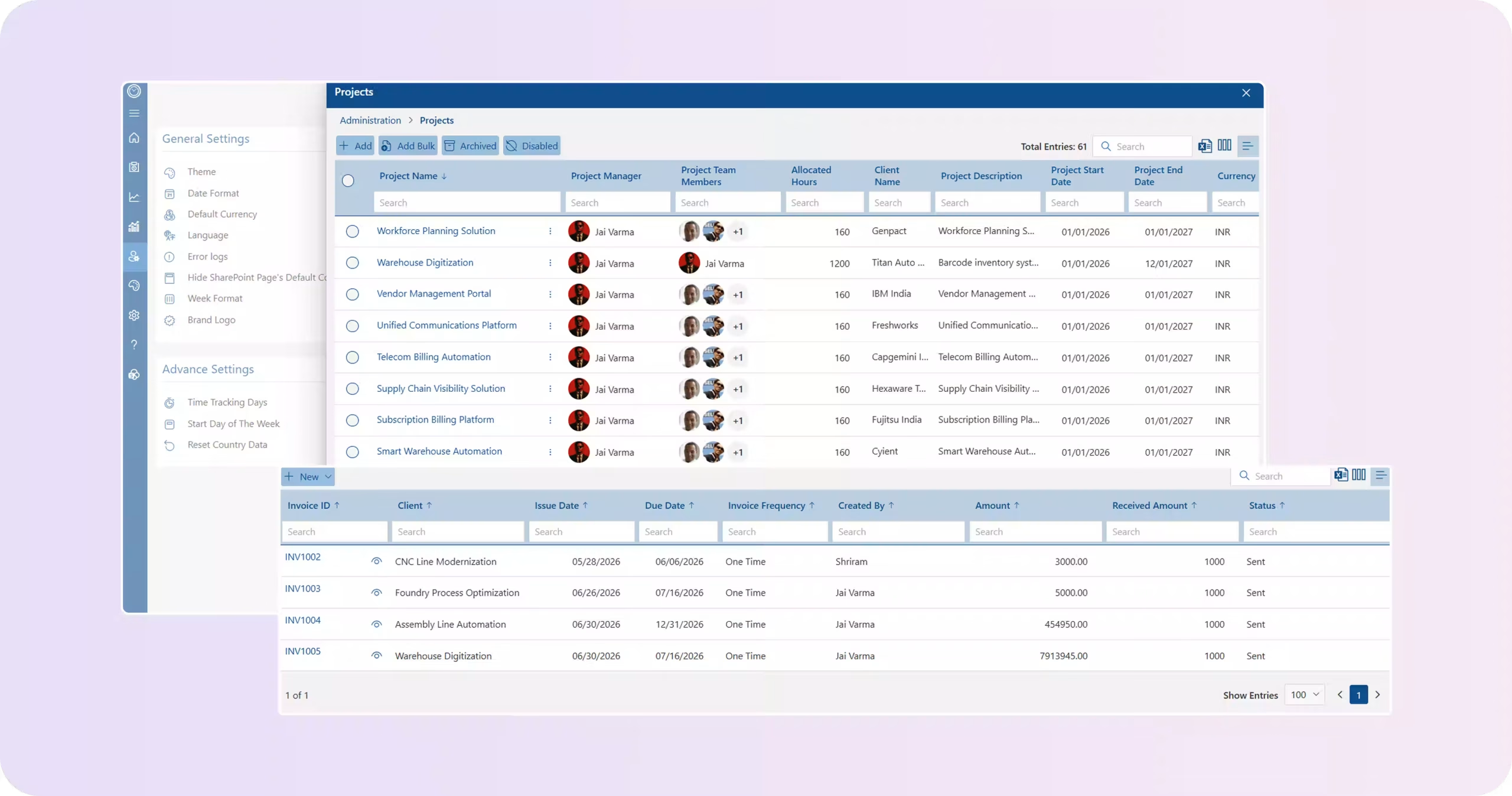
Convert tracked time directly into client-ready invoices and clean reports — monitor job hours, utilization, and job costs from a centralized dashboard.
- Auto-generate invoices from tracked hours, with role-based billing rules
- Bill within approved hour limits to avoid overages
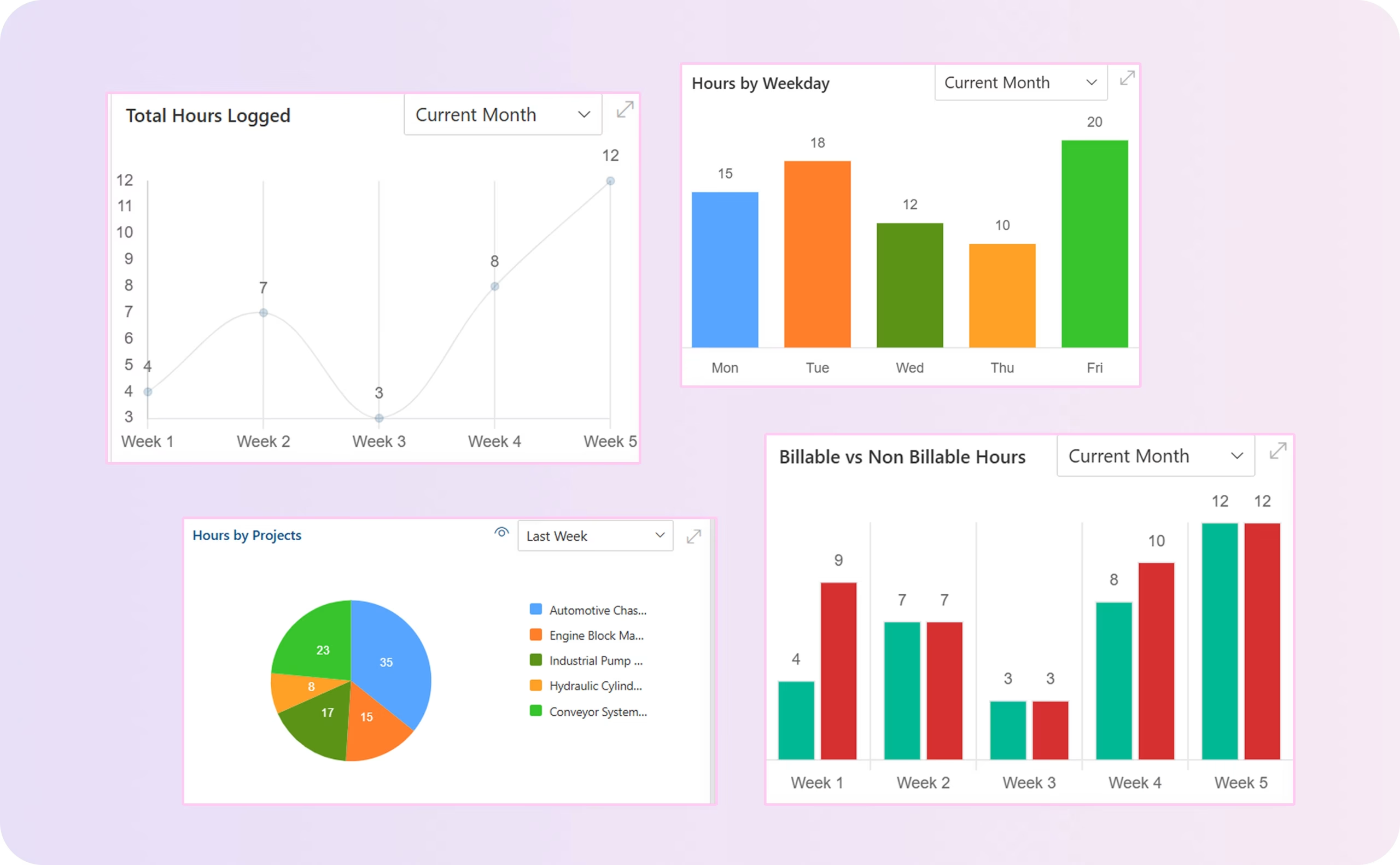
- Real-time dashboards for utilization, job hours, and crew workload
- Exportable, audit-ready reports for finance and project leads
Make Timesheet Submission Easier to Track, Approve and Report
Timesheet 365 helps construction teams log hours, get approvals, and connect with SharePoint projects — all with less manual work.
Works with Your Existing SharePoint Projects
No need for two separate systems. Timesheet 365 connects with the SharePoint projects, channels, and folders you already use. Crews log time on the same jobs, with no extra setup or duplicate work.
Multi-Level Approvals
Timesheets go to the right supervisor automatically. Timesheet 365 supports multi-level approvals with separate access for admins, managers, and field users, so nothing gets stuck or missed.
Clear Reports on Time and Resources
See job hours, crew workload, and activity in one place. Timesheet 365 gives you easy-to-read dashboards and reports, so leaders don’t have to check spreadsheets manually.
See Timesheet 365 Working Inside Your Microsoft 365
Connects with the Tools your Team already Uses
Timesheet 365 works seamlessly within Microsoft 365, enabling field crews and project managers to track and approve time directly in Microsoft Teams, SharePoint, and Outlook. Microsoft Entra ID provides secure user authentication and access.
It also integrates with Power Automate to automate workflows, Time Off Manager 365 for leave management, and Power BI for advanced reporting and business insights.
How Timesheet 365 Improves Construction Operations
Construction teams need accurate time tracking to keep projects on schedule, manage budgets, and optimize resources. Timesheet 365 centralizes job time, approvals, and reporting in one platform, helping teams improve visibility, reduce manual work, and deliver projects efficiently.
Job & Phase Time Tracking
Resource Utilization
Approval Workflows
Route timesheets to project managers or site supervisors for quick approvals, reducing delays and ensuring accurate job tracking.
Billable & Non-Billable Time
Track client-billable work alongside internal, warranty, or overhead hours for better cost control and job profitability.
Reporting & Analytics
Generate detailed reports on job progress, crew productivity, and logged hours to support planning, forecasting, and informed decision-making.
How Timesheet 365 Supports Construction Resource Management
Timesheet 365 provides a structured process to capture, track, approve, and report construction time across jobs, phases, and cost codes.
Log Time Entry
Timesheet 365 helps field crews capture hours against jobs, phases, tasks, and cost codes in one centralized platform, with pre-filled templates to keep entry fast.
Categorize Time Entry
Categorize hours by job, phase, cost code, or billable status to improve tracking, accuracy, and reporting.
Route for Approval
Approval rules automatically route timesheets to the right supervisor or project manager for faster review and sign-off.
Track Utilization & Resourcing
Managers monitor utilization, crew workload, and missed submissions in real time to keep resourcing accurate and balanced.
Send Status Updates
Notifications keep field crews informed when timesheets are submitted, approved, pending, or flagged, ensuring clear communication throughout the process.
Close and Report
Approved timesheets remain available for invoicing, audits, job costing, and continuous process improvement.
Construction Timesheet Software Guide
This guide serves as a practical instruction manual for construction teams looking to implement, optimize, or standardize their time tracking operations. It provides a structured approach to managing job hours, billable time, and resource utilization through a centralized time tracking for construction system.
- Establish a centralized time tracking system for capturing crew hours across jobs, phases, and cost codes.
- Define standardized time-entry workflows to ensure every task, site visit, and billable hour is captured, tracked, and recorded consistently.
- Configure approval routing rules based on crew, job, or supervisor requirements.
- Reduce timesheet errors by improving visibility into missed submissions and ensuring accurate real-time records.
- Improve collaboration between field crews, project management, and finance teams with complete timesheet visibility.
- Monitor crew performance using dashboards and reports to identify utilization trends and improve resource planning.
- Scale time tracking processes across multiple jobs and offices while maintaining consistent certified payroll and compliance standards.
Whether you’re deploying time tracking for construction for the first time or refining an existing process, use this guide as a step-by-step reference to build a scalable, accurate, and reliable timesheet system that supports continuous project delivery.
Why Construction Teams Choose a Microsoft-Native Timesheet
Capability | Timesheet 365 | Generic Cloud Timesheet |
Runs natively inside Microsoft Teams | ✓ | ✗ |
Data stored in your own SharePoint / M365 tenant | ✓ | ✗ |
Multi-job / multi-phase tracking | ✓ | Varies by plan |
Automated invoice generation from hours | ✓ | Varies by plan |
Real-time missed timesheet alerts | ✓ | ✗ |
Built-in Copilot AI assistance | ✓ | Rare |
Construction Teams That Use Timesheet 365
Time tracking for construction supports every team involved in tracking job hours, crew schedules, and billable work. By centralizing time tracking and automating approvals, it helps departments collaborate more efficiently while ensuring accurate records across every job site.
Project Managers
Gain real-time visibility into job hours, utilization, and workload to improve resourcing across one or multiple job sites.
Site Supervisors & Foremen
Track crew attendance and hours directly from the field, keeping daily logs accurate without paperwork.
HR Teams
Track attendance, manage timesheet records, and generate accurate reports for compliance and workforce planning.
Estimating & Pre-Construction Teams
Compare estimated vs. actual labor hours to refine future bids and job costing accuracy.
Finance & Billing Teams
Access accurate, approved timesheets for every job to streamline client invoicing, certified payroll, and reduce manual errors.
Safety & Compliance Teams
Maintain accurate, audit-ready time records to support certified payroll, prevailing wage, and regulatory requirements.
Our Clients
Senior Manager
Ireland
IT Administrator & Security Manager
San Francisco
Principal Engineer
Australia
Accountant
Greater Newcastle Area
Project Management Lead
Philippines
Clients Speak
Using Azure? now you can buy Timesheet software on Azure Marketplace or using your enterprise agreement
Get started with 14 days risk free trial.
No credit card details required.
Frequently Asked Questions
Can field crews log time against SharePoint job sites directly?
Yes. Timesheet 365 connects with your existing SharePoint projects, channels, and folders. Crews select from the same job list they already use, with no duplicate setup required.
How long does it take to submit a weekly timesheet?
Most field crews complete a weekly timesheet in under a minute. Pre-filled tasks and job templates reduce repetitive entry, so logging hours doesn’t interrupt work on site.
Does the system support multi-level approvals?
Yes. Timesheets can be routed through multiple levels of supervisors and managers based on your team’s hierarchy. Each approver only sees the requests relevant to them.
Can we track time by job, phase, and cost code separately?
Yes. Timesheet 365 breaks down hours by job, phase, task, and cost code, giving you clear visibility into where construction time and labor cost are actually going.
What happens if a crew member forgets to submit their timesheet?
Automated reminders are sent for pending submissions and approvals, so supervisors and crews don’t need to chase each other manually.
Can we see crew utilization and resource planning data?
Yes. Built-in dashboards show utilization, job hours, and workload across the team, helping managers plan resources without relying on spreadsheets.
Can Timesheet 365 generate invoices from tracked hours?
Yes, it includes an invoice generation module supporting both recurring and one-time client billing.
Does the platform maintain audit logs for certified payroll and compliance purposes?
Yes, every time entry and edit is automatically logged for full audit visibility — supporting reviews against standards like SOC 2, ISO 27001, and certified payroll/prevailing wage requirements.
Can different teams have different access levels in the system?
Yes, role-based access is available for admins, project managers, supervisors, and field crews.
Can Timesheet 365 scale as our construction company grows after new hires or an acquisition?
Yes, it’s designed to scale across jobs and offices while standardizing time capture for growing construction organizations.
Try It Free, No Obligation


Schedule a free personalized 1:1 demo
By proceeding, you accept Cubic Logics’s terms and conditions and privacy policy


By proceeding, you accept Cubic Logics Terms and Conditions and Privacy Policy
Please provide your contact details, we will connect with you soon!
By proceeding, you accept Cubic Logics Terms and Conditions and Privacy Policy
Schedule a free personalized 1:1 demo
By proceeding, you accept Cubic Logics’s terms and conditions and privacy policy