














Built for Healthcare Teams

What If Every Leave Request Helped You Plan Better?
See Absences Clearly

Time off Manager 365 helps healthcare teams manage leave, track staff availability, automate approvals and stay updated in real time with leave management for healthcare  – all within Microsoft 365

Live inside Microsoft 365 in minutes

 Built on SharePoint & Microsoft Teams

4.8/5 (350)

Start with 14-Days Free Trial

healthcare leave software

Trusted by 12,100+ deployments from 172 countries

SOC
SOC 2
ISO
Microsoft
Best ROI
Momentum
Best SUpport
Microsoft Azure
Great Place to Work

What Is Healthcare Leave Management?

Healthcare leave management helps hospitals, clinics, and care facilities track, approve, and plan staff time off without affecting patient care or coverage. It keeps vacation, sick leave, comp-off, and shift-based absences in one system instead of across paper forms, emails, and spreadsheets. 

Key benefits 

  • Track vacation, sick leave, comp-off, and TOIL balances in one connected system.  
  • Give employees self-service access to their leave balances without contacting HR.  
  • Identify coverage gaps early and plan ahead instead of scrambling at the last minute. 

What Happens Without Centralized Healthcare Leave Management

Without a dedicated system, healthcare absence management turns reactive instead of proactive and coverage is usually the first thing to slip.

Understaffed Shifts

When leave isn't tracked properly, shifts can end up short-staffed, putting more pressure on the rest of the team.

Manual Leave Tracking

Leave requests sent through email or paper forms are easy to lose or forget, which often leads to scheduling mix-ups.
Compliance Risks

Missing or incomplete leave records can create problems with labor laws and required rest-time rules.

Delayed Approvals

Slow or manual approvals leave staff unsure about their schedules and managers rushing to find last-minute coverage.

Lack of Real-Time Visibility

Without a clear view of who is on leave, planning shifts becomes a guessing game for managers.

Burnout from Poor Planning

When leave isn't shared or balanced fairly, the same staff end up covering gaps again and again leading to tiredness and higher turnover.

What Time Off Manager 365 Delivers for Healthcare Teams

Reduction in leave approval time
0 %
Faster shift coverage planning
0 x
Leave requests tracked accurately
0 %
Response time for urgent coverage gaps
< 5 min

Everything Healthcare Teams Need in One Leave Management System

Manage leave requests, approvals, accruals, and coverage — all in one place. 

Manage Every Leave Request from One Place

Track time-off requests and staff coverage across every department, all in one system built for Microsoft 365. 

✔ Multi-level approval workflows for every department 
✔ Backdate leave requests when needed 
✔ Recurring leave requests for regular time off 
✔ Enable leave eligibility delay for new hires 

Faster Approvals, Fewer Delays

Give managers and HR full control over leave approvals with flexible, easy-to-set-up workflows. 

✔ HR and additional approver workflows 
✔ Auto-approvals for routine leave requests 
✔ Second-level approval for leave cancellations 
✔ Team-based approvals for department heads 

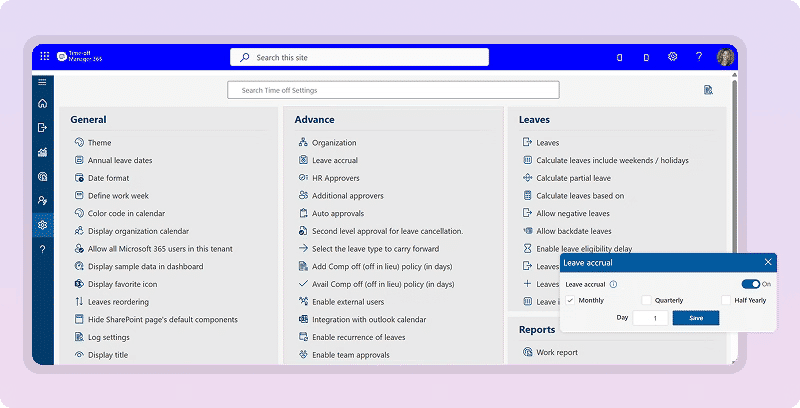
Accurate Accruals, Zero Manual Work

Automatically calculate leave balances based on tenure, role, or policy — no manual tracking needed. 

✔ Accrual rules based on tenure or role 
✔ Carry forward unused leave automatically 
✔ Add comp off (in lieu) for extra shifts worked 
✔ TOIL calculated automatically by hour type 
✔ Separate accrual rules for full-time and part-time staff 

leave accrual for healthcare

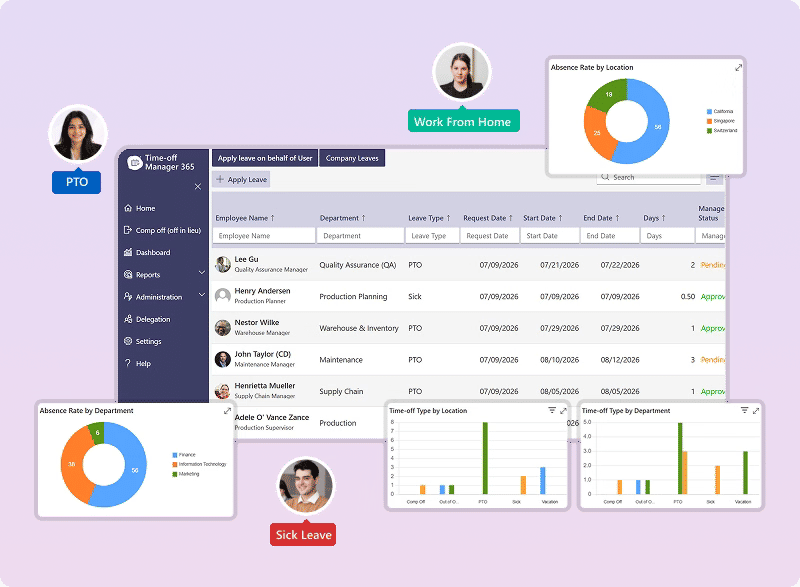
Complete Visibility for Compliance and Planning

Get full reporting on staff leave and coverage, ready for audits and workforce planning. 

✔ Leave summary and work reports 
✔ Reports by leave type and department 
✔ Complete audit trail for compliance 
✔ Exportable reports for HR and management 

Make Healthcare Leave Management Easier to Request, Approve, and Track

Less manual work. More time for patient care

Time Off Manager 365 helps healthcare teams log leave, secure approvals, and stay connected to Microsoft 365 — with less manual work and fewer disconnected tools.

Works Inside the Microsoft 365 You Already Use

No separate HR portal to remember. Time Off Manager 365 connects directly to your Microsoft 365 directory, Teams, and Outlook calendars, so staff request and check leave from tools they already open every day.

Multi-Level Approvals, Routed Automatically

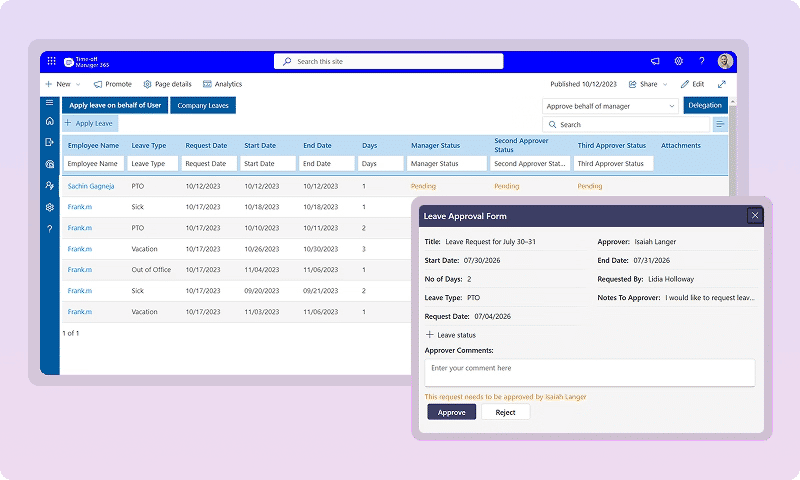
Leave requests reach the right manager or department head without anyone forwarding an email. Time Off Manager 365 supports multi-level approval chains with separate access for HR, managers, and staff, so nothing sits waiting in an inbox.

Clear Reports on Leave and Staffing

See leave balances, coverage gaps, and policy compliance from a single dashboard. Time Off Manager 365 gives HR and operations leaders easy-to-read reports, so no one has to reconcile spreadsheets by hand.

See Time Off Manager 365 Working Inside Your Microsoft 365

Get a personalized 20-minute demo based on your healthcare staffing model, leave policies, and approval workflows.

Connects with the Tools your Team already Uses

Time Off Manager 365 works natively within Microsoft 365, letting clinical and administrative staff request and approve leave directly inside Microsoft Teams, Outlook, and SharePoint. Microsoft Entra ID handles secure authentication and directory sync. 

It also connects with Power Automate for custom workflow automation, Timesheet 365 for shift and hours  & task tracking.

How Time Off Manager 365 Improves Healthcare Operations

Healthcare teams need reliable leave tracking to protect patient care, manage overtime, and keep staff from burning out. Time Off Manager 365 centralizes leave, approvals, and reporting in one platform, helping HR and operations teams cut manual work and plan coverage with more confidence. 

Leave & Coverage Planning

Track leave against shifts, departments, and roles to catch coverage gaps before they affect patient care. 

Monitor how leave is distributed across teams and shifts to reduce burnout and balance workload fairly.

Route leave requests to the right manager or department head automatically, cutting down on delays and back-and-forth.

Apply different accrual and eligibility rules for full-time, part-time, and per-diem staff without manual tracking.

Generate detailed reports on leave trends, coverage, and compliance to support workforce planning and audits.

healthcare leave tracking

How Time Off Manager 365 Supports Healthcare Workforce Planning

Time Off Manager 365 provides a structured process to capture, approve, and report healthcare staff leave from request to resolution.

Submit a Leave Request

Staff request leave directly from Microsoft Teams or Outlook, with policy rules applied automatically based on role and tenure. 

Categorize the Request

Requests are tagged by leave type, department, and shift for accurate tracking and reporting. 

Route for Approval

Approval rules automatically send requests to the right manager or department head for review. 

Track Request Progress

Managers see real-time balances, coverage gaps, and pending requests without checking spreadsheets. 

Send Status Updates

Notifications keep staff informed when a request is submitted, approved, denied, or needs more information. 

Close and Report

Approved leave remains available for payroll, audits, and workforce planning, with a full history retained. 

Healthcare Leave Management Guide

This guide is a practical starting point for healthcare organizations looking to implement, standardize, or improve how they manage staff leave. It lays out a structured approach to healthcare leave management and healthcare absence management, from leave requests to reporting, using a system built natively for Microsoft 365. 

time off manager guide for healthcare
  • Centralize leave requests and balances instead of splitting them across Excel, paper forms, and personnel files. 
  • Standardize approval workflows so every request reaches the right manager without unnecessary delays. 
  • Apply accurate accrual and Time Off in Lieu (TOIL) rules automatically, based on tenure, role, and employment type. 
  • Give staff self-service access to their own leave balances directly inside Microsoft Teams. 
  • Reduce compliance risk with a complete audit trail for every leave request and approval. 
  • Scale leave policies consistently across departments, shifts, and locations as your organization grows. 

Whether you’re replacing a legacy HR system for the first time or refining an existing leave process, use this guide as a reference for building a reliable, Microsoft 365-native leave management system that keeps pace with healthcare scheduling. 

Why Healthcare Teams Choose a Microsoft-Native Leave Management System

Choosing between a generic HR tool and one already built into Microsoft 365 usually comes down to a few clear differences. 

Capability 

Time Off Manager 365 

Generic Leave Tool 

Runs natively inside Microsoft Teams 


Data stored in your own SharePoint / M365 tenant 


Automated multi-level approvals 


Varies by plan 

Real-time leave balance self-service 


Real-time alerts for pending or missed approvals 


Rare 

Built-in Copilot AI assistance 


Rare 

Healthcare Teams That Use Time Off Manager 365

Built for every team that touches a shift, not just HR. 

Healthcare leave management works best when every department — not just HR — has visibility into who’s on leave and when. 

HR Teams 
Centralize leave records, automate approvals, and generate audit-ready reports for compliance and workforce planning. 

Department Managers & Shift Leads 
See real-time coverage and leave balances to plan shifts confidently, without last-minute scrambling for coverage. 

Clinical & Care Staff 
Request leave and check balances directly from Microsoft Teams, without paperwork or phone calls to HR. 

Administrative & Support Staff 
Track vacation, sick leave, and comp-off in the same system used by clinical teams, with no separate process. 

Payroll & Finance Teams 
Access accurate, approved leave records to reduce payroll errors and cut down on reconciliation time. 

Compliance & Risk Teams 
Maintain a full audit trail to support labor law and required rest-time rule compliance. 

Our Clients

Girish Babu
Operations Manager
Masqat, Oman
"Managing employee absences is much easier with Time off Manager 365. It's straightforward to use, and the reporting provides the visibility our HR team needs to plan more effectively."
Emelyn Mendegoria
Operations Specialist
UK
"We've had a great experience with Time off Manager 365. It's user-friendly, easy to navigate, and has made managing employee leave much more efficient."
Paul Newton
President
US
"Time off Manager 365 has exceeded our expectations. The team behind the product is responsive, and we've always received timely assistance whenever needed."
Julie Solomon
CFO
US
"A simple and reliable solution for managing employee leave. Everything from tracking leave balances to generating reports is straightforward and easy to use."

Clients Speak

Wessam Baroudi
Head Of Information & Technology
"After joining ABC Mobility, I saw the need for a helpdesk to streamline IT operations. After evaluating several options, I chose HR365. This customizable SharePoint system met our needs, offering multi-team support."
Jason Gardner
Director of Infrastructure
"Our support requests came from various channels: email, Teams, texts, calls causing confusion and no way to track or verify service issues. We evaluated several ticketing systems, including building one in MS."
Corey Jackson
Barton Associates
"Great app for SharePoint or MS Teams! We use it to help employees connect within SharePoint and MS Teams. Very happy with its functionality and the support from HR365."
JP Nicols
Cofounder
"Outstanding tech support! We use HR365 uniquely, with a small team and 1000+ members. HR365 serves as our member directory. Frank and the team spent hours resolving a complex permissions issue late on a Friday night."
John Persons
Vice President of Operations
"Great product and support! Coming from an old version of Employee Directory 365, Frank and Sakshi were fantastic during the upgrade to Modern SharePoint. All questions were promptly answered, with remote support as needed."

Using Azure? now you can buy Time off Manager software on Azure Marketplace or using your enterprise agreement​

Frequently Asked Questions

It’s a system that helps healthcare organizations track, approve, and manage staff leave including vacation, sick leave, and shift-based time off from one centralized platform. 

Healthcare runs on shift coverage and patient care. A dedicated system helps prevent understaffing, missed approvals, and compliance gaps that manual tracking often causes. 

It gives managers real-time visibility into who’s on leave, so shift gaps can be spotted and covered early before they impact patient care. 

It supports vacation, sick leave, comp-off, child-care leave, and other custom leave types configured to your organization’s policies. 

Yes. Time Off Manager 365 works natively within Microsoft 365, syncing leave requests and approvals directly with Teams, Outlook, and your user directory. 

Try It Free, No Obligation
By proceeding, you accept Cubic Logics’s terms and conditions and privacy policy
"Exceptional tool that delivers seamless integration, powerful features, and unmatched reliability."

Schedule a free personalized 1:1 demo

By proceeding, you accept Cubic Logics’s terms and conditions and privacy policy

"Outstanding product that combines ease of use, robust security, and cut Expenses."
Let’s Customize a Plan for You

By proceeding, you accept Cubic Logics Terms and Conditions and Privacy Policy

NPO Price Request

By proceeding, you accept Cubic Logics Terms and Conditions and Privacy Policy

Please provide your contact details, we will connect with you soon!

Please provide your contact details, we will connect with you soon!

Request for the custom price​

By proceeding, you accept Cubic Logics Terms and Conditions and Privacy Policy

Schedule a free personalized 1:1 demo

By proceeding, you accept Cubic Logics’s terms and conditions and privacy policy

"Outstanding product that combines ease of use, robust security, and cut Expenses."
License Request Form

By proceeding, you accept Cubic Logics Terms and Conditions and Privacy Policy