

Helpdesk 365 Workflow Excellence Automating Every Step from Ticket Creation to Resolution
Optimize your helpdesk workflow by automating ticket routing, escalation paths, SLA enforcement, and resolution tracking inside Helpdesk 365.
_eH2jDg7dZ.png)

Support teams cannot afford slow or broken processes anymore. With ticket volumes rising and customers expecting faster responses, a robust helpdesk workflow is essential. Companies that adopt automated helpdesk workflows can reduce resolution time by up to 30% and boost customer satisfaction by improving efficiency and streamlining support processes.
This comprehensive guide explores helpdesk workflows from both conceptual and technical perspectives, with special focus on implementing efficient workflows using Helpdesk 365, a powerful SharePoint-based solution designed for modern IT and customer service teams.
Understanding Helpdesk Workflows
What Is a Helpdesk Workflow?
A helpdesk workflow is a predefined roadmap for resolving customer issues. It provides clear, systematic steps for routing, escalating, and resolving support requests. Think of it as the operational backbone that transforms chaotic ticket management into a streamlined, efficient process.
At its core, a helpdesk workflow ensures that every customer query is addressed in a uniform, consistent manner. This systematic approach prevents tickets from falling through the cracks and ensures that support teams can maintain high service standards even during peak demand periods.
Why Helpdesk Workflows Matter
The benefits of implementing structured helpdesk workflows extend across multiple dimensions:
- Improved Efficiency: Streamlined processes reduce time wasted on figuring out next steps or locating information
- Consistent Service Delivery: Every customer query is handled uniformly, ensuring all customers receive the same level of service
- Better Prioritization: High-priority issues are quickly identified and escalated, ensuring critical problems are addressed promptly
- Enhanced Collaboration: Teams can work together seamlessly, with everyone having access to the same information and updates
- Data-Driven Insights: With systematic workflows, it’s easier to analyze data and identify areas for improvement
Core Components of Helpdesk Workflows
While helpdesk workflows vary by organization, several universal elements form the foundation of any effective system:
1. Ticket Creation and Categorization
This is where the support journey begins. When a customer reaches out, their issue must be officially logged and categorized. Proper categorization iscrucial, it determines how the ticket flows through your system and who handles it.
Modern helpdesk systems can automatically categorize tickets based on keywords, customer type, or communication channel. This automation significantly reduces manual effort and ensures consistent classification.
2. Prioritization and Routing
Not all tickets are createdequal. Some may be routine requests, while others might be critical inquiries requiring immediate attention. An effective workflow assesses and prioritizes tickets, ensuring they’re handled according to urgency and business impact.
Smart routing assigns tickets to agents based on skills, department, workload, or expertise. This balanced approach reduces wait times and ensures customers connect with qualified support personnel quickly.
3. Escalation Management
Sometimes, frontline agents needbackup. Escalation management defines when and how tickets move through higher levels of authority. A well-designed escalation process balances the need for quick resolutions with the requirement to properly handle complex issues.
Escalation can be triggered by factors such as ticket age, severity level, customer tier, or agent inability to resolve within specified timeframes.
4. Automation and Integration
Automation is the engine that powers IT support helpdesk workflows. By automating repetitive tasks, you free agents to focus on complex, high-value interactions. Automation can handle:
- Automatic ticket assignments based on predefined rules
- Status updates and notifications to stakeholders
- Follow-up messages after periods of inactivity
- Data synchronization from CRM systems
- Tagging and labeling based on content analysis
Common Helpdesk Workflow Patterns
Understanding common workflow patterns helps organizations design systems that match their operational needs. Here are several proven workflow examples:
Incident Management Workflow
This workflow focuses on mitigating IT incidents to minimize negative impact on business operations. It typically includes rapid triage, immediate notification to affected parties, root cause analysis, and resolution tracking.
Key steps: Incident detection → Categorization → Impact assessment → Assignment to technical team → Investigation → Resolution → Documentation → Post-incident review

Password Reset Workflow
One of the most common IT helpdesk requests, password resets benefit tremendously from automation. This workflow can handle verification, self-service options, and automated execution.
Key steps: Identity verification → Security question validation → Password reset link generation → Confirmation → Follow-up security notification
Important Customer Support Workflow
High-value customers deserve special attention. This workflow automatically identifies important tickets, escalates them to senior agents, and applies stricter SLA requirements. Features may include automatic priority marking, assignment to dedicated success managers, and real-time notifications to management.
Multi-Channel Request Consolidation
Modern customers reach out through various channels, such as email, chat, and phone. This workflow automatically consolidates requests from the same customer across channels, preventing duplicate work and providing agents with complete context.
Strategies for Workflow Optimization
Define Clear Objectives and Metrics
Start with specific, measurable goals. Are you trying to reduce response times? Increase first-contact resolution? Improve customer satisfaction scores? Your objectives will guide workflow design and help you measure success.
Essential metrics to track:
- First Response Time (FRT)
- Average Handle Time (AHT)
- Ticket Resolution Rate
- Customer Satisfaction (CSAT) Scores
- Escalation Rate
Establish Realistic SLAs
Service Level Agreements (SLAs) set expectations for both customers and support teams. However, unrealistic SLAs create stress and disappointment. Analyze historical data to establish achievable targets, then gradually improve them as your workflows mature. Consider different SLA tiers for various ticket priorities and customer segments.
Build Comprehensive Knowledge Bases
Empower agents with robust knowledge resources. A well-maintained knowledge base serves dual purposes: it helps agents resolve issues faster and enables customer self-service. Modern systems use AI to suggest relevant articles based on ticket content, dramatically reducing resolution times.
Implement Smart Automation Selectively
While helpdesk workflow automation drives efficiency, not everything should be automated. Focus automation efforts on repetitive, rules-based tasks with clear decision criteria. Keep human judgment involved for complex issues, sensitive situations, or cases requiring empathy and creativity. The goal is to support teams with technology, not replace them.
Create Effective Escalation Matrices
Design escalation paths that balance speed with expertise. Your escalation matrix should consider agent experience levels, issue severity, resolution timeframes, and customer tier. Clear escalation triggers prevent both under-escalation (agents struggling too long) and over-escalation (senior resources on routine issues).
Implementing Workflows with Helpdesk 365
Helpdesk 365 is a comprehensive SharePoint-based helpdesk solution that brings enterprise-grade ticketing and workflow capabilities to Microsoft 365 environments. Built natively on SharePoint, it offers seamless integration with the Microsoft ecosystem while providing powerful automation and customization features.
Key Features for Workflow Management
Helpdesk 365 provides several critical capabilities for implementing refined workflows:
- SharePoint Power Automate Integration: Leverage Microsoft Power Automate to create complex, multi-step workflows without coding
- Customizable Ticket Fields: Define custom fields to capture organization-specific data that drives routing and prioritization
- Email Integration: Automatically convert emails into tickets with smart parsing and categorization
- SLA Management: Configure and monitor service level agreements with automatic escalations
- Knowledge Base Integration: Link articles to tickets and enable agent-assisted resolution
- Multi-Tier Support: Configure support tiers with automatic escalation between levels
Technical Workflow Implementation
Implementing workflows in Helpdesk 365 typically involves configuring both the ticketing system settings and Power Automate flows. Here’s a technical helpdesk workflow overview of the process:
Step 1: Configure Ticket Categories and Priorities
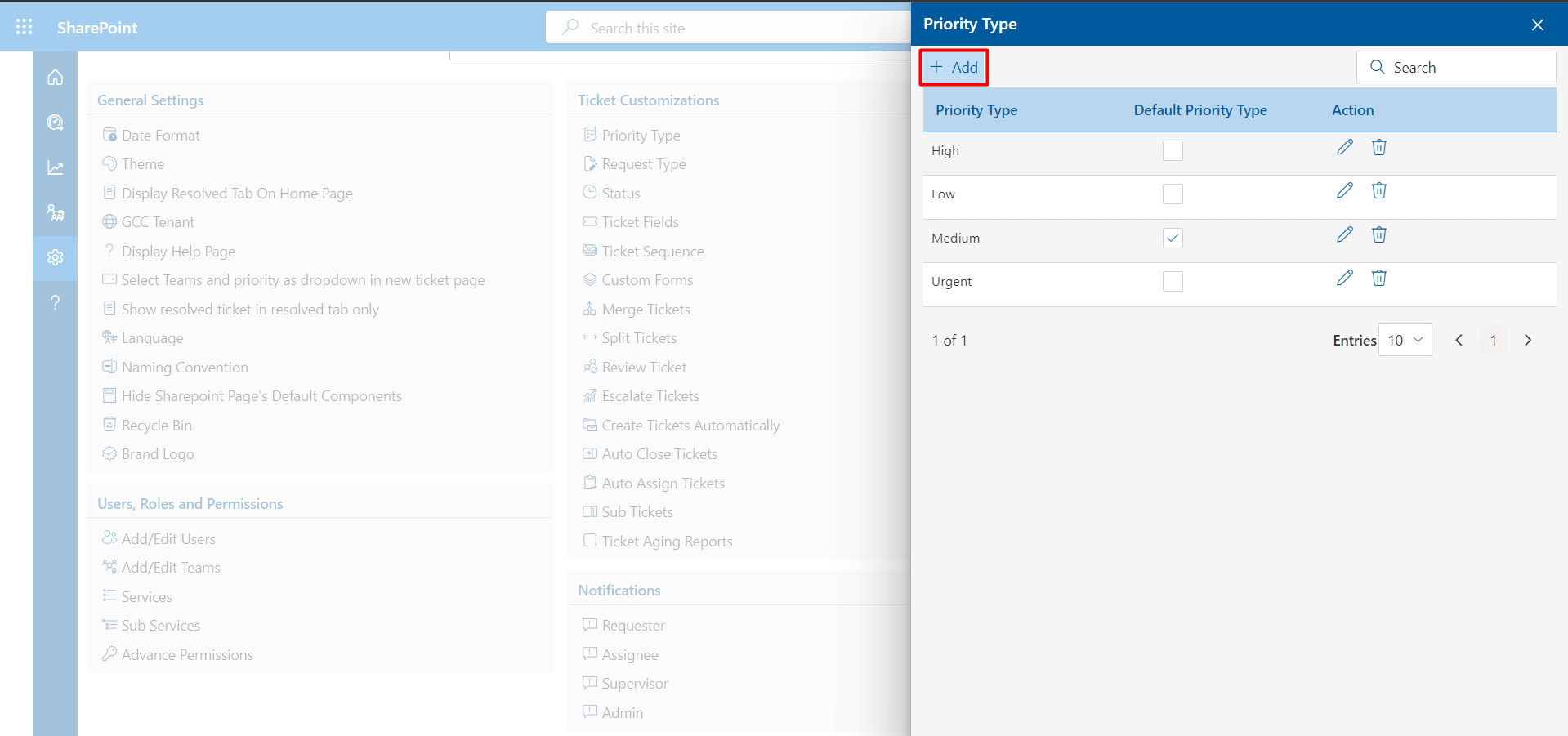
Navigate to the Helpdesk 365 admin settings within SharePoint. Define your ticket categories to align with your service offerings (e.g., Hardware Issues, Software Problems, Access Requests, General Inquiries). Configure priority levels such as Critical, High, Normal, and Low with corresponding SLA timeframes.
Step 2: Set Up Automated Routing Rules
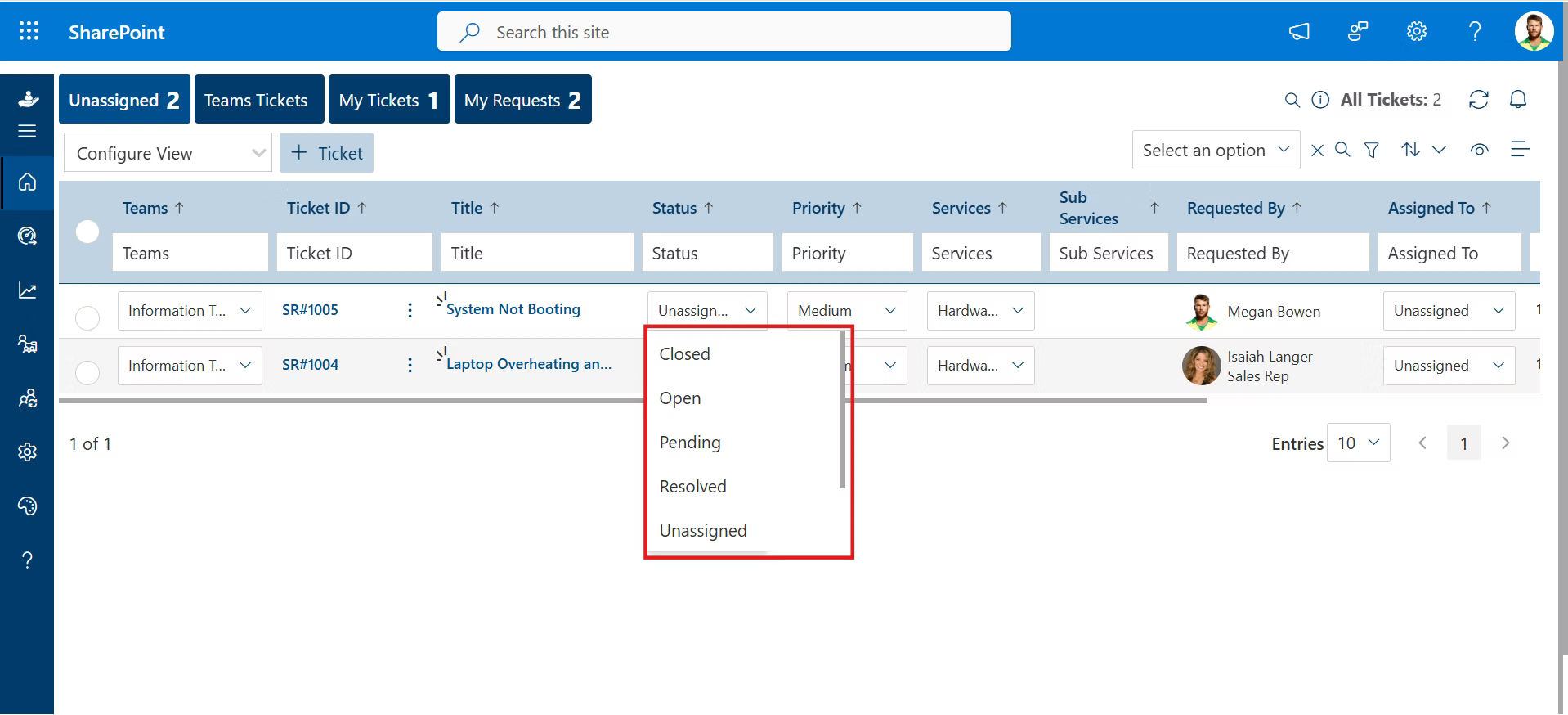
Use Power Automate to create flows that automatically assign tickets based on conditions. For example: “When a new ticket is created AND Category equals ‘Hardware Issues’ THEN assign to IT Hardware Team.” These flows can incorporate complex logic including agent availability, workload balancing, and skill matching.
Step 3: Create Escalation Workflows
Build escalation flows that monitor ticket age and status. A typical pattern: “When a High Priority ticket remains ‘In Progress’ for more than 4 hours, send notification to Team Lead and update ticket priority to Critical.” You can create multiple escalation tiers with increasing notification urgency.
Step 4: Implement Notification Workflows
Configure automated notifications for key events: ticket creation confirmations, status updates, resolution notifications, and satisfaction surveys. Power Automate allows you to customize email templates and delivery timing, ensuring stakeholders stay informed without overwhelming them.
Step 5: Enable Self-Service Capabilities
Integrate Helpdesk 365 with your knowledge base. Configure workflows that suggest relevant articles based on ticket content, enabling agents to quickly provide solutions. You can also implement a customer-facing portal where users can search the knowledge base before submitting tickets.
Advanced Workflow Scenarios
Helpdesk 365 supports advanced workflow scenarios that address complex business requirements:
Approval-Based Workflows
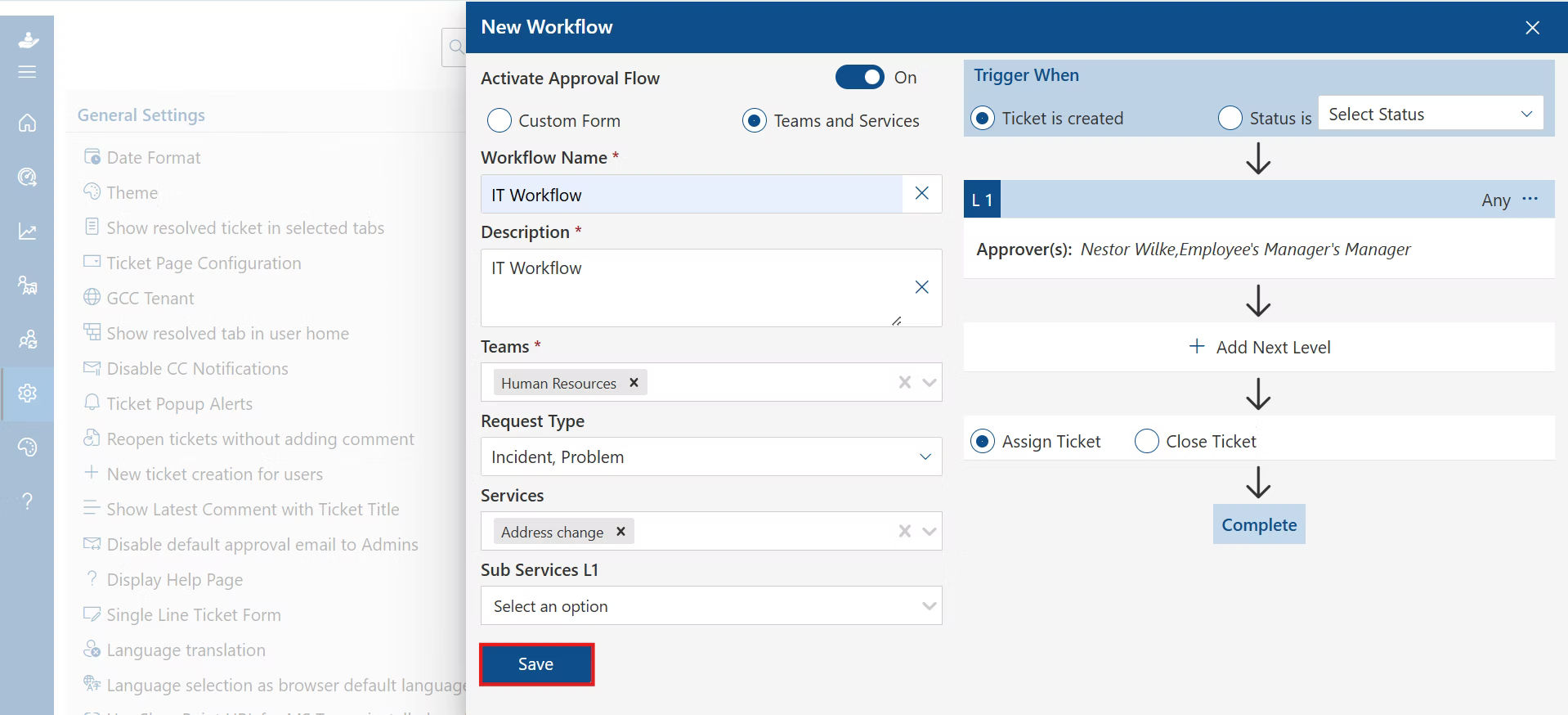
For requests requiring manager approval (software installations, access grants), create multi-stage approval workflows. Power Automate handles approval routing, reminder notifications, and automatic ticket status updates based on approval outcomes.
Change Management Integration
As part of a well-defined ticket lifecycle, connect tickets to change management processes so that when specific request types are logged, they automatically initiate structured approval workflows and required documentation steps.
Survey and Feedback Automation
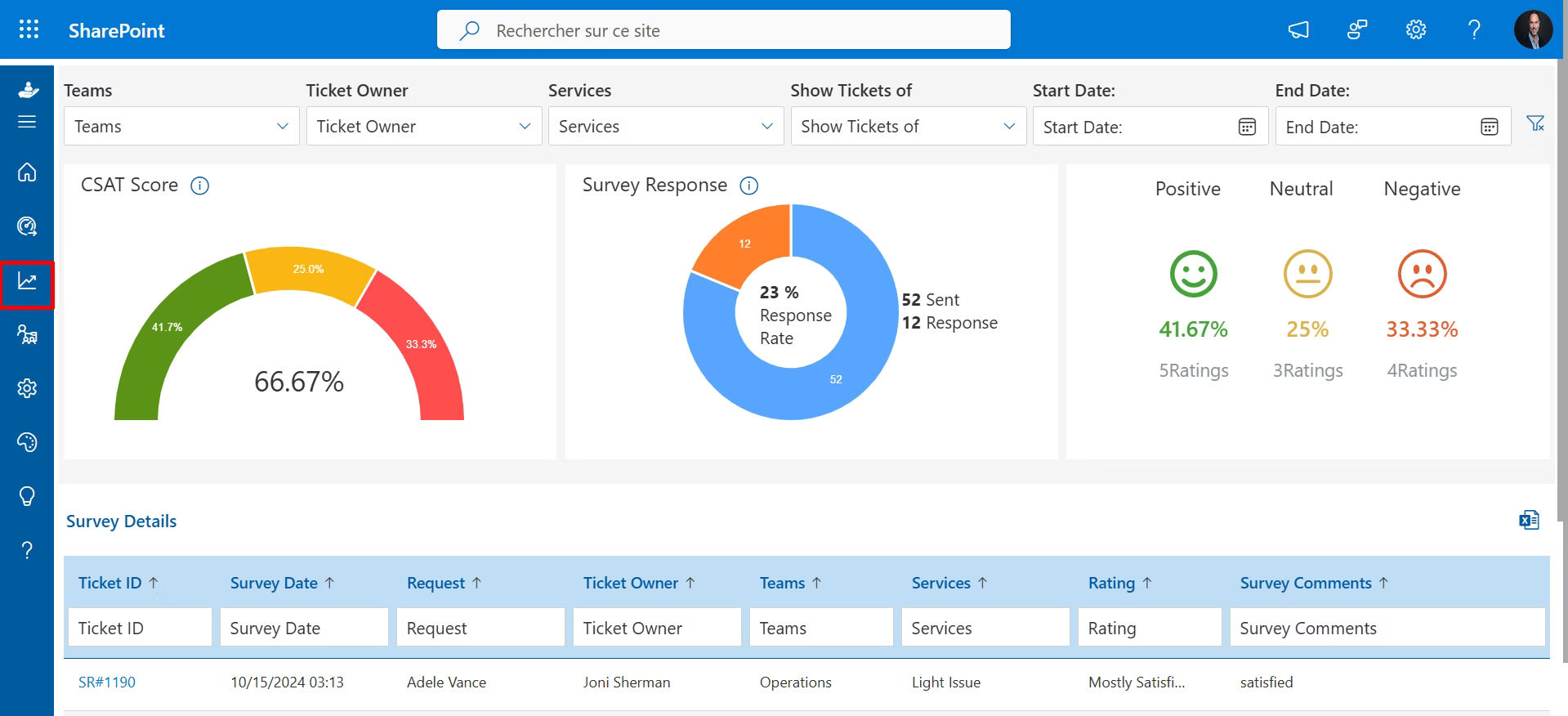
After ticket resolution, automatically send satisfaction surveys as part of a structured workflow management approach in helpdesk software. Configure the process to analyze responses, flag negative feedback for management review, and monitor CSAT trends over time. This closed-loop feedback system supports continuous service improvement.
Best Practices for Workflow Excellence
Building on industry insights and practical experience, these best practices will help you maximize the value of your helpdesk workflows:
Building on industry insights and practical experience, these best practices will help you maximize the value of your helpdesk workflows:
Start Simple, Iterate Often
Don’t try to automate everything at once. Begin with your most common, straightforward workflows. Monitor their performance, gather agent feedback, and refine before adding complexity. This iterative approach prevents overwhelming your team and allows for course corrections.
Document Everything
Maintain comprehensive documentation of your workflows, including trigger conditions, decision logic, and expected outcomes. This documentation serves as training material for new agents, troubleshooting reference for administrators, and audit trail for compliance purposes.
Monitor and Measure Continuously
Implement dashboards that track workflow performance metrics. Monitor automation success rates, escalation patterns, and resolution times. Set up alerts for issues like sudden increases in ticket volume or declining CSAT scores. Data-driven insights enable proactive optimization.
Maintain Human Oversight
Even with advanced automation, maintain human checkpoints for critical decisions. Build in escalation paths that allow agents to override automatic routing when context demands it. The best workflows enhance human judgment rather than replace it entirely.
Regular Review and Refinement
Schedule quarterly workflow reviews. Analyze metrics, gather stakeholder feedback, and identify bottlenecks. As your business evolves, your workflows must evolve too. Regular reviews ensure your processes remain aligned with organizational goals.
Invest in Training
Even the best workflows fail without proper training. Ensure agents understand not just how to use the system, but why workflows exist and how they benefit customers. Well-trained agents become workflow advocates, suggesting improvements based on frontline experience.
Overcoming Common Workflow Challenges
Even well-designed workflows face challenges. Understanding common pitfalls helps you avoid them:
Resistance to Change
Challenge: Agents comfortable with existing processes may resist new workflows.
Solution: Involve frontline staff in workflow design from the start. Demonstrate actual benefits like reduced workload and faster resolutions. Provide comprehensive training and address concerns transparently.
Over-Automation
Challenge: Excessive automation creates rigid processes that can’t handle edge cases.
Solution: Build flexibility into automated workflows. Include override options for agents and escalation paths for unusual situations. Remember that automation should enhance, not constrain, problem-solving capabilities.
Integration Complexity
Challenge: Connecting helpdesk workflows with existing systems (CRM, ITSM, etc.) proves technically challenging.
Solution: Leverage integration platforms and APIs. For Helpdesk 365, the Microsoft Power Platform ecosystem simplifies connections to hundreds of applications. Start with critical integrations and expand gradually.
Data Security and Privacy
Challenge: Automated workflows handling sensitive customer data raise security and compliance concerns.
Solution: Implement role-based access controls, encrypt sensitive data, and maintain audit logs. Ensure workflows comply with relevant regulations (GDPR, HIPAA, etc.). Regular security reviews and penetration testing help identify vulnerabilities.
Conclusion
Helpdesk workflows represent far more than technical configurations, they embody your organization’s commitment to customer service excellence. When designed thoughtfully and implemented effectively, they transform support operations from reactive chaos to proactive, efficient service delivery.
Helpdesk 365 provides the technical foundation for building sophisticated workflows within the Microsoft 365 ecosystem. Its native SharePoint integration, Power Automate capabilities, and extensive customization options make it an ideal platform for organizations of all sizes.
Remember that workflow implementation is a journey, not a destination. Start with clear objectives, implement incrementally, measure continuously, and refine relentlessly. Engage your team in the process, leverage automation judiciously, and always keep the customer experience at the center of your design decisions.
With the strategies and technical insights outlined in this guide, you’re equipped to build helpdesk workflows that not only meet today’s demands but scale to accommodate tomorrow’s challenges. The result? Happier customers, more efficient agents, and a support operation that drives competitive advantage.
Frequently Asked Questions
What is helpdesk workflow automation?
Helpdesk workflow automation is the process of using predefined rules to automatically route, prioritize, assign, escalate, and track support tickets from creation to resolution, reducing manual effort and improving response time.
How does Helpdesk 365 automate ticket creation?
Helpdesk 365 automatically creates tickets from emails, Microsoft Teams messages, web forms, and portals, capturing key details such as requester information, category, priority, and attachments.
How are tickets automatically assigned in Helpdesk 365?
Tickets can be auto-assigned based on department, issue type, keywords, SLA rules, workload balancing, or predefined routing logic to ensure the right agent handles the request.
Can workflows in Helpdesk 365 trigger approvals?
Yes. Workflow rules can trigger approval processes for specific ticket types such as access requests, infrastructure updates, or policy changes, ensuring structured governance.
How does Helpdesk 365 manage SLAs automatically?
The system tracks SLA timers, sends reminders before deadlines, and escalates tickets if response or resolution targets are missed.
Does Helpdesk 365 support multi-stage ticket workflows?
Yes. Tickets move through defined lifecycle stages such as New, Assigned, In Progress, On Hold, Escalated, and Closed, ensuring full visibility and structured resolution.
Can workflows send automatic notifications?
Automated alerts notify agents, supervisors, and requesters about status updates, escalations, approvals, and closures in real time.
How does Helpdesk 365 improve first response time?
By automating ticket routing, categorization, and prioritization, Helpdesk 365 reduces manual sorting and ensures faster first responses.
Can helpdesk workflows integrate with Microsoft 365 tools?
Yes. Helpdesk 365 integrates with Microsoft Teams, SharePoint, and Outlook to enable collaboration, document management, and communication within a unified environment.
How does workflow automation improve customer satisfaction?
Automated processes reduce delays, minimize errors, ensure SLA compliance, and enable consistent communication, leading to better customer experience and higher CSAT scores.
Try It Free, No Obligation










Schedule a free personalized 1:1 demo
By proceeding, you accept Cubic Logics’s terms and conditions and privacy policy





Don't leave yet,
get up to 30% special offer
until 31st March 2026
Enter your business email ID and we will send a personalized coupon code straight to your inbox.
Please provide your contact details, we will connect with you soon!
Please provide your contact details, we will connect with you soon!
By proceeding, you accept Cubic Logics Terms and Conditions and Privacy Policy
Schedule a free personalized 1:1 demo
By proceeding, you accept Cubic Logics’s terms and conditions and privacy policy








By proceeding, you accept Cubic Logics Terms and Conditions and Privacy Policy