
Contract Review Software | Manage Contracts Faster
Contract review software simplifies the process of understanding complex legal agreements by identifying critical terms, highlighting key clauses, and presenting essential contract information in an easy-to-understand format.

Reviewing lengthy contracts manually takes time and makes it harder for legal teams to identify important contract clauses, missing terms, and potential risks.
According to a study by McKinsey, 88% of organizations now use AI in at least one business function. As AI adoption grows, companies are also looking for better ways to handle legal reviews without adding more work to their teams.
However, reviewing agreements involves more than finding errors. Businesses must check whether the conditions match their policies, protect their interests, and support their goals.
In this blog, we explain how AI-native review tools work, their key features, benefits, challenges, and how to choose the right solution for your business.
What Is Contract Review Software?
Contract review software is a digital tool that helps businesses review legal clauses before they are signed. It identifies important contract terms and conditions, highlights possible risks, and checks whether the document follows company policies.
Traditional reviews require legal teams to read every page, compare conditions, and suggest changes. The tool can complete many of these checks automatically, allowing professionals to focus on decisions that need their judgment.
For example, when a supplier submits an agreement, the system can identify unusual payment conditions, missing liability limits, or renewal rules that differ from company standards.
Why Is Contract Review Becoming Difficult for Businesses?
As companies grow, they work with more customers, suppliers, and partners. Each relationship brings new documents that legal teams must examine before business can move forward. Here are five challenges that make reviews difficult.
Legal departments receive documents from sales, finance, HR, and purchasing teams. When several requests arrive together, reviewing each one becomes difficult. Employees may spend hours reading similar clauses across multiple files. As the workload grows, urgent agreements compete for attention, delaying business decisions.
Not every contract risks is easy to recognize. Some agreements contain unusual liability conditions, one-sided cancellation rules, or payment requirements that may create financial problems. Reviewers must understand how individual provisions affect the entire business relationship. Missing a single detail can lead to unexpected costs later.
Different reviewers may interpret the same language differently. One employee might accept a agreement conditions that another considers risky. Without shared contract guidelines, businesses may approve documents that do not match their preferred legal positions. This becomes more challenging when teams work across departments, locations, or business units.
According to research cited by Thomson Reuters, lawyers spend around 40–60% of their time writing and reviewing documents. Reading lengthy files, comparing versions, and checking legal language can take considerable time. When professionals spend most of their day on routine checks, they have less time for negotiations, business advice, and complex legal matters.
Agreements often move between legal, sales, finance, and management through emails or shared folders. Without a software to evaluate contracts, employees may not know who is reviewing a document, what changes are pending, or why a decision is delayed. This lack of visibility can create repeated follow-ups and missed deadlines.
How Does Contract Review Software Make Reviews Easier?
It uses AI and predefined NLP to examine agreements and identify information that needs attention. Here is how the process typically works.
- Upload the agreement: Employees add a Word document or PDF to the platform.
- Identify important clauses: AI recognizes sections related to payments, confidentiality, liability, renewal, and other business conditions.
- Check against company policies: The system compares the document with approved language and internal guidelines.
- Highlight potential risks: Unusual wording, missing protections, and conflicting provisions are marked for review.
- Recommend changes: The tool may suggest approved wording or alternative clauses based on the company’s legal playbook.
- Send for human review: Legal professionals examine the findings, make changes, and decide whether the document is ready to proceed.
For example, if a vendor contracts allows automatic renewal without advance notice, the platform can flag the provision and suggest language that matches company policy. This approach helps employees spend less time locating issues and more time deciding how to address them.
Manual vs. AI Contract Review: Which Works Better?
Manual and AI-native reviews serve different purposes. While humans provide legal judgment and business understanding, AI can handle many routine checks faster.
Comparison | Manual Review | AI Contract Review |
Review speed | Depends on document length and complexity | Quickly checks supported document types |
Clause identification | Reviewers locate each section | AI identifies relevant provisions |
Risk detection | Depends on professional experience | Flags issues based on configured rules and AI capabilities |
Consistency | May vary between reviewers | Applies shared review guidelines |
Document comparison | Requires reading different versions | Highlights differences automatically |
Scalability | Needs more reviewer time as volume grows | Handles larger volumes with human oversight |
Legal judgment | Can interpret context and negotiate exceptions | Requires human validation for complex decisions |
Cost | Higher labor needs for repeated checks | May reduce routine effort but requires software investment |
A LawGeex experiment involving five NDAs found that 20 US-trained lawyers took an average of 92 minutes to complete the task, while the AI system finished in 26 seconds.
Which works better? AI-assisted review is useful for repetitive work and standard documents. Human review remains important for complex agreements, unusual situations, and final legal decisions. Businesses often benefit most from combining both approaches.
Why Businesses Still Need Human Review Alongside AI
AI can summarize contracts, identify unusual wording, and recommend changes. However, it cannot fully understand every business relationship or legal situation.
For example, a limitation of liability that appears unfavourable might be acceptable when the agreement involves a low-value purchase. The same language could create major concerns in a high-value technology deal.
A human reviewer can consider the contract value, relationship history, industry practices, and business goals before planning.
AI may also misunderstand unusual wording, overlook information spread across several sections, or flag acceptable provisions.
Legal professionals must review critical findings, validate the extracted information, and assess proposed changes based on their legal expertise.
The purpose is not to replace lawyers but to reduce manual effort, allowing them to focus more on tasks that require professional knowledge, critical thinking, and legal judgment.
As per Victorian Legal Research, says that almost a third consulted with colleagues or experts (32%). Intervention legal counsel plays a crucial role.
Key Features of Contract Review Software?
Choosing the right platform starts with understanding how its features support everyday legal work. Here are important capabilities to look for.
Agreements contain several sections covering pricing, confidentiality, service commitments, and other business matters.
Contract intelligence classify these sections, even when different documents use different wording.
For example, one supplier may use the heading “Termination,” while another uses “Ending the Agreement.” The system can recognize that both sections serve a similar purpose.
This feature helps reviewers locate important information without searching through every page.
The platform helps businesses identify provisions that may create legal, financial, or operational concerns.
Clause evaluation software can also help reviewers prioritize findings based on their potential impact.
However, teams should verify flagged issues before accepting the system’s recommendations.
Finding a problem is only part of the review. Employees must also decide how to correct it.
The contract verification software can recommend replacement language based on approved contract templates and legal playbooks.
For example, if a customer agreement contains a payment period of 90 days while the company’s standard is 30 days, the platform may suggest revised wording.
Automated clause evaluation can help identify the difference, while approved replacement language gives reviewers a starting point for negotiations.
Legal teams can accept, edit, or reject these suggestions based on the situation.
Businesses frequently receive revised versions of the same agreement during negotiations. Reviewers need to identify what changed and whether those contract changes affect previously accepted conditions.
This helps teams avoid overlooking important edits hidden among minor wording changes.
Important information often appears across different pages of a legal document.
AI-contract data extraction captures selected details and organizes them into searchable fields.
For businesses managing large collections of agreements, this reduces repeated data entry.
Agentic AI goes beyond identifying information. It can support connected tasks across different stages of a review, based on the permissions and rules set by the business.
It may also prepare a summary of requested changes or notify team members when their input is needed.
However, companies should keep human approval points for important legal decisions and limit what AI agents can change or share without permission.
How Does Contract Review Software Benefit Businesses?
It can improve how teams manage legal documents, especially when they handle repeated requests and large volumes. Here are seven practical benefits.
Contract Review
The contract review software automatically reads the contracts and highlights the key sections like contractual obligations, rights, limitations, and responsibilities.
It reads summarizes the contract and identifies the clauses which typically need legal consideration such as commercial and compliance related terms.
This will enable legal operations teams to do less manual reading and more analysis and decision-making.

AI Agent
The AI Agent assists users to learn the complicated contract clauses easily. Upon the user pointing to any clause in the contract, the AI will automatically give a clear explanation in simple non-legal terms.
This enables non legal departments like sales, procurement and finance to know the terms of the contract without having to wait to get legal assistance.
The AI Agent also describes the possible risks, duties, and major results concerning the clause.

Clause Summary
Clause summary converts the long and complicated legal clause into brief and simplified data.
Contract review software identifies the important clauses and clarifies their meaning in simple business terms.
This assists the sales, procurement and finance departments to know the terms of the contract without having to wait to be deciphered by the legal department.

Real-Time Clause Suggestion
When contract language does not match company-approved standards, the contract review software suggests the alternative clauses immediately.
Such recommendations are retrieved from centralized clause library of clauses that is developed based on legal policies and already accepted agreements.
This helps in the uniformity of the contract language and decreases the time of review between the teams.

Obligation Tracking
The recurring responsibilities in contracts include payment dates, renewal dates, and notice.
Contract review software recognizes such obligations and records them in a tabular format that can be easily tracked.
This assists teams to be aware of the duties during the contract life cycle.

How Does Contract Review Software Benefit Businesses?
It can improve how teams manage legal documents, especially when they handle repeated requests and large volumes. Here are seven practical benefits.
Why should legal professionals read the same standard language across hundreds of agreements?
AI can identify familiar clauses and highlight differences, allowing employees to concentrate on unusual provisions.
Research by Deloitte and Docusign reported 36% efficiency gains through time savings and shorter contract cycle times in the processes studied. Although results vary between organizations, reducing repeated work can free up time for more valuable activities.
A small change in wording can create a large financial concern. AI can flag such provisions so legal professionals can examine them before the business commits. Finding potential issues early gives teams more room to negotiate.
When several employees examine agreements, different interpretations can lead to uneven decisions. A shared legal playbook gives reviewers common standards for acceptable language. Legal terms checking software can compare incoming documents with these guidelines, helping employees follow a more consistent approach.
Sales representatives often wait for legal feedback before sending agreements to customers. When standard documents receive quicker initial checks, sales teams can move negotiations forward without unnecessary delays. This is especially useful for businesses handling recurring customer agreements.
Without a shared platform, employees may exchange several emails to discuss one clause. A central review workspace can keep comments, suggested contract edits, and document versions together.
Everyone involved can see what needs attention, reducing repeated questions and confusion.
Hiring additional reviewers for every increase in workload can become expensive. AI can help existing teams manage more routine requests while reserving specialist attention for high-risk documents. This does not remove the need for legal expertise. It allows organizations to use that expertise where it matters most.
Managers need to understand which agreements are pending, why they are delayed, and where employees need support. Platforms with contract tracking and reporting features can provide this information in one place.
These insights can help businesses improve internal guidelines and reduce recurring delays.
Who Uses Contract Review Software?
Clause extraction software is useful beyond legal departments. Any team that creates, receives, or negotiates business agreements may benefit from it.
Team | How they use the software |
Legal teams | Check provisions, identify risks, and suggest edits |
Sales teams | Review customer agreements and track requested changes |
Procurement teams | Examine supplier pricing, service commitments, and purchasing conditions |
Finance teams | Verify payment schedules, fees, and financial exposure |
HR teams | Check employment agreements, confidentiality provisions, and workplace documents |
Compliance teams | Review documents against internal policies and applicable requirements |
Business leaders | View pending reviews and identify matters requiring decisions |
This helps departments prepare documents more effectively while keeping important decisions with authorized reviewers.
Cut contract review time and focus on what truly matters
7 Practical Steps to Simplify Their Contract Review Workflow
Businesses need clear guidelines, assigned roles, and a consistent way to handle incoming documents. Here are practical steps.
Understand the Purpose of the Agreement
Start by understanding why the agreement exists, what both parties expect, and what the business wants to achieve. This context helps identify which clauses need closer attention.
Identify Each Party's Responsibilities
Check what each party has agreed to deliver, when they must fulfil their responsibilities, and what happens if they fail to meet those commitments.
Review Clauses Separately
Divide the agreement into sections such as payment terms, confidentiality, termination, liability, and renewal. Review each section to identify missing details or unclear conditions.
Compare With Previous Agreements
Compare new clauses with previously approved contracts to identify changes in payment periods, pricing, responsibilities, and other important terms.
Check the Business Impact
Look beyond the legal wording. Understand whether a clause could increase costs, create additional responsibilities, delay operations, or expose the business to financial losses.
Document Issues and Suggested Changes
Record unclear terms, missing information, and potential risks. Explain why a change is required and suggest alternative wording for further discussion.
Review the Final Changes
Before approval, check whether all agreed changes have been included, important terms remain consistent, and no unexpected conditions have been introduced.
According to a Virginia State Bar study cited in discussions of legal AI, automation could potentially assist with a substantial share of routine law firm work, with estimates reaching 75% for certain activities.
How Does CLM 365 Help Businesses Review Contracts?
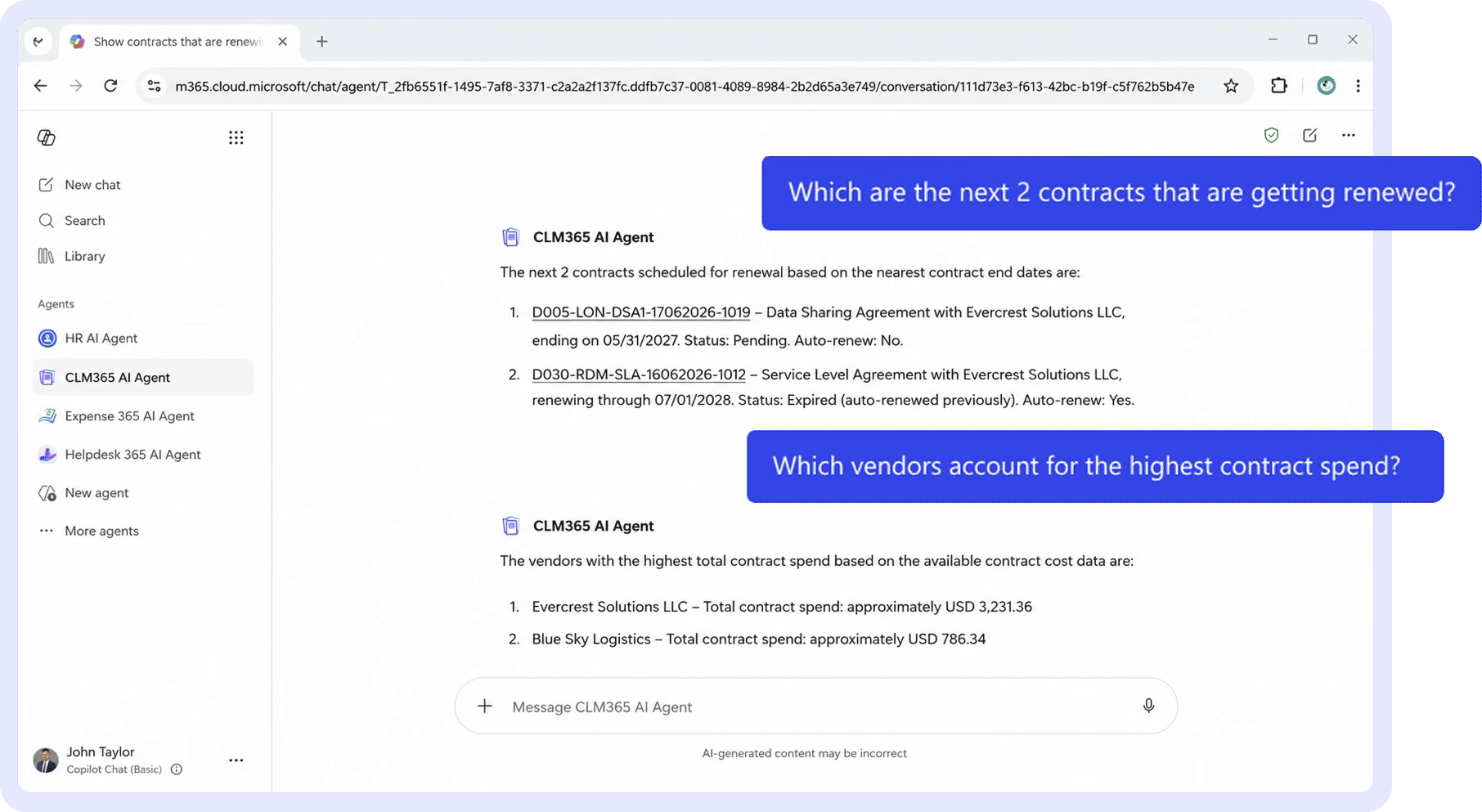
CLM 365 is a SharePoint contract management tool designed to help businesses manage legal agreements across different stages, from creation and review to signing and ongoing management.
For organizations looking to reduce manual review work, a connected system can provide a central place for documents, team collaboration, and approval activities.
When evaluating the tool for contract reviews, businesses should focus on these capabilities:
- Centralized Approach: Keep agreements in one location so authorized employees can find the files they need without searching through emails or shared folders.
- Review and Approval Workflows: Send documents to the appropriate legal, finance, or business teams based on internal requirements.
- Version Tracking: Maintain visibility into revisions so employees can work with the correct agreement.
- Team Collaboration: Support communication between departments during negotiations and document reviews.
- Visibility: Connect review activities with later stages, including signing, renewal, and ongoing commitments.
Businesses interested in AI-powered review should also confirm which capabilities are available in their CLM 365 plan, including intelligent clause recognition, risk detection, suggested wording, and agentic AI features.
Data Security and Confidentiality in AI Contract Analysis
Contracts contain sensitive legal, financial, and commercial information, making data protection essential when using AI for contract analysis.
CLM 365 operates within your existing Microsoft 365 environment, allowing contract documents to remain stored within your organization’s Microsoft tenant. It does not send contract data to public AI services such as ChatGPT unless you explicitly configure an approved AI provider.
Your contract information is also not used to train public AI models. AI processes contract content to generate summaries, explain clauses, identify risks, and extract key obligations.
By leveraging Microsoft 365 security and governance capabilities, CLM 365 helps organizations manage document access, maintain audit trails, and apply existing compliance policies while benefiting from AI-powered contract analysis.
Conclusion
Manual contract reviews can consume time and make it harder to identify important clauses and potential risks. Contract review software helps teams analyze agreements, compare versions, and reduce repetitive work.
However, AI works best alongside experienced legal reviewers and established review policies. Choosing the right solution can improve review accuracy, collaboration, and document visibility. CLM 365 brings AI-powered contract analysis and contract management together within your Microsoft 365 environment.
Frequently Asked Questions
What are the common contract clauses reviewed by AI contract review software?
AI contract review software can examine clauses covering confidentiality, indemnification, liability, termination, payment, renewal, and regulatory compliance to identify risks and unusual terms.
What types of contracts can contract review software review?
It can review various agreements, including NDAs, MSAs, vendor contracts, employment agreements, SLAs, lease agreements, and customer contracts.
How many languages does CLM 365 support for clause summaries?
CLM 365 supports clause summaries in 10+ languages, helping global teams understand contractual terms across different languages.
How does AI contract review software evaluate clauses?
It identifies and categorizes contract clauses, compares their language against predefined standards, and highlights missing terms, unusual wording, and potential risks for human review.
Can AI contract review software analyze multiple contracts in bulk?
Yes. It can process multiple agreements to identify recurring risks, missing clauses, and deviations. This is particularly useful for contract audits, due diligence, and reviewing large contract repositories.
Can AI contract review software analyze multiple contracts in bulk?
Yes. It can process multiple agreements to identify recurring risks, missing clauses, and deviations. This is particularly useful for contract audits, due diligence, and reviewing large contract repositories.
Try It Free, No Obligation










Schedule a free personalized 1:1 demo
By proceeding, you accept Cubic Logics’s terms and conditions and privacy policy





Last Chance! Offer Ends in!
Don't Miss Out! Thanksgiving & Black Friday Sale
Avail up to Flat 30% Discount until
November 30th, 2026.
Enter your business email ID and we will send a personalized coupon code straight to your inbox.
Please provide your contact details, we will connect with you soon!
Please provide your contact details, we will connect with you soon!
By proceeding, you accept Cubic Logics Terms and Conditions and Privacy Policy
Schedule a free personalized 1:1 demo
By proceeding, you accept Cubic Logics’s terms and conditions and privacy policy