
A Comprehensive Guide to Employee Directory Software
Employee directory software serves as a centralized platform that helps organizations keep track of their workforce, fostering transparency, accessibility, and collaboration.
_eH2jDg7dZ.png)
Understanding Employee Directory Software
Effective communication and streamlined collaboration are crucial for organizational success. As companies grow and adapt to remote and hybrid work environments, the need for centralized and efficient tools to manage employee information has never been greater. This is where employee directory software comes into play.
By offering searchable profiles, organizational charts, and integrated communication tools, these systems simplify the process of finding and connecting with colleagues across departments, locations, or time zones.
Employee directory software is a centralized digital platform designed to store and manage employee information. It functions as a virtual address book where employees can easily search for colleagues based on specific criteria such as name, department, job title, or location.
The employee directory app goes beyond just contact information; it often integrates with other HR and communication tools to streamline internal processes and enhance team collaboration.
Communication and Collaboration Challenges and Solutions for New Employees
New employees often face communication and collaboration challenges as they adjust to new teams, workflows, and workplace expectations. Organizations can address these challenges by providing clear communication channels, structured onboarding, and collaborative tools that help new hires connect with colleagues and integrate into the team more smoothly.
Challenges that Employee Faces Within Internal Organization
Lack of Clear Communication Channels
Effective communication is crucial for productivity, yet many businesses struggle with fragmented or unclear communication channels. Employees may find it difficult to communicate with others, resulting in misunderstandings, delays, and a lack of collaboration across teams.
This often leads to inefficiencies, as messages may be missed or misinterpreted, and the right information may not reach the right people at the right time.
Difficulty in Tracking Employee Performance
Without clear systems in place to monitor and track employee performance, businesses face challenges in identifying areas for improvement or recognizing top performers.
Inconsistent feedback, lack of measurable goals, and absence of performance metrics make it difficult for managers to provide the support employees need to succeed, resulting in missed opportunities for development and growth.
Challenges in building connections with new employee
When a new intern or employee joins, identifying their role and transferring domain knowledge can be challenging, especially if they are new to the industry. Providing clear SOPs and defined objectives is essential for a smooth transition.
Without proper guidance, freshers may feel unsupported and unsure whom to approach, leading to communication gaps that hinder workplace coordination and team efficiency.
Lack of Centralized Employee Data
In large organizations, maintaining up-to-date, accurate, and easily accessible employee information can be a challenge. Dispersed or fragmented systems for managing employee records whether digital or paper-based can result in data duplication, errors, and time wasted searching for information. This creates inefficiencies and slows down decision-making processes, as accurate employee information is often not readily available when needed.
Limited Collaboration Between Teams
As organizations grow, collaboration between departments can become more difficult. With different teams working in silos and with varying levels of access to important information, employees can struggle to work together efficiently.
This lack of cross-functional collaboration leads to missed opportunities, reduced innovation, and slower problem-solving across the organization.
Difficulty in Managing Remote Teams
The rise of remote work has brought its own set of challenges, particularly in terms of managing and engaging remote employees. Without in-person interaction, it can be harder for managers to assess employee productivity, offer support, or foster a strong team culture. This can lead to feelings of isolation among remote workers, difficulty in maintaining accountability, and challenges in aligning teams toward common goals.
Employee Engagement and Retention Challenges
High turnover and low employee engagement are common challenges faced by businesses.
If employees do not feel connected to their work or the company culture, they are more likely to leave. Additionally, a lack of career development opportunities, poor management practices, or insufficient recognition can lead to disengagement. Businesses struggle to retain their talent, leading to a constant cycle of hiring and training new employees.
No Integration with Other Tools
When employees switch between different systems for daily tasks, it creates inefficiencies. This lack of integration with the right systems leads to duplicated efforts and challenges in collaboration, as teams cannot easily access the same data. Over time, these workflow disruptions lower productivity and increase the risk of errors. Integrating tools into a unified system can streamline processes and improve overall efficiency.
Navigating Compliance and Legal Regulations
Businesses must navigate a complex landscape of legal and compliance requirements, particularly when managing employee data and ensuring fair labour practices.
From data protection laws to industry-specific regulations, staying compliant is a significant challenge. Without having proper software in place, a company might fail to adhere to these regulations and can result in legal consequences, financial penalties, and reputational damage to the organization.
Handling Organizational Change and Transition
Whether due to mergers, acquisitions, or internal restructuring, organizations often face challenges during periods of change. Employees may feel uncertain about their roles, career paths, or job security, which can affect morale and productivity. Managing change effectively requires clear communication, strong leadership, and support systems to help employees navigate transitions smoothly and stay engaged during uncertain times.
Solutions to Overcome Internal Communication and Collaboration Issues
Strong communication and collaboration are the backbone of any thriving organization. Yet, many teams face challenges such as misaligned goals, lack of transparency, or siloed work. Addressing these issues requires a mix of cultural, technological, and process-driven solutions.
Establish Clear Communication Channels
- Define which tools are used for which type of communication (e.g., instant messaging for quick updates, email for formal announcements, project boards for task tracking).
- Reduce confusion by standardizing these channels across the organization.
- Encourage use of threaded discussions or topic-based groups to keep conversations organized.
Foster a Culture of Openness
- Promote active listening and inclusivity in meetings so all voices are heard.
- Encourage feedback loops where employees can share concerns without hesitation.
- Recognize contributions publicly to build trust and strengthen morale.
Invest in Collaboration Tools
- Use integrated platforms like Microsoft Teams, or SharePoint that combine messaging, file-sharing, and project management.
- Adopt cloud-based document collaboration to ensure version control and real-time updates.
- Automate repetitive workflows (like approvals) to save time and reduce miscommunication.
Clarify Roles and Responsibilities
- Use tools such as RACI (Responsible, Accountable, Consulted, Informed) to avoid role ambiguity.
- Share updated organizational charts or team directories so employees know whom to contact.
- Align responsibilities with goals to minimize overlaps and misunderstandings.
Regular Check-ins and 1:1s
- Encourage weekly team meetings for alignment on priorities and progress.
- Schedule 1:1 sessions between managers and employees to address blockers early.
- Use structured agendas to keep discussions focused and outcomes clear.
Encourage Cross-Department Collaboration
- Launch cross-functional task forces for projects requiring diverse expertise.
- Host workshops, knowledge-sharing sessions, or “lunch and learns” to bridge silos.
- Rotate team members between projects to build empathy and understanding across departments.
Provide Training and Development
- Offer workshops on effective communication, conflict resolution, and collaboration best practices.
- Train leaders to model transparency and accountability.
- Encourage employees to continuously upskill in digital collaboration tools.
Measure and Improve
- Use surveys and feedback tools to measure communication effectiveness.
- Track collaboration outcomes through productivity metrics, project completion rates, and employee satisfaction.
- Continuously refine processes based on insights gathered.
By combining technology with cultural change, organizations can overcome internal communication barriers, strengthen teamwork, and achieve shared goals with greater efficiency.
Key Features of Employee Directory Software
An employee directory software goes far beyond a digital phone book. It’s a central hub where employees can quickly find, connect, and collaborate with colleagues across the organization. Below are the essential features that make such software effective and valuable:
Centralized Employee Profiles
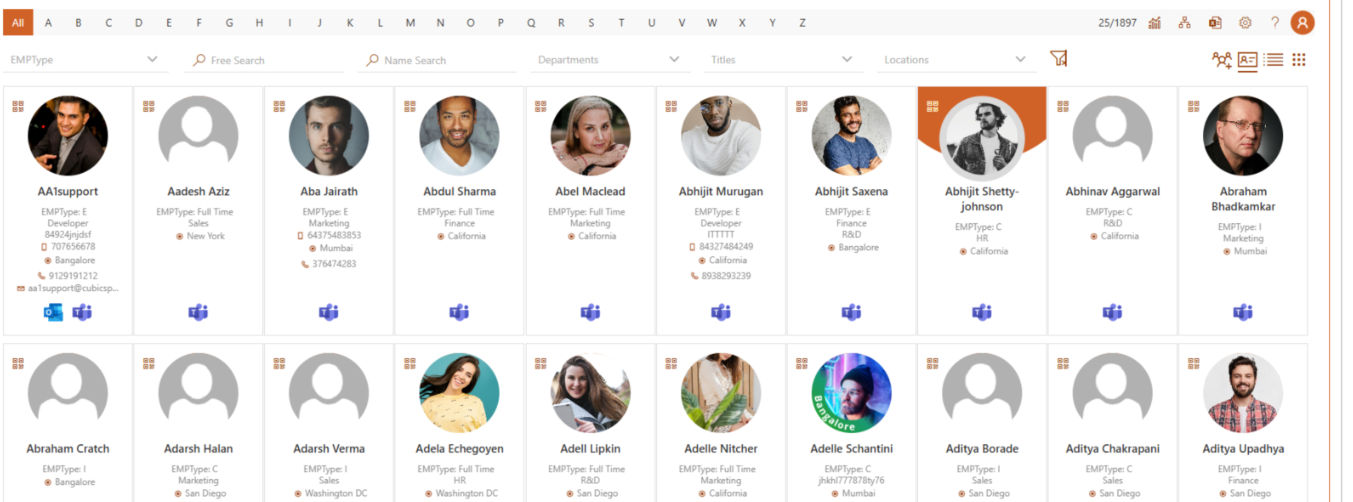
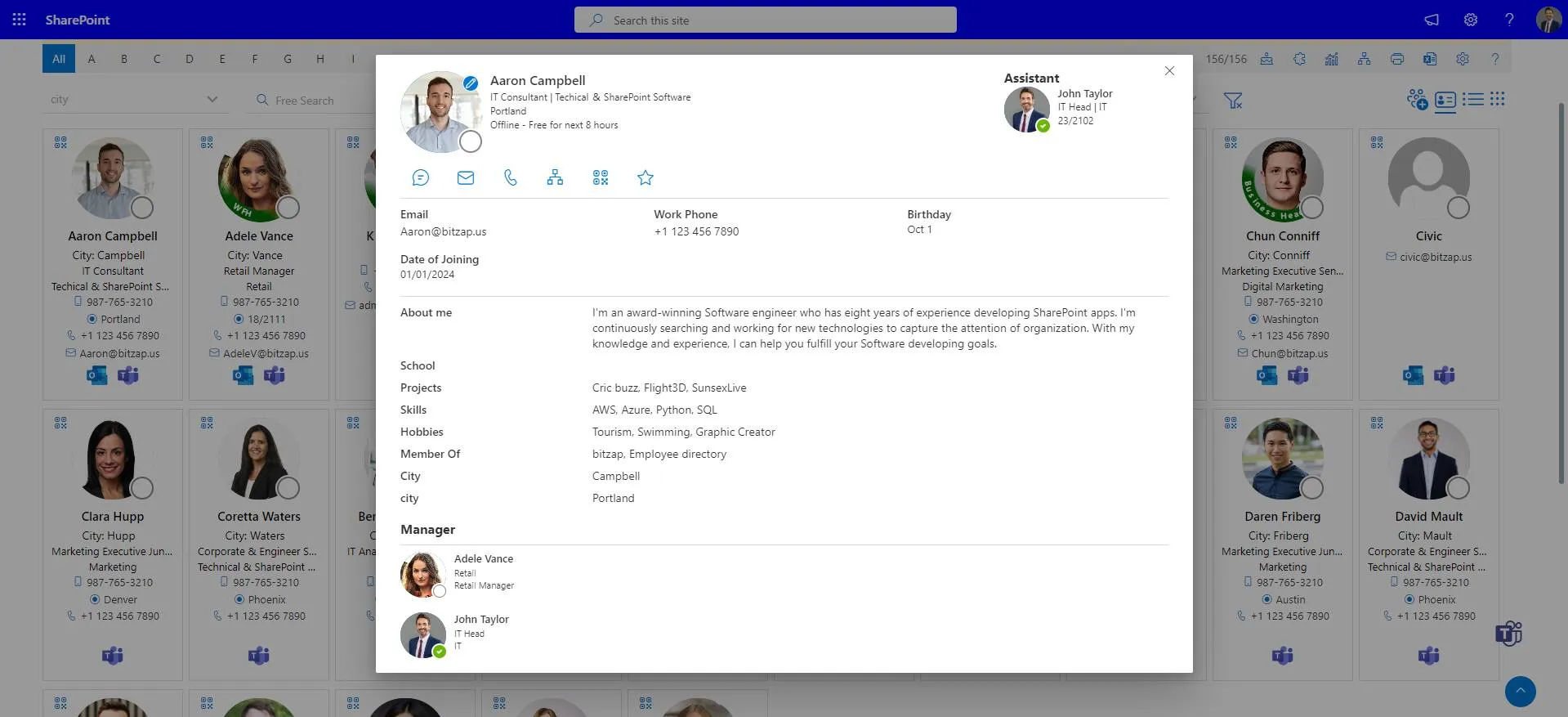
- Comprehensive profiles with name, photo, designation, department, and location.
- Additional details like skills, expertise, reporting manager, and work history.
- Helps employees know “who does what” and connect instantly with the right person.
Advanced Search and Filters
- Smart search by name, department, job title, skills, or location.
- Quick filters for departments, roles, or office locations.
- Saves time by making it easy to locate colleagues without endless browsing.
Organizational Chart (Org Chart)
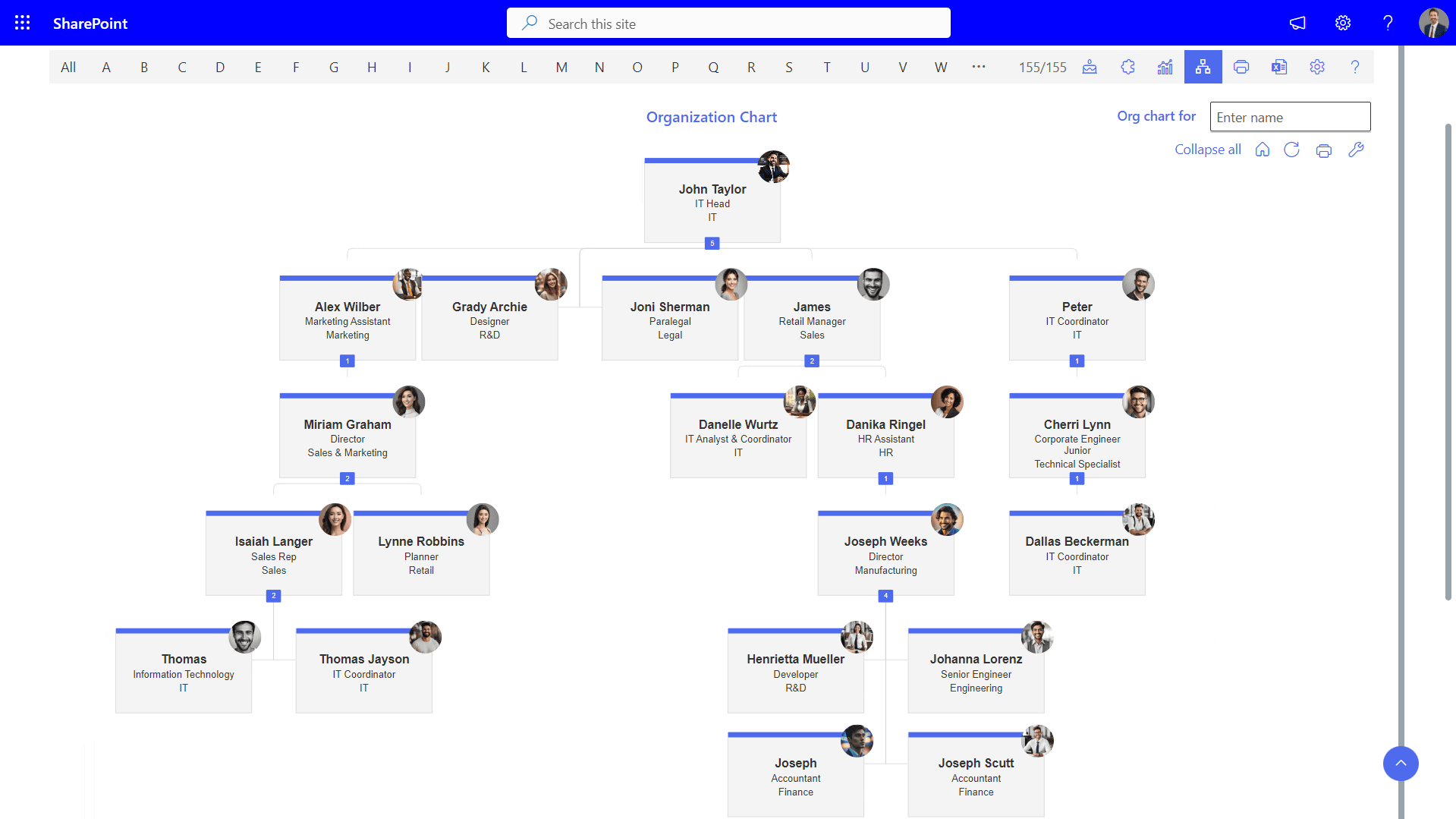
- Visual representation of company hierarchy.
- Easy to understand reporting lines and team structures.
- Useful for new employees to understand leadership and peer connections quickly.
Contact Information Accessibility
- One-click access to email, phone number, Teams/Slack chat, or video call.
- Ensures instant communication without hunting across different platforms.
- Reduces delays and improves collaboration across departments.
Integration with Collaboration Tools
- Seamless integration with Microsoft Teams, SharePoint, Outlook, or Slack.
- Direct communication links embedded in profiles.
- Improves productivity by reducing app-switching.
Skills and Expertise Mapping
- Employees can list certifications, languages, or technical expertise.
- Makes it easier to identify subject-matter experts for projects.
- Encourages cross-functional collaboration based on strengths.
Self-Service Updates
- Employees can update their own profiles to keep information current.
- Reduces dependency on HR for minor changes.
- Keeps the directory accurate and up-to-date.
Security and Access Control
- Role-based access to sensitive employee details.
- Compliance with data privacy standards.
- Ensures employee information is protected while still accessible to the right people.
Mobile Accessibility
- Mobile app or responsive design for on-the-go access.
- Helpful for field employees or distributed teams.
- Encourages faster connections even outside the office.
Analytics and Insights
- Track search trends to understand what employees are looking for.
- HR can identify collaboration gaps or skill shortages.
- Supports workforce planning and decision-making.
With these features, employee directory software not only simplifies “finding people” but also strengthens collaboration, enhances transparency, and accelerates workplace productivity.
Benefits of Using Employee Directory Software in Your Organization
Faster Communication Across Teams
With centralized employee database software, employees can quickly search and contact colleagues, breaking down communication silos. This ensures faster responses, fewer delays, and more cohesive teamwork.
Improved Collaboration Opportunities
Staff Directory software enables employees to locate team members based on skills, departments, or roles, making it easier to collaborate on projects. It streamlines cross-department communication and fosters a collaborative work culture.
Seamless Remote Work Integration
For organizations with dispersed teams, employee directory software for remote teams is a game-changer. It ensures that employees, no matter where they are located, can seamlessly access critical contact information and navigate team structures with ease.
This fosters a sense of connection and collaboration among remote workers, breaking down barriers that physical distance often creates.
Better Employee Engagement
While a company strives to achieve its goals, strong internal network engagement among team members makes the process more efficient and seamless. Employee directory software enables individuals to connect with the right colleagues, fostering collaboration and idea-sharing to complete tasks effectively.
This sense of inclusion and transparency enhances overall morale and boosts employee engagement.
Quick Problem Solving
By easily identifying subject matter experts or connecting with relevant colleagues, employees can tackle challenges and resolve issues more efficiently. The employee database software simplifies the process of finding the right support, eliminating unnecessary delays and barriers.
This streamlined approach not only saves time but also fosters a collaborative work environment, enabling teams to focus on delivering results with greater confidence and speed.
Secures Employee sensitive information
Using employee database software with robust security measures in place, businesses can ensure that sensitive employee information is protected from unauthorized access, breaches, or misuse.
By implementing advanced authentication protocols and strict access controls, only authorized personnel can view or edit employee data, maintaining the confidentiality and integrity of the information. This not only builds employee trust but also gives confidence within the workforce.
Increased Productivity
In organizations, finding the right person for documents or assistance can be challenging, causing delays and frustration. An employee search application simplifies this by providing a centralized platform to quickly access contact details by name, department, or role. This ensures smoother collaboration, saves time, and helps teams stay organized, boosting productivity and improving communication.
Clear Visualization of Hierarchy structure
Employee directory software provides interactive organizational charts that offer clear, visually engaging representations of company hierarchy, team structures, and reporting lines. These charts help team members quickly understand their roles within the organization and how they connect to others.
Managers can use this clarity to optimize team structures, improve collaboration, and streamline decision-making by simplifying complex relationships into easy-to-follow visuals.
Enhanced Transparency and easy decision-making
A transparency around workspace helps decision makers to take the right move. Employee directory application presents team structures and reporting lines in an easy-to-understand format.
Clarity builds trust by providing accurate and accessible information. Managers can quickly identify team dynamics and reporting relationships, making decisions faster and more effectively.
How to Select the Best Employee Directory Software
Choosing the right employee directory software is a critical decision for any organization, as it directly impacts employee collaboration, communication, and overall productivity. To make an informed choice, consider the following key factors
Complete control over data
One of the most important aspects to consider is data ownership. Ensure the software allows your organization to retain full control over employee data, ensuring that sensitive information remains secure and is accessible only to authorized personnel. This is crucial for maintaining privacy and compliance with data protection regulations.

Integration with Current Systems
The software should integrate seamlessly with your existing systems, such as Microsoft or other enterprise tools. This allows for smooth data synchronization and reduces the complexity of managing multiple systems, ensuring that employee information is always up to date across platforms.

Look for Affordable with Quality systems
When selecting the tool, it should be affordable staff directory software for teams. Look for a tool that fits within your budget while offering the necessary features and functionality. It’s important to assess the long-term value the software brings to the organization rather than focusing solely on initial costs.

Implement of Automation
The current business world is going behind automation and reducing the human errors at it’s possible. Look for employee directory app with automated features which helps in reducing manual efforts. Features like automatic updates, real-time syncing, and automated notifications can help maintain accurate data without requiring constant manual input. Automation not only saves time but also ensures that your employee directory stays current and reliable.

Supports Scalability
As your business grows, so will the complexity of managing employee data. Choose employee database software that supports scalability, meaning it can easily adapt to changes in the organization, such as adding new teams, departments, or locations without disrupting workflows.
Customization options
Customization is another important factor. The software should offer options to tailor the directory to fit the specific needs of your organization, such as adding custom fields, employee profiles, or workflows that align with your company’s structure and processes.
By carefully evaluating these aspects, you can select a staff directory tool that not only meets your current needs but also grows with your organization, enhancing collaboration.
How to Use Employee Directory 365 at Its Best?
Employee Directory 365 is more than just a digital contact list. When used effectively, it becomes a powerful tool for enhancing workplace collaboration, improving transparency, and saving valuable time. Here are the best ways to maximize its potential:
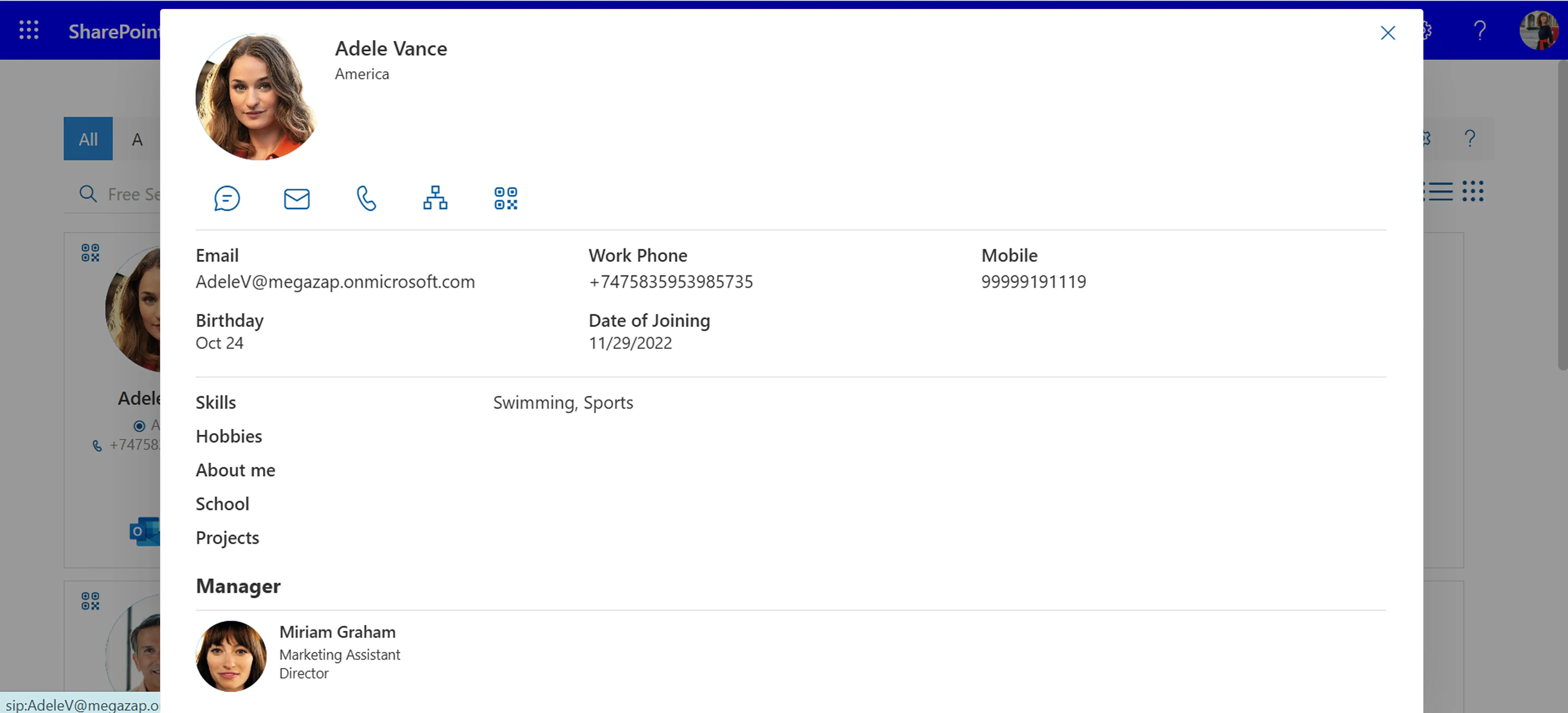
1. Keep Profiles Complete and Updated
- Encourage every employee to add accurate details such as photo, department, designation, skills, and contact information.
- Regularly update changes in job role, location, or reporting manager to maintain accuracy.
- A complete directory builds trust and helps colleagues connect faster.
2. Use Advanced Search and Filters
- Take advantage of smart search to find people by name, role, department, or even skills.
- Apply filters like office location or job function to narrow down results quickly.
- This ensures you always reach the right person without wasting time.
3. Leverage the Organizational Chart
- Use the built-in org chart to understand reporting structures and team hierarchies.
- Helpful for new employees during onboarding and for managers to see team alignment.
- Makes it easier to find the right decision-makers.
4. Integrate with Microsoft 365 Tools
- Launch a Teams chat, email, or call directly from the employee profile.
- Sync seamlessly with Outlook and SharePoint for smooth collaboration.
- Reduces app-switching and keeps workflows efficient.
5. Highlight Skills and Expertise
- Encourage employees to showcase certifications, technical skills, or languages.
- Use these insights to form cross-functional teams or locate experts for specific projects.
- Creates opportunities for knowledge sharing and internal mobility.
6. Support HR and IT Teams
- HR can use the directory for onboarding, workforce planning, or finding role-specific expertise.
- IT can ensure updated records help with access management and security roles.
- Departments save time with self-service, reducing dependency on manual updates.
7. Make It Mobile-Friendly
- Use the mobile version of Employee Directory 365 to stay connected on the go.
- Ideal for field staff, traveling employees, or hybrid teams.
- Ensures communication never stops, regardless of location.
8. Encourage Organization-Wide Adoption
- Train teams on how to get the most from the tool.
- Share quick tips, conduct demos, or highlight success stories.
- Adoption ensures the software becomes a true single source of truth.
By keeping profiles updated, leveraging search, integrating with Microsoft 365, and encouraging adoption, organizations can use Employee Directory 365 to its fullest potential, boosting connectivity, collaboration, and productivity across the workplace.
Insights on Future of Employee Directory Software
As businesses grow and change, employee directory software is becoming an essential tool for streamlining internal communication and collaboration.
AI-Powered Search and Personalization
Employee directories will utilize AI to improve search capabilities. By learning from users’ search patterns and preferences, AI will be able to predict and recommend relevant employee profiles more accurately. For example, AI could suggest the best person to contact for a specific task based on their role, expertise, and past interactions.
Mobile-First Solutions
As remote work continues to rise, employee directory software will evolve to become more mobile-friendly. Mobile apps will offer seamless access to employee details, ensuring that employees can access information wherever they are, fostering better connectivity and collaboration among distributed teams.
Enhanced Security Features
With the growing concerns around data privacy, future employee directories will prioritize robust security measures. Expect stronger encryption, role-based access control, and stricter authentication protocols to protect sensitive employee data and prevent unauthorized access.
.webp)
A Guide to Building a SharePoint Ticketing System for Your Team
Conclusion
Employee directory software helps organizations maintain a centralized and organized record of employee information, making it easier for teams to find colleagues, understand reporting structures, and communicate effectively. By providing searchable profiles, department details, and organizational visibility, it supports better collaboration across the workplace.
Solutions such as Employee Directory 365 help organizations manage employee information efficiently while improving internal connectivity and team coordination.
Frequently Asked Questions
What is employee directory software?
Employee directory software is a digital tool that stores and organizes employee information in a centralized system. It allows employees to quickly find colleague details such as name, role, department, contact information, and reporting structure.
What are the main features of employee directory software?
Common features include employee profiles, department directories, search and filtering options, organizational charts, contact details, and integration with workplace platforms such as Microsoft 365 or collaboration tools.
Why do organizations use employee directory software?
Organizations use employee directory software to help employees find colleagues quickly, improve internal communication, and maintain an organized record of workforce information in one centralized platform.
How does employee directory software improve internal communication?
Employee directory software makes it easier for employees to identify the right person to contact for specific tasks or information. This reduces delays, improves collaboration, and helps teams communicate more efficiently.
What information is typically stored in an employee directory?
An employee directory typically includes employee name, job title, department, email address, phone number, location, manager details, and sometimes profile photos or skills information.
Can employee directory software integrate with workplace platforms?
Yes. Many employee directory solutions integrate with platforms such as Microsoft Teams, SharePoint, and other collaboration tools, allowing organizations to maintain updated employee information within their existing workplace environment.






















