

_eH2jDg7dZ.png)
A ticket queue system helps support teams respond faster by organizing and prioritizing customer requests. In today’s customer-first economy, quick responses build trust, while delays can lead to frustration, lost customers, and lower retention.. Here enters the ticket queue system, a powerful method to handle incoming support tickets based on priority, urgency, and time of submission. But it is more than a system it is the heart of modern service operations.
- A ticket queue system organizes support requests in a structured workflow for faster handling.
- It helps teams prioritize, assign, and track tickets based on urgency and workload.
- Automated routing reduces manual effort and improves response and resolution times.
- Better queue management enhances team productivity and delivers a more consistent support experience.
As digital transformation continues to accelerate, businesses in 2026 are turning toward intelligent, AI-ready solutions. A well-built ticket queue management system is now a critical piece in that transformation.
What Is Ticket Queue System
A ticket queue system keeps support requests organized and easy to manage. Whether it is a question from a customer, a task from an employee, or help needed by a support team, each request turns into a ticket and goes into a waiting line.
The system looks at details like when the ticket was created, how urgent it feels, or what kind of issue it is. Then, it lines up tickets, so the right ones get picked first. It saves time, reduces issues, and helps everyone work better.
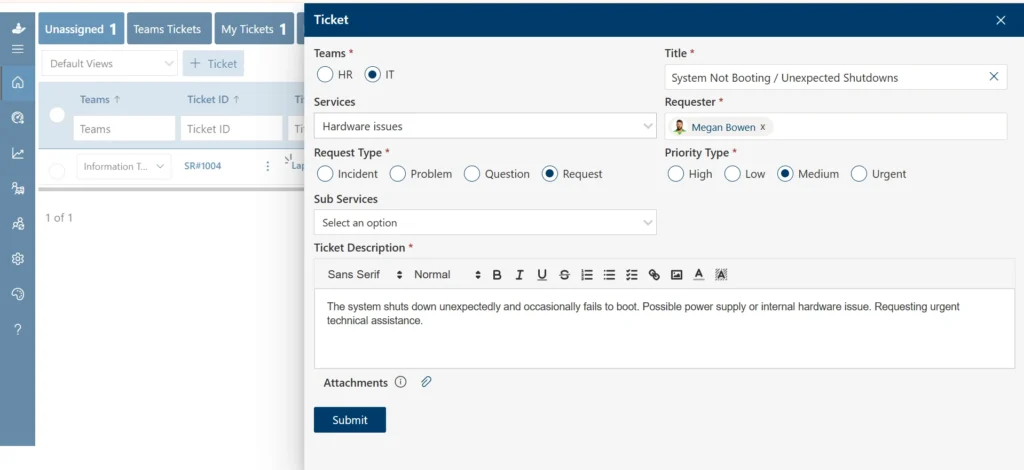
How Does Ticket Queue System Works
Every support request has a process; from the moment it’s submitted to the moment it’s resolved. A ticket queue system makes this journey smooth, clear, and easy for both customers and support teams. Here is how it works in real life.
1. A Request Enters
It starts when someone needs help.Maybe a customer has a question, or an employee reports a problem. They send a message through email, a chatbot, a web form, or call support. As soon as that happens, the system creates a ticket to track the request.
Recommended Read: Leveraging Helpdesk Ticket Across All Channels
2. Ticket Gets Categorized
Once the ticket is created, the system looks at the details. What is the issue about? How urgent does it seem? Which team can help best? It tags the ticket with this information like “high priority” or “HR-related”, and assigns it to someone who can solve it.
3. Ticket Joins the Queue
After tagging, the ticket goes into a queue. This queue follows smart rules. Some tickets go first because they’re urgent. Others follow the “first come, first served” rule. In many setups, AI helps choose what needs attention right away, so nothing important gets delayed
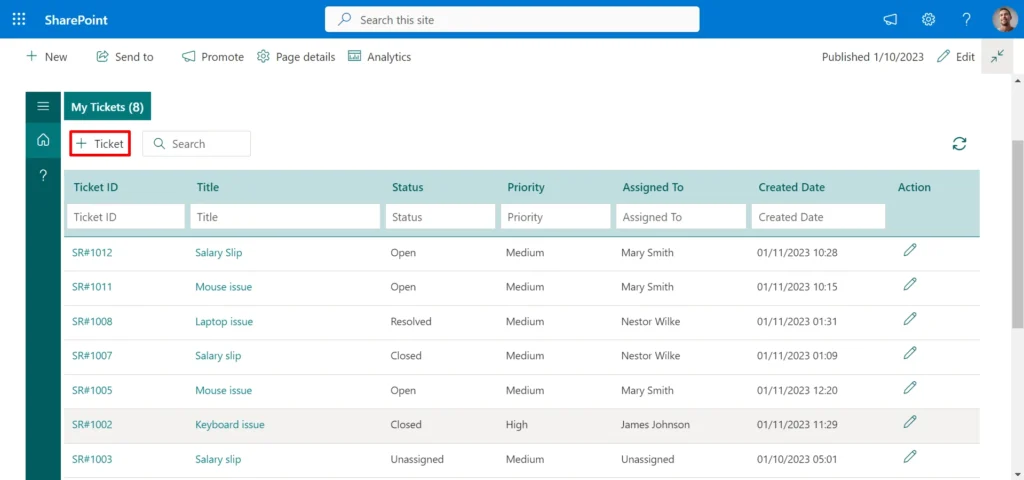
4. Work Begins and Ticket Gets Resolved
The system sends the ticket to the right agent. That person starts working, updates the status as progress happens, and solves the issue. Once done, they close the ticket, so everyone knows it has been handled.
5. The System Learns Over Time
Advanced systems do more than just sort and send. They track patterns like repeated questions or common problems and help teams fix those issues before they grow. This makes support smarter, faster, and more helpful with every ticket.
Benefits of Using Ticket Queue Management System
Support teams work better when requests are clear, organized, and easy to track. A IT support software helps teams move faster, stay focused, and deliver better service every step of the way. Here is how it makes a real difference in ticketing process
1.Faster Response Times
When tickets are queued and sorted properly, nothing slips through. Support teams know what to work on next, without guessing. This reduceswait time for customers and builds trust. Quick responses show people they matter.
A well-organized queue helps agents stay on track. It also avoids backlogs, even on busy days.
2.Save Costs with Digital-First Support
As per an article by HDI, the average cost of handling a self-help ticket is $2.37, while walk-up support costs $37.52. When teams rely on manual processes or walk-ins, it costs more both time and money. A ticket queue management system guides users toraise tickets automatically, where support can work faster.
Lower support costs mean better use of budgets. It also means fewer interruptions and more time spent on high-priority issues. In short, it helps you do more with less
3. Keep Support Teams Productive
A scattered inbox or random messages leave agents feeling overwhelmed. With a queue, they see requests lined up clearly. They focus on solving one issue at a time instead of switching between tasks. This steady flow reduces stress. Teams can focus on priority work. They spend less energy switching between tools or trying to find what to do next. That makes work easier and more rewarding.
4.Improve Experience
According to a Forbes article, only 19% of companies have a dedicated team for customer experience. Most organizations do not have extra staff focused solely on managing customer satisfaction.
It brings structure to support processes, which improves the customer experience even in the absence of a formal CX department. When issues are resolved faster, customers feel acknowledged.
5.Smarter Decisions Through Data
Every ticket holds valuable information what users ask, when issues come up, and how fast they get solved. A good system collects all of it.
With this insight, leaders spot patterns, see common problems, and improve support processes. They adjust staffing, build help guides, or even fix root causes before new tickets arrive. This helps shape better decisions, based on real data, not guesswork.
6.AI Helps You Stay Ahead of the Curve
A recent study shows,80% of support teams will use generative AI by 2026.
Helpdesk with AI-powered system built into modern queue systems do more than route tickets. They suggest answers, analyse and detect the emotions in the message, sets dynamic priority setting and shows signals about tickets that might escalate.
This means agents spend less time on routine questions and more time on critical cases. AI becomes a teammate always learning, always helping.
7.Build Trust with Clear Communication
When users raise tickets, they want updates. Silence creates doubt. A ticket queue management system keeps communication open. Users see when their issue was received, who is working on it, and when to expect a reply.
It builds confidence. A reliable system keeps everyone in the loop, which boosts satisfaction across the board.
Best Practices for Using a Ticket Queue System
A Ticket Queue System brings structure, speed, and clarity to support teams. But to unlock its full value, you need more than just installing the tool you need to use it the right way. These best practices will help you stay efficient, and customer focused.
1.Set Clear Ticket Categories
Not every request holds the same priority. Define clear categories such as “Technical Issue,” “Account Request,” or “Urgent Downtime.” Match them with priority levels like High, Medium, or Low. This helps agents see what needs attention first. It also reduces guesswork and delays. A smart queue begins with smart labels.
2.Use SLAs to Guide Response Times
Service Level Agreements(SLAs) help teams know when to open the ticket. Set expectations for how quickly each ticket type should receive a response. For example, high-priority issues might need a reply within one hour. General questions could wait four hours. With SLAs in place, agents stay accountable, and customers stay informed.
3.Keep Ticket Statuses Updated
An unopened ticket reduces customer’s trust. Always update the status “In Progress,” “Waiting on Customer,” or “Resolved.” Clear updates keep everyone in the loop. It also helps managers spot stuck tickets and step in before small issues grow bigger.
4.Assign Tickets Based on Skills
Smart assignment avoids repeat handling. Match tickets to agents with the right skills, not just whoever is free. This shortens resolution time and avoids miscommunication. Customers get better answers faster. Agents feel moreconfident solving problems they understand well.
5.Use Internal Notes to Collaborate
Sometimes, a single agent cannot solve the issue. Use internal notes to hand off work, add context, or share insights without confusing the customer. This keeps communication clean while building teamwork behind the scenes. It also makes follow-upseasier if the issue returns later.
6.Automate the Process
Automation saves time but only when used wisely. Auto-tagging,ticket routing, and instant replies for FAQs helps the customers or internal teams. But sensitive issues still need human touch. Let automation handle the routine. Let agents handle what truly needs empathy and context. This balance creates a better experience for everyone.
7.Learn from Past Tickets
Review past tickets to spottrends repeated issues, common delays, or customer pain points. Use this data to improve help articles, upgrade workflows, or even fix root problems before new tickets arrive. A team that learns from patterns stays one step ahead.
8.Use Dashboards to Track Performance
Dashboardshelp monitor team performance. You can track how many tickets are open, how long they take to resolve, and how quickly agents respond. This information highlights what works well and where improvements are needed. Use these insights to improve processes and support quality.
9.Keep Feedback Loop Open
After closing a ticket, request feedback from the user. A short follow-up question like “Was this helpful?” can reveal valuable input. Positive responses highlight what works well. Negative ones helpidentify areas that need attention. Regular feedback supports continuous improvement and helps build stronger user relationships.
10.Train Your Team
Your ticket queue system will evolve, new features, better tools, AI improvements. Make sure your team stays updated.
Run quick training sessions. Share best practices. Help them stay confident using the system. A strong system works best when people know how to use it well.
How Helpdesk 365 Supports IT Teams
Helpdesk 365 is purpose-built for modern IT teams operating within the Microsoft ecosystem. Designed to work effortlessly with Microsoft Teams, Outlook, and SharePoint, it brings ticketing right into the tools teams already use every day.
What sets Helpdesk 365 apart is its intelligent design. With built-in AI, it automates ticket handling, detects urgency, and even interprets user sentiment.
While its performance has earned consistent praise from users on platforms like G2 highlighting both its ease of use and impact on daily IT operations.
For IT teams aiming to reduce response time, improve collaboration, and deliver more meaningful support, Helpdesk 365 offers a trusted, future-ready solution.
Conclusion
A ticket queue system empowers support teams to manage requests with clarity, speed, and precision. It helps prevent delays, reduces stress on staff, and creates a better experience for every user. It is not just about solving problems it s about building trust through consistent, reliable support. Ready to upgrade your support experience? Start your 14-day free trial of Helpdesk 365 today and see the difference.
Join Our Creative Community
Frequently Asked Questions
How are tickets prioritized in a queue?
Tickets are prioritized based on factors such as urgency, time of submission, issue type, and customer category. Some systems also use business rules or AI to assign higher priority to time-sensitive or high-impact issues. This ensures that critical requests are handled first, while routine ones follow in order
Does the system support automation?
Yes, most modern ticket queue systems come with built-in automation. They can automatically assign categories, tag issues, route tickets to the right team, and update statuses as progress is made. This helps reduce manual work, speeds up resolution, and minimizes errors
Can tickets be assigned to specific team members?
Yes. Tickets can be assigned manually by team leads or automatically by the system using defined rules. These rules may consider the agent’s skill set, current workload, or department. This helps distribute tasks fairly and ensures the right person handles each request.
What happens if a ticket is not resolved on time?
If a ticket approaches or passes its deadline, the system can trigger alerts, escalate the issue to a manager, or reassign it to ensure it gets resolved quickly. This helps prevent delays and keeps service levels on track.
Can agents collaborate on tickets?
Yes. Agents can leave internal notes, tag teammates, or share updates within the ticket without involving the requester. This allows teams to work together effectively, exchange context, and resolve complex issues faster, without confusing the customer with back-end conversations.


_JiluXJRGNl.svg)























