

Trouble Ticket Tracking Software Guide: Key Features, Benefits & Selection Tips

Trouble Ticket Tracking Software turns scattered IT requests into trackable tickets with clear owners, priorities, deadlines, histories, and outcomes.
It matters because email threads, chats, hallway requests, and spreadsheets make it easy for urgent work to disappear while users wait without knowing what happens next.
- Trouble Ticket Tracking Software creates one accountable record for every issue or request from submission through closure.
- Strong ticket tracking depends on routing, priority rules, SLA timers, history, notifications, search, reporting, self-service, and integrations working together.
- The biggest hidden risks are not missing features; they are poor adoption, overcomplicated workflows, weak permissions, noisy automation, and unclear ownership.
- AI is most useful when it reduces triage, summarizes context, suggests knowledge, detects urgency, and supports agents without making unreviewed high-impact decisions.
For IT leaders, reliable ticket tracking creates accountability, faster handoffs, clearer communication, and evidence for service decisions.
Microsoft’s Work Trend Index found that 64% of surveyed employees struggled to find enough time and energy to do their work, while the average Microsoft 365 user spent 57% of time communicating and 43% creating.
What Is Trouble Ticket Tracking Software?
Trouble Ticket Tracking Software is a system that records, organizes, assigns, prioritizes, monitors, and resolves support issues as structured tickets. Each ticket keeps the requester, problem details, owner, status, timestamps, communication, SLA targets, and resolution history together, giving IT teams a reliable trail from initial report to verified closure.
A trouble ticket may represent a broken laptop, password problem, software error, access request, network outage, device setup, application question, or another issue that needs accountable follow-through. Ticket Tracking gives that work a unique record instead of leaving it buried in somebody’s inbox.
A practical lifecycle usually looks like this:
- A user submits an issue through email, portal, Teams, form, chat, or another approved channel.
- The system creates a ticket and records the requester, description, category, time, and attachments.
- Rules or agents set priority, assignment, SLA targets, and required approvals.
- Technicians investigate, collaborate, document actions, and communicate progress.
- Escalations occur if risk, impact, inactivity, or deadlines require attention.
- The ticket closes with a resolution record that can support future reporting and knowledge.
Why Trouble Ticket Tracking Matters
Without structured Ticket Tracking, technicians spend time asking basic questions: Who owns this? Has anyone replied? Is this user blocked? When is it due? Did we already fix something similar? Was the requester informed?
It also creates operational memory. When the same VPN issue appears twelve times after an update, those tickets should not look like twelve unrelated conversations. Categories, tags, linked incidents, asset context, search, and reporting help IT see the pattern and move from repeated fixes toward root-cause action.
Service leaders also gain measurable signals. Ticket volume, backlog age, first-response time, resolution time, reopen rate, SLA compliance, category trends, agent workload, and satisfaction can reveal where work is slowing down.
A State of Service study reported that 77% of agents saw workloads become heavier and more complex than the previous year. It also found that 69% had difficulty balancing speed and quality. A ticket system cannot remove every demand, but better context and workflow control can reduce avoidable administrative work around that demand.
Problems IT Teams Face Without Reliable Ticket Tracking
Requests Get Lost Between Channels
An employee sends an email, then messages a technician in Teams, then asks another technician for an update. Now three people may hold partial context and nobody knows which message is authoritative.
The cost is not only delay. Duplicate work starts, conflicting answers appear, and users learn that chasing people is faster than following the process.
Priority Becomes a Negotiation
When every requester marks an issue urgent, technicians either accept the label or waste time debating it.
Effective Trouble Ticket Tracking Software separates requester emotion from operational priority. Impact and urgency rules can distinguish one blocked user from a department outage, a routine request from a security concern, or a cosmetic defect from a revenue-stopping failure.
Ownership Becomes Invisible
Shared inboxes often create the “someone else probably has it” problem.
SLA Breaches Appear Too Late
A spreadsheet can store a due date, but it rarely warns the right person at the right moment.
Modern systems track response and resolution targets, show approaching deadlines, trigger reminders, and escalate at-risk tickets. Current trouble-ticket product research repeatedly emphasizes real-time SLA timers and escalation as core controls for preventing idle work.
Repeated Issues Stay Repeated
When closure notes live only inside old email threads, technicians solve the same problem from scratch.
Searchable ticket history and knowledge creation turn resolved work into reusable support intelligence.
Leaders See Activity but Not Performance
Without reliable reporting, leaders may count closed tickets while missing rising backlog age, repeated reopens, overloaded technicians, slow approval stages, or one category consuming disproportionate effort.
Key Features of Trouble Ticket Tracking Software
The most useful ticket tracking features are centralized intake, configurable forms, automatic routing, clear priorities, custom statuses, SLA monitoring, escalation rules, searchable histories, internal notes, notifications, self-service, knowledge management, dashboards, audit trails, permissions, integrations, and AI assistance. Together, these features make work visible, repeatable, measurable, and easier to improve.
1. Centralized Multichannel Intake
Users should be able to ask for help through approved channels without creating separate records for the same issue.
Email-to-ticket, portal forms, Teams or chat intake, and service request forms can all work well if they feed one system of record. Current ticketing platforms increasingly emphasize multichannel intake because context is lost when each channel becomes its own support island.
2. Smart Routing and Assignment
Routing should consider category, department, location, skill, workload, priority, or request type.
3. Priority and Impact Controls
For example, a P1 might mean a critical business service is unavailable for many users, while a P4 might mean a low-impact question with a workaround. The tool should help enforce these definitions instead of letting priority become a free-text opinion.
4. SLA Tracking and Escalation
A useful SLA engine tracks response and resolution commitments by ticket type, priority, department, customer group, or support schedule.
Warnings should appear before breach, not after. Escalation paths should identify who gets notified, when ownership changes, and whether clocks pause while waiting for requester input or approved dependencies.
5. Ticket History and Audit Trail
Every meaningful action should leave a trace: assignment changes, status changes, notes, requester replies, approvals, escalations, and closure details.
6. Collaboration Without Collision
Internal notes, mentions, watchers, linked tickets, and controlled handoffs help specialists work together.
Collision prevention is especially valuable in busy queues. If two technicians start solving the same ticket, the system should make that visible. Research across current ticketing comparisons highlights collision control as an important usability and productivity factor, yet it is often missing from basic checklists.
7. Self-Service and Knowledge
A portal should let users submit requests, check status, review past tickets, and search approved knowledge.
8. Reporting and Operational Dashboards
Useful dashboards show incoming volume, backlog by age, SLA risk, first response, resolution time, reopen rate, ticket mix, satisfaction, and workload by technician or queue. Historical reporting should make trends visible, while real-time views should show what needs attention now. Current product research treats both historical analytics and live monitoring as core capabilities.
9. Security, Permissions, and Governance
Ticket systems can contain passwords accidentally pasted into messages, employee issues, access requests, device details, screenshots, customer information, and internal operational data.
Evaluate role-based access, single sign-on, multifactor authentication support, audit logs, encryption, data location, retention controls, administrative permissions, and relevant certifications. Security and compliance are now explicit buying criteria in current 2026 trouble-ticket evaluations, not an enterprise-only afterthought.
10. Integrations and Context
A technician should not need five browser tabs to understand one request.
Connections with identity, device management, monitoring, asset records, collaboration tools, email, knowledge, and business systems can reduce context switching. Research found that 58% of agents at underperforming organizations toggled across multiple screens to find needed information, compared with 36% at high performers.
Trouble Ticket Tracking Software vs Shared Inbox
| Comparison Area | Shared Inbox | Trouble Ticket Tracking Software |
|---|---|---|
| Main Purpose | Centralizes emails and support messages in one place. | Converts requests into structured, trackable tickets. |
| Ownership | Team members may manually claim or assign messages. | Each ticket can have a clear owner, technician, or support queue. |
| Priority and Status | Limited or managed through labels and folders. | Uses defined priorities, statuses, categories, and escalation rules. |
| SLA Management | Usually does not include response or resolution timers. | Tracks SLA deadlines and sends warnings before breaches occur. |
| Workflow Automation | Offers basic rules such as forwarding or labeling emails. | Automates routing, approvals, notifications, escalations, and recurring tasks. |
| Audit History | Shows email conversations but may not capture every action. | Records assignments, status changes, comments, approvals, and resolution history. |
| Reporting | Provides limited visibility into workload and performance. | Reports on ticket volume, response time, resolution time, SLA compliance, and technician performance. |
| Self-Service | Employees normally submit requests through email. | Can provide a self-service portal, request forms, service catalogs, and knowledge articles. |
| Collaboration | Multiple people can access messages, but duplicate replies may occur. | Supports internal notes, clear assignments, collision alerts, and structured handoffs. |
| Compliance and Control | May be difficult to manage for regulated or audit-heavy processes. | Provides stronger permissions, records, reporting, and accountability. |
| Best For | Tiny teams handling a small number of simple requests. | Growing IT teams managing higher ticket volumes, multiple technicians, approvals, SLAs, or compliance requirements. |
| Key Limitation | Becomes difficult to control as request volume and complexity increase. | Requires setup, workflow design, and ongoing administration. |
Best Practices for Better Ticket Tracking
Effective ticket tracking starts with clear categories, priorities, ownership rules, and consistent status updates so every request moves forward without confusion.
Use automation, SLA alerts, dashboards, and regular queue reviews to prevent delays, improve accountability, and identify recurring support problems.
Keep Intake Short but Useful
Collect information that changes routing or diagnosis: affected service, impact, device, location, urgency reason, error message, and attachment when relevant. Technicians can gather deeper technical detail later.
Define Statuses Around Real Work
For many teams, New, Assigned, In Progress, Waiting, Resolved, and Closed are enough. Add a status only when it changes responsibility, SLA behavior, reporting, or the requester’s understanding.
Separate Priority From Queue Order
Priority should reflect business impact and urgency. Queue order can also consider age, skill, SLA risk, dependencies, maintenance windows, or executive decisions.
Use Automation Where the Decision Is Stable
Automate obvious routing, reminders, categorization, acknowledgments, and overdue escalations.
Do not automate a confusing approval chain simply because the tool can. First document the desired process, exceptions, owners, and exit conditions. Then automate the repetitive parts.
Review Aging Tickets, Not Just Backlog Count
Track aging buckets and inactivity. Old tickets often reveal unclear ownership, missing requester information, blocked approvals, or work nobody wants to claim.
Turn Resolutions Into Knowledge
Each week, review repeated categories and high-effort fixes.
Convert only useful resolutions into knowledge articles. Include symptoms, scope, prerequisites, steps, known limitations, and when to escalate. Link articles back to relevant ticket types so technicians and users can find them during future incidents.
How to Choose Trouble Ticket Tracking Software
Choose ticket tracking software by mapping your current request journey, defining must-have controls, checking security and integrations, testing real workflows, reviewing reporting, estimating full cost, and running a pilot with actual tickets. Score each option against the problems you need to remove. The best tool is the one your team can operate consistently.
Step 1: Map the Current Request Journey
Follow five recent tickets from request to closure.
Mark every handoff, duplicate entry, missing field, status chase, spreadsheet update, approval delay, and place where a technician leaves the system to find context.
This exposes requirements better than a generic feature wishlist.
Step 2: Separate Must-Haves From Nice-to-Haves
Must-haves might include Microsoft 365 fit, email-to-ticket, Teams access, SLA management, approvals, audit history, reporting, role permissions, and knowledge.
Nice-to-haves might include advanced AI, custom branding, multilingual portals, or complex integrations.
Step 3: Evaluate Security Early
Do not wait until procurement to ask where ticket data lives, who can access it, how permissions work, what gets logged, and how authentication is handled.
Step 4: Test Real Tickets and Edge Cases
Current independent comparisons recommend going beyond feature checklists and running actual workflows through shortlisted systems.
Test a P1 outage, a routine password issue, a request needing approval, a ticket transferred between teams, a reopened case, a duplicate incident, a user reply after closure, and a ticket close to SLA breach.
Step 5: Measure Administration Effort
Ask who will maintain categories, workflows, SLAs, permissions, templates, integrations, and reports.
Powerful software can become expensive if every small process change needs a specialist. Simpler tools can also become limiting if your environment requires deep customization.
Step 6: Calculate Total Cost
Include licenses, implementation, training, add-ons, AI usage, integrations, storage, consulting, internal administration, and future growth.
Research-Backed Criteria Often Missed in Ticketing Guides
Current 2026 ticketing research adds several buying questions that deserve more attention than another feature checklist.
Next, check asset and service context. A device issue is easier to diagnose when the ticket shows the affected asset, owner, location, warranty, or related service.
Also, inspect governance. Role design, audit trails, retention, authentication, and data handling should match the sensitivity of your tickets.
Then, test reporting without exports. Leaders should be able to answer basic questions about backlog, SLA risk, workload, and repeat issues without rebuilding the dataset in spreadsheets.
Finally, treat the pilot as an operational test, not a demo. Use messy requests, missing information, reopened cases, exceptions, and real handoffs. That is where weak software design becomes visible.
The Role of AI in Trouble Ticket Tracking
AI can make Ticket Tracking faster, but only when it supports a defined service process.
Useful applications include:
- Classifying incoming tickets by issue type or department.
- Detecting urgency or sentiment signals that deserve review.
- Summarizing long ticket histories before a handoff.
- Suggesting replies based on approved knowledge.
- Recommending related articles or past resolutions.
- Extracting key details from unstructured requests.
- Identifying duplicate or related incidents.
- Drafting knowledge articles from validated resolutions.
- Highlighting tickets at risk because of age, inactivity, or SLA deadlines.
An AI model can suggest that a ticket looks critical, but your priority policy should define what critical means. It can draft a response, but technicians should verify technical accuracy and permissions. It can recommend knowledge, but outdated articles still produce outdated answers.
AI quality should be evaluated with real, messy tickets. Current 2026 ticketing research recommends testing intent detection, routing precision, suggested-response relevance, and actual deflection rather than accepting an “AI-powered” label at face value.
How HelpDesk 365 Helps IT Teams Track Tickets
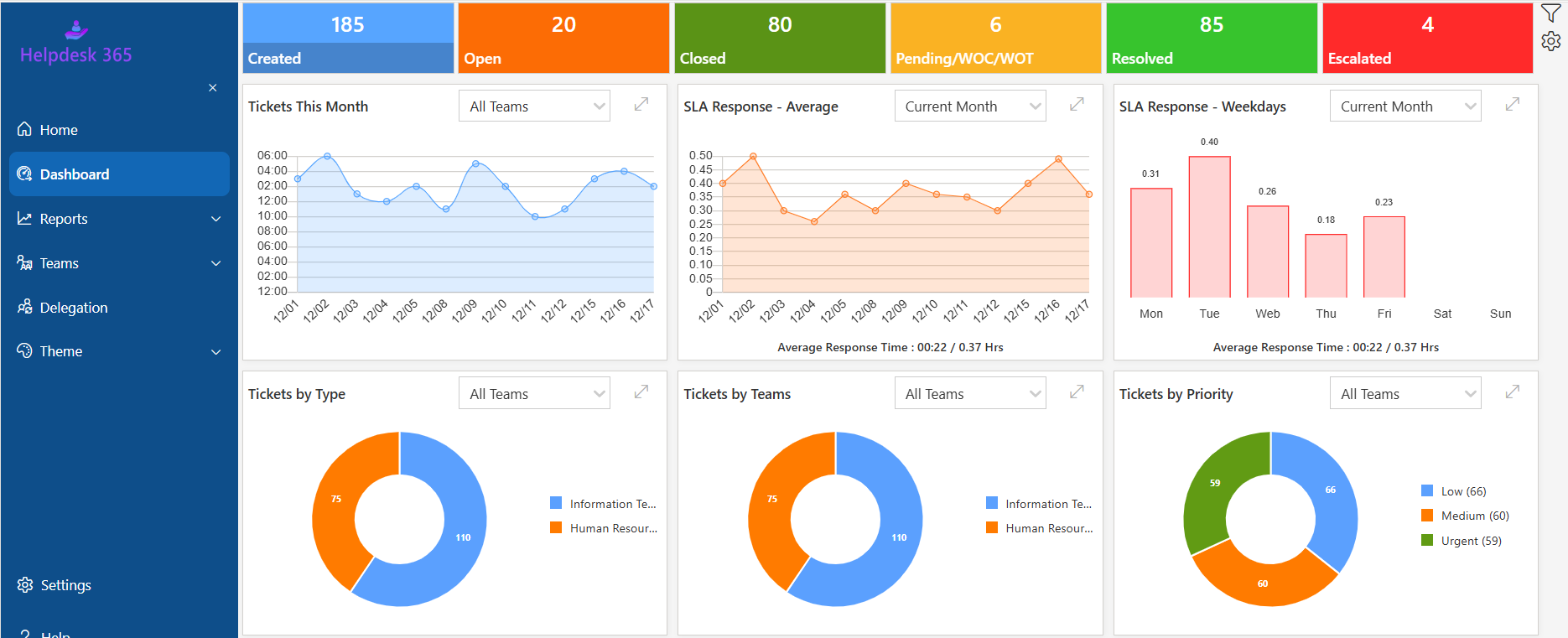
Helpdesk 365 is designed for organizations that want ticketing inside the Microsoft 365 environment. Microsoft’s marketplace and certification information describe it as a SharePoint and Microsoft Teams ticketing system for Microsoft 365.
Helpdesk 365 supports automated rules for ticket assignment, categorization, status updates, reminders, escalations, and SLA-risk notifications. Its published feature documentation also describes custom workflows and time-based triggers for approvals and follow-ups.
For IT teams, the practical value is the combination of visibility and control:
- Centralized tickets instead of requests scattered across messages.
- Routing based on department, priority, category, keywords, or other defined conditions.
- SLA monitoring with reminders and escalation before deadlines are missed.
- Self-service and knowledge options for repeat questions.
- Reporting on ticket volume, response, resolution, and team performance.
- Microsoft 365 context for organizations already working in Teams and SharePoint.
💼 If your service desk already works heavily in Microsoft 365, compare your current email or spreadsheet process with a HelpDesk 365 pilot using the same request categories and SLA rules.
Conclusion
Trouble Ticket Tracking Software works best when it creates one dependable operating record for support: what happened, who owns it, what matters most, when action is due, what the user was told, and how the issue ended.
The strongest platform is not the one with the longest feature page. It is the one that reduces lost work, manual routing, status chasing, repeat diagnosis, SLA surprises, and reporting effort without creating a new administration burden.
Start with the problems your IT team experiences every week. Map the current journey, define priority and SLA rules, identify security requirements, test real tickets, inspect reporting, and calculate total cost. Then choose the system your technicians can use consistently under pressure.
If your organization already works in Microsoft Teams and SharePoint and wants structured Ticket Tracking inside that environment, evaluate Sharepoint Helpdesk 365 against your real queues, request types, permissions, and service targets.
Evaluate HelpDesk 365 using three real support scenarios. Review how each ticket is created, routed, escalated, tracked, reported, and closed to confirm the workflow fits your IT operation.
Join Our Creative Community
Frequently Asked Questions
Is trouble ticket tracking the same as incident management?
Not exactly. Ticket tracking is the broader mechanism used to record and manage many kinds of support work. Incident management focuses specifically on restoring normal service after an interruption. A ticketing platform may track incidents, service requests, access requests, questions, problems, changes, or other work types.
What should every trouble ticket contain?
At minimum, record the requester, issue summary, description, affected service or asset when relevant, category, priority, status, owner, timestamps, communication history, SLA target, and resolution. Add fields only when they improve routing, diagnosis, approval, reporting, or compliance.
How many ticket statuses should an IT team use?
Use as few as your process can support clearly. Many teams can operate with five or six meaningful statuses. Too many statuses create reporting noise and inconsistent agent behavior. Add a status only when it changes ownership, work state, SLA timing, or requester expectations.
Can small IT teams benefit from Ticket Tracking?
Yes. Small teams often feel the pain first because one technician may handle support, devices, accounts, projects, and vendors at the same time. A simple queue, clear ownership, automated notifications, and searchable history can provide value even before ticket volume becomes large.
How do you know when email is no longer enough?
Email stops being enough when requests are lost, multiple technicians answer the same issue, users repeatedly ask for status, priorities are unclear, SLA commitments cannot be measured, approvals are hard to follow, or managers need reporting that requires manual spreadsheet work.
Which ticket tracking metrics matter most?
Start with ticket volume, backlog age, first-response time, resolution time, SLA compliance, reopen rate, requester satisfaction, and workload distribution. Then add category-specific metrics when they support a real decision. Avoid dashboards filled with numbers nobody uses.
Should AI automatically close support tickets?
Usually not without strong safeguards. AI can identify likely resolutions, draft closure notes, or suggest that a ticket appears complete. High-impact actions should follow clear rules and, where appropriate, human review. Incorrect automatic closure can hide unresolved problems and damage trust.


_JiluXJRGNl.svg)























