

How to Manage Critical Production Issues with Automated Support Workflows
_eH2jDg7dZ.png)
When a machine goes down on the shop floor, every minute counts. A single line stoppage can delay shipments, frustrate dealers, and put your reputation on the line. Yet many manufacturing support teams still manage these critical moments the old way, through shared inboxes, phone calls, and spreadsheets. By the time the right engineer sees the request, valuable time is already lost.
- Automated support workflows cut response time for line-down and breakdown tickets from hours to minutes.
- SLA-based escalation makes sure critical issues never sit unnoticed in a shared inbox.
- Custom fields and smart routing connect every ticket to the right engineer, machine, and history.
- Platforms like Helpdesk 365 turn scattered support requests into a single, trackable, audit-ready system.
Automated support workflows change this. They make sure the most urgent issues are seen, assigned, and acted on within minutes, not hours. In this guide, we will look at what critical production issues really are, why manual processes struggle to keep up, and how an automated support workflow, like the one built into Helpdesk 365, helps manufacturing teams respond faster, track every issue, and turn support data into real quality improvements.
What Are Critical Production Issues?
Critical production issues are problems that stop or slow down manufacturing operations, either at your own plant or at a customer’s site. They include a machine breakdown on the assembly line, a safety fault that halts work, a defective part that holds up an entire batch, or a dealer reporting that equipment has stopped working in the field.
What makes these issues “critical” is not just their technical severity, it is their business impact. A delayed spare part request is inconvenient. A line-down breakdown is expensive, and every hour of downtime can mean lost production, missed delivery dates, and an unhappy customer. Recognising which issues fall into this category, and treating them differently from routine queries, is the first step toward managing them well.
Why Manual Support Processes Fail Under Pressure
Manual support processes were never built for speed at scale. When requests arrive through email, phone calls, and dealer portals with no shared system, three things tend to happen.
First, urgent tickets get buried. A line-down email can sit unread in a crowded inbox next to a routine password reset request, with nothing to tell a support agent which one needs attention first.
Second, there is no clear ownership. Without automated routing, a ticket might bounce between departments, sales forwards it to service, service forwards it to engineering, while the customer waits for an update.
Third, there is no visibility for managers. If tickets live in personal inboxes or spreadsheets, a service manager cannot see, at a glance, which issues are open, which are close to breaching a deadline, or which regions are struggling the most. The result is slower resolution times, frustrated dealers, and quality data that never reaches the teams who could act on it. As your dealer network and product range grow, these manual gaps only get wider.
What Is an Automated Support Workflow?
An automated support workflow is a set of rules built into your helpdesk software that decides, without human intervention, how a ticket should be handled the moment it arrives. Instead of a person reading every email and deciding what to do next, the system does it for you.
A ticket that mentions “line down” or “machine stopped” is automatically marked as high priority. It is assigned to the correct on-call engineer based on region or product line. A timer starts, counting down against your service-level agreement. If nobody responds in time, the ticket automatically escalates to a senior engineer or manager.
The customer receives an instant acknowledgement, so they know their issue has been received, even before a human has replied. None of this requires extra staff, it requires the right rules, set up once, working in the background every time a critical issue comes in.
Key Components of an Automated Workflow for Manufacturing
A strong automated workflow for manufacturing support is built from a few key components working together.
SLA-Based Escalation
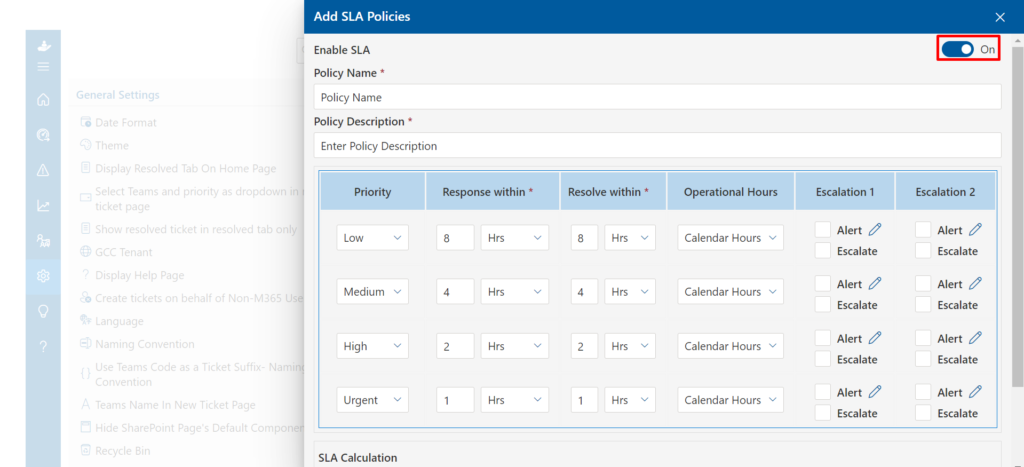
SLA-based escalation is the backbone of any critical issue workflow. You define how quickly different ticket types must be acknowledged and resolved, for example, a line-down breakdown might need a response within thirty minutes, while a spare-parts query can wait a few hours. The system tracks every ticket against its deadline automatically.
If a ticket is close to breaching its SLA, it escalates on its own, moving to a senior engineer, a manager, or a wider team, before the deadline is missed rather than after. This removes the guesswork and makes sure nothing critical is quietly forgotten.
Smart Ticket Routing
Smart ticket routing makes sure each request reaches the person best placed to solve it, without a manual handoff. Rules can route by keyword (“breakdown,” “urgent,” “line down”), by product line, by region, or by the custom fields captured on the ticket, such as machine model or plant location. A breakdown reported by a dealer in one region is sent straight to the field engineer covering that territory, not to a general queue where it has to be manually reassigned.
Omni-Channel Ticket Intake
Omni-channel ticket intake brings every request, email, phone, dealer portal, Microsoft Teams, and web forms, into one shared queue. This matters because critical issues do not always arrive through the same channel.
A dealer might call, a customer might email, and a field engineer might message on Teams. When all of these feed into a single system, nothing gets lost between channels, and every request is visible to the whole team, not just the person who happened to receive it.
Real-Time Cross-Team Collaboration
Real-time cross-team collaboration keeps everyone aligned once a ticket is open. Private internal notes let engineering, procurement, and service teams discuss a fix without cluttering the customer-facing conversation.
Ticket watchers let a plant manager or quality engineer follow a critical issue without taking it over. Approval workflows route decisions, like warranty replacements or emergency part shipments, to the right person automatically, instead of waiting for someone to remember to ask.
Step-by-Step: Building an Automated Workflow for Critical Issues
Setting up an automated workflow does not require a large IT project. Manufacturing teams can typically get a working system live in under a day, following five steps.
- Step 1 — Map your ticket types: List the categories your team deals with most, breakdowns, warranty claims, spare-parts requests, quality complaints, and general queries.
- Step 2 — Set your SLA policies: Decide how fast each ticket type needs a first response and a resolution. Be realistic, but bias toward speed for anything that stops production.
- Step 3 — Build your routing rules: Connect keywords, product lines, and regions to the right teams or individual engineers.
- Step 4 — Connect your channels: Link your support email, dealer portal, and Microsoft Teams workspace so every request flows into the same system.
- Step 5 — Test with real scenarios: Submit a mock line-down ticket and confirm it is prioritised, routed, and escalated correctly, then let it run.
See How Fast you Can Set up Automated Escalation for your Own Team
How Helpdesk 365 Helps Manufacturing Teams Respond Faster
Helpdesk 365 was built with exactly these workflows in mind for manufacturing support teams. Its omni-channel inbox pulls in email, dealer portal submissions, and Microsoft Teams messages into a single ticket queue, so nothing is missed regardless of how a customer reaches out.
Custom ticket fields capture machine model, serial number, plant location, and warranty status on every request, giving your team full context the moment a ticket is created. SLA timers with automatic escalation make sure production-critical tickets are pushed to senior engineers before a deadline is breached, not after.
Keyword-based routing detects phrases like “line down” or “breakdown” and instantly assigns the ticket to the right on-call field engineer. Because Helpdesk 365 integrates natively with Microsoft Teams, field engineers can view and update tickets directly from their phone or tablet while standing on the shop floor, without switching between apps. And every action is logged automatically, giving your quality team a clean, exportable audit trail for ISO 9001 reviews.
For manufacturing teams that need speed without added complexity, this combination turns a chaotic inbox into a dependable, trackable system.
Real-World Impact of Automation
Manufacturing teams that move from manual processes to automated workflows tend to see the change quickly. Teams using Helpdesk 365 report warranty claim resolution times dropping by up to 45 percent, and average first response on critical breakdown tickets falling to under one hour.
Support agents typically handle up to three times more tickets, simply because they are no longer manually sorting and forwarding requests. SLA compliance rates commonly reach 96 percent or higher once escalation rules take over from manual monitoring. These are not small efficiency gains, for a manufacturer, faster response on a line-down issue can directly protect a customer relationship and prevent a costly production delay from turning into a lost contract.
Best Practices for Managing Production-Critical Tickets
A few habits separate teams that get real value from automation from those that set it up and forget it.
- Review your SLA targets every quarter, since production schedules and dealer expectations change over time.
- Keep your routing rules updated as your team grows or your regions shift, so tickets never default to a person who has moved roles.
- Use the custom fields you capture, machine model, defect type, plant location, to build reports your quality and engineering teams actually use.
- Close the loop with dealers and customers through short satisfaction surveys after every ticket.
Common Mistakes to Avoid
Some common mistakes can quietly undermine an otherwise strong workflow.
- Treating every ticket as equally urgent defeats the purpose of prioritisation, if everything is marked critical, nothing really is.
- Setting up rules once and never revisiting them causes routing to drift out of date as staff and territories change.
- Ignoring the reporting side of your helpdesk means recurring product defects go unnoticed until they become expensive problems.
- Relying on a tool that does not connect to channels your team actually uses, like Microsoft Teams for field engineers, forces people back into manual work-arounds.
Conclusion
Critical production issues will always happen, but how fast your team notices, assigns, and resolves them is within your control. Automated support workflows replace guesswork and buried emails with SLA-driven escalation, smart routing, and a single shared view of every open issue.
Platforms like Helpdesk 365 bring these capabilities together specifically for manufacturing support teams, connecting dealer portals, email, and Microsoft Teams into one system that never lets a line-down ticket slip through the cracks. The teams that make this shift are not just resolving issues faster, they are turning every support ticket into data that helps prevent the next one.
Join Our Creative Community
Frequently Asked Questions
How quickly can a manufacturing team set up an automated support workflow?
Most teams can configure ticket categories, SLA rules, and routing within a single business day, with no dedicated IT project required.
Does automation replace the need for skilled support engineers?
No. Automation handles routing, prioritisation, and escalation so the right engineer sees the right ticket immediately — the technical expertise still comes from your team.
Can automated workflows help with ISO 9001 compliance?
Yes. Systems like Helpdesk 365 log every action automatically, creating a tamper-proof audit trail that is ready for internal or external audits at any time.


_JiluXJRGNl.svg)























