

_mVFFaHUZhS.webp)
Managing employee time off sounds simple — until it isn’t. Missed approvals, messy spreadsheets, and unhappy teams can quietly drain your business’s productivity. That’s why picking the right leave management tool matters more than most HR leaders think.
- Time Off Manager 365 is built natively for Microsoft 365, SharePoint, and Teams, while PlanMyLeave operates as a standalone cloud application.
- Organizations using Microsoft 365 benefit from seamless Teams, Outlook, and SharePoint integration without requiring additional logins or external data storage.
- Time Off Manager 365 offers AI-powered insights, flat-rate pricing, and data residency within your own Microsoft 365 tenant for enhanced security and scalability.
- PlanMyLeave is a suitable option for smaller businesses with basic leave management needs, whereas Time Off Manager 365 is better suited for growing and enterprise teams.
Why Choosing the Right Leave Tool Is a Big Deal
Think about what happens when leave tracking goes wrong:
- Employees don’t know how many days they have left
- Managers approve overlapping vacations — leaving teams understaffed
- HR spends hours fixing errors in spreadsheets
- Compliance becomes a guessing game
77% of employees say workplace stress directly affects their productivity. Poor leave management is one of the leading causes of that stress — for both employees and managers.
Companies that use automated leave tools report up to 40% less time spent on HR admin tasks. That’s hours you could spend on hiring, culture, and growth.
So, the question isn’t just “which tool is prettier.” It’s: which tool will actually fix the problem, fit your workflow, and grow with your business?
PlanMyLeave: A Quick Overview
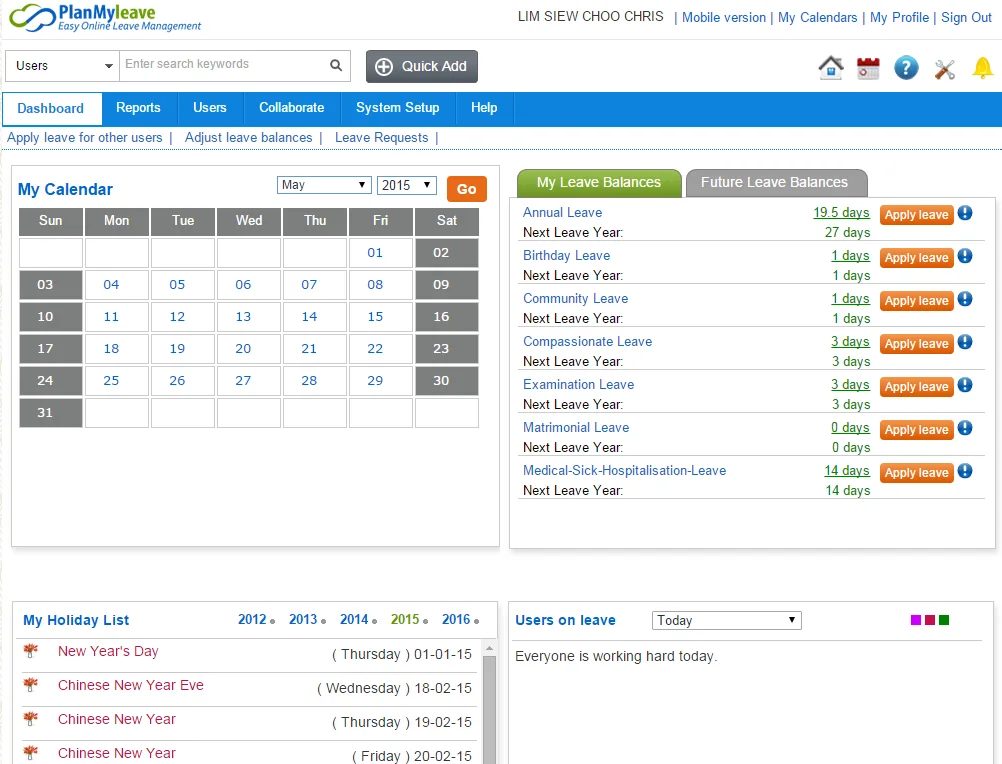
PlanMyLeave is a cloud-based leave management platform built for small to mid-sized businesses. It focuses on simplifying the leave request and approval process through an online portal.
What PlanMyLeave Offers:
- Web-based leave requests and approvals
- Customizable leave types and policies
- Multi-team and multi-location support
- Leave balance tracking and accrual management
- Basic reporting and calendar views
- Email notifications for approvals and rejections
- Public holiday management by country
G2 Ratings: 4.5/5 (4reviews)
However, PlanMyLeave operates as a separate, third-party cloud application. It is not built inside Microsoft 365 or SharePoint, which can create friction for teams already working within the Microsoft ecosystem.
Time Off Manager 365: A Quick Overview
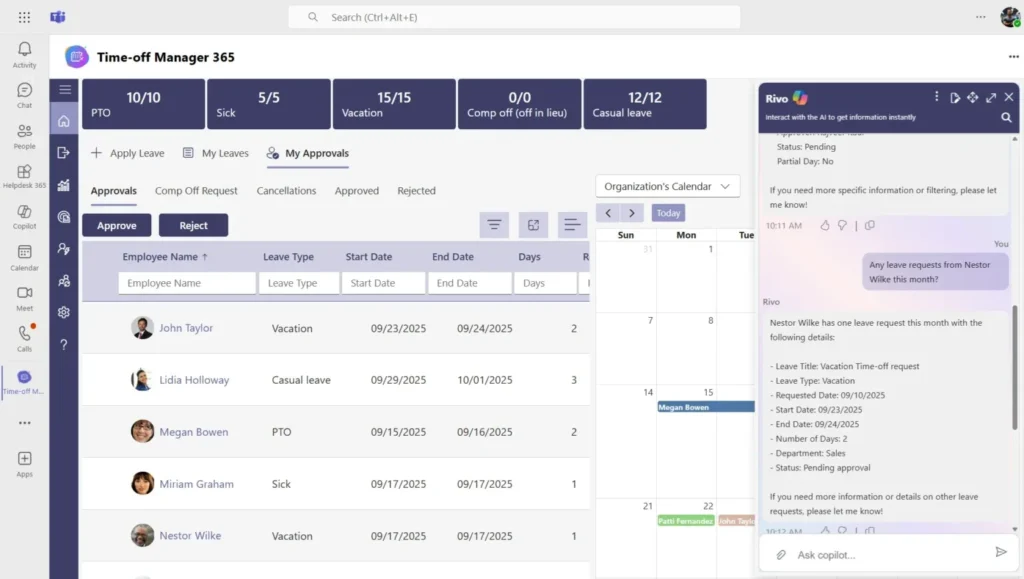
Time Off Manager 365 is a leave and absence management solution built natively inside Microsoft 365 — specifically for SharePoint and Microsoft Teams. It is designed for organizations that already use the Microsoft 365 suite and want their leave management to live inside that same environment.
What Time Off Manager 365 Offers:
- Full SharePoint integration — leave data lives in your own tenant
- Microsoft Teams app — request, approve, and track leave directly from Teams
- AI-powered insights and reporting
- Outlook calendar sync — time-off blocks appear directly in your calendar
- Accrual policies, carry-forward rules, and custom leave types
- Multi-department and multi-location management
- Role-based access controls
- Compliance-ready audit trails
- Mobile-friendly interface
G2 Ratings: 4.8/5 (330 Reviews)
🚀 Ready to See Time Off Manager 365 in Action?
Watch how it works inside SharePoint and Microsoft Teams — no setup required on your end.
PlanMyLeave vs Time Off Manager 365: Feature Comparison
Feature | PlanMyLeave | Time Off Manager 365 |
Microsoft 365 Integration | Limited | ✅ Deep Native Integration |
SharePoint Based | ❌ No | ✅ Yes – Built for SharePoint |
Microsoft Teams App | ❌ No | ✅ Yes – Manage from Teams |
AI-Powered Insights | ❌ No | ✅ Yes – Built-in AI |
Accrual Policies & Carry Forward | ✅ Yes | ✅ Yes |
Custom Leave Types | ✅ Yes | ✅ Yes |
Data Stored in Your Tenant | ❌ No (Cloud) | ✅ Yes – 100% Your Data |
The biggest difference? Time Off Manager 365 is built inside Microsoft 365. Your data stays in your own SharePoint environment — not in a third-party cloud server. For enterprise teams, that’s a significant security and compliance advantage.
Microsoft 365 & SharePoint Integration: Why It Matters
Here’s a stat worth thinking about as of 2024, Microsoft 365 is used by over 400 million paid seats worldwide. If your company is one of them, you already have the infrastructure Time Off Manager 365 runs on.
PlanMyLeave is a capable standalone tool, but it exists outside your Microsoft environment. That means:
- Separate login credentials for employees to remember
- Data stored in a third-party cloud — outside your IT control
- No native integration with Outlook, Teams, or SharePoint
- Additional costs or manual effort to sync data with your existing tools
With Time Off Manager 365, everything works inside the tools your team already uses every day:
- Employees submit leave requests directly in Microsoft Teams
- Managers approve or reject from within Teams — no separate app needed
- Approved leave automatically shows up in Outlook calendars
- All data stays securely in your own SharePoint tenant
- Your IT team maintains full control and visibility
For organizations that prioritize data security, compliance, and ecosystem consistency, this is not a minor detail — it’s a core reason to choose a Microsoft-native solution.
AI-Powered Features: A Look Ahead
Artificial intelligence is no longer a bonus feature in HR tools — it’s becoming a standard expectation. 65% of organizations are now regularly using AI in at least one business function.
PlanMyLeave currently focuses on core leave management features without built-in AI capabilities.
Time Off Manager 365 includes AI-powered insights that help HR leaders:
- Identify leave trends and peak absence periods
- Predict potential understaffing issues before they happen
- Generate automated compliance reports
- Surface actionable data to help with workforce planning
As HR teams are asked to do more with less, AI-assisted tools can save dozens of hours per month — and help leaders make smarter decisions faster.
Pricing Comparison: PlanMyLeave vs Time Off Manager 365
Pricing is always a key factor. Here’s how both platforms compare:
PlanMyLeave uses a per-user pricing model, which works well for very small teams but can become costly as your workforce grows. If you add 50 or 100 users, those per-user fees add up quickly.
Time Off Manager 365 offers flat-rate plans designed for growing teams, which means your costs stay predictable even as you scale. For larger organizations, this can represent significant savings over time.
Both tools offer a free trial, so you can test before committing. To see the full breakdown of Time Off Manager 365 plans, visit: apps365.com/sharepoint-time-off-manager-365/pricing
User Experience: What Real Users Say
Numbers from G2 tell a clear story:
- PlanMyLeave: 4.5/5 rating — based on 4 reviews
- Time Off Manager 365: 4.8/5 rating — based on 330+ reviews
More reviews mean more data points — and a 4.8 average across hundreds of users suggests consistent, repeatable satisfaction. Here are some themes that appear in Time Off Manager 365 reviews:
- “Seamless inside Microsoft Teams — our team barely noticed we switched.”
- “Setup was fast and support was excellent.”
- “Love that our data stays in our own SharePoint — IT team is very happy.”
- “The AI reports save us hours every month.”
PlanMyLeave users generally appreciate its simplicity and ease of setup, making it a reasonable option for small teams not embedded in the Microsoft ecosystem.
Who Should Use PlanMyLeave?
PlanMyLeave is a good fit for:
- Small businesses (under 25 employees) not on Microsoft 365
- Teams looking for a simple, no-frills leave tracking tool
- Organizations with basic leave policy needs
- Startups that want a quick, lightweight solution to get started
Who Should Use Time Off Manager 365?
Time Off Manager 365 is the better fit for:
- Companies already using Microsoft 365, SharePoint, or Teams
- Mid-to-large organizations that need scalable, flat-rate pricing
- HR teams that need AI-powered analytics and workforce insights
- IT-conscious organizations that require data to stay inside their tenant
- Enterprises with multi-department, multi-location leave management needs
- Teams that want a unified, integrated HR experience without extra logins
🚀 See How Time Off Manager 365 Fits Your Microsoft 365 Setup
Book a free, no-obligation demo and explore all features — live, with one of our product experts.
Implementation & Support: What to Expect
Getting a new leave tool up and running is only half the battle. Long-term support matters just as much.
PlanMyLeave:
- Standard cloud onboarding
- Email support available
- Help documentation and guides
- Setup is relatively quick for small teams
Time Off Manager 365:
- Onboarding inside your existing SharePoint environment
- Dedicated customer support team
- Step-by-step setup assistance
- Regular feature updates tied to the Microsoft 365 ecosystem
- Active user community and knowledge base
For enterprise buyers, having a responsive support team and a clear product roadmap is often as important as the features themselves.
Data Security & Compliance
Data privacy is not optional — it’s a legal and ethical requirement. This is one area where the two tools take very different approaches.
PlanMyLeave stores your employee leave data on its own cloud servers. This means your HR data leaves your organizational environment.
Time Off Manager 365 stores ALL data within your own Microsoft 365 / SharePoint tenant. Nothing leaves your environment. This makes it:
- GDPR-friendly for European organizations
- Easier to manage under HIPAA-adjacent policies
- Fully auditable by your internal IT and compliance teams
- Zero risk of data exposure from third-party breaches
For regulated industries — healthcare, finance, legal, education, government — this single difference can make Time Off Manager 365 the only viable option.
Conclusion: Which Tool Is Right for You?
Both PlanMyLeave and Time Off Manager 365 are legitimate leave management solutions. PlanMyLeave is clean, functional, and works well for smaller teams who don’t rely on Microsoft 365.
But if your business runs on Microsoft 365 — and most mid-to-large businesses do — Time Off Manager 365 offers a fundamentally different value proposition:
- Your data stays inside your SharePoint tenant
- Your team manages leave from within Microsoft Teams
- AI helps you make better workforce decisions
- Flat-rate pricing keeps costs predictable as you scale
- 330+ verified G2 reviews back up the real-world performance
For Microsoft 365 users, the answer is clear. Time Off Manager 365 doesn’t ask your team to change how they work — it enhances the tools they already love.
Join Our Creative Community
Frequently Asked Questions
Is Time Off Manager 365 only for large companies?
Not at all. Time Off Manager 365 has plans for teams of all sizes — from startups to enterprises. Its flat-rate pricing actually makes it very cost-effective for growing mid-sized businesses.
Does PlanMyLeave integrate with Microsoft Teams?
PlanMyLeave does not currently offer a native Microsoft Teams integration. Time Off Manager 365 is built specifically to work inside Teams and SharePoint.
Where is employee data stored in Time Off Manager 365?
All data is stored securely inside your own Microsoft 365 / SharePoint tenant. Apps365 does not store or access your HR data on external servers.
Can I try Time Off Manager 365 before buying?
Yes. A free trial is available. You can also book a live demo with a product expert to see all features in action before making any commitment.
Does Time Off Manager 365 support accrual policies and carry-forward rules?
Yes. The platform supports custom leave types, accrual policies, carry-forward rules, and holiday calendars — giving HR teams full control over leave policy configuration.


_JiluXJRGNl.svg)























