
Out of 12 Rota Tools? These 7 Free Tools Fix Scheduling (and Leave) in 2027

You’ve built the perfect rota. Then someone books a holiday you forgot about, two people swap shifts by text, and on Saturday you’re one person short with the doors about to open. Sound familiar?
- Free plans exist, but most cap users, locations or features.
- Leave visibility is the missing piece in most rotas.
- Hospitality teams get the most from shift-focused tools.
- Microsoft 365 teams can manage leave inside Teams.
Spreadsheets and WhatsApp groups only get you so far. Good staff rota software lets you build schedules in minutes, publish them to everyone’s phone and spot gaps before they turn into problems. Better still, several solid tools have free plans that suit small teams well.
We’ve compared seven of them, looking at what the free plans really include, where the limits kick in and what you’ll pay when you outgrow them. The first tool tackles the problem most rota tools miss: knowing who’s actually available before you schedule them. Whether you run a café, a care team, a retail shop or a busy office, there’s an option here that fits your team and your budget.
Quick Comparison: 7 Best Staff Rota Tools
Tool | Free Option | Best For | Starting Paid Price* |
Free trial | Leave-aware rotas in Microsoft Teams | $1.60/user/month | |
Connecteam | Free plan, up to 10 users | Frontline teams wanting an all-in-one app | ~$29/month (first 30 users) |
Homebase | Free plan, one location | Single-site hourly businesses | Per location/month |
Sling | Free plan | Simple, low-cost scheduling | ~$1.70/user/month |
7shifts | Free Comp plan | Restaurants and hospitality | Per location/month |
Zoho Shifts | Free plan, small teams | Businesses already using Zoho | Per user/month |
Findmyshift | Free plan, small teams | UK small businesses | Per team/month |
*Competitor prices are indicative and billed annually where noted. Always confirm on each vendor’s pricing page.
How to Choose the Right Staff Scheduling Software
- Count your users and sites. Free plans usually cap one or both, so check the limits against your headcount today and next year.
- Check how it handles leave. If holidays live in a separate spreadsheet, gaps will slip through. Look for leave integration or a dedicated tool like Time Off Manager 365.
- Test the mobile app. Your team will use it far more than you will, so it must be quick and simple on a phone.
- Look at your existing stack. Microsoft 365, Zoho or POS integrations save hours of double entry.
- Plan for growth. Compare paid tiers now so you’re not caught out when you hire employee number 11.
Key Benefits of Employee Staff Scheduling Software
- Time savings: reusable templates and auto-scheduling cut hours of weekly admin, freeing managers to focus on customers and coaching.
- Better coverage: live availability and leave data show gaps before they happen, so you’re not scrambling for cover on the day.
- Improved compliance: rest breaks, maximum hours and leave entitlements are easier to track, which helps you stay on the right side of working time rules.
- Lower admin costs: fewer manual changes and fewer payroll errors, because hours worked and leave taken are recorded in one place.
- Happier employees: staff see their shifts early, swap fairly and request time off from their phones, which builds trust in the rota.
- Useful analytics: labour-cost and absence reports help you plan smarter for busy seasons and quiet weeks alike.
Fair, predictable rotas also matter for morale. Gallup’s State of the Global Workplace 2025 report found global employee engagement fell to 21% in 2024, with low engagement costing an estimated $438 billion in lost productivity, so cutting last-minute shift chaos is worth the effort.
How We Picked These Tools
- A genuine free option: a free-forever plan rather than just a 14-day trial (our featured pick, Time Off Manager 365, offers a free trial).
- Core rota features: building shifts, publishing schedules, shift swaps and availability.
- Mobile access: because frontline staff don’t sit at desks.
- SMB fit: suitable for small and mid-sized businesses in the UK and worldwide.
We left out Deputy, When I Work, Planday, RotaCloud and Shiftbase because, at the time of writing, they offer free trials rather than free-forever plans.
What Is Staff Rota Software?
Staff rota software is a digital tool for creating, sharing and managing work schedules. Instead of emailing a spreadsheet, managers drag and drop shifts onto a calendar, and employees see their rota in an app, set availability and request swaps. Most staff scheduling software also handles time-off requests, clock-in/out and labour-cost forecasting, keeping rota, attendance and payroll data connected.
That time saving counts. Microsoft’s 2025 Work Trend Index reports that 80% of the global workforce say they lack the time or energy to do their work, and every hour a manager spends rebuilding a rota by hand is an hour taken away from leading the team.
Common Rota Mistakes (and How Software Fixes Them)
Even experienced managers fall into the same scheduling traps. Here are the ones we see most often, and how the right tool helps:
- Planning without leave data: holidays approved by email or on paper never make it onto the rota. Connecting leave tracking to scheduling means approved time off appears automatically.
- Publishing too late: rotas shared a day or two in advance leave staff unable to plan childcare, study or second jobs. Software makes it easy to publish weeks ahead and update changes instantly.
- Unfair shift distribution: the same people always get the late closes or weekend shifts. Reports on hours and shift types help you share the load fairly.
- Ignoring availability: scheduling people on days they can’t work leads to last-minute swaps. Letting employees set availability in an app prevents clashes before they start.
- Relying on group chats: shift swaps agreed in WhatsApp are easy to miss. In-app swap requests with manager approval keep everyone on the same page.
#1. Time Off Manager 365
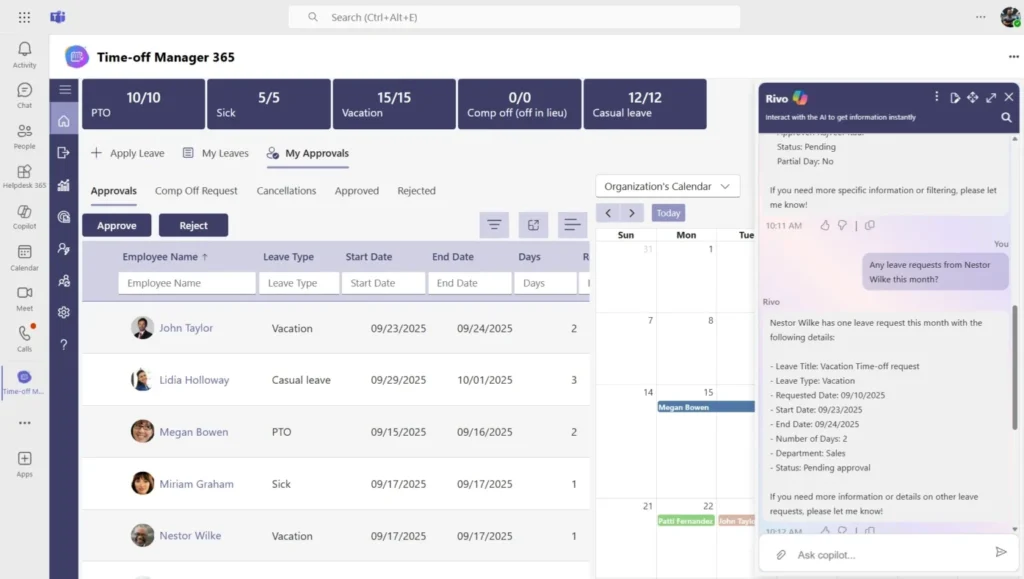
Time Off Manager 365 is a leave management and tracking tool built for Microsoft 365. Its AI agent lets employees submit leave requests and pull reports simply by chatting, with no forms to dig through. For rota planners, that means live absence visibility: you see who’s off before you publish a schedule, closing coverage gaps before they happen.
- AI agent for submitting leave requests and getting balance or absence reports through chat
- Native Microsoft Teams and SharePoint integration, with no separate app to learn
- Custom leave policies, accrual rules and multi-level approval workflows
- Team leave calendars that show absence alongside rota planning
- Absence reports for spotting patterns and planning cover
Best For: Microsoft 365 organisations that want leave-aware rotas and a simpler time-off process inside Teams.
Pricing: $1.60 per user per month, with a free trial available.
Good to Know: Because it lives inside Teams, there’s nothing new for staff to download or log into. It focuses on leave rather than shift building, so pair it with any rota tool on this list to give managers a single, reliable view of who’s available each week.
Why a chat-based AI agent? McKinsey’s January 2025 Superagency in the Workplace report found employees are three times more likely to be using gen AI for at least 30% of their work than their leaders imagine, so requesting leave by chat feels natural to most teams.
Still finding out about holidays after the rota’s published?
Let Time Off Manager 365 bring every leave request into Teams, so you plan shifts around real availability, not guesswork.
#2. Connecteam
Connecteam is an all-in-one app for deskless teams that combines scheduling, time clocks, communication and HR tools. Its drag-and-drop scheduler handles recurring shifts, open shifts and availability, and its free plan is unusually generous for micro-businesses with up to 10 staff.
- Drag-and-drop scheduler with templates and auto-scheduling
- Open shifts, shift swaps and availability
- GPS time clock and digital timesheets
- In-app chat, company updates and time-off requests
Best For: Small field and frontline teams that want scheduling plus communication in one app.
Pricing: Free Small Business plan for up to 10 users. Paid Operations Hub plans start from about $29/month for the first 30 users (billed annually).
Good to Know: The free plan is a great fit for micro-teams, but costs step up once you pass 10 users. Its wide feature set can feel like a lot if all you need is a basic weekly rota, so start with the scheduler and add modules as you grow.
#3. Homebase
Homebase is a favourite with hourly-worker businesses such as cafés, shops and salons. It combines scheduling, time tracking and team messaging, and its free Basic plan covers one location, making it a natural starting point for single-site businesses.
- Schedule builder with templates and availability
- Free time clock with timesheets
- Team messaging and automatic shift reminders
- Labour-cost visibility on paid tiers
Best For: Single-location hourly businesses such as cafés, retail shops and salons.
Pricing: Free Basic plan for one location (employee caps apply). Paid Essentials, Plus and All-in-one plans are charged per location per month.
Good to Know: Location-based pricing can work out cheaper than per-user tools for busy single sites with lots of part-timers. Multi-site businesses will need a paid plan for each location, so factor that in before you commit.
#4. Sling
Sling, owned by Toast, is a clean and simple scheduler whose free plan includes core scheduling and team messaging. Teams pick it up quickly, and paid tiers add labour-cost tools and time tracking at a low per-user price that suits growing businesses.
- Drag-and-drop scheduling with templates
- Availability, time-off requests and shift swaps
- Team messaging and a company newsfeed
- Labour-cost optimisation on paid plans
Best For: Budget-conscious teams that want simple scheduling without feature overload.
Pricing: Free plan available. Premium from about $1.70/user/month and Business from about $3.40/user/month (billed annually).
Good to Know: Sling’s free plan is one of the easiest ways to move a team off spreadsheets in an afternoon. Advanced labour-cost controls and time tracking sit on paid tiers, so expect to upgrade if you want tighter control of wage spend.
#5. 7shifts
7shifts is built specifically for restaurants, handling everything from shift scheduling to tip pooling. Its free Comp plan suits a single small site, while paid tiers add sales-based labour forecasting, POS integrations and deeper reporting for multi-site operators.
- Restaurant-focused scheduling with templates
- Shift trades, availability and time-off requests
- Team communication and shift feedback
- POS integrations and labour forecasting on paid tiers
Best For: Restaurants, bars and quick-service hospitality.
Pricing: Free Comp plan for one location with a limited number of employees. Paid Entrée, The Works and Gourmet plans are priced per location per month.
Good to Know: Its hospitality focus is its biggest strength and its main limitation: features like tip pooling and POS links are brilliant for restaurants but less relevant for offices, care settings or field teams.
#6. Zoho Shifts
Zoho Shifts is Zoho’s dedicated scheduling app, offering a free plan for very small teams and tight links to the wider Zoho suite. It covers the scheduling essentials cleanly and suits businesses already running payroll, CRM or HR on Zoho.
- Drag-and-drop shift scheduling with templates
- Availability, time-off and shift-swap requests
- Time clock and timesheets
- Integrations with Zoho People, Zoho Payroll and other Zoho apps
Best For: Small businesses already on the Zoho ecosystem.
Pricing: Free plan for small teams (user caps apply). Paid Standard and Premium plans are charged per user per month.
Good to Know: If you don’t already use Zoho, the integration advantage disappears, though it still works well as a standalone scheduler. Check the free plan’s user cap carefully, as it is aimed at very small teams.
#7. Findmyshift
Findmyshift is a long-running, UK-founded online rota planner that’s quick to set up in a browser or on mobile. It offers a free option for small teams and is a no-frills choice for managers who simply want to publish a clear rota fast.
- Online rota builder with copy-forward weeks
- Leave and availability tracking
- Timesheets and payroll exports
- Staff app with shift notifications
Best For: UK small businesses that want a straightforward, browser-based rota.
Pricing: Free plan for small teams. Paid plans are charged per team per month in GBP.
Good to Know: The interface is more functional than flashy, but that simplicity is the point for many managers. UK-based pricing in pounds also makes budgeting easier for British businesses avoiding currency swings.
Free vs Paid: When Should You Upgrade?
Free plans are a brilliant way to get started, and for many small teams they’re all you’ll ever need. But there are clear signs it’s time to move to a paid tier:
- You’ve hit the user or location cap. Growing past 10 staff or opening a second site is the most common trigger.
- You need labour-cost control. Forecasting wages against sales or budgets is usually a paid feature, and it can pay for itself quickly.
- Leave is getting complicated. Multiple leave types, accruals and approval chains outgrow basic time-off requests fast.
- You need integrations. Payroll, POS, HR or Microsoft 365 connections save hours of manual data entry each month.
The smartest approach is to start free, use the tool properly for a few months and upgrade only when a real limit starts costing you time or money.
Join Our Creative Community
Frequently Asked Questions
Is there truly free staff rota software?
Yes. Connecteam, Homebase, Sling, 7shifts, Zoho Shifts and Findmyshift all offer free plans, though expect limits on users, locations or advanced features.
What’s the difference between staff rota software and staff scheduling software?
Very little. “Rota” is the common UK term and “scheduling” is used more globally; both describe tools for planning and publishing shifts.
Can employee staff scheduling software handle holiday requests?
Most employee staff scheduling software logs basic time-off requests. For policies, accruals and approvals, a dedicated tool like Time Off Manager 365 gives far better control.
Why integrate leave management with my rota?
Because absence you don’t know about causes gaps. With integration, approved leave shows up as you build shifts, so you never schedule someone who’s off.
Does Time Off Manager 365 work with Microsoft Teams?
Because absence you don’t know about causes gaps. With integration, approved leave shows up as you build shifts, so you never schedule someone who’s off.