



















SharePoint IT Asset Management: Maximize IT Asset Value and Control
Managing IT assets manually through spreadsheets and disconnected systems often leads to lost equipment, rising maintenance costs, poor visibility, compliance risks and reduced operational efficiency. As organizations grow, tracking hardware, software licenses, warranties and asset performance become increasingly complex. Businesses need a centralized and automated solution that helps them monitor the complete asset lifecycle while improving productivity and reducing costs.
Maximizing the Value of IT Assets with SharePoint Asset Management allows businesses to efficiently track and manage assets using a centralized platform. SharePoint automates workflows, provides real-time visibility and enhances team collaboration, optimizing asset performance.
By automating the asset lifecycle, SharePoint ensures proper maintenance, compliance, security, reducing costs and extending asset lifespan. It helps businesses make informed decisions and maximize asset utilization.
SharePoint IT Asset Management provides organizations with a powerful way to streamline asset tracking, automate workflows, improve compliance and maximize the value of IT investments using the Microsoft 365 ecosystem. In this guide, we will explore how businesses can use SharePoint IT Asset Management software to optimize asset utilization, automate processes and improve decision-making across the organization.
What is SharePoint IT Asset Management?
SharePoint IT Asset Management is the process of using Microsoft SharePoint and Microsoft 365 tools to track, manage, monitor and optimize IT assets throughout their lifecycle from procurement to disposal. IT assets may include:
- Laptops and desktops
- Servers and networking equipment
- Software licenses and subscriptions
- Mobile devices
- Printers and peripherals
- Cloud infrastructure assets
A SharePoint-based IT asset management solution enables businesses to centralize asset information, automate workflows, monitor asset performance and maintain compliance using a secure and scalable platform. Unlike spreadsheets or disconnected systems, SharePoint provides real-time visibility into asset inventory, maintenance schedules, ownership records and lifecycle status.
Common IT Asset Management Challenges
Many organizations struggle with inefficient IT asset tracking processes that create operational and financial issues. Common challenges include:
- Missing or untracked IT equipment
- Inaccurate spreadsheet-based records
- Expired warranties and licenses
- Delayed maintenance schedules
- Software compliance risks
- Poor visibility into asset utilization
- Difficulty managing remote assets
- Lack of centralized asset information
- High replacement and maintenance costs
Without a centralized IT asset inventory management system, businesses risk unnecessary expenses, reduced productivity and compliance violations. This is where SharePoint IT Asset Management software delivers significant value.

Why Use SharePoint for IT Asset Management?
Centralized IT Asset Repository
One of the biggest advantages of SharePoint IT Asset Management is centralized asset tracking. SharePoint allows organizations to create a single source of truth for all IT asset data, including:
- Asset IDs and serial numbers
- Purchase and warranty details
- Assigned users and departments
- Maintenance history
- Software license information
- Vendor and procurement records
- Asset lifecycle status
With all information stored in one secure location, teams can quickly access accurate asset data without relying on scattered spreadsheets or manual processes.
Real-Time IT Asset Visibility
Real-time visibility is essential for effective asset management. SharePoint enables organizations to:
- Track asset status in real time
- Monitor asset availability and utilization
- View maintenance schedules
- Identify aging or underperforming assets
- Track asset movement across departments or locations
By improving visibility into IT infrastructure, businesses can make faster and more informed decisions regarding upgrades, maintenance and replacements.
Benefits of SharePoint IT Asset Management Software
1.Automated Asset Lifecycle Management
Managing the entire asset lifecycle manually is time-consuming and error prone. With SharePoint and Microsoft Power Automate, businesses can automate:
- Asset procurement workflows
- Approval processes
- Asset assignment
- Maintenance scheduling
- Software renewal reminders
- Warranty expiration alerts
- Asset retirement and disposal workflows
Automation reduces administrative effort, minimizes human errors and ensures assets are managed efficiently throughout their lifecycle.
Example: When a new laptop is purchased, SharePoint can automatically:
- Create an asset record
- Assign ownership
- Notify the IT team
- Schedule future maintenance reminders
- Track warranty expiration dates
2.Improved IT Asset Tracking and Inventory Management
SharePoint provides businesses with a scalable IT asset tracking software solution that improves inventory accuracy and control. Organizations can:
- Track hardware and software assets
- Monitor asset movement
- Manage remote employee devices
- Search and filter assets instantly
- Generate asset inventory reports
This helps businesses reduce asset loss, eliminate duplicate purchases and improve overall asset utilization.
3.Better Collaboration Across Teams
Effective IT asset management requires collaboration between IT, finance, procurement, compliance and operations teams. SharePoint improves collaboration by enabling teams to:
- Share asset-related documents
- Track service requests
- Manage maintenance tasks
- Collaborate through Microsoft Teams integration
- Access real-time updates
This centralized collaboration improves communication and ensures everyone works with the latest asset information.
4.Enhanced Compliance and Audit Readiness
Regulatory compliance is critical for modern businesses. SharePoint helps organizations maintain compliance through:
- Version control
- Audit trails
- Document management
- Permission-based access
- Automated record keeping
Businesses can maintain accurate records for:
- Software licensing
- Asset depreciation
- Maintenance logs
- Disposal documentation
- Procurement records
This simplifies audits and reduces compliance risks.
5.Improved Security for Asset Data
Protecting sensitive asset information is essential. SharePoint provides enterprise-grade security features, including:
- Role-based access control
- Multi-factor authentication
- Data encryption
- Automated backups
- Permission management
These features help organizations protect IT asset data while ensuring only authorized users can access sensitive information.
Automating IT Asset Lifecycle Management with SharePoint
- Automation is one of the most valuable capabilities of SharePoint IT Asset Management software.
- Organizations can automate every stage of the asset lifecycle.
Procurement and Asset Acquisition
SharePoint can automatically:
- Create asset records
- Store purchase information
- Track delivery status
- Notify stakeholders
This improves procurement visibility and reduces onboarding delays.
Asset Assignment and Tracking
Assets can be automatically assigned to:
- Employees
- Departments
- Locations
- Remote workers
Organizations gain better visibility into who is using each asset and where it is located.
Maintenance and Service Management
SharePoint can automate:
- Preventive maintenance schedules
- Service reminders
- Repair requests
- Upgrade notifications
This helps extend asset lifespan and reduce downtime.
Asset Disposal and Retirement
When assets reach end-of-life, SharePoint workflows can automate:
- Approval processes
- Data wiping confirmation
- Disposal documentation
- Recycling tracking
This ensures secure and compliant asset retirement.
Real-Time Reporting and Analytics
Modern organizations need actionable insights into asset performance. SharePoint integrates with Microsoft Power BI to provide detailed dashboards and reporting capabilities. Businesses can generate reports for:
- Asset utilization
- Maintenance costs
- Warranty status
- Depreciation tracking
- Software license usage
- Asset performance trends
These insights help organizations:
- Reduce unnecessary purchases
- Optimize asset allocation
- Improve budgeting decisions
- Extend asset lifespan
- Identify underutilized assets
Real-time analytics enable smarter and more strategic IT asset management decisions.
Why SharePoint is Better Than Spreadsheet-Based Asset Tracking
Many organizations still rely on spreadsheets for IT asset management, but spreadsheets create several limitations.

Spreadsheet Tracking | SharePoint IT Asset Management |
Manual updates | Automated workflows |
Limited collaboration | Real-time team collaboration |
High error risk | Centralized accurate data |
No automation | Automated lifecycle management |
Difficult reporting | Real-time dashboards and analytics |
Limited scalability | Enterprise scalability |
Weak security | Enterprise-grade security |
SharePoint provides a far more scalable, secure and efficient asset management solution for growing organizations.

Industry Use Cases for SharePoint IT Asset Management
- Healthcare: Track medical devices, software licenses and compliance documentation securely.
- Manufacturing: Monitor production equipment, maintenance schedules and asset utilization.
- Education: Manage laptops, classroom technology, and software subscriptions across campuses.
- IT Services: Track client-owned equipment, support contracts and remote devices.
- Government Organizations: Maintain secure and compliant asset tracking with audit-ready documentation.
Why Businesses Choose Asset 365
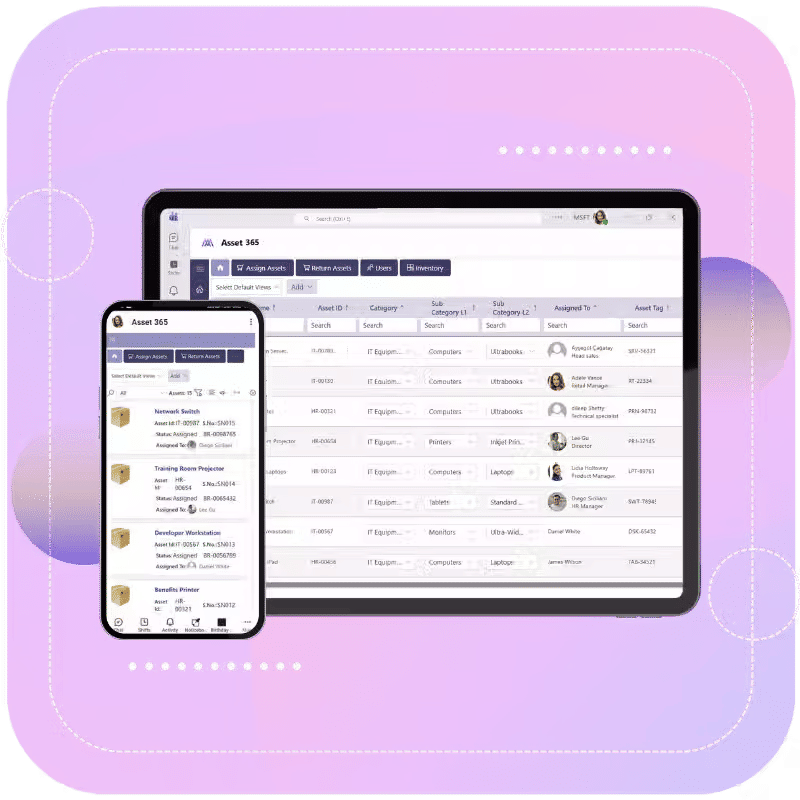
Asset 365 is a powerful SharePoint IT Asset Management solution designed to help organizations simplify and automate asset management inside Microsoft 365. With Asset 365, businesses can:
- Centralize IT asset tracking
- Automate asset lifecycle workflows
- Improve compliance management
- Monitor maintenance schedules
- Track warranties and licenses
- Generate real-time reports
- Improve asset visibility across departments
Built on SharePoint and Microsoft 365, Asset 365 delivers a scalable and secure enterprise asset management platform for modern organizations.

Conclusion
Managing IT assets efficiently is essential for reducing operational costs, improving compliance, and maximizing technology ROI. With SharePoint IT Asset Management, businesses can centralize asset data, automate lifecycle workflows, improve reporting and gain real-time visibility into asset performance. By replacing manual tracking systems with automated and scalable asset management software, organizations can improve productivity, extend asset lifespan, and make smarter business decisions.

Asset 365 provides a complete SharePoint-based IT asset management solution that helps organizations streamline asset tracking, automate workflows and optimize IT operations inside Microsoft 365. Whether you need better control over hardware inventory, software licenses, warranties or maintenance schedules, Asset 365 helps you manage your IT assets more efficiently.
Book a free demo today to see how Asset 365 can simplify and automate your IT asset management processes.

Join Our Creative Community
Frequently Asked Questions
What is SharePoint IT Asset Management?
SharePoint IT Asset Management is a system for tracking and managing IT assets using Microsoft SharePoint and Microsoft 365 tools.

Can SharePoint be used for asset tracking?
Yes. SharePoint can be customized to track hardware, software, warranties, maintenance schedules and asset ownership in a centralized environment.
What are the benefits of SharePoint asset management software?
- centralized asset tracking
- workflow automation
- improved compliance
- real-time reporting
- enhanced collaboration
- better security
How does SharePoint improve IT asset lifecycle management?
SharePoint automates procurement, assignment, maintenance, reporting and disposal workflows, helping organizations manage assets more efficiently.
Is SharePoint suitable for enterprise asset management?
Yes. SharePoint is highly scalable and supports enterprise-level asset tracking, automation, security and reporting capabilities.