
_aE0IuVLof.webp)

No matter if your business handles subscriptions, invoicing, billing, or CPQ (Configure, Price, Quote) activities, using the right software can help you work faster, avoid errors, and manage customer offers more smoothly.
- Quotation management software cuts manual work by automating pricing, approvals, and document creation.
- CPQ-enabled tools help sales teams close deals faster and generate more proposals every month.
- Businesses get better accuracy, consistency, and forecasting with one connected quoting workflow.
- Revenue 365 brings quotation handling into Microsoft 365, so pricing and approvals stay secure and connected.
In this article, you’ll learn why manual quotation methods often create problems, what quotation management software actually does, the important features to consider, the benefits it brings to your business, and practical ways to get better ROI from it.
Quotation management software is not just for creating quotes. It helps businesses organize pricing, approval workflows, and customer communication from one platform.
Companies of any size can use it to keep sales processes structured, monitor quote performance, and speed up deal closures.
What is Quotation Management Software?
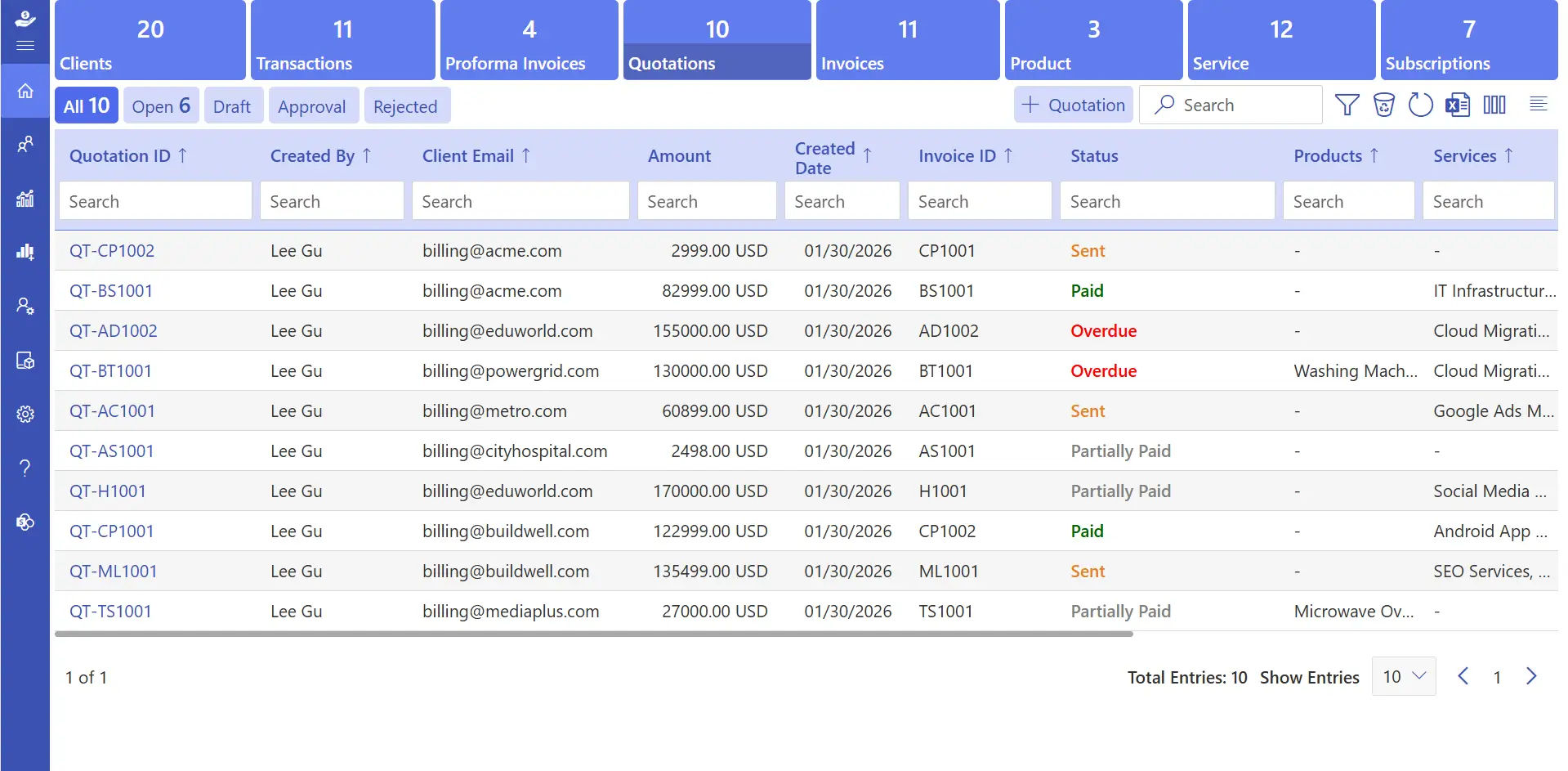
Quotation management software helps businesses create, manage, and send accurate quotes faster while reducing manual work and pricing errors. modern solutions work alongside a configure-price-quote engine to bring the entire quoting process into one platform.
Automates repetitive tasks
Pricing, approvals, and document generation happen without manual entry, so reps aren’t rebuilding the same quote structure every time a request comes in. This frees up hours that would otherwise go into copy-pasting old templates and double-checking numbers by hand.
Reduces pricing mistakes
Built-in rules apply consistent discounts and rates every time, which matters most when multiple people are quoting the same products across different deals. It removes the guesswork that usually creeps in when pricing logic lives only in someone’s head.
Improves customer experience
Quotes go out faster and look more professional, which shapes how prospects judge your business before a single call happens. A clean, quick quote often does more to build trust than a long sales pitch.
Keeps approvals visible
Sales teams can track status without digging through email, so nothing sits waiting on a manager who hasn’t seen it yet. Everyone involved can see exactly where a quote stands at any given moment.
📄 Want to send accurate quotes without the back-and-forth?
See how Revenue 365 handles configuration and pricing for your sales team.
Why Do Manual Quotes Fail for Growing Businesses?
Many businesses still rely on manual methods to create and send quotations spreadsheets, Word documents, or email threads to calculate prices, apply discounts, and communicate with clients.
Time-consuming work
Creating quotes manually takes hours, especially when products, pricing, or discounts change often and every version needs to be double-checked by hand. That time adds up fast once quote volume increases even slightly.
Inconsistent pricing and details
Different employees create quotes separately, so customers can end up seeing different numbers or terms for what’s meant to be the same offer. That inconsistency quietly damages trust before a deal even gets discussed.
Slow response to customers
Manual processes delay quotes by hours or days, and prospects comparing vendors often go with whoever answers first. Speed alone can be the deciding factor in a competitive deal.
Difficulty tracking quotations
Without a shared system, it’s hard to know what’s approved, pending, rejected, or expired, so important follow-ups quietly slip through. Deals can stall simply because no one remembered to check back in.
How Does Quotation Management Software Work?
You want to understand what happens behind the scenes before switching systems. Here’s the actual workflow, from the first request to a signed, converted quote.most quotation management platforms follow a similar flow, even if the interface looks different from vendor to vendor:
Product and pricing setup
Teams configure catalogs, pricing rules, and discount tiers once upfront, so every quote pulls from the same approved source instead of starting from scratch. This keeps pricing logic consistent no matter who builds the quote.
Quote generation
Sales reps select products and options, and the system calculates totals, taxes, and discounts automatically in the background. Reps spend their time on the conversation instead of the math.
Internal review
Quotes route through a structured sign-off process before reaching the customer, giving finance or management a chance to catch errors early. Nothing goes out the door without the right eyes on it first.
Delivery and tracking
The quote is sent to the customer, and its status updates in real time as it’s viewed, left pending, or approved. Sales teams know exactly when to follow up instead of guessing.
Conversion to invoice
Once accepted, the quote moves directly into billing without anyone re-entering the same details a second time. That single step removes a common source of billing errors.
What Features Should You Look for in Quotation Management Software?
Not every tool marketed as “quotation software” actually covers what your team needs. Here’s what genuinely separates a useful platform from a basic form builder.
According to the Aberdeen Group, businesses using CPQ software can shorten their sales cycle by 28% and create 49% more proposals per sales representative every month. Choosing software with the right features can improve productivity, accuracy, and customer experience.
Easy quotation creation
Add customer information, pricing, and products in a simple format, so reps can send a complete quote in minutes instead of piecing one together manually. The faster this step is, the faster deals move forward.
CPQ (Configure, Price, Quote)
Configure products and apply pricing rules automatically, which matters most for businesses with complex or tiered pricing models. It keeps every quote accurate even as product combinations get more complicated.
Invoice approval workflow
Managers or finance teams verify pricing and details internally, catching mistakes before they ever reach a customer’s inbox. This builds a layer of quality control into every quote sent out.
Custom invoice templates
Add your logo, brand colors, and custom fields to every document, so quotes look consistent no matter who on the team sends them. Branded documents also make your business look more established.
Customized quotations
Build in special pricing, discounts, or terms for specific customers without needing a separate template for each one. Flexibility stays intact even as automation handles the repetitive parts.
Smart tax management
Apply the right tax rate automatically based on product, service, or customer location, cutting down on manual calculation errors. This matters even more once you’re selling across multiple regions.
Multi-currency support
Generate quotes and invoices in different currencies with exchange rates that update automatically for international clients. It removes a common friction point in closing global deals.
Advanced reporting and insights
Track which quotes are converting, stalling, or getting rejected, so teams can adjust strategy based on real data. Patterns in quote performance become visible instead of anecdotal.
Curious how automated pricing rules protect your margins?
Explore how Revenue 365 handles tax and compliance for growing teams.
What Are the Benefits of Using Quotation Management Software?
You already know the feature list now you want the actual day-to-day payoff. Here’s what tends to change once a team moves off spreadsheets and onto software.
Quotation management software improves speed, accuracy, and overall sales efficiency. It reduces manual work and makes the quotation process easier for both teams and customers.
Faster customer response
Send quotes in minutes instead of hours, which keeps prospects engaged while they’re still actively comparing vendors. That speed alone can be the difference between winning and losing a deal.
Better pricing accuracy
Automatic calculations for totals, taxes, and discounts remove the guesswork that usually causes costly quoting mistakes. Fewer errors also means fewer awkward conversations correcting a quote after it’s sent.
Improved team collaboration
Sales, finance, and management stay connected on a single platform instead of chasing approvals through long email chains. Everyone works from the same version of the quote at all times.
Stronger revenue forecasting
Branded, clearly formatted documents build customer confidence before a deal is even finalized. First impressions from a quote carry more weight than most teams realize.
Centralized document management
Search past quotations and customer history instantly instead of digging through old folders or inboxes. This saves real time during renewals or repeat business.
Flexible customization
Adjust templates, pricing, and terms per customer without rebuilding a quote from scratch each time. Personalization and speed no longer have to be a trade-off.
Reduced manual workload
Automation frees reps to focus on selling and customer conversations instead of repetitive paperwork. That shift in time usually shows up directly in close rates.
Want real insight into which quotes turn into revenue?
Check out how Revenue 365 reports on sales performance.
How Much Does Quotation Management Software Cost?
Budget is usually the deciding factor once the feature comparisons are done. Here’s what actually drives the price up or down across different vendors.
Pricing for quotation management software typically depends on a few factors:
Number of users
Most vendors price per seat or per sales rep, so cost scales directly with how many people need quote-building access. Smaller teams naturally pay less until they need to add more seats.
Feature tier
Basic quote creation costs less than platforms bundling full CPQ, tax automation, and advanced reporting into one plan. It’s worth mapping your actual needs before paying for features you won’t use.
Integration needs
Tools built into ecosystems you already use, like Microsoft Teams and SharePoint, often cut down on separate setup and training costs. Fewer new logins usually means faster adoption across the team.
Customer volume
Some platforms scale pricing with the number of quotes or invoices generated each month rather than charging a flat rate. This matters more for businesses with seasonal spikes in quote volume.
Number of users
The real cost comparison isn’t just the subscription fee it’s weighed against the time saved on manual quote creation and the deals recovered from faster response times.
What Are the Best Practices for Creating Accurate Quotations?
Even the best software won’t fix a quote that’s poorly put together. Here’s what to get right every time, regardless of which tool you’re using.
- Clearly mention product or service details
Names, descriptions, specifications, and scope of work to avoid confusion and keep expectations aligned from the start. Vague quotes are one of the most common causes of back-and-forth clarification emails. - Provide accurate pricing details
Including discounts, taxes, and additional charges, to maintain transparency and prevent disputes later on. Customers are far more likely to accept a quote they fully understand upfront. - Add simple, clear terms and conditions
Payment terms, delivery timelines, and quotation validity so both sides know exactly what’s agreed. This avoids awkward conversations about expectations after the fact. - Use professional, branded quotation templates
With your logo and consistent formatting to create a stronger first impression. Consistency across every quote reinforces that your business runs smoothly. - Mention taxes, shipping, and extra charges separately
So the client can easily see how the total was calculated. Hidden costs discovered later are one of the fastest ways to lose trust. - Personalize quotations based on customer requirements
Including special pricing or tailored terms where it makes sense. A generic quote rarely lands as well as one that reflects the actual conversation. - Review and approve quotations carefully before sending
To catch calculation errors or incorrect product details. A single mistake here can undo the credibility built through the rest of the sales process. - Keep quotations organized and easy to read
So clients can make a decision quickly instead of asking for clarification. A confusing layout can slow down even a genuinely good offer. - Set a clear expiry date on every quote
So pricing doesn’t stay open-ended indefinitely and customers feel a natural reason to respond. This also protects your margins from outdated rates being honored months later.
Is Quotation Management Software Worth It for Small Businesses?
You’re not enterprise-size and don’t want to pay enterprise-size costs for software. Here’s how to figure out if it’s actually worth adopting at a smaller scale.
Small businesses often assume quotation software is overkill until quote volume picks up. A few signs it’s worth adopting early:
You send more than a handful of quotes a week
Manual tracking starts quietly costing real hours that could go toward selling instead. That time cost only grows as the business gains more customers.
More than one person creates quotes
Inconsistent pricing and formatting shows up fast, even with just two people building quotes independently. A shared system keeps everyone aligned without needing constant check-ins.
You're losing deals to slow response times
Competitors who quote faster often win the deal before your quote even goes out. Speed becomes a genuine competitive advantage once volume increases.
You already use Microsoft 365
A tool that lives inside that ecosystem avoids extra logins and keeps everything in one connected workflow. Adoption tends to be faster when the tool feels familiar from day one.
For small teams, the return usually shows up in hours saved per week and fewer pricing errors, rather than any single standout feature.
How Does Revenue 365 Help With Quotation Handling?
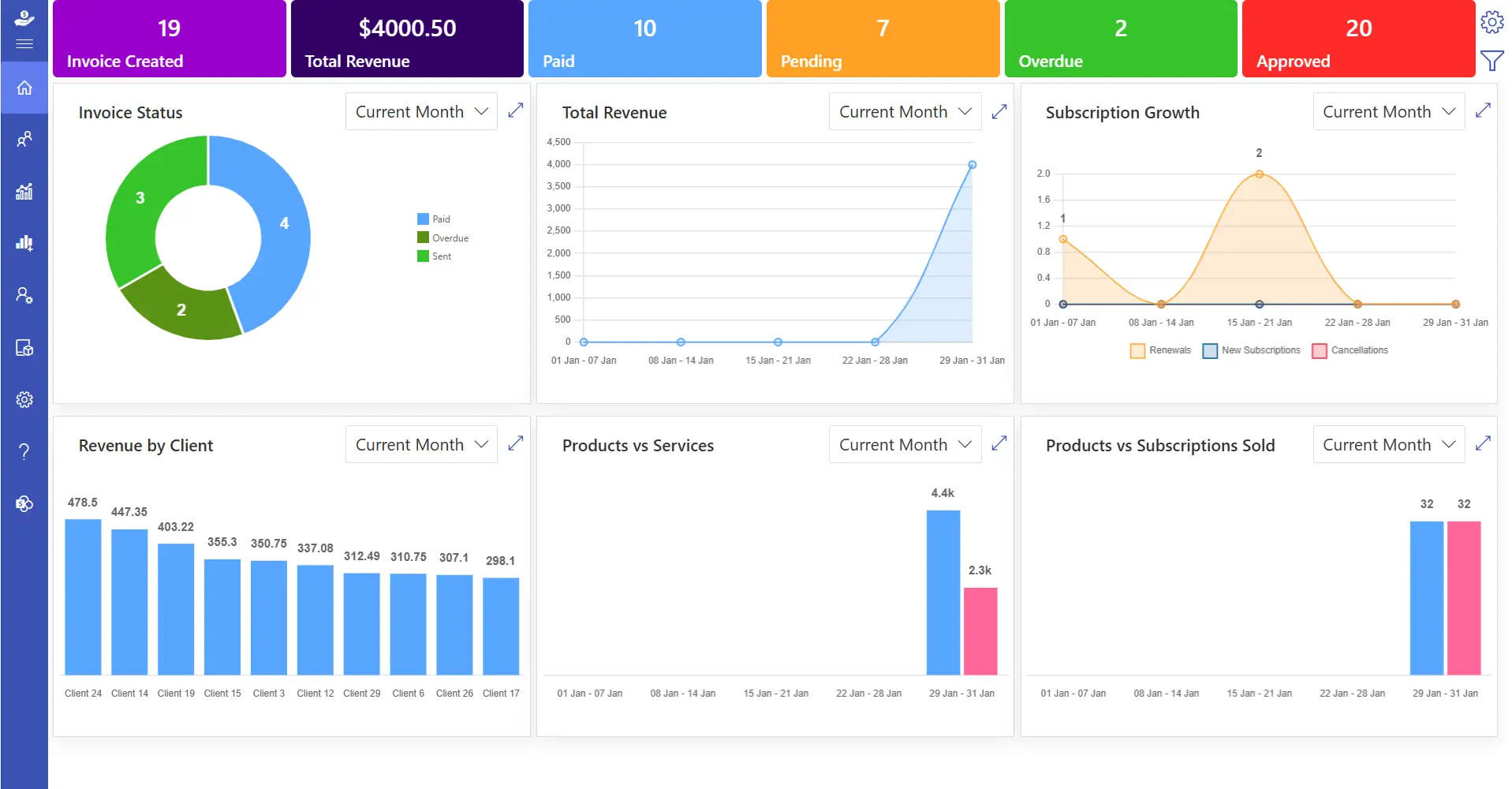
You’ve seen what the category offers broadly now here’s the specific fit. Built directly on Microsoft 365, not as a separate platform your team has to manage. It is built to make quotation management faster, simpler, and more organized for businesses that already run on Microsoft 365:
Enterprise-level security
Business information and customer data stay protected at every stage, from quote creation through final approval. This matters most for teams handling sensitive pricing or contract terms.
Microsoft Teams connectivity
Approvals and internal discussions on a quote can happen directly inside Teams, where sales and finance already collaborate. This cuts down on quotes getting stuck waiting on a scattered email thread.
SharePoint-based document storage
Every quote and related document lives in a structured, searchable location instead of scattered personal folders. Past quotes and customer history are always easy to pull up.
Power BI reporting
Quote performance, conversion rates, and revenue trends surface through familiar dashboards rather than a separate reporting tool. Teams get insight without learning new software.
Automated repetitive tasks
Pricing, approvals, and document generation happen without manual re-entry, freeing reps to focus on the customer instead of paperwork. This is where most of the day-to-day time savings comes from.
Flexible customization
Businesses can generate customized quotations, update pricing, modify terms, and personalize templates based on client requirements without slowing down the sales process. Personalization doesn’t come at the cost of speed.
Conclusion
Modern businesses need a smarter way to manage quotations, pricing, approvals, and customer communication. Quotation management software reduces errors and improves overall sales efficiency.
Revenue 365 helps businesses simplify quotation workflows with automation, secure integrations, and flexible customization built for growing teams.
🚀 Ready to give your sales team a quoting process that keeps up with demand?
See what Revenue 365 can do for your pipeline.
Frequently Asked Questions
Is quotation software actually worth it for a small sales team, or is that overkill?
If you’re sending more than a few quotes a week, or more than one person is building them, it pays for itself pretty quick. The pricing mistakes alone add up faster than people expect.
What's the difference between quotation software and just CPQ?
CPQ is really the pricing/configuration engine it’s usually one piece inside a broader quotation management tool that also handles approvals, templates, and tracking.
Can I still customize quotes per customer, or does automation make everything generic?
You can still fully customize — special pricing, discounts, custom terms. The automation just handles the repetitive math and formatting so you’re not rebuilding a quote from scratch every time.
Does this stuff actually integrate with Outlook and Teams, or is that just marketing?
Depends on the vendor. Some tools are genuinely built inside Microsoft 365 rather than bolted on as a separate login worth checking before you buy.
How long does it usually take to get a team up and running on one of these tools?
Varies by platform, but tools built into ecosystems you already use tend to have a much shorter learning curve since the interface already feels familiar.
Will switching from spreadsheets to software mess up my existing pricing structure?
No most platforms let you import your current pricing and discount rules during setup, so you’re not starting from zero.


_JiluXJRGNl.svg)























