

Proactive Customer Service: Real Examples and Proven Strategies

Most customer service problems don’t start with a complaint. They start with a warning that goes unnoticed. By the time customers reach out, frustration has already grown, and support teams are racing to respond.
- Proactive customer service prevents issues before they affect customers.
- Proactive vs. reactive support: One prevents problems; the other resolves them.
- Early communication reduces confusion and repeat support requests.
- AI and automation help predict issues and improve support efficiency.
- Helpdesk 365 supports proactive service with AI, automation, and SLA tracking.
Proactive customer service helps businesses identify potential issues early, anticipate customer needs, and take action before problems escalate.
Let’s explore how practical examples and proven strategies can help your team stay one step ahead.
What Is Proactive Customer Service?
It means identifying potential needs, risks, or service problems and taking helpful action before customers ask for assistance. Instead of waiting for a complaint, teams use service data, planned schedules, feedback, and warning signals to share updates, prevent disruption, or offer guidance. The goal is not constant messaging. It is timely help that removes avoidable effort.
IT might warn employees about network upgrades. A software provider could report degraded performance before tickets arrive. HR might send new hires instructions before day one.
Proactive solutions customer service starts with a simple question: What will users struggle with next, and what can we responsibly do about it now?
Consider the difference between sending a vague reminder and sharing useful guidance. “Your software needs attention” creates concern. “Your VPN certificate expires Friday; follow these three steps before Thursday” creates a clear path forward. The second gives a clear deadline and action.
Proactive support also has limits. Teams cannot predict every incident, and alerts do not replace a working resolution process. They need reliable triggers and a path to support when advice fails.
Proactive vs. Reactive Customer Service
Proactive customer service acts before a user reports a problem; reactive customer service responds after the user makes contact. Proactive teams monitor warning signs, communicate expected changes, and prevent repeat issues. Reactive teams investigate reported incidents, answer questions, and restore service. Both approaches matter: prevention reduces avoidable disruption, while responsive support handles unexpected failures and individual needs.
Area | Proactive Customer Service | Reactive Customer Service |
Starting point | A signal, forecast, or known event | A complaint, question, or ticket |
Main goal | Prevent trouble or reduce its impact | Resolve the reported issue |
Typical action | Send an outage notice before users ask | Reply after users report the outage |
Success measure | Avoided repeat contacts and informed users | Response time and resolution quality |
Common risk | Excessive or inaccurate notifications | Delays, duplicate tickets, and frustration |
Imagine a payroll portal will be unavailable for maintenance on Saturday. A reactive team answers login complaints after staff encounter the outage. A proactive team announces the maintenance on Wednesday, explains the affected functions, and suggests completing urgent tasks beforehand.
The proactive approach does not make reactive support unnecessary. Unexpected errors still happen. Strong teams use incident history for prevention and early guidance for clearer support.
Importance of Proactive Customer Service
Customers rarely judge support only by how quickly a ticket closes. They remember the uncertainty before an answer arrives. Did anyone recognize the issue? Is their work affected? Should they try again, use another tool, or stop?
The gap between expectations and delivery is significant. Salesforce’s 2024 State of Service research found that 53% of customers wanted companies to predict their needs, but only 33% felt companies generally anticipated and addressed those needs. These are survey responses, not guaranteed results.
Internal IT faces the same challenge in a different form. Employees depend on devices, access, and shared systems. A missed warning about a password change can delay a meeting. An unclear maintenance notice can interrupt payroll or finance approvals.
Microsoft’s 2025 Work Trend Index reported interruptions every two minutes during core working hours among the high-volume users examined in its productivity signals. Repeated support requests make clear communication valuable.
Proactivity matters because it gives people more control. Even when a problem cannot be prevented, knowing what happened and when the next update will arrive lets users adjust their plans. Silence leaves them guessing, often creating more tickets than the original issue requires.
IT managers also see recurring failures. Instead of celebrating quick fixes to the same printer, login, or approval problem, they can ask why it keeps happening. That change in focus turns support history into an improvement plan.
Benefits of Proactive Customer Service
The main benefits of proactive customer service are fewer preventable tickets, less disruption, better trust, and clearer workload planning. Early warnings help users act before problems grow. Knowledge articles reduce routine questions. Targeted notifications prevent duplicate requests during outages. Support teams can then spend more time on complex issues instead of answering the same question repeatedly.
Fewer Repeated Support Requests
When fifty employees lose access to the same tool, fifty separate tickets rarely reveal fifty separate causes. One confirmed incident notice can explain the shared problem, provide a workaround, and direct users to a single source of updates. It reduces confusion without discouraging legitimate reports.
Faster Decisions During Disruptions
A service interruption creates two problems: the technical failure and the uncertainty around it. A clear announcement can tell finance staff to use an approved alternate process, or advise sales teams to postpone a data upload. People make safer decisions when they understand the impact.
Stronger Customer Trust
Trust grows when messages are accurate, consistent, and followed by action. Customers do not expect perfect uptime. They do expect teams to acknowledge issues and explain what happens next. An early, honest notice often serves users better than a confident but unsupported promise.
More Predictable Support Workloads
Maintenance reminders, onboarding instructions, and renewal alerts spread demand across time. Without them, hundreds of predictable questions can arrive on the same morning. Teams can prepare articles, assign owners, and reserve coverage for high-risk periods.
Better Employee Experience
Internal service quality affects productivity. New employees who receive access instructions before joining can spend their first morning working rather than searching for an IT contact. The same idea helps HR with policy changes and finance with expense deadlines.
More Useful Service Data
Proactive work creates measurable signals. Teams can track repeated ticket categories, notices sent, article usefulness, reopened cases, and user feedback. These measures show whether a communication actually reduced effort, rather than merely increasing the volume of messages.
However, reduced ticket volume is not always proof of success. Users might stop reporting problems because the process feels difficult. Pair operational metrics with satisfaction surveys and checks for unresolved issues.
How Helpdesk 365 Supports Proactive Customer Service
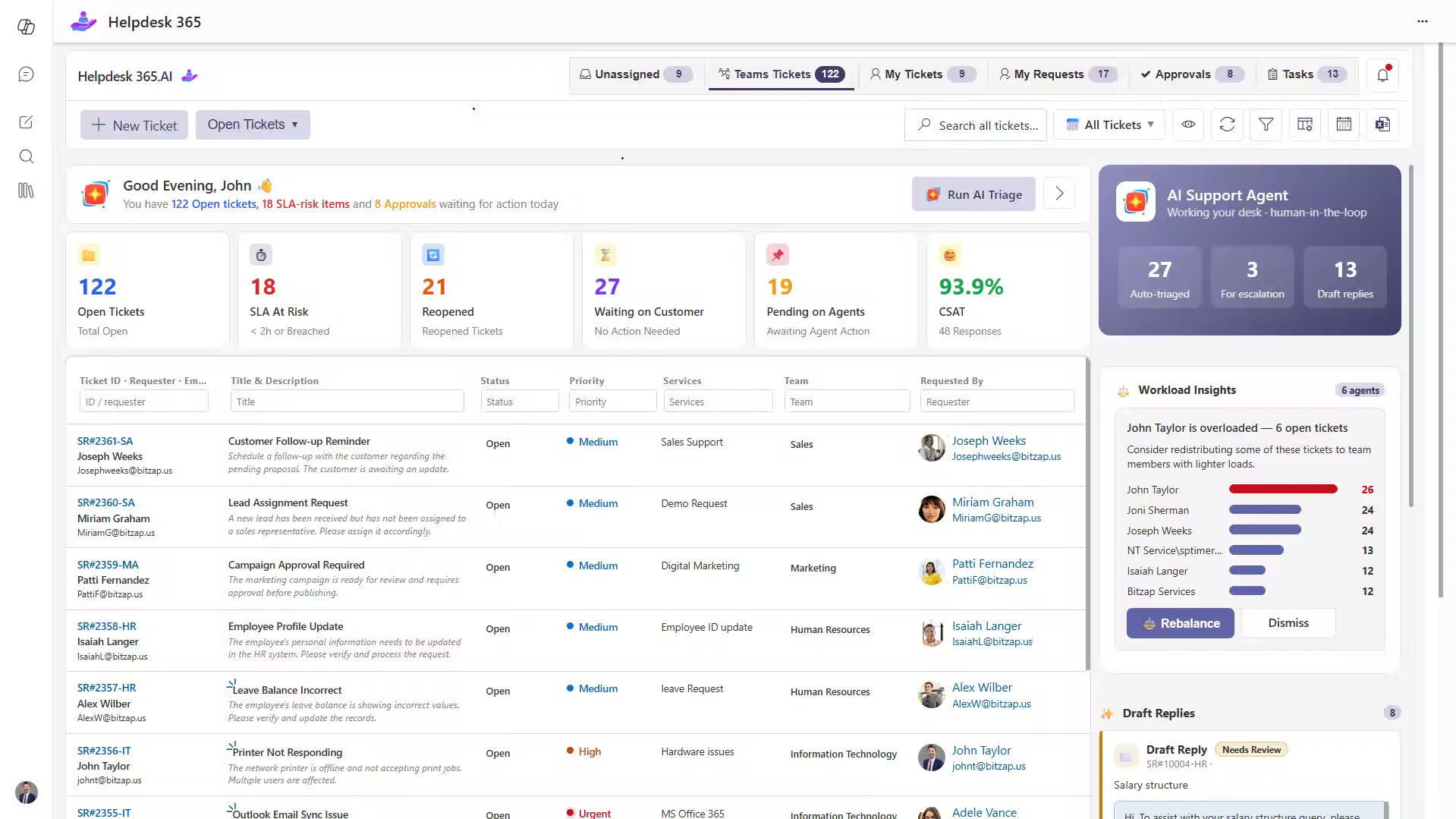
Teams cannot deliver consistent proactive support when requests sit across personal inboxes, chat messages, and disconnected spreadsheets. They need visibility into the problems people report and a reliable method for acting on patterns.
Helpdesk 365 is an AI-powered ticketing system built for organizations using Microsoft 365, SharePoint, Outlook and Microsoft Teams. It helps IT, HR, Finance, and other departments organize requests, automate routine steps, and keep responsibility clear.
Centralized Ticket Visibility
A shared ticket record helps teams recognize when separate complaints describe one wider issue. Agents can review categories, priorities, ownership, and history instead of relying on scattered messages. That makes repeated symptoms easier to spot and investigate.
Automated Routing and Notifications
Rules and AI-assisted routing can direct incoming requests to appropriate teams. Configured workflows can send status notifications, reminders, and escalations. For example, a ticket approaching its response target can reach the responsible owner before the deadline is missed.
SLA Management and Escalations
Service level agreement tracking helps managers identify tickets at risk of delay. Early internal alerts create time to intervene, reassign work, or give users an honest progress update. An SLA alert is not a promise that an incident will be resolved immediately.
Knowledge Base and Self-Service
A searchable knowledge base gives employees a clear place to find approved instructions. When recurring password, access, or setup requests appear, teams can turn verified resolutions into articles and share them before common deadlines.
Reporting and AI Assistance
Dashboards reveal ticket trends, response times, and service patterns. AI-assisted categorization, summaries, and suggested responses help agents review requests with context. External system monitoring and outage detection may still require separate tools.
For a Microsoft 365 organization, the practical advantage is consistency: support teams can recognize a pattern, assign an owner, communicate through established workflows, and measure what happens afterward.
Proactive Customer Service Examples
Proactive customer service works best when businesses identify potential issues and take action before customers experience major disruptions. Here are seven practical examples of how organizations can anticipate customer needs, reduce support requests, and improve service experiences.
1. Announcing a Software Outage Early
When an application starts experiencing login failures, waiting for employees to raise tickets can create unnecessary confusion. A proactive support team identifies the issue, informs affected users, shares available workarounds, and provides regular updates.
This reduces duplicate support requests, keeps employees informed, and helps them plan their work while the technical team resolves the issue.
2. Sending Password Expiration Reminders
Employees often realize their passwords have expired only when they cannot access important applications. This creates last-minute support requests and interrupts their daily work.
With proactive customer service, IT teams send automated password expiration reminders along with clear instructions for updating credentials. Employees can take action before losing access, reducing avoidable tickets and login-related disruptions.
3. Preparing Employees Before Their First Day
A new employee joins an organization but cannot access Microsoft Teams, email, or essential business applications. What should be an exciting first day turns into hours of waiting for IT assistance.
Proactive support teams coordinate with HR to prepare user accounts, devices, and access permissions before the employee’s joining date. They also share onboarding instructions in advance, helping new hires start work with fewer technical difficulties.
4. Informing Users About Scheduled Maintenance
Unexpected system downtime can interrupt business operations, especially when employees depend on critical applications to complete time-sensitive tasks.
Instead of waiting for complaints, support teams announce planned maintenance in advance, explain which services will be affected, and suggest alternative options when available. This gives employees enough time to complete urgent tasks and prepare for temporary service interruptions.
5. Preventing Recurring IT Issues
Imagine employees reporting the same printer or network issue every week. Resolving individual tickets may restore service temporarily, but the underlying problem remains.
A proactive IT team reviews historical ticket data, identifies recurring patterns, and investigates the root cause. By addressing the source of repeated failures, organizations can reduce unnecessary support requests and improve long-term service reliability.
6. Reaching Customers Before Subscription Renewal
Customers approaching subscription renewal may have unresolved questions about product usage, technical issues, or available features. Waiting until the renewal date to address these concerns can create dissatisfaction.
A proactive customer service team reviews previous support interactions and contacts customers before renewal. By addressing outstanding issues, sharing relevant guidance, and understanding customer needs, businesses can build stronger relationships and support informed renewal decisions.
7. Communicating Policy Changes in Advance
When organizations introduce new HR policies, expense procedures, or IT security requirements, employees may struggle to understand what has changed and how it affects their work.
Proactive support teams communicate upcoming changes early, provide step-by-step instructions, and answer common questions through knowledge base articles. This helps employees adapt to new procedures while reducing confusion and repetitive support requests.
How to Deliver Proactive Customer Service
Start with recurring problems, choose reliable warning signals, assign clear ownership, and contact only affected users. Give each notice a purpose, next step, and update time. Build an easy path to human support. Finally, compare results against a baseline, review incorrect alerts, and improve the workflow before expanding it to more services.
Step 1: Review Existing Ticket Patterns
Group the last few months of tickets by category, service, location, urgency, and repeat frequency. Look for avoidable peaks: account lockouts after holidays, device requests before onboarding, or access complaints after scheduled changes. Ask agents which issues generate duplicate explanations.
Step 2: Choose Signals You Can Trust
A useful trigger might be an upcoming expiry date, a scheduled maintenance window, a confirmed incident, or repeated reports about one application. Define who validates the signal. Do not treat an AI prediction as confirmed evidence without appropriate review.
Step 3: Match Each Signal to an Action
Write down what happens when the trigger appears. Options include sending an approved reminder, opening an investigation ticket, alerting an owner, publishing a knowledge article, or contacting a particular account. Use automation for dependable actions and human review for sensitive messages.
Step 4: Design the Communication
Answer five questions: What changed? Who is affected? What should they do now? What is the team doing? When will the next update arrive? Use simple language and the channels people already check. Provide a direct contact route for exceptions.
Step 5: Test With One Service
Begin with a common, low-risk issue such as onboarding preparation or maintenance reminders. Test delivery lists, permissions, timing, and links. Ask several users whether the guidance is understandable before launching it broadly.
Step 6: Measure Results and Improve
Compare tickets for the target issue before and after the change. Track notification accuracy, time to first update, repeat contacts, article completion, and customer satisfaction. Review unusual results: fewer tickets may reflect less confusion, but they may also hide reporting barriers.
Step 7: Expand Carefully
Once one workflow performs reliably, adapt it for other services. Keep a named owner for every rule, review triggers after major changes, and retire notices that no longer help. Good proactive support grows through evidence, not notification volume.
Best Practices for Proactive Customer Service
Contact the right people, not everyone. A delayed finance system should not trigger an organization-wide warning when only one region uses it. Segment audiences by application access, location, role, or subscription preference when those details are appropriate and accurate.
Make messages actionable. “We are aware” is a starting point, not a full update. Add confirmed impact, available workarounds, and the next communication time. When a fix is uncertain, say so instead of inventing a deadline.
Use a consistent incident rhythm. Atlassian’s incident communication guidance recommends early acknowledgment and regular updates at a cadence suited to the situation. Set that cadence by incident severity and audience needs, then meet it even when there is little new information.
Protect privacy and permissions. Avoid exposing another customer’s ticket details, sending confidential HR information to broad groups, or putting sensitive logs into unapproved AI tools. Follow organizational access rules and retain only necessary information.
Avoid alert fatigue. Repeated low-value notifications train users to ignore the next urgent message. Suppress duplicates, offer preferences where possible, and reserve high-priority channels for issues that truly need attention.
Close the communication loop. After resolution, confirm that service is restored, explain any remaining limitations, and link to a relevant article. For serious incidents, share what will change to reduce recurrence without disclosing sensitive security details.
Give users a voice. A proactive message must not block people from raising issues. Invite corrections, provide accessible contact options, and track cases that continue after the general fix. The most useful feedback often comes from users whose experience differed from the standard notice.
How AI Improves Proactive Customer Service
AI can help teams notice patterns and prepare responses earlier, especially when ticket volumes make manual review difficult. Its value comes from supporting human decisions, not pretending every forecast is certain.
Pattern recognition: AI-assisted categorization can group similar requests so service teams recognize clusters sooner. Managers still need to confirm whether the cluster reflects one incident or unrelated problems.
Ticket prioritization: Classification tools can highlight requests that appear urgent. Teams should define escalation rules and audit errors, particularly when a low-priority label could delay access to an essential service.
Suggested guidance: An assistant can surface relevant knowledge articles and draft clear responses using available ticket context. Agents should verify that instructions are current before sending them.
Early workload planning: Historical trends can suggest where demand may increase, such as during onboarding periods or software changes. Treat forecasts as planning inputs rather than guarantees.
Better follow-up: Automated summaries make it easier for the next agent to understand the history of an unresolved request. Consistent context reduces the need for users to repeat their story.
The risks deserve attention. Poor data can produce wrong predictions. Overconfident AI messages can spread misinformation quickly. Use approved data sources, human review for major notices, and audit logs for decisions that affect service access.
Conclusion
Proactive customer service is not about sending more alerts or claiming to prevent every failure. It is about noticing predictable trouble, communicating before uncertainty grows, and fixing causes that repeatedly waste people’s time.
Start with one recurring issue, define a trustworthy trigger, and create a useful action. Measure whether users feel better informed and whether the underlying problem becomes less disruptive. For Microsoft 365 teams, Helpdesk 365 can help organize tickets, automate follow-ups, and identify recurring patterns within everyday support workflows.
See how AI and automation can reduce recurring issues and improve proactive customer service.
Join Our Creative Community
Frequently Asked Questions
What is an example of proactive customer service?
An IT team informs employees about a confirmed system outage before many of them report it, explains the impact, shares a workaround, and commits to the next update. The service team reduces uncertainty while technicians work on restoration.
Is proactive customer service better than reactive support?
Neither replaces the other. Proactive support prevents predictable difficulties and gives early guidance. Reactive support solves unexpected or individual problems after someone asks. Strong teams connect both through incident records, knowledge articles, and feedback.
What are proactive solutions in customer service?
They are actions taken ahead of a likely customer need, such as renewal reminders, maintenance notices, onboarding checklists, self-service instructions, and early incident communication. Effective solutions address a verified risk and give users a practical next step.
How can IT teams measure proactive support?
Track repeat tickets for a specific issue, notification accuracy, first-update time, article usefulness, customer satisfaction, and recurrence after the fix. Compare results with a baseline and confirm that people can still report unresolved problems.
Can AI automatically prevent customer service issues?
AI can detect patterns, prioritize tickets, suggest responses, and support forecasts. It cannot guarantee prevention or replace system monitoring, technical repairs, and human judgment. Validate predictions before acting on them, especially when customer access or privacy is involved.


























