MSP Ticketing System: Complete Guide & 10 Best Tools for 2027

Managing IT support for several clients becomes difficult when requests arrive through emails, phone calls, and different support channels. Without a central system, technicians may miss tickets, delay responses, or struggle to meet client service agreements.
An MSP ticketing system helps managed service providers (MSPs) organize, track, assign, and resolve support requests across multiple clients. It also helps teams manage service-level agreements (SLAs), automate routine tasks, and keep clients informed.
- An MSP ticketing system helps service providers manage support requests across multiple client organizations
- Important features include ticket automation, client management, SLA tracking, reporting, and integrations
- PSA platforms combine ticket management with contracts, technician time tracking, and billing
- The best tool depends on your client count, existing IT tools, support workflows, and budget
Some MSP ticketing tools also connect support tickets with remote monitoring, time tracking, contracts, and billing. Popular options include HaloPSA, Helpdesk 365, ConnectWise PSA, Autotask PSA, and SuperOps.
In this guide, we compare 10 MSP ticketing systems for 2027, explain their key features, and help you find the right solution for your business.
What Is an MSP Ticketing System?
An MSP ticketing system is software that managed service providers use to record, manage, and resolve IT support requests from their clients.
Each support request becomes a ticket containing details such as the client’s name, issue type, priority, assigned technician, and current status.
Unlike a basic help desk, MSP-focused software is designed to handle requests from several organizations, often with separate client accounts, service agreements, and access permissions.
For example, imagine an MSP supporting 20 businesses. One client reports a network outage, another needs a password reset, and a third requests new software.
An MSP ticketing system brings these requests into a shared service desk, helping technicians identify urgent issues, track progress, and provide timely updates.
More advanced solutions connect tickets with monitoring alerts, contracts, and billing records, making them useful for daily MSP operations.
How Does an MSP Ticketing System Work?
MSP ticketing software follows a structured process from ticket creation to resolution.
- Ticket submission
Clients submit requests through email, a self-service portal, phone support, or supported chat channels.
The system records the issue as a ticket with the relevant client and contact details.
- Ticket categorization
The ticket is categorized by issue type, urgency, and service requirements.
For example, a server outage receives higher priority than a routine software installation.
- Automated assignment
The system routes the ticket to a suitable technician based on predefined rules, skills, or workload.
- SLA tracking and resolution
Technicians investigate the issue, record updates, and work toward the agreed response and resolution targets.
Escalation rules can notify managers when tickets are at risk of missing deadlines.
- Ticket closure and reporting
Once the issue is resolved, the ticket is closed and its history remains available.
MSPs can review response times, recurring problems, client satisfaction, and technician performance.
When connected to a PSA platform, recorded work can also contribute to client invoices.
MSP Ticketing System vs. Traditional Help Desk Software
Although both systems manage support requests, their purpose is different.
Feature | Traditional Help Desk | MSP Ticketing System |
Primary use | Support one organization | Support multiple client organizations |
Client management | Usually one organization | Separate client accounts |
SLA tracking | General support SLAs | Client-specific SLAs |
Remote monitoring | May require integration | Often connects with RMM |
Time tracking | Varies by product | Common in PSA platforms |
Billing | Usually separate | Often integrated with PSA |
Reporting | Team-level reporting | Client-level and service reporting |
A traditional help desk can work for simpler client support needs. However, MSPs managing separate contracts, billing rates, and IT environments often need a purpose-built MSP service desk or PSA solution.
7 Essential Features to Look for in MSP Ticketing Software
Before choosing a platform, consider the features that support your daily operations.
Multi-client ticket management
A multi-client ticketing system should separate client data while allowing authorized technicians to manage requests from one workspace.
Look for client-specific permissions, ticket views, workflows, and service settings.
Automated ticket management
Automation helps MSPs handle repetitive work without manually reviewing every request.
Useful capabilities include:
- Priority-based routing
- Status updates and notifications
- Escalation rules and scheduled reminders
SLA management
SLA management software helps MSPs meet promised response and resolution times.
Look for client-specific policies, working-hour settings, deadline alerts, and SLA performance reports.
Multi-channel ticket submission
Clients should be able to request support through familiar channels, such as email and self-service portals.
Some products also support Microsoft Teams, chat, and monitoring-generated tickets.
RMM and PSA integration
Remote monitoring and management (RMM) tools can detect device problems and generate tickets automatically.
PSA integrations can connect support activity with contracts, time tracking, and invoicing.
Reporting and analytics
Reporting helps MSPs understand ticket volume, technician workload, service quality, and recurring issues.
Client-level reports also support regular service reviews.
Security and access control
Look for role-based permissions, audit logs, secure authentication, and clear rules for separating customer information.
Choosing a Microsoft 365-based help desk?
Explore Helpdesk 365 to see its ticket management, SLA tracking, and automation features.
10 Best MSP Ticketing Systems for 2027
The following tools cover different needs, from complete PSA platforms to Microsoft 365-based ticket management and monitoring-connected service desks.
These comparisons are based on publicly documented capabilities available in November 2026. Features, plans, and pricing may change during 2027.
MSP Ticketing System Comparison Table
Tool | Best For | Standout Capability |
HaloPSA | Growing MSPs | Comprehensive PSA workflows |
Helpdesk 365 | Microsoft 365-focused support | Teams and SharePoint integration |
ConnectWise PSA | Established MSPs | Service dispatch and business management |
Autotask PSA | Datto ecosystem users | Contract-based service management |
SuperOps | Unified IT operations | Connected PSA and RMM |
Atera | Small and growing MSPs | RMM and PSA in one platform |
Syncro | Technician-based MSP operations | Ticketing, RMM, and billing |
ManageEngine ServiceDesk Plus MSP | Multi-client service desks | Account-specific configurations |
Rev.io PSA | Service providers needing billing | Ticket-to-invoice workflows |
MSP360 Tickets | Backup and RMM-focused MSPs | Automated monitoring alerts |
1. HaloPSA: Best for comprehensive MSP service management
Best for: Growing MSPs that need ticketing, contracts, and business operations in one platform
HaloPSA provides professional services automation tools for MSPs managing support requests, customer agreements, projects, and business workflows.
It connects ticket management with service-level agreements, asset information, time tracking, and reporting.
MSPs can use configurable workflows to manage different client requirements and maintain visibility across their support operations.
Key features
- Ticket management and workflow automation
- Client SLA and contract management
- Self-service portal and knowledge base
- Time tracking, reporting, and integrations
What to consider: Advanced configuration can require planning, especially when migrating from an existing PSA platform.
Why choose HaloPSA?
It is suitable for MSPs that want a broad PSA platform rather than separate tools for every business process.
Helpdesk 365: Best for Microsoft 365-based support teams
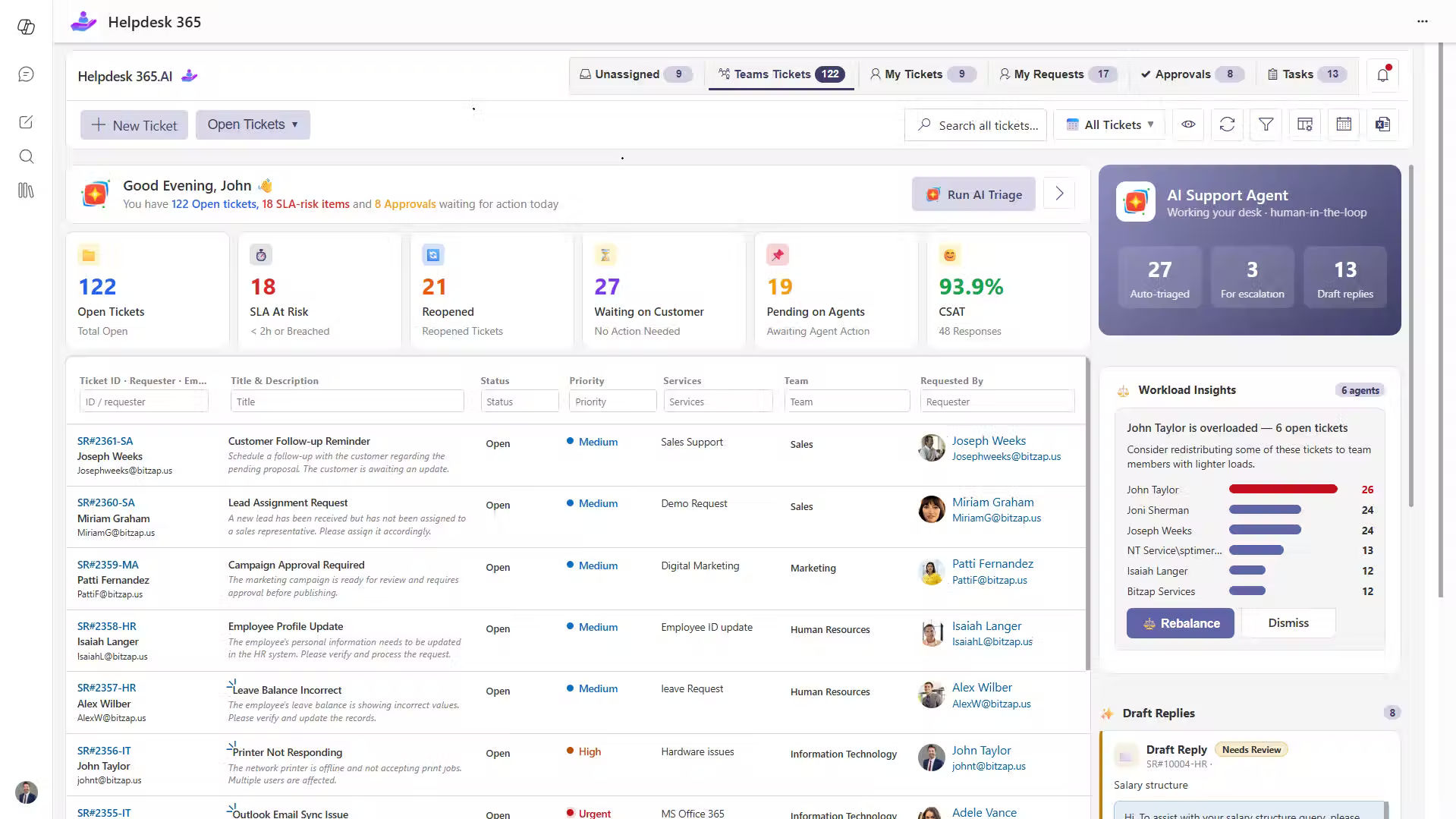
Best for: Microsoft 365-focused service teams that want ticket management within Teams and SharePoint
Helpdesk 365 is a SharePoint-based help desk solution that integrates with Microsoft Teams and other Microsoft 365 services.
It enables support teams to capture requests from email, Teams, and support portals in a centralized workspace.
With automated ticket assignment, SLA tracking, AI-assisted features, and reporting, teams can organize support requests and reduce routine manual work.
Its Microsoft 365-based approach is useful when clients and support staff already use Microsoft tools for daily communication.
Key features
- Ticket creation through Teams, email, and portals
- SLA tracking, alerts, and escalations
- AI assistance, knowledge base, and reporting
- Custom forms and approval workflows
What to consider: Helpdesk 365 is a Microsoft 365 help desk, not a complete MSP PSA platform. MSPs should confirm their requirements for separate client tenants, client-specific access, RMM integrations, contracts, and automated billing before selecting it.
Why choose Helpdesk 365?
It is worth considering when the main goal is to simplify Microsoft 365-based support instead of replacing an entire MSP business management platform.
ConnectWise PSA: Best for established managed service providers
Best for: MSPs managing larger support teams and complex client agreements
ConnectWise PSA combines help desk management with scheduling, time tracking, and service operations.
It collects support requests from different channels and helps technicians manage tickets across client accounts.
Its dispatch features support workload planning, while automated escalations help teams handle urgent requests.
Key features
- Multi-channel ticket management
- Technician scheduling and dispatch
- Automated ticket escalation
- Time tracking and service reporting
- PSA and RMM ecosystem integrations
What to consider: The range of functions may add configuration and training requirements.
Why choose ConnectWise PSA?
It supports established MSPs that need structured service delivery and connections between support work and business operations.
Autotask PSA: Best for Datto ecosystem users
Best for: MSPs using Datto RMM and contract-based support services
Autotask PSA helps managed service providers manage service tickets, customer contracts, technician activities, and billing.
It connects support requests to customer records and service agreements, making it easier to record work under the correct contract.
Integration with Datto products can help MSPs connect technical operations with service management.
Key features
- Service desk ticket management
- Customer contracts and billing rules
- Technician time entries
- Workflow automation
- Integration with Datto tools
What to consider: Contract and workflow configuration may take time for teams new to PSA software.
Why choose Autotask PSA?
It is a practical option for MSPs that already rely on the Datto ecosystem and need detailed service agreement management.
SuperOps: Best for unified PSA and RMM workflows
Best for: MSPs looking to connect endpoint monitoring with service desk operations
SuperOps combines professional services automation, remote monitoring, and ticket management.
Its ticketing features help technicians manage requests using client details and device information.
Automation rules, scheduled tickets, and runbooks help standardize recurring support tasks.
Key features
- Integrated PSA and RMM
- Device-aware ticket management
- Automated assignment and escalations
- Recurring ticket scheduling
- Runbooks and reporting
What to consider: Review endpoint-based pricing and available features against your device count and service needs.
Why choose SuperOps?
It is suitable for MSPs that want monitoring alerts and support workflows connected within one platform.
Atera: Best for small and growing MSPs
Best for: MSPs looking for ticketing and remote management in one interface
Atera provides RMM, ticketing, remote access, automation, and PSA capabilities.
Its MSP plans support client management alongside day-to-day IT support.
Technicians can manage service requests while accessing monitoring and device information, reducing the need to move between separate tools.
Key features
- Help desk and ticket management
- Remote monitoring and management
- IT automation and remote access
- Client management and billing
- Reporting and AI assistance
What to consider: Check the differences between MSP plans, AI products, and optional capabilities.
Why choose Atera?
It works well for MSPs seeking an integrated platform without building a large collection of separate tools.
Syncro: Best for technician-based MSP operations
Best for: MSPs managing many endpoints with a smaller technical team
Syncro combines ticketing, endpoint management, automation, and billing tools.
Technicians can manage service requests, review device information, and connect support work with invoicing processes.
Its per-technician pricing approach may appeal to providers managing a large number of client devices.
Key features
- Ticketing and help desk workflows
- RMM and endpoint management
- Billing and invoicing
- Remote access and scripting
- Customizable reporting
What to consider: Review plan limits, SLA capabilities, and pricing before choosing a subscription.
Why choose Syncro?
It offers a connected approach to support operations for MSPs that prefer technician-based software costs.
ManageEngine ServiceDesk Plus MSP: Best for multi-client service desks
Best for: MSPs needing detailed client-specific configurations
ManageEngine ServiceDesk Plus MSP is designed to deliver IT support to multiple organizations from one service desk.
It allows MSPs to maintain separate customer accounts with their own workflows, SLAs, assets, and support portals.
The platform also includes service contracts and billing capabilities.
Key features
- Multiple client account management
- Client-specific SLAs and workflows
- Self-service portals
- Asset and contract management
- Billing and service reporting
What to consider: Advanced account and process configuration requires careful setup.
Why choose ServiceDesk Plus MSP?
It is a strong fit when client separation and structured IT service management are major requirements.
Rev.io PSA: Best for ticketing and billing integration
Rev.io PSA: Best for ticketing and billing integration
Best for: MSPs and service providers that need to connect support activity with revenue
Rev.io PSA combines service desk ticketing with time tracking, customer information, and billing.
Its workflows help technicians manage tickets while recording the time and services delivered.
This is useful for businesses that charge customers based on service agreements or completed work.
Key features
- Centralized ticket management
- SLA-driven routing and escalation
- Technician time tracking
- Integrated billing and invoicing
- Reporting and service analytics
What to consider: Its broad PSA features may be unnecessary for organizations looking for a simple ticketing tool.
Why choose Rev.io PSA?
It is useful for service providers that want ticket activity, technician work, and invoices connected.
MSP360 Tickets: Best for backup and RMM-connected ticketing
Best for: MSPs already using MSP360 for backup or endpoint management
MSP360 Tickets provides ticket management within the MSP360 Management Console.
It allows technicians to create tickets manually or generate them from backup and RMM alerts.
Each ticket can be associated with a customer and device, helping technicians investigate issues with relevant technical context.
Key features
- Manual ticket creation
- Automatic tickets from backup and RMM alerts
- Customer and device association
- Technician assignment and ticket status tracking
- Internal ticket conversations
What to consider: It is a lighter ticketing solution than a full PSA platform. Confirm the availability of SLA, billing, and advanced workflow features before relying on them.
Why choose MSP360 Tickets?
It offers a straightforward option for MSPs that want ticket tracking within their existing monitoring and backup environment.
How to Choose the Best MSP Ticketing System
The best MSP ticketing system is not always the platform with the most features. It should match your support needs and business operations.
Review your client requirements
Start by identifying how many clients you support, the services you provide, and your average monthly ticket volume.
If clients require separate SLAs, reports, and portals, prioritize dedicated multi-client support.
Decide between help desk and PSA software
A help desk may be enough when your main requirement is organizing support requests.
Choose PSA ticketing software when you also need contracts, billable time tracking, service scheduling, and invoicing.
Check your existing integrations
Review your email system, Microsoft 365 tools, RMM software, accounting platform, and security applications.
Select software that connects with the systems your technicians already use.
Compare total costs
Consider more than the advertised subscription price.
Check:
- Per-agent, per-technician, or per-endpoint pricing
- Setup and migration costs
- Required add-ons and integrations
- Client and requester limits
- Support and training costs
Test the real support workflow
Use a product demo or trial to test how your team receives, assigns, escalates, resolves, and reports on tickets.
Check whether technicians can complete common tasks without unnecessary steps.
Evaluate future growth
Choose a system that can support more clients, technicians, and service requests without forcing major changes to your processes.
5 Best Practices for Implementing MSP Ticketing Software
Choosing the right tool is only the first step. A clear rollout plan helps your team use it effectively.
- Define ticket categories: Create consistent categories for incidents, access requests, hardware issues, and routine service tasks
- Set client-specific SLAs: Define response and resolution goals based on customer agreements
- Automate repetitive work: Start with ticket assignment, notifications, and escalation rules before adding complex workflows
- Create a knowledge base: Document solutions to common issues so technicians can resolve them consistently
- Monitor service performance: Review ticket backlog, first response time, resolution time, and SLA compliance regularly
Begin with a small group of clients, test the setup, and expand after resolving workflow problems.
Conclusion
An MSP ticketing system helps managed service providers organize client support, reduce manual work, and manage requests more efficiently.
The right solution depends on how your business operates.
HaloPSA, ConnectWise PSA, and Autotask PSA are suitable options for MSPs needing broad service management capabilities. SuperOps, Atera, and Syncro combine ticketing with remote monitoring, while Rev.io and ServiceDesk Plus MSP offer additional service management features.
For organizations focused on Microsoft 365 support, Helpdesk 365 provides ticket management, SLA tracking, workflow automation, and integration with Microsoft Teams and SharePoint. MSPs needing advanced multi-client PSA functionality should verify those requirements separately.
Want to simplify ticket management inside Microsoft 365?
See how your team can manage support requests with less manual effort.
Join Our Creative Community
Frequently Asked Questions
What is the difference between MSP ticketing and PSA software?
MSP ticketing focuses on managing support requests across clients.
PSA software goes further by connecting those requests with technician time tracking, contracts, projects, scheduling, and billing.
Many PSA platforms include ticketing as a core feature.
Can an MSP ticketing system manage multiple clients?
Yes. Purpose-built MSP ticketing systems allow service providers to manage several client organizations from one platform.
Many support separate client accounts, access permissions, SLAs, and reporting. Always verify how each product separates customer data.
Does MSP ticketing software replace RMM tools?
Not necessarily. Ticketing systems manage support requests, while RMM tools monitor and manage devices.
Some platforms combine both functions. Others require integrations to turn monitoring alerts into tickets.
What should I look for in a free MSP ticketing system?
Look for client management, ticket limits, access control, assignment rules, and reporting.
Also check whether SLA management, integrations, and billing require paid plans.
A free tool may be enough for basic ticket tracking but not for complex MSP operations.