
Meetings should help teams make decisions, solve problems, and move work forward. But without a clear agenda, meeting notes, or follow-up tasks, important discussions can easily lead nowhere.
The best meeting management software helps businesses plan meetings, organize agendas, record decisions, and track action items in one place. Some tools also use AI to create summaries, identify next steps, and reduce manual note-taking.
- Meeting management software helps organize agendas, minutes, decisions, and follow-up tasks
- The right tool depends on your meeting type, team size, and workflow
- Compare integrations, pricing, security, and essential features before choosing
- AI can simplify meeting summaries and action item tracking, but results need review
Whether you manage daily team meetings, project reviews, leadership discussions, or board meetings, choosing the right software can make a real difference.
In this guide, we compare 12 meeting management software tools for 2027, covering their features, strengths, limitations, and ideal use cases so you can find the best fit for your organization.
What Is Meeting Management Software?
Meeting management software helps teams organize and manage meetings from start to finish.
Instead of using separate tools for scheduling, agendas, meeting minutes, and follow-ups, businesses can manage these activities through a more connected process.
The software generally supports three stages:
- Before meetings: Schedule sessions, prepare agendas, invite attendees, and share documents
- During meetings: Record notes, track discussions, document decisions, and assign responsibilities
- After meetings: Share minutes, review action items, monitor deadlines, and prepare for the next meeting
Some platforms focus on the complete meeting process, while others specialize in video conferencing, AI meeting intelligence, or board governance.
The right choice depends on which part of your meeting process needs the most improvement.
12 Best Meeting Management Software Tools: Quick Comparison
The following comparison highlights the tools worth considering for different meeting needs.
Tool | Best For | Standout Capability |
|---|---|---|
Apps365 AI Meeting Intelligence Agent | Meeting insights | Decisions, sentiment, and attendee analysis |
Fellow | Team meetings | Shared agendas and AI notes |
Decisions | Microsoft Teams users | Agenda, minutes, and decision tracking |
MeetingKing | Meeting documentation | Agenda, minutes, and task tracking |
OpenProject | Project teams | Meetings linked to project tasks |
Microsoft Teams | Microsoft 365 organizations | Video meetings and Copilot recaps |
Zoom Workplace | Hybrid and remote teams | Video meetings and AI summaries |
BoardPro | Board meetings | Board packs and decision records |
OnBoard | Enterprise boards | Secure governance and approvals |
Granicus | Government meetings | Public agendas and transparency |
Tyler Meeting Manager | Public agencies | Agenda approvals and public minutes |
Intelex | EHS and compliance teams | Meeting records and audit trails |
12 Best Meeting Management Software in 2027
Explore the 12 best meeting management software tools for 2027, compared by features, ease of use, and team needs. Find the right solution to organize meetings, track action items, and improve productivity.
Apps365 AI Meeting Intelligence Agent: Best for AI meeting insights
Best for: Organizations that want to turn meeting conversations into actionable insights
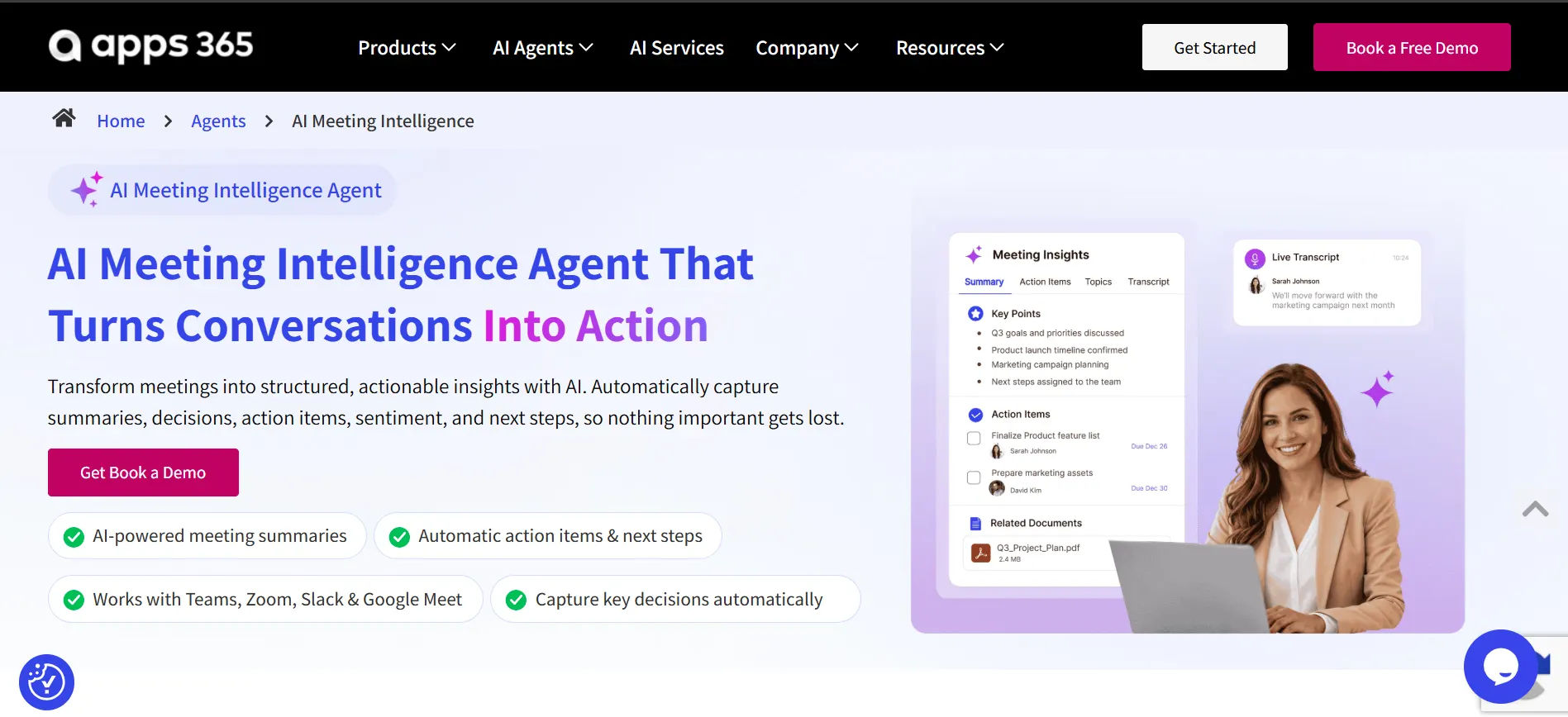
Apps365 AI Meeting Intelligence Agent helps businesses understand what happens during meetings and identify important outcomes.
Instead of reviewing long transcripts, teams can use AI-generated insights to understand decisions, responsibilities, discussion topics, and next steps.
Consider a project review where employees discuss delays, deadlines, customer concerns, and assigned work.
The agent can analyze the conversation and organize the key information into structured insights for follow-up.
Key features
- AI-generated meeting summaries
- Key decision and action item detection
- Meeting sentiment and topic analysis
- Attendee participation and engagement insights
- Identification of responsibilities and next steps
What to consider: This is a meeting intelligence solution rather than a complete agenda scheduling or board management platform. Supported integrations depend on configuration.
Why choose Apps365 AI Meeting Intelligence Agent?
It is useful for teams that already conduct meetings through tools such as Microsoft Teams, Zoom, or Google Meet and want deeper insights from their conversations.
Want to Turn Meeting Discussions Into Actionable Results?
Fellow: Best for shared agendas and team follow-ups
Best for: Teams managing recurring meetings, one-on-ones, and project discussions
Fellow helps teams prepare meeting agendas, take notes, and manage follow-up activities.
Participants can add discussion points before meetings, keeping conversations focused on important topics.
Its AI capabilities can also record conversations, generate summaries, and suggest action items. This makes it useful for managers who conduct several meetings each week.
Key features
- Collaborative meeting agendas and templates
- AI meeting notes, recordings, and summaries
- Action item creation and follow-up tracking
- Calendar and meeting platform integrations
What to consider: The free plan has limits on recording credits and note history. Advanced AI features may require paid plans.
Why choose Fellow?
Fellow is a good option for teams that want to improve meeting preparation and accountability without changing their existing video meeting platform.
Decisions: Best for Microsoft Teams meeting management
Best for: Microsoft 365 organizations that need structured meeting workflows
Decisions is designed to help organizations manage meetings within Microsoft Teams.
It supports the full meeting process, including agenda preparation, meeting notes, decision tracking, and follow-up activities.
For example, a leadership team can prepare an agenda, record important decisions during the discussion, and assign tasks afterward.
Key features
- Agenda builder with reusable templates
- Meeting minutes and decision tracking
- AI-generated meeting recaps
- Microsoft Planner and To Do task synchronization
What to consider: Decisions is most useful for teams already working within Microsoft 365. Feature availability depends on the selected plan.
Why choose Decisions?
It helps Microsoft Teams users manage formal meetings and follow-up work without relying on disconnected documents and spreadsheets.
MeetingKing: Best for meeting agendas and minutes
Best for: Businesses that need a simple way to document meetings
MeetingKing helps users prepare agendas, record minutes, and manage meeting tasks.
It follows a straightforward meeting workflow: prepare, meet, and follow up.
Teams can create agendas before a discussion, capture notes during the meeting, and send minutes afterward.
Its task management capabilities help participants keep track of their responsibilities.
Key features
- Meeting agenda and minutes templates
- Automated meeting document creation
- Meeting task tracking and reminders
- Searchable meeting history
What to consider: Teams looking mainly for advanced AI conversation analysis may need a separate solution.
Why choose MeetingKing?
MeetingKing is suitable for organizations that want structured meeting documentation without a complex setup.
OpenProject: Best for project meeting management
Best for: Project managers and cross-functional teams
OpenProject connects meeting management with project planning and task execution.
Users can create meeting agendas, assign responsibilities, document decisions, and link discussion points to project work.
For example, if a project team identifies a delay during a weekly review, the issue can be connected to a work package for follow-up.
Key features
- Structured and reusable meeting agendas
- Recurring meeting management
- Meeting minutes and decision documentation
- Integration with project work packages
- Meeting history and PDF exports
What to consider: Organizations that only need basic video meetings may find its broader project management capabilities unnecessary.
Why choose OpenProject?
OpenProject works well when meetings are closely connected to project milestones, responsibilities, and ongoing tasks.
Zoom Workplace: Best for remote and hybrid meetings
Best for: Distributed teams and organizations hosting online meetings
Zoom Workplace provides video meetings and collaboration features for remote and hybrid teams.
Its AI Companion capabilities can generate meeting summaries, highlight important discussions, and suggest next steps.
Teams can use these summaries to review conversations without watching full recordings.
Key features
- HD video meetings and screen sharing
- AI-generated meeting summaries
- Meeting recordings and searchable information
- Team chat and collaboration features
- AI-supported task recommendations on eligible plans
What to consider: Advanced AI features may require paid plans, and availability varies by account and region.
Why choose Zoom Workplace?
Zoom is useful for organizations that prioritize reliable online meetings and want AI assistance to reduce post-meeting work.
BoardPro: Best for board meeting management
Best for: Small and growing boards, nonprofits, and leadership committees
BoardPro helps organizations manage formal board meetings, documents, decisions, and responsibilities.
Administrators can prepare meeting agendas, organize board packs, record minutes, and maintain decision records.
This reduces the need to manage board documents through separate emails and files.
Key features
- Board agenda and document management
- Structured meeting minutes
- Decision registers and action tracking
- Digital approvals and voting on eligible plans
- Secure document access
What to consider: BoardPro is designed for board governance rather than everyday team meetings.
Why choose BoardPro?
It provides a structured meeting process for organizations that need clear records and reliable follow-up on board decisions.
OnBoard: Best for enterprise board governance
Best for: Large organizations managing board and committee meetings
OnBoard is a board management platform that helps organizations handle meeting preparation, governance documents, and formal decisions.
Its tools support agenda building, board book creation, secure communication, and meeting minutes.
Administrators can also manage approvals and monitor action items across meetings.
Key features
- Board meeting agenda builder
- Digital board books and annotations
- Meeting minutes and task management
- Electronic signatures and approvals
- Governance and engagement analytics
What to consider: The platform may be more than a small team needs for routine internal meetings.
Why choose OnBoard?
OnBoard fits organizations that need stronger document control, structured approvals, and secure collaboration for executive or board meetings.
Granicus: Best for government meeting management
Best for: City councils, municipalities, and public agencies
Granicus helps government organizations manage public meeting agendas, documents, and meeting records.
Public agencies often need to share meeting information with citizens while maintaining organized internal approval processes.
Granicus supports these needs through agenda management, meeting minutes, and public access capabilities.
Key features
- Public meeting agenda preparation
- Automated approval workflows
- Meeting minutes management
- Video streaming and meeting records
- Public access to agendas and documents
What to consider: Its government-focused capabilities may not be necessary for private businesses managing internal meetings.
Why choose Granicus?
It is useful for public organizations that need structured meeting processes and easier access to public information.
Tyler Meeting Manager: Best for public meeting administration
Best for: Local government offices, school boards, and public committees
Tyler Meeting Manager helps public organizations organize meetings from agenda preparation through public posting.
Users can schedule meetings, collect agenda items, manage documents, and prepare minutes.
Its approval workflows help teams review meeting materials before publication.
Key features
- Meeting scheduling and agenda planning
- Document storage and version control
- Agenda review and approval workflows
- Meeting minutes generation
- Public meeting information sharing
What to consider: The platform focuses on public-sector administration rather than general workplace collaboration.
Why choose Tyler Meeting Manager?
It is a strong option for public agencies that want to replace manual meeting preparation with a more organized digital process.
Intelex: Best for compliance-focused meetings
Best for: Environmental, health, and safety teams
Intelex provides meeting management capabilities designed for organizations handling EHS and ESG responsibilities.
Teams can organize meetings, track attendance, document discussion points, and maintain records needed for internal reviews.
For example, a safety team can record corrective actions from a workplace inspection meeting and keep the documentation available for later review.
Key features
- Meeting scheduling and reminders
- Attendance and meeting minutes tracking
- Action item management
- Centralized meeting documentation
- Reporting and audit trails
What to consider: Intelex is better suited to compliance and operational needs than basic team meetings.
Why choose Intelex?
It helps organizations connect meeting records, responsibilities, and compliance-related follow-ups in one system.
Cisco Webex: Best for enterprise meeting management
Best for: Large organizations and enterprise teams
Cisco Webex provides video conferencing, team collaboration, and meeting management tools for organizations that need reliable virtual meetings.
Teams can schedule meetings, share presentations, record discussions, and collaborate through Webex messaging.
Key features
- HD video meetings and screen sharing
- Meeting scheduling and calendar integration
- Meeting recordings and transcripts
- AI-generated meeting summaries and action items
- Real-time translation and meeting highlights
What to consider: AI Assistant features depend on the Webex platform, eligible plans, and administrator settings.
Post-meeting summaries with Cisco AI Assistant+1
Why choose Cisco Webex?
It is a good choice for organizations that need enterprise video meetings, AI-powered meeting summaries, and automated follow-up tasks.
What Features Should You Look for in Meeting Management Software?
Not every meeting tool offers the same capabilities. Before choosing one, identify the problems your team wants to solve.
Meeting scheduling and calendar integration
The software should help users schedule meetings, invite attendees, and avoid scheduling conflicts.
Look for integration with Outlook, Google Calendar, or the calendar your team already uses.
Agenda creation and sharing
A clear agenda helps participants prepare before a meeting.
Choose tools that support reusable templates, shared discussion points, and document attachments.
Meeting notes and minutes
Good meeting documentation makes it easier to review important discussions.
Look for tools that can organize notes, preserve meeting history, and share minutes with participants.
Action item tracking
A meeting should end with clear responsibilities.
The software should help teams record tasks, assign owners, set deadlines, and monitor progress.
AI-powered meeting insights
AI capabilities can reduce the time spent reviewing meeting conversations.
Depending on the platform, these may include summaries, decisions, action items, topic identification, and attendee insights.
Security and access controls
Meeting discussions may include sensitive business information.
Check how the platform manages recordings, documents, user permissions, retention, and access to meeting content.
How to Choose the Best Meeting Management Software
The best solution depends on your meeting types, existing technology, and team size.
Step 1: Identify your biggest meeting problem
Start with the issue that causes the most wasted time.
Is your team struggling to prepare agendas, document discussions, or follow up on assigned tasks?
For example, if meetings are well organized but decisions are often forgotten, focus on tools with action tracking or AI meeting intelligence.
Step 2: Match the tool to your meeting type
Different meetings require different capabilities.
- Daily team meetings: Fellow or MeetingKing
- Microsoft 365 meetings: Decisions or Microsoft Teams
- Project reviews: OpenProject
- AI meeting analysis: Apps365 AI Meeting Intelligence Agent
- Board meetings: BoardPro or OnBoard
- Public meetings: Granicus or Tyler Meeting Manager
- Compliance meetings: Intelex
Step 3: Check your existing integrations
Choose software that works with your current meeting platform, calendar, and task management system.
This can reduce duplicate work and make adoption easier.
Step 4: Compare the total cost
Review more than the advertised monthly price.
Consider user licenses, AI feature limits, recording storage, setup fees, and support costs.
Step 5: Test a real meeting workflow
Use a trial or demo to manage an actual meeting.
Check how easily your team can create an agenda, capture decisions, assign tasks, and find the information afterward.
A useful solution should make these steps simpler, not add more administrative work.
How AI Is Changing Meeting Management in 2027
Traditional meeting tools mainly focused on scheduling, agendas, and minutes.
AI adds another layer by helping teams understand conversations and identify important information.
Imagine a customer success team discussing an ongoing customer issue.
During the meeting, participants review the problem, suggest solutions, assign responsibilities, and agree on deadlines.
Without a structured process, these details may remain scattered across meeting notes and chat messages.
AI meeting intelligence can help organize the conversation into summaries, decisions, action items, and next steps.
This approach becomes especially useful when teams manage multiple meetings each day.
However, AI-generated results should still be reviewed. A manager should confirm important decisions, task owners, and deadlines before sharing them with the team.
Need Better Visibility Into Meeting Decisions and Follow-Ups?
Explore how it help your team identify key outcomes and reduce manual documentation.
Conclusion:-
Choosing the right meeting management software can help your organization spend less time organizing meetings and more time completing meaningful work.
For everyday team meetings, Fellow and MeetingKing offer practical agenda and follow-up capabilities. OpenProject suits project teams, while BoardPro and OnBoard support more formal governance needs.
Organizations using Microsoft 365 can also consider Decisions and Microsoft Teams for connected collaboration.
If your biggest challenge is understanding meeting discussions, capturing important decisions, and identifying next steps, Apps365 AI Meeting Intelligence Agent is worth exploring.
The best choice is not simply the platform with the most features. It is the one that helps your team prepare better, make clearer decisions, and follow through consistently
Ready to Turn Your Meetings Into Meaningful Action?
See how Apps365 AI Meeting Intelligence Agent helps teams capture summaries, decisions, action items, sentiment, and attendee insights.
Join Our Creative Community
Frequently Asked Questions
1. What features are essential for managing business meetings?
Important features include meeting scheduling, shared agendas, meeting minutes, action item tracking, calendar integration, and secure document access. AI summaries and analytics can provide additional value depending on your needs.
2. Which meeting management tool works best with Microsoft Teams?
Decisions is designed for structured meeting management within Microsoft Teams. Microsoft Teams itself provides meeting and collaboration capabilities, while Apps365 AI Meeting Intelligence Agent can support conversation analysis in compatible configurations.
3. Can AI help manage meeting action items?
Yes. AI meeting tools can identify tasks, decisions, and next steps from meeting conversations. However, users should confirm assigned owners and deadlines before relying on the results.
4. What is the best meeting management software?
The best meeting management software depends on your business needs. Fellow works well for team agendas and follow-ups, Decisions supports structured Microsoft Teams meetings, and OpenProject connects meetings with project tasks.
Table of Contents
- 12 Best Meeting Management Software Tools: Quick Comparison