

_mVFFaHUZhS.webp)
Choosing the right leave management tool affects how your HR team handles time-off requests and approvals every day. LeaveBoard has built a name for itself among small and mid-sized companies, but a tool that worked two years ago might not fit where your business stands now.
- A SharePoint timesheet keeps time tracking inside tools your team already uses, with no new login and no new app.
- Timesheet 365 deploys in a single afternoon, with no developer needed.
- It works natively inside both SharePoint and Microsoft Teams, with automatic approvals and real-time reports.
- Manual timesheet errors can cost 1% to 8% of total payroll a year, so a proper system usually pays for itself fast.
Why Look for LeaveBoard Alternatives
Teams typically look for LeaveBoard alternatives for a few practical reasons:
- Outgrowing the free tier as headcount grows and per-employee costs add up
- Wanting leave requests handled inside Microsoft 365, Slack, or Google Workspace instead of a separate app
- Needing broader HR functionality like performance reviews or onboarding in one platform
- Managing multi-country teams that need local holiday calendars and leave rules
- Wanting deeper reporting or AI-assisted forecasting of coverage gaps
- Preferring a single vendor relationship instead of stitching together multiple point tools
- Wanting single sign-on through an existing identity provider instead of separate credentials
None of this means it’s a poor product, just that needs change, which is why it’s worth reviewing alternatives for LeaveBoard periodically.
What Is LeaveBoard?
LeaveBoard is a cloud-based leave and attendance platform built for small and medium-sized businesses. It offers a shared team calendar, approval workflows, and integrations with Slack, Microsoft Teams, and Outlook, plus a usable free tier for small teams. It’s a dedicated point solution rather than a full HR system, which keeps it lightweight but means it skips payroll, recruitment, and performance management. Pricing scales by employee count once you move past the free plan, which is typical for tools in this category.
Pros of LeaveBoard
- Simple setup with no formal onboarding needed
- A genuinely usable free tier for small teams
- Clean, visual team calendar
- Slack and Teams integration for requests and approvals
- Custom leave types for sick, parental, and unpaid leave
- Mobile-friendly for approvals on the go
- Straightforward pricing that’s easy to explain to finance
- Quick employee invitations via email or a shared signup link
Cons of LeaveBoard
No platform fits every business forever:
- Limited to leave and attendance, so payroll or performance reviews need a separate tool
- Costs rise once you outgrow the free tier
- Lighter native Microsoft 365 depth than dedicated M365 apps
- Reporting covers the basics but lacks AI-driven forecasting
- Less granular controls for multi-country policies
- Support response times can vary depending on your plan tier
- Fewer built-in integrations with dedicated payroll or accounting software
The right fit depends on your headcount and existing software stack, which is why it’s worth checking alternatives for LeaveBoard before you renew.
10 LeaveBoard Alternatives & Competitors
1. Time off Manager 365 (Best for Microsoft & SharePoint users)
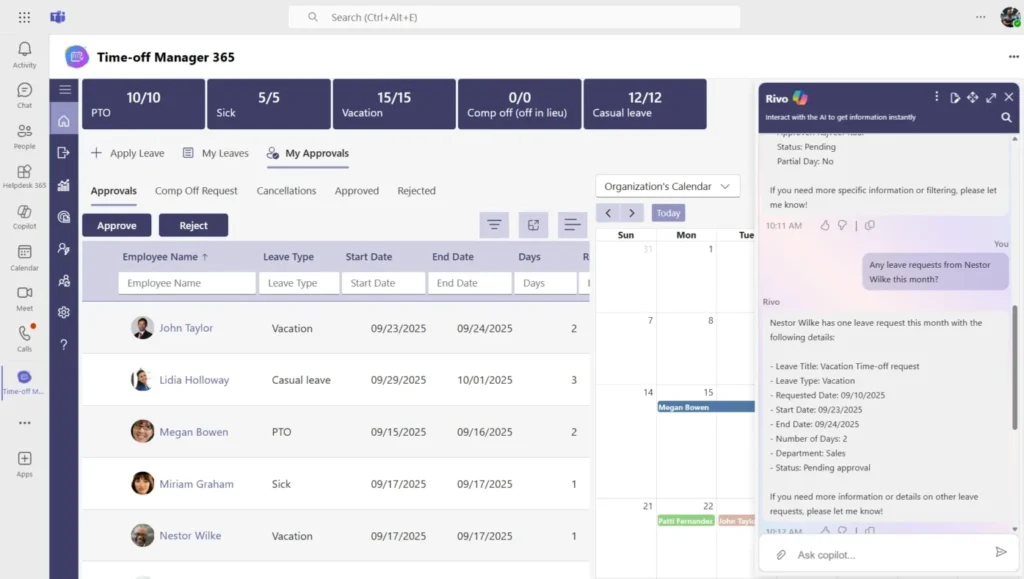
Time off Manager 365 is a leave management app built for companies already running on Microsoft 365. It lives inside SharePoint and Microsoft Teams, so requests and approvals happen where your team already works, and it’s aimed at mid-sized and enterprise teams standardized on Microsoft’s productivity suite.
Key Features
- Native SharePoint integration for the leave calendar
- Microsoft Teams app for requests and approvals
- AI-assisted forecasting for coverage gaps
- Flexible accrual rules by role or location
- Global holiday calendars updated automatically
- Manager dashboards showing team availability
- Outlook calendar sync for approved leave
- Permissions matched to Microsoft 365 security groups
- Power BI integration for advanced leave analytics and reporting
Why Choose Time off Manager 365 as a LeaveBoard Alternative
For companies standardized on Microsoft 365, this native fit is the biggest reason to consider a change from a standalone tool like LeaveBoard. It builds AI-assisted forecasting into the Teams and SharePoint environment your team already uses, and permissions map to existing Microsoft 365 security groups instead of a separate set of accounts.
Ratings
G2: 4.8/5 ★★★★★ (350reviews)
Capterra: 5/5
Still checking three different apps just to see who’s out this week?
Time off Manager 365 puts requests and approvals inside Teams and SharePoint. Book a free walkthrough and see how it fits your setup.
2. BambooHR
BambooHR is one of the most recognized all-in-one HR platforms for small and mid-sized businesses, combining time-off tracking with hiring, onboarding, and performance management under one roof. It’s often the first stop for companies moving from a basic leave tracker toward a complete people platform.
Key Features
- Centralized employee database (HRIS)
- Applicant tracking system for hiring
- Performance management with goal tracking and reviews
- Onboarding workflows with automated new-hire checklists
Why Choose BambooHR as a LeaveBoard Alternative
BambooHR suits companies that have outgrown a leave-only tool and want hiring, onboarding, and performance management in the same system as time-off tracking. It consolidates most of the employee lifecycle into one platform, though it costs more per employee and takes longer to set up than a dedicated leave tool. Its reporting suite also tends to be deeper than what most dedicated leave trackers offer.
Ratings
G2: 4.4/5 ★★★★☆
Capterra: 4.6/5
3. Zoho People
Zoho People is the HR module within the Zoho software suite, built for companies already using other Zoho products, with pricing that appeals to budget-conscious teams. Its per-employee cost tends to undercut many competitors at similar feature levels.
Key Features
- Leave and attendance management with biometric integration
- HR case management helpdesk
- Native Zoho ecosystem integration
- Custom workflows configurable without code
Why Choose Zoho People as a LeaveBoard Alternative
Zoho People fits companies already invested in the Zoho ecosystem, since leave data and other business functions stay connected without custom integration work. It adds case management and appraisals beyond LeaveBoard’s narrower focus, and works especially well for teams with distributed regional offices that need local compliance support.
Ratings
G2: 4.4/5 ★★★★☆
Capterra: 4.4/5
4. Deputy
Deputy is built for shift-based and hourly workforces like retail and hospitality, where scheduling, time tracking, and leave management need to work together. It’s particularly popular with multi-location chains managing constantly changing shift patterns.
Key Features
- Drag-and-drop employee scheduling
- Time and attendance tracking with geolocation
- Labor cost forecasting
- Payroll integrations with Gusto, QuickBooks, and Xero
Why Choose Deputy as a LeaveBoard Alternative
Deputy fits companies where leave decisions and shift scheduling can’t be handled separately, since a manager approving time off needs to know who can cover the shift. LeaveBoard handles leave well on its own, but isn’t built for hourly, shift-based scheduling the way Deputy is.
Ratings
G2: 4.6/5 ★★★★★
Capterra: 4.6/5
5. Calamari
Calamari is a dedicated leave and attendance tool that positions itself directly against products like LeaveBoard, splitting leave management and attendance into connected modules businesses can adopt separately.
Key Features
- Custom leave types with approval workflows
- Multi-location policies by country or office
- Slack, Teams, and Google Workspace integration
- Two-way calendar sync with Google Calendar and Outlook
Why Choose Calamari as a LeaveBoard Alternative
Calamari is one of the closest direct comparisons to LeaveBoard, since both are dedicated leave tools rather than full HR suites. Companies with offices in multiple countries may find its policy controls a bit more granular, and its pricing tends to scale predictably as headcount grows.
Ratings
G2: 4.7/5 ★★★★★
Capterra: 4.7/5
6. Vacation Tracker
Vacation Tracker keeps leave management entirely inside the chat and calendar tools a team already uses, making it a strong fit for distributed, remote-first teams. Setup typically takes less than a day, with no dedicated HR software experience required.
Key Features
- Native Slack, Teams, and Google Workspace integration
- Multiple locations and departments
- Multi-language support
- Automated daily or weekly absence notifications
Why Choose Vacation Tracker as a LeaveBoard Alternative
Vacation Tracker suits remote teams that want leave management to feel like a natural extension of Slack or Teams. LeaveBoard also integrates with these tools, but Vacation Tracker was built chat-first, so more can be done without opening a browser tab.
Ratings
G2: 4.8/5 ★★★★★
Capterra: 4.7/5
7. Timetastic
Timetastic keeps things simple: an online leave booking tool with a shared calendar and clear approval workflow, with little setup needed. Most employees need no training at all to submit their first request.
Key Features
- Shared team calendar
- Simple leave booking with automatic balance calculation
- Public holiday calendars by country
- Two-way sync with Outlook, Google Calendar, and iCal
Why Choose Timetastic as a LeaveBoard Alternative
Timetastic and LeaveBoard sit close together in the market, both lightweight and aimed at smaller businesses. Timetastic tends to get praised for needing little onboarding, and its flat-rate pricing doesn’t change much as your team grows.
Ratings
G2: 4.7/5 ★★★★★
Capterra: 4.8/5
8. Sage HR
Sage HR, formerly CakeHR, is a modular HR platform where leave management is one of several add-on modules businesses can expand into over time. It’s backed by Sage, an established name in small business software.
Key Features
- Configurable leave policies and approval workflows
- Performance management with 360-degree reviews
- Recruitment module
- Shift scheduling for rota-based staff
Why Choose Sage HR as a LeaveBoard Alternative
Sage HR appeals to companies that want to start with leave management and expand into other HR functions later. Its modular pricing avoids paying for tools you don’t need yet, and Sage’s established presence adds financial stability for a multi-year investment.
Ratings
G2: 4.4/5 ★★★★☆
Capterra: 4.5/5
9. Factorial
Factorial is an HR platform that has grown quickly in Europe, covering time-off management alongside document storage, payroll integration, and performance reviews. Its interface tends to appeal to younger, fast-growing teams.
Key Features
- Time-off and absence management
- Digital document management for contracts and payslips
- Payroll integration for regional providers
- Clock-in and clock-out time tracking with automatic timesheets
Why Choose Factorial as a LeaveBoard Alternative
Factorial suits companies that want leave management bundled with document storage and payroll in one modern platform, particularly in Europe where its compliance features are built around regional requirements. It also supports several European languages natively, which helps multinational teams onboard faster.
Ratings
G2: 4.4/5 ★★★★☆
Capterra: 4.4/5
10. OrangeHRM
OrangeHRM is open-source, with a free community edition alongside paid versions, making it a budget-friendly option for companies willing to handle more setup. It particularly suits companies with an in-house IT team.
Key Features
- Configurable leave management module
- Free, self-hosted community edition
- Employee information management (HRIS)
- Recruitment and applicant tracking module
Why Choose OrangeHRM as a LeaveBoard Alternative
OrangeHRM suits budget-conscious companies with technical resources to self-host the free edition. It trades some of the polish of paid tools like LeaveBoard for lower costs, full control over hosting and data, and no long-term lock-in to a single vendor’s roadmap.
Ratings
G2: 4.2/5 ★★★★☆
Capterra: 4.3/5
Best Practices to Choose an Alternative for LeaveBoard
Comparing 10 tools at once is a lot, so here’s how to narrow it down:
- Start with your software stack. Microsoft 365 users benefit from native SharePoint and Teams integration, like Time off Manager 365. Slack or Google Workspace teams should prioritize tools built around those platforms.
- Map your headcount and growth plans, since pricing tiers shift as you scale and a tool that’s affordable today could get expensive fast at double your current size.
- Decide how much HR functionality you want in one platform versus a dedicated leave tool.
- Check multi-country needs early, since retrofitting compliance rules later is harder than building them in from the start.
- Read recent G2 and Capterra reviews specifically about support quality.
- Run a real trial with your own team’s leave data, not sample data.
- Factor in total cost of ownership, including setup or migration fees, not just the monthly subscription price.
- Ask whether the vendor offers a dedicated account manager once you cross a certain headcount.
Most teams can eliminate half the list just by matching software stack and headcount to the options above, which leaves a much smaller shortlist to trial in detail.
Ten platforms is a lot to hold in your head at once. If you run on Microsoft 365, start with Time off Manager 365: request a free demo before you decide.
Conclusion
LeaveBoard remains a solid choice for small businesses that want simple leave tracking without extra HR modules. But as headcount grows or business needs shift toward deeper HR functionality, tighter Microsoft 365 integration, or AI-assisted reporting, it’s worth looking elsewhere.
There’s no universal best LeaveBoard alternative, only the one that matches your headcount, tools, and where your business is headed. If you’re unsure where to start, shortlist based on your existing software stack first, since integration friction is often the biggest hidden cost of switching tools. Run a real trial and get feedback from the people who’ll use it daily before deciding, and revisit the decision again as your team and budget change.
Frequently Asked Questions
Is Time off Manager 365 a good free alternative to LeaveBoard?
Time off Manager 365’s main advantage on cost is that it lives inside Microsoft 365 tools most organizations are already paying for, rather than adding a separate subscription the way LeaveBoard does. Worth confirming your specific plan or trial terms, but for Microsoft-first teams it often works out more cost-effective long-term than running LeaveBoard alongside Teams.
Why does Time off Manager 365 work better with Microsoft Teams and SharePoint than LeaveBoard?
Time off Manager 365 is built natively for the Microsoft 365 ecosystem — leave requests, approvals, and balances all live directly inside Teams, with SharePoint handling the data and reporting behind the scenes. LeaveBoard connects to Teams through an integration, but it isn’t built around SharePoint the same way, which is the main gap for Microsoft-first organizations.
Is Time off Manager 365 a good fit for fully remote teams?
Yes. Since requests and approvals happen inside Teams, remote employees never have to leave the tool they’re already using to talk to their team, and SharePoint keeps one always-current record of balances — helpful when people are spread across time zones. LeaveBoard can technically serve remote teams too, but everything sits in its own separate app.
How do I migrate from LeaveBoard to Time off Manager 365?
Export leave balances and history from LeaveBoard as a CSV, then import it into Time off Manager 365. Run the migration during a trial period, confirm carried-over balances and part-time accrual rules came across correctly, and time the cutover for a slower period rather than mid-month.
Is Time off Manager 365 a good choice for a small business currently on LeaveBoard?
If the business already runs on Microsoft 365, Time off Manager 365 usually means less overhead than LeaveBoard — no separate platform to license, log into, or train people on, since it’s already where the team works. Same due diligence applies either way: confirm setup is actually simple and that support is responsive on your plan tier.


_JiluXJRGNl.svg)























